remote control BUICK LACROSSE 2013 User Guide
[x] Cancel search | Manufacturer: BUICK, Model Year: 2013, Model line: LACROSSE, Model: BUICK LACROSSE 2013Pages: 422, PDF Size: 5.74 MB
Page 56 of 422
Black plate (6,1)Buick LaCrosse Owner Manual - 2013 - crc - 9/7/12
3-6 Seats and Restraints
2. Move the seatback to thedesired position, and then
release the lever to lock the
seatback in place.
3. Push and pull on the seatback to make sure it is locked.
To return the seatback to the upright
position:
1. Lift the lever fully without applying pressure to the
seatback, and the seatback will
return to the upright position.
2. Push and pull on the seatback to make sure it is locked.Power Reclining Seatbacks
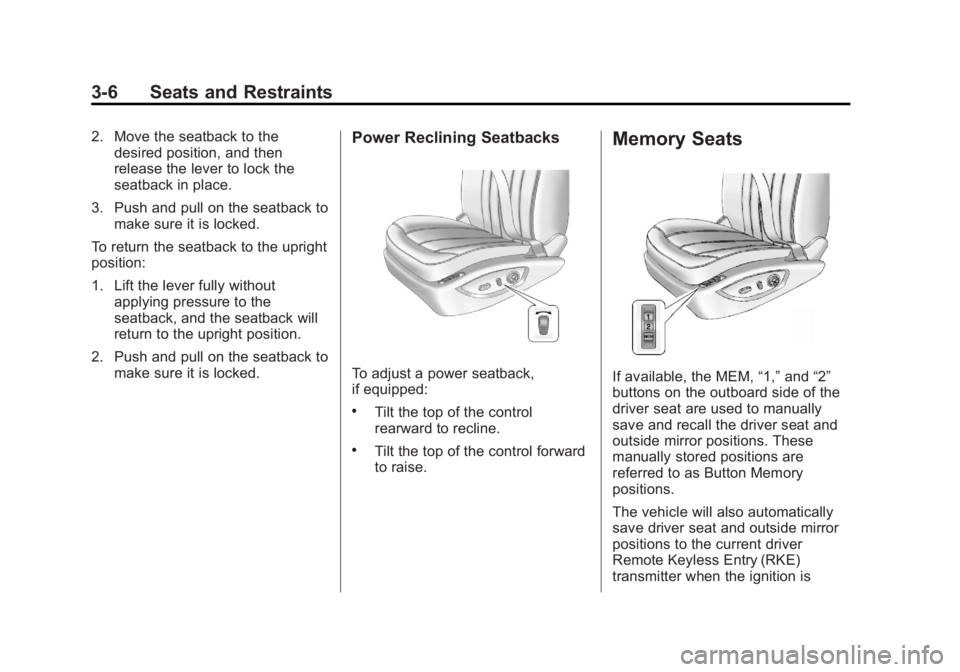
To adjust a power seatback,
if equipped:
.Tilt the top of the control
rearward to recline.
.Tilt the top of the control forward
to raise.
Memory Seats
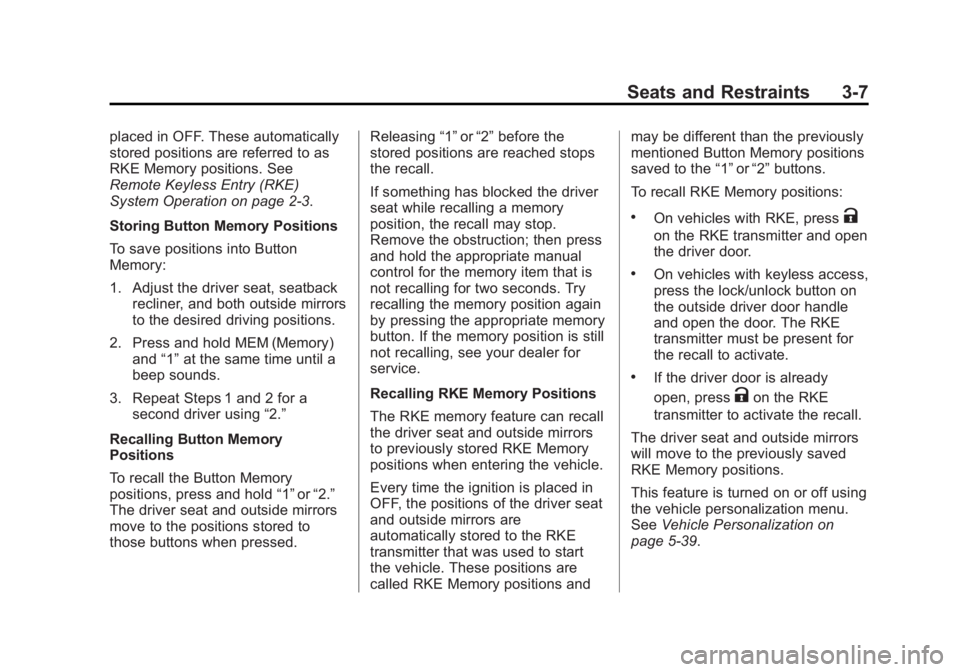
If available, the MEM, “1,”and “2”
buttons on the outboard side of the
driver seat are used to manually
save and recall the driver seat and
outside mirror positions. These
manually stored positions are
referred to as Button Memory
positions.
The vehicle will also automatically
save driver seat and outside mirror
positions to the current driver
Remote Keyless Entry (RKE)
transmitter when the ignition is
Page 57 of 422
Black plate (7,1)Buick LaCrosse Owner Manual - 2013 - crc - 9/7/12
Seats and Restraints 3-7
placed in OFF. These automatically
stored positions are referred to as
RKE Memory positions. See
Remote Keyless Entry (RKE)
System Operation on page 2‑3.
Storing Button Memory Positions
To save positions into Button
Memory:
1. Adjust the driver seat, seatbackrecliner, and both outside mirrors
to the desired driving positions.
2. Press and hold MEM (Memory) and “1”at the same time until a
beep sounds.
3. Repeat Steps 1 and 2 for a second driver using “2.”
Recalling Button Memory
Positions
To recall the Button Memory
positions, press and hold “1”or“2.”
The driver seat and outside mirrors
move to the positions stored to
those buttons when pressed. Releasing
“1”or“2” before the
stored positions are reached stops
the recall.
If something has blocked the driver
seat while recalling a memory
position, the recall may stop.
Remove the obstruction; then press
and hold the appropriate manual
control for the memory item that is
not recalling for two seconds. Try
recalling the memory position again
by pressing the appropriate memory
button. If the memory position is still
not recalling, see your dealer for
service.
Recalling RKE Memory Positions
The RKE memory feature can recall
the driver seat and outside mirrors
to previously stored RKE Memory
positions when entering the vehicle.
Every time the ignition is placed in
OFF, the positions of the driver seat
and outside mirrors are
automatically stored to the RKE
transmitter that was used to start
the vehicle. These positions are
called RKE Memory positions and may be different than the previously
mentioned Button Memory positions
saved to the
“1”or“2” buttons.
To recall RKE Memory positions:
.On vehicles with RKE, pressK
on the RKE transmitter and open
the driver door.
.On vehicles with keyless access,
press the lock/unlock button on
the outside driver door handle
and open the door. The RKE
transmitter must be present for
the recall to activate.
.If the driver door is already
open, press
Kon the RKE
transmitter to activate the recall.
The driver seat and outside mirrors
will move to the previously saved
RKE Memory positions.
This feature is turned on or off using
the vehicle personalization menu.
See Vehicle Personalization on
page 5‑39.
Page 106 of 422
Black plate (2,1)Buick LaCrosse Owner Manual - 2013 - crc - 9/7/12
5-2 Instruments and Controls
Tire Messages . . . . . . . . . . . . . . . 5-38
Transmission Messages . . . . . 5-39
Window Messages . . . . . . . . . . . 5-39
Vehicle Personalization
Vehicle Personalization . . . . . . 5-39
Universal Remote System
Universal Remote System . . . 5-45
Universal Remote SystemProgramming . . . . . . . . . . . . . . . 5-45
Universal Remote System Operation . . . . . . . . . . . . . . . . . . 5-48
Controls
Steering Wheel
Adjustment
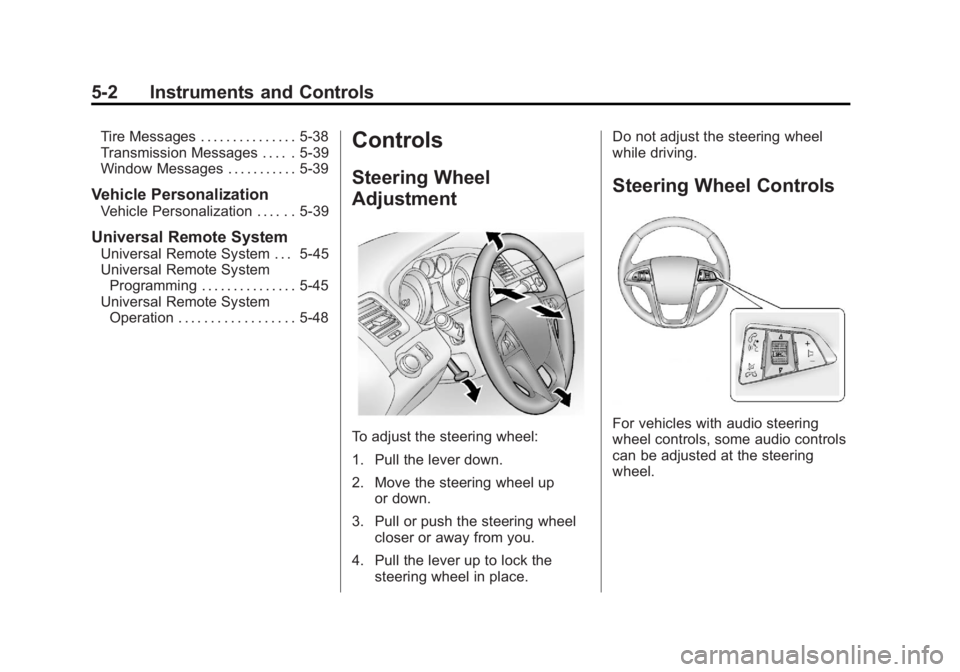
To adjust the steering wheel:
1. Pull the lever down.
2. Move the steering wheel up
or down.
3. Pull or push the steering wheel closer or away from you.
4. Pull the lever up to lock the steering wheel in place. Do not adjust the steering wheel
while driving.
Steering Wheel Controls
For vehicles with audio steering
wheel controls, some audio controls
can be adjusted at the steering
wheel.
Page 111 of 422
Black plate (7,1)Buick LaCrosse Owner Manual - 2013 - crc - 9/7/12
Instruments and Controls 5-7
When adding electrical equipment,
be sure to follow the installation
instructions included with the
equipment. SeeAdd-On Electrical
Equipment on page 9‑57.
Notice: Hanging heavy
equipment from the power outlet
can cause damage not covered
by the vehicle warranty. The
power outlets are designed for
accessory power plugs only, such
as cell phone charge cords.
Power Outlet 110 Volt Alternating
Current
The vehicle may have a power
outlet that can be used to plug in
electrical equipment with a
maximum limit of 150 watts.
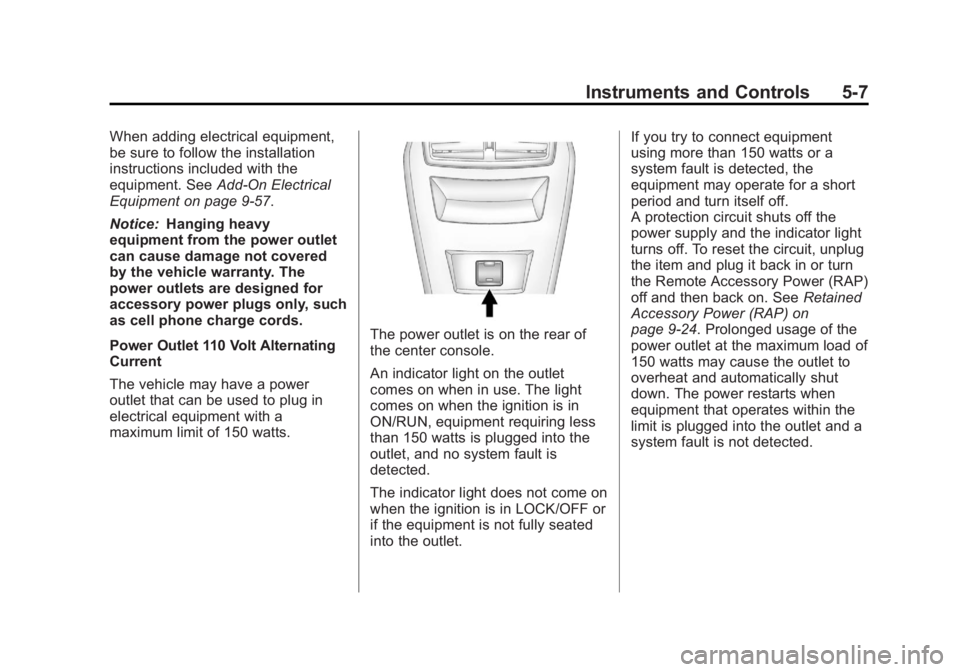
The power outlet is on the rear of
the center console.
An indicator light on the outlet
comes on when in use. The light
comes on when the ignition is in
ON/RUN, equipment requiring less
than 150 watts is plugged into the
outlet, and no system fault is
detected.
The indicator light does not come on
when the ignition is in LOCK/OFF or
if the equipment is not fully seated
into the outlet. If you try to connect equipment
using more than 150 watts or a
system fault is detected, the
equipment may operate for a short
period and turn itself off.
A protection circuit shuts off the
power supply and the indicator light
turns off. To reset the circuit, unplug
the item and plug it back in or turn
the Remote Accessory Power (RAP)
off and then back on. See
Retained
Accessory Power (RAP) on
page 9‑24. Prolonged usage of the
power outlet at the maximum load of
150 watts may cause the outlet to
overheat and automatically shut
down. The power restarts when
equipment that operates within the
limit is plugged into the outlet and a
system fault is not detected.
Page 119 of 422
Black plate (15,1)Buick LaCrosse Owner Manual - 2013 - crc - 9/7/12
Instruments and Controls 5-15
WARNING (Continued)
without a crash. To help avoid
injury, have the vehicle serviced
right away.
Passenger Airbag Status
Indicator
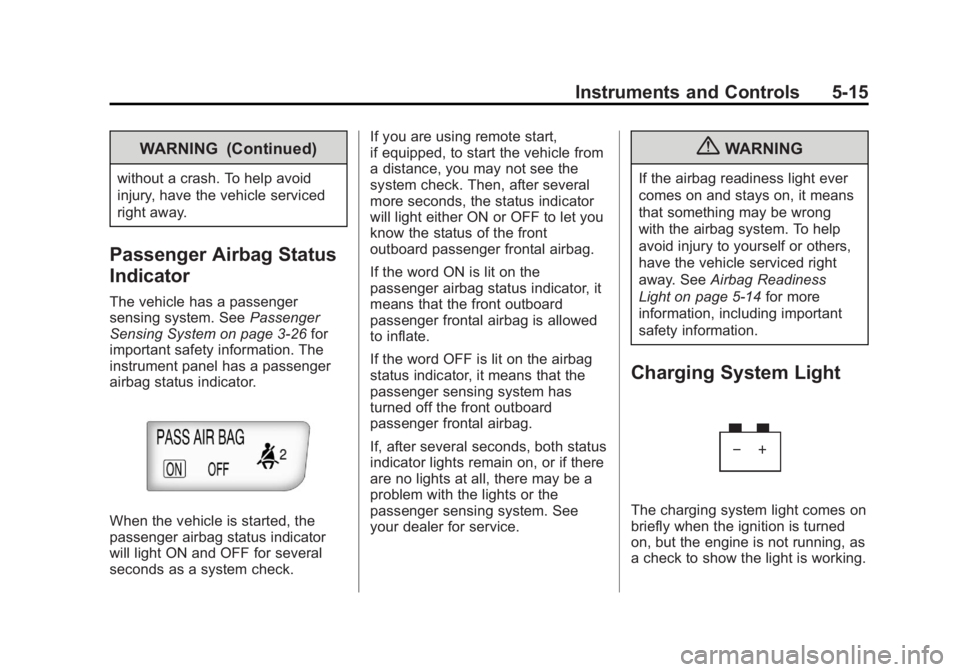
The vehicle has a passenger
sensing system. SeePassenger
Sensing System on page 3‑26 for
important safety information. The
instrument panel has a passenger
airbag status indicator.
When the vehicle is started, the
passenger airbag status indicator
will light ON and OFF for several
seconds as a system check. If you are using remote start,
if equipped, to start the vehicle from
a distance, you may not see the
system check. Then, after several
more seconds, the status indicator
will light either ON or OFF to let you
know the status of the front
outboard passenger frontal airbag.
If the word ON is lit on the
passenger airbag status indicator, it
means that the front outboard
passenger frontal airbag is allowed
to inflate.
If the word OFF is lit on the airbag
status indicator, it means that the
passenger sensing system has
turned off the front outboard
passenger frontal airbag.
If, after several seconds, both status
indicator lights remain on, or if there
are no lights at all, there may be a
problem with the lights or the
passenger sensing system. See
your dealer for service.
{WARNING
If the airbag readiness light ever
comes on and stays on, it means
that something may be wrong
with the airbag system. To help
avoid injury to yourself or others,
have the vehicle serviced right
away. See
Airbag Readiness
Light on page 5‑14 for more
information, including important
safety information.
Charging System Light
The charging system light comes on
briefly when the ignition is turned
on, but the engine is not running, as
a check to show the light is working.
Page 140 of 422
Black plate (36,1)Buick LaCrosse Owner Manual - 2013 - crc - 9/7/12
5-36 Instruments and Controls
Key and Lock Messages
NO REMOTE DETECTED
This message displays when the
transmitter battery is weak on
vehicles with keyless access. See
“Starting the Vehicle with a Low
Transmitter Battery”underRemote
Keyless Entry (RKE) System
Operation on page 2‑3.
REPLACE BATTERY IN
REMOTE KEY
This message displays when the
battery in the Remote Keyless Entry
(RKE) transmitter needs to be
replaced. See “Battery
Replacement” underRemote
Keyless Entry (RKE) System
Operation on page 2‑3.
Lamp Messages
AFL (Adaptive Forward
Lighting) LAMPS NEED
SERVICE
This message displays when the
Adaptive Forward Lighting (AFL)
system is disabled and needs
service. See your dealer. See
Adaptive Forward Lighting (AFL) on
page 6‑3 for more information.
Object Detection System
Messages
PARK ASSIST OFF
This message displays when the
park assist system has been turned
off or when there is a temporary
condition causing the system to be
disabled. See Ultrasonic Parking
Assist on page 9‑40.
SERVICE PARK ASSIST
This message displays if there is a
problem with the Ultrasonic Rear
Parking Assist (URPA) system. Do not use this system to help you
park. See
Ultrasonic Parking Assist
on page 9‑40.
SERVICE BLIND ZONE ALERT
SYSTEM
If this message appears, both SBZA
displays will remain on indicating
there is a problem with the SBZA
system. If these displays remain on
after continued driving, the system
needs service. Take the vehicle to
your dealer.
SIDE BLIND ZONE ALERT
SYSTEM OFF
This message indicates that the
driver has turned the system off.
SIDE BLIND ZONE SYS.
UNAVAILABLE
This message indicates that the
SBZA system is disabled because
the sensor is blocked and cannot
detect vehicles in the blind zone.
The sensor may be blocked by mud,
dirt, snow, ice, or slush. This
message may also activate during
Page 144 of 422
Black plate (40,1)Buick LaCrosse Owner Manual - 2013 - crc - 9/7/12
5-40 Instruments and Controls
The following list of menu items may
be available:
.Climate and Air Quality
.Comfort and Convenience
.Collision/Detection Systems
.Language
.Lighting
.Power Door Locks
.Remote Lock/Unlock/Start
.Return to Factory Settings
Turn the Multifunction knob to
highlight the menu. Press SELECT
to select it. Each of the menus is
detailed in the following information.
Climate and Air Quality
Select the Climate and Air Quality
menu and the following may be
displayed:
.Auto Fan Speed
.Air Quality Sensor
.Auto Heated Seats
.Air Conditioning Mode
.Remote Start Auto Heated Seats
.Remote Start Cooled Seats
.Auto Defog
.Auto Rear Defog
Auto Fan Speed
This will allow you to select the
automatic fan speed. It can be
adjusted to run lower or higher than
normal.
Press SELECT when Auto Fan
Speed is highlighted to open the
menu. Turn the Multifunction knob
to highlight High, Medium, or Low.
Press SELECT to confirm the
selection. Press
/BACK to move to
the last menu.
Air Quality Sensor
This will allow you to select whether
the system will operate at high or
low sensitivity. Only vehicles with
the dual zone climate control will
have this option. Press SELECT when Air Quality
Sensor is highlighted to open the
menu. Turn the Multifunction knob
to highlight High or Low. Press
SELECT to confirm the selection.
Press
/BACK to move to the
last menu.
Auto Heated Seats
If equipped and turned on, this
feature will automatically activate
heated seats at the level required by
the interior temperature. The auto
heated seats can be turned off by
using the heated seat buttons on
the climate control panel.
Press SELECT when Auto Heated
Seats is highlighted to open the
menu. Turn the Multifunction knob
to highlight On or Off. Press
SELECT to confirm the selection.
Press
/BACK to move to the
last menu.
Page 145 of 422
Black plate (41,1)Buick LaCrosse Owner Manual - 2013 - crc - 9/7/12
Instruments and Controls 5-41
Air Conditioning Mode
This allows selection of automatic
start of the air conditioning upon
vehicle start. Selecting On indicates
the air conditioning will be on when
the vehicle is started. Selecting Off
turns the air conditioning off each
time the vehicle is started. Last
Setting will resume the last setting
when the vehicle was shut off.
Press SELECT when Air
Conditioning Mode is highlighted to
open the menu. Turn the
Multifunction knob to highlight Off,
On, or Last Setting. Press SELECT
to confirm the selection. Press
/
BACK to move to the last menu.
Remote Start Auto Heated Seats
If equipped and turned on, this
feature will turn the heated seats on
when using remote start on
cold days.
Press SELECT when Remote Start
Auto Heated Seats is highlighted.
Turn the Multifunction knob to selectOn or Off. Press SELECT to confirm
the selection. Press
/BACK to
move to the last menu.
Remote Start Cooled Seats
If equipped and turned on, this
feature will turn the cooled seats on
when using remote start on
warm days.
Press SELECT when Remote Start
Cooled Seats is highlighted. Turn
the Multifunction knob to select On
or Off. Press SELECT to confirm the
selection. Press
/BACK to move to
the last menu.
Auto Defog
This will allow you to turn the auto
defog on or off. Only vehicles with
the dual zone climate control will
have this option.
Press SELECT when Auto Defog is
highlighted to open the menu. Turn
the Multifunction knob to highlight
On or Off. Press SELECT to confirm
the selection. Press
/BACK to
move to the last menu. Auto Rear Defog
If equipped, this will allow you to
turn the auto rear defog on or off.
This feature will automatically turn
on the rear defogger when it is cold
outside.
Press SELECT when Auto Rear
Defog is highlighted to open the
menu. Turn the Multifunction knob
to highlight On or Off. Press
SELECT to confirm the selection.
Press
/BACK to move to the
last menu.
Comfort and Convenience
Select the Comfort and
Convenience menu and the
following will be displayed:
.Chime Volume
.Driver Seat Easy Exit
.Park Tilt Mirrors
Page 148 of 422
Black plate (44,1)Buick LaCrosse Owner Manual - 2013 - crc - 9/7/12
5-44 Instruments and Controls
Press SELECT when Auto Door
Unlock is highlighted. Turn the
Multifunction knob to select All
Doors, Driver Door, or Off. Press
SELECT to confirm the selection.
Press
/BACK to move to the
last menu.
Remote Lock/Unlock/Start
Select Remote Lock/Unlock/Start
and the following will be displayed:
.Unlock Feedback (Lights)
.Locking Feedback
.Door Unlock Options
.Remote Recall
.Passive Entry
.Remote Left In Vehicle
Unlock Feedback (Lights)
When on, the exterior lamps will
flash when unlocking the vehicle
with the RKE transmitter.
Press SELECT when Unlock
Feedback (Lights) is highlighted.
Turn the Multifunction knob to select On or Off. Press SELECT to confirm
the selection. Press
/BACK to
move to the last menu.
Locking Feedback
This allows selection of what type of
feedback is given when locking the
vehicle with the RKE transmitter.
Press SELECT when Locking
Feedback is highlighted. Turn the
Multifunction knob to select Lights
and Horn, Lights Only, Horn Only,
or Off. Press SELECT to confirm the
selection. Press
/BACK to move to
the last menu.
Door Unlock Options
This allows selection of which doors
will unlock when pressing
Kon the
RKE transmitter.
Press SELECT when Door Unlock
Options is highlighted. Turn the
Multifunction knob to select All
Doors or Driver Door Only. When
set to Driver Door Only, the driver
door will unlock the first time the
unlock button is pressed and all doors will unlock when the button is
pressed a second time. When set to
All Doors, all of the doors will unlock
at the first press of
K. Press
SELECT to confirm the selection.
Press
/BACK to move to the
last menu.
Remote Recall
When on, this feature will recall the
current driver's last seat and outside
mirror positions upon unlocking the
driver door with the RKE, and
opening that door. The current driver
is identified when the RKE is used
to unlock the driver door. If keyless
access equipped, the recall will
occur upon opening the driver door.
See “Memory Remote Recall” under
Memory Seats on page 3‑6.
This allows the Remote Recall
feature to be turned on or off.
Remote Recall is when the
memorized settings will be recalled
as you unlock and enter the vehicle.
Page 149 of 422
Black plate (45,1)Buick LaCrosse Owner Manual - 2013 - crc - 9/7/12
Instruments and Controls 5-45
Press SELECT when Remote Recall
is highlighted. Turn the Multifunction
knob to select On or Off. Press
SELECT to confirm the selection.
Press
/BACK to move to the
last menu.
Passive Entry
This allows the Passive Entry
feature to be turned on or off.
Press SELECT when Passive Entry
is highlighted. Turn the Multifunction
knob to select On or Off. Press
SELECT to confirm the selection.
Press
/BACK to move to the
last menu.
Remote Left In Vehicle
This allows the Remote Left In
Vehicle reminder feature to be
turned on or off. If on, the horn will
chirp if a remote is left in the
vehicle. Press SELECT when Remote Left In
Vehicle is highlighted. Turn the
Multifunction knob to select On or
Off. Press SELECT to confirm the
selection. Press
/BACK to move to
the last menu.
Return to Factory Settings
Select Return to Factory Settings to
return all of the vehicle
personalization to the default
settings. Turn the Multifunction knob
to select Yes or No. Press SELECT
to confirm and go back to the
last menu.
Universal Remote
System
See Radio Frequency Statement on
page 13‑20 for information
regarding Part 15 of the Federal
Communications Commission (FCC)
rules and Industry Canada
Standards RSS-GEN/210/220/310.
Universal Remote System
Programming
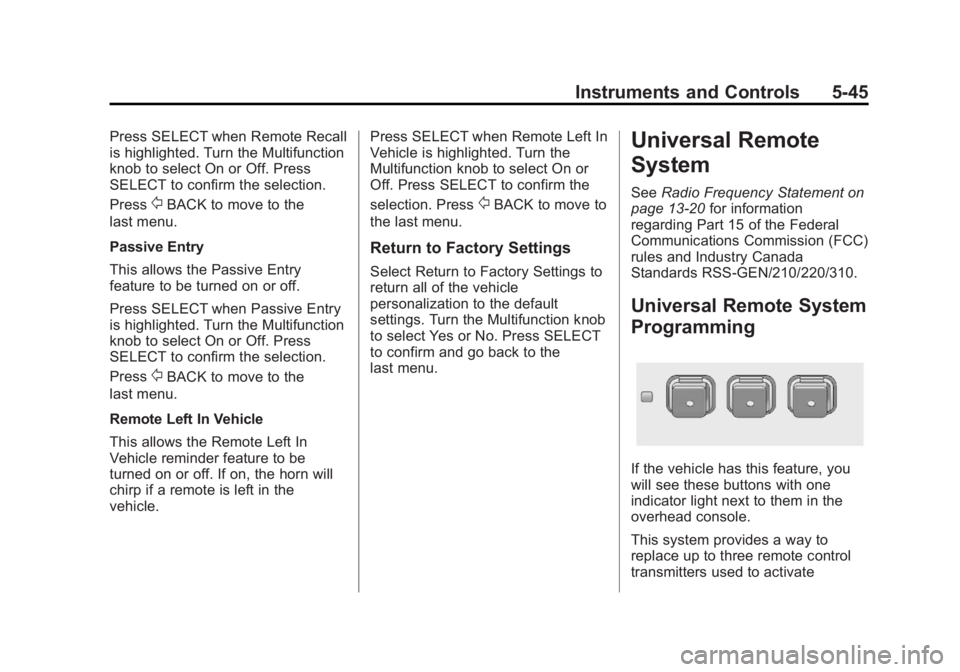
If the vehicle has this feature, you
will see these buttons with one
indicator light next to them in the
overhead console.
This system provides a way to
replace up to three remote control
transmitters used to activate