remote start BUICK LACROSSE 2013 Owner's Guide
[x] Cancel search | Manufacturer: BUICK, Model Year: 2013, Model line: LACROSSE, Model: BUICK LACROSSE 2013Pages: 422, PDF Size: 5.74 MB
Page 144 of 422
Black plate (40,1)Buick LaCrosse Owner Manual - 2013 - crc - 9/7/12
5-40 Instruments and Controls
The following list of menu items may
be available:
.Climate and Air Quality
.Comfort and Convenience
.Collision/Detection Systems
.Language
.Lighting
.Power Door Locks
.Remote Lock/Unlock/Start
.Return to Factory Settings
Turn the Multifunction knob to
highlight the menu. Press SELECT
to select it. Each of the menus is
detailed in the following information.
Climate and Air Quality
Select the Climate and Air Quality
menu and the following may be
displayed:
.Auto Fan Speed
.Air Quality Sensor
.Auto Heated Seats
.Air Conditioning Mode
.Remote Start Auto Heated Seats
.Remote Start Cooled Seats
.Auto Defog
.Auto Rear Defog
Auto Fan Speed
This will allow you to select the
automatic fan speed. It can be
adjusted to run lower or higher than
normal.
Press SELECT when Auto Fan
Speed is highlighted to open the
menu. Turn the Multifunction knob
to highlight High, Medium, or Low.
Press SELECT to confirm the
selection. Press
/BACK to move to
the last menu.
Air Quality Sensor
This will allow you to select whether
the system will operate at high or
low sensitivity. Only vehicles with
the dual zone climate control will
have this option. Press SELECT when Air Quality
Sensor is highlighted to open the
menu. Turn the Multifunction knob
to highlight High or Low. Press
SELECT to confirm the selection.
Press
/BACK to move to the
last menu.
Auto Heated Seats
If equipped and turned on, this
feature will automatically activate
heated seats at the level required by
the interior temperature. The auto
heated seats can be turned off by
using the heated seat buttons on
the climate control panel.
Press SELECT when Auto Heated
Seats is highlighted to open the
menu. Turn the Multifunction knob
to highlight On or Off. Press
SELECT to confirm the selection.
Press
/BACK to move to the
last menu.
Page 145 of 422
Black plate (41,1)Buick LaCrosse Owner Manual - 2013 - crc - 9/7/12
Instruments and Controls 5-41
Air Conditioning Mode
This allows selection of automatic
start of the air conditioning upon
vehicle start. Selecting On indicates
the air conditioning will be on when
the vehicle is started. Selecting Off
turns the air conditioning off each
time the vehicle is started. Last
Setting will resume the last setting
when the vehicle was shut off.
Press SELECT when Air
Conditioning Mode is highlighted to
open the menu. Turn the
Multifunction knob to highlight Off,
On, or Last Setting. Press SELECT
to confirm the selection. Press
/
BACK to move to the last menu.
Remote Start Auto Heated Seats
If equipped and turned on, this
feature will turn the heated seats on
when using remote start on
cold days.
Press SELECT when Remote Start
Auto Heated Seats is highlighted.
Turn the Multifunction knob to selectOn or Off. Press SELECT to confirm
the selection. Press
/BACK to
move to the last menu.
Remote Start Cooled Seats
If equipped and turned on, this
feature will turn the cooled seats on
when using remote start on
warm days.
Press SELECT when Remote Start
Cooled Seats is highlighted. Turn
the Multifunction knob to select On
or Off. Press SELECT to confirm the
selection. Press
/BACK to move to
the last menu.
Auto Defog
This will allow you to turn the auto
defog on or off. Only vehicles with
the dual zone climate control will
have this option.
Press SELECT when Auto Defog is
highlighted to open the menu. Turn
the Multifunction knob to highlight
On or Off. Press SELECT to confirm
the selection. Press
/BACK to
move to the last menu. Auto Rear Defog
If equipped, this will allow you to
turn the auto rear defog on or off.
This feature will automatically turn
on the rear defogger when it is cold
outside.
Press SELECT when Auto Rear
Defog is highlighted to open the
menu. Turn the Multifunction knob
to highlight On or Off. Press
SELECT to confirm the selection.
Press
/BACK to move to the
last menu.
Comfort and Convenience
Select the Comfort and
Convenience menu and the
following will be displayed:
.Chime Volume
.Driver Seat Easy Exit
.Park Tilt Mirrors
Page 148 of 422
Black plate (44,1)Buick LaCrosse Owner Manual - 2013 - crc - 9/7/12
5-44 Instruments and Controls
Press SELECT when Auto Door
Unlock is highlighted. Turn the
Multifunction knob to select All
Doors, Driver Door, or Off. Press
SELECT to confirm the selection.
Press
/BACK to move to the
last menu.
Remote Lock/Unlock/Start
Select Remote Lock/Unlock/Start
and the following will be displayed:
.Unlock Feedback (Lights)
.Locking Feedback
.Door Unlock Options
.Remote Recall
.Passive Entry
.Remote Left In Vehicle
Unlock Feedback (Lights)
When on, the exterior lamps will
flash when unlocking the vehicle
with the RKE transmitter.
Press SELECT when Unlock
Feedback (Lights) is highlighted.
Turn the Multifunction knob to select On or Off. Press SELECT to confirm
the selection. Press
/BACK to
move to the last menu.
Locking Feedback
This allows selection of what type of
feedback is given when locking the
vehicle with the RKE transmitter.
Press SELECT when Locking
Feedback is highlighted. Turn the
Multifunction knob to select Lights
and Horn, Lights Only, Horn Only,
or Off. Press SELECT to confirm the
selection. Press
/BACK to move to
the last menu.
Door Unlock Options
This allows selection of which doors
will unlock when pressing
Kon the
RKE transmitter.
Press SELECT when Door Unlock
Options is highlighted. Turn the
Multifunction knob to select All
Doors or Driver Door Only. When
set to Driver Door Only, the driver
door will unlock the first time the
unlock button is pressed and all doors will unlock when the button is
pressed a second time. When set to
All Doors, all of the doors will unlock
at the first press of
K. Press
SELECT to confirm the selection.
Press
/BACK to move to the
last menu.
Remote Recall
When on, this feature will recall the
current driver's last seat and outside
mirror positions upon unlocking the
driver door with the RKE, and
opening that door. The current driver
is identified when the RKE is used
to unlock the driver door. If keyless
access equipped, the recall will
occur upon opening the driver door.
See “Memory Remote Recall” under
Memory Seats on page 3‑6.
This allows the Remote Recall
feature to be turned on or off.
Remote Recall is when the
memorized settings will be recalled
as you unlock and enter the vehicle.
Page 150 of 422
Black plate (46,1)Buick LaCrosse Owner Manual - 2013 - crc - 9/7/12
5-46 Instruments and Controls
devices such as garage door
openers, security systems, and
home automation devices.
Do not use the Universal Remote
system with any garage door opener
that does not have the stop and
reverse feature. This includes any
garage door opener model
manufactured before April 1,1982.
Read the instructions completely
before attempting to program the
Universal Remote system. Because
of the steps involved, it may be
helpful to have another person
available to assist with programming
the Universal Remote system.
Keep the original hand-held
transmitter for use in other vehicles
as well as for future Universal
Remote system programming. It is
also recommended that upon the
sale of the vehicle, the programmed
Universal Remote system buttons
be erased for security purposes.
See“Erasing Universal Remote
System Buttons” later in this
section. When programming a garage door,
park outside of the garage. Park
directly in line with and facing the
garage door opener motor-head or
gate motor-head. Be sure that
people and objects are clear of the
garage door or gate being
programmed.
It is recommended that a new
battery be installed in the hand-held
transmitter for quicker and more
accurate transmission of the
radio-frequency signal.
Programming the Universal
Remote System
For questions or help programming
the Universal Remote system, call
1-800-355-3515 or go to
www.homelink.com.
Programming a garage door opener
involves time-sensitive actions, so
read the entire procedure before
starting. Otherwise, the device will
time out and the procedure will have
to be repeated.
To program up to three devices:
1. Hold the end of the hand-held
transmitter about 3 to 8 cm (1 to
3 in) away from the Universal
Remote system buttons while
keeping the indicator light in
view. The hand-held transmitter
was supplied by the
manufacturer of the garage door
opener receiver
(motor-head unit).
2. At the same time, press and hold both the hand-held
transmitter button and one of the
three Universal Remote system
buttons to be used to operate
the garage door. Do not release
the Universal Remote system
button or the hand-held
transmitter button until the
indicator light changes from a
slowly to a rapidly flashing light.
You now may release both
buttons.
Page 151 of 422
Black plate (47,1)Buick LaCrosse Owner Manual - 2013 - crc - 9/7/12
Instruments and Controls 5-47
Some entry gates and garage
door openers may require
substitution of Step 2 with the
procedure noted in“Gate
Operator and Canadian
Programming” later in this
section.
3. Press and hold for five seconds the newly trained Universal
Remote system button (the
button selected in Step 2) while
observing the indicator light and
garage door activation.
.If the indicator light stays on
continuously or the garage
door starts to move when
the Universal Remote
system button is pressed
and released, then the
programming is complete.
There is no need to
continue programming
Steps 4–6.
.If the Universal Remote
system indicator light blinks
rapidly for two seconds,
then turns to a constant
light and the garage door
does not move, continue
with programming
Steps 4–6.
It may be helpful to have
another person assist with
the remaining Steps 4–6.
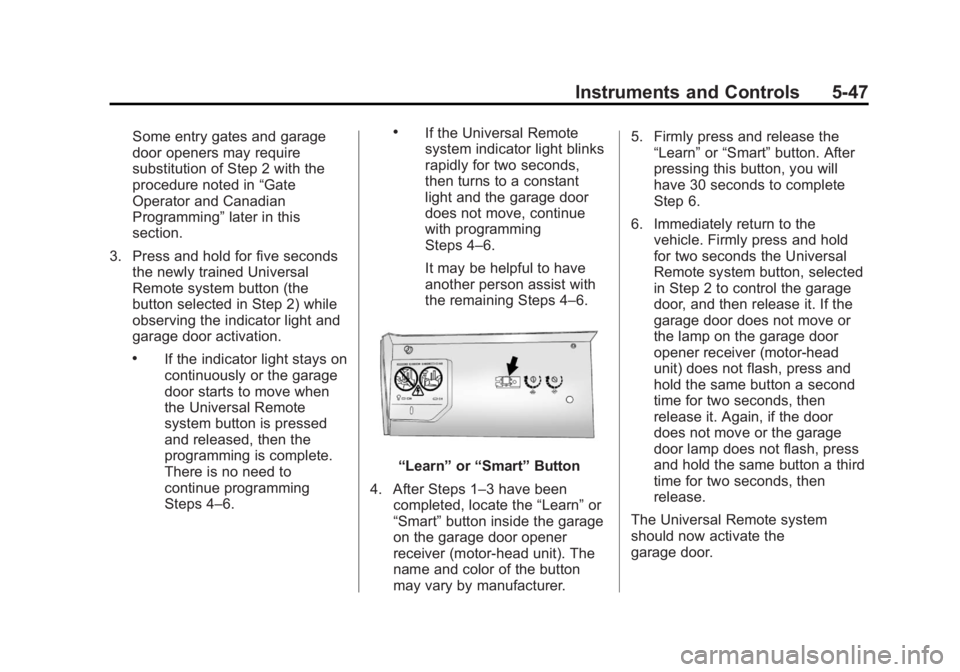
“Learn” or“Smart” Button
4. After Steps 1–3 have been completed, locate the “Learn”or
“Smart” button inside the garage
on the garage door opener
receiver (motor-head unit). The
name and color of the button
may vary by manufacturer. 5. Firmly press and release the
“Learn” or“Smart” button. After
pressing this button, you will
have 30 seconds to complete
Step 6.
6. Immediately return to the vehicle. Firmly press and hold
for two seconds the Universal
Remote system button, selected
in Step 2 to control the garage
door, and then release it. If the
garage door does not move or
the lamp on the garage door
opener receiver (motor-head
unit) does not flash, press and
hold the same button a second
time for two seconds, then
release it. Again, if the door
does not move or the garage
door lamp does not flash, press
and hold the same button a third
time for two seconds, then
release.
The Universal Remote system
should now activate the
garage door.
Page 199 of 422
Black plate (5,1)Buick LaCrosse Owner Manual - 2013 - crc - 9/7/12
Climate Controls 8-5
When the indicator light is on, air is
recirculated inside the vehicle. If the
indicator light is off, outside air will
flow into the vehicle. Press AUTO or
@to return to automatic
operation.
Auto Defog: The climate control
system may have a sensor to
automatically detect high humidity
inside the vehicle. When high
humidity is detected, the climate
control system may adjust to
outside air supply and turn on the
air conditioner. The fan speed may
slightly increase to help prevent
fogging. If the climate control
system does not detect possible
window fogging, it returns to normal
operation. For eAssist vehicles,
there may be shorter and less
frequent auto stops when auto
defog is in use.
To turn Auto Defog off or on, see
“Climate and Air Quality” under
Vehicle Personalization on
page 5‑39.
Rear Window Defogger
=(Rear Window Defogger):
Press to turn the rear window
defogger on or off.
The rear window defogger turns off
automatically after about
10 minutes. If turned on again it
runs for about five minutes before
turning off. The defogger can also
be turned off by turning the ignition
to ACC/ACCESSORY or
LOCK/OFF.
The rear window defogger can be
set to automatic operation. See
“Climate and Air Quality” under
Vehicle Personalization on
page 5‑39. When auto rear defog is
selected, the rear window defogger
turns on automatically when the
interior temperature is cold and the
outside temperature is about 4°C
(40°F) and below. The auto rear
defogger turns off automatically
after about 10 minutes, or after
five minutes if the outside
temperature is not as cold. For eAssist vehicles, auto rear
defog will only run during a remote
start and the feature is not available
in the Vehicle Personalization menu.
For vehicles with heated outside
rearview mirrors, they turn on when
the rear window defogger button is
on and help to clear fog or frost from
the surface of the mirror. See
Heated Mirrors on page 2‑16.
Notice:
Do not try to clear frost
or other material from the inside
of the front windshield and rear
window with a razor blade or
anything else that is sharp. This
may damage the rear window
defogger grid and affect the
radio's ability to pick up stations
clearly. The repairs would not be
covered by the vehicle warranty.
((Heated Steering Wheel): For
vehicles with this feature, press to
turn on or off. See Heated Steering
Wheel on page 5‑3.
Page 200 of 422
Black plate (6,1)Buick LaCrosse Owner Manual - 2013 - crc - 9/7/12
8-6 Climate Controls
Remote Start Climate Control
Operation (If Equipped):For
vehicles with the remote start
feature, the climate control system
may run when the vehicle is started
remotely. The system uses the
driver ’s previous settings to heat or
cool the inside of the vehicle. The
rear defog may come on during
remote start based on cold ambient
conditions. If the vehicle has heated
or ventilated seats, they may come
on during a remote start. See
Remote Vehicle Start on page 2‑8
and Heated and Ventilated Seats on
page 1‑8.Sensor
The solar sensor, located on top of
the instrument panel near the
windshield, monitors the solar heat.
The climate control system uses the
sensor information to adjust the
temperature, fan speed,
recirculation, and air delivery mode
for best comfort.
Do not cover the sensor; otherwise
the automatic climate control system
may not work properly.
Air Vents
Use the louvers located on the air
vents to change the direction of the
airflow.
To open the vent, move the
thumbwheel to
t. To close the vent,
move the thumbwheel to
l.
For vehicles with eAssist, there is a
battery cooling air vent located on
the shelf behind the rear passenger
seats below the rear window. Keep
this air inlet clear from items that
may block air flow. Proper airflow is
required to keep the eAssist battery
and control system cool.
Page 217 of 422
Black plate (15,1)Buick LaCrosse Owner Manual - 2013 - crc - 9/7/12
Driving and Operating 9-15
above 110 km/h (68 mph)
should be limited to
five minutes per use.
.Avoid making hard stops for
the first 322 km (200 mi) or
so. During this time the new
brake linings are not yet
broken in. Hard stops with
new linings can mean
premature wear and earlier
replacement. Follow this
breaking-in guideline every
time you get new brake
linings.
.Do not tow a trailer during
break-in. SeeDriving
Characteristics and Towing
Tips on page 9‑51 for the
trailer towing capabilities of
your vehicle and more
information.
Following break‐in, engine speed
and load can be gradually
increased.
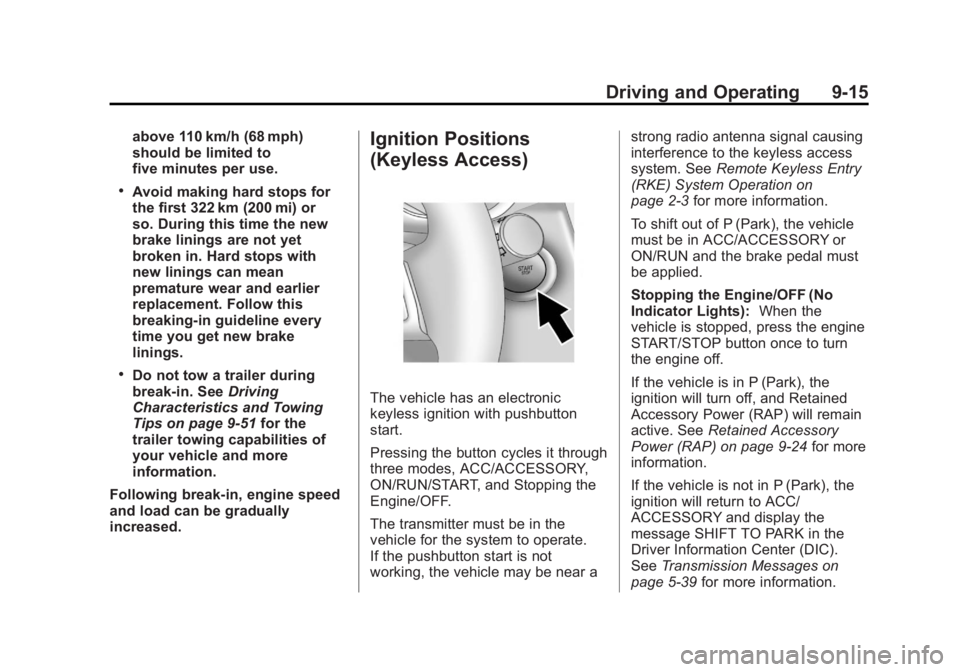
Ignition Positions
(Keyless Access)
The vehicle has an electronic
keyless ignition with pushbutton
start.
Pressing the button cycles it through
three modes, ACC/ACCESSORY,
ON/RUN/START, and Stopping the
Engine/OFF.
The transmitter must be in the
vehicle for the system to operate.
If the pushbutton start is not
working, the vehicle may be near a strong radio antenna signal causing
interference to the keyless access
system. See
Remote Keyless Entry
(RKE) System Operation on
page 2‑3 for more information.
To shift out of P (Park), the vehicle
must be in ACC/ACCESSORY or
ON/RUN and the brake pedal must
be applied.
Stopping the Engine/OFF (No
Indicator Lights): When the
vehicle is stopped, press the engine
START/STOP button once to turn
the engine off.
If the vehicle is in P (Park), the
ignition will turn off, and Retained
Accessory Power (RAP) will remain
active. See Retained Accessory
Power (RAP) on page 9‑24 for more
information.
If the vehicle is not in P (Park), the
ignition will return to ACC/
ACCESSORY and display the
message SHIFT TO PARK in the
Driver Information Center (DIC).
See Transmission Messages on
page 5‑39 for more information.
Page 222 of 422
Black plate (20,1)Buick LaCrosse Owner Manual - 2013 - crc - 9/7/12
9-20 Driving and Operating
the cranking motor, and drain the
battery. Wait at least 15 seconds
between each try, to let the
cranking motor cool down.
2. If the engine does not start afterfive to 10 seconds, especially in
very cold weather (below −18°C
or 0°F), it could be flooded with
too much gasoline. Try pushing
the accelerator pedal all the way
to the floor and holding it there
as you hold the key in START,
or press the START button, for
up to a maximum of 15 seconds.
Wait at least 15 seconds
between each try, to allow the
cranking motor to cool down.
When the engine starts, let go of
the key or button, and the
accelerator. If the vehicle starts
briefly but then stops again, do
the same thing. This clears the
extra gasoline from the engine.
Do not race the engine
immediately after starting it.
Operate the engine and transmission gently until the oil
warms up and lubricates all
moving parts.
Starting Procedure (Keyless
Access)
1. If the vehicle has the keyless access system, the transmitter
must be in the vehicle. Put your
foot on the brake pedal and
push the START button. When
the engine begins cranking, let
go of the button.
The idle speed will go down as
your engine gets warm. Do not
race the engine immediately
after starting it. Operate the
engine and transmission gently
to allow the oil to warm up and
lubricate all moving parts.
If the transmitter is not in the
vehicle or something is
interfering with the transmitter,
the Driver Information Center
(DIC) will display a message.
See Key and Lock Messages on
page 5‑36 for more information. If the battery in the Remote
Keyless Entry (RKE) transmitter
needs replacing, the DIC will
display a message. The vehicle
can still be driven. See
“Starting
the Vehicle with a Low
Transmitter Battery” inRemote
Keyless Entry (RKE) System
Operation on page 2‑3 for more
information.
The vehicle has a
Computer-Controlled Cranking
System. This feature assists in
starting the engine and protects
components. If the START
button is pressed, and then
released when the engine
begins cranking, the engine will
continue cranking for a few
seconds or until the vehicle
starts. If the engine does not
start and the button is pressed
for many seconds, cranking will
be stopped after 15 seconds to
prevent cranking motor damage.
To prevent gear damage, this
system also prevents cranking if
the engine is already running.
Page 388 of 422
Black plate (8,1)Buick LaCrosse Owner Manual - 2013 - crc - 9/7/12
13-8 Customer Information
Buick and General Motors of
Canada Limited reserve the right to
limit services or payment to an
owner or driver if they decide the
claims are made too often, or the
same type of claim is made many
times.
Services Provided
.Emergency Fuel Delivery:
Delivery of enough fuel for the
vehicle to get to the nearest
service station.
.Lock-Out Service:Service to
unlock the vehicle if you are
locked out. A remote unlock may
be available if you have
OnStar
®. For security reasons,
the driver must present
identification before this service
is given.
.Emergency Tow from a Public
Road or Highway: Tow to the
nearest Buick dealer for
warranty service, or if the vehicle
was in a crash and cannot be driven. Assistance is also given
when the vehicle is stuck in
sand, mud, or snow.
.Flat Tire Change:
Service to
change a flat tire with the spare
tire. The spare tire, if equipped,
must be in good condition and
properly inflated. It is the owner's
responsibility for the repair or
replacement of the tire if it is not
covered by the warranty.
.Battery Jump Start: Service to
jump start a dead battery.
Services Not Included in
Roadside Assistance
.Impound towing caused by
violation of any laws.
.Legal fines.
.Mounting, dismounting,
or changing of snow tires,
chains, or other traction devices.
.Towing or services for vehicles
driven on a non-public road or
highway.
Services Specific to
Canadian-Purchased Vehicles
.Fuel delivery: Reimbursement
is approximately $5 Canadian.
Diesel fuel delivery may be
restricted. Propane and other
fuels are not provided through
this service.
.Lock-Out Service: Vehicle
registration is required.
.Trip Interruption Benefits and
Assistance: Must be over
250 kilometers from where your
trip was started to qualify.
General Motors of Canada
Limited requires
pre-authorization, original
detailed receipts, and a copy of
the repair orders. Once
authorization has been received,
the Roadside Assistance advisor
will help you make arrangements
and explain how to receive
payment.