battery BUICK LACROSSE 2014 User Guide
[x] Cancel search | Manufacturer: BUICK, Model Year: 2014, Model line: LACROSSE, Model: BUICK LACROSSE 2014Pages: 402, PDF Size: 4.37 MB
Page 86 of 402
Black plate (32,1)Buick LaCrosse Owner Manual (GMNA-Localizing-U.S./Canada/Mexico-
6043609) - 2014 - 2nd Edition - 10/17/13
3-32 Seats and Restraints
Warning (Continued)
protect you and your
passenger(s) in a crash, resulting
in serious injury or even death. To
help make sure the airbag
systems are working properly
after a crash, have them
inspected and any necessary
replacements made as soon as
possible.
If an airbag inflates, you will need to
replace airbag system parts. See
your dealer for service.
If the airbag readiness light stays on
after the vehicle is started or comes
on when you are driving, the airbag
system may not work properly. Have
the vehicle serviced right away. See
Airbag Readiness Light on
page 5-14 for more information. Vehicles with eAssist have a high
voltage battery and a standard
12‐volt battery. If an airbag inflates
or the vehicle has been in a crash,
the vehicle's sensing system may
shut down the high voltage system.
When this occurs, the high voltage
battery is disconnected and the
vehicle is not charging the 12‐volt
battery or the electrical system. The
vehicle may start but it shuts down
once the 12‐volt battery is depleted.
When the 12‐volt battery is
depleted, the vehicle will not start
and the on‐board jump start feature
is disabled. The airbag readiness
light and/or the 12‐volt battery
warning light are displayed. Before
the vehicle can be operated again, it
must be serviced at your dealer.
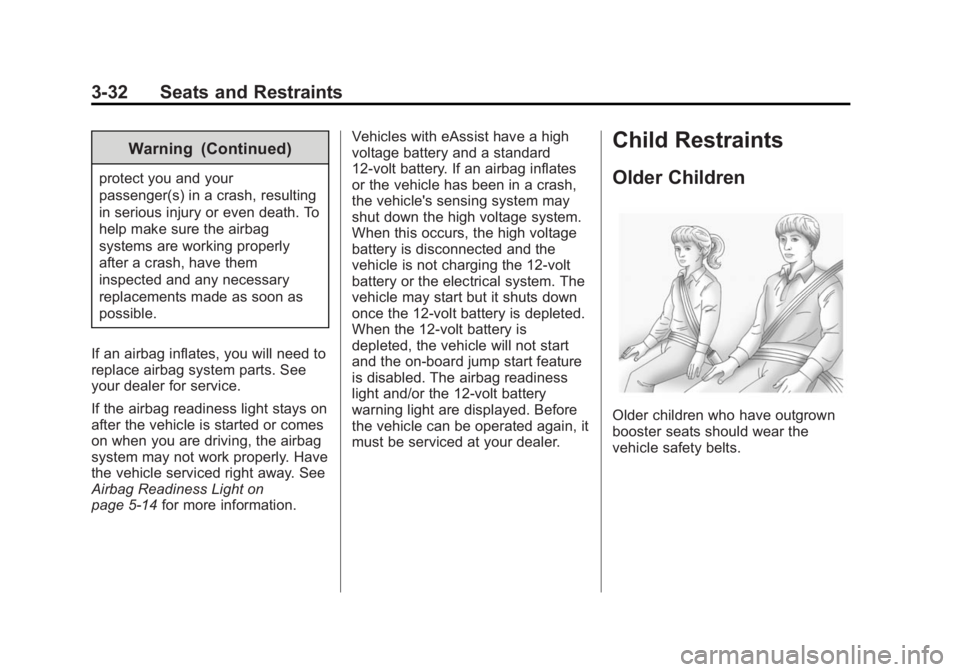
Child Restraints
Older Children
Older children who have outgrown
booster seats should wear the
vehicle safety belts.
Page 111 of 402
Black plate (1,1)Buick LaCrosse Owner Manual (GMNA-Localizing-U.S./Canada/Mexico-
6043609) - 2014 - 2nd Edition - 10/17/13
Instruments and Controls 5-1
Instruments and
Controls
Controls
Steering Wheel Adjustment . . . 5-2
Steering Wheel Controls . . . . . . 5-2
Heated Steering Wheel . . . . . . . 5-3
Horn . . . . . . . . . . . . . . . . . . . . . . . . . . 5-3
Windshield Wiper/Washer . . . . . 5-3
Compass . . . . . . . . . . . . . . . . . . . . . 5-4
Clock . . . . . . . . . . . . . . . . . . . . . . . . . 5-5
Power Outlets . . . . . . . . . . . . . . . . . 5-5
Warning Lights, Gauges, and
Indicators
Warning Lights, Gauges, andIndicators . . . . . . . . . . . . . . . . . . . . 5-7
Instrument Cluster . . . . . . . . . . . . 5-8
Speedometer . . . . . . . . . . . . . . . . 5-11
Odometer . . . . . . . . . . . . . . . . . . . . 5-11
Tachometer . . . . . . . . . . . . . . . . . . 5-11
Fuel Gauge . . . . . . . . . . . . . . . . . . 5-12
Engine Coolant Temperature Gauge . . . . . . . . . . . . . . . . . . . . . . 5-13
Safety Belt Reminders . . . . . . . 5-13
Airbag Readiness Light . . . . . . 5-14 Passenger Airbag Status
Indicator . . . . . . . . . . . . . . . . . . . . 5-15
Charging System Light . . . . . . 5-16
Malfunction Indicator Lamp . . . . . . . . . . . . . 5-16
Brake System Warning Light . . . . . . . . . . . . . . . . . . . . . . . 5-19
Electric Parking Brake Light . . . . . . . . . . . . . . . . . . . . . . . 5-19
Service Electric Parking Brake Light . . . . . . . . . . . . . . . . . . . . . . . 5-19
Antilock Brake System (ABS) Warning Light . . . . . . . . . . . . . . 5-20
Lane Departure Warning (LDW) Light . . . . . . . . . . . . . . . . 5-20
Vehicle Ahead Indicator . . . . . . 5-21
Traction Off Light . . . . . . . . . . . . 5-21
StabiliTrak®OFF Light . . . . . . . 5-21
Traction Control System (TCS)/StabiliTrak
®Light . . . . 5-21
Engine Coolant Temperature Warning Light . . . . . . . . . . . . . . 5-22
Tire Pressure Light . . . . . . . . . . 5-22
Engine Oil Pressure Light . . . . 5-23
Low Fuel Warning Light . . . . . . 5-23
Security Light . . . . . . . . . . . . . . . . 5-24
High-Beam On Light . . . . . . . . . 5-24
Front Fog Lamp Light . . . . . . . . 5-24 Lamps On Reminder . . . . . . . . . 5-24
Cruise Control Light . . . . . . . . . 5-24
Door Ajar Light . . . . . . . . . . . . . . 5-25
Information Displays
Power Flows
(eAssist Only) . . . . . . . . . . . . . . 5-25
Energy Information (eAssist Only) . . . . . . . . . . . . . . 5-26
Driver Information Center (DIC) . . . . . . . . . . . . . . . 5-27
Head-Up Display (HUD) . . . . . 5-30
Vehicle Messages
Vehicle Messages . . . . . . . . . . . 5-34
Battery Voltage and Charging Messages . . . . . . . . . . . . . . . . . . 5-34
Brake System Messages . . . . 5-34
Compass Messages . . . . . . . . . 5-35
Cruise Control Messages . . . . 5-35
Door Ajar Messages . . . . . . . . . 5-36
Engine Cooling System Messages . . . . . . . . . . . . . . . . . . 5-36
Engine Oil Messages . . . . . . . . 5-37
Engine Power Messages . . . . 5-37
Fuel System Messages . . . . . . 5-37
Key and Lock Messages . . . . . 5-38
Lamp Messages . . . . . . . . . . . . . 5-38
Page 126 of 402
Black plate (16,1)Buick LaCrosse Owner Manual (GMNA-Localizing-U.S./Canada/Mexico-
6043609) - 2014 - 2nd Edition - 10/17/13
5-16 Instruments and Controls
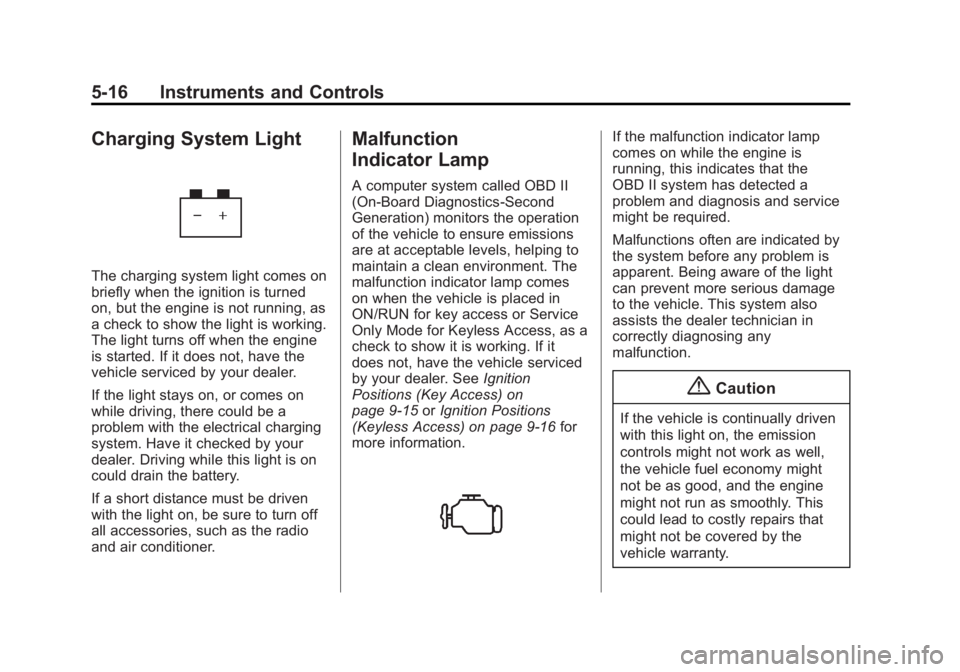
Charging System Light
The charging system light comes on
briefly when the ignition is turned
on, but the engine is not running, as
a check to show the light is working.
The light turns off when the engine
is started. If it does not, have the
vehicle serviced by your dealer.
If the light stays on, or comes on
while driving, there could be a
problem with the electrical charging
system. Have it checked by your
dealer. Driving while this light is on
could drain the battery.
If a short distance must be driven
with the light on, be sure to turn off
all accessories, such as the radio
and air conditioner.
Malfunction
Indicator Lamp
A computer system called OBD II
(On-Board Diagnostics-Second
Generation) monitors the operation
of the vehicle to ensure emissions
are at acceptable levels, helping to
maintain a clean environment. The
malfunction indicator lamp comes
on when the vehicle is placed in
ON/RUN for key access or Service
Only Mode for Keyless Access, as a
check to show it is working. If it
does not, have the vehicle serviced
by your dealer. SeeIgnition
Positions (Key Access) on
page 9-15 orIgnition Positions
(Keyless Access) on page 9-16 for
more information.
If the malfunction indicator lamp
comes on while the engine is
running, this indicates that the
OBD II system has detected a
problem and diagnosis and service
might be required.
Malfunctions often are indicated by
the system before any problem is
apparent. Being aware of the light
can prevent more serious damage
to the vehicle. This system also
assists the dealer technician in
correctly diagnosing any
malfunction.
{Caution
If the vehicle is continually driven
with this light on, the emission
controls might not work as well,
the vehicle fuel economy might
not be as good, and the engine
might not run as smoothly. This
could lead to costly repairs that
might not be covered by the
vehicle warranty.
Page 128 of 402
Black plate (18,1)Buick LaCrosse Owner Manual (GMNA-Localizing-U.S./Canada/Mexico-
6043609) - 2014 - 2nd Edition - 10/17/13
5-18 Instruments and Controls
If one or more of these conditions
occurs, change the fuel brand used.
It may require at least one full tank
of the proper fuel to turn the light off.
SeeRecommended Fuel on
page 9-58.
If none of the above have made the
light turn off, your dealer can check
the vehicle. The dealer has the
proper test equipment and
diagnostic tools to fix any
mechanical or electrical problems
that might have developed.
Emissions Inspection and
Maintenance Programs
Depending on where you live, your
vehicle may be required to
participate in an emission control
system inspection and maintenance
program. For the inspection, the
emission system test equipment will
likely connect to the vehicle's Data
Link Connector (DLC).
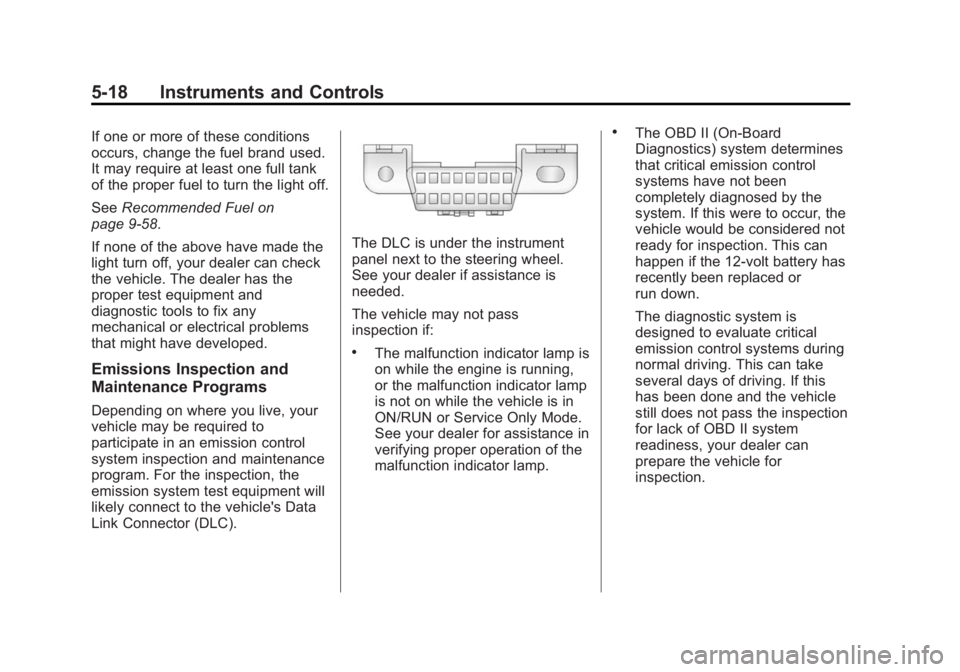
The DLC is under the instrument
panel next to the steering wheel.
See your dealer if assistance is
needed.
The vehicle may not pass
inspection if:
.The malfunction indicator lamp is
on while the engine is running,
or the malfunction indicator lamp
is not on while the vehicle is in
ON/RUN or Service Only Mode.
See your dealer for assistance in
verifying proper operation of the
malfunction indicator lamp.
.The OBD II (On-Board
Diagnostics) system determines
that critical emission control
systems have not been
completely diagnosed by the
system. If this were to occur, the
vehicle would be considered not
ready for inspection. This can
happen if the 12-volt battery has
recently been replaced or
run down.
The diagnostic system is
designed to evaluate critical
emission control systems during
normal driving. This can take
several days of driving. If this
has been done and the vehicle
still does not pass the inspection
for lack of OBD II system
readiness, your dealer can
prepare the vehicle for
inspection.
Page 135 of 402
Black plate (25,1)Buick LaCrosse Owner Manual (GMNA-Localizing-U.S./Canada/Mexico-
6043609) - 2014 - 2nd Edition - 10/17/13
Instruments and Controls 5-25
The cruise control light is white
when the cruise control is on and
ready, and turns green when the
cruise control is set and active.
SeeCruise Control on page 9-37.
Adaptive Cruise Control Light
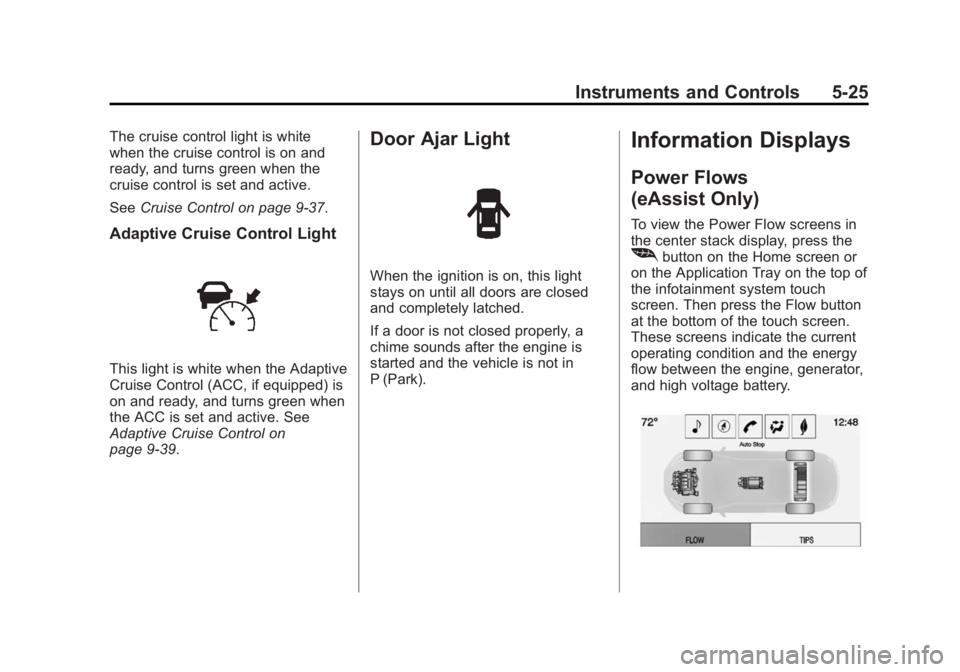
This light is white when the Adaptive
Cruise Control (ACC, if equipped) is
on and ready, and turns green when
the ACC is set and active. See
Adaptive Cruise Control on
page 9-39.
Door Ajar Light
When the ignition is on, this light
stays on until all doors are closed
and completely latched.
If a door is not closed properly, a
chime sounds after the engine is
started and the vehicle is not in
P (Park).
Information Displays
Power Flows
(eAssist Only)
To view the Power Flow screens in
the center stack display, press the
[button on the Home screen or
on the Application Tray on the top of
the infotainment system touch
screen. Then press the Flow button
at the bottom of the touch screen.
These screens indicate the current
operating condition and the energy
flow between the engine, generator,
and high voltage battery.
Page 136 of 402
Black plate (26,1)Buick LaCrosse Owner Manual (GMNA-Localizing-U.S./Canada/Mexico-
6043609) - 2014 - 2nd Edition - 10/17/13
5-26 Instruments and Controls
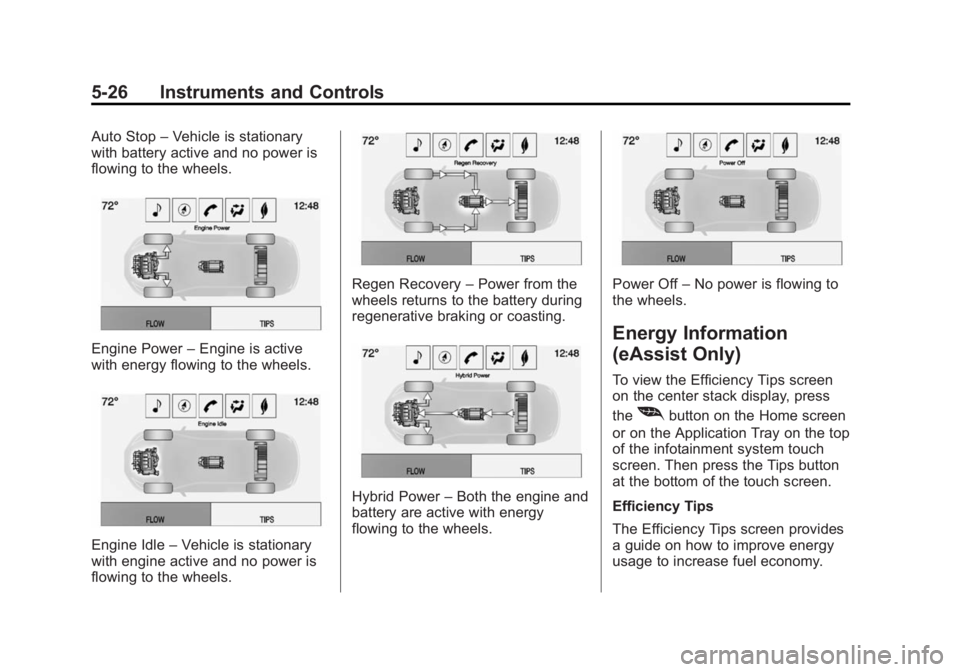
Auto Stop–Vehicle is stationary
with battery active and no power is
flowing to the wheels.
Engine Power –Engine is active
with energy flowing to the wheels.
Engine Idle –Vehicle is stationary
with engine active and no power is
flowing to the wheels.
Regen Recovery –Power from the
wheels returns to the battery during
regenerative braking or coasting.
Hybrid Power –Both the engine and
battery are active with energy
flowing to the wheels.
Power Off –No power is flowing to
the wheels.
Energy Information
(eAssist Only)
To view the Efficiency Tips screen
on the center stack display, press
the
[button on the Home screen
or on the Application Tray on the top
of the infotainment system touch
screen. Then press the Tips button
at the bottom of the touch screen.
Efficiency Tips
The Efficiency Tips screen provides
a guide on how to improve energy
usage to increase fuel economy.
Page 144 of 402
Black plate (34,1)Buick LaCrosse Owner Manual (GMNA-Localizing-U.S./Canada/Mexico-
6043609) - 2014 - 2nd Edition - 10/17/13
5-34 Instruments and Controls
Vehicle Messages
Messages displayed on the DIC
indicate the status of the vehicle or
some action that may be needed to
correct a condition. Multiple
messages may appear one after
another.
The messages that do not require
immediate action can be
acknowledged and cleared by
pressing
V(Set/Reset).
The messages that require
immediate action cannot be cleared
until that action is performed.
All messages should be taken
seriously; clearing the message
does not correct the problem.
The following are the possible
messages and some information
about them.
Battery Voltage and
Charging Messages
BATTERY SAVER ACTIVE
This message displays when the
vehicle has detected that the battery
voltage is dropping beyond a
reasonable point. The battery saver
system starts reducing features of
the vehicle that may be noticed. At
the point that features are disabled,
this message displays. Turn off
unnecessary accessories to allow
the battery to recharge.
LOW BATTERY
This message is displayed when the
battery voltage is low. See Battery
on page 10-27.
SERVICE BATTERY
CHARGING SYSTEM
This message is displayed when
there is a fault in the battery
charging system. Take the vehicle to
your dealer for service.
Brake System Messages
BRAKE FLUID LOW
This message is displayed when the
brake fluid level is low. See Brake
Fluid on page 10-25.
STEP ON BRAKE TO
RELEASE PARK BRAKE
This message is displayed if you
attempt to release the electric
parking brake without the brake
pedal applied. See Parking Brake
on page 9-32 for more information.
RELEASE PARK BRAKE
This message is displayed if the
electric parking brake is on while the
vehicle is in motion. Release it
before you attempt to drive. See
Parking Brake on page 9-32 for
more information.
SERVICE BRAKE ASSIST
This message may be displayed
when there is a problem with the
brake boost assist system. When
this message is displayed, the brake
Page 148 of 402
Black plate (38,1)Buick LaCrosse Owner Manual (GMNA-Localizing-U.S./Canada/Mexico-
6043609) - 2014 - 2nd Edition - 10/17/13
5-38 Instruments and Controls
Key and Lock Messages
NO REMOTE DETECTED
This message displays when the
transmitter battery is weak on
vehicles with Keyless Access. See
“Starting the Vehicle with a Low
Transmitter Battery”underRemote
Keyless Entry (RKE) System
Operation on page 2-3.
NO REMOTE KEY WAS
DETECTED PLACE KEY IN
TRANSMITTER POCKET THEN
START YOUR VEHICLE
This message displays when trying
to start the vehicle if an RKE
transmitter is not detected. The
transmitter battery may be weak.
See “Starting the Vehicle with a Low
Transmitter Battery” underRemote
Keyless Entry (RKE) System
Operation on page 2-3.
REPLACE BATTERY IN
REMOTE KEY
This message displays when the
battery in the Remote Keyless Entry
(RKE) transmitter needs to be
replaced. See “Battery
Replacement” underRemote
Keyless Entry (RKE) System
Operation on page 2-3.
Lamp Messages
AFL (Adaptive Forward
Lighting) LAMPS NEED
SERVICE
This message displays when the
Adaptive Forward Lighting (AFL)
system is disabled and needs
service. See your dealer. See
Adaptive Forward Lighting (AFL) on
page 6-3 for more information.
Object Detection System
Messages
AUTOMATIC COLLISION
PREP OFF
This message displays when the
Active Emergency Braking System
has been turned off. See Active
Emergency Braking System on
page 9-52.
AUTOMATIC COLLISION PREP
REDUCED
This message displays when the
Active Emergency Braking System
has been set to the "Alert" setting.
This setting disables most automatic
braking functions of the Auto
Collision Preparation feature. Some
last-second automatic braking
capability is still provided with the
"Alert" setting, but braking is less
likely to occur. See Active
Emergency Braking System on
page 9-52.
Page 152 of 402
Black plate (42,1)Buick LaCrosse Owner Manual (GMNA-Localizing-U.S./Canada/Mexico-
6043609) - 2014 - 2nd Edition - 10/17/13
5-42 Instruments and Controls
JUMP START COMPLETE
ATTEMPT START
This message displays while
performing an on-board jump start
of the vehicle. See“Jump Starting
(On-board with eAssist Only).”
JUMP START DISABLED SEE
OWNERS MANUAL
This message displays if there is a
problem with the on-board jump
start system, or the 12 volt battery is
too low to perform an on-board jump
start. Try using jumper cables and
performing a normal jump start. See
“Jump Starting (On-board with
eAssist Only).” Take the vehicle to
your dealer for service if this
message continues to be displayed.
Tire Messages
SERVICE TIRE MONITOR
SYSTEM
This message displays if there is a
problem with the Tire Pressure
Monitor System (TPMS). See Tire
Pressure Monitor Operation on
page 10-52.
TIRE LEARNING ACTIVE
This message displays when the
system is learning new tires. See
Tire Pressure Monitor Operation on
page 10-52.
TIRE PRESSURE LOW ADD
AIR TO TIRE
On vehicles with the Tire Pressure
Monitor System (TPMS), this
message displays when the
pressure in one or more of the
vehicle's tires is low.
The low tire pressure warning light
will also come on. See Tire
Pressure Light on page 5-22. If a tire pressure message displays,
inflate the tires until the tire pressure
is equal to the values shown on the
Tire and Loading Information label.
See
Tires on page 10-42, Vehicle
Load Limits on page 9-10, and Tire
Pressure on page 10-49.
More than one tire pressure
message can be received at a time.
The DIC also shows the tire
pressure values. See Driver
Information Center (DIC) on
page 5-27.
Transmission Messages
SERVICE TRANSMISSION
This message displays if there is a
problem with the transmission. See
your dealer.
SHIFT TO PARK
This message displays when the
transmission needs to be shifted to
P (Park). This may appear when
attempting to remove the key from
the ignition or from the vehicle if the
vehicle is not in P (Park).
Page 153 of 402
Black plate (43,1)Buick LaCrosse Owner Manual (GMNA-Localizing-U.S./Canada/Mexico-
6043609) - 2014 - 2nd Edition - 10/17/13
Instruments and Controls 5-43
TRANSMISSION HOT—IDLE
ENGINE
This message displays and a chime
sounds if the transmission fluid in
the vehicle gets hot. Driving with the
transmission fluid temperature high
can cause damage to the vehicle.
Stop the vehicle and let it idle to
allow the transmission to cool. This
message clears when the fluid
temperature reaches a safe level.
Vehicle Speed Messages
SPEED LIMIT EXCEEDED
This message is displayed when the
vehicle speed is greater than the
speed warning speed. See "Speed
Warning" under Instrument Cluster
on page 5-8.
SPEED LIMIT SET TO XXX
This message is displayed when the
speed warning is set. See "Speed
Warning" under Instrument Cluster
on page 5-8.
Window Messages
OPEN, THEN CLOSE DRIVER/
PASSENGER WINDOW
This message is displayed when the
window needs to be reprogrammed.
If the vehicle's battery has been
recharged or disconnected, you will
need to program each front window
for the express-up feature to work.
See Power Windows on page 2-20.
Vehicle
Personalization
Use the audio system controls to
access the personalization menus
for customizing vehicle features.
The following are all possible
personalization features. Depending
on the vehicle, some may not be
available.
To access the personalization
menus:
1. Press SETTINGS on the Home
page on the infotainment system
display.
2. Press the desired feature to display a list of available
options.
3. Press the desired option.
4. Press to select the desired option setting.
5. Press
qBACK to return to the
previous menu.