radio controls BUICK LACROSSE 2014 User Guide
[x] Cancel search | Manufacturer: BUICK, Model Year: 2014, Model line: LACROSSE, Model: BUICK LACROSSE 2014Pages: 402, PDF Size: 4.37 MB
Page 288 of 402
Black plate (40,1)Buick LaCrosse Owner Manual (GMNA-Localizing-U.S./Canada/Mexico-
6043609) - 2014 - 2nd Edition - 10/17/13
10-40 Vehicle Care
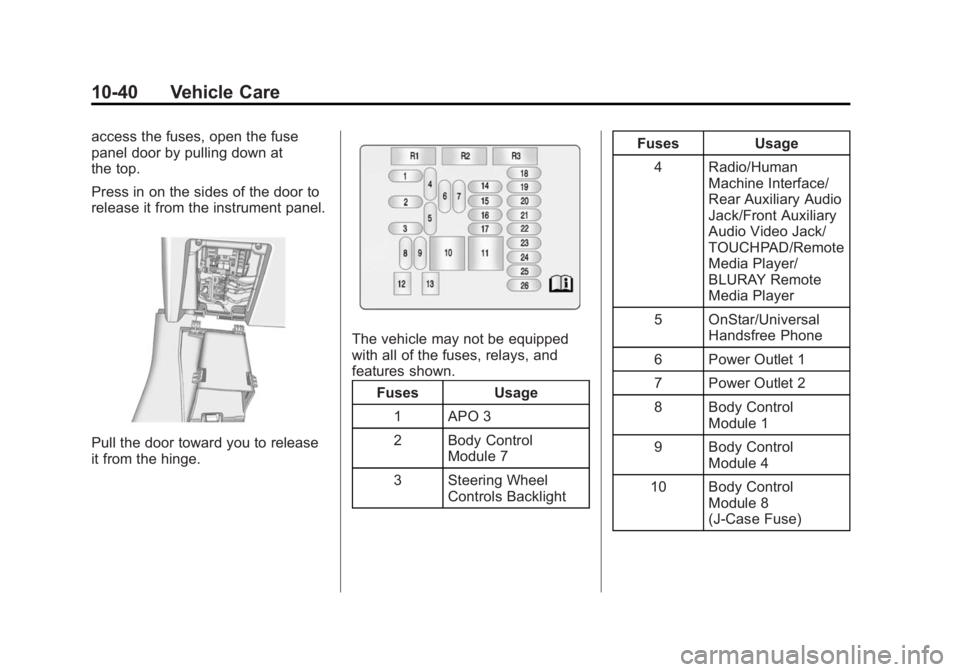
access the fuses, open the fuse
panel door by pulling down at
the top.
Press in on the sides of the door to
release it from the instrument panel.
Pull the door toward you to release
it from the hinge.
The vehicle may not be equipped
with all of the fuses, relays, and
features shown.Fuses Usage
1 APO 3
2 Body Control Module 7
3 Steering Wheel Controls Backlight Fuses Usage
4 Radio/Human Machine Interface/
Rear Auxiliary Audio
Jack/Front Auxiliary
Audio Video Jack/
TOUCHPAD/Remote
Media Player/
BLURAY Remote
Media Player
5 OnStar/Universal Handsfree Phone
6 Power Outlet 1
7 Power Outlet 2
8 Body Control Module 1
9 Body Control Module 4
10 Body Control Module 8
(J-Case Fuse)
Page 302 of 402
Black plate (54,1)Buick LaCrosse Owner Manual (GMNA-Localizing-U.S./Canada/Mexico-
6043609) - 2014 - 2nd Edition - 10/17/13
10-54 Vehicle Care
.Replacement tires or wheels do
not match the original equipment
tires or wheels. Tires and wheels
other than those recommended
could prevent the TPMS from
functioning properly. SeeBuying
New Tires on page 10-57.
.Operating electronic devices or
being near facilities using radio
wave frequencies similar to the
TPMS could cause the TPMS
sensors to malfunction.
If the TPMS is not functioning
properly it cannot detect or signal a
low tire condition. See your dealer
for service if the TPMS malfunction
light and DIC message comes on
and stays on.
TPMS Sensor Matching
Process
Each TPMS sensor has a unique
identification code. The identification
code needs to be matched to a new
tire/wheel position after rotating the
vehicle’s tires or replacing one or
more of the TPMS sensors. The
TPMS sensor matching process should also be performed after
replacing a spare tire with a road
tire containing the TPMS sensor.
The malfunction light and the DIC
message should go off at the next
ignition cycle. The sensors are
matched to the tire/wheel positions,
using a TPMS relearn tool, in the
following order: driver side front tire,
passenger side front tire, passenger
side rear tire, and driver side rear.
See your dealer for service or to
purchase a relearn tool.
There are two minutes to match the
first tire/wheel position, and
five minutes overall to match all four
tire/wheel positions. If it takes
longer, the matching process stops
and must be restarted.
The TPMS sensor matching
process is:
1. Set the parking brake.
2. Turn the ignition to ON/RUN with
the engine off or place the
vehicle power mode in ON/RUN/ START. See
Ignition Positions
(Key Access) on page 9-15 or
Ignition Positions (Keyless
Access) on page 9-16.
3. Make sure the Tire Pressure info page option is turned on. The
info pages on the DIC can be
turned on and off through the
Settings menu. See Driver
Information Center (DIC) on
page 5-27.
4. Use the DIC controls on the right side of the steering wheel to
scroll to the Tire Pressure
screen under the DIC info page.
5. Press and hold the
V(Set/
Reset) button located in the
center of the DIC controls.
The horn sounds twice to signal
the receiver is in relearn mode
and the TIRE LEARNING
ACTIVE message displays on
the DIC screen.
6. Start with the driver side front tire.