climate control BUICK LACROSSE 2016 Owner's Manual
[x] Cancel search | Manufacturer: BUICK, Model Year: 2016, Model line: LACROSSE, Model: BUICK LACROSSE 2016Pages: 367, PDF Size: 5.33 MB
Page 2 of 367
Buick LaCrosse Owner Manual (GMNA-Localizing-U.S./Canada/Mexico-
9159288) - 2016 - CRC - 10/5/15
ContentsIntroduction . . . . . . . . . . . . . . . . . . . . . . 2
In Brief . . . . . . . . . . . . . . . . . . . . . . . . . . . 5
Keys, Doors, and Windows . . . . . 26
Seats and Restraints . . . . . . . . . . . 49
Storage . . . . . . . . . . . . . . . . . . . . . . . . . 97
Instruments and Controls . . . . . . 100
Lighting . . . . . . . . . . . . . . . . . . . . . . . 148
Infotainment System . . . . . . . . . . 156
Climate Controls . . . . . . . . . . . . . . 157
Driving and Operating . . . . . . . . . 163
Vehicle Care . . . . . . . . . . . . . . . . . . 226
Service and Maintenance . . . . . 313
Technical Data . . . . . . . . . . . . . . . . 326
Customer Information . . . . . . . . . 330
Reporting Safety Defects . . . . . . 341
OnStar . . . . . . . . . . . . . . . . . . . . . . . . 345
Index . . . . . . . . . . . . . . . . . . . . 355
Page 6 of 367
Buick LaCrosse Owner Manual (GMNA-Localizing-U.S./Canada/Mexico-
9159288) - 2016 - CRC - 10/5/15
In Brief 5
In Brief
Instrument Panel
Instrument Panel . . . . . . . . . . . . . . . . 6
Initial Drive Information
Initial Drive Information . . . . . . . . . . 8
Remote Keyless Entry (RKE)System . . . . . . . . . . . . . . . . . . . . . . . . 8
Remote Vehicle Start . . . . . . . . . . . 8
Door Locks . . . . . . . . . . . . . . . . . . . . . 9
Trunk Release . . . . . . . . . . . . . . . . . . 9
Windows . . . . . . . . . . . . . . . . . . . . . . . . 9
Seat Adjustment . . . . . . . . . . . . . . . 10
Memory Features . . . . . . . . . . . . . . 12
Heated and Ventilated Seats . . . 12
Head Restraint Adjustment . . . . 13
Safety Belts . . . . . . . . . . . . . . . . . . . . 13
Passenger Sensing System . . . 13
Mirror Adjustment . . . . . . . . . . . . . . 14
Steering Wheel Adjustment . . . . 15
Interior Lighting . . . . . . . . . . . . . . . . 15
Exterior Lighting . . . . . . . . . . . . . . . 16
Windshield Wiper/Washer . . . . . . 16
Climate Controls . . . . . . . . . . . . . . . 17
Transmission . . . . . . . . . . . . . . . . . . 18
Vehicle Features
Infotainment System . . . . . . . . . . . 18
Steering Wheel Controls . . . . . . . 18 Cruise Control . . . . . . . . . . . . . . . . . 18
Driver Information
Center (DIC) . . . . . . . . . . . . . . . . . 19
Forward Collision Alert (FCA) System . . . . . . . . . . . . . . . . . . . . . . . 19
Front Automatic Braking (FAB) System . . . . . . . . . . . . . . . . . . . . . . . 19
Lane Departure Warning (LDW) . . . . . . . . . . . . . . . 19
Lane Change Alert (LCA) . . . . . . 20
Rear Vision Camera (RVC) . . . . 20
Rear Cross Traffic Alert (RCTA) System . . . . . . . . . . . . . . . . . . . . . . . 20
Parking Assist . . . . . . . . . . . . . . . . . 20
Power Outlets . . . . . . . . . . . . . . . . . 20
Universal Remote System . . . . . 21
Sunroof . . . . . . . . . . . . . . . . . . . . . . . . 21
eAssist Features
eAssist®Overview . . . . . . . . . . . . . 22
High Voltage Safety Information . . . . . . . . . . . . . . . . . . . 22
Automatic Engine Start/Stop Feature . . . . . . . . . . . . . . . . . . . . . . . 22
Regenerative Braking . . . . . . . . . . 23
Battery . . . . . . . . . . . . . . . . . . . . . . . . . 23
Service . . . . . . . . . . . . . . . . . . . . . . . . 23
Performance and Maintenance
Traction Control/Electronic Stability Control . . . . . . . . . . . . . . 23 Tire Pressure Monitor . . . . . . . . . . 24
Engine Oil Life System . . . . . . . . 24
E85 or FlexFuel . . . . . . . . . . . . . . . . 25
Driving for Better Fuel
Economy . . . . . . . . . . . . . . . . . . . . . 25
Roadside Assistance Program . . . . . . . . . . . . . . . . . . . . . . 25
Page 8 of 367

Buick LaCrosse Owner Manual (GMNA-Localizing-U.S./Canada/Mexico-
9159288) - 2016 - CRC - 10/5/15
In Brief 7
1.Exterior Lamp Controls 0148.
Fog Lamps 0151 (If
Equipped).
Instrument Panel Illumination
Control 0152.
Head-Up Display (HUD) 0126
(If Equipped).
2. Air Vents 0161.
3. Turn Signal Lever. See Turn
and Lane-Change
Signals 0151.
4. Instrument Cluster 0106.
Driver Information Center
Display. See Driver Information
Center (DIC) 0123.
5. Windshield Wiper/
Washer 0102.
6. Hazard Warning
Flashers 0151.
Lane Departure Warning
(LDW) 0213 (If Equipped).
Rear Parking Assist Button (If
Equipped). See Assistance
Systems for Parking or
Backing 0205. 7. Light Sensor. See
Automatic
Headlamp System 0149.
8. Infotainment 0156.
9. Heated and Ventilated Front
Seats 056 (If Equipped).
10. Dual Automatic Climate Control
System 0157.
11. Parking Brake 0190.
Traction Control/Electronic
Stability Control 0192.
12. Shift Lever. See Automatic
Transmission 0186.
13. Ignition Positions (Keyless
Access) 0175 orIgnition
Positions (Key Access) 0176.
14. Steering Wheel Controls 0101
(If Equipped).
Driver Information Center (DIC)
Buttons. See Driver Information
Center (DIC) 0123.
15. Horn 0102.
16. Steering Wheel
Adjustment 0101. 17.
Cruise Control 0195.
Forward Collision Alert (FCA)
System 0208 (If Equipped).
18. Hood Release. See Hood 0230.
19. Front Storage 098.
20. Data Link Connector (DLC) (Out of View). See Malfunction
Indicator Lamp (Check Engine
Light) 0114.
Page 13 of 367
Buick LaCrosse Owner Manual (GMNA-Localizing-U.S./Canada/Mexico-
9159288) - 2016 - CRC - 10/5/15
12 In Brief
Memory Features
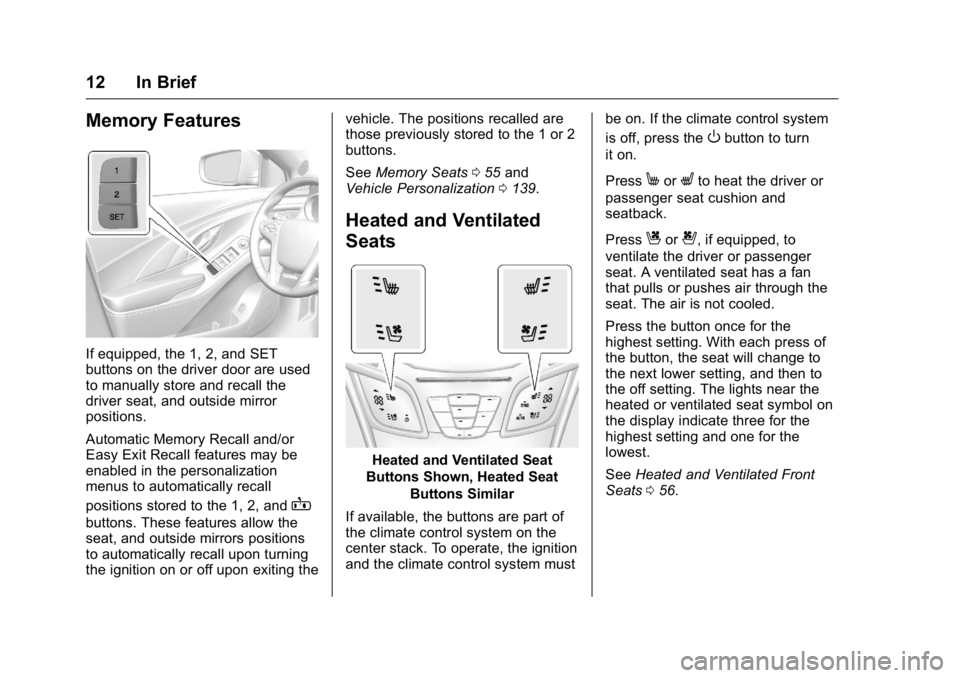
If equipped, the 1, 2, and SET
buttons on the driver door are used
to manually store and recall the
driver seat, and outside mirror
positions.
Automatic Memory Recall and/or
Easy Exit Recall features may be
enabled in the personalization
menus to automatically recall
positions stored to the 1, 2, and
B
buttons. These features allow the
seat, and outside mirrors positions
to automatically recall upon turning
the ignition on or off upon exiting thevehicle. The positions recalled are
those previously stored to the 1 or 2
buttons.
See
Memory Seats 055 and
Vehicle Personalization 0139.
Heated and Ventilated
Seats
Heated and Ventilated Seat
Buttons Shown, Heated Seat
Buttons Similar
If available, the buttons are part of
the climate control system on the
center stack. To operate, the ignition
and the climate control system must be on. If the climate control system
is off, press the
Obutton to turn
it on.
Press
MorLto heat the driver or
passenger seat cushion and
seatback.
Press
Cor{, if equipped, to
ventilate the driver or passenger
seat. A ventilated seat has a fan
that pulls or pushes air through the
seat. The air is not cooled.
Press the button once for the
highest setting. With each press of
the button, the seat will change to
the next lower setting, and then to
the off setting. The lights near the
heated or ventilated seat symbol on
the display indicate three for the
highest setting and one for the
lowest.
See Heated and Ventilated Front
Seats 056.
Page 18 of 367
Buick LaCrosse Owner Manual (GMNA-Localizing-U.S./Canada/Mexico-
9159288) - 2016 - CRC - 10/5/15
In Brief 17
INT :Move the lever up to INT for
intermittent wipes, then turn
the
xINT band up for more
frequent wipes or down for less
frequent wipes.
OFF : Use to turn the wipers off.
1X : For a single wipe, briefly move
the lever down. For several wipes,
hold the lever down.
n L: Pull the lever toward you to
spray windshield washer fluid and
activate the wipers.
See Windshield Wiper/
Washer 0102.
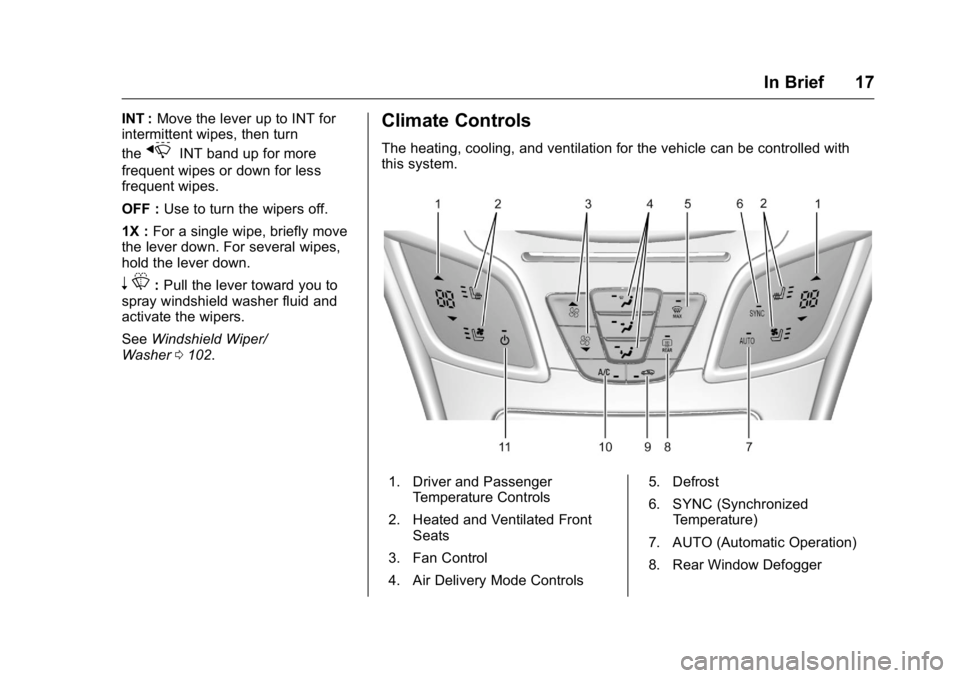
Climate Controls
The heating, cooling, and ventilation for the vehicle can be controlled with
this system.
1. Driver and Passenger
Temperature Controls
2. Heated and Ventilated Front Seats
3. Fan Control
4. Air Delivery Mode Controls 5. Defrost
6. SYNC (Synchronized
Temperature)
7. AUTO (Automatic Operation)
8. Rear Window Defogger
Page 19 of 367
Buick LaCrosse Owner Manual (GMNA-Localizing-U.S./Canada/Mexico-
9159288) - 2016 - CRC - 10/5/15
18 In Brief
9. Recirculation/AutoRecirculation
10. A/C (Air Conditioning)
11. Power
See Dual Automatic Climate Control
System 0157.
Transmission
Automatic Transmission
Driver Shift Control (DSC)
Driver Shift Control (DSC) allows
shifting an automatic transmission
similar to a manual transmission.
DSC can be enabled through the
shift lever. See Manual Mode0188.
Vehicle Features
Infotainment System
See the infotainment manual for
information on the radio, audio
players, phone, navigation system,
Rear Seat Entertainment (RSE),
and voice or speech recognition.
It also includes information on
settings.
Steering Wheel Controls
The infotainment system can be
operated by using the steering
wheel controls. See "Steering
Wheel Controls" in the infotainment
manual.
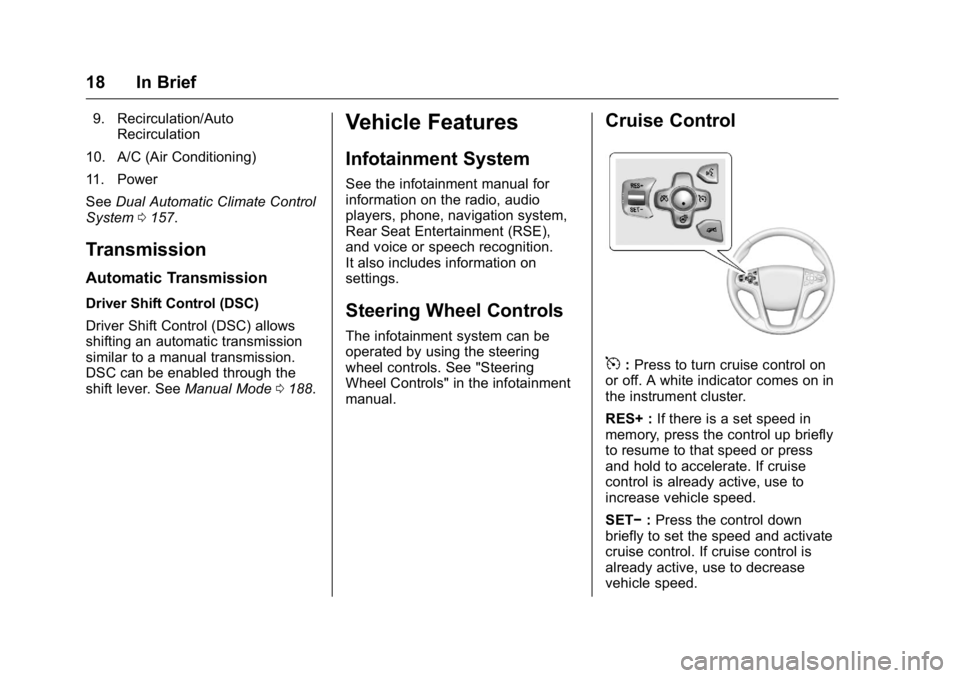
Cruise Control
5:Press to turn cruise control on
or off. A white indicator comes on in
the instrument cluster.
RES+ : If there is a set speed in
memory, press the control up briefly
to resume to that speed or press
and hold to accelerate. If cruise
control is already active, use to
increase vehicle speed.
SET− :Press the control down
briefly to set the speed and activate
cruise control. If cruise control is
already active, use to decrease
vehicle speed.
Page 23 of 367
Buick LaCrosse Owner Manual (GMNA-Localizing-U.S./Canada/Mexico-
9159288) - 2016 - CRC - 10/5/15
22 In Brief
eAssist Features
eAssist®Overview
If the vehicle has eAssist, there are
several additional features that
contribute to increased efficiency.
Vehicles with eAssist have an
automatic engine start/stop feature.
This feature saves fuel by shutting
the engine off when the vehicle is
stopped. When the engine shuts off
automatically, all the accessories
will continue to operate normally. In
very hot or cold conditions, the
engine may not shut off. See
Starting the Engine0178.
There are two air conditioning
settings available. The comfort
setting maximizes cabin comfort.
The eco setting maximizes
efficiency allowing more frequent,
and longer engine stops than the
comfort setting. See Dual Automatic
Climate Control System 0157. This vehicle has a Hill Start Assist
(HSA) feature, which may be useful
when the vehicle is stopped on a
grade. See
Hill Start Assist
(HSA) 0192.
Vehicles with eAssist include an
AUTO STOP indicator on the
tachometer. See Instrument
Cluster 0106.
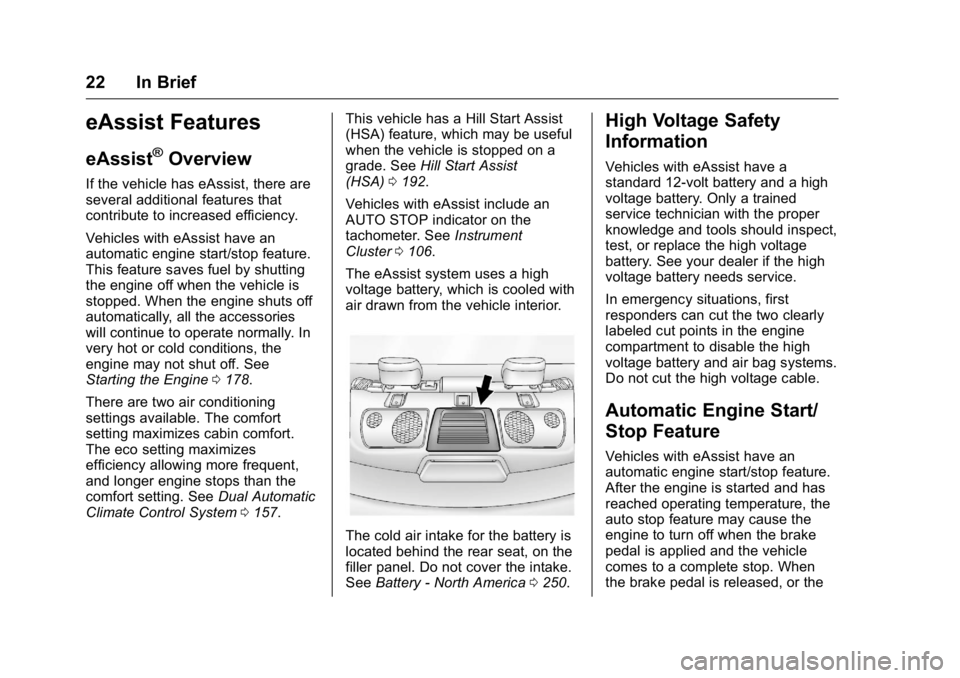
The eAssist system uses a high
voltage battery, which is cooled with
air drawn from the vehicle interior.
The cold air intake for the battery is
located behind the rear seat, on the
filler panel. Do not cover the intake.
See Battery - North America 0250.
High Voltage Safety
Information
Vehicles with eAssist have a
standard 12-volt battery and a high
voltage battery. Only a trained
service technician with the proper
knowledge and tools should inspect,
test, or replace the high voltage
battery. See your dealer if the high
voltage battery needs service.
In emergency situations, first
responders can cut the two clearly
labeled cut points in the engine
compartment to disable the high
voltage battery and air bag systems.
Do not cut the high voltage cable.
Automatic Engine Start/
Stop Feature
Vehicles with eAssist have an
automatic engine start/stop feature.
After the engine is started and has
reached operating temperature, the
auto stop feature may cause the
engine to turn off when the brake
pedal is applied and the vehicle
comes to a complete stop. When
the brake pedal is released, or the
Page 35 of 367
Buick LaCrosse Owner Manual (GMNA-Localizing-U.S./Canada/Mexico-
9159288) - 2016 - CRC - 10/5/15
34 Keys, Doors, and Windows
Battery Replacement
Replace the battery if the REPLACE
BATTERY IN REMOTE KEY
message displays in the DIC. See
Key and Lock Messages0133.
Caution
When replacing the battery, do
not touch any of the circuitry on
the transmitter. Static from your
body could damage the
transmitter.
The battery is not rechargeable. To
replace the battery: 1. Press the button on the transmitter to extend the key.
2. Remove the battery cover by prying it with a finger.
3. Remove the battery by pushing on the battery and sliding it
toward the key blade. 4. Insert the new battery, positive
side facing up. Push the
battery down until it is held in
place. Replace with a CR2032
or equivalent battery.
5. Snap the battery cover back on to the transmitter.Remote Vehicle Start
This feature allows the engine to be
started from outside the vehicle.
The
/button will be on the RKE
transmitter if the vehicle has remote
start.
Laws in some local communities
may restrict the use of remote
starters. For example, some laws
may require a person using remote
start to have the vehicle in view.
Check local regulations for any
requirements.
Starting the Engine Using Remote
Start
To start the engine using the remote
start feature:
1. Press and release
Q. 2. Immediately after completing
Step 2, press and hold
/for at
least four seconds or until the
turn signal lamps flash. The
turn signal lamps flashing
confirms the request to remote
start the vehicle has been
received.
When the engine starts, the
parking lamps will turn on and
remain on as long as the
engine is running. The doors
will be locked and the climate
control system may come on.
Turn the ignition to ON/RUN (Key
Access), or select the ON/RUN/
START ignition position (Keyless
Access), to drive the vehicle.
The engine will shut off after
10 minutes unless a time extension
is done or the ignition is put in ON/
RUN (Key Access) or ON/RUN/
START (Keyless Access).
Page 36 of 367
Buick LaCrosse Owner Manual (GMNA-Localizing-U.S./Canada/Mexico-
9159288) - 2016 - CRC - 10/5/15
Keys, Doors, and Windows 35
The climate control system will use
the previous setting during a remote
start. The rear defog may come on
during remote start based on cold
ambient conditions. The rear defog
indicator light does not come on
during remote start. See“Remote
Start Climate Control Operation” in
Dual Automatic Climate Control
System 0157. Vehicles with heated
or heated and ventilated front seats
can have this feature turn on
automatically during a remote start.
See “Remote Start Auto Heat Seats”
and “Remote Start Auto Cool Seats”
under Vehicle
Personalization 0139.
Extending Engine Run Time
The engine run time can also be
extended by another 10 minutes,
if during the first 10 minutes
Steps 1–2 are repeated while the
engine is still running. An extension
can be requested, 30 seconds after
starting. This provides a total of
20 minutes.
The remote start can only be
extended once. When the remote start is extended,
the second 10-minute period is
added on to the first 10 minutes for
a total of 20 minutes.
A maximum of two remote starts,
or a remote start with an extension,
are allowed between ignition cycles.
The vehicle's ignition must be
changed to ON/RUN/START and
then back to OFF before the remote
start procedure can be used again.
Canceling a Remote Start
To cancel a remote start, do any of
the following:
.
Press and hold
/until the
parking lamps turn off.
. Turn on the hazard warning
flashers.
. Turn the vehicle on and then off.
Conditions in Which Remote Start
Will Not Work
The remote start will not operate if:
. The key is in the ignition (Key
Access) or the ignition is in any
position other than OFF (Keyless
Access). .
The transmitter is in the vehicle
(Keyless Access).
. The hood is not closed.
. The hazard warning flashers
are on.
. There is an emission control
system malfunction.
. The engine coolant temperature
is too high.
. The oil pressure is low.
. Two remote vehicle starts have
already been used.
. The vehicle is not in P (Park).Door Locks
{Warning
Unlocked doors can be
dangerous.
. Passengers, especially
children, can easily open
the doors and fall out of a
moving vehicle. The chance
of being thrown out of the
(Continued)
Page 39 of 367
Buick LaCrosse Owner Manual (GMNA-Localizing-U.S./Canada/Mexico-
9159288) - 2016 - CRC - 10/5/15
38 Keys, Doors, and Windows
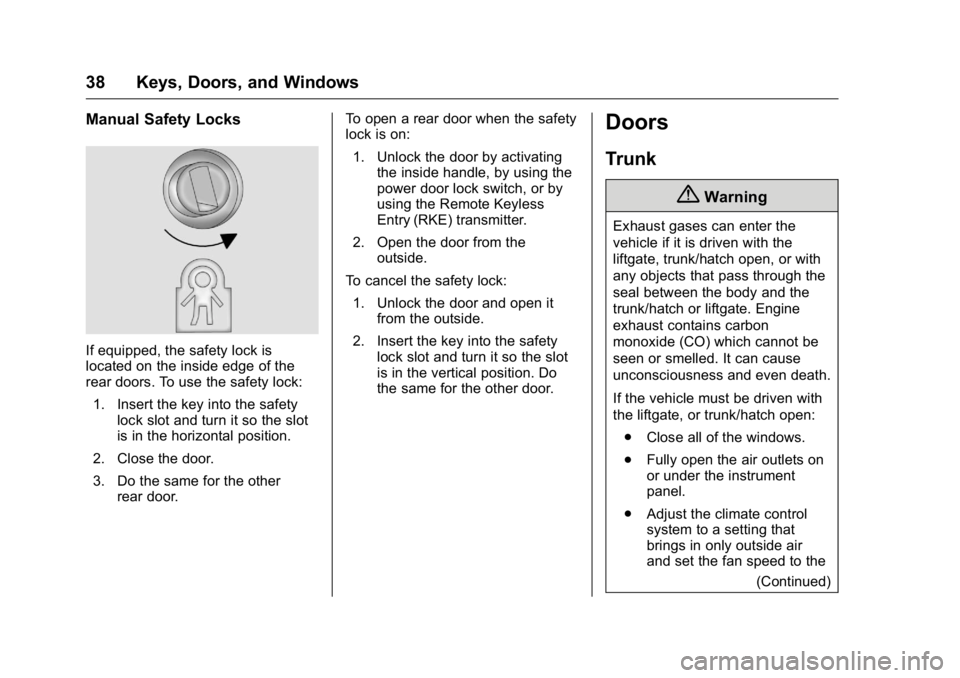
Manual Safety Locks
If equipped, the safety lock is
located on the inside edge of the
rear doors. To use the safety lock:1. Insert the key into the safety lock slot and turn it so the slot
is in the horizontal position.
2. Close the door.
3. Do the same for the other rear door. To open a rear door when the safety
lock is on:
1. Unlock the door by activating the inside handle, by using the
power door lock switch, or by
using the Remote Keyless
Entry (RKE) transmitter.
2. Open the door from the outside.
To cancel the safety lock: 1. Unlock the door and open it from the outside.
2. Insert the key into the safety lock slot and turn it so the slot
is in the vertical position. Do
the same for the other door.
Doors
Trunk
{Warning
Exhaust gases can enter the
vehicle if it is driven with the
liftgate, trunk/hatch open, or with
any objects that pass through the
seal between the body and the
trunk/hatch or liftgate. Engine
exhaust contains carbon
monoxide (CO) which cannot be
seen or smelled. It can cause
unconsciousness and even death.
If the vehicle must be driven with
the liftgate, or trunk/hatch open:
. Close all of the windows.
. Fully open the air outlets on
or under the instrument
panel.
. Adjust the climate control
system to a setting that
brings in only outside air
and set the fan speed to the
(Continued)