speed display BUICK LACROSSE 2017 Owner's Guide
[x] Cancel search | Manufacturer: BUICK, Model Year: 2017, Model line: LACROSSE, Model: BUICK LACROSSE 2017Pages: 346, PDF Size: 4.73 MB
Page 205 of 346
Buick LaCrosse Owner Manual (GMNA-Localizing-U.S./Canada-9803782) -
2017 - crc - 9/7/16
204 Driving and Operating
Parking Assist
With RPA, and if equipped with FPA,
as the vehicle moves at speeds of
less than 8 km/h (5 mph) the
sensors on the bumpers may detect
objects up to 1.8 m (6 ft) behind the
vehicle and 1.2 m (4 ft) in front of the
vehicle within a zone 25 cm (10 in)
high off the ground and below
bumper level. These detection
distances may be shorter during
warmer or humid weather. Blocked
sensors will not detect objects and
can also cause false detections.
Keep the sensors clean of mud, dirt,
snow, ice, and slush; and clean
sensors after a car wash in freezing
temperatures.
{Warning
The Parking Assist system does
not detect children, pedestrians,
bicyclists, animals, or objects
located below the bumper or that
are too close or too far from the
vehicle. It is not available at
speeds greater than 8 km/h(Continued)
Warning (Continued)
(5 mph). To prevent injury, death,
or vehicle damage, even with
Parking Assist, always check the
area around the vehicle and
check all mirrors before moving
forward or backing.
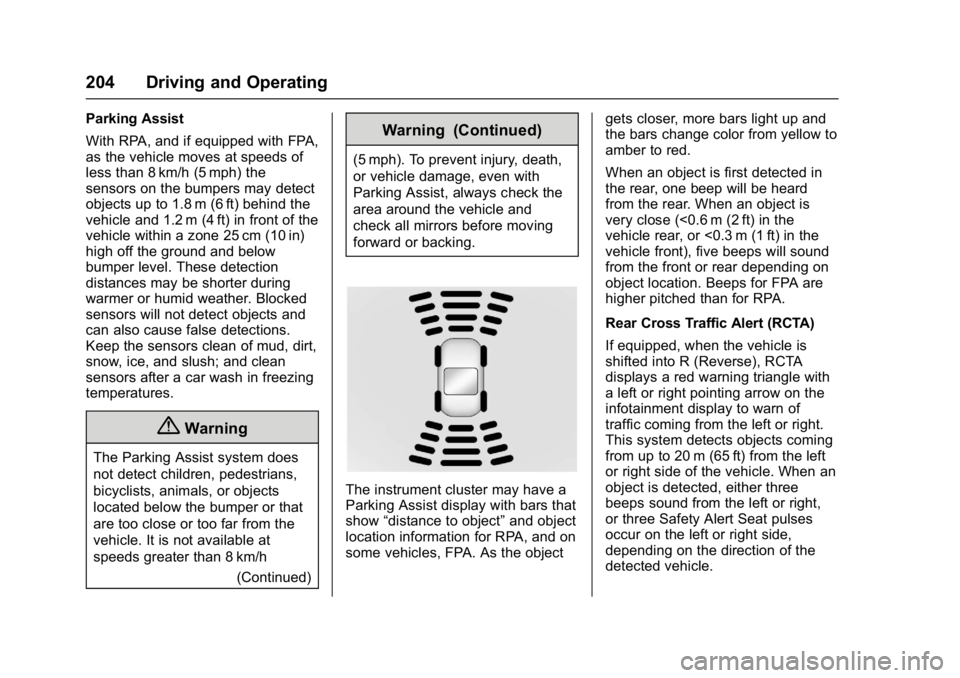
The instrument cluster may have a
Parking Assist display with bars that
show“distance to object” and object
location information for RPA, and on
some vehicles, FPA. As the object gets closer, more bars light up and
the bars change color from yellow to
amber to red.
When an object is first detected in
the rear, one beep will be heard
from the rear. When an object is
very close (<0.6 m (2 ft) in the
vehicle rear, or <0.3 m (1 ft) in the
vehicle front), five beeps will sound
from the front or rear depending on
object location. Beeps for FPA are
higher pitched than for RPA.
Rear Cross Traffic Alert (RCTA)
If equipped, when the vehicle is
shifted into R (Reverse), RCTA
displays a red warning triangle with
a left or right pointing arrow on the
infotainment display to warn of
traffic coming from the left or right.
This system detects objects coming
from up to 20 m (65 ft) from the left
or right side of the vehicle. When an
object is detected, either three
beeps sound from the left or right,
or three Safety Alert Seat pulses
occur on the left or right side,
depending on the direction of the
detected vehicle.
Page 207 of 346
Buick LaCrosse Owner Manual (GMNA-Localizing-U.S./Canada-9803782) -
2017 - crc - 9/7/16
206 Driving and Operating
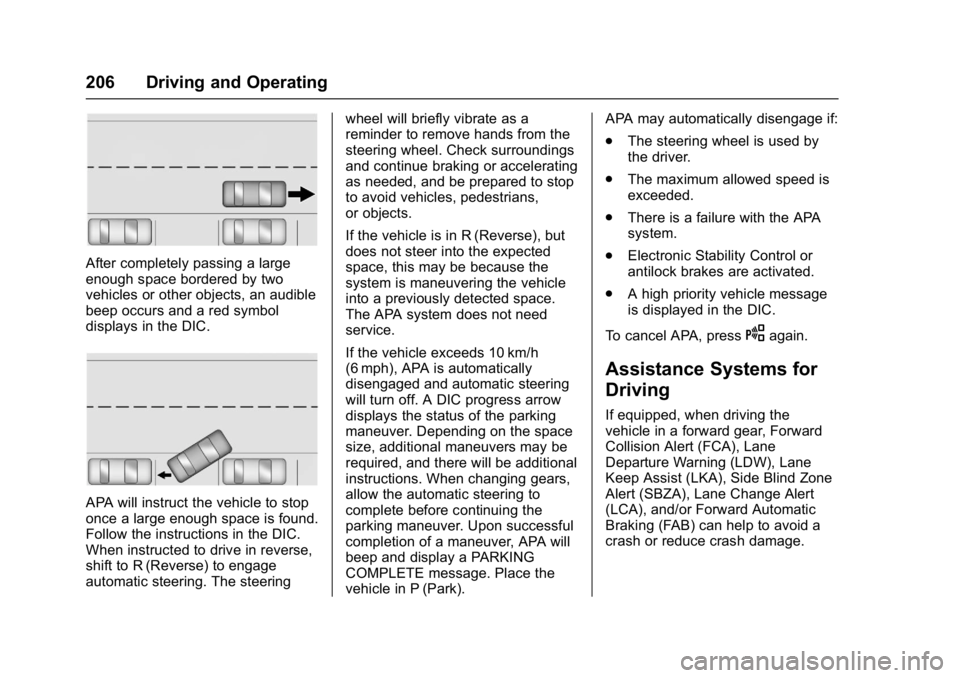
After completely passing a large
enough space bordered by two
vehicles or other objects, an audible
beep occurs and a red symbol
displays in the DIC.
APA will instruct the vehicle to stop
once a large enough space is found.
Follow the instructions in the DIC.
When instructed to drive in reverse,
shift to R (Reverse) to engage
automatic steering. The steeringwheel will briefly vibrate as a
reminder to remove hands from the
steering wheel. Check surroundings
and continue braking or accelerating
as needed, and be prepared to stop
to avoid vehicles, pedestrians,
or objects.
If the vehicle is in R (Reverse), but
does not steer into the expected
space, this may be because the
system is maneuvering the vehicle
into a previously detected space.
The APA system does not need
service.
If the vehicle exceeds 10 km/h
(6 mph), APA is automatically
disengaged and automatic steering
will turn off. A DIC progress arrow
displays the status of the parking
maneuver. Depending on the space
size, additional maneuvers may be
required, and there will be additional
instructions. When changing gears,
allow the automatic steering to
complete before continuing the
parking maneuver. Upon successful
completion of a maneuver, APA will
beep and display a PARKING
COMPLETE message. Place the
vehicle in P (Park).APA may automatically disengage if:
.
The steering wheel is used by
the driver.
. The maximum allowed speed is
exceeded.
. There is a failure with the APA
system.
. Electronic Stability Control or
antilock brakes are activated.
. A high priority vehicle message
is displayed in the DIC.
To cancel APA, press
Oagain.
Assistance Systems for
Driving
If equipped, when driving the
vehicle in a forward gear, Forward
Collision Alert (FCA), Lane
Departure Warning (LDW), Lane
Keep Assist (LKA), Side Blind Zone
Alert (SBZA), Lane Change Alert
(LCA), and/or Forward Automatic
Braking (FAB) can help to avoid a
crash or reduce crash damage.
Page 208 of 346
Buick LaCrosse Owner Manual (GMNA-Localizing-U.S./Canada-9803782) -
2017 - crc - 9/7/16
Driving and Operating 207
Forward Collision Alert
(FCA) System
The FCA system may help to avoid
or reduce the harm caused by
front-end crashes. FCA provides a
flashing red alert on the windshield,
and beeps or pulses the Safety Alert
Seat when approaching a vehicle
directly ahead too quickly. FCA also
provides a visual alert if following
another vehicle much too closely.
FCA detects vehicles within a
distance of approximately 60 m
(197 ft) and operates at speeds
above 8 km/h (5 mph). If the vehicle
has Adaptive Cruise Control (ACC),
it can detect vehicles to distances of
approximately 110 m (360 ft). See
Adaptive Cruise Control0194.
{Warning
FCA is a warning system and
does not apply the brakes. When
approaching a slower-moving or
stopped vehicle ahead too rapidly,
or when following a vehicle too
(Continued)
Warning (Continued)
closely, FCA may not provide a
warning with enough time to help
avoid a crash. It also may not
provide any warning at all. FCA
does not warn of pedestrians,
animals, signs, guardrails,
bridges, construction barrels,
or other objects. Be ready to take
action and apply the brakes. See
Defensive Driving0164.
FCA can be disabled through
vehicle personalization. See
“Collision/Detection Systems” under
Vehicle Personalization 0138.
Detecting the Vehicle Ahead
FCA warnings will not occur unless
the FCA system detects a vehicle
ahead. When a vehicle is detected, the vehicle ahead indicator will
display green. Vehicles may not be
detected on curves, highway exit
ramps, or hills, due to poor visibility;
or if a vehicle ahead is partially
blocked by pedestrians or other
objects. FCA will not detect another
vehicle ahead until it is completely
in the driving lane.
{Warning
FCA does not provide a warning
to help avoid a crash, unless it
detects a vehicle. FCA may not
detect a vehicle ahead if the FCA
sensor is blocked by dirt, snow,
or ice, or if the windshield is
damaged. It may also not detect a
vehicle on winding or hilly roads,
or in conditions that can limit
visibility such as fog, rain,
or snow, or if the headlamps or
windshield are not cleaned or in
proper condition. Keep the
windshield, headlamps, and FCA
sensors clean and in good repair.
Page 209 of 346
Buick LaCrosse Owner Manual (GMNA-Localizing-U.S./Canada-9803782) -
2017 - crc - 9/7/16
208 Driving and Operating
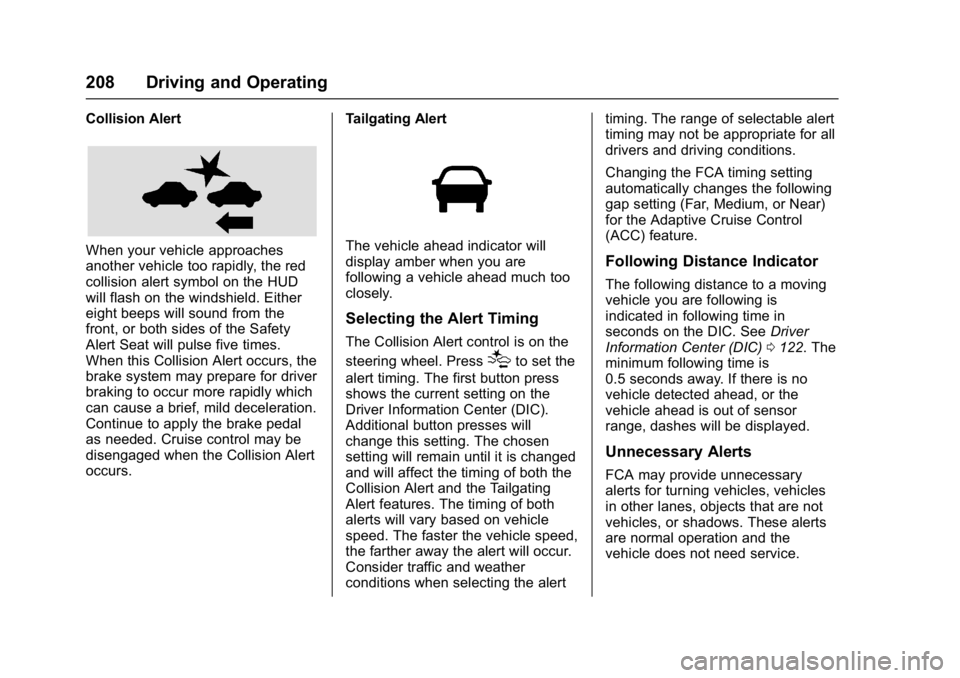
Collision Alert
When your vehicle approaches
another vehicle too rapidly, the red
collision alert symbol on the HUD
will flash on the windshield. Either
eight beeps will sound from the
front, or both sides of the Safety
Alert Seat will pulse five times.
When this Collision Alert occurs, the
brake system may prepare for driver
braking to occur more rapidly which
can cause a brief, mild deceleration.
Continue to apply the brake pedal
as needed. Cruise control may be
disengaged when the Collision Alert
occurs.Tailgating AlertThe vehicle ahead indicator will
display amber when you are
following a vehicle ahead much too
closely.
Selecting the Alert Timing
The Collision Alert control is on the
steering wheel. Press
[to set the
alert timing. The first button press
shows the current setting on the
Driver Information Center (DIC).
Additional button presses will
change this setting. The chosen
setting will remain until it is changed
and will affect the timing of both the
Collision Alert and the Tailgating
Alert features. The timing of both
alerts will vary based on vehicle
speed. The faster the vehicle speed,
the farther away the alert will occur.
Consider traffic and weather
conditions when selecting the alert timing. The range of selectable alert
timing may not be appropriate for all
drivers and driving conditions.
Changing the FCA timing setting
automatically changes the following
gap setting (Far, Medium, or Near)
for the Adaptive Cruise Control
(ACC) feature.
Following Distance Indicator
The following distance to a moving
vehicle you are following is
indicated in following time in
seconds on the DIC. See
Driver
Information Center (DIC) 0122. The
minimum following time is
0.5 seconds away. If there is no
vehicle detected ahead, or the
vehicle ahead is out of sensor
range, dashes will be displayed.
Unnecessary Alerts
FCA may provide unnecessary
alerts for turning vehicles, vehicles
in other lanes, objects that are not
vehicles, or shadows. These alerts
are normal operation and the
vehicle does not need service.
Page 211 of 346
Buick LaCrosse Owner Manual (GMNA-Localizing-U.S./Canada-9803782) -
2017 - crc - 9/7/16
210 Driving and Operating
Warning (Continued)
undesired. It could respond to a
turning vehicle ahead, guardrails,
signs, and other non-moving
objects. To override FAB, firmly
press the accelerator pedal, if it is
safe to do so.
Intelligent Brake Assist (IBA)
IBA may activate when the brake
pedal is applied quickly by providing
a boost to braking based on the
speed of approach and distance to
a vehicle ahead.
Minor brake pedal pulsations or
pedal movement during this time is
normal and the brake pedal should
continue to be applied as needed.
IBA will automatically disengage
only when the brake pedal is
released.
{Warning
IBA may increase vehicle braking
in situations when it may not be
necessary. You could block the
flow of traffic. If this occurs, take
your foot off the brake pedal and
then apply the brakes as needed.
FAB and IBA can be disabled
through vehicle personalization. See
Vehicle Personalization 0138.
{Warning
Using FAB or IBA while towing a
trailer could cause you to lose
control of the vehicle and crash.
Turn the system to Off when
towing a trailer.
Front Pedestrian Braking
(FPB) System
If equipped, the FPB system may
help avoid or reduce the harm
caused by front-end crashes with
nearby pedestrians when driving in a forward gear. FPB displays an
amber indicator,
~, when a nearby
pedestrian is detected directly
ahead. When approaching a
detected pedestrian too quickly,
FPB provides a red flashing alert on
the windshield and rapidly beeps or
pulses the driver seat. FPB can
provide a boost to braking or
automatically brake the vehicle. This
system includes Intelligent Brake
Assist (IBA), and the Forward
Automatic Braking (FAB) system
may also respond to pedestrians.
See Forward Automatic Braking
(FAB) 0209.
The FPB system can detect and
alert to pedestrians in a forward
gear at speeds between 8 km/h
(5 mph) and 80 km/h (50 mph).
During daytime driving, the system
detects pedestrians up to a distance
of approximately 40 m (131 ft).
During nighttime driving, system
performance is very limited.
Page 213 of 346
Buick LaCrosse Owner Manual (GMNA-Localizing-U.S./Canada-9803782) -
2017 - crc - 9/7/16
212 Driving and Operating
brake pedal as needed. Cruise
control may be disengaged when
the Front Pedestrian Alert occurs.
Automatic Braking
If FPB detects it is about to crash
into a pedestrian directly ahead, and
the brakes have not been applied,
FPB may automatically brake
moderately or brake hard. This can
help to avoid some very low speed
pedestrian crashes or reduce
pedestrian injury. FPB can
automatically brake to detected
pedestrians between 8 km/h (5 mph)
and 80 km/h (50 mph). Automatic
braking levels may be reduced
under certain conditions, such as
higher speeds.
If this happens, Automatic Braking
may engage the Electric Parking
Brake (EPB) to hold the vehicle at a
stop. Release the EPB. A firm press
of the accelerator pedal will also
release Automatic Braking and
the EPB.
{Warning
FPB may alert or automatically
brake the vehicle suddenly in
situations where it is unexpected
and undesired. It could falsely
alert or brake for objects similar in
shape or size to pedestrians,
including shadows. This is normal
operation and the vehicle does
not need service. To override
Automatic Braking, firmly press
the accelerator pedal, if it is safe
to do so.
Automatic Braking can be disabled
through vehicle personalization. See
“Front Pedestrian Detection” in
“Collision/Detection Systems” under
Vehicle Personalization 0138.
{Warning
Using the Front Pedestrian
Braking system while towing a
trailer could cause you to lose
(Continued)
Warning (Continued)
control of the vehicle and crash.
Turn the system to Alert or Off
when towing a trailer.
Cleaning the System
If FPB does not seem to operate
properly, cleaning the outside of the
windshield in front of the rearview
mirror may correct the issue.
Side Blind Zone
Alert (SBZA)
If equipped, the SBZA system is a
lane-changing aid that assists
drivers with avoiding crashes that
occur with moving vehicles in the
side blind zone (or spot) areas.
When the vehicle is in a forward
gear, the left or right side mirror
display will light up if a moving
vehicle is detected in that blind
zone. If the turn signal is activated
and a vehicle is also detected on
the same side, the display will flash
as an extra warning not to change
lanes. Since this system is part of
Page 241 of 346
Buick LaCrosse Owner Manual (GMNA-Localizing-U.S./Canada-9803782) -
2017 - crc - 9/7/16
240 Vehicle Care
If the decision is made not to lift the
hood when this warning appears,
get service help right away. See
Roadside Assistance Program
0315.
If the decision is made to lift the
hood, make sure the vehicle is
parked on a level surface. Then
check to see if the engine cooling
fans are running. If the engine is
overheating, the fans should be
running. If they are not, do not
continue to run the engine. Have the
vehicle serviced.
Caution
Running the engine without
coolant may cause damage or a
fire. Vehicle damage would not be
covered by the vehicle warranty.
If Steam Is Coming from the
Engine Compartment
See Overheated Engine Protection
Operating Mode 0240 for
information on driving to a safe
place in an emergency.
If No Steam Is Coming from
the Engine Compartment
If an engine overheat warning is
displayed but no steam can be seen
or heard, the problem may not be
too serious. Sometimes the engine
can get a little too hot when the
vehicle:
. Climbs a long hill on a hot day.
. Stops after high-speed driving.
. Idles for long periods in traffic.
If the overheat warning is displayed
with no sign of steam: 1. Turn the air conditioning off.
2. Turn the heater on to the highest temperature and to the
highest fan speed. Open the
windows as necessary.
3. When it is safe to do so, pull off the road, shift to P (Park) or
N (Neutral), and let the
engine idle.
If the engine coolant temperature
gauge is no longer in the
overheated area or the engine
coolant temperature warning light no
longer displays, the vehicle can be driven. Continue to drive the vehicle
slowly for about 10 minutes. Keep a
safe distance from the vehicle in
front. If the warning does not come
back on, continue to drive normally
and have the cooling system
checked for proper fill and function.
If the warning continues, pull over,
stop, and park the vehicle
right away.
If there is no sign of steam, idle the
engine for three minutes while
parked. If the warning is still
displayed, turn off the engine until it
cools down. Also, see
Overheated
Engine Protection Operating Mode
0 240.
Overheated Engine
Protection
Operating Mode
This emergency operating mode
allows the vehicle to be driven to a
safe place in an emergency
situation. If an overheated engine
condition exists, an overheat
protection mode which alternates
firing groups of cylinders helps
Page 298 of 346
Buick LaCrosse Owner Manual (GMNA-Localizing-U.S./Canada-9803782) -
2017 - crc - 9/7/16
Service and Maintenance 297
frequent checks and services. The
Additional Required Services -
Normal are for vehicles that:
.Carry passengers and cargo
within recommended limits on
the Tire and Loading Information
label. See Vehicle Load Limits
0 170.
. Are driven on reasonable road
surfaces within legal driving
limits.
. Use the recommended fuel. See
Fuel 0217.
Refer to the information in the
Maintenance Schedule Additional
Required Services - Normal chart.
The Additional Required Services -
Severe are for vehicles that are:
. Mainly driven in heavy city traffic
in hot weather.
. Mainly driven in hilly or
mountainous terrain.
. Frequently towing a trailer.
. Used for high speed or
competitive driving. .
Used for taxi, police, or delivery
service.
Refer to the information in the
Maintenance Schedule Additional
Required Services - Severe chart.
{Warning
Performing maintenance work can
be dangerous and can cause
serious injury. Perform
maintenance work only if the
required information, proper tools,
and equipment are available.
If they are not, see your dealer to
have a trained technician do the
work. See Doing Your Own
Service Work 0228.
Maintenance
Schedule
Owner Checks and Services
At Each Fuel Stop
.
Check the engine oil level. See
Engine Oil 0231.
Once a Month
. Check the tire inflation
pressures. See Tire Pressure
0 261.
. Inspect the tires for wear. See
Tire Inspection 0267.
. Check the windshield washer
fluid level. See Washer Fluid
0 241.
Engine Oil Change
When the CHANGE ENGINE OIL
SOON message displays, have the
engine oil and filter changed within
the next 1 000 km/600 mi. If driven
under the best conditions, the
engine oil life system may not
indicate the need for vehicle service
for up to a year. The engine oil and
filter must be changed at least once
Page 329 of 346
Buick LaCrosse Owner Manual (GMNA-Localizing-U.S./Canada-9803782) -
2017 - crc - 9/7/16
328 OnStar
from each other and use a
combination of letters, numbers,
and symbols to increase the
security.
. Change the default name of the
SSID (Service Set Identifier).
This is your network’s name that
is visible to other wireless
devices. Choose a unique name
and avoid family names or
vehicle descriptions.
OnStar Wi-Fi
®Hotspot (If
Equipped)
The vehicle may have a built-in
Wi-Fi hotspot that provides access
to the Internet and web content at
4G LTE speed. Up to seven mobile
devices can be connected. A data
plan is required. Use the in-vehicle
controls only when it is safe to
do so.
1. To retrieve Wi-Fi hotspot information, press
=, wait for
the prompt, then say “Wi-Fi
settings.” On some vehicles,
touch Wi-Fi Settings on the
screen. 2. The Wi-Fi settings will display
the Wi-Fi hotspot name (SSID),
password, and on some
vehicles, the connection type
(no Internet connection, 3G,
4G, 4G LTE), and signal quality
(poor, good, excellent).
3. To change the SSID or password, press
Qor call
1-888-4ONSTAR to connect
with an Advisor.
After initial set-up, your vehicle’s
Wi-Fi hotspot will connect
automatically to your mobile
devices. Manage data usage by
turning Wi-Fi on or off on your
mobile device, using the
RemoteLink mobile app, or by
contacting an OnStar Advisor.
OnStar RemoteLink
®Mobile App
(If Equipped)
Download the OnStar RemoteLink
mobile app to select Apple
®iOS,
Android™, BlackBerry®,
or Windows®mobile devices.
OnStar Subscribers can access the
following services from a mobile
device: .
Remotely start/stop the vehicle,
if factory-equipped.
. Lock/unlock doors, if equipped
with automatic locks.
. Activate the horn and lamps.
. Check the vehicle’s fuel level, oil
life, or tire pressure,
if factory-equipped with the Tire
Pressure Monitor System.
. Send directions to the vehicle.
. Locate the vehicle on a map
(U.S. market only).
. Turn the vehicle's Wi-Fi hotspot
on/off, manage settings, and
monitor data consumption,
if equipped.
For OnStar RemoteLink information
and compatibility, see
www.onstar.com (U.S.) or
www.onstar.ca (Canada).
Remote Services
Contact an OnStar Advisor to
unlock the doors or sound the horn
and flash the lamps.
Page 340 of 346

Buick LaCrosse Owner Manual (GMNA-Localizing-U.S./Canada-9803782) -
2017 - crc - 9/7/16
Index 339
Front SeatsHeated and Ventilated . . . . . . . . . . 55
Fuel . . . . . . . . . . . . . . . . . . . . . . . . . . . . 217 Additives . . . . . . . . . . . . . . . . . . . . . 218
Economy Driving . . . . . . . . . . . . . . . 24
Filling a Portable FuelContainer . . . . . . . . . . . . . . . . . . . 219
Filling the Tank . . . . . . . . . . . . . . . 218
Foreign Countries . . . . . . . . . . . . 218
Gauge . . . . . . . . . . . . . . . . . . . . . . . . .110
Low Fuel Warning Light . . . . . . . 120
Requirements, California . . . . . 217
System Messages . . . . . . . . . . . . 132
Fuses Engine Compartment FuseBlock . . . . . . . . . . . . . . . . . . . . . . . . 249
Fuses and Circuit Breakers . . . 249
Instrument Panel Fuse Block . . . . . . . . . . . . . . . . . . . . . . . . 252
G
Garage Door Opener . . . . . . . . . . . 145Programming . . . . . . . . . . . . . . . . . 145
Gauges Engine CoolantTemperature . . . . . . . . . . . . . . . . . 111
Fuel . . . . . . . . . . . . . . . . . . . . . . . . . . .110
Odometer . . . . . . . . . . . . . . . . . . . . . .110
Speedometer . . . . . . . . . . . . . . . . . .110 Gauges (cont'd)
Tachometer . . . . . . . . . . . . . . . . . . . .110
Warning Lights and
Indicators . . . . . . . . . . . . . . . . . . . 107
General Information Service and Maintenance . . . . . 296
Towing . . . . . . . . . . . . . . . . . . . . . . . . 220
Vehicle Care . . . . . . . . . . . . . . . . . . 227
Glove Box . . . . . . . . . . . . . . . . . . . . . . . 97
GM Mobility Reimbursement
Program . . . . . . . . . . . . . . . . . . . . . . . 315
H
Hazard Warning Flashers . . . . . . . 150
Head Restraints . . . . . . . . . . . . . . . . . 50
Head-up Display . . . . . . . . . . . . . . . . 125
HeadlampsAdaptive ForwardLighting (AFL) . . . . . . . . . . . . . . . 150
Aiming . . . . . . . . . . . . . . . . . . . . . . . . 246
Automatic . . . . . . . . . . . . . . . . . . . . . 149
Bulb Replacement . . . . . . . . . . . . 246
Daytime Running Lamps (DRL) . . . . . . . . . . . . . . . . 149
Flash-to-Pass . . . . . . . . . . . . . . . . . 149
High Intensity Discharge (HID) Lighting . . . . . . . . . . . . . . . 246
High-Beam On Light . . . . . . . . . . 121
High/Low Beam Changer . . . . . 149 Headlamps (cont'd)
Lamps On Reminder . . . . . . . . . 121
Heated Steering Wheel . . . . . . . . . . . . . . . 102
Heated and Ventilated Front Seats . . . . . . . . . . . . . . . . . . . . . . . . . . 55
Heated Mirrors . . . . . . . . . . . . . . . . . . . 43
Heater Engine . . . . . . . . . . . . . . . . . . . . . . . . 177
Heating . . . . . . . . . . . . . . . . . . . . . . . . . 156
High-Beam On Light . . . . . . . . . . . . 121
High-Speed Operation . . . . . . . . . . 262
Hill and Mountain Roads . . . . . . . . 167
Hood . . . . . . . . . . . . . . . . . . . . . . . . . . . 229
Horn . . . . . . . . . . . . . . . . . . . . . . . . . . . . 102
How to Wear Safety Belts Properly . . . . . . . . . . . . . . . . . . . . . . . . 60
HVAC . . . . . . . . . . . . . . . . . . . . . . . . . . . 156
I
Ignition Positions . . . . . . . . . . . . . . . 173
Immobilizer . . . . . . . . . . . . . . . . . . . . . . 41
Indicator Vehicle Ahead . . . . . . . . . . . . . . . . .118
Infants and Young Children, Restraints . . . . . . . . . . . . . . . . . . . . . . 80
Infotainment . . . . . . . . . . . . . . . . . . . . 155
Infotainment System . . . . . . . . . . . . 324
Instrument Cluster . . . . . . . . . . . . . . 108