climate control BUICK LACROSSE 2017 Owner's Manual
[x] Cancel search | Manufacturer: BUICK, Model Year: 2017, Model line: LACROSSE, Model: BUICK LACROSSE 2017Pages: 346, PDF Size: 4.73 MB
Page 2 of 346
Buick LaCrosse Owner Manual (GMNA-Localizing-U.S./Canada-9803782) -
2017 - crc - 9/7/16
ContentsIntroduction . . . . . . . . . . . . . . . . . . . . . . 2
In Brief . . . . . . . . . . . . . . . . . . . . . . . . . . . 5
Keys, Doors, and Windows . . . . . 26
Seats and Restraints . . . . . . . . . . . 49
Storage . . . . . . . . . . . . . . . . . . . . . . . . . 97
Instruments and Controls . . . . . . 100
Lighting . . . . . . . . . . . . . . . . . . . . . . . 148
Infotainment System . . . . . . . . . . 155
Climate Controls . . . . . . . . . . . . . . 156
Driving and Operating . . . . . . . . . 162
Vehicle Care . . . . . . . . . . . . . . . . . . 226
Service and Maintenance . . . . . 296
Technical Data . . . . . . . . . . . . . . . . 308
Customer Information . . . . . . . . . 311
Reporting Safety Defects . . . . . . 321
OnStar . . . . . . . . . . . . . . . . . . . . . . . . 325
Index . . . . . . . . . . . . . . . . . . . . 335
Page 6 of 346
Buick LaCrosse Owner Manual (GMNA-Localizing-U.S./Canada-9803782) -
2017 - crc - 9/7/16
In Brief 5
In Brief
Instrument Panel
Instrument Panel . . . . . . . . . . . . . . . . 6
Initial Drive Information
Initial Drive Information . . . . . . . . . . 8
Stop/Start System . . . . . . . . . . . . . . . 8
Remote Keyless Entry (RKE)System . . . . . . . . . . . . . . . . . . . . . . . . 8
Remote Vehicle Start . . . . . . . . . . . 8
Door Locks . . . . . . . . . . . . . . . . . . . . . 9
Trunk Release . . . . . . . . . . . . . . . . . . 9
Windows . . . . . . . . . . . . . . . . . . . . . . . 10
Seat Adjustment . . . . . . . . . . . . . . . 10
Memory Features . . . . . . . . . . . . . . 11
Heated and Ventilated Seats . . . 12
Head Restraint Adjustment . . . . 12
Safety Belts . . . . . . . . . . . . . . . . . . . . 13
Passenger Sensing System . . . 13
Mirror Adjustment . . . . . . . . . . . . . . 13
Steering Wheel Adjustment . . . . 14
Interior Lighting . . . . . . . . . . . . . . . . 15
Exterior Lighting . . . . . . . . . . . . . . . 16
Windshield Wiper/Washer . . . . . . 16
Climate Controls . . . . . . . . . . . . . . . 17
Transmission . . . . . . . . . . . . . . . . . . 18
Vehicle Features
Infotainment System . . . . . . . . . . . 18
Steering Wheel Controls . . . . . . . 18
Cruise Control . . . . . . . . . . . . . . . . . 18
Driver Information Center (DIC) . . . . . . . . . . . . . . . . . 19
Forward Collision Alert (FCA) System . . . . . . . . . . . . . . . . . . . . . . . 19
Forward Automatic Braking (FAB) . . . . . . . . . . . . . . . . 19
Front Pedestrian Braking (FPB) System . . . . . . . . . . . . . . . . . . . . . . . 19
Lane Keep Assist (LKA) . . . . . . . 20
Lane Change Alert (LCA) . . . . . . 20
Rear Vision Camera (RVC) . . . . 20
Rear Cross Traffic Alert (RCTA) System . . . . . . . . . . . . . . . . . . . . . . . 20
Parking Assist . . . . . . . . . . . . . . . . . 20
Automatic Parking Assist (APA) . . . . . . . . . . . . . . . . . . 21
Power Outlets . . . . . . . . . . . . . . . . . 21
Universal Remote System . . . . . 21
Sunroof . . . . . . . . . . . . . . . . . . . . . . . . 22
Performance and Maintenance
Traction Control/Electronic Stability Control . . . . . . . . . . . . . . 23
Tire Pressure Monitor . . . . . . . . . . 23
Fuel . . . . . . . . . . . . . . . . . . . . . . . . . . . 23
E85 or FlexFuel . . . . . . . . . . . . . . . . 24
Engine Oil Life System . . . . . . . . 24
Driving for Better Fuel Economy . . . . . . . . . . . . . . . . . . . . . 24
Roadside Assistance Program . . . . . . . . . . . . . . . . . . . . . . 25
Page 8 of 346

Buick LaCrosse Owner Manual (GMNA-Localizing-U.S./Canada-9803782) -
2017 - crc - 9/7/16
In Brief 7
1.Air Vents 0160.
2. Exterior Lamp Controls 0148.
Fog Lamps 0151.
Instrument Panel Illumination
Control 0152.
3. Turn and Lane-Change Signals
0151.
4. Tap Shift Controls (If Equipped). See Manual Mode
0 185.
5. Instrument Cluster 0108.
Driver Information Center (DIC)
Display. See Driver Information
Center (DIC) 0122.
6. Windshield Wiper/Washer
0102.
7. Hazard Warning Flashers
0150.
8. Light Sensor. See Automatic
Headlamp System 0149.
9. Infotainment 0155.
10. Dual Automatic Climate Control
System 0156.
11. Traction Control/Electronic
Stability Control 0190. Parking Assist Button. See
Driver Assistance Systems
0
202.
SPORT Button (If Equipped).
See Selective Ride Control
0 192.
Lane Keep Assist (LKA) 0215
(If Equipped).
Automatic Parking Assist
Button (If Equipped). See
Driver Assistance Systems
0 202.
12. Shift Lever. See Automatic
Transmission 0181.
13. ENGINE START/STOP Button (Out of View). See Ignition
Positions 0173.
14. Steering Wheel Controls. See the infotainment manual.
Driver Information Center (DIC)
Controls. See Driver
Information Center (DIC) 0122.
15. Horn 0102.
16. Steering Wheel Adjustment
0101 (Out of View). 17.
Cruise Control 0192 (If
Equipped).
Adaptive Cruise Control 0194
(If Equipped).
Forward Collision Alert (FCA)
System 0207 (If Equipped).
Heated Steering Wheel 0102
(If Equipped).
18. Head-Up Display (HUD) 0125
(If Equipped).
19. Hood Release (Out of View). SeeHood 0229.
20. Front Storage.
21. Data Link Connector (DLC) (Out of View). See Malfunction
Indicator Lamp (Check Engine
Light) 0114.
22. Electric Parking Brake 0187.
Page 13 of 346
Buick LaCrosse Owner Manual (GMNA-Localizing-U.S./Canada-9803782) -
2017 - crc - 9/7/16
12 In Brief
When Easy Exit Options is enabled
in the personalization menu, the
feature automatically recalls the
current driver’s previously stored
exit position when exiting the
vehicle.
See Memory Seats 053 and
Vehicle Personalization 0138.Heated and Ventilated
Seats
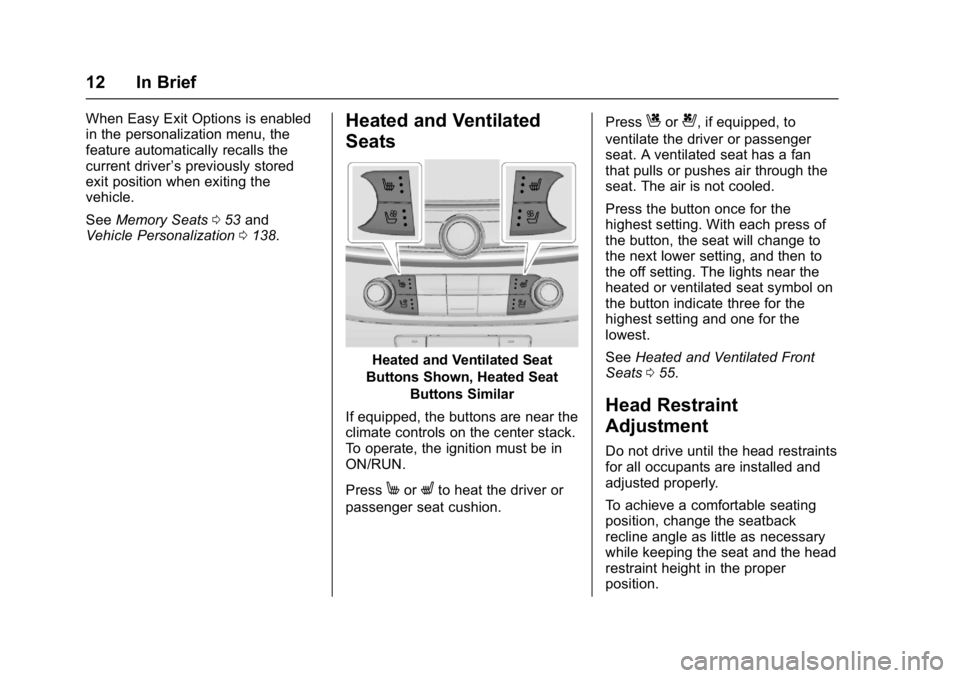
Heated and Ventilated Seat
Buttons Shown, Heated Seat Buttons Similar
If equipped, the buttons are near the
climate controls on the center stack.
To operate, the ignition must be in
ON/RUN.
Press
MorLto heat the driver or
passenger seat cushion. Press
Cor{, if equipped, to
ventilate the driver or passenger
seat. A ventilated seat has a fan
that pulls or pushes air through the
seat. The air is not cooled.
Press the button once for the
highest setting. With each press of
the button, the seat will change to
the next lower setting, and then to
the off setting. The lights near the
heated or ventilated seat symbol on
the button indicate three for the
highest setting and one for the
lowest.
See Heated and Ventilated Front
Seats 055.
Head Restraint
Adjustment
Do not drive until the head restraints
for all occupants are installed and
adjusted properly.
To achieve a comfortable seating
position, change the seatback
recline angle as little as necessary
while keeping the seat and the head
restraint height in the proper
position.
Page 18 of 346
Buick LaCrosse Owner Manual (GMNA-Localizing-U.S./Canada-9803782) -
2017 - crc - 9/7/16
In Brief 17
Climate Controls
Dual Automatic Climate control System
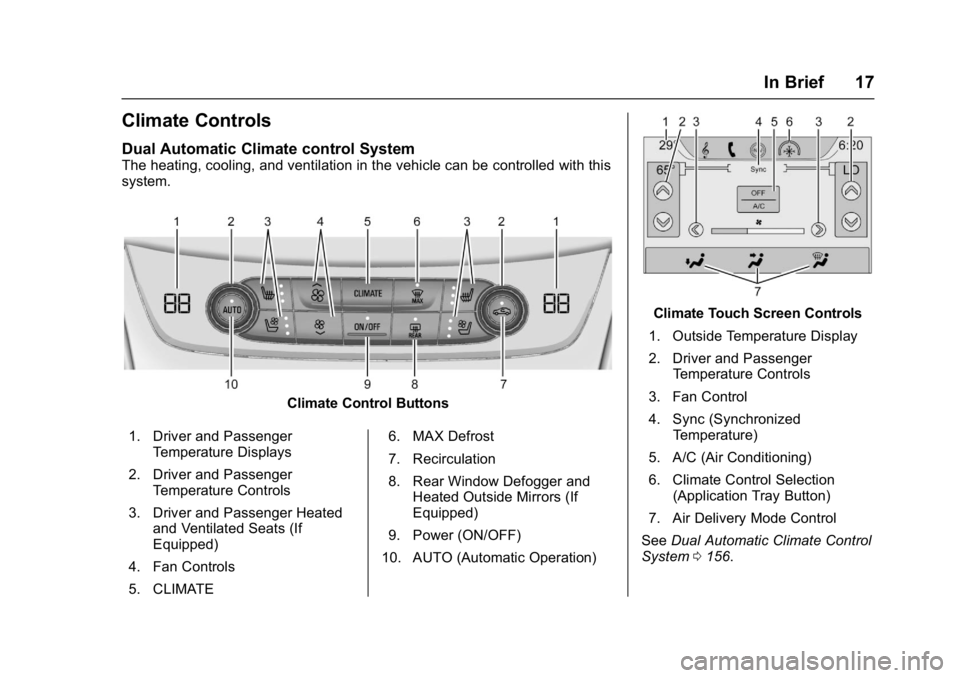
The heating, cooling, and ventilation in the vehicle can be controlled with this
system.
Climate Control Buttons
1. Driver and Passenger Temperature Displays
2. Driver and Passenger Temperature Controls
3. Driver and Passenger Heated and Ventilated Seats (If
Equipped)
4. Fan Controls
5. CLIMATE 6. MAX Defrost
7. Recirculation
8. Rear Window Defogger and
Heated Outside Mirrors (If
Equipped)
9. Power (ON/OFF)
10. AUTO (Automatic Operation)
Climate Touch Screen Controls
1. Outside Temperature Display
2. Driver and Passenger Temperature Controls
3. Fan Control
4. Sync (Synchronized Temperature)
5. A/C (Air Conditioning)
6. Climate Control Selection (Application Tray Button)
7. Air Delivery Mode Control
See Dual Automatic Climate Control
System 0156.
Page 35 of 346
Buick LaCrosse Owner Manual (GMNA-Localizing-U.S./Canada-9803782) -
2017 - crc - 9/7/16
34 Keys, Doors, and Windows
engine is running. The doors
will be locked and the climate
control system may come on.
Start the engine to drive the vehicle.
The engine will shut off after
10 minutes unless a time extension
is done or the engine is started.
The climate control system will use
the previous setting during a remote
start. The rear defog may come on
during remote start based on cold
ambient conditions. The rear defog
indicator light does not come on
during remote start. Vehicles with
heated or heated and ventilated
front seats can have this feature
turn on automatically during a
remote start. See Vehicle
Personalization 0138.
Extending Engine Run Time
The engine run time can also be
extended by another 10 minutes,
if during the first 10 minutes
Steps 1–3 are repeated while the
engine is still running. An extension
can be requested, 30 seconds after
starting. This provides a total of
20 minutes. The remote start can only be
extended once.
When the remote start is extended,
the second 10-minute period is
added on to the first 10 minutes for
a total of 20 minutes.
A maximum of two remote starts,
or a remote start with an extension,
are allowed between ignition cycles.
The vehicle's ignition must be
changed to ON/RUN/START and
then back to OFF before the remote
start procedure can be used again.
Canceling a Remote Start
To cancel a remote start, do any of
the following:
.
Aim the RKE transmitter at the
vehicle and press and hold
/
until the parking lamps turn off.
. Turn on the hazard warning
flashers.
. Turn the vehicle on and then off. Conditions in Which Remote Start
Will Not Work
The remote start will not operate if:
.
The transmitter is in the vehicle.
. The hood is not closed.
. The hazard warning flashers
are on.
. There is an emission control
system malfunction.
. The engine coolant temperature
is too high.
. The oil pressure is low.
. Two remote vehicle starts have
already been used.
. The vehicle is not in P (Park).
Page 39 of 346
Buick LaCrosse Owner Manual (GMNA-Localizing-U.S./Canada-9803782) -
2017 - crc - 9/7/16
38 Keys, Doors, and Windows
Safety Locks
The rear door safety locks prevent
passengers from opening the rear
doors from inside the vehicle.
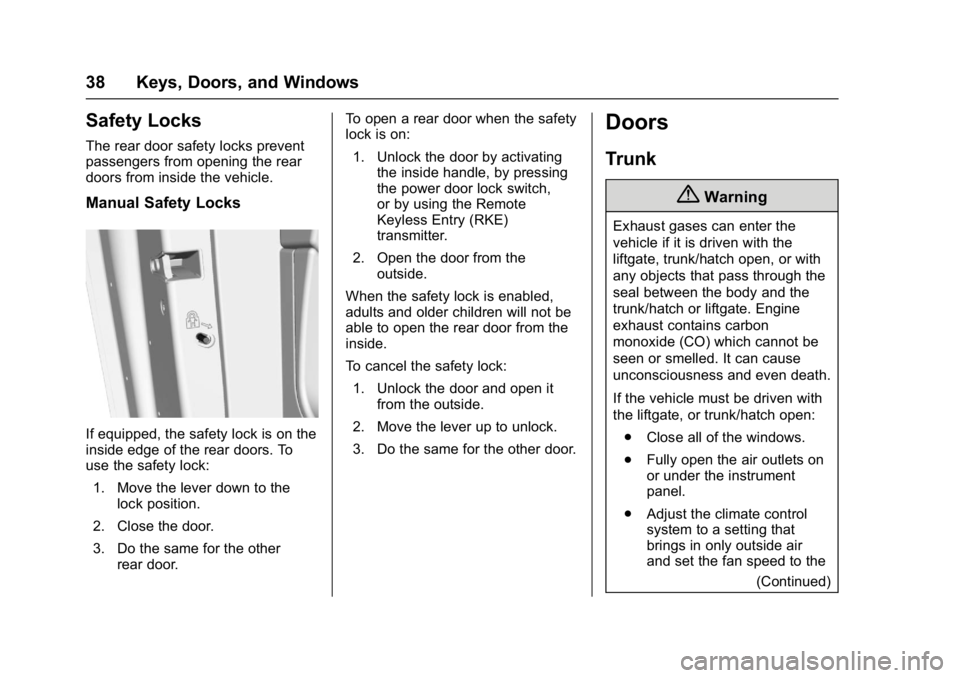
Manual Safety Locks
If equipped, the safety lock is on the
inside edge of the rear doors. To
use the safety lock:1. Move the lever down to the lock position.
2. Close the door.
3. Do the same for the other rear door. To open a rear door when the safety
lock is on:
1. Unlock the door by activating the inside handle, by pressing
the power door lock switch,
or by using the Remote
Keyless Entry (RKE)
transmitter.
2. Open the door from the outside.
When the safety lock is enabled,
adults and older children will not be
able to open the rear door from the
inside.
To cancel the safety lock: 1. Unlock the door and open it from the outside.
2. Move the lever up to unlock.
3. Do the same for the other door.
Doors
Trunk
{Warning
Exhaust gases can enter the
vehicle if it is driven with the
liftgate, trunk/hatch open, or with
any objects that pass through the
seal between the body and the
trunk/hatch or liftgate. Engine
exhaust contains carbon
monoxide (CO) which cannot be
seen or smelled. It can cause
unconsciousness and even death.
If the vehicle must be driven with
the liftgate, or trunk/hatch open: . Close all of the windows.
. Fully open the air outlets on
or under the instrument
panel.
. Adjust the climate control
system to a setting that
brings in only outside air
and set the fan speed to the
(Continued)
Page 40 of 346
Buick LaCrosse Owner Manual (GMNA-Localizing-U.S./Canada-9803782) -
2017 - crc - 9/7/16
Keys, Doors, and Windows 39
Warning (Continued)
highest setting. See
“Climate Control Systems”
in the Index.
. If the vehicle has a power
liftgate, disable the power
liftgate function.
For more information about
carbon monoxide, see Engine
Exhaust 0180.
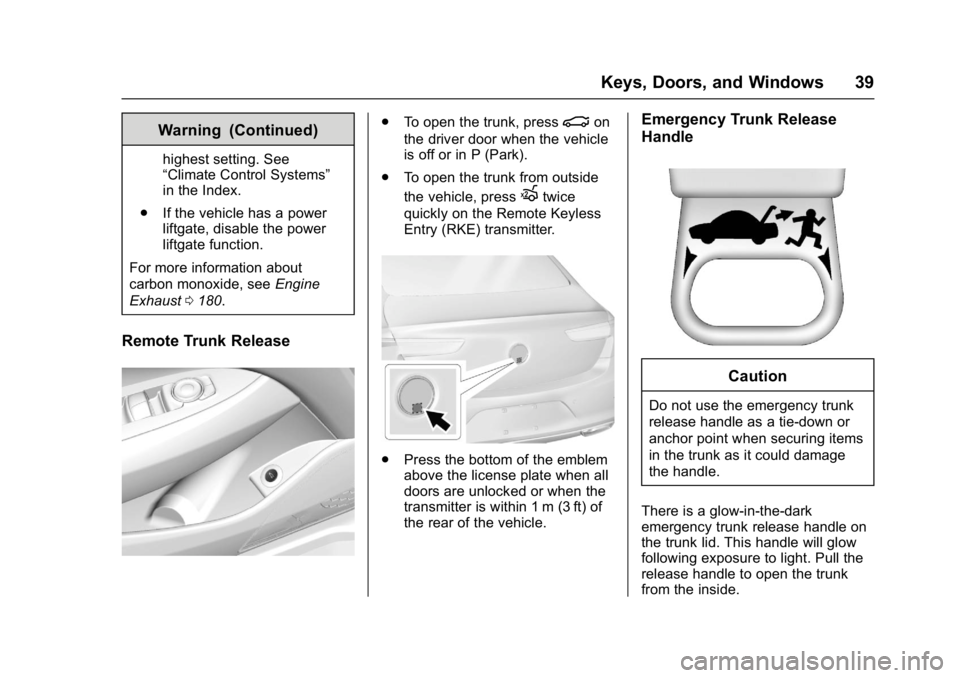
Remote Trunk Release
.
To open the trunk, press|on
the driver door when the vehicle
is off or in P (Park).
. To open the trunk from outside
the vehicle, press
Xtwice
quickly on the Remote Keyless
Entry (RKE) transmitter.
. Press the bottom of the emblem
above the license plate when all
doors are unlocked or when the
transmitter is within 1 m (3 ft) of
the rear of the vehicle.
Emergency Trunk Release
Handle
Caution
Do not use the emergency trunk
release handle as a tie-down or
anchor point when securing items
in the trunk as it could damage
the handle.
There is a glow-in-the-dark
emergency trunk release handle on
the trunk lid. This handle will glow
following exposure to light. Pull the
release handle to open the trunk
from the inside.
Page 44 of 346
Buick LaCrosse Owner Manual (GMNA-Localizing-U.S./Canada-9803782) -
2017 - crc - 9/7/16
Keys, Doors, and Windows 43
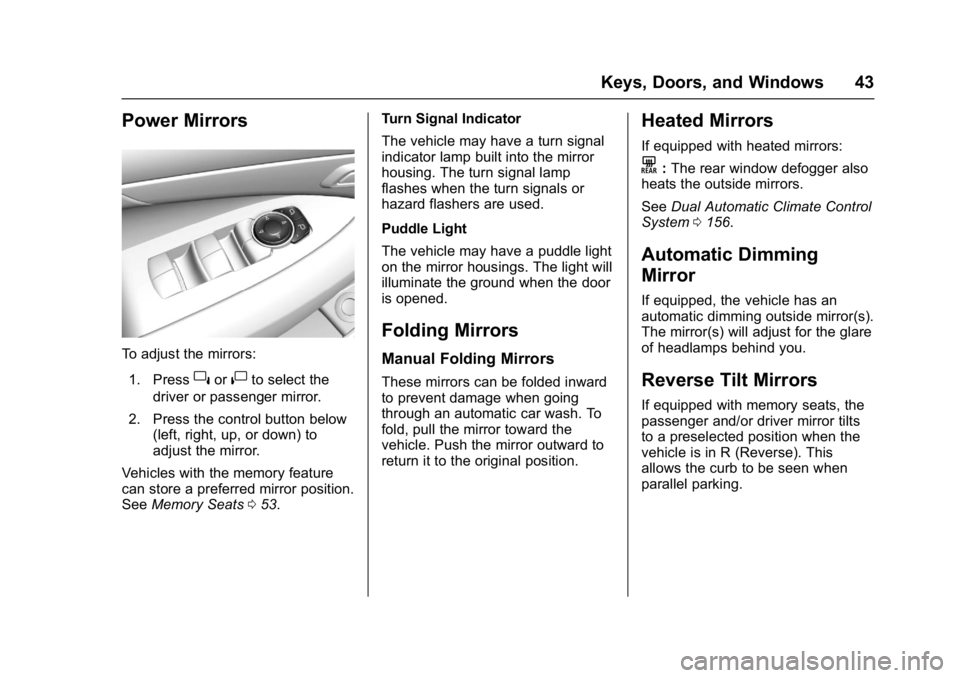
Power Mirrors
To adjust the mirrors:1. Press
}or|to select the
driver or passenger mirror.
2. Press the control button below (left, right, up, or down) to
adjust the mirror.
Vehicles with the memory feature
can store a preferred mirror position.
See Memory Seats 053. Turn Signal Indicator
The vehicle may have a turn signal
indicator lamp built into the mirror
housing. The turn signal lamp
flashes when the turn signals or
hazard flashers are used.
Puddle Light
The vehicle may have a puddle light
on the mirror housings. The light will
illuminate the ground when the door
is opened.
Folding Mirrors
Manual Folding Mirrors
These mirrors can be folded inward
to prevent damage when going
through an automatic car wash. To
fold, pull the mirror toward the
vehicle. Push the mirror outward to
return it to the original position.
Heated Mirrors
If equipped with heated mirrors:
K:
The rear window defogger also
heats the outside mirrors.
See Dual Automatic Climate Control
System 0156.
Automatic Dimming
Mirror
If equipped, the vehicle has an
automatic dimming outside mirror(s).
The mirror(s) will adjust for the glare
of headlamps behind you.
Reverse Tilt Mirrors
If equipped with memory seats, the
passenger and/or driver mirror tilts
to a preselected position when the
vehicle is in R (Reverse). This
allows the curb to be seen when
parallel parking.
Page 56 of 346
Buick LaCrosse Owner Manual (GMNA-Localizing-U.S./Canada-9803782) -
2017 - crc - 9/7/16
Seats and Restraints 55
Obstructions
If something has blocked the driver
seat while recalling a memory
position, the recall may stop.
Remove the obstruction. Then do
one of the following:
.If automatically or manually
recalling the stored memory
position, press and hold the
appropriate manual control for
two seconds. Try recalling again
by pressing the appropriate
memory button. If automatically
recalling the position, try
recalling again by opening the
driver door and pressing
Kon
the RKE transmitter.
. If recalling the exit position,
press and hold the appropriate
manual control for the exit
feature not recalling for
two seconds. Then try recalling
the exit position again.
If the memory position is still not
recalling, see your dealer for
service.
Heated and Ventilated
Front Seats
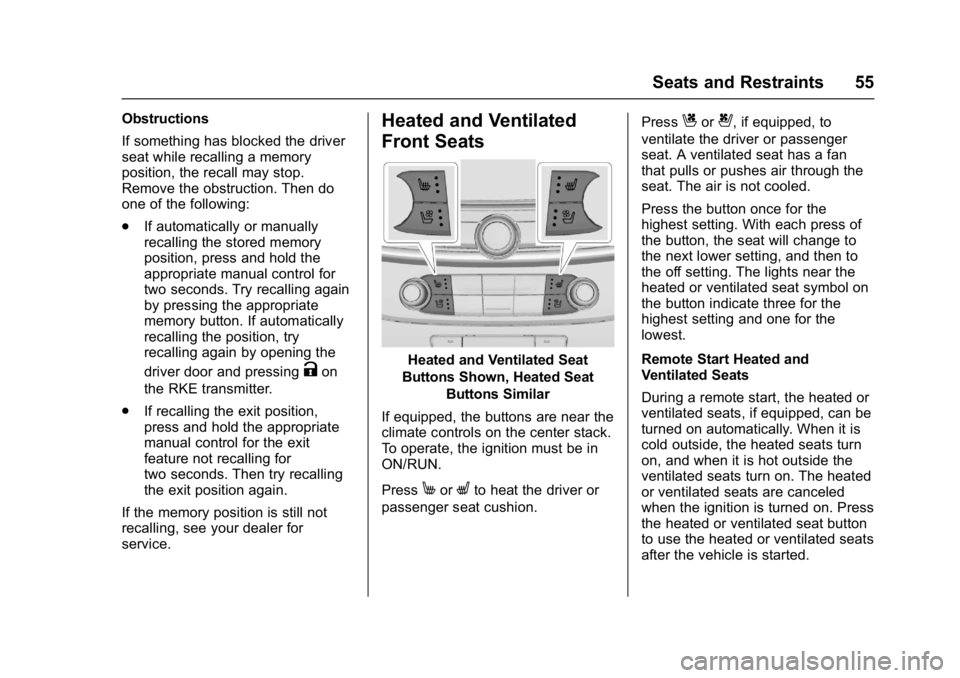
Heated and Ventilated Seat
Buttons Shown, Heated Seat Buttons Similar
If equipped, the buttons are near the
climate controls on the center stack.
To operate, the ignition must be in
ON/RUN.
Press
MorLto heat the driver or
passenger seat cushion. Press
Cor{, if equipped, to
ventilate the driver or passenger
seat. A ventilated seat has a fan
that pulls or pushes air through the
seat. The air is not cooled.
Press the button once for the
highest setting. With each press of
the button, the seat will change to
the next lower setting, and then to
the off setting. The lights near the
heated or ventilated seat symbol on
the button indicate three for the
highest setting and one for the
lowest.
Remote Start Heated and
Ventilated Seats
During a remote start, the heated or
ventilated seats, if equipped, can be
turned on automatically. When it is
cold outside, the heated seats turn
on, and when it is hot outside the
ventilated seats turn on. The heated
or ventilated seats are canceled
when the ignition is turned on. Press
the heated or ventilated seat button
to use the heated or ventilated seats
after the vehicle is started.