rear BUICK LACROSSE 2017 Owner's Manual
[x] Cancel search | Manufacturer: BUICK, Model Year: 2017, Model line: LACROSSE, Model: BUICK LACROSSE 2017Pages: 346, PDF Size: 4.73 MB
Page 6 of 346
Buick LaCrosse Owner Manual (GMNA-Localizing-U.S./Canada-9803782) -
2017 - crc - 9/7/16
In Brief 5
In Brief
Instrument Panel
Instrument Panel . . . . . . . . . . . . . . . . 6
Initial Drive Information
Initial Drive Information . . . . . . . . . . 8
Stop/Start System . . . . . . . . . . . . . . . 8
Remote Keyless Entry (RKE)System . . . . . . . . . . . . . . . . . . . . . . . . 8
Remote Vehicle Start . . . . . . . . . . . 8
Door Locks . . . . . . . . . . . . . . . . . . . . . 9
Trunk Release . . . . . . . . . . . . . . . . . . 9
Windows . . . . . . . . . . . . . . . . . . . . . . . 10
Seat Adjustment . . . . . . . . . . . . . . . 10
Memory Features . . . . . . . . . . . . . . 11
Heated and Ventilated Seats . . . 12
Head Restraint Adjustment . . . . 12
Safety Belts . . . . . . . . . . . . . . . . . . . . 13
Passenger Sensing System . . . 13
Mirror Adjustment . . . . . . . . . . . . . . 13
Steering Wheel Adjustment . . . . 14
Interior Lighting . . . . . . . . . . . . . . . . 15
Exterior Lighting . . . . . . . . . . . . . . . 16
Windshield Wiper/Washer . . . . . . 16
Climate Controls . . . . . . . . . . . . . . . 17
Transmission . . . . . . . . . . . . . . . . . . 18
Vehicle Features
Infotainment System . . . . . . . . . . . 18
Steering Wheel Controls . . . . . . . 18
Cruise Control . . . . . . . . . . . . . . . . . 18
Driver Information Center (DIC) . . . . . . . . . . . . . . . . . 19
Forward Collision Alert (FCA) System . . . . . . . . . . . . . . . . . . . . . . . 19
Forward Automatic Braking (FAB) . . . . . . . . . . . . . . . . 19
Front Pedestrian Braking (FPB) System . . . . . . . . . . . . . . . . . . . . . . . 19
Lane Keep Assist (LKA) . . . . . . . 20
Lane Change Alert (LCA) . . . . . . 20
Rear Vision Camera (RVC) . . . . 20
Rear Cross Traffic Alert (RCTA) System . . . . . . . . . . . . . . . . . . . . . . . 20
Parking Assist . . . . . . . . . . . . . . . . . 20
Automatic Parking Assist (APA) . . . . . . . . . . . . . . . . . . 21
Power Outlets . . . . . . . . . . . . . . . . . 21
Universal Remote System . . . . . 21
Sunroof . . . . . . . . . . . . . . . . . . . . . . . . 22
Performance and Maintenance
Traction Control/Electronic Stability Control . . . . . . . . . . . . . . 23
Tire Pressure Monitor . . . . . . . . . . 23
Fuel . . . . . . . . . . . . . . . . . . . . . . . . . . . 23
E85 or FlexFuel . . . . . . . . . . . . . . . . 24
Engine Oil Life System . . . . . . . . 24
Driving for Better Fuel Economy . . . . . . . . . . . . . . . . . . . . . 24
Roadside Assistance Program . . . . . . . . . . . . . . . . . . . . . . 25
Page 11 of 346
Buick LaCrosse Owner Manual (GMNA-Localizing-U.S./Canada-9803782) -
2017 - crc - 9/7/16
10 In Brief
Windows
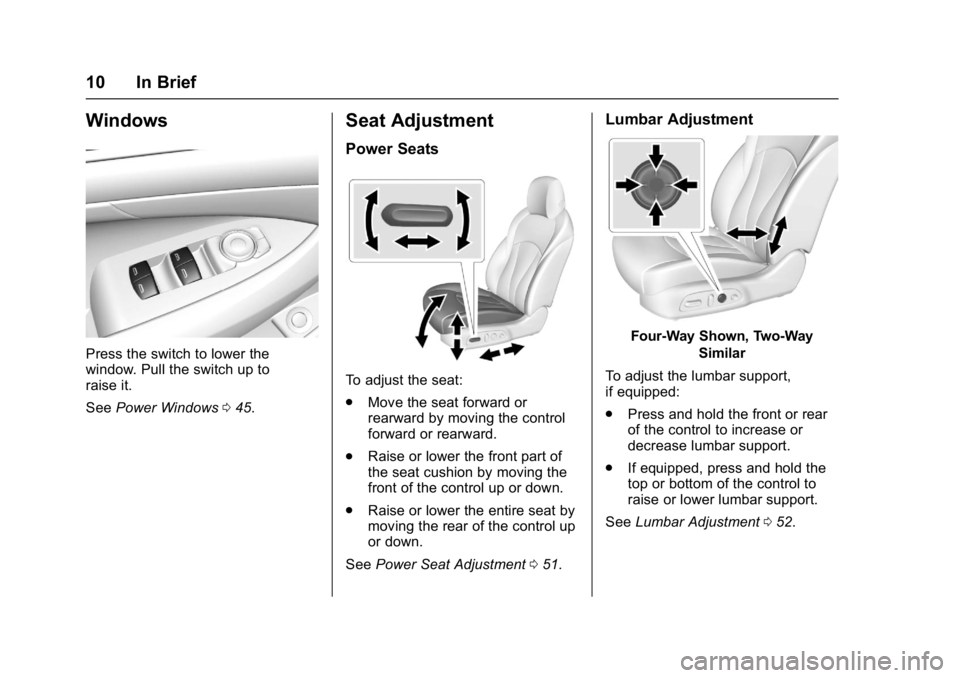
Press the switch to lower the
window. Pull the switch up to
raise it.
SeePower Windows 045.
Seat Adjustment
Power Seats
To adjust the seat:
.
Move the seat forward or
rearward by moving the control
forward or rearward.
. Raise or lower the front part of
the seat cushion by moving the
front of the control up or down.
. Raise or lower the entire seat by
moving the rear of the control up
or down.
See Power Seat Adjustment 051.
Lumbar Adjustment
Four-Way Shown, Two-Way
Similar
To adjust the lumbar support,
if equipped:
. Press and hold the front or rear
of the control to increase or
decrease lumbar support.
. If equipped, press and hold the
top or bottom of the control to
raise or lower lumbar support.
See Lumbar Adjustment 052.
Page 12 of 346
Buick LaCrosse Owner Manual (GMNA-Localizing-U.S./Canada-9803782) -
2017 - crc - 9/7/16
In Brief 11
Massage
If equipped, the ignition must be on
to use the massage feature.
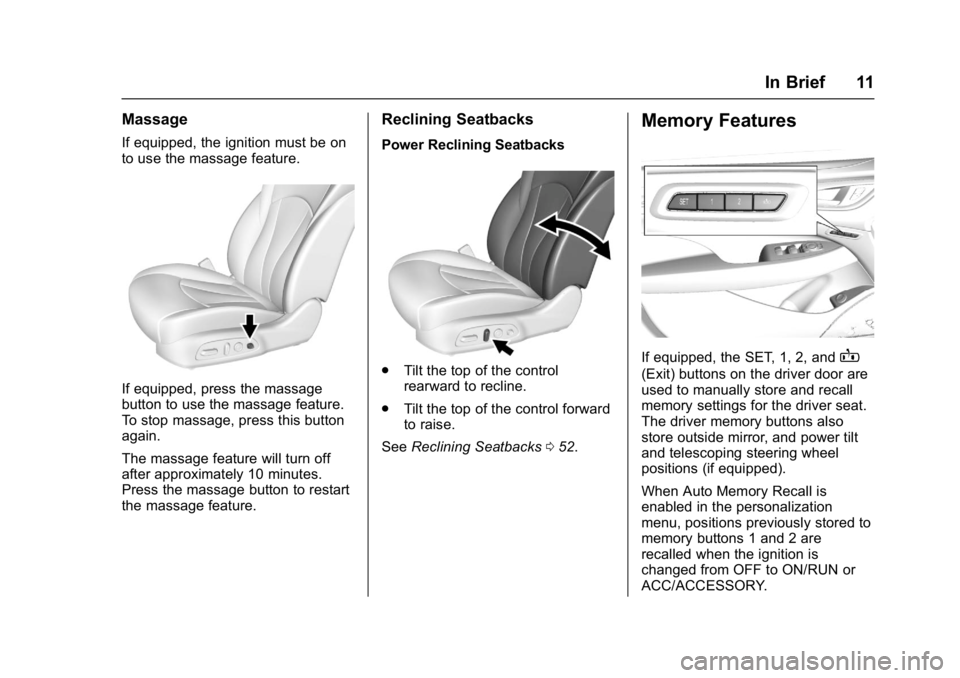
If equipped, press the massage
button to use the massage feature.
To stop massage, press this button
again.
The massage feature will turn off
after approximately 10 minutes.
Press the massage button to restart
the massage feature.
Reclining Seatbacks
Power Reclining Seatbacks
.Tilt the top of the control
rearward to recline.
. Tilt the top of the control forward
to raise.
See Reclining Seatbacks 052.
Memory Features
If equipped, the SET, 1, 2, andB
(Exit) buttons on the driver door are
used to manually store and recall
memory settings for the driver seat.
The driver memory buttons also
store outside mirror, and power tilt
and telescoping steering wheel
positions (if equipped).
When Auto Memory Recall is
enabled in the personalization
menu, positions previously stored to
memory buttons 1 and 2 are
recalled when the ignition is
changed from OFF to ON/RUN or
ACC/ACCESSORY.
Page 15 of 346
Buick LaCrosse Owner Manual (GMNA-Localizing-U.S./Canada-9803782) -
2017 - crc - 9/7/16
14 In Brief
Manual Folding Mirrors
The outside mirrors can be folded
inward to prevent damage when
going through an automatic car
wash. To fold, pull the mirror toward
the vehicle. Push the mirror outward
to return it to the original position.
SeeFolding Mirrors 043.
Automatic Dimming Feature
If equipped, the driver outside mirror
automatically dims to reduce the
glare of headlamps from behind.
See Power Mirrors 043.
Turn Signal Indicator
The vehicle may have a turn signal
indicator lamp built into the mirror
housing. The turn signal lamp
flashes when the turn signals or
hazard flashers are used.
Interior
Adjust the rearview mirror for a clear
view of the area behind your
vehicle. Automatic Dimming Rearview
Mirror
If equipped, automatic dimming
reduces the glare of the headlamps
from behind. This feature comes on
when the vehicle is started. See
Automatic Dimming Rearview Mirror
0
44.
Steering Wheel
Adjustment
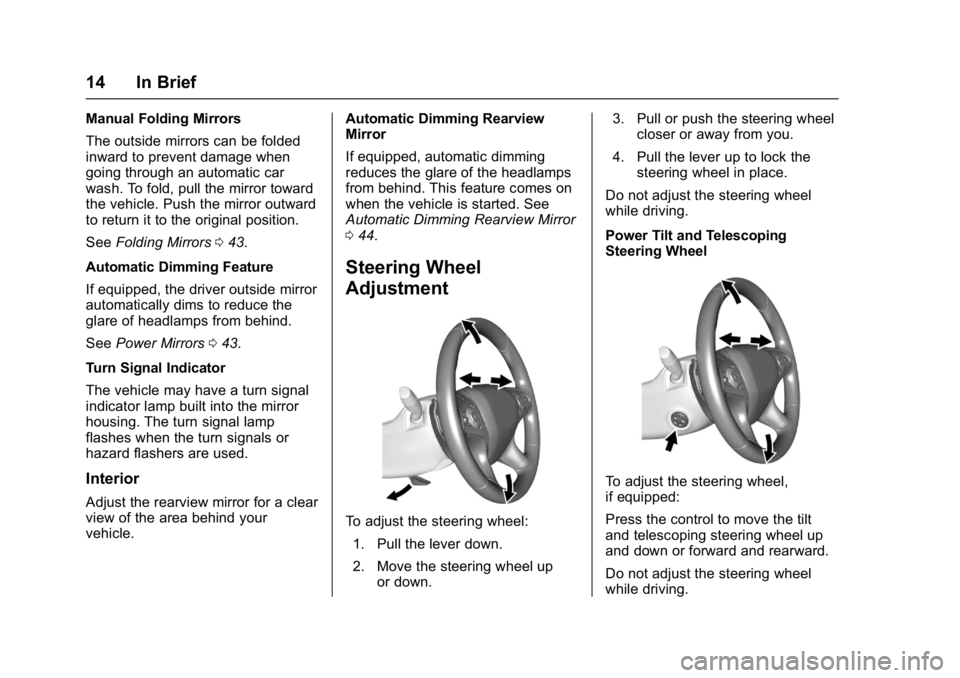
To adjust the steering wheel:
1. Pull the lever down.
2. Move the steering wheel up or down. 3. Pull or push the steering wheel
closer or away from you.
4. Pull the lever up to lock the steering wheel in place.
Do not adjust the steering wheel
while driving.
Power Tilt and Telescoping
Steering Wheel
To adjust the steering wheel,
if equipped:
Press the control to move the tilt
and telescoping steering wheel up
and down or forward and rearward.
Do not adjust the steering wheel
while driving.
Page 16 of 346
Buick LaCrosse Owner Manual (GMNA-Localizing-U.S./Canada-9803782) -
2017 - crc - 9/7/16
In Brief 15
Interior Lighting
Dome Lamps
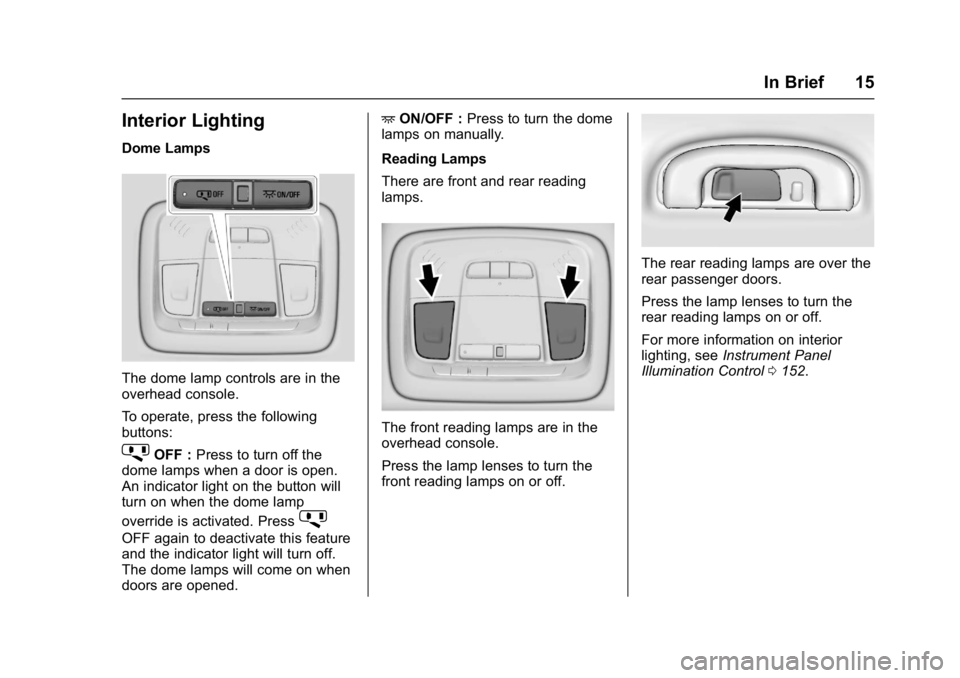
The dome lamp controls are in the
overhead console.
To operate, press the following
buttons:
jOFF :Press to turn off the
dome lamps when a door is open.
An indicator light on the button will
turn on when the dome lamp
override is activated. Press
j
OFF again to deactivate this feature
and the indicator light will turn off.
The dome lamps will come on when
doors are opened. +
ON/OFF : Press to turn the dome
lamps on manually.
Reading Lamps
There are front and rear reading
lamps.
The front reading lamps are in the
overhead console.
Press the lamp lenses to turn the
front reading lamps on or off.
The rear reading lamps are over the
rear passenger doors.
Press the lamp lenses to turn the
rear reading lamps on or off.
For more information on interior
lighting, see Instrument Panel
Illumination Control 0152.
Page 18 of 346
Buick LaCrosse Owner Manual (GMNA-Localizing-U.S./Canada-9803782) -
2017 - crc - 9/7/16
In Brief 17
Climate Controls
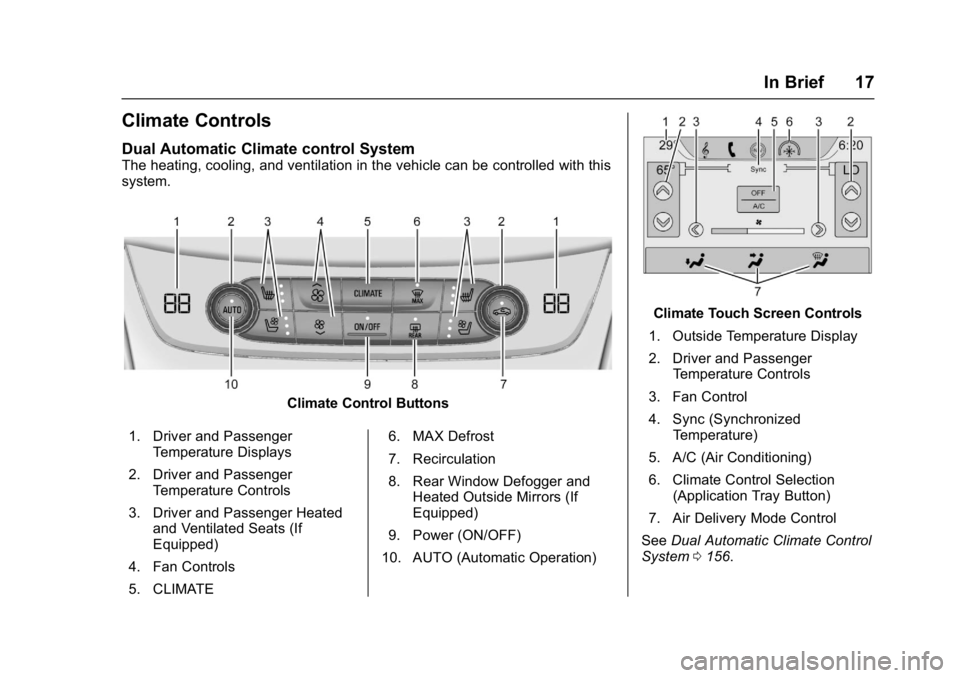
Dual Automatic Climate control System
The heating, cooling, and ventilation in the vehicle can be controlled with this
system.
Climate Control Buttons
1. Driver and Passenger Temperature Displays
2. Driver and Passenger Temperature Controls
3. Driver and Passenger Heated and Ventilated Seats (If
Equipped)
4. Fan Controls
5. CLIMATE 6. MAX Defrost
7. Recirculation
8. Rear Window Defogger and
Heated Outside Mirrors (If
Equipped)
9. Power (ON/OFF)
10. AUTO (Automatic Operation)
Climate Touch Screen Controls
1. Outside Temperature Display
2. Driver and Passenger Temperature Controls
3. Fan Control
4. Sync (Synchronized Temperature)
5. A/C (Air Conditioning)
6. Climate Control Selection (Application Tray Button)
7. Air Delivery Mode Control
See Dual Automatic Climate Control
System 0156.
Page 21 of 346
Buick LaCrosse Owner Manual (GMNA-Localizing-U.S./Canada-9803782) -
2017 - crc - 9/7/16
20 In Brief
FPB provides a red flashing alert on
the windshield and rapidly beeps or
pulses the driver seat. FPB can
provide a boost to braking or
automatically brake the vehicle.
SeeFront Pedestrian Braking (FPB)
System 0210.
Lane Keep Assist (LKA)
If equipped, LKA may help avoid
crashes due to unintentional lane
departures. It may assist by gently
turning the steering wheel if the
vehicle approaches a detected lane
marking without using a turn signal
in that direction. It may also provide
a Lane Departure Warning (LDW)
alert as the lane marking is crossed.
The system will not assist or alert if
it detects that you are actively
steering. Override LKA by turning
the steering wheel. LKA uses a
camera to detect lane markings
between 60 km/h (37 mph) and
180 km/h (112 mph).
See Lane Departure Warning (LDW)
0 215 andLane Keep Assist (LKA)
0 215.
Lane Change Alert (LCA)
If equipped, the LCA system is a
lane-changing aid that assists
drivers with avoiding lane change
crashes that occur with moving
vehicles in the side blind zone (or
spot) areas or with vehicles rapidly
approaching these areas from
behind. The LCA warning display
will light up in the corresponding
outside mirror and will flash if the
turn signal is on. The Side Blind
Zone Alert (SBZA) system is
included as part of the LCA system.
See Side Blind Zone Alert (SBZA)
0 212 andLane Change Alert (LCA)
0 213.
Rear Vision
Camera (RVC)
RVC displays a view of the area
behind the vehicle on the
infotainment display when the
vehicle is shifted into R (Reverse) to
aid with parking and low-speed
backing maneuvers.
See Assistance Systems for Parking
or Backing 0203.
Rear Cross Traffic Alert
(RCTA) System
If equipped, the RCTA system uses
a triangle with an arrow displayed
on the infotainment display to warn
of traffic behind your vehicle that
may cross your vehicle's path while
in R (Reverse). In addition, beeps
will sound, or the driver seat will
pulse.
See Assistance Systems for Parking
or Backing 0203.
Parking Assist
If equipped, Rear Parking
Assist (RPA) uses sensors on the
rear bumper to assist with parking
and avoiding objects while in
R (Reverse). It operates at speeds
less than 8 km/h (5 mph). RPA may
display a warning triangle on the
Rear Vision Camera screen and a
graphic on the instrument cluster to
provide the object distance. In
addition, multiple beeps or seat
pulses may occur if very close to an
object.
Page 22 of 346
Buick LaCrosse Owner Manual (GMNA-Localizing-U.S./Canada-9803782) -
2017 - crc - 9/7/16
In Brief 21
SeeAssistance Systems for Parking
or Backing 0203.
Automatic Parking
Assist (APA)
If equipped, the APA system helps
to search for and maneuver the
vehicle into parallel or perpendicular
parking spots using automatic
steering, DIC displays, and beeps.
When the vehicle speed is below
30 km/h (18 mph), press
Oto
enable the system.
See “Automatic Parking Assist
(APA)” underAssistance Systems
for Parking or Backing 0203.
Power Outlets
The 12-volt power outlets can be
used to plug in electrical equipment,
such as a cell phone or MP3 player.
The vehicle has three power outlets:
.
Under the front of the center
console.
. Inside the center console
storage.
. On the rear of the center
console.
Open the protective cover to use the
power outlet. The outlet is powered when the
ignition is in ON/RUN or ACC/
ACCESSORY, or until the driver
door is opened within 10 minutes of
turning off the vehicle. See
Retained
Accessory Power (RAP) 0178.
See Power Outlets 0104.
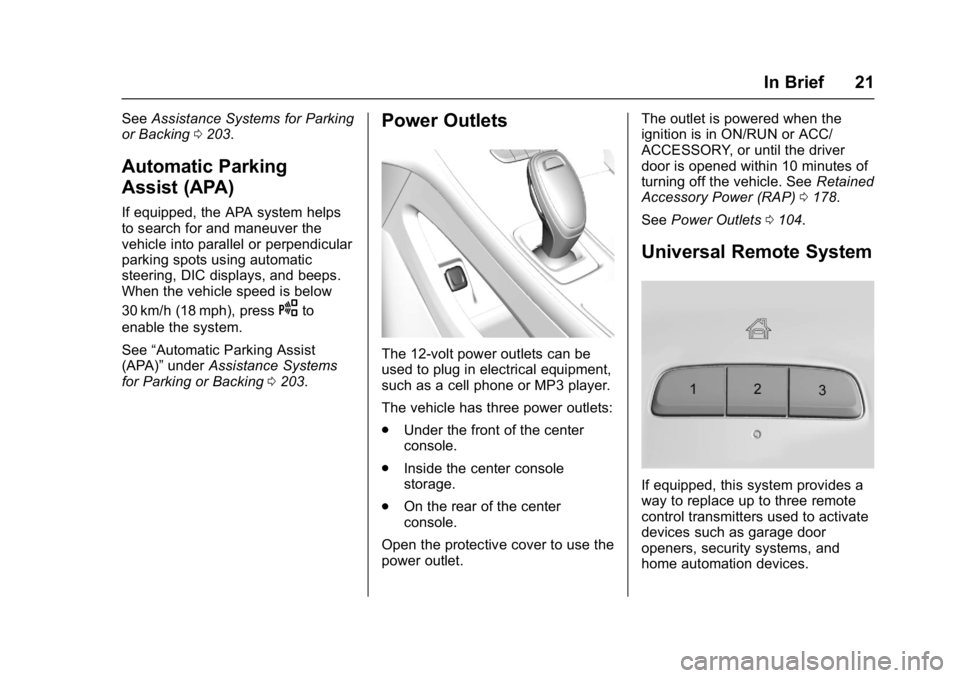
Universal Remote System
If equipped, this system provides a
way to replace up to three remote
control transmitters used to activate
devices such as garage door
openers, security systems, and
home automation devices.
Page 23 of 346
Buick LaCrosse Owner Manual (GMNA-Localizing-U.S./Canada-9803782) -
2017 - crc - 9/7/16
22 In Brief
Read the instructions completely
before attempting to program the
Universal Remote system. Because
of the steps involved, it may be
helpful to have another person
available to assist with programming
the Universal Remote system.
SeeUniversal Remote System
0 145.
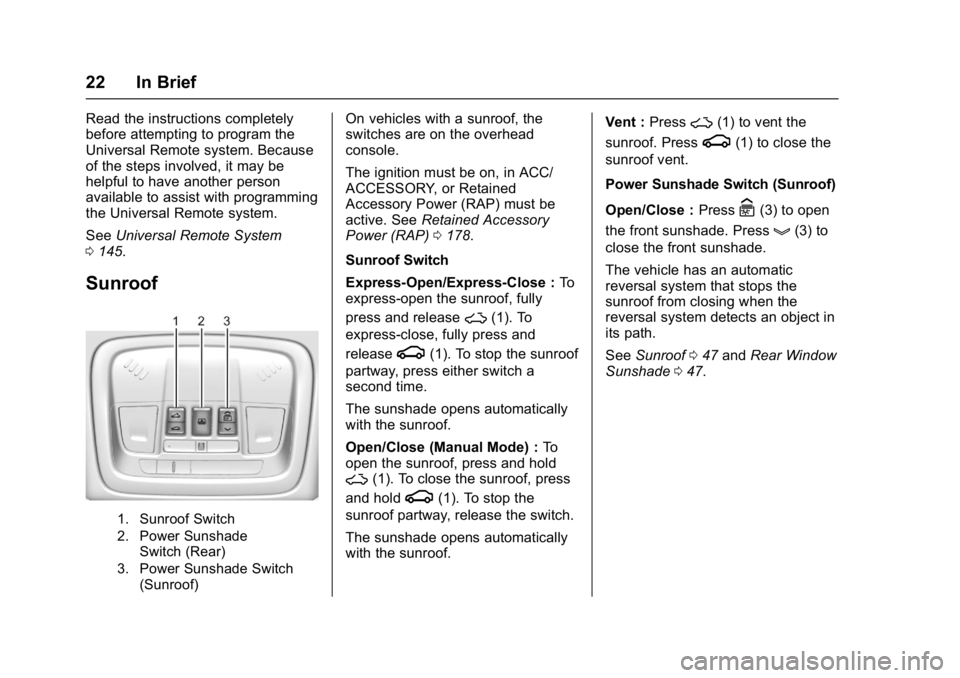
Sunroof
1. Sunroof Switch
2. Power Sunshade
Switch (Rear)
3. Power Sunshade Switch (Sunroof)
On vehicles with a sunroof, the
switches are on the overhead
console.
The ignition must be on, in ACC/
ACCESSORY, or Retained
Accessory Power (RAP) must be
active. See Retained Accessory
Power (RAP) 0178.
Sunroof Switch
Express-Open/Express-Close : To
express-open the sunroof, fully
press and release
~(1). To
express-close, fully press and
release
g(1). To stop the sunroof
partway, press either switch a
second time.
The sunshade opens automatically
with the sunroof.
Open/Close (Manual Mode) : To
open the sunroof, press and hold
~(1). To close the sunroof, press
and hold
g(1). To stop the
sunroof partway, release the switch.
The sunshade opens automatically
with the sunroof. Vent :
Press
~(1) to vent the
sunroof. Press
g(1) to close the
sunroof vent.
Power Sunshade Switch (Sunroof)
Open/Close : Press
C(3) to open
the front sunshade. Press
g(3) to
close the front sunshade.
The vehicle has an automatic
reversal system that stops the
sunroof from closing when the
reversal system detects an object in
its path.
See Sunroof 047 and Rear Window
Sunshade 047.
Page 27 of 346
Buick LaCrosse Owner Manual (GMNA-Localizing-U.S./Canada-9803782) -
2017 - crc - 9/7/16
26 Keys, Doors, and Windows
Keys, Doors, and
Windows
Keys and Locks
Keys . . . . . . . . . . . . . . . . . . . . . . . . . . . 26
Remote Keyless Entry (RKE)System . . . . . . . . . . . . . . . . . . . . . . . 27
Remote Keyless Entry (RKE) System Operation . . . . . . . . . . . . 27
Remote Vehicle Start . . . . . . . . . . 33
Door Locks . . . . . . . . . . . . . . . . . . . . 35
Power Door Locks . . . . . . . . . . . . . 36
Delayed Locking . . . . . . . . . . . . . . . 37
Automatic Door Locks . . . . . . . . . 37
Lockout Protection . . . . . . . . . . . . . 37
Safety Locks . . . . . . . . . . . . . . . . . . . 38
Doors
Trunk . . . . . . . . . . . . . . . . . . . . . . . . . . 38
Vehicle Security
Vehicle Security . . . . . . . . . . . . . . . . 40
Vehicle Alarm System . . . . . . . . . 40
Immobilizer . . . . . . . . . . . . . . . . . . . . 41
Immobilizer Operation . . . . . . . . . 41
Exterior Mirrors
Convex Mirrors . . . . . . . . . . . . . . . . 42
Power Mirrors . . . . . . . . . . . . . . . . . . 43 Folding Mirrors . . . . . . . . . . . . . . . . . 43
Heated Mirrors . . . . . . . . . . . . . . . . . 43
Automatic Dimming Mirror . . . . . 43
Reverse Tilt Mirrors . . . . . . . . . . . . 43
Interior Mirrors
Interior Rearview Mirrors . . . . . . . 44
Automatic Dimming Rearview
Mirror . . . . . . . . . . . . . . . . . . . . . . . . . 44
Windows
Windows . . . . . . . . . . . . . . . . . . . . . . . 44
Power Windows . . . . . . . . . . . . . . . 45
Sun Visors . . . . . . . . . . . . . . . . . . . . . 47
Rear Window Sunshade . . . . . . . 47
Roof
Sunroof . . . . . . . . . . . . . . . . . . . . . . . . 47
Keys and Locks
Keys
{Warning
Leaving children in a vehicle with
a Remote Keyless Entry (RKE)
transmitter is dangerous and
children or others could be
seriously injured or killed. They
could operate the power windows
or other controls or make the
vehicle move. The windows will
function with the RKE transmitter
in the vehicle, and children or
others could be caught in the path
of a closing window. Do not leave
children in a vehicle with an RKE
transmitter.