start stop button BUICK LESABRE 1993 Owners Manual
[x] Cancel search | Manufacturer: BUICK, Model Year: 1993, Model line: LESABRE, Model: BUICK LESABRE 1993Pages: 324, PDF Size: 17.02 MB
Page 42 of 324
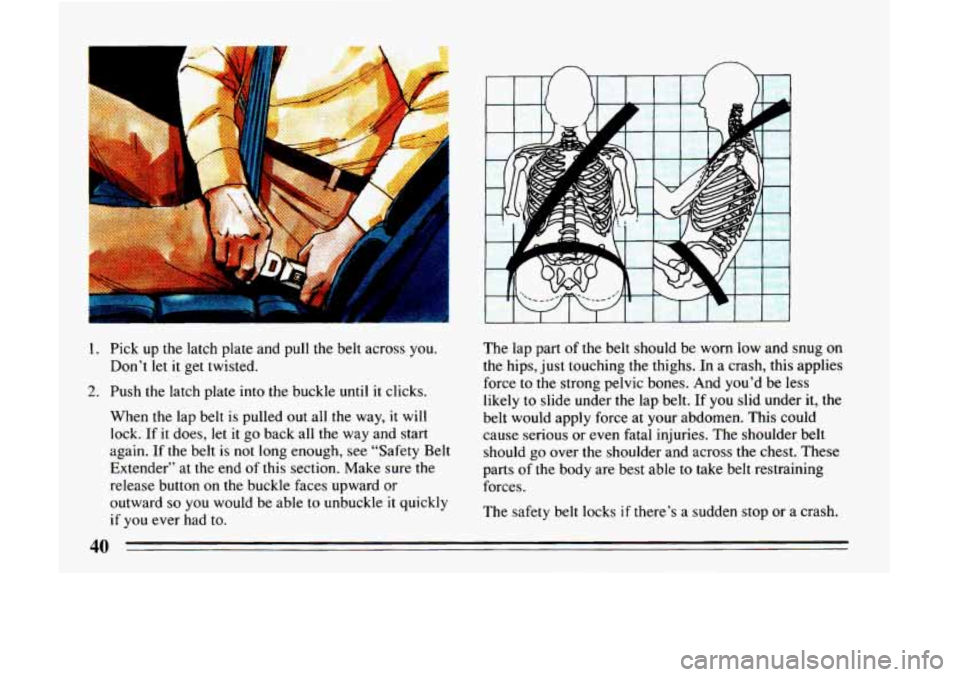
1. Pick up the latch plate and pull the belt across you.
2. Push the latch plate into the buckle until it clicks.
Don’t
let it
get twisted.
When the lap belt is pulled
out all the way, it will
lock. If
it does, let it go back all the way and start
again. If the belt
is not long enough, see “Safety Belt
Extender” at the end of this section. Make sure the
release button on the buckle faces upward or
outward
so you would be able to unbuckle it quickly
if you ever had to. The
lap part of the belt should be worn low and snug
on
the hips, just touching the thighs. In a crash, this applies
force
to the strong pelvic bones. And you’d be less
likely to slide under the lap belt.
If you slid under it, the
belt would apply force at your abdomen. This could
cause serious or even fatal injuries. The shoulder belt
should
go over the shoulder and across the chest. These
parts of the body are best able
to take belt restraining
forces.
The safety belt locks
if there’s a sudden stop or a crash.
40
Page 136 of 324
RCL
It tells you the time or the radio frequency. When the
ignition
is off, push RCL to display the time. With the
radio on, when the time is displayed, push
RCL to
display the frequency.
SEEK 4 or b
Pressing the SEEK 4 or b button will cause the
receiver to seek
the next lower or higher station and
stop.
SCAN
When you press SCAN, the radio will go to the next
station and pause and keep doing that until
you press
SCAN again. SC will appear in the display.
Pushbuttons
The five pushbuttons let you return to favorite stations.
You can set the pushbuttons for up to ten stations (5 AM
and 5 FM).
0 Tune in the station you want to listen to.
Press the SET pushbutton. (The display will show
SET.)
0 Within 5 seconds, push one of the five pushbuttons.
(SET will disappear from the display when the
station is set.)
Whenever you press that button, the preset station
will return.
Clock
To set the clock,
Press the SET button.
0 Within 5 seconds, press and hold SCAN until the
correct hour appears on the display.
Press and hold SEEK 4 or b until the correct
minute appears on the display.
To Adjust The Tone
Use the levers next to the display to set the bass,
midrange, and treble until
you get the sound you want.
The
60 and 250 levers adjust the bass; 1K is midrange;
and
3.5K and 1OK control the treble.
We suggest you start with the center lever
(LK) in the
midpoint position. Then move the others up or down
until you get the amount of bass and treble you like.
To Play A Cassette
Your tape player is built to work best with tapes that are
30 to 45 minutes long on each side. Tapes longer than
that are
so thin they may not work well in this player.
134
Page 139 of 324
RCL
It tells you the time. When the ignition is off, push RCL
to display the time. With the radio on, and the time
displayed, push it to see the frequency.
SEEK 4 or b
Pressing the SEEK 4 or b button will cause the
receiver
to seek the next lower or higher station and
stop.
SCAN
When you press SCAN, the radio will go to the next
station and pause and keep doing that until you press
SCAN again. SC will appear in the display.
Pushbuttons
The five pushbuttons let you return to favorite stations.
You can set the pushbuttons for up to ten stations (5 AM
and 5 FM).
Tune in the station you want to listen to.
0 Press the SET pushbutton. The display will show
SET.
0 Within 5 seconds, push one of the five pushbuttons.
SET will disappear from the display when the station
is set.
Whenever you press that button, the preset station will
return.
Clock
To set the clock:
0 Press the SET p lushbutt on.
0 Within 5 seconds, press and hold SCAN until the
0 Press and hold SEEK or 4 until the correct
correct
hour appears
on the display.
minute appears
on the display.
To Adjust The Tone
Use the levers next to the display to set the base,
midrange and treble until
you get the sound you want.
The
60 and 250 levers adjust the bass; IK is midrange;
and
3.5K and 10K control the treble.
We suggest
you start with the center lever (IK) in the
midpoint position. Then move the others up or down
until you get the amount
of bass and treble you like.
137
Page 141 of 324
FWD
Press and hold FWD to advance quickly within a track.
Release it to resume playing. Watch
the graphic display
to stop at a specific passage.
PREV
Press PREV to hear the previous track. Press it again to
move back one more track.
NEXT
Press NEXT to hear the next track instead of waiting
until the present track is finished. If you hold this
button, or press
it more than once, the disc will advance
further.
STFL
Press ST/PL (Stop/Play) and the disc will stop hd the
radio will play. Press
STPL again to restart the disc at
the point where it stopped.
Press the PWR button or
turn the ignition key off to stop
the disc player. The disc stays
in the player and will
resahe playing at the point where it stopped.
EJECT
Press EJCT, the disc will eject and the radio will play.
The disc will start at track
1 when you reinsert it.
As a feature to protect the disc, if you turn off the
ignition with the disc partway out of the slot (after
eject), it will be drawn back into the player
in about 30
seconds.
The disc will play at track
1 when the radio system is
turned on again.
Anti-Theft Feature
Delco-Loc I1 is a security feature for the compact disc
player. It can be used or ignored. If ignored, the system
plays normally. If it is used, your player won’t be usable
if it’s ever stolen, because it won’t turn on.
The instructions below
tell you how to enter your
personal secret code into the system.
If your car loses
battery power for any reason, you must unlock the
system with the secret code again before the system will
turn on.
Be sure to read through the entire procedure and become
familiar with the appropriate buttons and knobs before
itarting.
k.
139