brake BUICK LESABRE 2003 User Guide
[x] Cancel search | Manufacturer: BUICK, Model Year: 2003, Model line: LESABRE, Model: BUICK LESABRE 2003Pages: 380, PDF Size: 2.75 MB
Page 94 of 380
Running Your Engine While You
Are Parked
It's better not to park with the engine running. But if you
ever have to, here are some things to know.
{CAUTION:
Idling the engine with the climate control
system off could allow dangerous exhaust into
your vehicle. See the earlier Caution under
ªEngine Exhaust.º
Also, idling in a closed-in place can let deadly
carbon monoxide (CO) into your vehicle even if
the climate control fan is at the highest setting.
One place this can happen is a garage.
Exhaust Ð with CO Ð can come in easily.
NEVER park in a garage with the engine
running.
Another closed-in place can be a blizzard. See
ªWinter Drivingº in the Index.
{CAUTION:
It can be dangerous to get out of your vehicle
if the shift lever is not fully in PARK (P) with
the parking brake ®rmly set. Your vehicle can
roll. Do not leave your vehicle when the engine
is running unless you have to. If you have left
the engine running, the vehicle can move
suddenly. You or others could be injured. To
be sure your vehicle will not move, even when
you are on fairly level ground, always set your
parking brake and move the shift lever to
PARK (P).
Follow the proper steps to be sure your vehicle won't
move. See
Shifting Into Park (P) on page 2-28.
If you are parking on a hill and if you're pulling a trailer,
also see
Towing a Trailer on page 4-35.
2-32
Page 109 of 380
Instrument Panel Overview...............................3-4
Hazard Warning Flashers................................3-6
Other Warning Devices...................................3-6
Horn.............................................................3-7
Tilt Wheel.....................................................3-7
Turn Signal/Multifunction Lever.........................3-7
Exterior Lamps.............................................3-14
Interior Lamps..............................................3-17
Head-Up Display (HUD).................................3-20
Accessory Power Outlets...............................3-22
Ashtrays and Cigarette Lighter........................3-23
Climate Controls............................................3-24
Climate Control System.................................3-24
Dual Automatic Climate Control System...........3-26
Outlet Adjustment.........................................3-30
Steering Wheel Climate Controls.....................3-31
Climate Controls Personalization.....................3-31
Warning Lights, Gages and Indicators.............3-32
Instrument Panel Cluster................................3-33
Speedometer and Odometer...........................3-35
Tachometer.................................................3-35
Safety Belt Reminder Light.............................3-36Air Bag Readiness Light................................3-36
Battery Warning Light....................................3-37
Brake System Warning Light..........................3-37
Anti-Lock Brake System Warning Light.............3-38
Traction Control System (TCS) Warning Light . . .3-39
Engine Coolant Temperature Gage..................3-40
Malfunction Indicator Lamp.............................3-40
Oil Pressure Light.........................................3-43
Security Light...............................................3-44
Cruise Control Light......................................3-44
Service Vehicle Soon Light............................3-44
Fuel Gage...................................................3-45
Driver Information Center (DIC).......................3-45
DIC Controls and Displays.............................3-46
DIC Warnings and Messages.........................3-49
DIC Vehicle Personalization............................3-50
Audio System(s).............................................3-55
Setting the Time...........................................3-55
Radio with CD..............................................3-56
Radio with Cassette and CD..........................3-62
Trunk-Mounted CD Changer...........................3-73
Personal Choice Radio Controls......................3-77
Section 3 Instrument Panel
3-1
Page 113 of 380
The main components of your instrument panel are the following:
A. Air Outlets
B. Driver Information Center (DIC) Buttons (If Equipped)
C. Turn Signal/Multifunction Lever
D. Steering Wheel Controls (If Equipped)
E. Hazard Warning Flashers
F. Instrument Panel Cluster
G. Traction Control Button (If Equipped)
H. Exterior Lamp ButtonsI. Head-Up Display (HUD) Controls (If Equipped)
J. Hood Release
K. Parking Brake
L. Cruise Controls
M. Audio System
N. Climate Controls
O. Glove Box
3-5
Page 120 of 380

When you apply your brakes, the cruise control
shuts off.
{CAUTION:
·Cruise control can be dangerous where
you can't drive safely at a steady speed.
So, don't use your cruise control on
winding roads or in heavy traffic.
·Cruise control can be dangerous on
slippery roads. On such roads, fast
changes in tire traction can cause
needless wheel spinning, and you could
lose control. Don't use cruise control on
slippery roads.
If your vehicle is in cruise control when the optional
traction control system begins to limit wheel spin, the
cruise control will automatically disengage. See
Traction
Control System (TCS) on page 4-9. When road
conditions allow you to safely use it again, you may turn
the cruise control back on.
Setting Cruise Control
{CAUTION:
If you leave your cruise control on when you're
not using cruise, you might hit a button and go
into cruise when you don't want to. You could
be startled and even lose control. Keep the
cruise control switch off until you want to use
cruise control.
1. Press the ON/OFF switch to turn cruise control on.
An indicator light will come on in the switch to show
that cruise control is on.
2. Get up to the speed you want.
3. Press the SET/COAST switch and the CRUISE light
on the instrument panel cluster will illuminate.
4. Take your foot off the accelerator pedal.
Resuming a Set Speed
Suppose you set your cruise control at a desired speed
and then you apply the brake. This, of course, shuts
off the cruise control. But you don't need to reset it.
3-12
Page 121 of 380

Once you're going about 25 mph (40 km/h) or more, you
can brie¯y press the RESUME/ACCEL
(resume/accelerate) switch to return to your desired
preset speed.
You'll go right back up to your chosen speed and stay
there. If you press and hold the RESUME/ACCEL
switch, the vehicle will keep going faster until you
release the switch or apply the brake. So unless you
want to go faster, don't press and hold the
RESUME/ACCEL switch.
Increasing Speed While Using Cruise
Control
There are two ways to go to a higher speed:
·Use the accelerator pedal to get to the higher
speed. Press the SET/COAST switch, then release
it and the accelerator pedal. You'll now cruise at
the higher speed.
·Press the RESUME/ACCEL switch. Hold it there
until you get up to the speed you want, and then
release it. (To increase your speed in very
small amounts, brie¯y press the RESUME/ACCEL
switch and then release it. Each time you do
this, your vehicle will go about 1 mph (1.6 km/h)
faster.)
The accelerate feature will only work after you have set
the cruise control speed by pressing the SET/COAST
switch.
Reducing Speed While Using Cruise
Control
There are two ways to reduce your speed while using
cruise control:
·Press the SET/COAST switch until you reach the
lower speed you want, then release it.
·To slow down in very small amounts, push the
SET/COAST switch brie¯y. Each time you do
this, you'll go about 1 mph (1.6 km/h) slower.
Passing Another Vehicle While Using
Cruise Control
Use the accelerator pedal to increase your speed.
When you take your foot off the pedal, your vehicle will
slow down to the cruise control speed you set earlier.
Using Cruise Control on Hills
How well your cruise control will work on hills depends
upon your speed, load and the steepness of the
hills. When going up steep hills, you may have to step
on the accelerator pedal to maintain your speed.
When going downhill, you may have to brake or shift to
a lower gear to keep your speed down. Applying the
brake or shifting into a lower gear will take your vehicle
out of cruise control. If you need to apply the brake
or shift to a lower gear due to the grade of the downhill
slope, you may not want to attempt to use your
cruise control feature.
3-13
Page 122 of 380
Ending Cruise Control
There are two ways to turn off the cruise control:
·Step lightly on the brake pedal; or
·press ON/OFF.
Erasing Speed Memory
When you turn off the cruise control or the ignition, your
cruise control set speed memory is erased.
Exterior Lamps
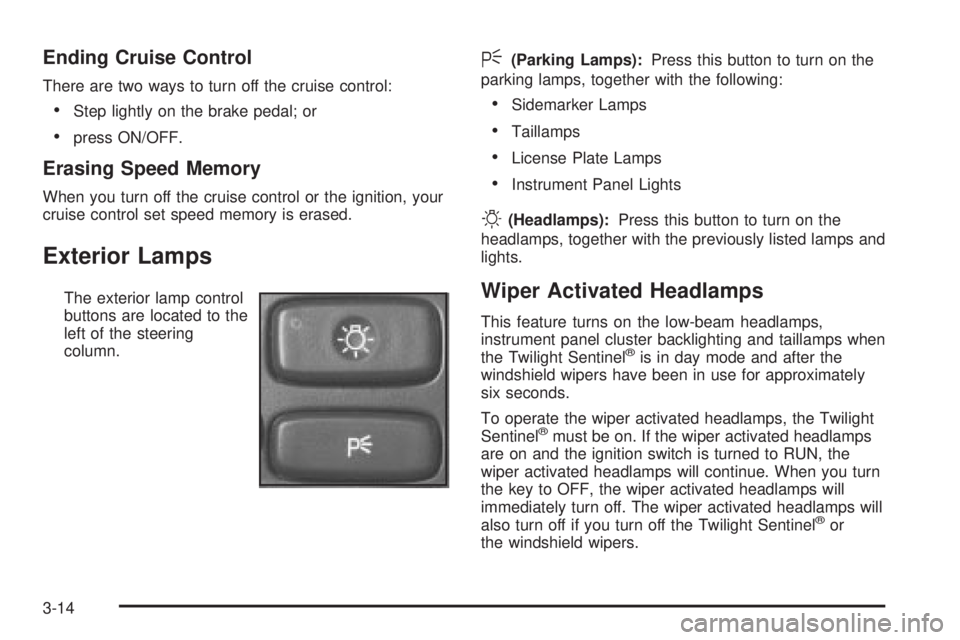
The exterior lamp control
buttons are located to the
left of the steering
column.
<(Parking Lamps):Press this button to turn on the
parking lamps, together with the following:
·Sidemarker Lamps
·Taillamps
·License Plate Lamps
·Instrument Panel Lights
O(Headlamps):Press this button to turn on the
headlamps, together with the previously listed lamps and
lights.
Wiper Activated Headlamps
This feature turns on the low-beam headlamps,
instrument panel cluster backlighting and taillamps when
the Twilight Sentinel
žis in day mode and after the
windshield wipers have been in use for approximately
six seconds.
To operate the wiper activated headlamps, the Twilight
Sentinel
žmust be on. If the wiper activated headlamps
are on and the ignition switch is turned to RUN, the
wiper activated headlamps will continue. When you turn
the key to OFF, the wiper activated headlamps will
immediately turn off. The wiper activated headlamps will
also turn off if you turn off the Twilight Sentinel
žor
the windshield wipers.
3-14
Page 145 of 380

The air bag readiness light should ¯ash for a few
seconds when you turn the ignition key to RUN. If the
light doesn't come on then, have it ®xed so it will
be ready to warn you if there is a problem.
Battery Warning Light
When you turn the key to
RUN, this light will turn on
brie¯y to show that the
generator and battery
charging systems
are working.
If the light stays on, a chime will sound indicating that
the vehicle needs service. You should take your vehicle
to the dealer as soon as possible. To save the battery
until you get there, turn off all accessories and set
the climate control system to OFF.
Brake System Warning Light
Your vehicle's hydraulic brake system is divided into two
parts. If one part isn't working, the other part can still
work and stop you. For good braking, though, you need
both parts working well.
If the warning light comes on, there is a brake problem.
Have your brake system inspected right away.
This light should come on when you turn the key to
RUN. If it doesn't come on then, have it ®xed so it will
be ready to warn you if there's a problem.
United StatesCanada
3-37
Page 146 of 380

When the ignition is on, the brake system warning light
will also come on when you set your parking brake.
The light will stay on if your parking brake doesn't
release fully. If you try to drive off with the parking brake
set, a chime will also come on until you release the
parking brake. If the light stays on after your parking
brake is fully released, it means you have a brake
problem.
If the light comes on while you are driving, pull off the
road and stop carefully. You may notice that the pedal is
harder to push. Or, the pedal may go closer to the
¯oor. It may take longer to stop. If the light is still on,
have the vehicle towed for service. See
Towing
Your Vehicle on page 4-31.
{CAUTION:
Your brake system may not be working
properly if the brake system warning light is
on. Driving with the brake system warning light
on can lead to an accident. If the light is still
on after you've pulled off the road and stopped
carefully, have the vehicle towed for service.
Anti-Lock Brake System
Warning Light
With the anti-lock brake
system, the light(s) will
come on when your engine
is started and may stay
on for several seconds.
That's normal.
If the light stays on, turn the ignition to OFF. Or, if the
light comes on when you're driving, stop as soon
as possible and turn the ignition off. Then start the
engine again to reset the system. If the light still stays
on, or comes on again while you're driving, your vehicle
needs service. If the regular brake system warning
light isn't on, you still have brakes, but you don't have
anti-lock brakes. If the regular brake system warning
light is also on, you don't have anti-lock brakes
and there's a problem with your regular brakes. See
Brake System Warning Light on page 3-37.
The anti-lock brake system warning light will come on
brie¯y when you turn the ignition key to RUN. This
is normal. If the light doesn't come on then, have it ®xed
so it will be ready to warn you if there is a problem.
3-38
Page 147 of 380
Traction Control System (TCS)
Warning Light
For vehicles equipped with
the traction control system,
this warning light should
come on brie¯y when
the engine is started.
If the warning light doesn't come on then, have it ®xed
so it will be ready to warn you if there's a problem.
If it stays on, or comes on when you're driving, there
may be a problem with your traction control system and
your vehicle may need service. When this warning
light is on, the system will not limit wheel spin. Adjust
your driving accordingly.The traction control system warning light may come on
for the following reasons:
·If you turn the system off by pressing the button
located on the end of the gearshift lever, the
warning light will come on and stay on. To turn the
system back on, press the button again. The
warning light should go off. See
Traction Control
System (TCS) on page 4-9for more information.
·If there's a brake system problem that is speci®cally
related to traction control, the traction control
system will turn off and the warning light will come
on. If your brakes begin to overheat, the traction
control system will turn off and the warning light will
come on until your brakes cool down.
·If the traction control system is affected by an
engine-related problem, the system will turn off and
the warning light will come on.
If the traction control system warning light comes on
and stays on for an extended period of time when the
system is turned on, your vehicle needs service.
3-39
Page 157 of 380
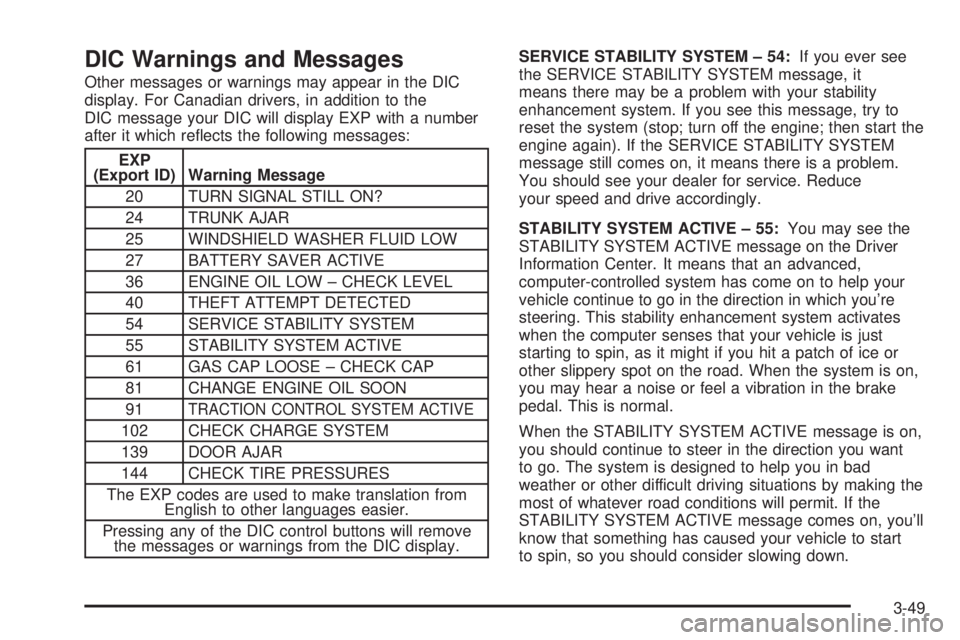
DIC Warnings and Messages
Other messages or warnings may appear in the DIC
display. For Canadian drivers, in addition to the
DIC message your DIC will display EXP with a number
after it which re¯ects the following messages:
EXP
(Export ID) Warning Message
20 TURN SIGNAL STILL ON?
24 TRUNK AJAR
25 WINDSHIELD WASHER FLUID LOW
27 BATTERY SAVER ACTIVE
36 ENGINE OIL LOW ± CHECK LEVEL
40 THEFT ATTEMPT DETECTED
54 SERVICE STABILITY SYSTEM
55 STABILITY SYSTEM ACTIVE
61 GAS CAP LOOSE ± CHECK CAP
81 CHANGE ENGINE OIL SOON
91
TRACTION CONTROL SYSTEM ACTIVE
102 CHECK CHARGE SYSTEM
139 DOOR AJAR
144 CHECK TIRE PRESSURES
The EXP codes are used to make translation from
English to other languages easier.
Pressing any of the DIC control buttons will remove
the messages or warnings from the DIC display.SERVICE STABILITY SYSTEM ± 54:If you ever see
the SERVICE STABILITY SYSTEM message, it
means there may be a problem with your stability
enhancement system. If you see this message, try to
reset the system (stop; turn off the engine; then start the
engine again). If the SERVICE STABILITY SYSTEM
message still comes on, it means there is a problem.
You should see your dealer for service. Reduce
your speed and drive accordingly.
STABILITY SYSTEM ACTIVE ± 55:You may see the
STABILITY SYSTEM ACTIVE message on the Driver
Information Center. It means that an advanced,
computer-controlled system has come on to help your
vehicle continue to go in the direction in which you're
steering. This stability enhancement system activates
when the computer senses that your vehicle is just
starting to spin, as it might if you hit a patch of ice or
other slippery spot on the road. When the system is on,
you may hear a noise or feel a vibration in the brake
pedal. This is normal.
When the STABILITY SYSTEM ACTIVE message is on,
you should continue to steer in the direction you want
to go. The system is designed to help you in bad
weather or other difficult driving situations by making the
most of whatever road conditions will permit. If the
STABILITY SYSTEM ACTIVE message comes on, you'll
know that something has caused your vehicle to start
to spin, so you should consider slowing down.
3-49