mount BUICK LESABRE 2003 Owner's Manual
[x] Cancel search | Manufacturer: BUICK, Model Year: 2003, Model line: LESABRE, Model: BUICK LESABRE 2003Pages: 380, PDF Size: 2.75 MB
Page 57 of 380
In addition, your vehicle has ªdual stageº frontal air
bags, which adjust the amount of restraint according to
crash severity. For moderate frontal impacts, these
air bags in¯ate at a level less than full deployment. For
more severe frontal impacts, full deployment occurs.
If the front of your vehicle goes straight into a wall that
does not move or deform, the threshold level for the
reduced deployment is about 10 to 16 mph (18 to
26 km/h), and the threshold level for a full deployment is
about 18 to 24 mph (29 to 38.5 km/h). The threshold
level can vary, however, with speci®c vehicle design, so
that it can be somewhat above or below this range.
If your vehicle strikes something that will move or
deform, such as a parked car, the threshold level will be
higher. The driver's and right front passenger's frontal
air bags are not designed to in¯ate in rollovers, rear
impacts, or in many side impacts because in¯ation
would not help the occupant.
Your vehicle may or may not have a side impact air
bag. See
Air Bag Systems on page 1-46. Side impact air
bags are designed to in¯ate in moderate to severe
side crashes. A side impact air bag will in¯ate if
the crash severity is above the system's designed
ªthreshold level.º The threshold level can vary with
speci®c vehicle design. Side impact air bags are
not designed to in¯ate in frontal or near-frontal impacts,
rollovers or rear impacts, because in¯ation would not
help the occupant. A side impact air bag will only deploy
on the side of the vehicle that is struck.In any particular crash, no one can say whether an air
bag should have in¯ated simply because of the damage
to a vehicle or because of what the repair costs were.
For frontal air bags, in¯ation is determined by the angle
of the impact and how quickly the vehicle slows down
in frontal and near-frontal impacts. For side impact
air bags, in¯ation is determined by the location
and severity of the impact.
What Makes an Air Bag In¯ate?
In an impact of sufficient severity, the air bag sensing
system detects that the vehicle is in a crash. For
both frontal and side impact air bags, the sensing
system triggers a release of gas from the in¯ator, which
in¯ates the air bag. The in¯ator, the air bag and
related hardware are all part of the air bag modules.
Frontal air bag modules are located inside the steering
wheel and instrument panel. For vehicles with side
impact air bags, the air bag modules are located in the
seatback closest to the driver's and/or right front
passenger's door.
1-51
Page 89 of 380
SECOND (2):This position gives you more power but
lower fuel economy than THIRD (3). You can use
SECOND (2) on hills. It can help control your speed as
you go down steep mountain roads, but then you
would also want to use your brakes off and on.
Notice:Don't drive in SECOND (2) for more than
5 miles (8 km), or at speeds over 55 mph (90 km/h),
or you can damage your transaxle. Use AUTOMATIC
OVERDRIVE (
X) or THIRD (3) as much as possible.
Don't shift into SECOND (2) unless you are going
slower than 65 mph (105 km/h), or you can damage
your engine.
FIRST (1):This position gives you even more power
but lower fuel economy than SECOND (2). You can use
it on very steep hills, or in deep snow or mud. If the
shift lever is put in FIRST (1), the transaxle won't shift
into ®rst gear until the vehicle is going slowly enough.
Notice:If your front wheels won't turn, don't
try to drive. This might happen if you were stuck in
very deep sand or mud or were up against a solid
object. You could damage your transaxle. Also,
if you stop when going uphill, don't hold your
vehicle there with only the accelerator pedal. This
could overheat and damage the transaxle. Use your
brakes to hold your vehicle in position on a hill.
Parking Brake
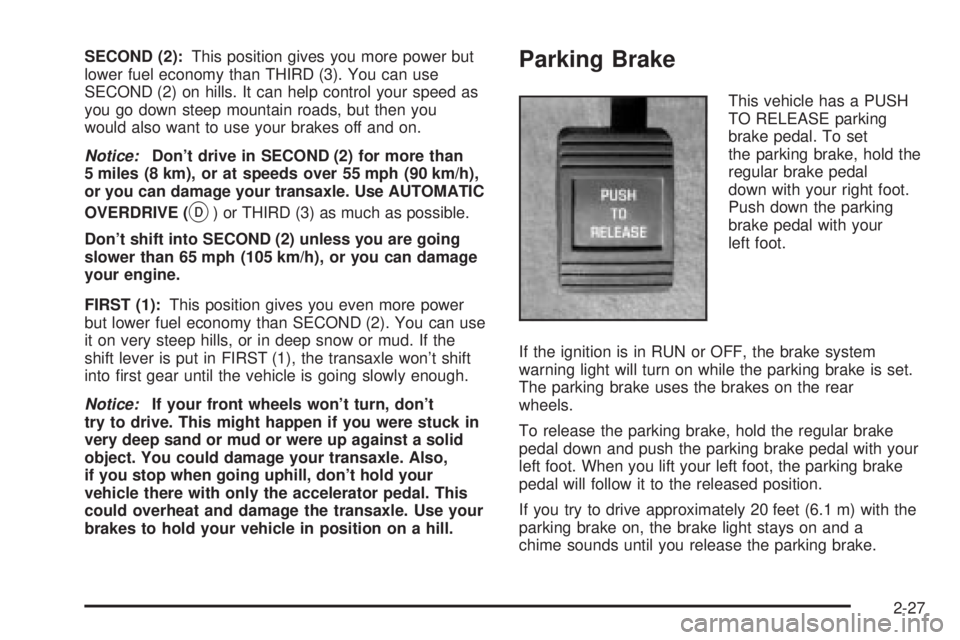
This vehicle has a PUSH
TO RELEASE parking
brake pedal. To set
the parking brake, hold the
regular brake pedal
down with your right foot.
Push down the parking
brake pedal with your
left foot.
If the ignition is in RUN or OFF, the brake system
warning light will turn on while the parking brake is set.
The parking brake uses the brakes on the rear
wheels.
To release the parking brake, hold the regular brake
pedal down and push the parking brake pedal with your
left foot. When you lift your left foot, the parking brake
pedal will follow it to the released position.
If you try to drive approximately 20 feet (6.1 m) with the
parking brake on, the brake light stays on and a
chime sounds until you release the parking brake.
2-27
Page 96 of 380

Mirror Operation
MIRROR:Press this button to turn on the automatic
dimming feature. Press it again to turn off the automatic
dimming feature.
O(On/Off):For mirrors equipped with OnStarž
controls, press and hold this button for several seconds
to turn on the automatic dimming feature. Press and
hold it again to turn the automatic dimming feature off.
The green indicator light will come on when this
feature is active. The automatic dimming feature will be
active each time the vehicle is started.
Compass Operation
COMPASS:Press this button once to turn the compass
on or off.
O(On/Off):For mirrors equipped with OnStarž
controls, press this button once to turn the compass on
or off.
When the ignition and the compass feature are on, the
compass will show two character boxes for
approximately two seconds. After two seconds, the
mirror will display the compass heading.
Compass Calibration
When on, the compass automatically calibrates as the
vehicle is driven. If, after two seconds, the display
does not show a compass heading (N for North, forexample), there may be a strong magnetic ®eld
interfering with the compass. Such interference may be
caused by a magnetic antenna mount, magnetic
note pad holder or a similar magnetic item. If the letter
C should ever appear in the compass window, the
compass may need calibration.
The mirror can be calibrated by driving the vehicle in
circles at 5 mph (8 km/h) or less until the display reads a
direction.
Mirrors equipped with OnStar
žcontrols can be placed
in calibration mode by pressing and holding the
on/off button untilaCisshown in the compass display.
Compass Variance
Compass variance is the difference between earth's
magnetic north and true geographic north. The mirror is
set in zone eight upon leaving the factory. It will be
necessary to adjust the compass to compensate
for compass variance if you live outside zone eight.
Under certain circumstances, as during a long distance
cross-country trip, it will be necessary to adjust for
compass variance. If not adjusted to account for
compass variance, your compass could give false
readings.
To adjust for compass variance, do the following:
1. Find your current location and variance zone
number on the following zone map.
2-34
Page 109 of 380
Instrument Panel Overview...............................3-4
Hazard Warning Flashers................................3-6
Other Warning Devices...................................3-6
Horn.............................................................3-7
Tilt Wheel.....................................................3-7
Turn Signal/Multifunction Lever.........................3-7
Exterior Lamps.............................................3-14
Interior Lamps..............................................3-17
Head-Up Display (HUD).................................3-20
Accessory Power Outlets...............................3-22
Ashtrays and Cigarette Lighter........................3-23
Climate Controls............................................3-24
Climate Control System.................................3-24
Dual Automatic Climate Control System...........3-26
Outlet Adjustment.........................................3-30
Steering Wheel Climate Controls.....................3-31
Climate Controls Personalization.....................3-31
Warning Lights, Gages and Indicators.............3-32
Instrument Panel Cluster................................3-33
Speedometer and Odometer...........................3-35
Tachometer.................................................3-35
Safety Belt Reminder Light.............................3-36Air Bag Readiness Light................................3-36
Battery Warning Light....................................3-37
Brake System Warning Light..........................3-37
Anti-Lock Brake System Warning Light.............3-38
Traction Control System (TCS) Warning Light . . .3-39
Engine Coolant Temperature Gage..................3-40
Malfunction Indicator Lamp.............................3-40
Oil Pressure Light.........................................3-43
Security Light...............................................3-44
Cruise Control Light......................................3-44
Service Vehicle Soon Light............................3-44
Fuel Gage...................................................3-45
Driver Information Center (DIC).......................3-45
DIC Controls and Displays.............................3-46
DIC Warnings and Messages.........................3-49
DIC Vehicle Personalization............................3-50
Audio System(s).............................................3-55
Setting the Time...........................................3-55
Radio with CD..............................................3-56
Radio with Cassette and CD..........................3-62
Trunk-Mounted CD Changer...........................3-73
Personal Choice Radio Controls......................3-77
Section 3 Instrument Panel
3-1
Page 118 of 380
MIST:For a single wiping cycle, turn the band to MIST.
Hold it there until the wipers start, then let go. The
wipers will stop after one cycle. If you want more cycles,
hold the band on MIST longer.
LO (Low Speed):Turn the band to LO for steady
wiping at a slow speed.
HI (High Speed):Turn the band to HI for steady wiping
at a high speed.
The wiper speed may be set for a long or short delay
between wipes. Turn the band to choose the delay time.
The closer to LO, the shorter the delay.
Heavy snow or ice can overload your wiper motor. A
circuit breaker will stop the motor until it cools.
Clear away snow or ice to prevent an overload.
Keep in mind that damaged wiper blades may prevent
you from seeing well enough to drive safely. To
avoid damage, be sure to clear ice and snow from the
wiper blades before using them. If your blades do
become damaged, get new blades or blade inserts.
RainsenseŸ II Wipers
If your vehicle has this feature, the moisture sensor is
mounted on the interior of the windshield below the
rearview mirror and is used to automatically operate the
wipers. This system operates by monitoring the
amount of moisture build-up on the windshield. Wipes
occur as needed to clear the windshield dependingon the driving conditions and the sensitivity setting. In
light rain or snow, fewer wipes will occur. In heavy
rain or snow, wipes will occur more frequently.
The system will operate in the delay, low speed and
high speed modes. If the system is left on for long
periods of time, occasional wipes may occur without any
moisture on the windshield. This is normal and
indicates that the RainsenseŸ system is active.
The RainsenseŸ system is activated by turning the
wiper control band to one of the ®ve sensitivity levels
within the delay area. The delay position closest to
OFF/MIST is the lowest sensitivity setting, level one. The
highest sensitivity setting, level ®ve, is closest to the
LO position. A single wipe will occur each time you turn
the wiper control band to a higher sensitivity level to
indicate that the sensitivity level has been increased.
Notice:The wipers must be turned off when going
through a car wash to avoid damage.
The MIST and wash cycles operate as normal and are
not affected by the RainsenseŸ function. The system
can be overridden at any time by manually changing the
wiper control to LO or HI speed.
Notice:Do not place stickers or other items on the
exterior glass surface directly in front of the
rainsensor. Doing this could cause the rainsensor
to malfunction.
3-10
Page 121 of 380

Once you're going about 25 mph (40 km/h) or more, you
can brie¯y press the RESUME/ACCEL
(resume/accelerate) switch to return to your desired
preset speed.
You'll go right back up to your chosen speed and stay
there. If you press and hold the RESUME/ACCEL
switch, the vehicle will keep going faster until you
release the switch or apply the brake. So unless you
want to go faster, don't press and hold the
RESUME/ACCEL switch.
Increasing Speed While Using Cruise
Control
There are two ways to go to a higher speed:
·Use the accelerator pedal to get to the higher
speed. Press the SET/COAST switch, then release
it and the accelerator pedal. You'll now cruise at
the higher speed.
·Press the RESUME/ACCEL switch. Hold it there
until you get up to the speed you want, and then
release it. (To increase your speed in very
small amounts, brie¯y press the RESUME/ACCEL
switch and then release it. Each time you do
this, your vehicle will go about 1 mph (1.6 km/h)
faster.)
The accelerate feature will only work after you have set
the cruise control speed by pressing the SET/COAST
switch.
Reducing Speed While Using Cruise
Control
There are two ways to reduce your speed while using
cruise control:
·Press the SET/COAST switch until you reach the
lower speed you want, then release it.
·To slow down in very small amounts, push the
SET/COAST switch brie¯y. Each time you do
this, you'll go about 1 mph (1.6 km/h) slower.
Passing Another Vehicle While Using
Cruise Control
Use the accelerator pedal to increase your speed.
When you take your foot off the pedal, your vehicle will
slow down to the cruise control speed you set earlier.
Using Cruise Control on Hills
How well your cruise control will work on hills depends
upon your speed, load and the steepness of the
hills. When going up steep hills, you may have to step
on the accelerator pedal to maintain your speed.
When going downhill, you may have to brake or shift to
a lower gear to keep your speed down. Applying the
brake or shifting into a lower gear will take your vehicle
out of cruise control. If you need to apply the brake
or shift to a lower gear due to the grade of the downhill
slope, you may not want to attempt to use your
cruise control feature.
3-13
Page 132 of 380

Climate Controls
Climate Control System
With this system you can control the heating, cooling
and ventilation for your vehicle.
TEMPERATURE:This lever is used to adjust the
temperature of the air coming through the system.
Moving the lever between COOL and WARM will change
the temperature of the air coming through your outlets.
9FAN:Move this lever to select the speed of
the fan. Moving the lever between LOW and HIGH will
decrease or increase the fan speed. The fan will be
off when the system is off.To change the current mode, select one of the following:
RECIRC (Recirculation):This mode keeps outside
air from coming in the vehicle. It can be used to prevent
outside air and odors from entering your vehicle or to
help heat or cool the air inside your vehicle more quickly.
Press this button to turn the recirculation mode on or
off. When the button is pressed, an indicator light
will come on. You may not use RECIRC with FRONT
defrost or BLEND.
VENT:This mode directs air to the instrument panel
outlets.
HTR (Heater):This mode directs most of the air to the
¯oor outlets with some air directed to the outboard
outlets (for the side windows) and some air directed to
the windshield.
BLEND:This mode splits the air¯ow between the
windshield and the ¯oor outlets. The air conditioning
compressor will be operating.
OFF:The ventilation system always allows fresh air to
¯ow through your vehicle when it is moving. The
system will try to keep the air at a previously chosen
temperature. When the system is off, the blower fan is
also off.
MAX (Maximum Air Conditioning):This mode directs
air¯ow through the instrument panel outlets. The
amount of outside air entering your vehicle is limited.
3-24
Page 133 of 380
Also in this mode, the RECIRC function is activated to
create the maximum cooling effect in the vehicle. If
RECIRC was activated before selecting MAX, the light
in the RECIRC button will go off. If RECIRC is
selected after MAX, the light in the RECIRC button will
not come on.
NORM (Normal Air Conditioning):This mode cools
the outside air entering your vehicle and directs it
through the instrument panel outlets.
BI-LEV (Bi-Level Air Conditioning):This mode directs
approximately half of the air to the instrument panel
outlets, and then directs most of the remaining air to the
¯oor outlets. Some air may be directed toward the
windshield. Cooler air is directed to the upper outlets
and warmer air to the ¯oor outlets. The air conditioning
compressor is on in this mode.
On hot days, open the windows to let hot inside air
escape; then close them. This helps to reduce the time
it takes for your vehicle to cool down. It also helps
the system to operate more efficiently.
For quick cool down on hot days, do the following:
1. Select the vent mode.
2. Select the recirculation mode.
3. Select MAX.
4. Select the coolest temperature.
5. Select the highest fan speed.Using these settings together for long periods of time
may cause the air inside of your vehicle to become too
dry. To prevent this from happening, after the air in
your vehicle has cooled, turn the recirculation mode off.
The air conditioning system removes moisture from
the air, so you may sometimes notice a small amount of
water dripping underneath your vehicle while idling or
after turning off the engine. This is normal.
Sensors
The solar sensor on your vehicle monitors the solar
radiation and the air inside of your vehicle, then uses the
information to maintain the selected temperature by
initiating needed adjustments to the temperature, the fan
speed and the air delivery system. The system may
also supply cooler air to the side of the vehicle facing the
sun. The recirculation mode will also be activated, as
necessary. Do not cover the solar sensor located in the
center of the instrument panel, near the windshield,
or the system will not work properly.
Defogging and Defrosting
Fog on the inside of windows is a result of high humidity
(moisture) condensing on the cool window glass. This
can be minimized if the climate control system is
used properly. This mode allows you to clear fog or
frost from your windshield.
3-25
Page 136 of 380

MID:This mode directs air¯ow through the instrument
panel outlets.
MID-FLOOR:This mode directs air¯ow through both
the ¯oor and the instrument panel outlets. There is also
a small amount of air directed to the windshield and
the outboard outlets (for the side windows).
FLOOR:This mode directs most of the air¯ow to the
¯oor outlets with some directed to the outboard
outlets (for the side windows) and the windshield.
OFF:Press the OFF button once to turn off the
passenger climate control, if it has been activated.
Pressing the OFF button a second time will turn off the
main system. The outside temperature will be shown
on the display when the system is off.
VENT (Flow-Through Ventilation):Pressing the VENT
button allows outside air to ¯ow through your vehicle
without the air conditioning compressor working. To turn
off the VENT selection, push the VENT button again.
Selecting the VENT and AUTO buttons at the same time
allows the system to control the air¯ow automatically
without using the air conditioning compressor or
the recirculation mode.RECIRC (Recirculation):Press this button to limit the
amount of outside air coming into the vehicle. It can
be used to prevent outside air and odors from entering
your vehicle or to help heat or cool the air inside
your vehicle more quickly. Press this button to turn the
recirculation mode on or off. When the button is
pressed, an indicator light will come on. The recirculation
mode cannot be used with the FRONT defrost or
VENT mode.
On hot days, open the windows to let hot air escape;
then close them. This helps to reduce the time it takes
for your vehicle to cool down. It also helps the system
to operate more efficiently.
For quick cool down on hot days, press the AUTO
button and the system will automatically enter
recirculation mode and the temperature will be at the full
cold position for maximum cooling.
Using these settings together for long periods of time
may cause the air inside of your vehicle to become too
dry. To prevent this from happening, after the air in
your vehicle has cooled, turn the recirculation mode off.
The air conditioning system removes moisture from
the air, so you may sometimes notice a small amount of
water dripping underneath your vehicle while idling or
after turning off the engine. This is normal.
3-28
Page 149 of 380
Notice:Modi®cations made to the engine,
transaxle, exhaust, intake or fuel system of your
vehicle or the replacement of the original tires with
other than those of the same Tire Performance
Criteria (TPC) can affect your vehicle's emission
controls and may cause this light to come on.
Modi®cations to these systems could lead to costly
repairs not covered by your warranty. This may
also result in a failure to pass a required Emission
Inspection/Maintenance test.
This light should come on, as a check to show you it is
working, when the ignition is on and the engine is
not running. If the light doesn't come on, have it
repaired. This light will also come on during a
malfunction in one of two ways:
·Light FlashingÐ A mis®re condition has been
detected. A mis®re increases vehicle emissions
and may damage the emission control system on
your vehicle. Diagnosis and service may be
required.
·Light On SteadyÐ An emission control system
malfunction has been detected on your vehicle.
Diagnosis and service may be required.
If the Light Is Flashing
The following may prevent more serious damage to
your vehicle:
·Reducing vehicle speed.
·Avoiding hard accelerations.
·Avoiding steep uphill grades.
·If you are towing a trailer, reduce the amount of
cargo being hauled as soon as it is possible.
If the light stops ¯ashing and remains on steady, see ªIf
the Light Is On Steadyº following.
If the light continues to ¯ash, when it is safe to do so,
stop the vehicle.Find a safe place to park your vehicle.
Turn the key off, wait at least 10 seconds and restart
the engine. If the light remains on steady, see ªIf
the Light Is On Steadyº following. If the light is still
¯ashing, follow the previous steps, and see your dealer
for service as soon as possible.
3-41