tow BUICK LESABRE 2003 Owner's Manual
[x] Cancel search | Manufacturer: BUICK, Model Year: 2003, Model line: LESABRE, Model: BUICK LESABRE 2003Pages: 380, PDF Size: 2.75 MB
Page 1 of 380
Seats and Restraint Systems........................... 1-1
Front Seats
............................................... 1-2
Safety Belts
.............................................. 1-6
Child Restraints
.......................................1-27
Air Bag Systems
......................................1-46
Restraint System Check
............................1-54
Features and Controls..................................... 2-1
Keys
........................................................ 2-3
Doors and Locks
....................................... 2-9
Windows
.................................................2-16
Theft-Deterrent Systems
............................2-18
Starting and Operating Your Vehicle
...........2-21
Mirrors
....................................................2-33
OnStar
žSystem
......................................2-37
HomeLinkžTransmitter
.............................2-38
Storage Areas
.........................................2-42
Sunroof
..................................................2-43
Vehicle Personalization
.............................2-44
Instrument Panel............................................. 3-1
Instrument Panel Overview
.......................... 3-4
Climate Controls
......................................3-24
Warning Lights, Gages and Indicators
.........3-32
Driver Information Center (DIC)
..................3-45
Audio System(s)
.......................................3-55Driving Your Vehicle....................................... 4-1
Your Driving, the Road, and Your Vehicle
..... 4-2
Towing
...................................................4-31
Service and Appearance Care.......................... 5-1
Service
..................................................... 5-3
Fuel
......................................................... 5-4
Checking Things Under the Hood
...............5-10
Headlamp Aiming
.....................................5-47
Bulb Replacement
....................................5-52
Windshield Wiper Blade Replacement
.........5-57
Tires
......................................................5-58
Appearance Care
.....................................5-77
Vehicle Identi®cation
.................................5-85
Electrical System
......................................5-85
Capacities and Speci®cations
.....................5-93
Normal Maintenance Replacement Parts
......5-94
Maintenance Schedule..................................... 6-1
Maintenance Schedule
................................ 6-2
Customer Assistance Information.................... 7-1
Customer Assistance Information
.................. 7-2
Reporting Safety Defects
............................ 7-9
Index.................................................................1
2003 Buick LeSabre Owner ManualM
Page 8 of 380
Front Seats
Manual Seats
{CAUTION:
You can lose control of the vehicle if you try to
adjust a manual driver's seat while the vehicle
is moving. The sudden movement could startle
and confuse you, or make you push a pedal
when you don't want to. Adjust the driver's
seat only when the vehicle is not moving.
Pull up on the control bar located under the front of the
seat to unlock it. Slide the seat to where you want it
and release the bar. Try to move the seat with your body
to make sure the seat is locked into place.
Power Seats
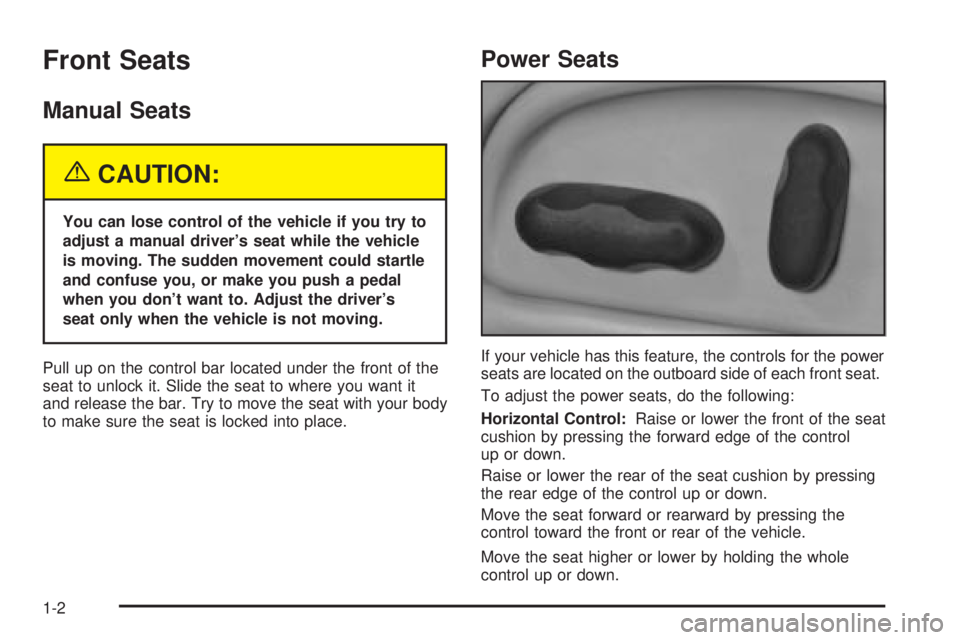
If your vehicle has this feature, the controls for the power
seats are located on the outboard side of each front seat.
To adjust the power seats, do the following:
Horizontal Control:Raise or lower the front of the seat
cushion by pressing the forward edge of the control
up or down.
Raise or lower the rear of the seat cushion by pressing
the rear edge of the control up or down.
Move the seat forward or rearward by pressing the
control toward the front or rear of the vehicle.
Move the seat higher or lower by holding the whole
control up or down.
1-2
Page 9 of 380
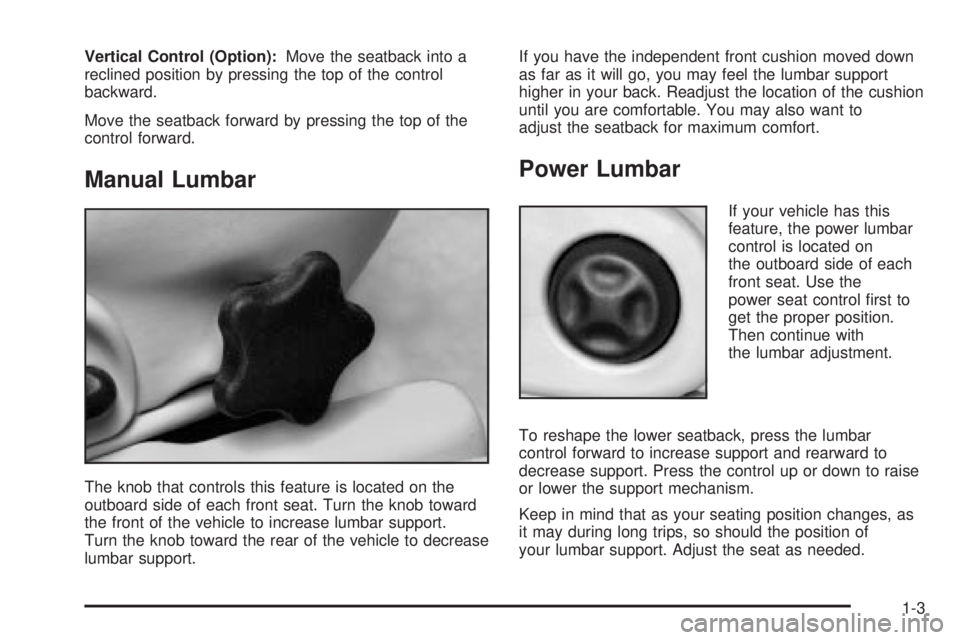
Vertical Control (Option):Move the seatback into a
reclined position by pressing the top of the control
backward.
Move the seatback forward by pressing the top of the
control forward.
Manual Lumbar
The knob that controls this feature is located on the
outboard side of each front seat. Turn the knob toward
the front of the vehicle to increase lumbar support.
Turn the knob toward the rear of the vehicle to decrease
lumbar support.If you have the independent front cushion moved down
as far as it will go, you may feel the lumbar support
higher in your back. Readjust the location of the cushion
until you are comfortable. You may also want to
adjust the seatback for maximum comfort.
Power Lumbar
If your vehicle has this
feature, the power lumbar
control is located on
the outboard side of each
front seat. Use the
power seat control ®rst to
get the proper position.
Then continue with
the lumbar adjustment.
To reshape the lower seatback, press the lumbar
control forward to increase support and rearward to
decrease support. Press the control up or down to raise
or lower the support mechanism.
Keep in mind that as your seating position changes, as
it may during long trips, so should the position of
your lumbar support. Adjust the seat as needed.
1-3
Page 34 of 380

{CAUTION:
Never do this.
Here two children are wearing the same belt.
The belt can't properly spread the impact
forces. In a crash, the two children can be
crushed together and seriously injured. A belt
must be used by only one person at a time.
Q:What if a child is wearing a lap-shoulder belt,
but the child is so small that the shoulder belt
is very close to the child's face or neck?
A:If the child is sitting in a seat next to a window,
move the child toward the center of the vehicle. If
the child is sitting in the center rear seat
passenger position, move the child toward the
safety belt buckle. In either case, be sure that the
shoulder belt still is on the child's shoulder, so
that in a crash the child's upper body would have
the restraint that belts provide.
If the child is so small that the shoulder belt is still
very close to the child's face or neck, you might
want to place the child in a seat that has a lap belt,
if your vehicle has one.
1-28
Page 39 of 380

Child Restraint Systems
An infant car bed (A), a special bed made for use in a
motor vehicle, is an infant restraint system designed
to restrain or position a child on a continuous ¯at
surface. Make sure that the infant's head rests toward
the center of the vehicle.A rear-facing infant seat (B) provides restraint with the
seating surface against the back of the infant. The
harness system holds the infant in place and, in a crash,
acts to keep the infant positioned in the restraint.
1-33
Page 58 of 380
How Does an Air Bag Restrain?
In moderate to severe frontal or near frontal collisions,
even belted occupants can contact the steering wheel or
the instrument panel. In moderate to severe side
collisions, even belted occupants can contact the inside
of the vehicle. The air bag supplements the protection
provided by safety belts. Air bags distribute the force of
the impact more evenly over the occupant's upper
body, stopping the occupant more gradually. But the
frontal air bags would not help you in many types
of collisions, including rollovers, rear impacts, and many
side impacts, primarily because an occupant's motion
is not toward the air bag. Side impact air bags would not
help you in many types of collisions, including frontal
or near frontal collisions, rollovers, and rear impacts,
primarily because an occupant's motion is not toward
those air bags. Air bags should never be regarded
as anything more than a supplement to safety belts, and
then only in moderate to severe frontal or near-frontal
collisions for the driver's and right front passenger's
frontal air bags, and only in moderate to severe
side collisions for vehicles with a driver's and right front
passenger's side impact air bag.
What Will You See After an Air Bag
In¯ates?
After the air bag in¯ates, it quickly de¯ates, so quickly
that some people may not even realize the air bag
in¯ated. Some components of the air bag module will be
hot for a short time. These components include the
steering wheel hub for the driver's frontal air bag and the
instrument panel for the right front passenger's frontal
air bag. For vehicles with side impact air bags, the side
of the seatback closest to the driver's and/or right
front passenger's door will be hot. The parts of the bag
that come into contact with you may be warm, but
not too hot to touch. There will be some smoke and dust
coming from the vents in the de¯ated air bags. Air
bag in¯ation doesn't prevent the driver from seeing or
being able to steer the vehicle, nor does it stop
people from leaving the vehicle.
1-52
Page 72 of 380

There are several ways to lock and unlock your vehicle.
If your vehicle has a content theft-deterrent system,
unlock the doors only with the key or remote keyless
entry system. This will avoid setting off the alarm.
To unlock the door from the outside, use your door key
or remote keyless entry transmitter. Turning the door
key toward the front of the vehicle will lock the
door. Turning the door key toward the rear of the
vehicle will unlock it.
To unlock the door from the inside, move the manual
door lock, located above the door handle, rearward. To
lock the door, move the manual door lock forward.Central Door Unlocking System
If your vehicle has a theft-deterrent system, all doors
will unlock if the key is held in the outside key cylinder
unlock position for more than two seconds. The
doors will also unlock if the key is turned to the unlock
position twice in three seconds.
Power Door Locks
With power door locks, you can lock or unlock all the
doors on your vehicle.
The power door lock
switches are located on
the driver's and front
passenger's door panels.
2-10
Page 79 of 380

Power Windows
The power window controls located on the driver's door
armrest operate each of the windows while the
ignition is on or while Retained Accessory Power (RAP)
is active. In addition, each passenger door has a
control for its own window. See ªRetained Accessory
Power (RAP)º under
Ignition Positions on page 2-22for
more information.
Express-Down Window
The driver's and front passenger's windows have an
express-down feature. Pull the AUTO control back
all the way; release it and the window will lowerautomatically. To stop the window from lowering, pull
the AUTO control again. To partially open the window,
pull the AUTO control back slightly. To raise the
window, push and hold the AUTO control forward.
Window Lock Out
Press the LOCK button on the driver's door armrest to
disable all passenger window controls. The driver's
window controls will still be operable. If you have
a Driver Information Center (DIC), you can also set the
control to only lock out the rear window controls.
See
Driver Information Center (DIC) on page 3-45.
Press the LOCK button again to allow passengers to use
their window controls.
Sun Visors
Lighted Visor Vanity Mirror
When you open the cover to the passenger's visor
vanity mirror, the lamp will turn on.
Your vehicle may also have a lighted driver's visor
vanity mirror.
Dual Sun Visor
If your vehicle has this feature, each visor has two
parts, so that both the windshield and door glass can be
shaded at the same time. To use the dual sun visors,
¯ip the ®rst visor down and turn it toward the window.
Then, ¯ip the second visor down toward the windshield.
2-17
Page 83 of 380
4. Insert the key to be programmed and turn it to RUN
within 10 seconds of removing the previous key.
5. The SECURITY telltale light will turn off once the
key has been programmed. It may not be apparent
that the SECURITY light went on due to how
quickly the key is programmed.
6. Repeat Steps 1 through 4 if additional keys are to
be programmed.
If you are ever driving and the SECURITY light comes
on and stays on, you will be able to restart your
engine if you turn it off. Your PASS-Key
žIII system,
however, is not working properly and must be serviced
by your dealer. Your vehicle is not protected by the
PASS-Key
žIII system at this time.
If you lose or damage a PASS-Key
žIII key, see your
dealer to have a new key made.
Starting and Operating Your
Vehicle
New Vehicle Break-In
Notice:Your vehicle doesn't need an elaborate
ªbreak-in.º But it will perform better in the long run
if you follow these guidelines:
·Don't drive at any one speed Ð fast or
slow Ð for the ®rst 500 miles (805 km). Don't
make full-throttle starts.
·Avoid making hard stops for the ®rst 200 miles
(322 km) or so. During this time your new
brake linings aren't yet broken in. Hard stops
with new linings can mean premature wear and
earlier replacement. Follow this breaking-in
guideline every time you get new brake linings.
·Don't tow a trailer during break-in. See ªTowing
a Trailerº in the Index for more information.
2-21
Page 84 of 380

Ignition Positions
With the key in the ignition switch, you can turn it to ®ve
different positions.
(A) ACCESSORY:This position lets you use your
electrical accessories such as power windows, power
sunroof (if equipped), radio and the windshield wipers.
To use, push in the ignition key and turn it toward
you. Your steering wheel will remain locked, just as it
was before you inserted the key.
(B) LOCK:This is the only position in which you can
remove the key. This position locks your ignition,
steering wheel and transaxle. It's a theft-deterrent
feature.
Notice:If your key seems stuck in LOCK and you
can't turn it, be sure you are using the correct key; if
so, is it all the way in? If it is, then turn the steering
wheel left and right while you turn the key hard.
Turn the key only with your hand. Using a tool
to force it could break the key or the ignition switch.
If none of these works, then your vehicle needs
service.
(C) OFF:This position lets you turn off the engine but
still turn the steering wheel. It doesn't lock the
steering wheel like LOCK and it doesn't send any
electrical power to the accessories. The instrument
panel cluster will remain powered in LOCK to illuminate
the gear shift indicator. The cluster will also activate
the parking brake light when the parking brake is
set. Use OFF if you must have your vehicle in motion
while the engine is not running.
(D) RUN:This is the position the switch returns to after
you start your engine and release the switch. This is
also the position for normal driving. Even when the
engine is not running, you can use RUN to operate your
electrical accessories and to display some instrument
panel warning lights.
(E) START:This position starts your engine. When the
engine starts, release the key. The ignition switch
will return to RUN for normal driving.
2-22