ECU BUICK LESABRE 2004 Owner's Guide
[x] Cancel search | Manufacturer: BUICK, Model Year: 2004, Model line: LESABRE, Model: BUICK LESABRE 2004Pages: 392, PDF Size: 4.3 MB
Page 160 of 392
DIC Vehicle Personalization
The DIC can be used to program the following personal
choice features available with your vehicle:
Automatic Door Locks
Window Lock Out
Security Feedback
Delayed Locking
Perimeter Lighting
Memory Seats
Outside Curb View Assist Mirror
Driver ID
Language Selection
The personal choice settings displayed on the DIC are
determined by the transmitter used to enter the
vehicle. Each remote keyless entry transmitter was
pre-programmed to belong to DRIVER 1 or DRIVER 2
and is numbered on the back. After the unlock button on
a remote keyless entry transmitter is pressed and the
ignition is in RUN, the DIC will display the identied
driver and recall the settings previously programmed for
that driver. The settings can also be recalled by
briey pressing one of the MEMORY buttons located on
the driver’s door.If you unlock the vehicle using your door key instead of
your transmitter, the DIC will not change drivers and
will recall the information from the last transmitter used
or the last driver using the memory seat controls. If
this happens and you were not the last driver of
the vehicle, simply press your correct driver number on
the memory seat controls or press the unlock button
on your remote keyless entry transmitter.
Use the following steps for personalization programming
instructions.
1. Turn the ignition on and keep the transaxle in
PARK (P).
2. Inform the DIC which driver you are by pressing the
unlock button on your remote keyless entry
transmitter or the appropriate memory seat control.
3. Press and hold the ENG/MET button for ve
seconds. WELCOME TO BUICK OPTION
FEATURE will appear in the display.
4. The rst choice to be made will be DRIVER
ID 1 or 2. Press the ENG/MET button to toggle
between your selections within a display and
RESET to choose the current selection and move
on to the next personal choice feature.
3-50
Page 162 of 392
Window Lock Out
The number of passenger windows locked out by the
window LOCK switch can be programmed through
the DIC.
If you choose R + PASS, all three passenger window
switches will be inactive when the window LOCK switch
is enabled.
If you choose REAR, only the two rear passenger
window switches will be locked out when the window
LOCK switch is enabled.
To change modes, do the following:
1. Move the arrow on the display between R + PASS
and REAR by pressing the ENG/MET button.
2. Once you have made your selection, press the
RESET button. Your choice will be retained in
memory.
For more information on this feature, see “Window Lock
Out” underPower Windows on page 2-17.
Security Feedback
By choosing different combinations of these selections,
you can choose the type of transmitter activated
feedback when locking and unlocking your vehicle with
your transmitter. Each time you make a selection by
pressing the ENG/MET button, press the RESET button
to record your choice.
KEYLESS FEEDBACK – OFF/ON
LIGHTS FEEDBACK – OFF/ON
HORN FEEDBACK – OFF/ON
If you choose ON for KEYLESS FEEDBACK you will
also need to choose LIGHTS and/or HORN FEEDBACK.
You can select the following modes:
If you choose OFF for KEYLESS FEEDBACK, you will
receive no security feedback when locking or
unlocking your vehicle.
If you choose ON for KEYLESS FEEDBACK and ON for
LIGHTS FEEDBACK, the exterior lamps will ash
twice when unlocking your vehicle and once when
locking your vehicle.
3-52
Page 163 of 392
If you choose ON for KEYLESS FEEDBACK and ON for
HORN FEEDBACK, your horn will chirp when all
doors are unlocked and when locking your vehicle.
If you choose ON for KEYLESS, LIGHTS and HORN
FEEDBACK, your exterior lamps will ash twice at
the rst unlock button press, your exterior lamps will
ash twice and the horn will chirp once at the second
unlock button press, and the exterior lamps will ash and
the horn will chirp once when locking your vehicle.
For more information on this feature, see “Security
Feedback” underRemote Keyless Entry System
Operation on page 2-5.
Delayed Locking
This feature, which delays the locking of the vehicle,
can be made active or inactive through the DIC. When
DELAYED LOCKING – OFF/ON appears on the
display, use the ENG/MET button to toggle the arrow
between OFF and ON. When you have made your
choice, press the RESET button to record your
selection.
For more information on this feature, seeDelayed
Locking on page 2-11.
Perimeter Lighting
Press the unlock button on the remote keyless entry
transmitter to turn on the DRL (high-beams at reduced
intensity), parking lamps and back-up lamps if it is
dark enough according to the Twilight Sentinel
®.
You can control activation of this feature by choosing
OFF or ON when the PERIMETER LIGHTS choice
is displayed on the DIC. Make your choice by pressing
the ENG/MET button and record your choice by
pressing the RESET button. You will then be prompted
to choose a TIMEOUT period. See “Exterior Lights”
following for more information.
For more information on this feature, see “Perimeter
Lighting” underInterior Lamps on page 3-17.
Exterior Lights
The EXTERIOR LIGHTS/TIMEOUT feature can be
changed to a desired setting by using the ENG/MET to
toggle from 5 to 30 seconds. Each toggle will increase
the time by ve seconds. Once the desired timeout
is displayed, press RESET to record your choice and
move on to the next personal choice feature.
3-53
Page 179 of 392
XM™ Radio Messages (cont’d)
Radio Display
MessageCondition Action Required
No Info Category Name not
availableNo category information is available at this time on this
channel. Your system is working properly.
No Info No Text/Informational
message availableNo text or informational messages are available at this time
on this channel. Your system is working properly.
Not Found No channel available for
the chosen categoryThere are no channels available for the category you
selected. Your system is working properly.
XM Locked Theft lock active The XM receiver in your vehicle may have previously been
in another vehicle. For security purposes, XM receivers
cannot be swapped between vehicles. If you receive this
message after having your vehicle serviced, check with the
servicing facility.
Radio ID Radio ID label
(channel 0)If you tune to channel 0, you will see this message
alternating with your XM Radio 8 digit radio ID label. This
label is needed to activate your service.
Unknown Radio ID not known
(should only be if
hardware failure)If you receive this message when you tune to channel 0, you
may have a receiver fault. Consult with your dealer.
Chk XMRcvr Hardware failure If this message does not clear within a short period of time,
your receiver may have a fault. Consult with your retail
location.
3-69
Page 218 of 392
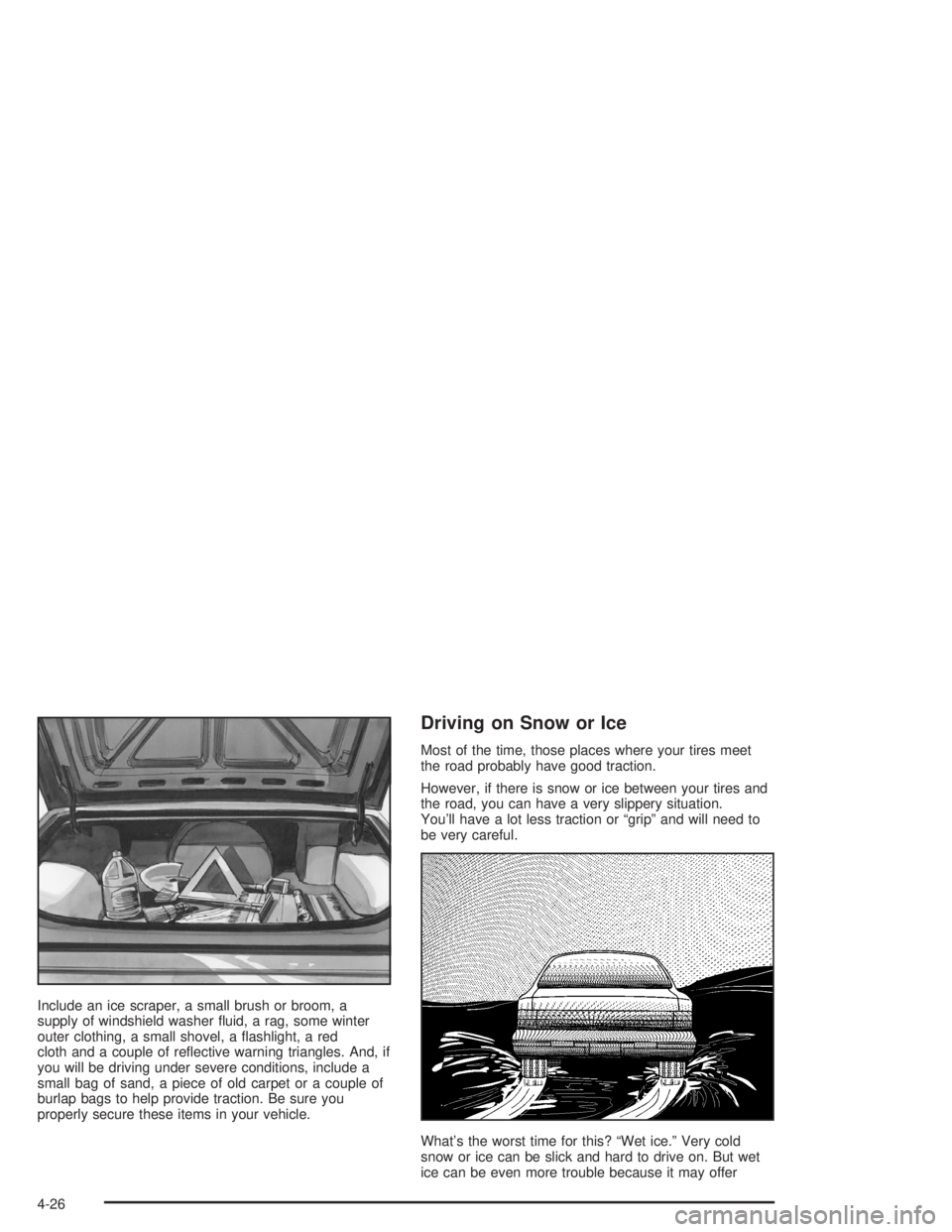
Include an ice scraper, a small brush or broom, a
supply of windshield washer uid, a rag, some winter
outer clothing, a small shovel, a ashlight, a red
cloth and a couple of reective warning triangles. And, if
you will be driving under severe conditions, include a
small bag of sand, a piece of old carpet or a couple of
burlap bags to help provide traction. Be sure you
properly secure these items in your vehicle.
Driving on Snow or Ice
Most of the time, those places where your tires meet
the road probably have good traction.
However, if there is snow or ice between your tires and
the road, you can have a very slippery situation.
You’ll have a lot less traction or “grip” and will need to
be very careful.
What’s the worst time for this? “Wet ice.” Very cold
snow or ice can be slick and hard to drive on. But wet
ice can be even more trouble because it may offer
4-26
Page 231 of 392
{CAUTION:
Things you put inside your vehicle can strike
and injure people in a sudden stop or turn, or
in a crash.
Put things in the trunk of your vehicle. In a
trunk, put them as far forward as you can.
Try to spread the weight evenly.
Never stack heavier things, like suitcases,
inside the vehicle so that some of them
are above the tops of the seats.
Don’t leave an unsecured child restraint in
your vehicle.
When you carry something inside the
vehicle, secure it whenever you can.
Automatic Level Control
This feature keeps the rear of your vehicle level as the
load changes. It is automatic — you do not need to
adjust anything.
Towing a Trailer
{CAUTION:
If you do not use the correct equipment and
drive properly, you can lose control when you
pull a trailer. For example, if the trailer is too
heavy, the brakes may not work well — or even
at all. You and your passengers could be
seriously injured. You may also damage your
vehicle; the resulting repairs would not be
covered by your warranty. Pull a trailer only if
you have followed all the steps in this section.
Ask your dealer for advice and information
about towing a trailer with your vehicle.
Your vehicle can tow a trailer if it is equipped with the
proper trailer towing equipment. To identify what
the vehicle trailering capacity is for your vehicle, you
should read the information in “Weight of the Trailer” that
appears later in this section. But trailering is different
than just driving your vehicle by itself. Trailering means
changes in handling, acceleration, braking, durability
and fuel economy. Successful, safe trailering takes
correct equipment, and it has to be used properly.
4-39
Page 235 of 392
Safety Chains
You should always attach chains between your vehicle
and your trailer. Cross the safety chains under the
tongue of the trailer so that the tongue will not drop to
the road if it becomes separated from the hitch.
Instructions about safety chains may be provided by the
hitch manufacturer or by the trailer manufacturer.
Follow the manufacturer’s recommendation for attaching
safety chains and do not attach them to the bumper.
Always leave just enough slack so you can turn
with your rig. And, never allow safety chains to drag on
the ground.
Trailer Brakes
Does your trailer have its own brakes? Be sure to read
and follow the instructions for the trailer brakes so
you will be able to install, adjust and maintain them
properly.
Because you have anti-lock brakes, do not try to tap
into your vehicle’s brake system. If you do, both brake
systems will not work well, or at all.
Trailer Wiring Harness
All of the electrical circuits required for your trailer
lighting system can be accessed at the driver’s side rear
lamp connector. This connector is located under the
carpet on the rear corner of the trunk compartment.
Driving with a Trailer
Towing a trailer requires a certain amount of experience.
Before setting out for the open road, you will want to
get to know your rig. Acquaint yourself with the feel of
handling and braking with the added weight of the trailer.
And always keep in mind that the vehicle you are
driving is now a good deal longer and not nearly as
responsive as your vehicle is by itself.
Before you start, check all trailer hitch parts and
attachments, safety chains, electrical connector, lamps,
tires and mirror adjustment. If the trailer has electric
brakes, start your vehicle and trailer moving and then
apply the trailer brake controller by hand to be sure
the brakes are working. This lets you check your
electrical connection at the same time.
During your trip, check occasionally to be sure that the
load is secure, and that the lamps and any trailer
brakes are still working.
4-43
Page 279 of 392
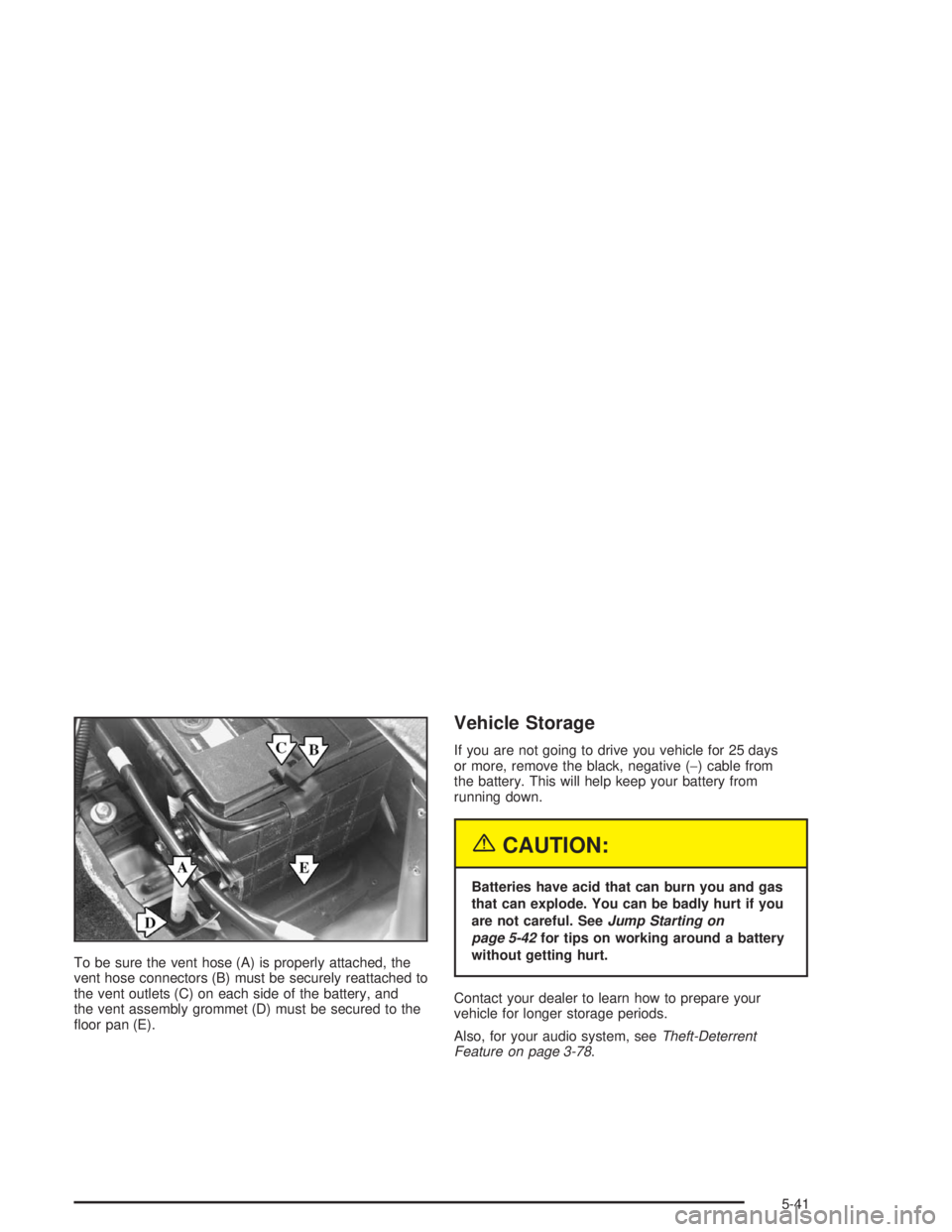
To be sure the vent hose (A) is properly attached, the
vent hose connectors (B) must be securely reattached to
the vent outlets (C) on each side of the battery, and
the vent assembly grommet (D) must be secured to the
oor pan (E).
Vehicle Storage
If you are not going to drive you vehicle for 25 days
or more, remove the black, negative (−) cable from
the battery. This will help keep your battery from
running down.
{CAUTION:
Batteries have acid that can burn you and gas
that can explode. You can be badly hurt if you
are not careful. SeeJump Starting on
page 5-42for tips on working around a battery
without getting hurt.
Contact your dealer to learn how to prepare your
vehicle for longer storage periods.
Also, for your audio system, seeTheft-Deterrent
Feature on page 3-78.
5-41
Page 310 of 392
If you need to replace any of your wheels, wheel bolts
or wheel nuts, replace them only with new GM
original equipment parts. This way, you will be sure to
have the right wheel, wheel bolts and wheel nuts
for your vehicle.
{CAUTION:
Using the wrong replacement wheels, wheel
bolts or wheel nuts on your vehicle can be
dangerous. It could affect the braking and
handling of your vehicle, make your tires lose
air and make you lose control. You could have
a collision in which you or others could be
injured. Always use the correct wheel, wheel
bolts and wheel nuts for replacement.
Notice:The wrong wheel can also cause problems
with bearing life, brake cooling, speedometer or
odometer calibration, headlamp aim, bumper height,
vehicle ground clearance and tire or tire chain
clearance to the body and chassis.
SeeChanging a Flat Tire on page 5-74for more
information.
Used Replacement Wheels
{CAUTION:
Putting a used wheel on your vehicle is
dangerous. You can’t know how it’s been used
or how far it’s been driven. It could fail
suddenly and cause a crash. If you have to
replace a wheel, use a new GM original
equipment wheel.
Tire Chains
Notice:Use tire chains only where legal and only
when you must. Use only SAE Class “S” type chains
that are the proper size for your tires. Install them
on the front tires and tighten them as tightly as
possible with the ends securely fastened. Drive
slowly and follow the chain manufacturer’s
instructions. If you can hear the chains contacting
your vehicle, stop and retighten them. If the contact
continues, slow down until it stops. Driving too
fast or spinning the wheels with chains on will
damage your vehicle.
5-72
Page 319 of 392
Notice:Improperly tightened wheel nuts can lead
to brake pulsation and rotor damage. To avoid
expensive brake repairs, evenly tighten the wheel
nuts in the proper sequence and to the proper
torque specication. See “Capacities and
Specications” in the index for the wheel nut torque
specication.
Notice:Wheel covers will not t on your compact
spare. If you try to put a wheel cover on the compact
spare, you could damage the cover or the spare.
Storing the Flat Tire and Tools
{CAUTION:
Storing a jack, a tire, or other equipment in the
passenger compartment of the vehicle could
cause injury. In a sudden stop or collision,
loose equipment could strike someone. Store
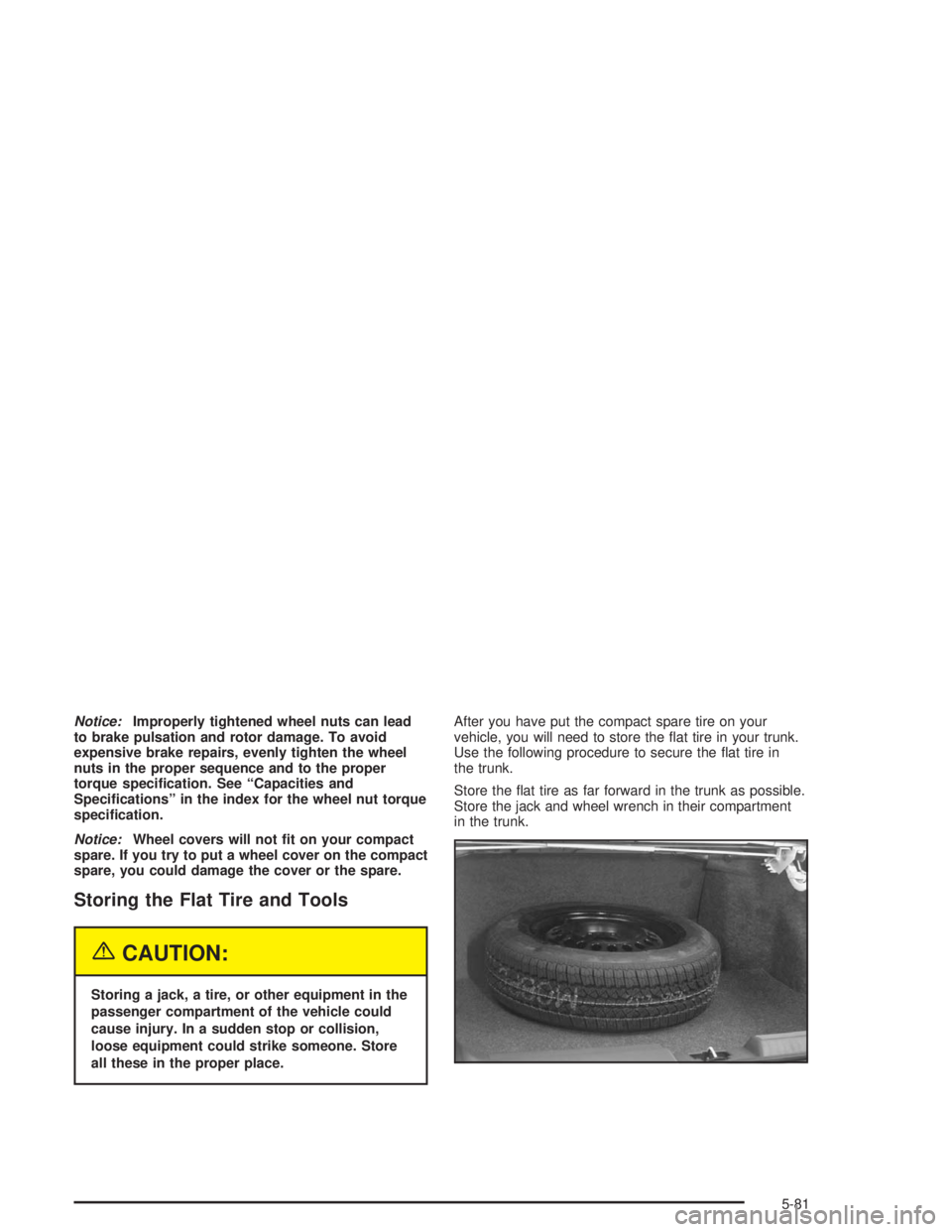
all these in the proper place.After you have put the compact spare tire on your
vehicle, you will need to store the at tire in your trunk.
Use the following procedure to secure the at tire in
the trunk.
Store the at tire as far forward in the trunk as possible.
Store the jack and wheel wrench in their compartment
in the trunk.
5-81