DIC BUICK LESABRE 2005 User Guide
[x] Cancel search | Manufacturer: BUICK, Model Year: 2005, Model line: LESABRE, Model: BUICK LESABRE 2005Pages: 392, PDF Size: 2.45 MB
Page 77 of 392
If your vehicle is equipped with the DIC, you must use
it to program this feature. SeeDriver Information
Center (DIC) on page 3-47.
If your vehicle is not equipped with the DIC, use the
following procedure to change modes:
1. Close all the doors and turn the ignition to RUN.
Keep all doors closed throughout this procedure.
2. Press and hold LOCK on the driver’s power door
lock switch throughout this procedure. All the
doors will lock.
3. Press the lock button on the remote keyless entry
transmitter. The automatic door locks will remain in
the current mode.
4. Press the lock button on the transmitter again. Each
time this button is pressed, the mode will advance
by one, going from 3 to 0 to 1, etc.
The door locks will cycle according to the mode
entered while customizing the memory door locks.
(Mode 0 has no feedback.)
5. Release the power door lock switch. The
automatic door locks will remain in the most
recent mode selected.
This procedure only changes the mode for the
transmitter used to change this setting.Rear Door Security Locks
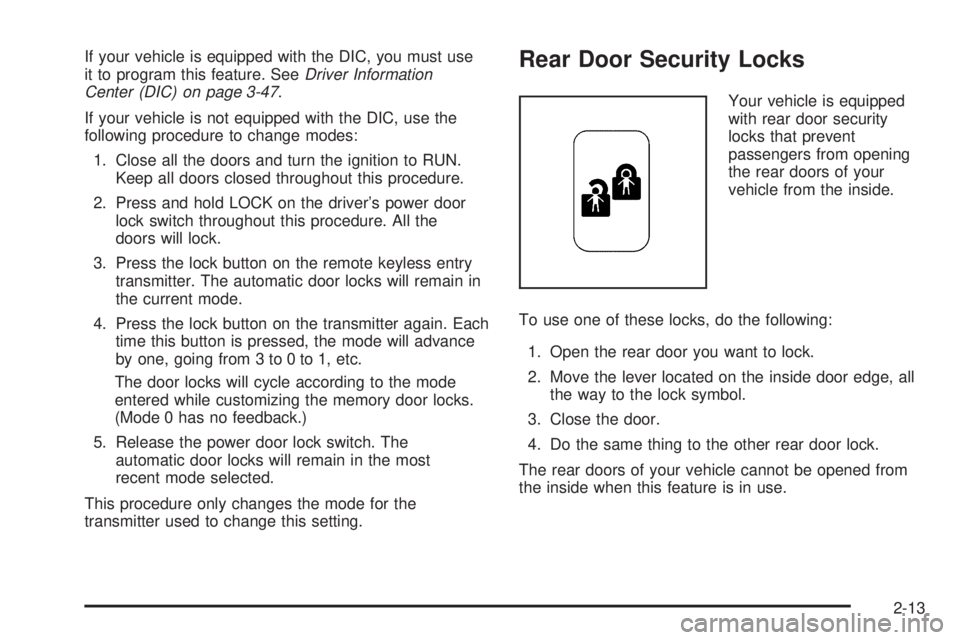
Your vehicle is equipped
with rear door security
locks that prevent
passengers from opening
the rear doors of your
vehicle from the inside.
To use one of these locks, do the following:
1. Open the rear door you want to lock.
2. Move the lever located on the inside door edge, all
the way to the lock symbol.
3. Close the door.
4. Do the same thing to the other rear door lock.
The rear doors of your vehicle cannot be opened from
the inside when this feature is in use.
2-13
Page 81 of 392
Power Windows
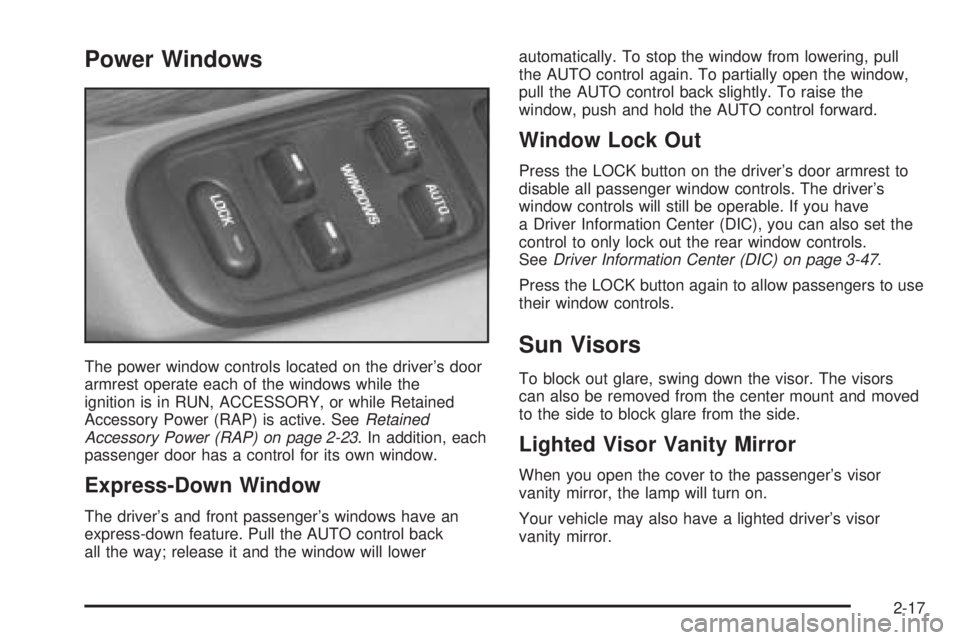
The power window controls located on the driver’s door
armrest operate each of the windows while the
ignition is in RUN, ACCESSORY, or while Retained
Accessory Power (RAP) is active. SeeRetained
Accessory Power (RAP) on page 2-23. In addition, each
passenger door has a control for its own window.
Express-Down Window
The driver’s and front passenger’s windows have an
express-down feature. Pull the AUTO control back
all the way; release it and the window will lowerautomatically. To stop the window from lowering, pull
the AUTO control again. To partially open the window,
pull the AUTO control back slightly. To raise the
window, push and hold the AUTO control forward.
Window Lock Out
Press the LOCK button on the driver’s door armrest to
disable all passenger window controls. The driver’s
window controls will still be operable. If you have
a Driver Information Center (DIC), you can also set the
control to only lock out the rear window controls.
SeeDriver Information Center (DIC) on page 3-47.
Press the LOCK button again to allow passengers to use
their window controls.
Sun Visors
To block out glare, swing down the visor. The visors
can also be removed from the center mount and moved
to the side to block glare from the side.
Lighted Visor Vanity Mirror
When you open the cover to the passenger’s visor
vanity mirror, the lamp will turn on.
Your vehicle may also have a lighted driver’s visor
vanity mirror.
2-17
Page 86 of 392
Ignition Positions
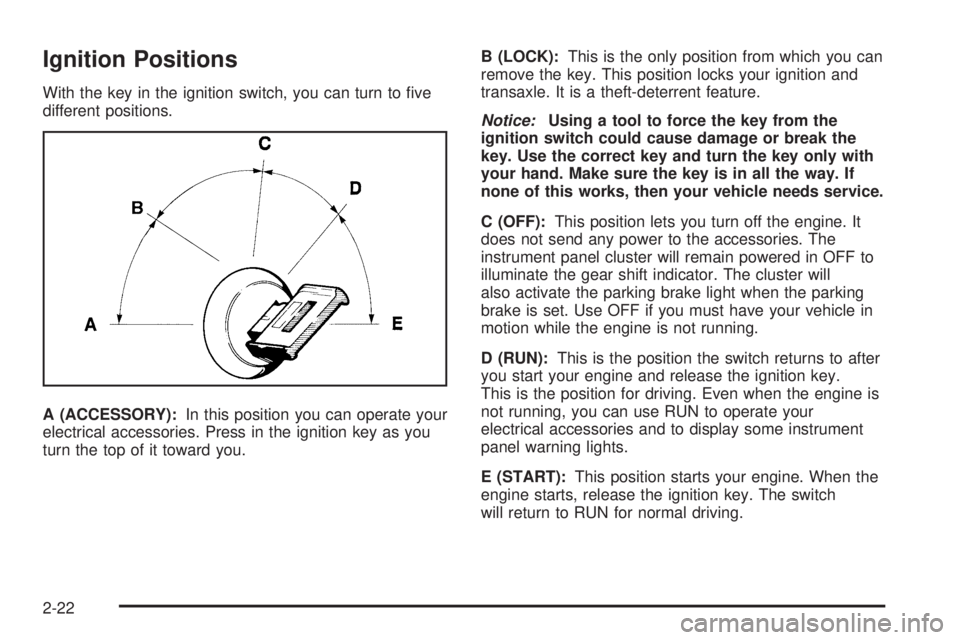
With the key in the ignition switch, you can turn to ve
different positions.
A (ACCESSORY):In this position you can operate your
electrical accessories. Press in the ignition key as you
turn the top of it toward you.B (LOCK):This is the only position from which you can
remove the key. This position locks your ignition and
transaxle. It is a theft-deterrent feature.
Notice:Using a tool to force the key from the
ignition switch could cause damage or break the
key. Use the correct key and turn the key only with
your hand. Make sure the key is in all the way. If
none of this works, then your vehicle needs service.
C (OFF):This position lets you turn off the engine. It
does not send any power to the accessories. The
instrument panel cluster will remain powered in OFF to
illuminate the gear shift indicator. The cluster will
also activate the parking brake light when the parking
brake is set. Use OFF if you must have your vehicle in
motion while the engine is not running.
D (RUN):This is the position the switch returns to after
you start your engine and release the ignition key.
This is the position for driving. Even when the engine is
not running, you can use RUN to operate your
electrical accessories and to display some instrument
panel warning lights.
E (START):This position starts your engine. When the
engine starts, release the ignition key. The switch
will return to RUN for normal driving.
2-22
Page 97 of 392

Mirror Operation
AUTO:Press this button to turn on the automatic
dimming feature.
OFF:Press this button to turn off the automatic
dimming feature.
O(On/Off):For mirrors equipped with OnStar®
controls, press this button to turn the automatic dimming
feature on or off.
The indicator light will be illuminated when this feature
is on.
Automatic Dimming Rearview Mirror
with Compass
The vehicle may have an automatic dimming rearview
mirror with a compass. It may also have OnStar®
controls. SeeOnStar®System on page 2-37for
more information.
The mirror has an eight-point compass display in the
upper right corner of the mirror.
When cleaning the mirror, use a paper towel or similar
material dampened with glass cleaner. Do not spray
glass cleaner directly on the mirror as that may cause
the liquid cleaner to enter the mirror housing.
Mirror Operation
MIRROR:Press this button to turn the automatic
dimming feature on or off.
O(On/Off):For mirrors equipped with OnStar®
controls, press and hold this button for several seconds
to turn on the automatic dimming feature on or off.
The indicator light will come on when this feature is on.
The automatic dimming feature will go on each time
the vehicle is started.
Compass Operation
COMPASS:Press this button once to turn the compass
on or off.
O(On/Off):For mirrors equipped with OnStar®
controls, press this button to turn the compass on or off.
When the ignition and the compass feature are on,
the compass will show two character boxes for about
two seconds. After two seconds, the mirror will display
the direction of the vehicle.
2-33
Page 100 of 392
Outside Curb View Assist Mirror
If you have the Memory Seat and Mirrors feature, the
passenger’s outside rearview mirror includes a tilt-down
feature that operates when the shift lever is in
REVERSE (R). This feature assists the driver, improving
rear obstacle detection. When the vehicle is shifted
out of REVERSE (R), the passenger mirror will return to
its original position after a ve-second delay. This
delay prevents movement of the mirror if multiple gear
transitions (REVERSE (R) to AUTOMATIC
OVERDRIVE (
X) to REVERSE (R)) occur during a
parallel parking maneuver. This feature can be
programmed on or off through the personal choice
selection menu. SeeDIC Vehicle Personalization on
page 3-51for programming instructions.
Outside Convex Mirror
The passenger’s side mirror is convex. A convex
mirror’s surface is curved so more can be seen from the
driver’s seat.
{CAUTION:
A convex mirror can make things (like other
vehicles) look farther away than they really are.
If you cut too sharply into the right lane, you
could hit a vehicle on your right. Check your
inside mirror or glance over your shoulder
before changing lanes.
Outside Automatic Dimming
Heated Mirror
If you have this feature, the outside driver’s mirror will
adjust for the glare of headlamps behind you. This
feature is controlled using the on and off settings on the
automatic dimming rearview mirror. SeeAutomatic
Dimming Rearview Mirror on page 2-32.
When you operate the rear window defogger, the
heated driver’s and passenger’s outside rearview mirrors
are warmed to help clear them of ice and snow. See
“Rear Window Defogger” underClimate Control System
on page 3-24orDual Automatic Climate Control
System on page 3-27for more information.
2-36
Page 104 of 392
Programming HomeLink®
Your vehicle’s engine should be turned off while
programming the transmitter. Follow these steps to
program up to three channels:
1. Press and hold down the two outside buttons,
releasing only when the indicator light begins to
ash, after 20 seconds. Do not hold down the
buttons for longer than 30 seconds and do not
repeat this step to program a second and/or third
transmitter to the remaining two HomeLink
®buttons.
2. Position the end of your hand-held transmitter about
1 to 3 inches (3 to 8 cm) away from the HomeLink
®
buttons while keeping the indicator light in view.
3. Simultaneously press and hold both the desired
button on HomeLink
®and the hand-held transmitter
button. Do not release the buttons until Step 4
has been completed.
Some entry gates and garage door openers may
require you to substitute Step 3 with the procedure
noted in “Gate Operator and Canadian
Programming” later in this section.4. The indicator light will ash slowly at rst and then
rapidly after HomeLink
®successfully receives the
frequency signal from the hand-held transmitter.
Release both buttons.
5. Press and hold the newly-trained HomeLink
®button
and observe the indicator light.
If the indicator light stays on constantly,
programming is complete and your device should
activate when the HomeLink
®button is pressed and
released.
To program the remaining two HomeLink
®buttons,
begin with Step 2 under “Programming HomeLink®.”
Do not repeat Step 1 as this will erase all of the
programmed channels.
If the indicator light blinks rapidly for two seconds
and then turns to a constant light, continue with
Steps 6 through 8 following to complete the
programming of a rolling-code equipped device
(most commonly, a garage door opener).
2-40
Page 105 of 392
6. Locate in the garage, the garage door opener
receiver (motor-head unit). Locate the “Learn”
or “Smart” button. This can usually be found where
the hanging antenna wire is attached to the
motor-head unit.
7. Firmly press and release the “Learn” or “Smart”
button. The name and color of the button may
vary by manufacturer.
You will have 30 seconds to start Step 8.
8. Return to the vehicle. Firmly press and hold the
programmed HomeLink
®button for two seconds,
then release. Repeat the press/hold/release
sequence a second time, and depending on the
brand of the garage door opener (or other rolling
code device), repeat this sequence a third time
to complete the programming.
HomeLink
®should now activate your rolling-code
equipped device.
To program the remaining two HomeLink
®buttons,
begin with Step 2 of “Programming HomeLink®.” You do
not want to repeat Step 1, as this will erase all
previous programming.
Gate Operator and Canadian
Programming
Canadian radio-frequency laws require transmitter
signals to “time out” or quit after several seconds of
transmission. This may not be long enough for
HomeLink
®to pick up the signal during programming.
Similarly, some U.S. gate operators are manufactured to
“time out” in the same manner.
If you live in Canada, or you are having difficulty
programming a gate operator by using the
“Programming HomeLink
®” procedures (regardless of
where you live), replace Step 3 under “Programming
HomeLink
®” with the following:
Continue to press and hold the HomeLink
®button while
you press and release every two seconds (cycle)
your hand-held transmitter until the frequency signal has
been successfully accepted by HomeLink
®. The
indicator light will ash slowly at rst and then rapidly.
Proceed with Step 4 under “Programming HomeLink
®”
to complete.
Using HomeLink®
Press and hold the appropriate HomeLink®button for at
least half of a second. The indicator light will come
on while the signal is being transmitted.
2-41
Page 106 of 392
Erasing HomeLink®Buttons
To erase programming from the three buttons do
the following:
1. Press and hold down the two outside buttons until
the indicator light begins to ash, after 20 seconds.
Do not hold the two outside buttons for longer
than 30 seconds.
2. Release both buttons.
HomeLink
®is now in the train (learning) mode and can
be programmed at any time beginning with Step 2
under “Programming HomeLink
®” shown earlier in
this section.
Individual buttons cannot be erased, but they can be
reprogrammed. See “Reprogramming a Single
HomeLink
®Button” following this section.
Reprogramming a Single
HomeLink®Button
To program a device to HomeLink®using a HomeLink®
button previously trained, follow these steps:
1. Press and hold the desired HomeLink
®button. Do
not release the button.
2. The indicator light will begin to ash after
20 seconds. While still holding the HomeLink
®
button, proceed with Step 2 under “Programming
HomeLink®” shown earlier in this section.
Resetting Defaults
To reset HomeLink®to default settings do the following:
1. Hold down the two outside buttons for about
20 seconds until the indicator light begins to ash.
2. Continue to hold both buttons until the HomeLink
®
indicator light turns off.
3. Release both buttons.
For questions or comments, contact HomeLink
®at
1-800-355-3515, or on the internet at
www.homelink.com.
2-42
Page 109 of 392

Vehicle Personalization
Memory Seat and Mirrors
If your vehicle has this feature, the controls are located
on the driver’s door panel, and are used to program
and recall memory settings for the driver’s seating,
outside mirror positions and climate controls.
SeeClimate Control System on page 3-24for
more information.To save your seat and mirror positions into memory,
use the following procedure:
1. First identify the DRIVER # on the Driver Information
Center (DIC) by pressing the MEMORY button 1
or 2 or by pressing the unlock button on the remote
keyless entry transmitter. SeeDriver Information
Center (DIC) on page 3-47.
2. Adjust the driver’s seat and lumbar position to a
safe and comfortable driving position. Adjust both
outside mirrors to suit you. SeeOutside Power
Mirrors on page 2-35.
3. Press and hold the MEMORY button (1 or 2)
corresponding with your DRIVER # displayed on the
DIC for longer than three seconds. You will hear
two beeps conrming that the seat and mirror
positions have been entered into memory.
To set the seat and mirror positions for a second driver,
follow the previous steps, but start by pressing the
unlock button on the transmitter that displays the other
DRIVER # on the DIC. Be sure to use the MEMORY
button which corresponds to the DRIVER # identied by
the second transmitter.
2-45
Page 110 of 392

To recall your memory positions, your vehicle must be
in PARK (P). Push and release the MEMORY button
corresponding to the desired driving position. The seat
and mirrors will move to the position previously
stored for the identied driver. You will hear one beep.
To store the exit position for an easy exit, use the
following procedure:
1. First identify the DRIVER # by pressing the
MEMORY button 1 or 2 or by pressing the unlock
button on the transmitter.
2. Adjust the driver’s seat to the desired exit position.
3. Press and hold the EXIT button for longer than
three seconds. You will hear two beeps conrming
that the seat exit position has been entered
into memory.
To set the exit position for a second driver, follow the
previous steps, but start by pressing the unlock
button on the transmitter that displays the other
DRIVER # on the DIC. Be sure to use the MEMORY
button which corresponds to the DRIVER # identied by
the other transmitter.To recall the exit position, your vehicle must be in
PARK (P). Push and release the EXIT button and the
seat will move to the exit position previously stored
for the current identied driver. You will hear one beep.
If an exit position has not been stored for the current
identied driver, the seat will move all the way back.
To stop recall movement of the seat at any time, press
the driver’s power seat control located on the outboard
side of the front seat.
Mirrors and lumbar positions will not be stored or
recalled for the exit position.
If you would like your stored driving or exit position to
be recalled when unlocking your vehicle with the
transmitter, seeDIC Vehicle Personalization on
page 3-51.
2-46