buttons BUICK LESABRE 2005 User Guide
[x] Cancel search | Manufacturer: BUICK, Model Year: 2005, Model line: LESABRE, Model: BUICK LESABRE 2005Pages: 392, PDF Size: 2.45 MB
Page 142 of 392

Climate Controls Personalization
If your vehicle is equipped with this feature, up to
two drivers are able to store and recall climate control
settings for the temperature, the fan speed and the
direction of the airow.
Memory buttons 1 and 2 are located on the driver’s
door armrest and correspond to the numbers 1
or 2 found on the back of each remote keyless
entry transmitter.
To store settings, do the following:
1. Select the desired temperature, fan speed and
airow mode. If desired, a separate temperature
setting may also be selected for the front seat
passenger. For information on how to do this, see
Dual Automatic Climate Control System on
page 3-27.2. Locate memory buttons 1 and 2 on the driver’s
door armrest.
3. Press the memory button on the door panel that
corresponds to the number on the back of the
transmitter you are programming, until you hear
two beeps. The beeps conrm that your selection
has been saved and can now be recalled. For more
information on the memory feature, seeMemory
Seat and Mirrors on page 2-45.
Follow these steps each time you want to change the
stored settings.
To recall the climate control settings last stored on your
transmitter, press the unlock button on your remote
keyless entry transmitter and put the ignition in
ACCESSORY or RUN. The settings will be recalled.
3-32
Page 158 of 392
If a problem is detected, a diagnostic message will
appear in the display. The following pages will show the
messages you may see on the DIC display.
The message center is continuously updated with the
vehicle’s performance status.
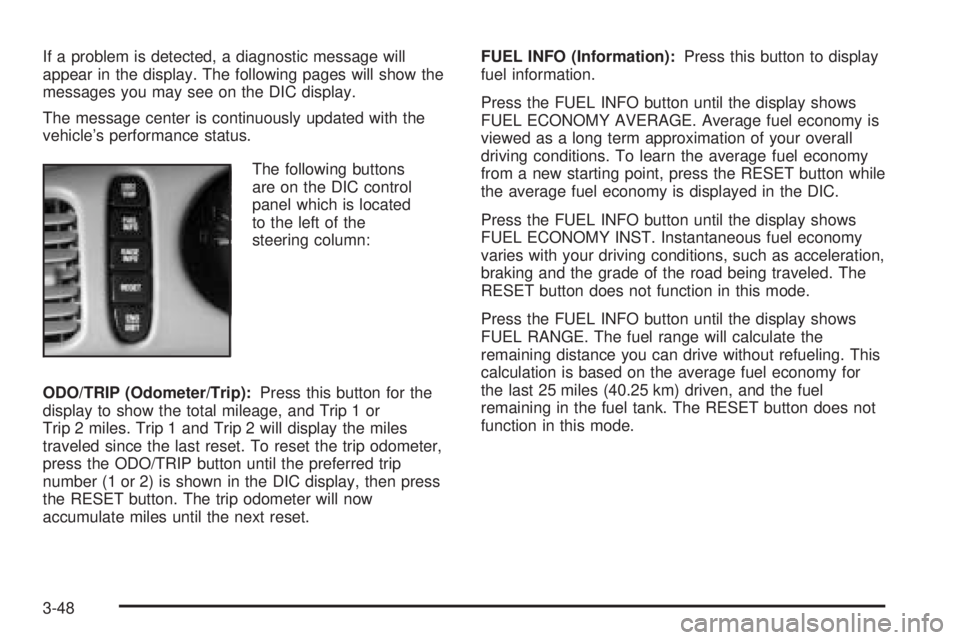
The following buttons
are on the DIC control
panel which is located
to the left of the
steering column:
ODO/TRIP (Odometer/Trip):Press this button for the
display to show the total mileage, and Trip 1 or
Trip 2 miles. Trip 1 and Trip 2 will display the miles
traveled since the last reset. To reset the trip odometer,
press the ODO/TRIP button until the preferred trip
number (1 or 2) is shown in the DIC display, then press
the RESET button. The trip odometer will now
accumulate miles until the next reset.FUEL INFO (Information):Press this button to display
fuel information.
Press the FUEL INFO button until the display shows
FUEL ECONOMY AVERAGE. Average fuel economy is
viewed as a long term approximation of your overall
driving conditions. To learn the average fuel economy
from a new starting point, press the RESET button while
the average fuel economy is displayed in the DIC.
Press the FUEL INFO button until the display shows
FUEL ECONOMY INST. Instantaneous fuel economy
varies with your driving conditions, such as acceleration,
braking and the grade of the road being traveled. The
RESET button does not function in this mode.
Press the FUEL INFO button until the display shows
FUEL RANGE. The fuel range will calculate the
remaining distance you can drive without refueling. This
calculation is based on the average fuel economy for
the last 25 miles (40.25 km) driven, and the fuel
remaining in the fuel tank. The RESET button does not
function in this mode.
3-48
Page 160 of 392
If you see the CHECK TIRE PRESSURE message, you
should stop as soon as you can and check all your
tires for damage. If a tire is at, seeIf a Tire Goes Flat
on page 5-69. Also check the tire pressure in all four
tires as soon as you can. SeeInation - Tire Pressure
on page 5-60andCheck Tire Pressure System on
page 5-62. There are times when you will have to reset
(calibrate) the Check Tire Pressure System. See
Check Tire Pressure System on page 5-62.
RESET:This button, used along with other buttons, will
reset system functions.
ENG/MET (English/Metric):Use this button to change
the display between English and metric units.
DIC messages can be displayed in one of three
languages: English, French or Spanish. The language
of the display is set by pressing both the FUEL
INFO and RESET buttons for ve seconds. As the
buttons are held, each language will be displayed for
three seconds. Release the FUEL INFO and RESET
buttons when the desired language is displayed. All DIC
messages will now be in the selected language.
Language selection can also be done through the DIC
Personal Choice Programming. See “Language
Selection” underDIC Vehicle Personalization on
page 3-51.DIC Warnings and Messages
Other messages or warnings may appear in the DIC
display. For Canadian drivers, in addition to the
DIC message your DIC will display EXP with a number
after it which reects the following messages:
EXP
(Export ID) Warning Message
20 TURN SIGNAL STILL ON?
24 TRUNK AJAR
25 WINDSHIELD WASHER FLUID LOW
27 BATTERY SAVER ACTIVE
36 ENGINE OIL LOW – CHECK LEVEL
40 THEFT ATTEMPT DETECTED
54 SERVICE STABILITY SYSTEM
55 STABILITY SYSTEM ACTIVE
61 GAS CAP LOOSE – CHECK CAP
81 CHANGE ENGINE OIL SOON
91 TRACTION CONTROL SYSTEM ACTIVE
102 CHECK CHARGE SYSTEM
139 DOOR AJAR
144 CHECK TIRE PRESSURES
The EXP codes are used to make translation from
English to other languages easier.
Pressing any of the DIC control buttons will remove the
messages or warnings from the DIC display.
3-50
Page 161 of 392
SERVICE STABILITY SYSTEM – 54:If you ever see
the SERVICE STABILITY SYSTEM message, it
means there may be a problem with your stability
enhancement system. If you see this message, try to
reset the system: stop, turn off the engine, then start the
engine again. If the SERVICE STABILITY SYSTEM
message still comes on, it means there is a problem.
You should see your GM dealer for service. Reduce
your speed and drive accordingly.
STABILITY SYSTEM ACTIVE – 55:You may see the
STABILITY SYSTEM ACTIVE message on the Driver
Information Center. It means that an advanced,
computer-controlled system has come on to help your
vehicle continue to go in the direction in which you
are steering. This stability enhancement system
activates when the computer senses that your vehicle is
just starting to spin, as it might if you hit a patch of
ice or other slippery spot on the road. When the system
is on, you may hear a noise or feel a vibration in the
brake pedal. This is normal.
When the STABILITY SYSTEM ACTIVE message is on,
you should continue to steer in the direction you want
to go. The system is designed to help you in bad
weather or other difficult driving situations by making the
most of whatever road conditions will permit. If the
STABILITY SYSTEM ACTIVE message comes on, you
will know that something has caused your vehicle to
start to spin, so you should consider slowing down.DIC Vehicle Personalization
The DIC can be used to program the following personal
choice features available with your vehicle:
Automatic Door Locks
Window Lock Out
Security Feedback
Delayed Locking
Perimeter Lighting
Memory Seats
Outside Curb View Assist Mirror
Driver ID
Language Selection
The personal choice settings displayed on the DIC are
determined by the transmitter used to enter the
vehicle. Each remote keyless entry transmitter was
pre-programmed to belong to DRIVER 1 or DRIVER 2
and is numbered on the back. After the unlock button on
a remote keyless entry transmitter is pressed and the
ignition is in RUN, the DIC will display the identied
driver and recall the settings previously programmed for
that driver. The settings can also be recalled by
briey pressing one of the MEMORY buttons located on
the driver’s door.
3-51
Page 168 of 392
SCV (Speed-Compensated Volume):With SCV, the
audio system adjusts automatically to make up for
road and wind noise as you drive.
To get to SCV, push the TUNE/AUDIO knob repeatedly
until SPEED VOL appears on the display. Turn the
TUNE/AUDIO knob to select MIN, MED, or MAX. Each
higher setting allows for more volume compensation at
faster vehicle speeds. Then, as you drive, SCV
automatically increases the volume, as necessary, to
overcome noise at any speed. The volume level should
always sound the same to you as you drive. To turn SCV
off, press this knob until OFF appears on the display.
DISP (Display):Press this button to switch the display
between the radio station frequency and the time. Press
this button to display the time with the ignition turned off.
Finding a Station
BAND:Press this button to switch between FM1, FM2,
and AM. The display will show the selection.
TUNE:Turn this knob to select radio stations.
©SEEK¨:Press the right or the left arrow to go to
the next or to the previous station and stay there.
To scan stations, press and hold either SEEK arrow for
two seconds until SCAN appears on the display. The
radio will go to a station, play for a few seconds, then go
on to the next station. Press either SEEK arrow again
to stop scanning.To scan preset stations, press and hold either SEEK
arrow for more than four seconds until PSCAN and the
preset number appear on the display. You will hear
a double beep. The radio will go to the rst preset
station stored on your pushbuttons, play for a few
seconds, then go on to the next preset station. Press
either SEEK arrow again to stop scanning presets.
The radio will only seek and scan stations with a strong
signal that are in the selected band.
Setting Preset Stations
Up to 18 stations (six FM1, six FM2, and six AM), can
be programmed on the six numbered pushbuttons,
by performing the following steps:
1. Turn the radio on.
2. Press BAND to select FM1, FM2, or AM.
3. Tune in the desired station.
4. Press EQ to select the equalization.
5. Press and hold one of the six numbered
pushbuttons until you hear a beep. Whenever that
numbered pushbutton is pressed, the station
that was set will return and the equalization that
was selected will be stored for that pushbutton.
6. Repeat the steps for each pushbutton.
3-58
Page 177 of 392
To scan preset stations, press and hold either SEEK
arrow for more than four seconds until SCAN and
the preset number appear on the display and you hear
a double beep. The radio will go to the rst preset
station, play for a few seconds, then go on to the next
preset station. Press either SEEK arrow again to
stop scanning presets.
The radio will only seek and scan stations with a strong
signal that are in the selected band.
Setting Preset Stations
Up to 30 stations (six FM1, six FM2, and six AM,
six XM1 and six XM2 (if equipped), can be programmed
on the six numbered pushbuttons, by performing the
following steps:
1. Turn the radio on.
2. Press BAND to select FM1, FM2, AM, or XM1,
or XM2.
3. Tune in the desired station.
4. Press EQ to select the equalization.
5. Press and hold one of the six numbered
pushbuttons until you hear a beep. Whenever that
numbered pushbutton is pressed, the station
that was set will return and the equalization that
was selected will be stored for that pushbutton.
6. Repeat the steps for each pushbutton.
Setting the Tone (Bass/Treble)
AUDIO:Push and release AUDIO until BASS, MID, or
TREBLE appears on the display. Then turn the
AUDIO knob to increase or to decrease. If a station is
weak or noisy, decrease the treble.
To adjust bass, midrange, or treble to the middle
position, select BASS, MID, or TREBLE. Then push and
hold AUDIO for more than two seconds until you hear
a beep. BASS and a zero, MID and a zero, or TREBLE
and a zero will appear on the display.
To adjust both tone controls and both speaker controls
to the middle position, end out of audio mode by
waiting ve seconds without making any changes. Then
push and hold AUDIO for more than two seconds
until you hear a beep. ALL CENTERED will appear on
the display.
EQ (Equalizer):Press this button to select customized
equalization settings designed for country/western,
jazz, talk, pop, rock, and classical.
3-67
Page 189 of 392
Whenever a CD magazine with CDs is loaded in the
changer and the door is closed, the CD changer symbol
will appear on the radio display. If the CD changer is
checking the magazine for CDs, the CD changer symbol
will ash on the radio display until the changer is
ready to play. When a CD begins playing, the CD and
track number will appear on the radio display. The
CD numbers are listed on the front of the magazine.
All of the CD functions are controlled by the radio
buttons except for ejecting the magazine.
Playing a CD
If an error appears on the display, see “CD Messages”
later in this section.
1
s(Reverse): Press and hold this pushbutton to
quickly reverse within a track. Release the pushbutton
to play the passage. The elapsed time of the track
will appear on the display.
2
\(Forward):Press and hold this pushbutton to
quickly advance within a track. Release the pushbutton
to play the passage. The elapsed time of the track
will appear on the display.4 RDM (Random):Press this pushbutton to listen to
the tracks on all of the loaded CDs in random,
rather than sequential, order. RAND will appear on the
display. Press RDM again to turn off random play.
6 SIDE:Press this pushbutton to select the next CD in
the magazine. Each time you press SIDE, the CD
number will appear on the display.
DISP (Display):Press this button to see how long the
current track has been playing. Press this button
again to display the CD and track number. To change
the default on the display, track or elapsed time,
press this button until you see the display you want,
then hold this button until the display ashes and
you hear a beep. While elapsed time is showing, CD
TIME will appear on the display.
©SEEK¨:Press the left arrow while playing a CD
to go to the start of the current track if more than
eight seconds have played. If the left arrow is held or
pressed more than once, the player will continue moving
backward through the CD.
Press the right arrow to go to the next track on the CD.
If the right arrow is held or pressed more than once,
the player will continue moving forward through the CD.
3-79
Page 190 of 392
To scan the tracks on all of the loaded CDs, press the
left SEEK arrow for two seconds until you hear a
beep. The CD will play the rst few seconds of each
track on each CD. DISC SCAN will appear on the
display. Press the left SEEK arrow again to
stop scanning.
BAND:Press this button to listen to the radio when a
CD is playing. The inactive CD will remain safely
inside the CD changer for future listening.
CD or CD TAPE:Press this button to play a CD if you
have a magazine loaded in the changer when listening
to the radio. Press this button to switch between playing
a cassette tape, CD, or the CD changer if all three
are loaded.
CD Messages
E (Error):If this message and a number appear on the
display, it could for one of the following reasons:
E30:You are driving on a very rough road. When
the road becomes smoother, the CD should play.
E30:The CD is dirty, scratched, wet, or
upside down.
E30:The air is very humid. If so, wait about an
hour and try again.
E34:The CD changer door is open. Completely
close the door to restore normal operation.
E35:An empty magazine is inserted in the CD
changer. Try the magazine again with a CD loaded
on one of the trays.
If any error occurs repeatedly or if an error cannot be
corrected, contact your dealer.
If the radio displays an error message other than the
error codes listed previously, write it down and provide it
to your dealer when reporting the problem.
Personal Choice Radio Controls
If your vehicle has this feature it will enable two drivers
to store and recall personal settings for radio presets,
last tuned station, volume, tone, and audio source
(radio, cassette, or CD).
The memory buttons, 1 and 2, are located on the
driver’s door panel and correspond to the numbers,
1 and 2, found on the back of each remote keyless entry
transmitter.
To recall audio sources, press the unlock button on the
remote keyless entry transmitter and turn the ignition
on. The radio settings will adjust to where they were last
set by the identied driver, 1 or 2.
3-80
Page 191 of 392
To program this feature, do the following:
1. Set all radio preferences. For more information see
“Setting Preset Stations” and “Setting the Tone”
listed for the radio.
2. Locate the memory buttons on the driver’s
door panel.
3. Press one of the memory buttons, 1 or 2, until you
hear two beeps. The beeps conrm that the
selection has been saved and can now be recalled.
Follow these steps each time you want to change the
stored settings.
Theft-Deterrent Feature
THEFTLOCK®is designed to discourage theft of your
vehicle’s radio. It works by using a secret code to
disable all radio functions whenever battery power is
removed and the radio is placed in a different vehicle.
This feature requires no user input to be activated.
The radio is automatically armed when it is put into the
vehicle for the rst time.
When the ignition is turned off, the blinking red light
indicates that THEFTLOCK
®is armed.
If THEFTLOCK®is activated, the radio will not operate
if stolen. The radio will display LOCKED and a red
LED indicator light will come on above the key symbol
to indicate a locked condition. If this occurs, the radio will
need to be returned to your GM dealer.
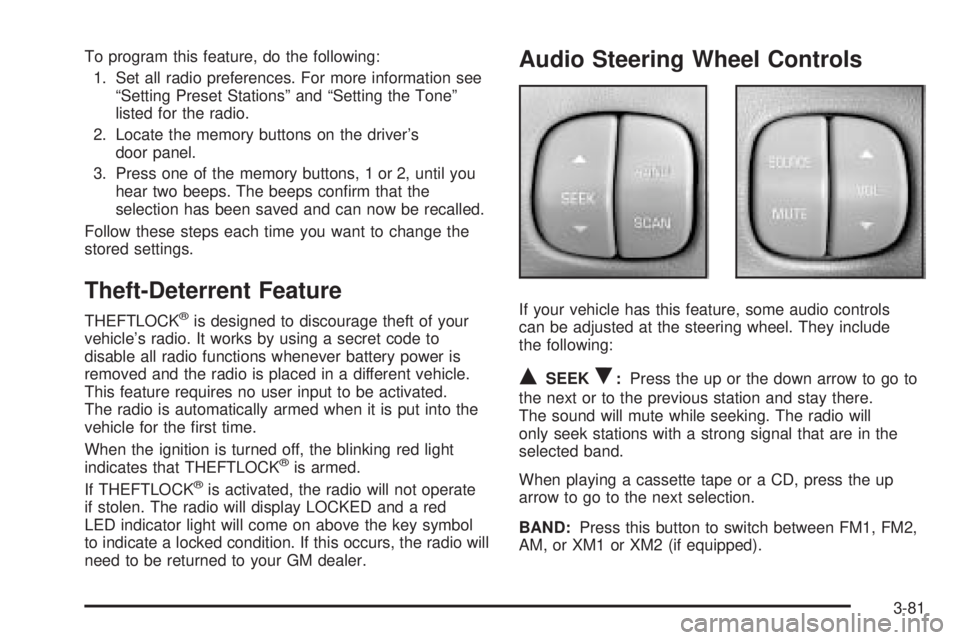
Audio Steering Wheel Controls
If your vehicle has this feature, some audio controls
can be adjusted at the steering wheel. They include
the following:
QSEEKR:Press the up or the down arrow to go to
the next or to the previous station and stay there.
The sound will mute while seeking. The radio will
only seek stations with a strong signal that are in the
selected band.
When playing a cassette tape or a CD, press the up
arrow to go to the next selection.
BAND:Press this button to switch between FM1, FM2,
AM, or XM1 or XM2 (if equipped).
3-81
Page 192 of 392
SCAN:Press this button to play the stations that are
programmed on the radio preset pushbuttons. The radio
will go to the rst preset station, play for a few
seconds, then go to the next preset station. Press this
button again to stop scanning. The radio will only
scan preset stations with a strong signal that are in the
selected band.
SOURCE:Press this button to play a cassette tape or
CD when listening to the radio. The inactive tape or
CD will remain safely inside the radio for future listening.
MUTE:Press this button to silence the system. Press
it again, or any other radio button, to turn on the sound.
QVOLR(Volume):Press the up or down arrow
to increase or to decrease the volume.
Radio Reception
AM
The range for most AM stations is greater than for FM,
especially at night. The longer range can cause
station frequencies to interfere with each other. Static
can occur on AM stations caused by things like
storms and power lines. Try reducing the treble to
reduce this noise.
FM Stereo
FM stereo will give the best sound, but FM signals will
reach only about 10 to 40 miles (16 to 65 km). Tall
buildings or hills can interfere with FM signals, causing
the sound to fade in and out.
XM™ Satellite Radio Service
XM™ Satellite Radio Service gives digital radio
reception from coast to coast. Just as with FM, tall
buildings or hills can interfere with satellite radio signals,
causing the sound to fade in and out. The radio may
display NO SIGNAL to indicate interference.
3-82