change time BUICK LESABRE 2005 User Guide
[x] Cancel search | Manufacturer: BUICK, Model Year: 2005, Model line: LESABRE, Model: BUICK LESABRE 2005Pages: 392, PDF Size: 2.45 MB
Page 112 of 392
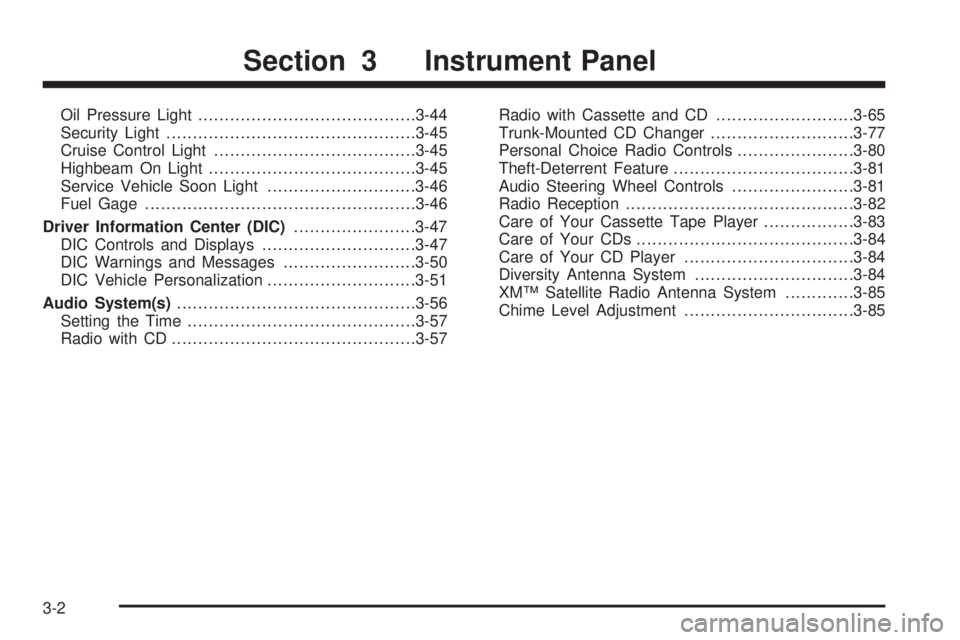
Oil Pressure Light.........................................3-44
Security Light...............................................3-45
Cruise Control Light......................................3-45
Highbeam On Light.......................................3-45
Service Vehicle Soon Light............................3-46
Fuel Gage...................................................3-46
Driver Information Center (DIC).......................3-47
DIC Controls and Displays.............................3-47
DIC Warnings and Messages.........................3-50
DIC Vehicle Personalization............................3-51
Audio System(s).............................................3-56
Setting the Time...........................................3-57
Radio with CD..............................................3-57Radio with Cassette and CD..........................3-65
Trunk-Mounted CD Changer...........................3-77
Personal Choice Radio Controls......................3-80
Theft-Deterrent Feature..................................3-81
Audio Steering Wheel Controls.......................3-81
Radio Reception...........................................3-82
Care of Your Cassette Tape Player.................3-83
Care of Your CDs.........................................3-84
Care of Your CD Player................................3-84
Diversity Antenna System..............................3-84
XM™ Satellite Radio Antenna System.............3-85
Chime Level Adjustment................................3-85
Section 3 Instrument Panel
3-2
Page 125 of 392

Daytime Running Lamps (DRL)
Daytime Running Lamps (DRL) can make it easier for
others to see the front of your vehicle during the
day. DRL can be helpful in many different driving
conditions, but they can be especially helpful in the short
periods after dawn and before sunset. Fully functional
daytime running lamps are required on all vehicles
rst sold in Canada.
A light sensor on top of the instrument panel monitors
the exterior light level for the operation of DRL and
Twilight Sentinel
®, so be sure it is not covered.
The DRL system will make your low-beam headlamps
turn on at reduced brightness in daylight when the
following conditions are met:
The ignition is on.
The exterior lamp button for the headlamps is off.
The transaxle is not in PARK (P).
When the DRL are on, only your low-beam headlamps
will be on. The parking lamps, taillamps, sidemarker
and other lamps will not be on.When it is dark enough outside, your low-beam
headlamps will come on. The other lamps that turn on
with your headlamps will also turn on. When it is
bright enough outside, the regular lamps will go off, and
your low-beam headlamps change to the reduced
brightness of DRL.
To turn off all exterior lighting at night when you are
parked, turn off the headlamps and move the Twilight
Sentinel
®lever all the way toward OFF. The exterior
lamps will turn back on automatically when you move
the transaxle out of PARK (P).
As with any vehicle, you should turn on the regular
headlamp system when you need it.
Cornering Lamps
If your vehicle has this feature, the cornering lamps
come on when the headlamps or parking lamps are on
and you signal a turn with the multifunction lever.
They provide more light for cornering.
3-15
Page 126 of 392

Twilight Sentinel®
Twilight Sentinel®turns your headlamps on and off by
sensing how dark it is outside.
The lever for this feature is
located to the left of the
steering column.
To operate it, leave the exterior lamp button off.If you slide the lever all the way to MAX, your
headlamps will remain on for about three minutes after
you turn off your engine. As you slide the lever
toward OFF, the headlamps will turn off more quickly.
You can change this delay time from only a few seconds
to three minutes.
The exterior lamps can be completely shut off while the
vehicle is in PARK (P) by sliding the Twilight
Sentinel
®lever all the way to OFF. To turn the exterior
lamps back on, slide the lever toward MAX again,
or shift out of PARK (P).
Park Lamp Override Feature
If the Twilight Sentinel®lighting is active, it can be
disabled by manually turning on the parking lamps. The
lighting will be disabled until the ignition is moved
from RUN or until the outside light level becomes
daylight. The outside light level changing to daylight will
cause the Twilight Sentinel
®feature to deactivate.
The wiper-activated headlamps will override the twilight
disable feature.
3-16
Page 129 of 392
3. Press the instant alarm on the transmitter. Perimeter
lighting remains on at this time and the horn will
chirp two times.
4. Press the instant alarm on the transmitter again.
Perimeter lighting is disabled and the horn will
chirp one time.
5. Release the door lock switch. The perimeter lighting
feature is now off.
To turn the feature on, do the following:
1. Close all the doors and turn the ignition to RUN.
Keep all doors closed throughout this procedure.
2. Press and hold LOCK on the power door lock switch
throughout this procedure. All the doors will lock.
3. Press the instant alarm on the transmitter. Perimeter
lighting now remains off at this time and the horn
will chirp one time.
4. Press the instant alarm on the transmitter again.
Perimeter lighting is now enabled and the horn
will chirp two times.
5. Release the door lock switch. The perimeter lighting
feature is now on.
This procedure only changes the mode for the
transmitter used to change this setting.Front Reading Lamps
The front reading lamps, located on the headliner, are
turned on or off by pressing one of the buttons
located near each lamp.
3-19
Page 137 of 392

Dual Automatic Climate
Control System
With this system you can control the heating, cooling
and ventilation for your vehicle.
Automatic Operation
AUTO (Automatic):Press the AUTO button for
automatic control of the inside temperature, the air
delivery mode and the fan speed.
1. Press the AUTO button.2. Adjust the temperature to 75°F (24°C).
Choosing the coldest or warmest temperature
setting will not cause the system to heat or cool any
faster. If you set the system at the warmest
temperature setting, the system will remain in
manual mode at that temperature and it will not go
into automatic mode.
In cold weather, the system will start at reduced fan
speeds to avoid blowing cold air into your vehicle
until warmer air is available. The system will
start out blowing air at the oor but may change
modes automatically as the vehicle warms up
to maintain the chosen temperature setting. The
length of time needed for warm up will depend on
the outside temperature and the length of time
that has elapsed since your vehicle was last driven.
3. Wait for the system to regulate. This may take
from 10 to 30 minutes. Then adjust the temperature,
if necessary.
Do not cover the solar sensor located in the center of
the instrument panel, near the windshield. For more
information on the solar sensor, see “Sensors” later in
this section.
3-27
Page 142 of 392

Climate Controls Personalization
If your vehicle is equipped with this feature, up to
two drivers are able to store and recall climate control
settings for the temperature, the fan speed and the
direction of the airow.
Memory buttons 1 and 2 are located on the driver’s
door armrest and correspond to the numbers 1
or 2 found on the back of each remote keyless
entry transmitter.
To store settings, do the following:
1. Select the desired temperature, fan speed and
airow mode. If desired, a separate temperature
setting may also be selected for the front seat
passenger. For information on how to do this, see
Dual Automatic Climate Control System on
page 3-27.2. Locate memory buttons 1 and 2 on the driver’s
door armrest.
3. Press the memory button on the door panel that
corresponds to the number on the back of the
transmitter you are programming, until you hear
two beeps. The beeps conrm that your selection
has been saved and can now be recalled. For more
information on the memory feature, seeMemory
Seat and Mirrors on page 2-45.
Follow these steps each time you want to change the
stored settings.
To recall the climate control settings last stored on your
transmitter, press the unlock button on your remote
keyless entry transmitter and put the ignition in
ACCESSORY or RUN. The settings will be recalled.
3-32
Page 160 of 392
If you see the CHECK TIRE PRESSURE message, you
should stop as soon as you can and check all your
tires for damage. If a tire is at, seeIf a Tire Goes Flat
on page 5-69. Also check the tire pressure in all four
tires as soon as you can. SeeInation - Tire Pressure
on page 5-60andCheck Tire Pressure System on
page 5-62. There are times when you will have to reset
(calibrate) the Check Tire Pressure System. See
Check Tire Pressure System on page 5-62.
RESET:This button, used along with other buttons, will
reset system functions.
ENG/MET (English/Metric):Use this button to change
the display between English and metric units.
DIC messages can be displayed in one of three
languages: English, French or Spanish. The language
of the display is set by pressing both the FUEL
INFO and RESET buttons for ve seconds. As the
buttons are held, each language will be displayed for
three seconds. Release the FUEL INFO and RESET
buttons when the desired language is displayed. All DIC
messages will now be in the selected language.
Language selection can also be done through the DIC
Personal Choice Programming. See “Language
Selection” underDIC Vehicle Personalization on
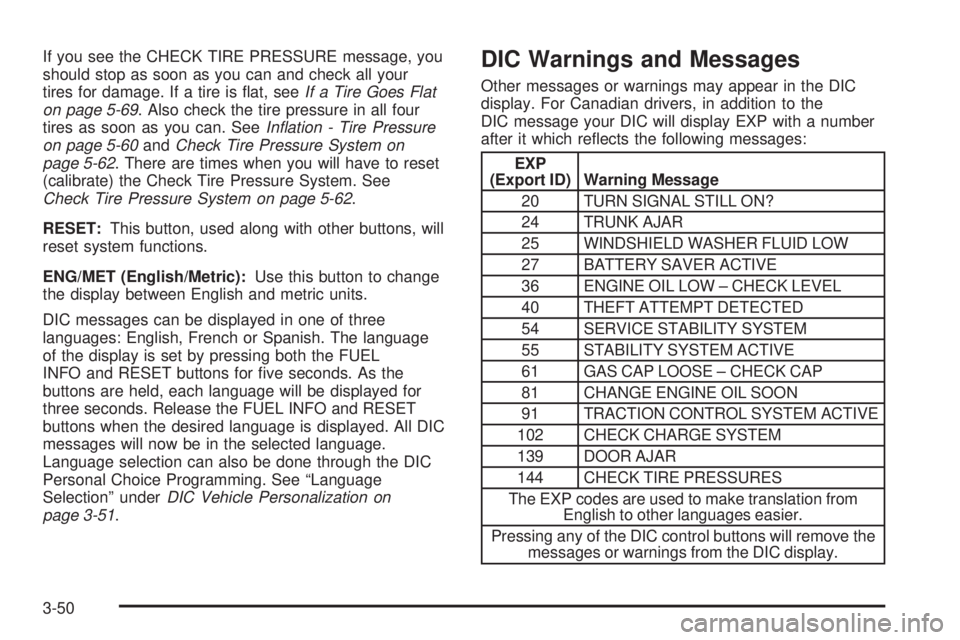
page 3-51.DIC Warnings and Messages
Other messages or warnings may appear in the DIC
display. For Canadian drivers, in addition to the
DIC message your DIC will display EXP with a number
after it which reects the following messages:
EXP
(Export ID) Warning Message
20 TURN SIGNAL STILL ON?
24 TRUNK AJAR
25 WINDSHIELD WASHER FLUID LOW
27 BATTERY SAVER ACTIVE
36 ENGINE OIL LOW – CHECK LEVEL
40 THEFT ATTEMPT DETECTED
54 SERVICE STABILITY SYSTEM
55 STABILITY SYSTEM ACTIVE
61 GAS CAP LOOSE – CHECK CAP
81 CHANGE ENGINE OIL SOON
91 TRACTION CONTROL SYSTEM ACTIVE
102 CHECK CHARGE SYSTEM
139 DOOR AJAR
144 CHECK TIRE PRESSURES
The EXP codes are used to make translation from
English to other languages easier.
Pressing any of the DIC control buttons will remove the
messages or warnings from the DIC display.
3-50
Page 162 of 392

If you unlock the vehicle using your door key instead of
your transmitter, the DIC will not change drivers and
will recall the information from the last transmitter used
or the last driver using the memory seat controls. If
this happens and you were not the last driver of
the vehicle, simply press your correct driver number on
the memory seat controls or press the unlock button
on your remote keyless entry transmitter.
Use the following steps for personalization programming
instructions.
1. Turn the ignition on and keep the transaxle
in PARK (P).
2. Inform the DIC which driver you are by pressing the
unlock button on your remote keyless entry
transmitter or the appropriate memory seat control.
3. Press and hold the ENG/MET button for
ve seconds. WELCOME TO BUICK OPTION
FEATURE will appear in the display.
4. The rst choice to be made will be DRIVER
ID 1 or 2. Press the ENG/MET button to toggle
between your selections within a display and
RESET to choose the current selection and move
on to the next personal choice feature.
If you would like to exit the selection mode without
moving through each of the personal choice features,
simply press a different button on the DIC or turn off the
ignition. Whatever personal choices you made willstill be retained, even without passing through each of
the features. In order for your personal choices to save,
you must press RESET after making your selections.
If you happen to move past a selection you would like to
make a personal choice for, press the unlock button
on your remote keyless entry transmitter or press
the appropriate driver number on the seat control. This
will return you to the beginning of the option feature
programming mode.
Automatic Door Locks
The door lock modes when shifting in and out of
PARK (P), can be changed through the DIC. You can
change these modes by different selections of the
following DIC displays:
AUTO DOOR LOCKS – OFF/ON
UNLOCK – OFF/ON
UNLOCK – KEY OFF/PARK
DOOR TO UNLOCK – DRIVER/ALL
If you choose OFF for AUTO DOOR LOCKS, your door
locks will operate normally with no automatic feature.
If you choose ON for AUTO DOOR LOCKS, ON
for UNLOCK and KEY OFF, your doors will lock every
time you shift out of PARK (P), and the doors will unlock
every time you stop and turn the ignition to OFF.
3-52
Page 163 of 392
If you choose ON for AUTO DOOR LOCKS, ON for
UNLOCK and PARK, your doors will lock every time you
shift out of PARK (P), and the doors will unlock every
time you stop and shift into PARK (P).
If you choose ON for AUTO DOOR LOCKS, and OFF
for UNLOCK, your doors will lock every time you
shift out of PARK (P), and there will be no automatic
door unlock when shifting back into PARK (P).
If you choose ON for UNLOCK and DRIVER for DOOR
TO UNLOCK, only the driver’s door will automatically
unlock when shifting into PARK or turning the key
to OFF.
If you choose ON for UNLOCK and ALL for DOOR TO
UNLOCK, all doors will automatically unlock when
shifting into PARK or turning the key to OFF.
To change modes, do the following:
1. Move the arrow on the display between the
selections by pressing the ENG/MET button.
2. Once you have made your selection, press the
RESET button and your choice will be retained
in memory.
SeeProgrammable Automatic Door Locks on page 2-12
for more information about this feature.Window Lock Out
The number of passenger windows locked out by the
window LOCK switch can be programmed through
the DIC.
If you choose R + PASS, all three passenger window
switches will be inactive when the window LOCK switch
is enabled.
If you choose REAR, only the two rear passenger
window switches will be locked out when the window
LOCK switch is enabled.
To change modes, do the following:
1. Move the arrow on the display between R + PASS
and REAR by pressing the ENG/MET button.
2. Once you have made your selection, press
the RESET button. Your choice will be retained
in memory.
For more information on this feature, see “Window Lock
Out” underPower Windows on page 2-17.
3-53
Page 165 of 392
Perimeter Lighting
Press the unlock button on the remote keyless entry
transmitter to turn on the DRL (high-beams at reduced
intensity), parking lamps and back-up lamps if it is
dark enough according to the Twilight Sentinel
®.
You can control activation of this feature by choosing
OFF or ON when the PERIMETER LIGHTS choice
is displayed on the DIC. Make your choice by pressing
the ENG/MET button and record your choice by
pressing the RESET button. You will then be prompted
to choose a TIMEOUT period. See “Exterior Lights”
following for more information.
For more information on this feature, seePerimeter
Lighting on page 3-18.
Exterior Lights
The EXTERIOR LIGHTS/TIMEOUT feature can be
changed to a desired setting by using the ENG/MET to
toggle from 5 to 30 seconds. Each toggle will increase
the time by ve seconds. Once the desired timeout
is displayed, press RESET to record your choice and
move on to the next personal choice feature.
Memory Seats
If your vehicle has this feature, the memory seat and
mirror positions will be recalled for the identied
driver when the remote keyless entry transmitter is used
to enter the vehicle.
You can program this feature to be active by choosing
ON when the SEAT RECALL choice appears, or
inactive by choosing OFF when the SEAT RECALL
choice appears on the DIC. Make your choices
by pressing the ENG/MET button and store them to
memory by pressing the RESET button.
You can also program this feature to recall your
memory seat position or the exit seat position.
MEMORY:Choose ON when the SEAT RECALL
choice appears, and then choose MEMORY when the
RECALL POSITION choice appears.
EXIT:Choose ON when the SEAT RECALL choice
appears, and then choose EXIT when the RECALL
POSITION choice appears. The seat will move when
you enter the vehicle after unlocking it with a remote
keyless entry transmitter. This will allow for easy entry.
For more information on this feature, seeMemory
Seat and Mirrors on page 2-45.
3-55