instrument cluster BUICK LESABRE 2005 User Guide
[x] Cancel search | Manufacturer: BUICK, Model Year: 2005, Model line: LESABRE, Model: BUICK LESABRE 2005Pages: 392, PDF Size: 2.45 MB
Page 130 of 392
Battery Load Management
The battery load management feature is designed to
monitor the vehicle’s electrical load and determine when
the battery is in a heavy discharge condition. During
times of high electrical loading, the engine may idle at a
higher RPM setting than normal to make sure the
battery charges. High electrical loads may occur when
several of the following are on: headlamps, high beams,
rear window defogger, fan at high speed, heated
seats (if equipped) and engine cooling fans.
If your vehicle’s battery remains in a heavy discharge
condition for a long period of time, the fan, rear
defogger, heated seats and heated mirrors will be
disabled and the DIC will display BATTERY SAVER
ACTIVE. This can happen either under long periods of
idling or low speed driving with high electrical loading,
or in the event of a charging system fault.
Inadvertent Power Battery Saver
This feature is designed to protect your vehicle’s battery
against drainage from the interior lamps, or garage
door opener. When the ignition is turned off, the power
to these features will automatically turn off after
10 minutes. Power will be restored for an additional
10 minutes if any door is opened, the trunk is opened or
the courtesy lamp switch is turned on.
Head-Up Display (HUD)
{CAUTION:
If the HUD image is too bright, or too high in
your eld of view, it may take you more time to
see things you need to see when it is dark
outside. Be sure to keep the HUD image dim
and placed low in your eld of view.
If your vehicle has the Head-Up Display (HUD) feature,
you can see some of the driver information that
appears on your instrument panel cluster.
The information may be displayed in English or metric
units and appears as an image focused out toward
the front of your vehicle. The HUD consists of the
following information:
Speedometer Reading
Turn Signal Indicators
High-Beam Headlamp Indicator
Check Gages Message
3-20
Page 131 of 392
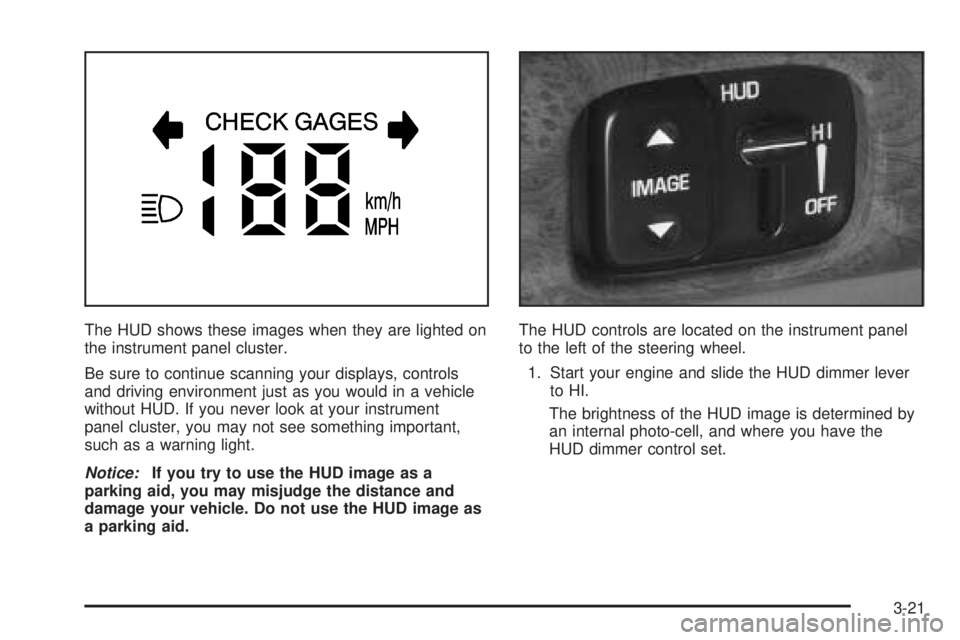
The HUD shows these images when they are lighted on
the instrument panel cluster.
Be sure to continue scanning your displays, controls
and driving environment just as you would in a vehicle
without HUD. If you never look at your instrument
panel cluster, you may not see something important,
such as a warning light.
Notice:If you try to use the HUD image as a
parking aid, you may misjudge the distance and
damage your vehicle. Do not use the HUD image as
a parking aid.The HUD controls are located on the instrument panel
to the left of the steering wheel.
1. Start your engine and slide the HUD dimmer lever
to HI.
The brightness of the HUD image is determined by
an internal photo-cell, and where you have the
HUD dimmer control set.
3-21
Page 143 of 392
Warning Lights, Gages,
and Indicators
This part describes the warning lights and gages that
may be on your vehicle. The pictures will help you
locate them.
Warning lights and gages can signal that something is
wrong before it becomes serious enough to cause
an expensive repair or replacement. Paying attention to
your warning lights and gages could also save you
or others from injury.
Warning lights come on when there may be or is a
problem with one of your vehicle’s functions. As you will
see in the details on the next few pages, some
warning lights come on briey when you start the
engine just to let you know they are working. If you are
familiar with this section, you should not be alarmed
when this happens.
Gages can indicate when there may be or is a problem
with one of your vehicle’s functions. Often gages
and warning lights work together to let you know when
there is a problem with your vehicle.When one of the warning lights comes on and stays on
when you are driving, or when one of the gages
shows there may be a problem, check the section that
tells you what to do about it. Please follow this
manual’s advice. Waiting to do repairs can be
costly — and even dangerous. So please get to know
your warning lights and gages. They are a big help.
Your vehicle may also have a DIC that works along with
the warning lights and gages. SeeDriver Information
Center (DIC) on page 3-47.
The volume of your vehicle’s warning chimes can be
adjusted. For information seeChime Level Adjustment
on page 3-85.
Instrument Panel Cluster
Your instrument panel cluster is designed to let you
know at a glance how your vehicle is running. You’ll
know how fast you’re going, how much fuel you’re
using, and many other things you’ll need to drive safely
and economically.
3-33
Page 144 of 392
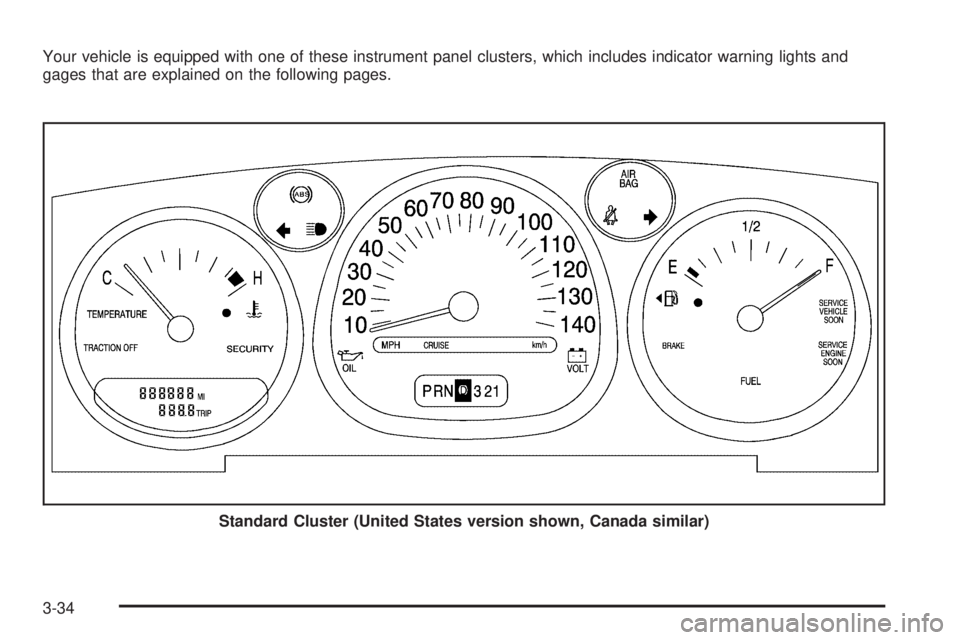
Your vehicle is equipped with one of these instrument panel clusters, which includes indicator warning lights and
gages that are explained on the following pages.
Standard Cluster (United States version shown, Canada similar)
3-34
Page 154 of 392
Emissions Inspection and
Maintenance Programs
Some state/provincial and local governments have or
may begin programs to inspect the emission control
equipment on your vehicle. Failure to pass this
inspection could prevent you from getting a
vehicle registration.
Here are some things you need to know in order to help
your vehicle pass an inspection:
Your vehicle will not pass this inspection if the SERVICE
ENGINE SOON light is on or not working properly.
Your vehicle will not pass this inspection if the OBD
(on-board diagnostic) system determines that critical
emission control systems have not been completely
diagnosed by the system. The vehicle would be
considered not ready for inspection. This can happen if
you have recently replaced your battery or if your
battery has run down. The diagnostic system is
designed to evaluate critical emission control systems
during normal driving. This may take several days
of routine driving. If you have done this and your vehicle
still does not pass the inspection for lack of OBD
system readiness, your GM dealer can prepare the
vehicle for inspection.
Oil Pressure Light
If your vehicle has the
standard instrument panel
cluster, this light will
come on if there is a
problem with your vehicle’s
engine oil pressure.
If your vehicle has the optional gage cluster, you can
read your oil pressure directly from the Driver
Information Center (DIC). SeeDIC Controls and
Displays on page 3-47.
The oil pressure light will come on briey when you turn
your key to RUN. That’s just a check to be sure the
light works. This is normal and doesn’t show a problem.
If it doesn’t come on and then go off, be sure to have
it xed so it will be there to warn you if there is
a problem.
When this lightcomeson andstayson, and a chime
sounds, it means oil isn’t going through the engine
properly. The oil could be low, or there might be some
other oil problem. See your dealer for service.
3-44
Page 253 of 392
A. Engine Compartment Fuse Block. SeeEngine
Compartment Fuse Block on page 5-89.
B. Windshield Washer Fluid Reservoir. See “Adding
Washer Fluid” underWindshield Washer Fluid
on page 5-34.
C. Remote Positive (+) Terminal. SeeJump Starting on
page 5-40.
D. Engine Coolant Recovery Tank. SeeCooling System
on page 5-28.
E. Radiator Pressure Cap. SeeRadiator Pressure Cap
on page 5-26.
F. Engine Oil Dipstick. See “Checking Engine Oil”
underEngine Oil on page 5-13.
G. Engine Oil Fill Cap. See “When to Add Engine Oil”
underEngine Oil on page 5-13.
H. Engine Coolant Air Bleed Valve. See “How to Add
Coolant to the Radiator” underCooling System
on page 5-28.
I. Automatic Transaxle Fluid Dipstick. See “Checking
the Fluid Level” underAutomatic Transaxle Fluid
on page 5-21.
J. Brake Master Cylinder Reservoir. See “Brake Fluid”
underBrakes on page 5-35.
K. Engine Air Cleaner/Filter. SeeEngine Air
Cleaner/Filter on page 5-18.Engine Oil
If the ENGINE OIL LOW
CHECK LEVEL DIC
message appears on the
instrument cluster, it
means you need to check
your engine oil level
right away. For more
information, seeDIC
Warnings and Messages
on page 3-50.
You should check your engine oil level regularly; this is
an added reminder.
Checking Engine Oil
It is a good idea to check your engine oil every time you
get fuel. In order to get an accurate reading, the oil
must be warm and the vehicle must be on level ground.
The engine oil dipstick handle is a yellow loop. See
Engine Compartment Overview on page 5-12for
the location of the engine oil dipstick.
1. Turn off the engine and give the oil several minutes
to drain back into the oil pan. If you do not do this,
the oil dipstick might not show the actual level.
2. Pull out the dipstick and clean it with a paper towel
or cloth, then push it back in all the way. Remove it
again, keeping the tip down, and check the level.
5-13
Page 266 of 392
Adding Coolant
If you need more coolant, add the proper
DEX-COOL®coolant mixtureat the coolant recovery
tank,but be careful not to spill it.
{CAUTION:
Turning the radiator pressure cap when the
engine and radiator are hot can allow steam
and scalding liquids to blow out and burn you
badly. With the coolant recovery tank, you will
almost never have to add coolant at the
radiator. Never turn the radiator pressure
cap — even a little — when the engine and
radiator are hot.
{CAUTION:
You can be burned if you spill coolant on hot
engine parts. Coolant contains ethylene glycol,
and it will burn if the engine parts are hot
enough. Do not spill coolant on a hot engine.
Occasionally check the coolant level in the radiator. For
information on how to add coolant to the radiator,
seeCooling System on page 5-28.
Radiator Pressure Cap
Notice:The radiator cap on your vehicle is a
pressure-type cap and must be tightly installed to
prevent coolant loss and possible engine damage
from overheating. Be sure the arrows on the cap line
up with the overow tube on the radiator ller neck.
SeeEngine Compartment Overview on page 5-12for
more information on location.
Engine Overheating
You will nd a warning light about a hot engine as well
as an engine coolant temperature gage on your
vehicle’s instrument panel cluster.
5-26
Page 385 of 392

Instrument Panel
Brightness..................................................3-17
Cluster.......................................................3-33
Overview..................................................... 3-4
J
Jump Starting.................................................5-40
K
Keyless Entry System....................................... 2-5
Keys............................................................... 2-3
L
Labelling, Tire Sidewall....................................5-55
Lamps
Battery Load Management............................3-20
Cornering...................................................3-15
Courtesy....................................................3-17
Exterior......................................................3-14
Exterior Lighting Battery Saver......................3-17
Front Reading.............................................3-19
Inadvertent Power Battery Saver....................3-20
Twilight Sentinel
®........................................3-16LATCH System
Child Restraints...........................................1-40
Securing a Child Restraint Designed for the
LATCH System........................................1-42
Light
Airbag Readiness........................................3-37
Anti-Lock Brake System Warning...................3-39
Battery Warning..........................................3-38
Brake System Warning.................................3-38
Cruise Control.............................................3-45
Highbeam On.............................................3-45
Malfunction Indicator....................................3-41
Oil Pressure...............................................3-44
Safety Belt Reminder...................................3-36
Security.....................................................3-45
Service Vehicle Soon...................................3-46
TCS Warning Light......................................3-40
Traction Control System (TCS) Warning..........3-40
Lighting
Delayed Entry.............................................3-18
Delayed Exit...............................................3-18
Entry.........................................................3-18
Perimeter...................................................3-18
Theater Dimming.........................................3-18
Lockout Protection..........................................2-14
7