reset BUICK LUCERNE 2006 User Guide
[x] Cancel search | Manufacturer: BUICK, Model Year: 2006, Model line: LUCERNE, Model: BUICK LUCERNE 2006Pages: 416, PDF Size: 2.6 MB
Page 178 of 416
Reset Tire Pressure System
Press the vehicle information button until PRESSVTO
RESET TIRE SYSTEM displays. This display allows
you to reset the tire pressure system. SeeCheck Tire
Pressure System on page 5-63for more information.
Once in this display, press the set/reset button to reset
the system. The message TIRE PRESSURE SYSTEM
RESET will display after the system has been reset.
Compass Zone
Your vehicle may have this feature. Under certain
circumstances, such as during a long distance
cross-country trip, it will be necessary to compensate for
compass variance and reset the zone through the DIC.
Compass variance is the difference between the
earth’s magnetic north and true geographic north.
If not adjusted to account for compass variance, the
compass in the vehicle could give false readings.
In order to do this, the compass must be set or
calibrated to the variance zone in which the vehicle
is traveling.To adjust for compass variance, use the following
procedure:
Compass Variance Procedure
1. Press the vehicle information button until PRESS
VTO CHANGE COMPASS ZONE displays.
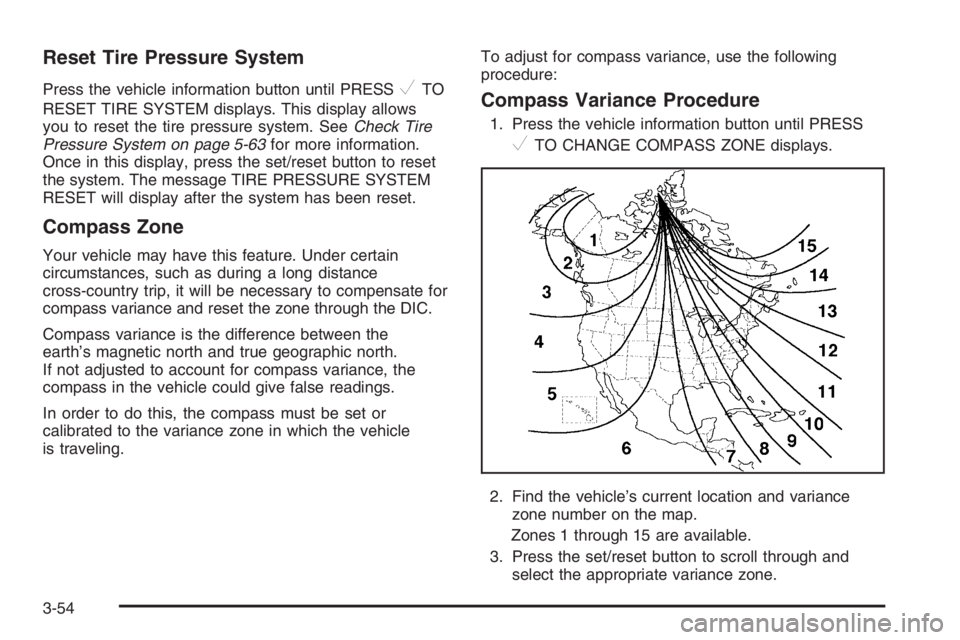
2. Find the vehicle’s current location and variance
zone number on the map.
Zones 1 through 15 are available.
3. Press the set/reset button to scroll through and
select the appropriate variance zone.
3-54
Page 179 of 416

Navigate to one of the trip/fuel menu screens to
view the direction the vehicle is moving. This will be
shown in the top right corner of the DIC display.
4. If you need to calibrate the compass, use the
compass calibration procedure. See “Compass
Calibration Procedure” following.
Compass Calibration
The compass can be manually calibrated. Only calibrate
the compass in a safe location where driving the vehicle
in circles is not a problem.
To calibrate the compass, use the following procedure:
Compass Calibration Procedure
1. Before calibrating the compass, make sure the
compass zone is set to the variance zone in
which the vehicle is traveling. See “Compass
Variance Procedure” earlier in this section.
2. Press the vehicle information button until the
PRESS
VTO CALIBRATE COMPASS screen
is displayed.
3. Press the set/reset button to start the compass
calibration.
4. The DIC will display CALIBRATING: DRIVE IN
CIRCLES. Drive the vehicle in circles at less
than 5 mph (8 km/h) to complete the calibration.
The DIC will display CALIBRATION COMPLETE
when the calibration is complete.
Remote Key
This display allows you to match the remote keyless
entry transmitter to your vehicle. To match a remote
keyless entry transmitter to your vehicle, do the
following:
1. Press the vehicle information button until PRESS
VTO RELEARN REMOTE KEY displays.
2. Press the set/reset button.
The message REMOTE KEY LEARNING ACTIVE
will display.
3. Press and hold the lock and unlock buttons on the
rst transmitter at the same time for approximately
15 seconds.
A chime will sound indicating that the transmitter is
matched.
4. To match additional transmitters at this time,
repeat Step 3.
Each vehicle can have a maximum of eight
transmitters matched to it.
5. To exit the programming mode, you must cycle
the key to OFF.
Blank Display
This display shows no information.
3-55
Page 180 of 416

Customization Menu Items
U
(Customization):Press this button to enter the
feature settings menu. This display allows you to
customize the feature settings on your vehicle.
SeeDIC Vehicle Customization on page 3-65for
more information.
DIC Warnings and Messages
Messages are displayed on the DIC to notify the driver
that the status of the vehicle has changed and that
some action may be needed by the driver to correct the
condition. Multiple messages may appear one after
another. Some messages may not require immediate
action, but you can press the set/reset button to
acknowledge that you received the message and clear it
from the DIC display. Pressing any of the DIC buttons
will also acknowledge and clear any messages.
Some messages cannot be cleared from the DIC display
because they are more urgent. These messages
require action before they can be cleared. You should
take any messages that appear on the display seriously
and remember that clearing the messages will only
make the messages disappear, not correct the problem.
The following are the possible messages that can be
displayed and some information about them.
AUTOMATIC LIGHT CONTROL OFF
This message will display when the automatic
headlamps are turned off.
AUTOMATIC LIGHT CONTROL ON
This message will display when the automatic
headlamps are turned on.
CHANGE ENGINE OIL SOON
This message will display when service is required
for the vehicle. See your GM dealer. SeeEngine Oil
on page 5-15andScheduled Maintenance on page 6-4
for more information.
Acknowledging the CHANGE ENGINE OIL SOON
message will not reset the OIL LIFE REMAINING.
That must be done at the OIL LIFE screen under the
vehicle information menu. See “Oil Life” underDIC
Controls and Displays on page 3-50andEngine Oil Life
System on page 5-18.
3-56
Page 181 of 416

CHECK TIRE PRESSURE
This warning message and the tire pressure light on
the instrument panel cluster will appear when the
air pressure in one of the tires is too low or too high.
Check the vehicle’s tire pressure as soon as possible,
and ll or deate the affected tire to the appropriate
level. The correct tire ination pressure should be set to
those shown on the tire-loading information label on
the vehicle. SeeLoading Your Vehicle on page 4-29and
Tire Pressure Light on page 3-44for more information.
This message is reset when it is acknowledged.
However, you must also reset the tire pressure system.
See “Reset Tire Pressure System” underDIC Controls
and Displays on page 3-50for more information.
DRIVER DOOR OPEN
This message will display when the driver’s door is not
closed properly. When this message appears, you should
make sure that the driver’s door is closed completely.
ENGINE HOT A/C (Air Conditioning) OFF
This message will display when the engine coolant
becomes hotter than the normal operating temperature.
To avoid added strain on a hot engine, the air
conditioning compressor is automatically turned off.
When the coolant temperature returns to normal,
the A/C operation will automatically resume. You can
continue to drive your vehicle. If this message continues
to appear, have the system repaired by your GM dealer
as soon as possible to avoid compressor damage.
ENGINE OIL LOW ADD OIL
This message will display when the vehicle’s engine oil
is low. Fill the oil to the proper level as soon as
possible. SeeEngine Compartment Overview on
page 5-12for the engine oil ll location. Also, see
Engine Oil on page 5-15for information on the kind of
oil to use and the proper oil level.
3-57
Page 184 of 416

PARK ASSIST OFF
After the vehicle has been started, this message will
remind the driver that the Ultrasonic Rear Parking
Assist (URPA) system has been turned off. Press the
set/reset button to acknowledge this message and clear
it from the DIC display. To turn the URPA system
back on, see “Park Assist” underDIC Controls and
Displays on page 3-50. SeeUltrasonic Rear Parking
Assist (URPA) on page 3-18for more information.
PASSENGER DOOR OPEN
This message will display when the front passenger’s
door is not closed properly. When this message
appears, you should make sure that the front
passenger’s door is closed completely.
RAINSENSE WIPERS ACTIVE
If your vehicle has this feature, this message will
display while the Rainsense™ system is active.
SeeRainsense™ II Wipers on page 3-9for more
information.
REMOTE KEY LEARNING ACTIVE
This message will display while you are matching a
remote keyless entry transmitter to your vehicle.
See “Matching Transmitter(s) to Your Vehicle” under
Remote Keyless Entry System Operation on page 2-6
andDIC Controls and Displays on page 3-50for
more information.
REPLACE BATTERY IN REMOTE KEY
This message will display when the battery in the remote
keyless entry transmitter needs to be replaced. To
replace the battery, see “Battery Replacement” under
Remote Keyless Entry System Operation on page 2-6.
RIGHT REAR DOOR OPEN
This message will display when the passenger’s side
rear door is not closed properly. When this message
appears, you should make sure that the passenger’s
door is closed completely.
3-60
Page 186 of 416
SERVICE PARK ASSIST
This message will display if there is a problem with the
Ultrasonic Rear Parking Assist (URPA) system.
Do not use this system to help you park. SeeUltrasonic
Rear Parking Assist (URPA) on page 3-18for more
information. See your GM dealer for service.
SERVICE POWER STEERING
Your vehicle may have a speed variable assist steering
system. SeeSteering on page 4-11.
This message will display if a problem is detected with
the speed variable assist steering system. When this
message is displayed, you may notice that the
effort required to steer the vehicle decreases or feels
lighter, but you will still be able to steer the vehicle.
SERVICE STABILITRAK
If your vehicle has StabiliTrak®, this message will
display if there has been a problem detected with
StabiliTrak
®. A warning light will also appear on
the instrument panel cluster. SeeTraction Control
System (TCS) Warning Light on page 3-41.
SeeStabiliTrak
®System on page 4-10for more
information.If this message turns on while you are driving, pull off
the road as soon as possible and stop carefully.
Try resetting the system by turning the ignition off and
then back on. If this message still stays on or turns back
on again while you are driving, your vehicle needs
service. Have the StabiliTrak
®System inspected by your
GM dealer as soon as possible.
SERVICE SUSPENSION SYSTEM
This message will display to indicate that the suspension
system is not operating properly. See your GM dealer
for service.
SERVICE THEFT SYSTEM
This message will display when there is a problem with
the theft-deterrent system programmed in the key.
A fault has been detected in the system which means
that the system is disabled and it is not protecting
the vehicle. The vehicle usually restarts; however,
you may want to take the vehicle to your GM dealer
before turning off the engine. SeePASS-Key
®III+
on page 2-19for more information.
3-62
Page 188 of 416
TIGHTEN GAS CAP
This message may be displayed if the gas cap is not
on, or is not fully tightened. Check the gas cap to ensure
that it is on properly. SeeFilling the Tank on page 5-8
for more information.
TIRE PRESSURE SYSTEM RESET
This message will display after the tire pressure system
has been reset. See “Reset Tire Pressure System”
underDIC Controls and Displays on page 3-50for more
information.
TRACTION CONTROL OFF
If your vehicle has the Traction Control System (TCS),
this message will display when the TCS is turned off.
Adjust your driving accordingly. SeeTraction Control
System (TCS) on page 4-9for more information.
TRANSMISSION HOT IDLE ENGINE
This message will display when the transaxle uid in
your vehicle is too hot. Stop the vehicle and allow it
to idle until it cools down. If the warning message
continues to display, have the vehicle serviced by your
GM dealer as soon as possible.
TRUNK OPEN
This message will display when the trunk is not closed
completely. You should make sure that the trunk is
closed completely. SeeTrunk on page 2-14.
TURN SIGNAL ON
This message will display as a reminder to turn off the
turn signal if you drive your vehicle for more than
about 0.75 mile (1.2 km) with a turn signal on.
SeeTurn Signal/Multifunction Lever on page 3-7.
This message displays and a chime sounds only when
the ignition is in RUN. The message will not disappear
until the turn signal is manually turned off, or a turn
is completed.
WASHER FLUID LOW ADD FLUID
This message will display when the windshield washer
uid is low. Fill the windshield washer reservoir as
soon as possible. SeeEngine Compartment Overview
on page 5-12for the location of the windshield
washer reservoir. Also, seeWindshield Washer Fluid on
page 5-39for more information.
3-64
Page 189 of 416

DIC Vehicle Customization
Your vehicle has customization capabilities that allow
you to program certain features to one preferred setting.
Customization features can only be programmed to
one setting on the vehicle and cannot be programmed
to a preferred setting for two different drivers.
All of the customization options may not be available on
your vehicle. Only the options available will be
displayed on your DIC.
The default settings for the customization features were
set when your vehicle left the factory, but may have
been changed from their default state since then.
The customization preferences are automatically
recalled.
To change customization preferences, use the
following procedure.
Entering the Feature Settings Menu
1. Turn the ignition on and place the vehicle in
PARK (P).
2. Press the customization button to enter the feature
settings menu.
If the menu is not available, FEATURE SETTINGS
AVAILABLE IN PARK will display. Before entering
the menu, make sure the vehicle is in PARK (P).
Feature Settings Menu Items
The following are customization features that allow you
to program settings to the vehicle:
DISPLAY IN ENGLISH
This feature will only display if a language other than
English has been set. This feature allows you to change
the language in which the DIC messages appear to
English.
Press the customization button until the PRESS
V
TO DISPLAY IN ENGLISH screen appears on the
DIC display. Press the set/reset button to display all
DIC messages in English.
3-65
Page 190 of 416

DISPLAY LANGUAGE
This feature allows you to select the language in which
the DIC messages will appear.
Press the customization button until the DISPLAY
LANGUAGE screen appears on the DIC display. Press
the set/reset button to access the settings for this
feature. Then press the customization button to scroll
through the following choices:
ENGLISH (default):All messages will appear in
English.
FRANCAIS (French):All messages will appear in
French.
ESPANOL (Spanish):All messages will appear in
Spanish.
NO CHANGE:No change will be made to this feature.
The current setting will remain.
Select one of the available choices and press the
set/reset button while it is displayed on the DIC to
select it.
AUTO DOOR LOCK
This feature allows you to select when the vehicle’s
doors will automatically lock. SeeProgrammable
Automatic Door Locks on page 2-13for more
information.
Press the customization button until AUTO DOOR
LOCK appears on the DIC display. Press the set/reset
button to access the settings for this feature. Then
press the customization button to scroll through
the following choices:
SHIFT OUT OF PARK (default):The vehicle’s doors
automatically lock when the doors are closed and
the vehicle is shifted out of PARK (P).
AT VEHICLE SPEED:The vehicle’s doors automatically
lock when the vehicle speed is above 5 mph (8 km/h)
for three seconds.
NO CHANGE:No change will be made to this feature.
The current setting will remain.
Select one of the available choices and press the
set/reset button while it is displayed on the DIC to
select it.
3-66
Page 191 of 416

AUTO DOOR UNLOCK
This feature allows you to select whether or not the
door(s) will automatically unlock. It also allows you to
select which doors and when they will automatically
unlock. SeeProgrammable Automatic Door Locks on
page 2-13for more information.
Press the customization button until AUTO DOOR
UNLOCK appears on the DIC display. Press the
set/reset button to access the settings for this feature.
Then press the customization button to scroll through
the following choices:
OFF:None of the doors will automatically unlock.
DRIVER AT KEY OUT:Only the driver’s door will
unlock when the key is taken out of the ignition.
DRIVER IN PARK:Only the driver’s door will unlock
when the vehicle is shifted into PARK (P).
ALL AT KEY OUT:All of the doors will unlock when
the key is taken out of the ignition.
ALL IN PARK (default):All of the doors will unlock
when the vehicle is shifted into PARK (P).
NO CHANGE:No change will be made to this feature.
The current setting will remain.
Select one of the available choices and press the
set/reset button while it is displayed on the DIC to
select it.
REMOTE DOOR LOCK
This feature allows you to select the type of feedback
you will receive when locking the vehicle with the remote
keyless entry transmitter. You will not receive feedback
when locking the vehicle with the remote keyless
entry transmitter if any of the doors are open.
SeeRemote Keyless Entry System Operation on
page 2-6for more information.
Press the customization button until REMOTE DOOR
LOCK appears on the DIC display. Press the set/reset
button to access the settings for this feature. Then
press the customization button to scroll through
the following choices:
HORN & LIGHTS OFF:There will be no feedback
when you press the lock button on the remote keyless
entry transmitter.
LIGHTS ONLY:The exterior lamps will ash when you
press the lock button on the remote keyless entry
transmitter.
HORN ONLY:The horn will sound on the second press
of the lock button on the remote keyless entry transmitter.
3-67