door lock BUICK LUCERNE 2006 Owner's Guide
[x] Cancel search | Manufacturer: BUICK, Model Year: 2006, Model line: LUCERNE, Model: BUICK LUCERNE 2006Pages: 416, PDF Size: 2.6 MB
Page 123 of 416

Memory Seat and Mirrors
Your vehicle may have the memory package.
The controls for this feature are located on the driver’s
door panel, and are used to program and recall
memory settings for the driver’s seat and the outside
mirrors.
To save your positions in memory, do the following:
1. Adjust the driver’s seat, including the seatback
recliner and lumbar, and both outside mirrors to
your preferred position.
2. Press and hold button 1 until two beeps sound
through the driver’s side front speaker to let you
know that the position has been stored.
A second seating and mirror position can be
programmed by repeating the above steps and pressing
button 2 for a second driver.To recall your memory positions, the vehicle must be in
PARK (P). Press and release either button 1 or
button 2 corresponding to the desired driving position.
The seat and outside mirrors will move to the position
previously stored for the identied driver. You will hear a
single beep.
If you use the remote keyless entry transmitter to enter
your vehicle and the remote recall memory feature
is on, automatic seat and mirror movement will occur.
See “MEMORY SEAT RECALL” underDIC Vehicle
Customization on page 3-65for more information.
To stop recall movement of the memory feature at any
time, press one of the power seat controls, memory
buttons, or power mirror buttons.
If something has blocked the driver’s seat while recalling
a memory position, the driver’s seat recall may stop
working. If this happens, press the appropriate control
for the area that is not recalling for two seconds,
after the obstruction is removed. Then try recalling the
memory position again by pressing the appropriate
memory button. If the memory position is still not
recalling, see your GM dealer for service.
2-47
Page 140 of 416
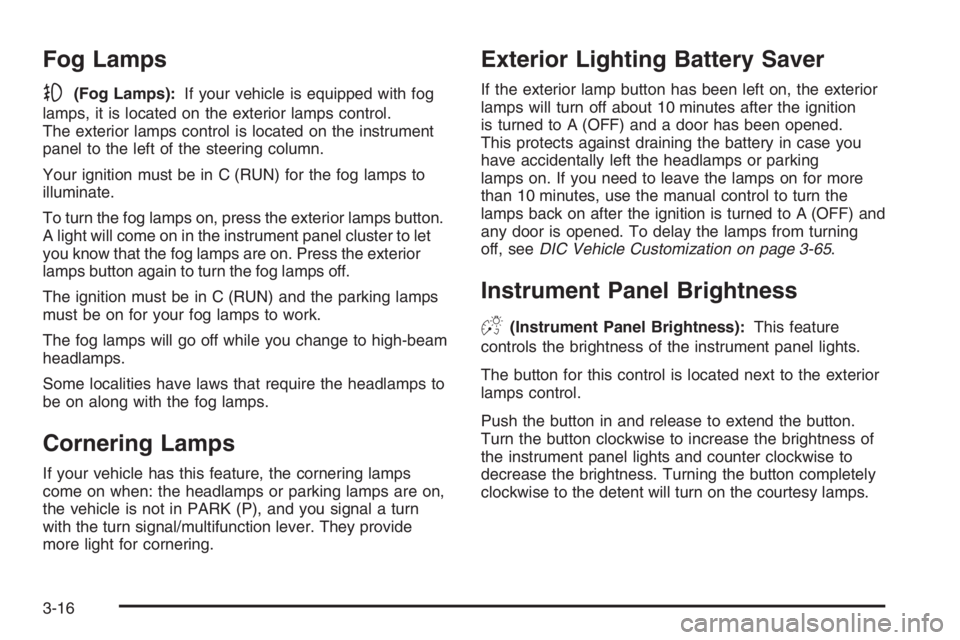
Fog Lamps
-(Fog Lamps):If your vehicle is equipped with fog
lamps, it is located on the exterior lamps control.
The exterior lamps control is located on the instrument
panel to the left of the steering column.
Your ignition must be in C (RUN) for the fog lamps to
illuminate.
To turn the fog lamps on, press the exterior lamps button.
A light will come on in the instrument panel cluster to let
you know that the fog lamps are on. Press the exterior
lamps button again to turn the fog lamps off.
The ignition must be in C (RUN) and the parking lamps
must be on for your fog lamps to work.
The fog lamps will go off while you change to high-beam
headlamps.
Some localities have laws that require the headlamps to
be on along with the fog lamps.
Cornering Lamps
If your vehicle has this feature, the cornering lamps
come on when: the headlamps or parking lamps are on,
the vehicle is not in PARK (P), and you signal a turn
with the turn signal/multifunction lever. They provide
more light for cornering.
Exterior Lighting Battery Saver
If the exterior lamp button has been left on, the exterior
lamps will turn off about 10 minutes after the ignition
is turned to A (OFF) and a door has been opened.
This protects against draining the battery in case you
have accidentally left the headlamps or parking
lamps on. If you need to leave the lamps on for more
than 10 minutes, use the manual control to turn the
lamps back on after the ignition is turned to A (OFF) and
any door is opened. To delay the lamps from turning
off, seeDIC Vehicle Customization on page 3-65.
Instrument Panel Brightness
D(Instrument Panel Brightness):This feature
controls the brightness of the instrument panel lights.
The button for this control is located next to the exterior
lamps control.
Push the button in and release to extend the button.
Turn the button clockwise to increase the brightness of
the instrument panel lights and counter clockwise to
decrease the brightness. Turning the button completely
clockwise to the detent will turn on the courtesy lamps.
3-16
Page 141 of 416

Courtesy Lamps
If it is dark enough outside, when any door is opened,
several lamps go on. They make it easy for you to enter
and leave the vehicle. Turn these lamps on manually
by turning the instrument panel brightness control
completely clockwise.
Entry Lighting
If it is dark enough outside when you press the unlock
button on the remote keyless entry transmitter, the
interior courtesy lamps will turn on and stay on for about
40 seconds. The lamps can be turned off immediately
by pressing the lock button on the remote keyless entry
transmitter, turning the ignition key to C (RUN) or
activating the power door locks.
Delayed Entry Lighting
The interior lamps will turn on if you open the door when it
is dark enough outside. When you close the door with
the ignition off, the interior lamps will stay on for up to
25 seconds or until the ignition is turned to an on position.
When the lamps turn off as a result of the 25 second
timer or the ignition switch being turned on, the lighting
will deactivate by way of the theater dimming effect.
Locking the doors will override the delayed entry lighting
feature and the lamps will turn off right away.
Theater Dimming
This feature allows for a three to ve-second fade out of
the courtesy lamps instead of immediate turn off.
Delayed Exit Lighting
If it is dark enough outside when you remove the key
from the ignition, the interior lamps will turn on and
stay on for about 25 seconds. This will give you time to
nd the door pull handle or lock switches. Once the
key is inserted into the ignition, the exit lighting will be
cancelled and the lighting will fade out.
Perimeter Lighting
If it is dark enough outside when the unlock button on
the remote keyless entry transmitter is pressed, the
DRL, parking lamps and back-up lamps will come on.
This feature can be programmed in the on for various
amounts of seconds or off mode for each transmitter.
SeeDIC Vehicle Customization on page 3-65for
information on programming.
3-17
Page 190 of 416

DISPLAY LANGUAGE
This feature allows you to select the language in which
the DIC messages will appear.
Press the customization button until the DISPLAY
LANGUAGE screen appears on the DIC display. Press
the set/reset button to access the settings for this
feature. Then press the customization button to scroll
through the following choices:
ENGLISH (default):All messages will appear in
English.
FRANCAIS (French):All messages will appear in
French.
ESPANOL (Spanish):All messages will appear in
Spanish.
NO CHANGE:No change will be made to this feature.
The current setting will remain.
Select one of the available choices and press the
set/reset button while it is displayed on the DIC to
select it.
AUTO DOOR LOCK
This feature allows you to select when the vehicle’s
doors will automatically lock. SeeProgrammable
Automatic Door Locks on page 2-13for more
information.
Press the customization button until AUTO DOOR
LOCK appears on the DIC display. Press the set/reset
button to access the settings for this feature. Then
press the customization button to scroll through
the following choices:
SHIFT OUT OF PARK (default):The vehicle’s doors
automatically lock when the doors are closed and
the vehicle is shifted out of PARK (P).
AT VEHICLE SPEED:The vehicle’s doors automatically
lock when the vehicle speed is above 5 mph (8 km/h)
for three seconds.
NO CHANGE:No change will be made to this feature.
The current setting will remain.
Select one of the available choices and press the
set/reset button while it is displayed on the DIC to
select it.
3-66
Page 191 of 416

AUTO DOOR UNLOCK
This feature allows you to select whether or not the
door(s) will automatically unlock. It also allows you to
select which doors and when they will automatically
unlock. SeeProgrammable Automatic Door Locks on
page 2-13for more information.
Press the customization button until AUTO DOOR
UNLOCK appears on the DIC display. Press the
set/reset button to access the settings for this feature.
Then press the customization button to scroll through
the following choices:
OFF:None of the doors will automatically unlock.
DRIVER AT KEY OUT:Only the driver’s door will
unlock when the key is taken out of the ignition.
DRIVER IN PARK:Only the driver’s door will unlock
when the vehicle is shifted into PARK (P).
ALL AT KEY OUT:All of the doors will unlock when
the key is taken out of the ignition.
ALL IN PARK (default):All of the doors will unlock
when the vehicle is shifted into PARK (P).
NO CHANGE:No change will be made to this feature.
The current setting will remain.
Select one of the available choices and press the
set/reset button while it is displayed on the DIC to
select it.
REMOTE DOOR LOCK
This feature allows you to select the type of feedback
you will receive when locking the vehicle with the remote
keyless entry transmitter. You will not receive feedback
when locking the vehicle with the remote keyless
entry transmitter if any of the doors are open.
SeeRemote Keyless Entry System Operation on
page 2-6for more information.
Press the customization button until REMOTE DOOR
LOCK appears on the DIC display. Press the set/reset
button to access the settings for this feature. Then
press the customization button to scroll through
the following choices:
HORN & LIGHTS OFF:There will be no feedback
when you press the lock button on the remote keyless
entry transmitter.
LIGHTS ONLY:The exterior lamps will ash when you
press the lock button on the remote keyless entry
transmitter.
HORN ONLY:The horn will sound on the second press
of the lock button on the remote keyless entry transmitter.
3-67
Page 192 of 416

HORN & LIGHTS ON (default):The exterior lamps will
ash when you press the lock button on the remote
keyless entry transmitter, and the horn will sound when
the lock button is pressed again within ve seconds
of the previous command.
NO CHANGE:No change will be made to this feature.
The current setting will remain.
Select one of the available choices and press the
set/reset button while it is displayed on the DIC to
select it.
REMOTE DOOR UNLOCK
This feature allows you to select the type of feedback
you will receive when unlocking the vehicle with
the remote keyless entry transmitter. You will not receive
feedback when unlocking the vehicle with the remote
keyless entry transmitter if the doors are open.
SeeRemote Keyless Entry System Operation on
page 2-6for more information.Press the customization button until REMOTE DOOR
UNLOCK appears on the DIC display. Press the
set/reset button to access the settings for this feature.
Then press the customization button to scroll through
the following choices:
LIGHTS OFF:The exterior lamps will not ash when
you press the unlock button on the remote keyless entry
transmitter.
LIGHTS ON (default):The exterior lamps will ash
when you press the unlock button on the remote keyless
entry transmitter.
NO CHANGE:No change will be made to this feature.
The current setting will remain.
Select one of the available choices and press the
set/reset button while it is displayed on the DIC to
select it.
3-68
Page 193 of 416

DELAY DOOR LOCK
This feature allows you to select whether or not the
locking of the vehicle’s doors will be delayed.
The locking of the vehicle’s doors is delayed for up to
10 seconds after a power door lock switch is pressed
when a door is open, or after the lock button on
the remote keyless entry transmitter is pressed while a
door is open. The key must be out of the ignition for
this feature to work.
Press the customization button until DELAY DOOR
LOCK appears on the DIC display. Press the
set/reset button to access the settings for this feature.
Then press the customization button to scroll through
the following choices:
OFF:There will be no delayed locking of the
vehicle’s doors.
ON (default):The locking of the vehicle’s doors will be
delayed by 10 seconds after a power door lock switch
is pressed when a door is open, or the lock button
on the remote keyless entry transmitter is pressed while
a door is open.
NO CHANGE:No change will be made to this feature.
The current setting will remain.
Select one of the available choices and press the
set/reset button while it is displayed on the DIC to
select it.
EXIT LIGHTING
If it is dark enough outside, this feature allows you to
select the amount of time you want the exterior lamps to
remain on. This happens after the vehicle is unlocked
using the remote keyless entry transmitter or if the
vehicle key is turned to OFF from RUN.
Press the customization button until EXIT LIGHTING
appears on the DIC display. Press the set/reset button to
access the settings for this feature. Then press the
customization button to scroll through the following
choices:
OFF:The exterior lamps will not turn on.
30 SECONDS (default):The exterior lamps will stay on
for 30 seconds.
1 MINUTE:The exterior lamps will stay on for
one minute.
2 MINUTES:The exterior lamps will stay on for
two minutes.
NO CHANGE:No change will be made to this feature.
The current setting will remain.
Select one of the available choices and press the
set/reset button while it is displayed on the DIC to
select it.
3-69
Page 255 of 416
Loading Your Vehicle
It is very important to know how much weight your
vehicle can carry. This weight is called the vehicle
capacity weight and includes the weight of all occupants,
cargo, and all nonfactory-installed options. Two labels
on your vehicle show how much weight it may properly
carry; the Tire and Loading Information label and the
Certication label.
{CAUTION:
Do not load your vehicle any heavier than the
Gross Vehicle Weight Rating (GVWR), or either
the maximum front or rear Gross Axle Weight
Rating (GAWR). If you do, parts on your
vehicle can break, and it can change the way
your vehicle handles. These could cause you
to lose control and crash. Also, overloading
can shorten the life of your vehicle.
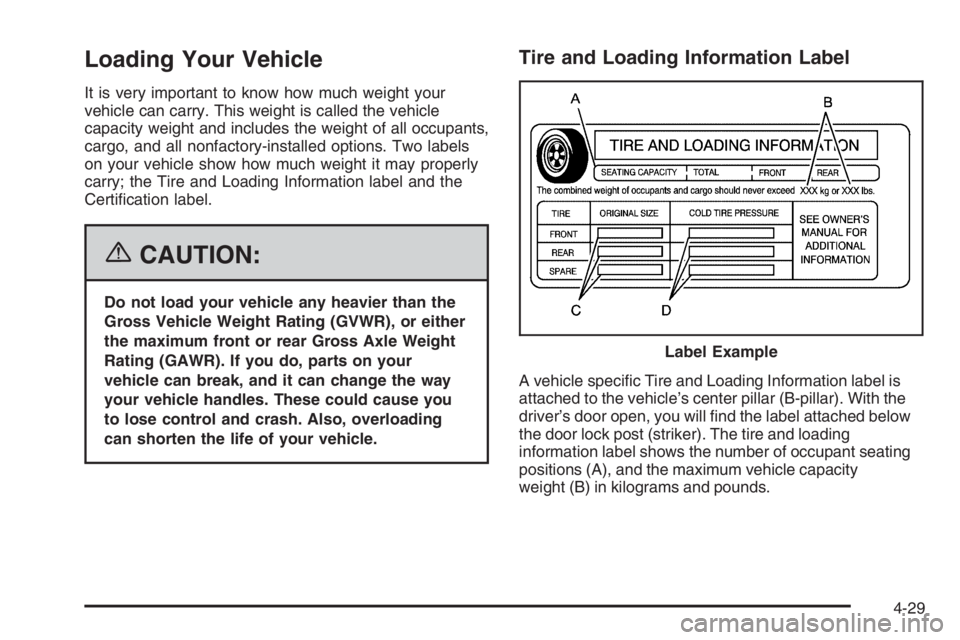
Tire and Loading Information Label
A vehicle specic Tire and Loading Information label is
attached to the vehicle’s center pillar (B-pillar). With the
driver’s door open, you will nd the label attached below
the door lock post (striker). The tire and loading
information label shows the number of occupant seating
positions (A), and the maximum vehicle capacity
weight (B) in kilograms and pounds.Label Example
4-29
Page 276 of 416

Filling the Tank
{CAUTION:
Fuel vapor burns violently and a fuel re can
cause bad injuries. To help avoid injuries to
you and others, read and follow all the
instructions on the pump island. Turn off your
engine when you are refueling. Do not smoke
if you are near fuel or refueling your vehicle.
Keep sparks, ames, and smoking materials
away from fuel. Do not leave the fuel pump
unattended when refueling your vehicle — this
is against the law in some places. Keep
children away from the fuel pump; never let
children pump fuel.The tethered fuel cap is located behind a hinged fuel
door on the driver’s side of the vehicle.
To open the fuel door, apply pressure in the center of
the rear edge of the fuel door and it will pop open.
To remove the fuel cap, turn it slowly to the left
(counterclockwise). The fuel cap has a spring in it; if the
cap is released too soon, it will spring back to the
right.
While refueling, hang the tethered fuel cap from the
hook on the fuel door.
5-8
Page 367 of 416
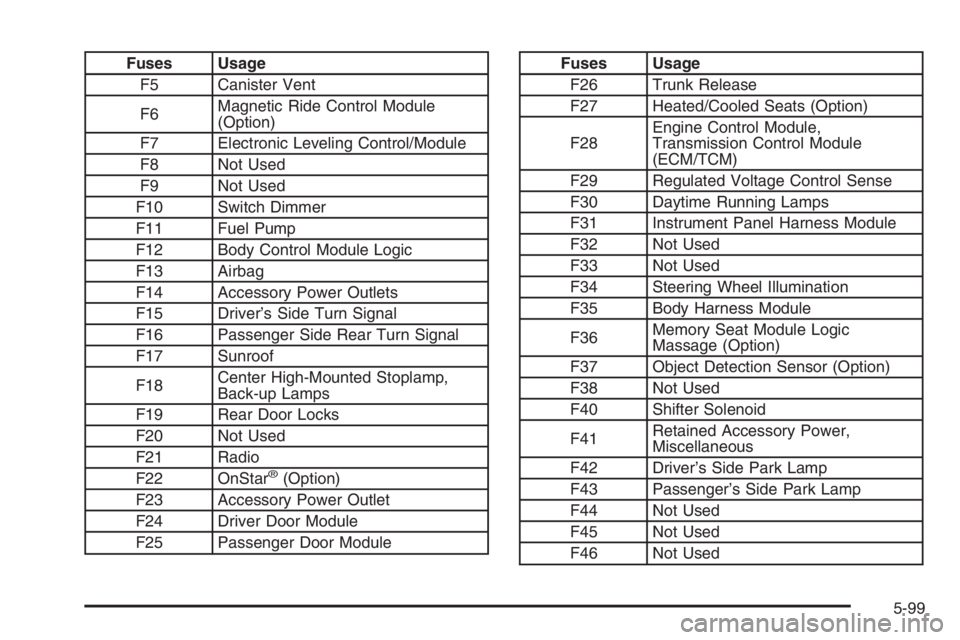
Fuses Usage
F5 Canister Vent
F6Magnetic Ride Control Module
(Option)
F7 Electronic Leveling Control/Module
F8 Not Used
F9 Not Used
F10 Switch Dimmer
F11 Fuel Pump
F12 Body Control Module Logic
F13 Airbag
F14 Accessory Power Outlets
F15 Driver’s Side Turn Signal
F16 Passenger Side Rear Turn Signal
F17 Sunroof
F18Center High-Mounted Stoplamp,
Back-up Lamps
F19 Rear Door Locks
F20 Not Used
F21 Radio
F22 OnStar
®(Option)
F23 Accessory Power Outlet
F24 Driver Door Module
F25 Passenger Door Module
Fuses Usage
F26 Trunk Release
F27 Heated/Cooled Seats (Option)
F28Engine Control Module,
Transmission Control Module
(ECM/TCM)
F29 Regulated Voltage Control Sense
F30 Daytime Running Lamps
F31 Instrument Panel Harness Module
F32 Not Used
F33 Not Used
F34 Steering Wheel Illumination
F35 Body Harness Module
F36Memory Seat Module Logic
Massage (Option)
F37 Object Detection Sensor (Option)
F38 Not Used
F40 Shifter Solenoid
F41Retained Accessory Power,
Miscellaneous
F42 Driver’s Side Park Lamp
F43 Passenger’s Side Park Lamp
F44 Not Used
F45 Not Used
F46 Not Used
5-99