Page 221 BUICK LUCERNE 2007 User Guide
[x] Cancel search | Manufacturer: BUICK, Model Year: 2007, Model line: LUCERNE, Model: BUICK LUCERNE 2007Pages: 496, PDF Size: 2.77 MB
Page 217 of 496
Units
Press the vehicle information button until UNITS
displays. This display allows you to select between
English or Metric units of measurement. Once in
this display, press the set/reset button to select
between ENGLISH or METRIC units.
Tire Pressure
The pressure for each tire can be viewed in the
DIC. The tire pressure will be shown in either
pounds per square inch (psi) or kilopascals (kPa).
Press the vehicle information button until the
DIC displays FRONT TIRES PSI (kPa) LEFT ##
RIGHT ##. Press the vehicle information button
again until the DIC displays REAR TIRES
PSI (kPa) LEFT ## RIGHT ##.
If a low or high tire pressure condition is detected by
the system while driving, a message advising you
to check the pressure in a specic tire will appear
in the display. SeeInation - Tire Pressure on
page 392andDIC Warnings and Messages on
page 221for more information.
If the tire pressure display shows dashes instead of
a value, there may be a problem with your vehicle.
If this consistently occurs, see your dealer for
service.
Learn Tire Positions
To access this display, the vehicle must be in
PARK (P). After rotating the tires or after replacing
a tire or sensor, the Tire Pressure Monitor (TPM)
system must re-learn the tire positions. To re-learn
the tire positions, seeTire Pressure Monitor System
on page 393. SeeTire Inspection and Rotation on
page 398andDIC Warnings and Messages on
page 221for more information.
Compass Zone
Your vehicle may have this feature. Under
certain circumstances, such as during a long
distance cross-country trip, it will be necessary to
compensate for compass variance and reset the
zone. To change the compass zone through the
DIC, seeDIC Compass on page 218.
Compass Calibration
The compass can be manually calibrated. To
calibrate the compass through the DIC, seeDIC
Compass on page 218.
217
Page 221 of 496
DIC Warnings and Messages
Messages are displayed on the DIC to notify the
driver that the status of the vehicle has changed
and that some action may be needed by the driver
to correct the condition. Multiple messages may
appear one after another. Some messages may not
require immediate action, but you can press the
set/reset button to acknowledge that you received
the message and clear it from the DIC display.
Pressing any of the DIC buttons also acknowledges
and clears any messages. Some messages cannot
be cleared from the DIC display because they are
more urgent. These messages require action
before they can be cleared. You should take any
messages that appear on the display seriously and
remember that clearing the messages will only
make the messages disappear, not correct the
problem. The following are the possible messages
that can be displayed and some information
about them.
AUTOMATIC LIGHT CONTROL OFF
This message displays when the automatic
headlamps are turned off. SeeExterior Lamps
on page 170for more information.
AUTOMATIC LIGHT CONTROL ON
This message displays when the automatic
headlamps are turned on. SeeExterior Lamps
on page 170for more information.
BATTERY SAVER ACTIVE
This message displays when the system detects
that the battery voltage is dropping beyond a
reasonable level. The battery saver system starts
reducing certain features of the vehicle that you
may be able to notice. At the point that the features
are disabled, this message is displayed. It means
that the vehicle is trying to save the charge in the
battery.
Turn off all unnecessary accessories to allow the
battery to recharge.
The normal battery voltage range is
11.5 to 15.5 volts.
221
Page 284 of 496
The SERVICE TRACTION CONTROL message,
the traction control system warning light and
the StabiliTrak
®warning light will come on to let
you know if there is a problem with the traction
control system. SeeDIC Warnings and Messages
on page 221.
When this light and the SERVICE TRACTION
CONTROL message are on, the system will not
limit wheel spin. Adjust your driving accordingly.
The traction control system automatically
comes on whenever you start your vehicle.
To limit wheel spin, especially in slippery road
conditions, you should always leave the system
on. But you can turn the traction control system off
if you ever need to.
You can turn the system on or off at any time by
pressing the traction control system button located
on the console. The DIC will display TRACTION
CONTROL OFF when you press the button.
Adding non-GM accessories can affect your
vehicle’s performance. SeeAccessories and
Modications on page 325for more information.
StabiliTrak®System
Your vehicle may have this feature. The
StabiliTrak®system is an advanced computer
controlled system that helps the driver maintain
directional control of the vehicle in difficult driving
conditions. This is accomplished by selectively
applying any one of the vehicle’s brakes and
reducing engine power. The StabiliTrak
®system
comes on automatically whenever you start
your vehicle. The system cannot be turned off.
The STABILITRAK NOT READY message may be
displayed in the DIC and the traction control system
and StabiliTrak
®warning light on the instrument
panel cluster will be on after rst driving the vehicle
and exceeding 19 mph (30 km/h) for 30 seconds.
The StabiliTrak
®system is off until the light has
turned off. This could take up to 15 minutes.
The traction control system and StabiliTrak
®
warning light on the instrument panel cluster will
ash when the system is operating. SeeTraction
Control System (TCS) Warning Light on page 202,
StabiliTrak
®Indicator Light on page 203andDIC
Warnings and Messages on page 221for more
information. You may also feel or hear the system
working. This is normal.
284
Page 337 of 496
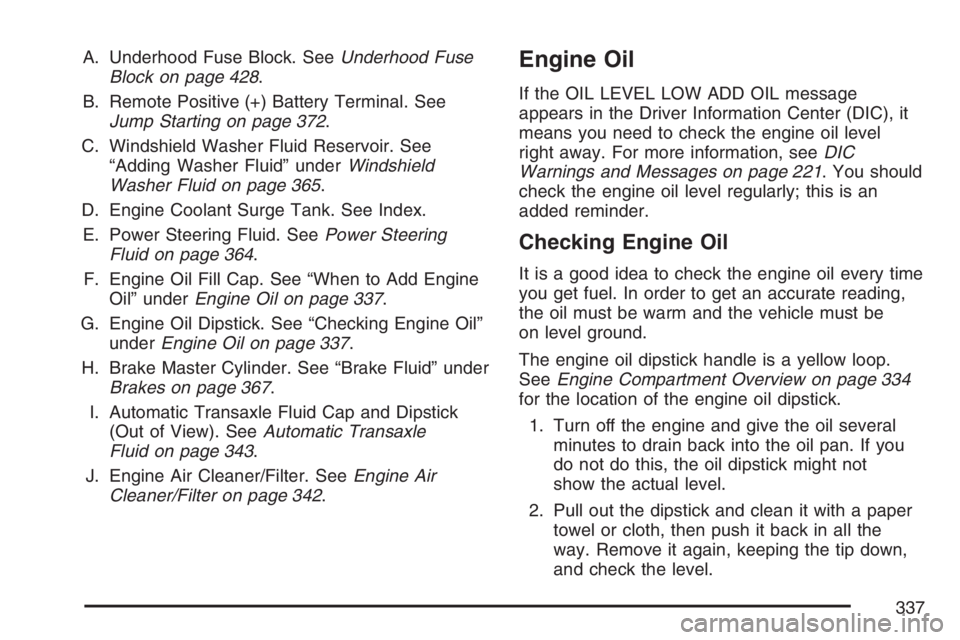
A. Underhood Fuse Block. SeeUnderhood Fuse
Block on page 428.
B. Remote Positive (+) Battery Terminal. See
Jump Starting on page 372.
C. Windshield Washer Fluid Reservoir. See
“Adding Washer Fluid” underWindshield
Washer Fluid on page 365.
D. Engine Coolant Surge Tank. See Index.
E. Power Steering Fluid. SeePower Steering
Fluid on page 364.
F. Engine Oil Fill Cap. See “When to Add Engine
Oil” underEngine Oil on page 337.
G. Engine Oil Dipstick. See “Checking Engine Oil”
underEngine Oil on page 337.
H. Brake Master Cylinder. See “Brake Fluid” under
Brakes on page 367.
I. Automatic Transaxle Fluid Cap and Dipstick
(Out of View). SeeAutomatic Transaxle
Fluid on page 343.
J. Engine Air Cleaner/Filter. SeeEngine Air
Cleaner/Filter on page 342.Engine Oil
If the OIL LEVEL LOW ADD OIL message
appears in the Driver Information Center (DIC), it
means you need to check the engine oil level
right away. For more information, seeDIC
Warnings and Messages on page 221. You should
check the engine oil level regularly; this is an
added reminder.
Checking Engine Oil
It is a good idea to check the engine oil every time
you get fuel. In order to get an accurate reading,
the oil must be warm and the vehicle must be
on level ground.
The engine oil dipstick handle is a yellow loop.
SeeEngine Compartment Overview on page 334
for the location of the engine oil dipstick.
1. Turn off the engine and give the oil several
minutes to drain back into the oil pan. If you
do not do this, the oil dipstick might not
show the actual level.
2. Pull out the dipstick and clean it with a paper
towel or cloth, then push it back in all the
way. Remove it again, keeping the tip down,
and check the level.
337
Page 340 of 496
If you are in an area of extreme cold, where the
temperature falls below−20°F (−29°C), it is
recommended that you use either an SAE 5W-30
synthetic oil or an SAE 0W-30 oil. Both will
provide easier cold starting and better protection
for the engine at extremely low temperatures.
Engine Oil Additives
Do not add anything to the oil. The recommended
oils with the starburst symbol that meet GM
Standard GM6094M are all you will need for good
performance and engine protection.
Engine Oil Life System
When to Change Engine Oil
Your vehicle has a computer system that lets you
know when to change the engine oil and lter.
This is based on engine revolutions and engine
temperature, and not on mileage. Based on driving
conditions, the mileage at which an oil change
will be indicated can vary considerably. For the oil
life system to work properly, you must reset the
system every time the oil is changed.When the system has calculated that oil life has
been diminished, it will indicate that an oil change
is necessary. A CHANGE ENGINE OIL SOON
message will come on. SeeDIC Warnings
and Messages on page 221. Change your oil as
soon as possible within the next 600 miles
(1 000 km). It is possible that, if you are driving
under the best conditions, the oil life system may
not indicate that an oil change is necessary for
over a year. However, your engine oil and
lter must be changed at least once a year and at
this time the system must be reset. Your dealer
has GM-trained service people who will perform
this work using genuine GM parts and reset
the system. It is also important to check your oil
regularly and keep it at the proper level.
If the system is ever reset accidentally, you must
change your oil at 3,000 miles (5 000 km)
since your last oil change. Remember to reset the
oil life system whenever the oil is changed.
340
Page 394 of 496

The TPMS is designed to alert the driver, if a low
tire pressure condition exists. If your vehicle
has the Driver Information Center (DIC), the driver
may also check tire pressure levels using the
DIC buttons located on the instrument panel.
When a low tire pressure condition is detected,
the TPMS will illuminate the low tire pressure
warning symbol, located on the instrument panel
cluster, and at the same time a message to check
the pressure in a specic tire will also appear on
the DIC display. The low tire pressure warning
symbol on the instrument panel cluster and
the CHECK TIRE PRESSURE warning message
on the DIC display will appear at each ignition
cycle until the tires are inated to the correct
ination pressure. For additional information and
details about the DIC operation and displays
seeDIC Controls and Displays on page 212and
DIC Warnings and Messages on page 221.
You may notice, during cooler weather conditions,
that the tire pressure monitor light, located on
the instrument panel cluster, and the CHECK TIRE
PRESSURE message will appear when the
vehicle is rst started and the turn off as you startto drive the vehicle. This could be an early
indicator that the tire pressures are getting low
and need to be inated to the proper pressure.
Each tire, including the spare (if provided), should
be checked monthly when cold and inated to
the ination pressure recommended by the vehicle
manufacturer on the vehicle placard or tire
ination pressure label. (If your vehicle has tires of
a different size than the size indicated on the
vehicle placard or tire ination pressure label, you
should determine the proper tire ination
pressure for those tires.)
As an added safety
feature, your vehicle
has been equipped with
a tire pressure
monitoring system
(TPMS) that illuminates
a low tire pressure
telltale when one
or more of your tires is
signicantly
under-inated.
394