park assist BUICK LUCERNE 2007 User Guide
[x] Cancel search | Manufacturer: BUICK, Model Year: 2007, Model line: LUCERNE, Model: BUICK LUCERNE 2007Pages: 496, PDF Size: 2.77 MB
Page 216 of 496
Vehicle Information Menu Items
T
(Vehicle Information):Press this button to
scroll through the following menu items:
Oil Life
Press the vehicle information button until OIL LIFE
REMAINING displays. This display shows an
estimate of the oil’s remaining useful life. If you
see 99% OIL LIFE REMAINING on the display,
that means 99% of the current oil life remains.
The engine oil life system will alert you to change
the oil on a schedule consistent with your driving
conditions.
When the remaining oil life is low, the CHANGE
ENGINE OIL SOON message will appear on the
display. See “CHANGE ENGINE OIL SOON” under
DIC Warnings and Messages on page 221. You
should change the oil as soon as possible. See
Engine Oil on page 337. In addition to the engine
oil life system monitoring the oil life, additional
maintenance is recommended in the Maintenance
Schedule in this manual. SeeScheduled
Maintenance on page 442for more information.Remember, you must reset the OIL LIFE yourself
after each oil change. It will not reset itself. Also, be
careful not to reset the OIL LIFE accidentally at any
time other than when the oil has just been changed.
It cannot be reset accurately until the next oil
change. To reset the engine oil life system,
seeEngine Oil Life System on page 340.
Park Assist
If your vehicle has the Ultrasonic Rear Parking
Assist (URPA) system, this display allows the
system to be turned on or off. Once in this display,
press the set/reset button to select between ON or
OFF. If you choose ON, the system will be turned
on. If you choose OFF, the system will be turned
off. The URPA system automatically turns back
on after each vehicle start. When the URPA system
is turned off and the vehicle is shifted out of
PARK (P), the DIC will display the PARK ASSIST
OFF message as a reminder that the system has
been turned off. SeeDIC Warnings and Messages
on page 221andUltrasonic Rear Parking Assist
(URPA) on page 178for more information.
216
Page 225 of 496

OIL PRESSURE LOW STOP ENGINE
Notice:If you drive your vehicle while the
engine oil pressure is low, severe engine
damage may occur. If a low oil pressure
warning appears on the instrument panel
cluster and/or DIC, stop the vehicle as soon
as possible. Do not drive the vehicle until the
cause of the low oil pressure is corrected. See
Engine Oil on page 337for more information.
This message displays when the vehicle’s engine
oil pressure is low. The oil pressure light also
appears on the instrument panel cluster.
SeeOil Pressure Light on page 209.
Stop the vehicle immediately, as engine damage
can result from driving a vehicle with low oil
pressure. Have the vehicle serviced by your
dealer as soon as possible when this message
is displayed.
PARK ASSIST OFF
If your vehicle has this feature, after the vehicle has
been started, this message will reminder the driver
that the Ultrasonic Rear Parking Assist (URPA)
system has been turned off. Press the set/reset
button to acknowledge this message and clear it
from the DIC display. To turn the URPA system
back on, see “Park Assist” underDIC Controls and
Displays on page 212. SeeUltrasonic Rear Parking
Assist (URPA) on page 178for more information.
PASSENGER DOOR OPEN
This message displays when the front passenger’s
door is not closed properly. When this message
appears, make sure that the front passenger’s
door is closed completely.
RAINSENSE WIPERS ACTIVE
If your vehicle has this feature, this message
displays while the Rainsense™ system is active.
SeeRainsense™ II Wipers on page 165for
more information.
225
Page 227 of 496

SERVICE BRAKE ASSIST
This message displays if there is a problem with the
brake system. The brake system warning light and
the anti-lock brake system warning light may also
be displayed on the instrument panel cluster. See
Brake System Warning Light on page 201and
Anti-Lock Brake System Warning Light on page 202
for more information. If this happens, stop as soon
as possible and turn off the vehicle. Restart the
vehicle and check for the message on the DIC
display. If the message is displayed or appears
again when you begin driving, the brake system
needs service. See your dealer as soon as
possible. SeeBrakes on page 367for more
information.
SERVICE BRAKE SYSTEM
This message displays if the ignition is on to
inform the driver that the brake uid level is low.
Have the brake system serviced by your dealer as
soon as possible. The brake system warning
light also appears on the instrument panel cluster
when this message appears on the DIC. See
Brake System Warning Light on page 201.
SERVICE PARK ASSIST
If your vehicle has this feature, this message
displays if there is a problem with the Ultrasonic
Rear Parking Assist (URPA) system. Do not
use this system to help you park. SeeUltrasonic
Rear Parking Assist (URPA) on page 178for more
information. See your dealer for service.
SERVICE POWER STEERING
Your vehicle may have a speed variable assist
steering system. SeeSteering on page 285.
This message displays if a problem is detected with
the speed variable assist steering system. When
this message is displayed, you may notice that the
effort required to steer the vehicle decreases or
feels lighter, but you will still be able to steer the
vehicle.
227
Page 237 of 496
NO CHANGE:No change will be made to this
feature. The current setting will remain.
Select one of the available choices and press
the set/reset button while it is displayed on the
DIC to select it.
CHIME VOLUME
This feature allows you to select the volume level
of the chime.
Press the customization button until CHIME
VOLUME appears on the DIC display. Press the
set/reset button to access the settings for this
feature. Then press the customization button to
scroll through the following choices:
NORMAL (default):The chime volume will be set
to a normal level.
LOUD:The chime volume will be set to a
loud level.
NO CHANGE:No change will be made to this
feature. The current setting will remain.
Select one of the available choices and press
the set/reset button while it is displayed on the DIC
to select it.
PARK TILT MIRRORS
If your vehicle has this feature, it allows you to
select whether or not the outside mirror(s) will
automatically tilt down when the vehicle is shifted
into REVERSE (R). SeeOutside Curb View Assist
Mirror on page 134for more information.
Press the customization button until PARK TILT
MIRRORS appears on the DIC display. Press the
set/reset button to access the settings for this
feature. Then press the customization button to
scroll through the following choices:
OFF (default):Neither outside mirror will be tilted
down when the vehicle is shifted into
REVERSE (R).
DRIVER MIRROR:The driver’s outside mirror will
be tilted down when the vehicle is shifted into
REVERSE (R).
PASSENGER MIRROR:The passenger’s outside
mirror will be tilted down when the vehicle is
shifted into REVERSE (R).
BOTH MIRRORS:The driver’s and passenger’s
outside mirrors will be tilted down when the vehicle
is shifted into REVERSE (R).
237
Page 408 of 496
Changing a Flat Tire
If a tire goes at, avoid further tire and wheel
damage by driving slowly to a level place. Turn on
your vehicle’s hazard warning ashers. See
Hazard Warning Flashers on page 160for more
information.
{CAUTION:
Changing a tire can be dangerous. The
vehicle can slip off the jack and roll over
or fall on you or other people. You and
they could be badly injured or even killed.
Find a level place to change your tire. To
help prevent the vehicle from moving:
1. Set the parking brake rmly.
2. Put the shift lever in PARK (P).
3. Turn off the engine and do not restart
while the vehicle is raised.
4. Do not allow passengers to remain in
the vehicle.
CAUTION: (Continued)
CAUTION: (Continued)
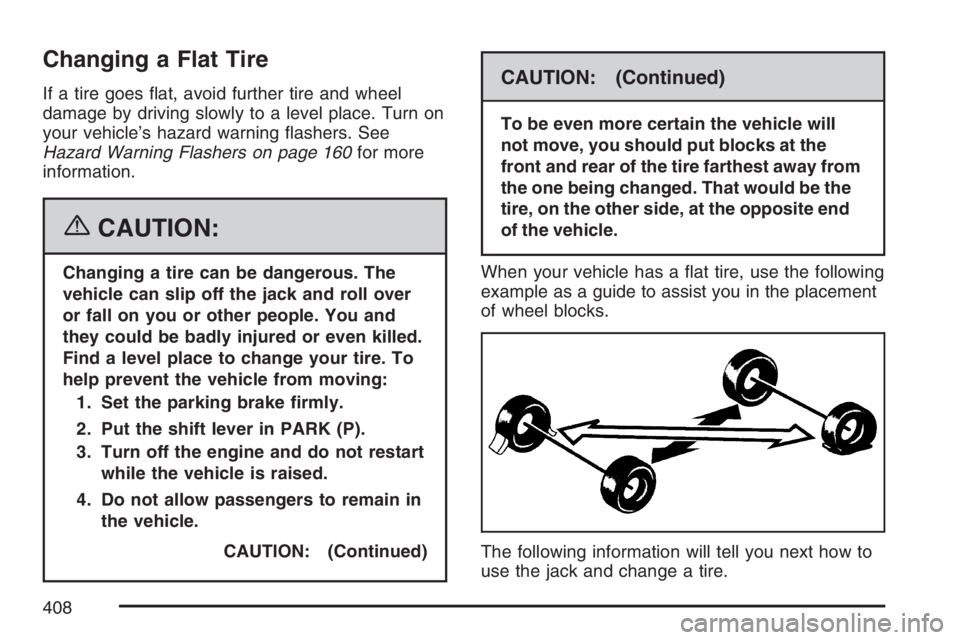
To be even more certain the vehicle will
not move, you should put blocks at the
front and rear of the tire farthest away from
the one being changed. That would be the
tire, on the other side, at the opposite end
of the vehicle.
When your vehicle has a at tire, use the following
example as a guide to assist you in the placement
of wheel blocks.
The following information will tell you next how to
use the jack and change a tire.
408
Page 482 of 496

Audio System(s) (cont.)
Navigation/Radio System,
see Navigation Manual......................... 271
Radio with CD................................245, 251
Setting the Time..............................242, 243
Theft-Deterrent Feature............................ 271
Understanding Radio Reception............... 272
XM™ Satellite Radio Antenna System...... 274
Automatic Transaxle
Fluid........................................................ 343
Operation................................................. 119
B
Backglass Antenna...................................... 274
Battery........................................................ 370
Electric Power Management..................... 176
Exterior Lighting Battery Saver................. 173
Inadvertent Power Saver.......................... 177
Run-Down Protection............................... 177Before Leaving on a Long Trip.................... 298
Brake
Anti-Lock Brake System (ABS)................. 281
Emergencies............................................ 283
Panic Assist............................................. 285
Parking.................................................... 122
System Warning Light.............................. 201
Brakes........................................................ 367
Braking....................................................... 280
Braking in Emergencies............................... 283
Break-In, New Vehicle................................. 113
Bulb Replacement....................................... 380
Halogen Bulbs......................................... 380
Headlamp Aiming..................................... 377
License Plate Lamps................................ 383
Replacement Bulbs.................................. 383
Taillamps and Back-Up Lamps................. 382
Taillamps, Turn Signal, Stoplamps and
Sidemarker Lamps................................ 380
Buying New Tires........................................ 400
482
Page 491 of 496
Outlet Adjustment........................................ 192
Outlet(s), Accessory Power.......................... 181
Outside
Automatic Dimming Heated Mirror............ 135
Convex Mirror.......................................... 134
Curb View Assist Mirror........................... 134
Power Mirrors.......................................... 133
Overheated Engine Protection
Operating Mode....................................... 353
Owner Checks and Services....................... 448
Owners, Canadian.......................................... 3
P
Paint, Damage............................................ 425
Panic Brake Assist...................................... 285
Park Aid...................................................... 178
Park (P)
Shifting Into............................................. 123
Shifting Out of......................................... 125
Parking
Assist....................................................... 178
Brake....................................................... 122
Over Things That Burn............................ 126Passenger Airbag Status Indicator............... 198
Passenger Compartment Air Filter............... 192
Passenger Sensing System........................... 81
Passing....................................................... 288
PASS-Key
®III+........................................... 111
PASS-Key®III+ Operation........................... 112
Perimeter Lighting....................................... 175
Power
Accessory Outlet(s).................................. 181
Door Locks.............................................. 103
Electrical System..................................... 428
Inadvertent Battery Saver......................... 177
Lumbar Controls........................................ 10
Retained Accessory (RAP)....................... 115
Seat............................................................ 9
Steering Fluid.......................................... 364
Windows.................................................. 109
Pretensioners, Safety Belt............................. 42
Programmable Automatic Door Locks.......... 104
Q
Questions and Answers About Safety Belts...... 24
491
Page 492 of 496

R
Radiator Pressure Cap................................ 351
Radios........................................................ 241
Care of Your CD Player........................... 274
Care of Your CDs.................................... 273
Navigation/Radio System,
see Navigation Manual......................... 271
Radio with CD................................245, 251
Setting the Time..............................242, 243
Theft-Deterrent......................................... 271
Understanding Reception......................... 272
Rainsense™ II Wipers................................. 165
Rear Door Security Locks........................... 104
Rear Safety Belt Comfort Guides.................. 39
Rear Seat Armrest...................................... 152
Rear Seat Passengers, Safety Belts.............. 36
Rearview Mirror, Automatic Dimming
with Compass.......................................... 132
Rearview Mirror, Automatic Dimming
with OnStar
®............................................ 129
Rearview Mirror, Automatic Dimming
with OnStar
®and Compass..................... 130
Rearview Mirror with Compass
and Temperature........................................ 19
Rearview Mirror with OnStar
®...................... 129
Rearview Mirrors......................................... 129Reclining Seatbacks...................................... 14
Recommended Fluids and Lubricants.......... 452
Recreational Vehicle Towing........................ 313
Remote Keyless Entry (RKE) System............ 94
Remote Keyless Entry (RKE) System,
Operation................................................... 95
Removing the Flat Tire and
Installing the Spare Tire........................... 410
Removing the Spare Tire and Tools............ 409
Replacement Bulbs..................................... 383
Reporting Safety Defects
Canadian Government............................. 477
General Motors........................................ 478
United States Government....................... 477
Restraint System Check
Checking the Restraint Systems................. 88
Replacing Restraint System Parts
After a Crash......................................... 89
Retained Accessory Power (RAP)................ 115
Right Front Passenger Position,
Safety Belts............................................... 34
Roadside
Assistance Program................................. 466
Rocking Your Vehicle to Get it Out.............. 307
Routing, Engine Drive Belt.......................... 454
Running the Engine While Parked............... 128
492
Page 495 of 496
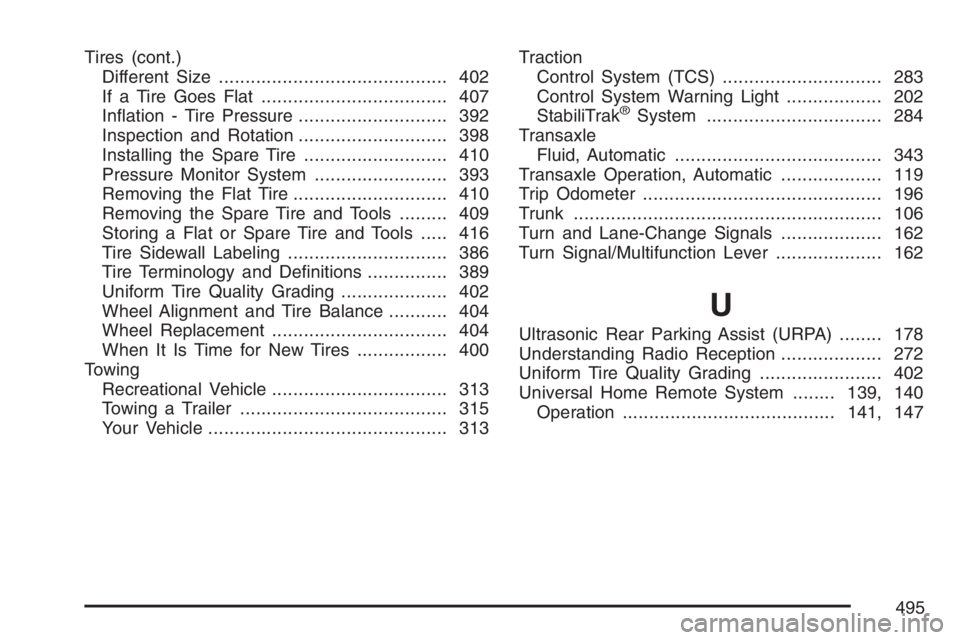
Tires (cont.)
Different Size........................................... 402
If a Tire Goes Flat................................... 407
Ination - Tire Pressure............................ 392
Inspection and Rotation............................ 398
Installing the Spare Tire........................... 410
Pressure Monitor System......................... 393
Removing the Flat Tire............................. 410
Removing the Spare Tire and Tools......... 409
Storing a Flat or Spare Tire and Tools..... 416
Tire Sidewall Labeling.............................. 386
Tire Terminology and Denitions............... 389
Uniform Tire Quality Grading.................... 402
Wheel Alignment and Tire Balance........... 404
Wheel Replacement................................. 404
When It Is Time for New Tires................. 400
Towing
Recreational Vehicle................................. 313
Towing a Trailer....................................... 315
Your Vehicle............................................. 313Traction
Control System (TCS) .............................. 283
Control System Warning Light.................. 202
StabiliTrak
®System................................. 284
Transaxle
Fluid, Automatic....................................... 343
Transaxle Operation, Automatic................... 119
Trip Odometer............................................. 196
Trunk.......................................................... 106
Turn and Lane-Change Signals................... 162
Turn Signal/Multifunction Lever.................... 162
U
Ultrasonic Rear Parking Assist (URPA)........ 178
Understanding Radio Reception................... 272
Uniform Tire Quality Grading....................... 402
Universal Home Remote System........139, 140
Operation........................................141, 147
495