service reset BUICK LUCERNE 2007 User Guide
[x] Cancel search | Manufacturer: BUICK, Model Year: 2007, Model line: LUCERNE, Model: BUICK LUCERNE 2007Pages: 496, PDF Size: 2.77 MB
Page 377 of 496
To disconnect the jumper cables from both
vehicles, do the following:
1. Disconnect the black negative (−) cable from
the vehicle that had the dead battery.
2. Disconnect the black negative (−) cable from
the vehicle with the good battery.
3. Disconnect the red positive (+) cable from the
vehicle with the good battery.
4. Disconnect the red positive (+) cable from the
other vehicle.
5. Return the positive (+) remote terminal cover
to its original position.
Headlamp Aiming
The vehicle has a visual optical headlamp aiming
system. The aim of the headlamps have been
preset at the factory and should need no further
adjustment.
However, if the vehicle is damaged in an accident,
the aim of the headlamps may be affected and
adjustment may be necessary.
If oncoming vehicles ash their high beams at
you, this may mean the vertical aim of your
headlamps needs to be adjusted.It is recommended that the vehicle is taken to your
dealer for service if the headlamps need to be
adjusted. It is possible however, to re-aim the
headlamps as described in the following procedure.
The vehicle should be properly prepared as
follows:
The vehicle should be placed so the
headlamps are 25 ft. (7.6 m) from a light
colored wall.
The vehicle must have all four tires on a level
surface which is level all the way to the wall.
The vehicle should be placed so it is
perpendicular to the wall.
The vehicle should not have any snow, ice or
mud on it.
The vehicle should be fully assembled and all
other work stopped while headlamp aiming is
being performed.
The vehicle should be normally loaded with a
full tank of fuel and one person or 160 lbs
(75 kg) sitting on the driver’s seat.
Tires should be properly inated.
The spare tire is in its proper location in the
vehicle.
377
Page 396 of 496

Your vehicle’s TPMS system can warn you about a
low tire pressure condition but it does not replace
normal tire maintenance. SeeTire Inspection and
Rotation on page 398andTires on page 385.
Notice:Do not use a tire sealant if your
vehicle has Tire Pressure Monitors. The liquid
sealant can damage the tire pressure monitor
sensors.
The TPMS will not function properly if one or more
of the TPMS sensors are missing or inoperable.
If the system detects a missing or inoperable
sensor, an error message SERVICE TIRE
MONITOR SYSTEM will be shown on the DIC
display. If you have replaced a tire/wheel assembly
without transferring the TPMS sensors, the error
message will be displayed. Once you re-install the
TPMS sensors, the error message should go
off. See your GM dealer for service if all TPMS
sensors are installed and the error message
comes on and stays on.Resetting the TPMS Sensor
Identication Codes
Each TPMS sensor has a unique identication
code. Any time you replace one or more of
the TPMS sensors or rotate the vehicle’s tires, the
identication codes will need to be matched to
the new tire/wheel position. The sensors are
matched, to the tire/wheel positions, in the
following order: driver’s side front tire, passenger’s
side front tire, passenger’s side rear tire, and
driver’s side rear tire using a TPMS diagnostic tool.
See your GM dealer for service.
The TPMS sensors may also be matched to each
tire/wheel position by increasing or decreasing
the tire’s air pressure. When increasing the tire’s
pressure, do not exceed the maximum ination
pressure indicated on the tire’s sidewall.
You will have two minutes to match each tire and
wheel position. If it takes longer than two minutes to
match any tire and wheel position, or more than
ve minutes to match all four tire and wheel
positions the matching process stops and you will
need to start over.
396
Page 397 of 496

The TPMS matching process is outlined below:
1. Set the parking brake.
2. Turn the ignition switch to RUN with the
engine off.
3. Using the DIC, press the vehicle information
button until the LEARN TIRE POSITIONS
message displays.
4. Press the set/reset button to allow the system
to learn the tire positions. The horn will sound
twice to indicate the receiver is ready, and
the TIRE LEARNING ACTIVE message
will display. The TPMS system is ready for
the sensor matching process to begin.
5. Start with the driver’s side front tire.
6. Remove the valve cap from the tire’s valve
stem. Activate the TPMS sensor by increasing
or decreasing the tire’s air pressure for
ve seconds, or until a horn chirp sounds.
The horn chirp, which may take up to
30 seconds to sound, conrms that the
sensor identication code has been matched
to the tire/wheel position. To decrease the
tire’s air-pressure use the pointed end of the
valve cap, a pencil-style air pressure gage,
or a key.7. Proceed to the passenger’s side front tire, and
repeat the procedure in Step 6.
8. Proceed to the passenger’s side rear tire, and
repeat the procedure in Step 6.
9. Proceed to the driver’s side rear tire, and
repeat the procedure in Step 6.
10. After hearing the conrming horn chirp for the
driver’s side rear tire, the tire learning process
ends. Turn the ignition switch to OFF.
11. Set all four tires to the recommended air
pressure level as indicated on the tire and
loading information label.
12. Put the valve caps back on the valve stems.
The compact spare tire and wheel assembly
does not have a TPMS sensor. If you replace
one of the road tires with the compact spare tire,
the SERVICE TIRE MONITOR SYSTEM
message will be displayed on the DIC display
screen. This message should go off once
you re-install the road tire containing the
TPMS sensor.
397
Page 442 of 496

When you go to your GM Goodwrench®dealer for
your service needs, you will know that GM-trained
and supported service technicians will perform
the work using genuine GM parts.
If you want to purchase service information, see
Service Publications Ordering Information on
page 478.
Owner Checks and Services on page 448tells you
what should be checked, when to check it, and
what you can easily do to help keep your vehicle in
good condition.
The proper replacement parts, uids, and
lubricants to use are listed inRecommended
Fluids and Lubricants on page 452andNormal
Maintenance Replacement Parts on page 453.
When your vehicle is serviced, make sure these
are used. All parts should be replaced and all
necessary repairs done before you or anyone else
drives the vehicle. We recommend the use of
genuine GM parts.Scheduled Maintenance
When the CHANGE ENGINE OIL SOON message
in the Driver Information Center (DIC) comes on, it
means that service is required for your vehicle.
Have your vehicle serviced as soon as possible
within the next 600 miles (1 000 km). It is possible
that, if you are driving under the best conditions, the
engine oil life system may not indicate that vehicle
service is necessary for over a year. However, the
engine oil and lter must be changed at least once
a year and at this time the system must be reset.
Your GM Goodwrench
®dealer has GM-trained
service technicians who will perform this work using
genuine GM parts and reset the system.
If the engine oil life system is ever reset
accidentally, you must service your vehicle within
3,000 miles (5 000 km) since your last service.
Remember to reset the oil life system whenever
the oil is changed. SeeEngine Oil Life System on
page 340for information on the Engine Oil Life
System and resetting the system.
442
Page 443 of 496
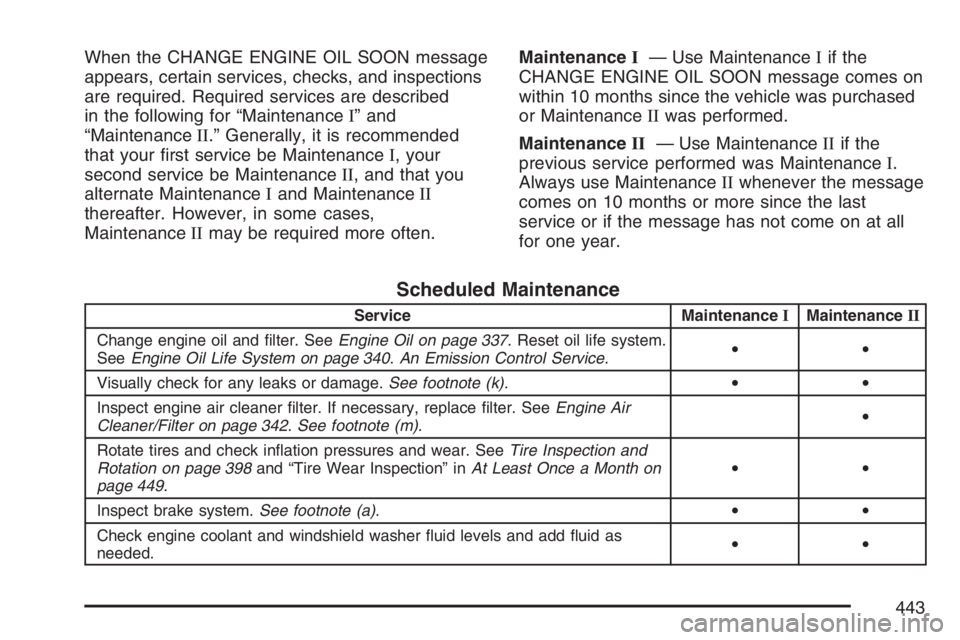
When the CHANGE ENGINE OIL SOON message
appears, certain services, checks, and inspections
are required. Required services are described
in the following for “MaintenanceI” and
“MaintenanceII.” Generally, it is recommended
that your rst service be MaintenanceI, your
second service be MaintenanceII, and that you
alternate MaintenanceIand MaintenanceII
thereafter. However, in some cases,
MaintenanceIImay be required more often.MaintenanceI— Use MaintenanceIif the
CHANGE ENGINE OIL SOON message comes on
within 10 months since the vehicle was purchased
or MaintenanceIIwas performed.
MaintenanceII— Use MaintenanceIIif the
previous service performed was MaintenanceI.
Always use MaintenanceIIwhenever the message
comes on 10 months or more since the last
service or if the message has not come on at all
for one year.
Scheduled Maintenance
Service MaintenanceIMaintenanceII
Change engine oil and lter. SeeEngine Oil on page 337. Reset oil life system.
SeeEngine Oil Life System on page 340.An Emission Control Service.••
Visually check for any leaks or damage.See footnote (k).••
Inspect engine air cleaner lter. If necessary, replace lter. SeeEngine Air
Cleaner/Filter on page 342.See footnote (m).•
Rotate tires and check ination pressures and wear. SeeTire Inspection and
Rotation on page 398and “Tire Wear Inspection” inAt Least Once a Month on
page 449.••
Inspect brake system.See footnote (a).••
Check engine coolant and windshield washer uid levels and add uid as
needed.••
443