fog light BUICK LUCERNE 2007 Owner's Manual
[x] Cancel search | Manufacturer: BUICK, Model Year: 2007, Model line: LUCERNE, Model: BUICK LUCERNE 2007Pages: 496, PDF Size: 2.77 MB
Page 155 of 496
Instrument Panel Overview........................ 158
Hazard Warning Flashers.......................... 160
Other Warning Devices............................. 160
Horn.......................................................... 160
Tilt Wheel.................................................. 161
Heated Steering Wheel............................. 161
Turn Signal/Multifunction Lever.................. 162
Turn and Lane-Change Signals................. 162
Headlamp High/Low-Beam Changer.......... 163
Flash-to-Pass............................................ 164
Windshield Wipers..................................... 164
Rainsense™ II Wipers............................... 165
Windshield Washer.................................... 166
Cruise Control........................................... 167
Exterior Lamps.......................................... 170
Wiper Activated Headlamps....................... 171
Headlamps on Reminder........................... 171
Daytime Running Lamps (DRL)................. 172
Fog Lamps................................................ 173
Cornering Lamps....................................... 173
Exterior Lighting Battery Saver.................. 173
Instrument Panel Brightness...................... 174
Courtesy Lamps........................................ 174
Entry Lighting............................................ 174Delayed Entry Lighting.............................. 174
Theater Dimming....................................... 175
Delayed Exit Lighting ................................. 175
Perimeter Lighting..................................... 175
Front Reading Lamps................................ 175
Electric Power Management...................... 176
Inadvertent Power Battery Saver............... 177
Battery Run-Down Protection..................... 177
Ultrasonic Rear Parking Assist (URPA)...... 178
Accessory Power Outlet(s)........................ 181
Ashtray(s) and Cigarette Lighter................ 182
Climate Controls......................................... 182
Climate Control System............................. 182
Dual Automatic Climate Control System.... 186
Outlet Adjustment...................................... 192
Passenger Compartment Air Filter............. 192
Warning Lights, Gages, and Indicators..... 194
Instrument Panel Cluster........................... 194
Speedometer and Odometer...................... 196
Trip Odometer........................................... 196
Tachometer............................................... 196
Safety Belt Reminder Light........................ 196
Section 3 Instrument Panel
155
Page 156 of 496
Passenger Safety Belt Reminder Light....... 197
Airbag Readiness Light............................. 197
Passenger Airbag Status Indicator............. 198
Charging System Light.............................. 200
Brake System Warning Light..................... 201
Anti-Lock Brake System Warning Light...... 202
Traction Control System (TCS)
Warning Light........................................ 202
StabiliTrak
®Indicator Light......................... 203
Engine Coolant Temperature
Warning Light........................................ 204
Engine Coolant Temperature Gage............ 204
Tire Pressure Light.................................... 205
Malfunction Indicator Lamp........................ 206
Oil Pressure Light..................................... 209
Security Light............................................ 210
Fog Lamp Light......................................... 210
Cruise Control Light.................................. 210
Highbeam On Light................................... 210
Fuel Gage................................................. 211Driver Information Center (DIC).................. 212
DIC Controls and Displays........................ 212
DIC Compass............................................ 218
DIC Warnings and Messages.................... 221
DIC Vehicle Customization........................ 231
Audio System(s)......................................... 241
Setting the Time (Without Date Display).... 242
Setting the Time (With Date Display)......... 243
Radio with CD (Base)............................... 245
Radio with CD (MP3)................................ 251
Using an MP3........................................... 262
XM Radio Messages................................. 269
Navigation/Radio System........................... 271
Theft-Deterrent Feature............................. 271
Audio Steering Wheel Controls.................. 271
Radio Reception........................................ 272
Care of Your CDs..................................... 273
Care of the CD Player.............................. 274
Backglass Antenna.................................... 274
XM™ Satellite Radio Antenna System....... 274
Section 3 Instrument Panel
156
Page 170 of 496
Using Cruise Control on Hills
How well the cruise control will work on hills
depends upon the vehicle speed, load and the
steepness of the hills. When going up steep hills,
you may have to step on the accelerator pedal
to maintain your speed. When going downhill, you
may have to brake or shift to a lower gear to
keep your speed down. Of course, applying the
brake ends the cruise control. Many drivers
nd this to be too much trouble and do not use
cruise control on steep hills.
Ending Cruise Control
There are three ways to end cruise control:
Step lightly on the brake pedal.
Press the[(cancel) button on the steering
wheel.
Press theT(on/off) button on the steering
wheel.
Erasing Speed Memory
The cruise control set speed memory is erased by
turning off the cruise control or the ignition.
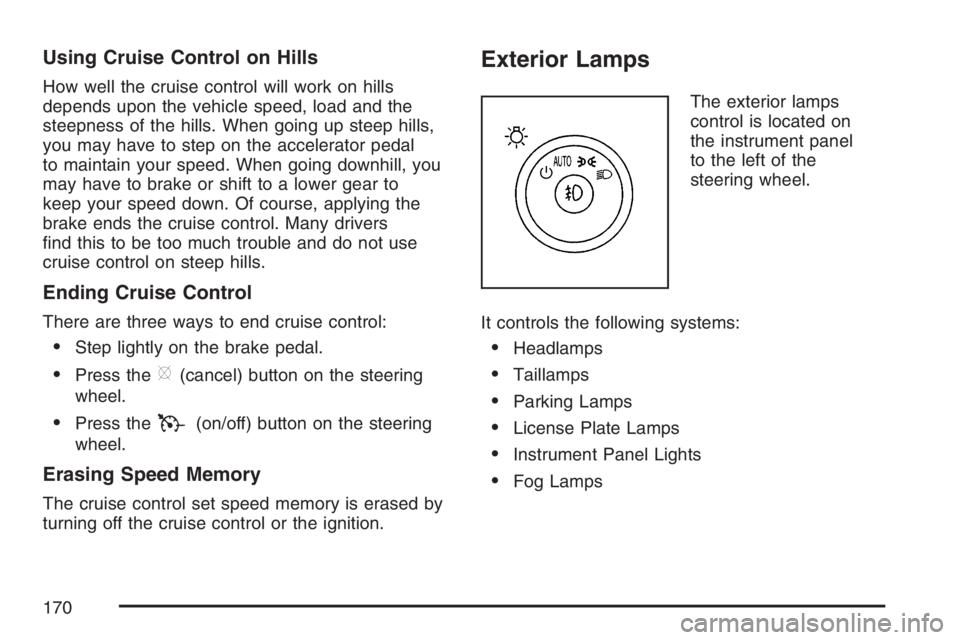
Exterior Lamps
The exterior lamps
control is located on
the instrument panel
to the left of the
steering wheel.
It controls the following systems:
Headlamps
Taillamps
Parking Lamps
License Plate Lamps
Instrument Panel Lights
Fog Lamps
170
Page 171 of 496
The exterior lamps control has four positions:
O(Off):Turn the control to this position to turn
off the exterior lamps.
AUTO (Automatic):Turn the control to this
position to automatically turn on the headlamps at
normal brightness, together with the following:
Parking Lamps
Instrument Panel Lights
;(Parking Lamps):Turn the control to this
position to turn on the parking lamps together with
the following:
Taillamps
License Plate Lamps
Instrument Panel Lights
2(Headlamps):Turn the control to this position
to turn on the headlamps together with the following
lamps listed below. A warning chime will sound if
you open the driver’s door when the ignition switch
is off and the headlamps are on.
Parking Lamps
License Plate Lamps
Instrument Panel Lights
-(Fog Lamps):Push the exterior lamps control
in to turn on the fog lamps.
SeeFog Lamps on page 173.
Wiper Activated Headlamps
This feature activates the headlamps and parking
lamps after the windshield wipers are turned
on and have completed eight wipe cycles within
four minutes.
When the ignition is turned to OFF, the
wiper-activated headlamps immediately turn off.
The wiper-activated headlamps also turn off if the
windshield wipers are turned off.
Headlamps on Reminder
If you leave the exterior lamp buttons for the
headlamps or parking lamps on, remove the key
from the ignition and open the driver’s door,
you will hear a continuous warning chime. The
chime will turn off when the lamps are turned off.
171
Page 173 of 496
Fog Lamps
-(Fog Lamps):If your vehicle has fog lamps,
the button is located on the exterior lamps control.
The exterior lamps control is located on the
instrument panel to the left of the steering column.
Your ignition must be in RUN for the fog lamps to
illuminate.
To turn the fog lamps on, press the exterior lamps
button. A light will come on in the instrument
panel cluster to let you know that the fog lamps
are on. SeeInstrument Panel Cluster on page 194.
Press the exterior lamps button again to turn the
fog lamps off.
The ignition must be in RUN and the parking
lamps must be on for your fog lamps to work.
The fog lamps will go off while you change
to high-beam headlamps.
Some localities have laws that require the
headlamps to be on along with the fog lamps.
Cornering Lamps
If your vehicle has this feature, the cornering lamps
come on when: the headlamps or parking lamps are
on, the vehicle is not in PARK (P), and you signal a
turn with the turn signal/multifunction lever. They
provide more light for cornering.
Exterior Lighting Battery Saver
If the exterior lamp button has been left on, the
exterior lamps will turn off about 10 minutes after
the ignition is turned to OFF and a door has been
opened. This protects against draining the battery
in case you have accidentally left the headlamps or
parking lamps on. If you need to leave the lamps on
for more than 10 minutes, use the manual control to
turn the lamps back on after the ignition is turned to
OFF and any door is opened.
173
Page 176 of 496
Electric Power Management
The vehicle has Electric Power Management
(EPM) that estimates the battery’s temperature and
state of charge. It then adjusts the voltage for
best performance and extended life of the battery.
When the battery’s state of charge is low, the
voltage is raised slightly to quickly put the charge
back in. When the state of charge is high, the
voltage is lowered slightly to prevent overcharging.
If the vehicle has a voltmeter gage or voltage
display on the Driver Information Center (DIC),
you may see the voltage move up or down. This
is normal. If there is a problem, an alert will
be displayed.
The battery can be discharged at idle if the
electrical loads are very high. This is true for all
vehicles. This is because the generator (alternator)
may not be spinning fast enough at idle to produce
all the power that is needed for very high electrical
loads.A high electrical load occurs when several of the
following loads are on: headlamps, high beams, fog
lamps, rear window defogger, climate control fan at
high speed, heated seats, engine cooling fans,
trailer loads, and loads plugged into accessory
power outlets.
EPM works to prevent excessive discharge of the
battery. It does this by balancing the generator’s
output and the vehicle’s electrical needs. It can
increase engine idle speed to generate more
power, whenever needed. It can temporarily
reduce the power demands of some accessories.
Normally, these actions occur in steps or levels,
without being noticeable. In rare cases at the
highest levels of corrective action, this action
may be noticeable to the driver. If so, a Driver
Information Center (DIC) message might be
displayed, such as Battery Saver Active or Service
Battery Charging System. If this message is
displayed, it is recommended that the driver
reduce the electrical loads as much as possible.
SeeDIC Warnings and Messages on page 221.
176
Page 182 of 496
Ashtray(s) and Cigarette Lighter
Push down on the front center tray to reveal the
front ashtray, cigarette lighter, and accessory
power outlet. The ashtray can be removed
for cleaning. Hold the sides of the ashtray
and then pull the ashtray up and out.
Notice:If you put papers, pins, or other
ammable items in the ashtray, hot cigarettes
or other smoking materials could ignite
them and possibly damage your vehicle.
Never put ammable items in the ashtray.
To use the lighter, push the center all the way in
and let it go. When it is ready, the center will
pop back out by itself. Pull out the entire unit to
use it.
Notice:Holding a cigarette lighter in while it
is heating will not allow the lighter to back
away from the heating element when it is hot.
Damage from overheating may occur to the
lighter or heating element, or a fuse could be
blown. Do not hold a cigarette lighter in
while it is heating.
Climate Controls
Climate Control System
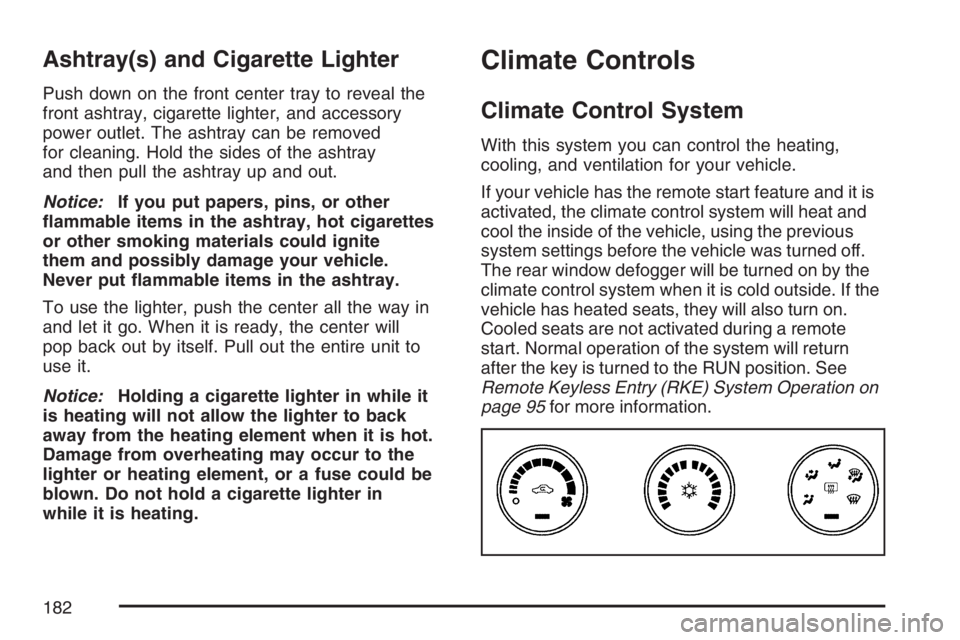
With this system you can control the heating,
cooling, and ventilation for your vehicle.
If your vehicle has the remote start feature and it is
activated, the climate control system will heat and
cool the inside of the vehicle, using the previous
system settings before the vehicle was turned off.
The rear window defogger will be turned on by the
climate control system when it is cold outside. If the
vehicle has heated seats, they will also turn on.
Cooled seats are not activated during a remote
start. Normal operation of the system will return
after the key is turned to the RUN position. See
Remote Keyless Entry (RKE) System Operation on
page 95for more information.
182
Page 183 of 496

Operation
(
(Off):Turn the left knob to this position to turn
the climate control system off.
9(Fan):Turn the left knob clockwise or
counterclockwise to increase or decrease the fan
speed. The fan speed will be temporarily reduced
between the transition to a new mode. The fan will
resume when the new mode is complete.
If the airow seems low when the fan speed is at
the highest setting, the passenger compartment
air lter may need to be replaced. For more
information, seePassenger Compartment Air
Filter on page 192andScheduled Maintenance
on page 442.
Temperature Control:Turn the center knob
clockwise or counterclockwise to warm or cool
the air coming through the outlets.
Use the right knob to select from the following
modes:
H(Vent):This mode directs outside air to the
instrument panel outlets.
)(Bi-Level):This mode directs half of the air to
the instrument panel outlets, and the remaining
air to the oor outlets. Slightly cooler air is directed
to the instrument panel outlets and warmer air is
directed to the oor outlets.
6(Floor):This mode directs most of the air to
the oor outlets with some air directed toward
the side window outlets and a little air directed to
the windshield.
In this mode, the system will automatically use
outside air.
You can also select modes by using the following
buttons:
h(Recirculate):Press this button to recirculate
cabin air through the vehicle. It can be used to
prevent outside air and odors from entering your
vehicle or to help heat or cool the air inside your
vehicle more quickly. An indicator light below the
button will come on in this mode. Operation in this
mode during periods of high humidity and cool
outside temperatures may result in increased
window fogging. If window fogging is experienced,
select the defrost mode.
183
Page 184 of 496
#(Air Conditioning):Press this button to turn
the air conditioning system on or off. When this
button is pressed, an indicator light below the
button will come on to let you know the air
conditioning is activated. Air conditioning can
be selected in any mode as long as the fan knob
is not in the off position.
On hot days during the vehicle’s initial start-up,
open the windows to let hot inside air escape; then
close them. This helps to reduce the time it takes
for the vehicle to cool down. It also helps the
system to operate more efficiently.
For quicker cool down on hot days, do the
following:
1. Select the vent air mode.
2. Select the recirculation mode.
3. Select the air conditioner.
4. Select the coolest temperature.
5. Select the highest fan speed.
The air-conditioning system removes moisture
from the air, so you may sometimes notice a
small amount of water dripping underneath your
vehicle while idling or after turning off the
engine. This is normal.Defogging and Defrosting
Fog on the inside of the vehicle is a result of high
humidity causing moisture to condense on the cool
window glass. This can be minimized if the climate
control system is used properly. There are two
modes to clear frost or fog from the windshield.
Use the oor/defog mode to clear the windows of
condensation and to warm the vehicle’s occupants.
Use the defrost mode to remove frost or
condensation from the windshield quickly.
See “Rear Window Defogger” later in this section
for information on clearing the rear window of
fog or ice.
Turn the right knob to select the defog or defrost
mode. The recirculation mode cannot be selected
while in these modes.
-(Floor/Defog):This mode directs half of the air
to the windshield and the side window outlets and
half to the oor outlets. The system runs the air
conditioning compressor unless the outside
temperature is near or below freezing.
0(Defrost):This mode directs most of the air to
the windshield and the side window outlets. The
system runs the air conditioning compressor unless
the outside temperature is near or below freezing.
184
Page 185 of 496
Rear Window Defogger
The rear window defogger uses a warming grid to
remove fog from the rear window.
<(Rear Window Defogger):Press this button
to turn the rear window defogger on or off. An
indicator light below the button will come on to
let you know that the rear window defogger is
activated. Be sure to clear as much snow from
the rear window as possible.
The rear window defogger will only work when the
ignition is in run. The rear window defogger will stay
on for about 20 minutes after the button is pressed
if you are traveling at slower vehicle speeds. At
higher vehicle speeds, the rear defogger may stay
on continuously. If turned on again, the defogger
will only run for about 10 minutes before turning off.
The defogger can be turned off by pressing
the button again, by turning the ignition to
ACCESSORY or RUN, or by turning off the engine.If your vehicle has heated outside rearview mirrors,
the mirrors will heat to help clear fog or frost from
the surface of the mirror when the rear window
defogger is on. SeeOutside Automatic Dimming
Heated Mirror on page 135for more information.
Notice:Do not use anything sharp on the
inside of the rear window. If you do, you could
cut or damage the warming grid, and the repairs
would not be covered by your warranty. Do not
attach a temporary vehicle license, tape, a decal
or anything similar to the defogger grid.
185