fog light BUICK LUCERNE 2008 User Guide
[x] Cancel search | Manufacturer: BUICK, Model Year: 2008, Model line: LUCERNE, Model: BUICK LUCERNE 2008Pages: 434
Page 163 of 434

Automatic Operation
AUTO (Automatic Fan):When AUTO is selected on
the fan control, the system automatically adjusts the fan
speed. If the OnStar
®system is activated when this
position is selected, the fan speed will lower.
AUTO (Automatic Mode)
1. Turn the fan control to AUTO.
2. Turn the mode control to AUTO.
3. Adjust the temperature to a comfortable setting
between 68°F (21°C) and 78°F (26°C).
Choosing the coldest or warmest temperature
setting will not cause the system to heat or cool any
faster. In cold weather, the system starts at
reduced fan speeds to avoid blowing cold air into
the vehicle until warmer air is available. The system
will start out blowing air to the oor, but may
change modes automatically as the vehicle warms
up to maintain the chosen temperature setting.
The length of time needed to warm the interior
depends on the outside temperature.
4. Wait a few minutes for the system to automatically
regulate. Then adjust the temperature as necessary
to nd your comfort setting.
Do not cover the solar sensor located in the center of
the instrument panel, near the windshield. For more
information on the solar sensor, see “Sensors” later in
this section.After the vehicle is started, the display shows the
interior temperature settings.
When the ENG/MET (English/metric) button on the
Driver Information Center (DIC) is pressed, the display
shows readings in Fahrenheit or Celsius. Use the
ENG/MET button to toggle between the readings.
AUTO (Automatic Air Conditioning):If AUTO is
selected on the fan or mode control, the system
automatically controls the air conditioning compressor.
The A/C compressor runs automatically even at cool
outside temperatures in order to dehumidify the air. The
A/C indicator light is lit when the system is operating
automatically. Press the A/C button on the fan control to
turn off the A/C. To clear windows better in defog or
defrost modes, the A/C compressor runs automatically
in damp cool conditions.
h(Auto Recirculation):If AUTO is selected on
either the fan or mode control, the system automatically
controls the supply of fresh outside air or recirculates
the interior air to cool the car faster. The indicator
light on the recirculation button will light whenever the
system switches to recirculation. You may force outside
air by pressing the outside air button. The next time
AUTO fan or mode is selected, it will reset back
to AUTO operation.
3-25
Page 164 of 434

Manual Operation
9(Fan):Turn the left knob either to the left or right to
adjust the fan speed. Turning this control completely
counterclockwise turns on the automatic fan operation.
If the airow seems low when the fan speed is at
the highest setting, the passenger compartment air lter
may need to be replaced. For more information, see
Passenger Compartment Air Filter on page 3-30
andScheduled Maintenance on page 6-4.
9(Off):Turn the left control to this position to turn
the climate control system off. Outside air still enters the
vehicle and is directed to the oor. The airow direction
and temperature can be adjusted, as indicated below.
If the temperature is adjusted while the system is off, the
display will light to show the current settings.
Mode Control:Turn the right knob clockwise or
counterclockwise to change the airow direction.
F(Vent):This mode directs outside air to the
instrument panel outlets.
*(Bi-Level):This mode splits the air between the
instrument panel outlets and the oor outlets. In
automatic operation, cooler air is directed to the upper
outlets and warmer air to the oor outlets.
7(Floor):This mode automatically uses outside air
and directs most to the oor outlets. Some air is directed
toward the side window outlets and to the windshield.
If recirculation is selected while in this mode, it stays on
for three minutes to reduce windshield fogging.
The mode control can also be used to select the
oor/defog mode. Information on defogging and
defrosting can be found later in this section.
#(Air Conditioning):Press the center of the left
control knob to override the automatic system and turn
the air conditioning system on or off. When this
button is pressed, an indicator light below the button
comes on to show that this mode is activated.
The air conditioning system removes moisture from the
air, so a small amount of water might drip underneath
the vehicle while idling or after turning off the engine.
This is normal.
3-26
Page 165 of 434

:(Outside Air):This mode lets outside air enter
the vehicle. When the button is pressed, an indicator
light turns on. Pressing the recirculation button cancels
this mode.
?(Recirculation):Press this button to recirculate
cabin air through the vehicle. An indicator light below the
button comes on to show that this mode is activated.
This mode can be used to prevent outside air and odors
from entering the vehicle or to help cool the air inside
the vehicle more quickly. This mode cannot be selected
while in the defog or defrost modes. If you try to
select the recirculation mode, the indicator light ashes
three times and turns off.
Operation in this mode during periods of high humidity
and cool outside temperatures may result in increased
window fogging. If window fogging is experienced, select
the defrost mode.
wx(Driver Temperature Controls):Press these
buttons next to the fan control to manually increase or
decrease the temperature inside the vehicle.
wx(Passenger Temperature Controls):Press
these buttons next to the mode control to manually
increase or decrease the temperature for the front
passenger. If the passenger climate control system is
off, pressing one of these buttons turns it on.
PASS (Passenger Climate Control):Press this button
to turn the passenger climate control systems on or off.
When the passenger climate control system is on, the
passenger temperature setting is displayed.
If the PASS button is pressed to turn the passenger
temperature setting off, the driver temperature setting
controls the temperature for the entire vehicle.
3-27
Page 167 of 434

Defogging and Defrosting
Fog on the inside of windows is a result of high humidity
(moisture) condensing on the cool window glass. This
can be minimized if the climate control system is
used properly. There are two modes to clear fog from
your windshield, defog and defrost.
W(Floor/Defog):Use this mode to clear the windows
of fog or moisture and to warm the passengers.
Turning the control to this mode directs about half of the
air to the oor outlets and the remaining air is directed
to the side window outlets and to the windshield.
When this mode is selected, the system turns off
recirculation and runs the air-conditioning compressor
unless the outside temperature is at or below freezing.
The recirculation mode cannot be selected while in
the oor/defog mode.
0(Defrost):Use this mode to remove fog or frost
from the windshield more quickly. Turning the control to
this mode directs most of the air to the windshield
and the side window outlets. In this mode, the system
automatically turns off recirculation and runs the
air-conditioning compressor, unless the outside
temperature is at or below freezing. Recirculation cannot
be selected while in the defrost mode.
Rear Window Defogger
The rear window defogger uses a warming grid to
remove fog or frost from the rear window.
<(Rear Defogger):Press this button to turn the rear
window defogger on or off. An indicator light below
the button comes on to show that the rear window
defogger is activated. Be sure to clear as much snow
from the rear window as possible.
The rear window defogger will only work when the
ignition is in ON/RUN. The rear window defogger stays
on for about 20 minutes after the button is pressed if
you are traveling at slower vehicle speeds. At higher
vehicle speeds the rear window defogger may stay on
continuously. If turned on again, the defogger only
runs for about 10 minutes before turning off. The
defogger can be turned off by pressing the button again,
by turning the ignition to ACC/ACCESSORY or
ON/RUN, or by turning off the engine.
The heated outside rearview mirrors will heat to help
clear fog or frost from the surface of the mirror when the
rear window defogger is on. SeeOutside Automatic
Dimming Heated Mirror on page 2-38for more
information.
Notice:Do not use a razor blade or sharp object to
clear the inside rear window. Do not adhere
anything to the defogger grid lines in the rear glass.
These actions may damage the rear defogger.
Repairs would not be covered by your warranty.
3-29
Page 185 of 434

Security Light
For information regarding
this light and the vehicle’s
security system, see
Content Theft-Deterrent on
page 2-17.
Fog Lamp Light
The fog lamp light will
come on when the fog
lamps are in use.
The light will go out when the fog lamps are turned off.
SeeFog Lamps on page 3-17for more information.
Cruise Control Light
This light comes on
whenever you set the
cruise control.
The light goes out when the cruise control is turned off.
SeeCruise Control on page 3-12for more information.
Highbeam On Light
This light comes on when
the high-beam headlamps
are in use.
SeeHeadlamp High/Low-Beam Changer on page 3-9
for more information.
3-47
Page 379 of 434

Fuses Usage
8 Steering Wheel Illumination
9 Front Heated/Cooled Seat Module
10Run 2 - Heated/Cooled Seats,
Heated Washer Fluid
11 Rear Heated Seat Module (optional)
12 RPA Module
13 PASS-Key
®III System
14 Unlock/Lock Module
15 Magnetic Ride Control
16 Not Used
17 Sunroof
18 Body Control Module (BCM) Dim
19 Body Control Module (BCM)
20 Run 1-Heated Steering Wheel
21 Ignition Switch
22 Driver Door Module
23 Rear Lumbar (optional)
24 Electronic Leveling Control Module
25Body Control Module (Left Turn
Signal)
26Cigarette Lighter, Auxiliary Power
Outlet
Fuses Usage
27 Navigation (optional)
28 Retained Accessory Power 1 (RAP)
29 Passenger Door Module
30 Sensing and Diagnostic Module
31 Accessory Power Outlets
32Body Control Module (BCM)
(Inadvertent)
33 Retained Accessory Power 2 (RAP)
34 CanisterVent Solenoid
35 Body Control Module (Courtesy)
36Body Control Module (Right Turn
Signal)
37 Trunk Release
38 Amplier, Radio
39 Body Control Module (CHMSL)
40 Body Control Module
41 Stoplamp (optional)
42 OnStar
®Module
43 Body Modules
44 Radio
45 Door Unlatch (optional)
46 Rear Defogger (J-Case)
5-111
Page 425 of 434
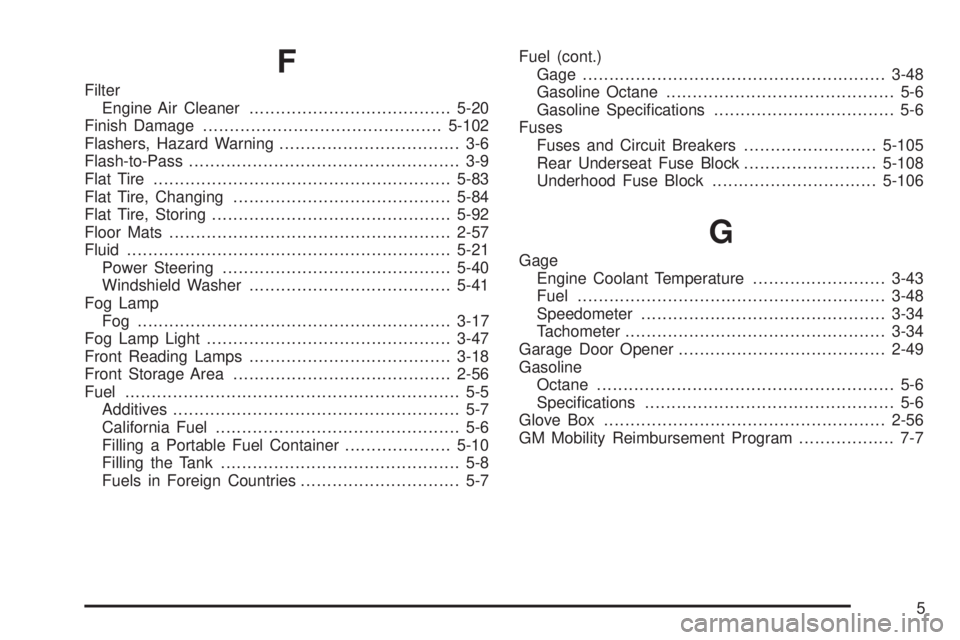
F
Filter
Engine Air Cleaner......................................5-20
Finish Damage.............................................5-102
Flashers, Hazard Warning.................................. 3-6
Flash-to-Pass................................................... 3-9
Flat Tire........................................................5-83
Flat Tire, Changing.........................................5-84
Flat Tire, Storing.............................................5-92
Floor Mats.....................................................2-57
Fluid.............................................................5-21
Power Steering...........................................5-40
Windshield Washer......................................5-41
Fog Lamp
Fog ...........................................................3-17
Fog Lamp Light..............................................3-47
Front Reading Lamps......................................3-18
Front Storage Area.........................................2-56
Fuel............................................................... 5-5
Additives...................................................... 5-7
California Fuel.............................................. 5-6
Filling a Portable Fuel Container....................5-10
Filling the Tank............................................. 5-8
Fuels in Foreign Countries.............................. 5-7Fuel (cont.)
Gage.........................................................3-48
Gasoline Octane........................................... 5-6
Gasoline Specications.................................. 5-6
Fuses
Fuses and Circuit Breakers.........................5-105
Rear Underseat Fuse Block.........................5-108
Underhood Fuse Block...............................5-106
G
Gage
Engine Coolant Temperature.........................3-43
Fuel..........................................................3-48
Speedometer..............................................3-34
Tachometer.................................................3-34
Garage Door Opener.......................................2-49
Gasoline
Octane........................................................ 5-6
Specications............................................... 5-6
Glove Box.....................................................2-56
GM Mobility Reimbursement Program.................. 7-7
5
Page 427 of 434

L
Labeling, Tire Sidewall.....................................5-61
Lamps
Cornering...................................................3-17
Courtesy....................................................3-17
Exterior Lighting Battery Saver......................3-17
Front Reading.............................................3-18
Inadvertent Power Battery Saver....................3-19
Lane Departure Warning..................................2-44
Lane Departure Warning Light..........................3-42
Lap Belt........................................................1-31
Lap-Shoulder Belt...........................................1-25
LATCH System
Child Restraints...........................................1-43
License Plate Lamps.......................................5-58
Light
Airbag Readiness........................................3-35
Antilock Brake System Warning.....................3-40
Brake System Warning.................................3-39
Charging System.........................................3-38
Cruise Control.............................................3-47
Engine Coolant Temperature Warning.............3-42
Fog Lamp..................................................3-47
Highbeam On.............................................3-47
Lane Departure Warning...............................3-42
Malfunction Indicator....................................3-44
Oil Pressure...............................................3-46
Passenger Airbag Status Indicator..................3-36
Safety Belt Reminders..................................3-34Light (cont.)
Security.....................................................3-47
StabiliTrak®Indicator....................................3-41
TCS Warning Light......................................3-40
Tire Pressure..............................................3-43
Traction Control System (TCS) Warning..........3-40
Lighting
Delayed Entry.............................................3-18
Delayed Exit...............................................3-18
Entry.........................................................3-18
Perimeter...................................................3-18
Theater Dimming.........................................3-18
Lights
Exterior Lamps............................................3-14
Flash-to-Pass............................................... 3-9
High/Low Beam Changer................................ 3-9
On Reminder..............................................3-16
Loading Your Vehicle.......................................4-19
Lockout Protection..........................................2-12
Locks
Delayed Locking..........................................2-11
Door..........................................................2-10
Lockout Protection.......................................2-12
Power Door................................................2-10
Programmable Automatic Door Locks.............2-11
Rear Door Security Locks.............................2-12
Loss of Control...............................................4-10
Lumbar
Power Controls............................................. 1-3
7