mirror BUICK LUCERNE 2008 User Guide
[x] Cancel search | Manufacturer: BUICK, Model Year: 2008, Model line: LUCERNE, Model: BUICK LUCERNE 2008Pages: 434
Page 119 of 434

Object Detection Systems
Ultrasonic Rear Parking
Assist (URPA)
If your vehicle has the Ultrasonic Rear Parking Assist
(URPA) system, it helps you park easier and avoid other
vehicles while in REVERSE (R). It operates at speeds
less than 5 mph (8 km/h). It can determine how
close objects are to the rear bumper, up to 8 feet (2.5 m)
behind your vehicle. The distance sensors are located
on the rear bumper.
{CAUTION:
The Ultrasonic Rear Parking Assist (URPA)
system does not replace driver vision. It
cannot detect:
objects that are below the bumper,
underneath the vehicle, or if they are too
close or far from the vehicle
children, pedestrians, bicyclists, or pets.
CAUTION: (Continued)
CAUTION: (Continued)
If you do not use proper care before and while
backing; vehicle damage, injury, or death
could occur. Even with URPA, always check
behind your vehicle before backing up. While
backing, be sure to look for objects and check
your vehicle’s mirrors.
The display is located on
the rear shelf, below the
rear window, and can
be seen by looking over
your right shoulder.
URPA uses three color-coded lights to provide distance
and system information.
2-39
Page 121 of 434
Side Blind Zone Alert
Your vehicle may have a Side Blind Zone Alert (SBZA)
system. Read this entire section before using the
system.
{CAUTION:
The Side Blind Zone Alert (SBZA) system does
not detect vehicles outside the side blind
zones, which may be rapidly approaching.
SBZA is not designed to detect pedestrians,
bicyclists, or animals. SBZA is only a lane
change aid. If you do not use proper care
before changing lanes, vehicle damage, injury,
or death could occur. Even with SBZA, always
check your vehicle’s mirrors, glance over your
shoulder, and start your turn signal before
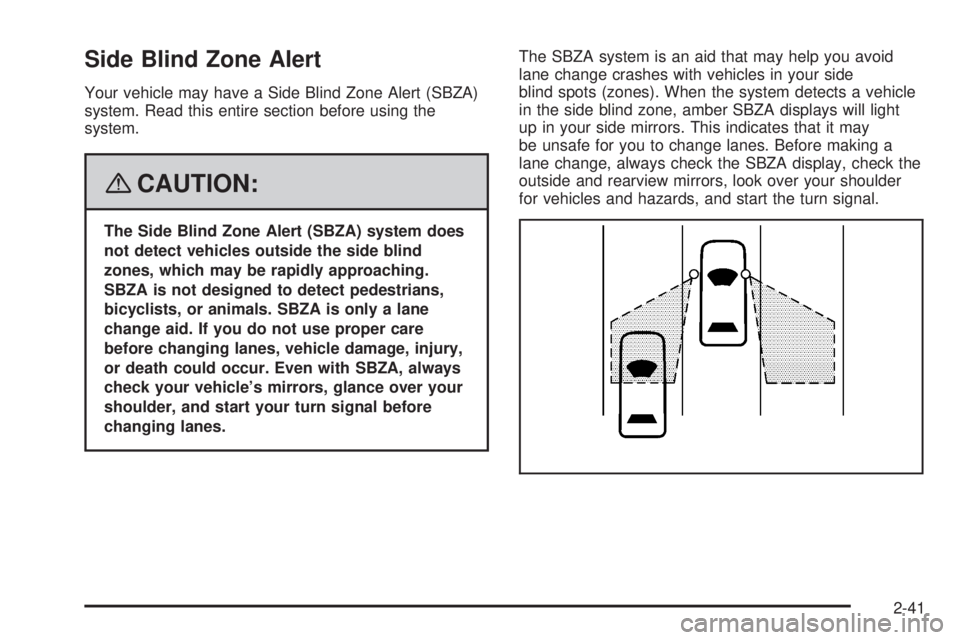
changing lanes.The SBZA system is an aid that may help you avoid
lane change crashes with vehicles in your side
blind spots (zones). When the system detects a vehicle
in the side blind zone, amber SBZA displays will light
up in your side mirrors. This indicates that it may
be unsafe for you to change lanes. Before making a
lane change, always check the SBZA display, check the
outside and rearview mirrors, look over your shoulder
for vehicles and hazards, and start the turn signal.
2-41
Page 122 of 434

SBZA Detection Zones
The SBZA sensor covers a zone of approximately one
lane over from both sides of the vehicle, 11 ft. or
3.5 m. This zone starts at each side mirror and goes
back approximately 16 ft. (5.0 m). The height of the zone
is approximately between 1.5 ft. (0.5 m) and 6 ft. (2.0 m)
off the ground.
The SBZA detection zones do not change if your
vehicle is towing a trailer. So be extra careful when
changing lanes while towing a trailer.
How the System Works
When the vehicle is started, both outside mirror displays
will briey come on to indicate that the system is
operating. When you are driving forward, the left or right
side mirror SBZA display will light up if a vehicle is
detected in that blind zone. If you activate a turn signal
and a vehicle has been detected on the same side,
the SBZA display will ash to give you extra warning not
to change lanes.
SBZA displays do not come on while your vehicle is
approaching or passing other vehicles.
SBZA can be disabled through the Driver Information
Center (DIC). SeeDriver Information Center (DIC)
on page 3-48for more information. If the SBZA
is disabled by the driver, the SBZA mirror displays will
not light up.
Left Side Mirror Display
Right Side Mirror
Display
2-42
Page 124 of 434

Lane Departure Warning
Your vehicle may have a Lane Departure Warning (LDW)
system. Read this entire section before using the system.
{CAUTION:
The Lane Departure Warning (LDW) system
does not steer the vehicle and is only an aid to
help you stay in your driving lane. The LDW
system may not:
Provide you with enough time to avoid a
lane change collision.
Be loud enough for you to hear the
warning beeps.
Work properly under bad weather
conditions or if the windshield is not kept
clean.
Detect lane markings and will not detect
road edges.
Warn you that your vehicle is crossing a
lane marking if the system does not detect
the lane marking.
CAUTION: (Continued)
CAUTION: (Continued)
LDW will indicate the system is working
whenever it detects either the left or right lane
marking. So if you depart on the side of the
lane that LDW is not detecting, LDW will not
warn you.
If you do not carefully maintain your vehicle
position within the lane, vehicle damage,
injury, or death could occur. Even with LDW,
always keep your attention on the road and
maintain proper vehicle position within the
lane. Always keep the windshield clean and do
not use LDW in bad weather conditions.
When you cross a detected lane marking, the LDW
symbol will ash and you will hear three beeps. LDW will
not warn you if your turn signal is on or if you make a
sharp maneuver. Before making a lane change,
check your vehicle’s mirrors, glance over your shoulder
for vehicles and hazards, and start your turn signal
before changing lanes.
2-44
Page 125 of 434
How the System Works
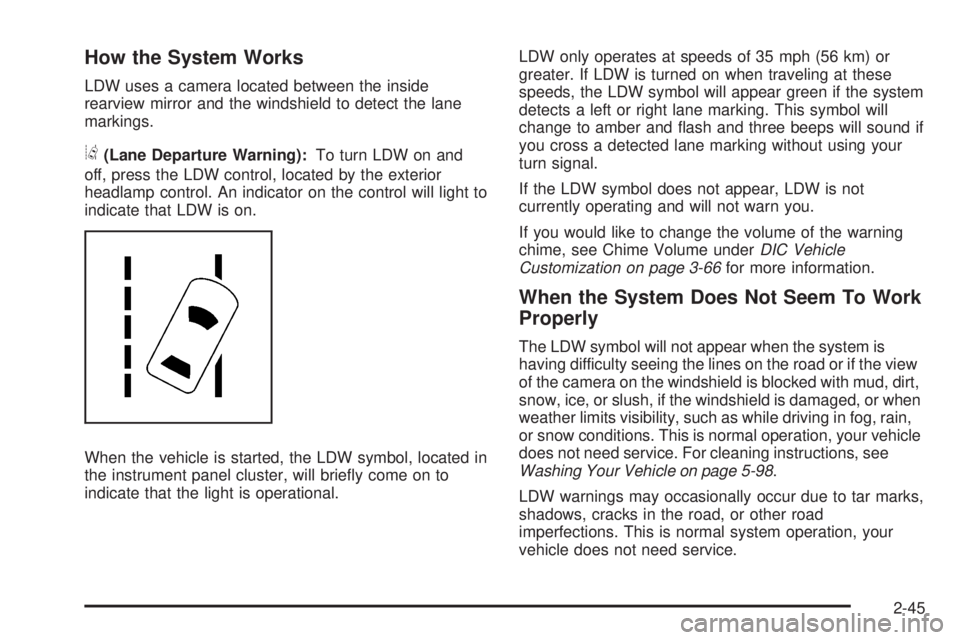
LDW uses a camera located between the inside
rearview mirror and the windshield to detect the lane
markings.
@(Lane Departure Warning):To turn LDW on and
off, press the LDW control, located by the exterior
headlamp control. An indicator on the control will light to
indicate that LDW is on.
When the vehicle is started, the LDW symbol, located in
the instrument panel cluster, will briey come on to
indicate that the light is operational.LDW only operates at speeds of 35 mph (56 km) or
greater. If LDW is turned on when traveling at these
speeds, the LDW symbol will appear green if the system
detects a left or right lane marking. This symbol will
change to amber and ash and three beeps will sound if
you cross a detected lane marking without using your
turn signal.
If the LDW symbol does not appear, LDW is not
currently operating and will not warn you.
If you would like to change the volume of the warning
chime, see Chime Volume underDIC Vehicle
Customization on page 3-66for more information.
When the System Does Not Seem To Work
Properly
The LDW symbol will not appear when the system is
having difficulty seeing the lines on the road or if the view
of the camera on the windshield is blocked with mud, dirt,
snow, ice, or slush, if the windshield is damaged, or when
weather limits visibility, such as while driving in fog, rain,
or snow conditions. This is normal operation, your vehicle
does not need service. For cleaning instructions, see
Washing Your Vehicle on page 5-98.
LDW warnings may occasionally occur due to tar marks,
shadows, cracks in the road, or other road
imperfections. This is normal system operation, your
vehicle does not need service.
2-45
Page 146 of 434

Turn Signal/Multifunction Lever
The lever on the left side of the steering column
includes the following:
GTurn and Lane-Change Signals. SeeTurn and
Lane-Change Signals on page 3-8.
23Headlamp High/Low-Beam Changer. See
Headlamp High/Low-Beam Changer on page 3-9.
Flash-To-Pass Feature. SeeFlash-to-Pass
on page 3-9.
NWindshield Wipers. SeeWindshield Wipers on
page 3-9.
LWindshield Washer. SeeWindshield Washer
on page 3-11.
_Heated Washer Fluid. SeeWindshield Washer
on page 3-11.
Turn and Lane-Change Signals
To signal a turn, move the lever on the left side of the
steering wheel all the way up or down. The lever returns
automatically when the turn is complete.
An arrow on the instrument
panel cluster will ash in
the direction of the
turn or lane change.
You may also have an arrow in the outside mirror that
ashes when the turn signal is used. SeeOutside Power
Mirrors on page 2-37for more information.
Raise or lower the lever until the arrow starts to ash to
signal a lane change. Hold it there until the lane
change is complete. If you momentarily press and
release the lever, the turn signal will ash three times.
If the arrows ash very fast as you signal a turn or
a lane change, a signal bulb may be burned out and
other drivers will not see your turn signal. If a bulb
is burned out, replace it to help avoid an accident.
If the arrows do not go on at all when you signal a turn,
check the fuse. SeeFuses and Circuit Breakers on
page 5-105.
3-8
Page 148 of 434
1(High Speed):For high-speed wiping, turn the
band further, to the second solid band past the
delay settings.
9(Off):To stop the wipers, move the band to off.
Clear ice and snow from the wiper blades before using
them. If they are frozen to the windshield, carefully
loosen or thaw them. If the blades become worn
or damaged, replace with new blades or blade inserts.
Heavy snow or ice can overload the wiper motor. A
circuit breaker will stop the motor until it cools. Clear
away snow or ice to prevent an overload.
Your vehicle has wiper-activated headlamps. After the
windshield wipers have completed eight wipe cycles
within four minutes, the headlamps automatically
turn on. SeeWiper Activated Headlamps on page 3-15
for more information.
Rainsense™ II Wipers
If your vehicle has this feature, the moisture sensor is
mounted on the interior of the windshield beside the
rearview mirror and is used to automatically operate the
wipers. This system operates by monitoring the amount
of moisture build-up on the windshield. Wipes occur as
needed to clear the windshield depending on the driving
conditions and the sensitivity setting. In light rain or snow,
fewer wipes will occur. In heavy rain or snow, wipes willoccur more frequently. The system operates in the delay
mode. If the system is left on for long periods of time,
occasional wipes may occur without any moisture on the
windshield. This is normal and indicates that the
Rainsense™ system is active.
The Rainsense™ system is activated by turning the
wiper control band to one of the ve sensitivity levels
within the delay area. The position closest to off is
the lowest sensitivity setting, level one. This allows more
rain or snow to collect on the windshield between
wipes. Turning the wiper band away from you to higher
sensitivity levels increases the sensitivity of the
system and frequency of wipes. The highest sensitivity
setting, level ve is closest to low. A single wipe will
occur each time you turn the wiper stalk to a higher
sensitivity level to indicate that the sensitivity level has
been increased.
Notice:Going through an automatic car wash with
the wipers on can damage them. Turn the wipers
off when going through an automatic car wash.
The MIST and wash cycles operate as normal and are
not affected by the Rainsense™ function. The system
can be overridden at any time by manually changing the
wiper control to low or high speed.
Notice:Do not place stickers or other items on the
exterior glass surface directly in front of the rain
sensor. Doing this could cause the rain sensor
to malfunction.
3-10
Page 162 of 434
Rear Window Defogger
The rear window defogger uses a warming grid to
remove fog from the rear window.
<(Rear Window Defogger):Press this button to
turn the rear window defogger on or off. An indicator
light below the button comes on to show that the rear
window defogger is activated. Be sure to clear as much
snow from the rear window as possible.
The rear window defogger will only work when the ignition
is in ON/RUN. The rear window defogger stays on for
about 20 minutes after the button is pressed if traveling at
slow speeds. At higher vehicle speeds, the rear defogger
may stay on continuously. If turned on again, the
defogger only runs for about 10 minutes before turning
off. The defogger can be turned off by pressing the button
again, by turning the ignition to ACC/ACCESSORY or
ON/RUN, or by turning off the engine.
If your vehicle has heated outside rearview mirrors, the
mirrors heat to help clear fog or frost from the surface of
the mirror when the rear window defogger is on. See
Outside Automatic Dimming Heated Mirror on page 2-38
for more information.
Notice:Do not use anything sharp on the inside of
the rear window. If you do, you could cut or
damage the warming grid, and the repairs would not
be covered by your warranty. Do not attach a
temporary vehicle license, tape, a decal or anything
similar to the defogger grid.
Dual Automatic Climate Control
System
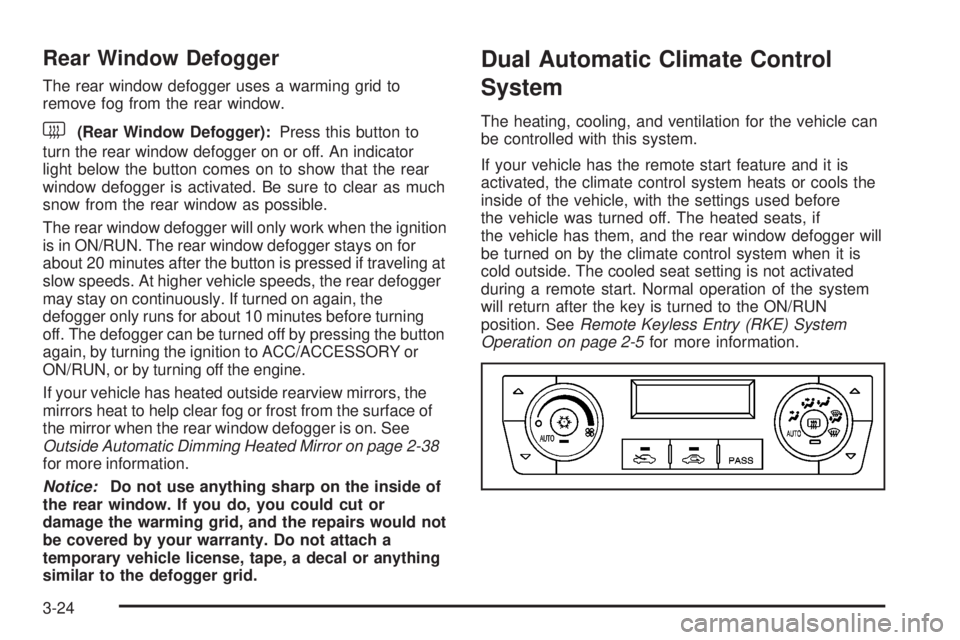
The heating, cooling, and ventilation for the vehicle can
be controlled with this system.
If your vehicle has the remote start feature and it is
activated, the climate control system heats or cools the
inside of the vehicle, with the settings used before
the vehicle was turned off. The heated seats, if
the vehicle has them, and the rear window defogger will
be turned on by the climate control system when it is
cold outside. The cooled seat setting is not activated
during a remote start. Normal operation of the system
will return after the key is turned to the ON/RUN
position. SeeRemote Keyless Entry (RKE) System
Operation on page 2-5for more information.
3-24
Page 167 of 434

Defogging and Defrosting
Fog on the inside of windows is a result of high humidity
(moisture) condensing on the cool window glass. This
can be minimized if the climate control system is
used properly. There are two modes to clear fog from
your windshield, defog and defrost.
W(Floor/Defog):Use this mode to clear the windows
of fog or moisture and to warm the passengers.
Turning the control to this mode directs about half of the
air to the oor outlets and the remaining air is directed
to the side window outlets and to the windshield.
When this mode is selected, the system turns off
recirculation and runs the air-conditioning compressor
unless the outside temperature is at or below freezing.
The recirculation mode cannot be selected while in
the oor/defog mode.
0(Defrost):Use this mode to remove fog or frost
from the windshield more quickly. Turning the control to
this mode directs most of the air to the windshield
and the side window outlets. In this mode, the system
automatically turns off recirculation and runs the
air-conditioning compressor, unless the outside
temperature is at or below freezing. Recirculation cannot
be selected while in the defrost mode.
Rear Window Defogger
The rear window defogger uses a warming grid to
remove fog or frost from the rear window.
<(Rear Defogger):Press this button to turn the rear
window defogger on or off. An indicator light below
the button comes on to show that the rear window
defogger is activated. Be sure to clear as much snow
from the rear window as possible.
The rear window defogger will only work when the
ignition is in ON/RUN. The rear window defogger stays
on for about 20 minutes after the button is pressed if
you are traveling at slower vehicle speeds. At higher
vehicle speeds the rear window defogger may stay on
continuously. If turned on again, the defogger only
runs for about 10 minutes before turning off. The
defogger can be turned off by pressing the button again,
by turning the ignition to ACC/ACCESSORY or
ON/RUN, or by turning off the engine.
The heated outside rearview mirrors will heat to help
clear fog or frost from the surface of the mirror when the
rear window defogger is on. SeeOutside Automatic
Dimming Heated Mirror on page 2-38for more
information.
Notice:Do not use a razor blade or sharp object to
clear the inside rear window. Do not adhere
anything to the defogger grid lines in the rear glass.
These actions may damage the rear defogger.
Repairs would not be covered by your warranty.
3-29
Page 192 of 434

3. Press and hold the lock and unlock buttons on the
rst transmitter at the same time for about
15 seconds.
On vehicles with memory recall seats, the rst
transmitter learned will match driver 1 and
the second will match driver 2.
A chime will sound indicating that the transmitter is
matched.
4. To match additional transmitters at this time, repeat
Step 3.
Each vehicle can have a maximum of eight
transmitters matched to it.
5. To exit the programming mode, you must cycle the
key to LOCK/OFF.
Blank Display
This display shows no information.
Customization Menu Items
U
(Customization):Press this button to enter the
feature settings menu. This display allows you to
customize the feature settings on your vehicle. SeeDIC
Vehicle Customization on page 3-66for more
information.
DIC Compass
Your vehicle may have a compass in the Driver
Information Center (DIC). The information below
explains how to operate this feature in the DIC.
If your vehicle has a compass in the mirror, see
Automatic Dimming Rearview Mirror with Compass on
page 2-36.
Compass Zone
Your dealer/retailer will set the correct zone for your
location.
Under certain circumstances, such as during a long
distance cross-country trip or moving to a new state or
province, it will be necessary to compensate for
compass variance by resetting the zone through the
DIC if the zone is not set correctly.
Compass variance is the difference between the earth’s
magnetic north and true geographic north. If the
compass is not set to the zone where you live, the
compass may give false readings. The compass must
be set to the variance zone in which the vehicle is
traveling.
3-54