lock BUICK LUCERNE 2008 Owner's Guide
[x] Cancel search | Manufacturer: BUICK, Model Year: 2008, Model line: LUCERNE, Model: BUICK LUCERNE 2008Pages: 434
Page 102 of 434
Key In the Ignition
Never leave your vehicle with the keys inside, as it is an
easy target for joy riders or thieves. If you leave the
key in the ignition and park your vehicle, a chime
will sound, when you open the driver’s door. Always
remember to remove your key from the ignition and take
it with you. This will lock your ignition and transmission.
Also, always remember to lock the doors.
The battery could be drained if you leave the key in the
ignition while your vehicle is parked. You may not be
able to start your vehicle after it has been parked for an
extended period of time.
Retained Accessory Power (RAP)
The following accessories on your vehicle can be used
for up to 10 minutes after the engine is turned off.
Audio System
Audio Steering Wheel (if equipped)
Clock
Power Windows
Sunroof (if equipped)
Power to these accessories works up to 10 minutes or
until the driver’s door is opened.The instrument panel cluster lights stay on for a few
seconds, then will go out. Once the driver’s door
is opened, the power shuts off to these accessories.
Your vehicle has a feature designed to protect the
battery against drainage. For more information
seeInadvertent Power Battery Saver on page 3-19and
Electric Power Management on page 3-19.
Starting the Engine
Move your shift lever to PARK (P) or NEUTRAL (N).
Your engine will not start in any other position – this is a
safety feature. To restart when you are already
moving, use NEUTRAL (N) only.
Notice:Do not try to shift to PARK (P) if your
vehicle is moving. If you do, you could damage the
transmission. Shift to PARK (P) only when your
vehicle is stopped.
2-22
Page 103 of 434
Starting Procedure
1. With your foot off the accelerator pedal, turn the
ignition key to START. When the engine starts,
let go of the key. The idle speed will go down as
your engine gets warm. Do not race the engine
immediately after starting it. Operate the engine and
transmission gently to allow the oil to warm up
and lubricate all moving parts.
Your vehicle has a Computer-Controlled Cranking
System. This feature assists in starting the
engine and protects components. If the ignition key
is turned to the START position, and then
released when the engine begins cranking, the
engine will continue cranking for a few seconds or
until the vehicle starts. If the engine does not
start and the key is held in START for many
seconds, cranking will be stopped after 15 seconds
to prevent cranking motor damage. To prevent
gear damage, this system also prevents cranking if
the engine is already running. Engine cranking
can be stopped by turning the ignition switch to the
ACC/ACCESSORY or LOCK/OFF position.
Notice:Cranking the engine for long periods of
time, by returning the key to the START position
immediately after cranking has ended, can overheat
and damage the cranking motor, and drain the
battery. Wait at least 15 seconds between each try,
to let the cranking motor cool down.2. If the engine does not start after 5-10 seconds,
especially in very cold weather (below 0°F or−18°C),
it could be ooded with too much gasoline. Try
pushing the accelerator pedal all the way to the oor
and holding it there as you hold the key in START for
up to a maximum of 15 seconds. Wait at least
15 seconds between each try, to allow the cranking
motor to cool down. When the engine starts, let go of
the key and accelerator. If the vehicle starts briey
but then stops again, do the same thing. This clears
the extra gasoline from the engine. Do not race the
engine immediately after starting it. Operate the
engine and transmission gently until the oil warms up
and lubricates all moving parts.
Notice:The engine is designed to work with the
electronics in your vehicle. If you add electrical
parts or accessories, you could change the way the
engine operates. Before adding electrical equipment,
check with your dealer/retailer. If you do not, your
engine might not perform properly. Any resulting
damage would not be covered by your vehicle’s
warranty.
2-23
Page 105 of 434
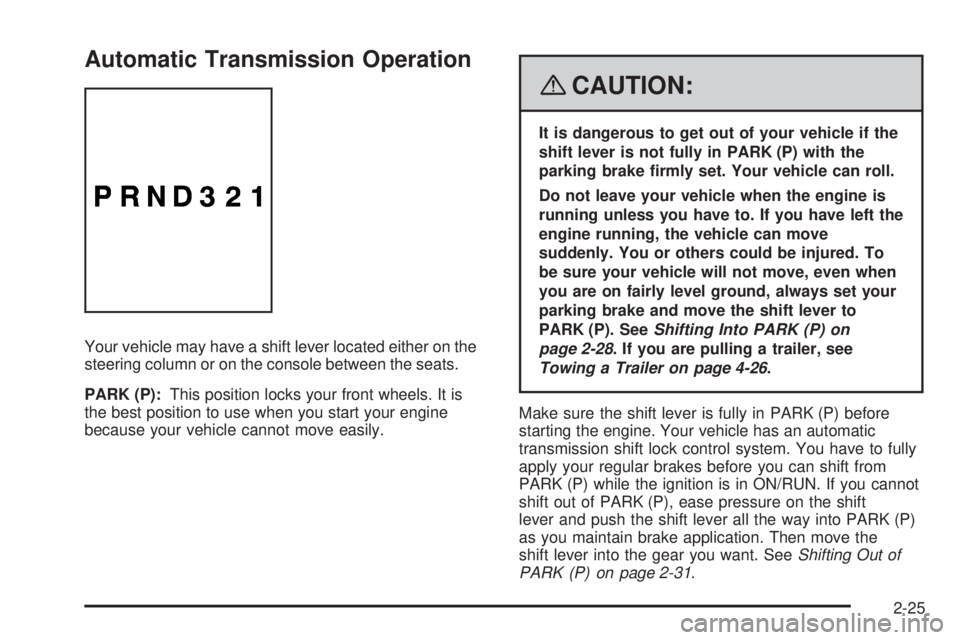
Automatic Transmission Operation
Your vehicle may have a shift lever located either on the
steering column or on the console between the seats.
PARK (P):This position locks your front wheels. It is
the best position to use when you start your engine
because your vehicle cannot move easily.
{CAUTION:
It is dangerous to get out of your vehicle if the
shift lever is not fully in PARK (P) with the
parking brake rmly set. Your vehicle can roll.
Do not leave your vehicle when the engine is
running unless you have to. If you have left the
engine running, the vehicle can move
suddenly. You or others could be injured. To
be sure your vehicle will not move, even when
you are on fairly level ground, always set your
parking brake and move the shift lever to
PARK (P). SeeShifting Into PARK (P) on
page 2-28. If you are pulling a trailer, see
Towing a Trailer on page 4-26.
Make sure the shift lever is fully in PARK (P) before
starting the engine. Your vehicle has an automatic
transmission shift lock control system. You have to fully
apply your regular brakes before you can shift from
PARK (P) while the ignition is in ON/RUN. If you cannot
shift out of PARK (P), ease pressure on the shift
lever and push the shift lever all the way into PARK (P)
as you maintain brake application. Then move the
shift lever into the gear you want. SeeShifting Out of
PARK (P) on page 2-31.
2-25
Page 109 of 434
Steering Column Shift Lever
If your vehicle has a steering column shift lever, use this
procedure to shift the vehicle into PARK (P):
1. Hold the brake pedal down with your right foot.
2. Move the shift lever into PARK (P) by pulling the
shift lever toward you and moving it up as far as it
will go.
3. With your right foot still holding the brake pedal
down, set the parking brake. SeeParking Brake
on page 2-27for more information.
4. Turn the ignition key to LOCK/OFF.
5. Remove the key and take it with you. If you can
leave your vehicle with the ignition key in your
hand, your vehicle is in PARK (P).
Console Shift Lever
If your vehicle is equipped with a console shift lever,
use this procedure to shift the vehicle into PARK (P):
1. Hold the brake pedal down with your right foot.
2. Move the shift lever into PARK (P) by pushing the
lever all the way toward the front of your vehicle
and then to the left.
3. With your right foot still holding the brake pedal
down, set the parking brake. SeeParking Brake
on page 2-27for more information.
4. Turn the ignition key to LOCK/OFF.
5. Remove the key and take it with you. If you can
leave your vehicle with the ignition key in your
hand, your vehicle is in PARK (P).
2-29
Page 110 of 434
Leaving Your Vehicle With the Engine
Running
{CAUTION:
It can be dangerous to leave your vehicle with
the engine running. Your vehicle could move
suddenly if the shift lever is not fully in
PARK (P) with the parking brake rmly set.
And, if you leave the vehicle with the engine
running, it could overheat and even catch re.
You or others could be injured. Do not leave
your vehicle with the engine running.
If you have to leave your vehicle with the engine
running, be sure your vehicle is in PARK (P) and your
parking brake is rmly set before you leave it. See
Parking Brake on page 2-27for more information.
Torque Lock
If you are parking on a hill and you do not shift your
transmission into PARK (P) properly, the weight of the
vehicle may put too much force on the parking pawl
in the transmission. You may nd it difficult to pull the
shift lever out of PARK (P). This is called torque lock. To
prevent torque lock, set the parking brake and then
shift into PARK (P) properly before you leave the driver’s
seat. To nd out how, seeShifting Into PARK (P) on
page 2-28.
If torque lock does occur, you may need to have
another vehicle push yours a little uphill to take some of
the pressure from the parking pawl in the transmission,
so you can pull the shift lever out of PARK (P).
2-30
Page 111 of 434
Shifting Out of PARK (P)
Automatic Transmission Shift Lock
This vehicle has an electronic shift lock release system.
The shift lock release is designed to:
Prevent ignition key removal unless the shift lever is
in PARK (P)
Prevent movement of the shift lever out of PARK (P),
unless the ignition is in ON/RUN and the regular
brake pedal is applied.
The shift lock is always functional except in the case of
a an uncharged or low voltage (less than 9 volt)
battery.
If your vehicle has an uncharged battery or a battery
with low voltage, try charging or jump starting the
battery. SeeJump Starting on page 5-48.
Console Shift
If your console shift cannot be moved out of PARK (P)
1. Apply and maintain the regular brakes.
2. Turn the ignition to ON/RUN position. SeeIgnition
Positions on page 2-21for more information.
3. Let up on the shift lever and make sure the shift
lever is pushed all the way into PARK (P).
4. Then, move the shift into the desired gear.
If you still cannot move the shift lever from PARK (P),
consult your dealer/retailer or a professional towing
service.
Column Shift
If your park lock cable cannot be moved out of PARK (P)
1. Apply and maintain the regular brakes.
2. Turn the ignition key to the ON/RUN position. See
Ignition Positions on page 2-21for more information.
3. Shift out of the PARK (P) position to the
NEUTRAL (N) position.
4. Move the vehicle to a safe location.
If you still cannot move the shift lever from PARK (P),
consult your dealer/retailer or a professional towing
service.
2-31
Page 118 of 434
Park Tilt Mirrors
If your vehicle has memory mirrors, the outside mirrors
have park tilt mirrors. This feature tilts the driver
side and passenger side mirror to a factory programmed
position when the vehicle is in REVERSE (R). This
feature may be useful in allowing you to view the curb
when you are parallel parking.
When the vehicle is shifted out of REVERSE (R) and
either a ve second delay has occurred, or the ignition is
turned to LOCK/OFF, the driver and passenger side
mirrors return to their original position.
SeeDIC Vehicle Customization on page 3-66for more
information.
Outside Convex Mirror
{CAUTION:
A convex mirror can make things (like other
vehicles) look farther away than they really are.
If you cut too sharply into the right lane, you
could hit a vehicle on your right. Check your
inside mirror or glance over your shoulder
before changing lanes.The passenger side mirror is convex. A convex mirror’s
surface is curved so more can be seen from the
driver seat. It also makes things, like other vehicles,
look farther away than they really are.
Outside Automatic Dimming Heated
Mirror
If your vehicle has this feature, the outside driver’s
mirror will adjust for the glare of headlamps behind you.
When you operate the rear window defogger, the
heated driver’s and passenger’s outside rearview mirrors
are warmed to help clear them of ice and snow. See
“Rear Window Defogger” underClimate Control System
on page 3-21orDual Automatic Climate Control
System on page 3-24for more information.
Your vehicle may also have a turn signal indicator on
the mirror. An arrow on the outside rearview mirror
will ash in the direction of the turn or lane change. See
Turn and Lane-Change Signals on page 3-8for more
information.
Side Blind Zone Alert (SBZA)
If your vehicle has the Side Blind Zone Alert (SBZA)
system, seeSide Blind Zone Alert on page 2-41.
2-38
Page 123 of 434

When the System Does Not Seem To Work
Properly
If the SBZA displays do not light up when the system is
on and vehicles are in the blind zone, the system
needs service. Take your vehicle to your dealer/retailer.
SBZA displays may occasionally light up due to guard
rails, signs, trees, shrubs, and other stationary objects.
This is normal system operation, your vehicle does
not need service.
SBZA does not operate when the left or right corners of
the rear bumper are covered with mud, dirt, snow,
ice, slush, or in heavy rainstorms. For cleaning
instructions, seeWashing Your Vehicle on page 5-98.If
the DIC still displays the CLEAN SIDE BLIND ZONE
ALERT SYSTEM message after cleaning the bumper,
see your dealer/retailer.
The SBZA displays may remain on if a trailer is attached
to your vehicle, or a bicycle or object is extending out
to either side of the vehicle.
When SBZA is disabled without the driver turning it off
and the driver attempts to turn SBZA back on using
the DIC, the SIDE ALERT ON option will not be
selectable if the necessary conditions for normal system
operation are not met.
SBZA Error Messages
The following messages may appear in the DIC:
SIDE BLIND ZONE ALERT SYSTEM OFF:This
message indicates that the driver has turned the
system off.
CLEAN SIDE BLIND ZONE ALERT SYSTEM:This
message indicates that the SBZA system is disabled
because the sensor is blocked and cannot detect
vehicles in your blind zone. The sensor may be blocked
by mud, dirt, snow, ice, slush, or even heavy rainstorms.
This message may also activate during heavy rain or
due to road spray. Your vehicle does not need service.
For cleaning, seeWashing Your Vehicle on page 5-98.
SERVICE SIDE BLIND ZONE ALERT SYSTEM:If
this message appears, both SBZA displays will remain
on indicating there is a problem with the SBZA
system. If these displays remain on after continued
driving, the system needs service. Take your vehicle to
your dealer/retailer.
2-43
Page 125 of 434
How the System Works
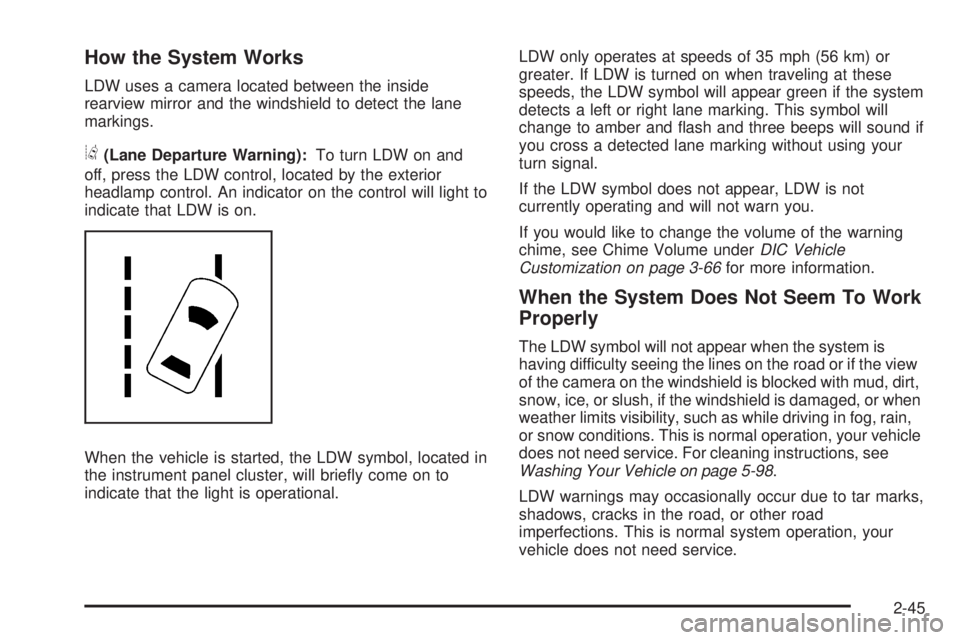
LDW uses a camera located between the inside
rearview mirror and the windshield to detect the lane
markings.
@(Lane Departure Warning):To turn LDW on and
off, press the LDW control, located by the exterior
headlamp control. An indicator on the control will light to
indicate that LDW is on.
When the vehicle is started, the LDW symbol, located in
the instrument panel cluster, will briey come on to
indicate that the light is operational.LDW only operates at speeds of 35 mph (56 km) or
greater. If LDW is turned on when traveling at these
speeds, the LDW symbol will appear green if the system
detects a left or right lane marking. This symbol will
change to amber and ash and three beeps will sound if
you cross a detected lane marking without using your
turn signal.
If the LDW symbol does not appear, LDW is not
currently operating and will not warn you.
If you would like to change the volume of the warning
chime, see Chime Volume underDIC Vehicle
Customization on page 3-66for more information.
When the System Does Not Seem To Work
Properly
The LDW symbol will not appear when the system is
having difficulty seeing the lines on the road or if the view
of the camera on the windshield is blocked with mud, dirt,
snow, ice, or slush, if the windshield is damaged, or when
weather limits visibility, such as while driving in fog, rain,
or snow conditions. This is normal operation, your vehicle
does not need service. For cleaning instructions, see
Washing Your Vehicle on page 5-98.
LDW warnings may occasionally occur due to tar marks,
shadows, cracks in the road, or other road
imperfections. This is normal system operation, your
vehicle does not need service.
2-45
Page 126 of 434

LDW Error Message
SERVICE LANE DEPARTURE SYSTEM:This
message may appear in the DIC to indicate that LDW is
not working properly. If this message remains on
after continued driving, the system needs service. Take
your vehicle to your dealer/retailer. SeeDIC Warnings
and Messages on page 3-56for more information.
LANE DEPARTURE SYSTEM UNAVAILABLE:This
message may appear in the DIC if LDW does not
activate due to a temporary condition. SeeDIC
Warnings and Messages on page 3-56for more
information.
OnStar®System
OnStar uses several innovative technologies and live
advisors to provide you with a wide range of safety,
security, information, and convenience services. If your
airbags deploy, the system is designed to make anautomatic call to OnStar Emergency advisors who can
request emergency services be sent to your location.
If you lock your keys in the vehicle, call OnStar at
1-888-4-ONSTAR and they can send a signal to unlock
your doors. If you need roadside assistance, press
the OnStar button and they can contact Roadside
Service for you.
OnStar service is provided to you subject to the OnStar
Terms and Conditions. You may cancel your OnStar
service at any time by contacting OnStar. A complete
OnStar Owner’s Guide and the OnStar Terms and
Conditions are included in the vehicle’s OnStar
Subscriber glove box literature. For more information,
visit onstar.com or onstar.ca, contact OnStar at
1-888-4-ONSTAR (1-888-466-7827) or TTY
1-877-248-2080, or press the OnStar button to speak
with an OnStar advisor 24 hours a day, 7 days a week.
Not all OnStar features are available on all vehicles.
To check if your vehicle is equipped to provide the
services described below, or for a full description of
OnStar services and system limitations, see the OnStar
Owner’s Guide in your glove box or visit onstar.com.
2-46