reset BUICK LUCERNE 2010 Owner's Guide
[x] Cancel search | Manufacturer: BUICK, Model Year: 2010, Model line: LUCERNE, Model: BUICK LUCERNE 2010Pages: 474
Page 239 of 474
Storing a Radio Station as a Favorite
Drivers are encouraged to set up their radio station
favorites while the vehicle is in P (Park). Tune to
favorite stations using the presets, favorites button, and
steering wheel controls if the vehicle has this feature.
SeeDefensive Driving on page 5‑2.
If the vehicle has XM and has a FAV button, a
maximum of 36 stations can be programmed as
favorites using the six pushbuttons positioned below the
radio station frequency tabs and by using the radio
favorites page button (FAV button).
FAV (Favorites): Press to go through up to six pages
of favorites, each having six favorite stations available
per page. Each page of favorites can contain any
combination of AM, FM, or XM stations. To store a
station as a favorite:
1. Tune to the desired radio station.
2. Press the FAV button to display the page where you want the station stored.
3. Press and hold one of the six pushbuttons until a beep sounds. When that pushbutton is pressed
and released, the station that was set, returns.
4. Repeat the steps for each pushbutton radio station you want stored as a favorite. The number of favorites pages can be setup using the
MENU button. To setup the number of favorites pages:
1. Press the MENU button to display the radio setup menu.
2. Press the pushbutton located below the FAV 1-6 tab.
3. Select the desired number of favorites pages by pressing the pushbutton located below the
displayed page numbers.
4. Press the FAV button, or let the menu time out, to return to the original main radio screen showing
the radio station frequency tabs and to begin the
process of programming favorites for the chosen
amount of numbered pages.
Setting the Tone (Bass/Midrange/Treble)
BASS/MID/TREB (Bass, Midrange, or Treble): The
radio may display some or all tones, such as BASS,
MID, and TREB. To adjust the tone settings, press the
fknob until the tone control tabs display. Press the
pushbutton positioned under the desired tab, then turn
the
fknob clockwise or counterclockwise to adjust the
highlighted setting. The highlighted setting can also be
adjusted by pressing either SEEK arrow,
\FWD,
or
sREV button until the desired levels are obtained.
If a station's frequency is weak, or has static, decrease
the treble.
4-79
Page 240 of 474

The radio may be capable of adjusting bass, midrange,
or treble to the middle position by pressing the
pushbutton positioned under the BASS, MID
(midrange), or TREB (treble) tab for more than
two seconds. The radio beeps once and the level
adjusts to the middle position.
The radio may also be capable of adjusting all tone and
speaker controls to the middle position by pressing the
fknob for more than two seconds until the radio
beeps once.
EQ (Equalization): Press to select preset equalization
settings.
To return to the manual mode, press until Manual
displays or start to manually adjust the bass and
depending on the radio, midrange, or treble by pressing
the
fknob.
Adjusting the Speakers (Balance/Fade)
`
BAL/FADE (Balance/Fade): To adjust balance or
fade, press the
`if the radio has this symbol, or the
fknob until the speaker control tabs display. Continue
pressing to highlight the desired tab, or press the
pushbutton positioned under the desired tab. Turn the
fknob clockwise or counterclockwise to adjust the
setting. The setting can also be adjusted by pressing
either SEEK arrow,
\FWD, orsREV until the
desired levels are obtained.
The radio may be capable of adjusting balance or fade
to the middle position by pressing the pushbutton
positioned under the BAL or FADE tab for more than
two seconds. The radio beeps once and the level
adjusts to the middle position.
The radio may also be capable of adjusting all speaker
and tone controls to the middle position by pressing
the
fknob for more than two seconds until the radio
beeps once.
4-80
Page 252 of 474

XM Radio Messages
XL (Explicit Language Channels):These channels,
or any others, can be blocked at a customer's request,
by calling 1-800-852-XMXM (9696).
XM Updating: The encryption code in the receiver is
being updated, and no action is required. This process
should take no longer than 30 seconds.
No XM Signal: The system is functioning correctly, but
the vehicle is in a location that is blocking the XM™
signal. When the vehicle is moved into an open area,
the signal should return.
Loading XM: The audio system is acquiring and
processing audio and text data. No action is needed.
This message should disappear shortly.
Channel Off Air: This channel is not currently in
service. Tune in to another channel.
Channel Unauth: This channel is blocked or cannot be
received with your XM Subscription package. Channel Unavail:
This previously assigned channel is
no longer assigned. Tune to another station. If this
station was one of the presets, choose another station
for that preset button.
No Artist Info: No artist information is available at this
time on this channel. The system is working properly.
No Title Info: No song title information is available at
this time on this channel. The system is working
properly.
No CAT Info: No category information is available at
this time on this channel. The system is working
properly.
No Information: No text or informational messages are
available at this time on this channel. The system is
working properly.
CAT Not Found: There are no channels available for
the selected category. The system is working properly.
4-92
Page 322 of 474

Engine Oil Life System
When to Change Engine Oil
This vehicle has a computer system that indicates when
to change the engine oil and filter. This is based on
engine revolutions and engine temperature, and not on
mileage. Based on driving conditions, the mileage at
which an oil change is indicated can vary considerably.
For the oil life system to work properly, the system must
be reset every time the oil is changed.
When the system has calculated that oil life has been
diminished, it indicates that an oil change is necessary.
A CHANGE ENGINE OIL SOON message comes on.
SeeDIC Warnings and Messages
on page 4‑55.
Change the oil as soon as possible within the next
600 miles (1 000 km). It is possible that, if driving under
the best conditions, the oil life system might not indicate
that an oil change is necessary for over a year.
However, the engine oil and filter must be changed at
least once a year and at this time the system must be
reset. Your dealer has trained service people who will
perform this work using genuine parts and reset the
system. It is also important to check the oil regularly
and keep it at the proper level.
If the system is ever reset accidentally, the oil must be
changed at 3,000 miles (5 000 km) since the last oil
change. Remember to reset the oil life system
whenever the oil is changed.
How to Reset the Engine Oil Life
System
The Engine Oil Life System calculates when to
change the engine oil and filter based on vehicle use.
Whenever the oil is changed, reset the system so it can
calculate when the next oil change is required. If a
situation occurs where the oil is changed prior to a
CHANGE ENGINE OIL SOON message being turned
on, reset the system.
Always reset the engine oil life to 100% after every oil
change. It will not reset itself. To reset the Engine Oil
Life System:
1. Display the OIL LIFE REMAINING on the DIC.
2. Press and hold the SET/RESET button on the DIC for more than five seconds. The oil life will change
to 100%.
If the CHANGE ENGINE OIL SOON message comes
back on when the vehicle is started, the Engine Oil Life
System has not reset. Repeat the procedure.
6-20
Page 339 of 474

If the temperature overheat gauge is no longer in the
overheat zone or an overheat warning no longer
displays, the vehicle can be driven. Continue to drive
the vehicle slow for about 10 minutes. Keep a safe
vehicle distance from the car in front of you. If the
warning does not come back on, continue to drive
normally.
If the warning continues, pull over, stop, and park the
vehicle right away.
If there is no sign of steam, idle the engine for
three minutes while parked. If the warning is still
displayed, turn off the engine until it cools down. Also,
see“Overheated Engine Protection Operating Mode”
next in this section.Overheated Engine Protection
Operating Mode
If an overheated engine condition exists and the
message ENGINE OVERHEATED STOP ENGINE
is displayed, an overheat protection mode which
alternates firing groups of cylinders helps prevent
engine damage. In this mode, you will notice a loss in
power and engine performance. This operating mode
allows the vehicle to be driven to a safe place in an
emergency. Driving extended miles (km) and/or towing
a trailer in the overheat protection mode should be
avoided.
Notice: After driving in the overheated engine
protection operating mode, to avoid engine damage,
allow the engine to cool before attempting any
repair. The engine oil will be severely degraded.
Repair the cause of coolant loss, change the oil
and reset the oil life system. See Engine Oil
on
page 6‑17.
6-37
Page 351 of 474
Headlamp Aiming
The vehicle has a visual optical headlamp aiming
system. The aim of the headlamps have been preset at
the factory and should need no further adjustment.
However, if the vehicle is damaged in a crash, the aim
of the headlamps may be affected and adjustment may
be necessary.
If oncoming vehicles flash their high beams at you, this
may mean the vertical aim of your headlamps needs to
be adjusted.
It is recommended that the vehicle is taken to your
dealer for service if the headlamps need to be adjusted.
It is possible however, to re-aim the headlamps as
described.The vehicle should:.Be placed so the headlamps are 25 ft. (7.6 m) from
a light colored wall.
.Have all four tires on a level surface which is level
all the way to the wall.
.Be placed so it is perpendicular to the wall.
.Not have any snow, ice or mud on it.
.Be fully assembled and all other work stopped
while headlamp aiming is being performed.
.Be normally loaded with a full tank of fuel and one
person or 160 lbs (75 kg) sitting on the driver seat.
.Have all tires properly inflated.
.Have the spare tire is in its proper location in the
vehicle.
6-49
Page 374 of 474
Any time you notice unusual wear, rotate the
tires as soon as possible and check wheel
alignment. Also check for damaged tires or
wheels. SeeWhen It Is Time for New Tires
on
page 6‑73
and Wheel Replacementon page 6‑78.
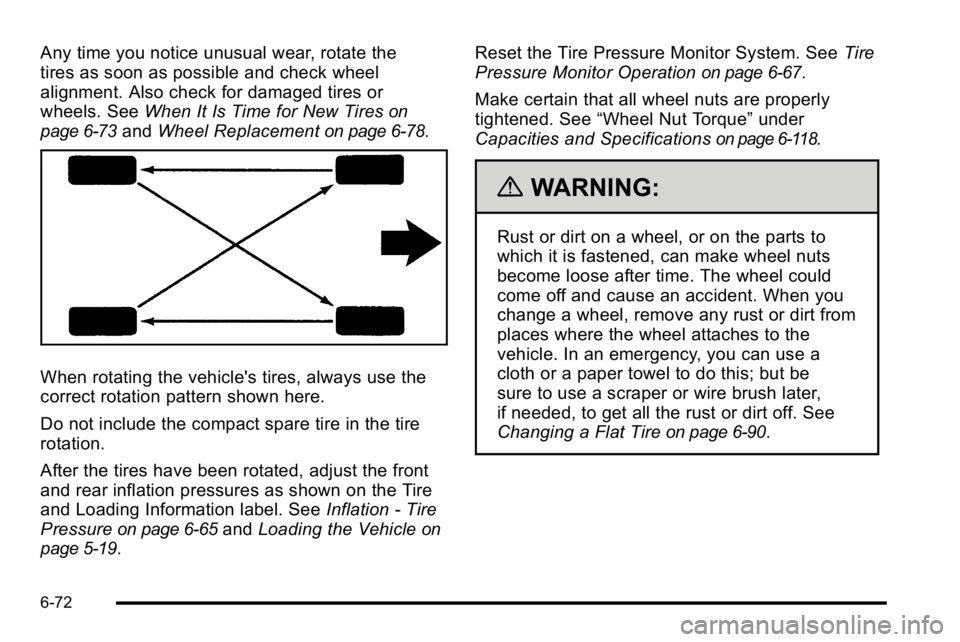
When rotating the vehicle's tires, always use the
correct rotation pattern shown here.
Do not include the compact spare tire in the tire
rotation.
After the tires have been rotated, adjust the front
and rear inflation pressures as shown on the Tire
and Loading Information label. See Inflation - Tire
Pressure
on page 6‑65and Loading the Vehicleon
page 5‑19
. Reset the Tire Pressure Monitor System. See
Tire
Pressure Monitor Operation
on page 6‑67.
Make certain that all wheel nuts are properly
tightened. See “Wheel Nut Torque” under
Capacities and Specifications
on page 6‑118.
{WARNING:
Rust or dirt on a wheel, or on the parts to
which it is fastened, can make wheel nuts
become loose after time. The wheel could
come off and cause an accident. When you
change a wheel, remove any rust or dirt from
places where the wheel attaches to the
vehicle. In an emergency, you can use a
cloth or a paper towel to do this; but be
sure to use a scraper or wire brush later,
if needed, to get all the rust or dirt off. See
Changing a Flat Tire
on page 6‑90.
6-72
Page 425 of 474

Rotation of New Tires
To maintain ride, handling, and performance of the
vehicle, it is important that the first rotation service for
new tires be performed when they have 8 000 to
13 000 km (5,000 to 8,000 miles). SeeTire Inspection
and Rotation on page 6‑71.
Scheduled Maintenance
When the Change Engine Oil Soon
Message Displays
Change engine oil and filter. See Engine Oilon
page 6‑17. An Emission Control Service.
When the Change Engine Oil Soon message displays,
service is required for the vehicle as soon as possible,
within the next 1 000 km/600 miles. If driving under the
best conditions, the engine oil life system might not
indicate the need for vehicle service for more than a
year. The engine oil and filter must be changed at least
once a year and the oil life system must be reset. Your
dealer has trained service technicians who will perform
this work and reset the system. If the engine oil life
system is reset accidentally, service the vehicle within
5 000 km/3,000 miles since the last service. Reset the
oil life system whenever the oil is changed. See Engine
Oil Life System on page 6‑20. When the Change Engine Oil Soon message displays,
certain services, checks, and inspections are required.
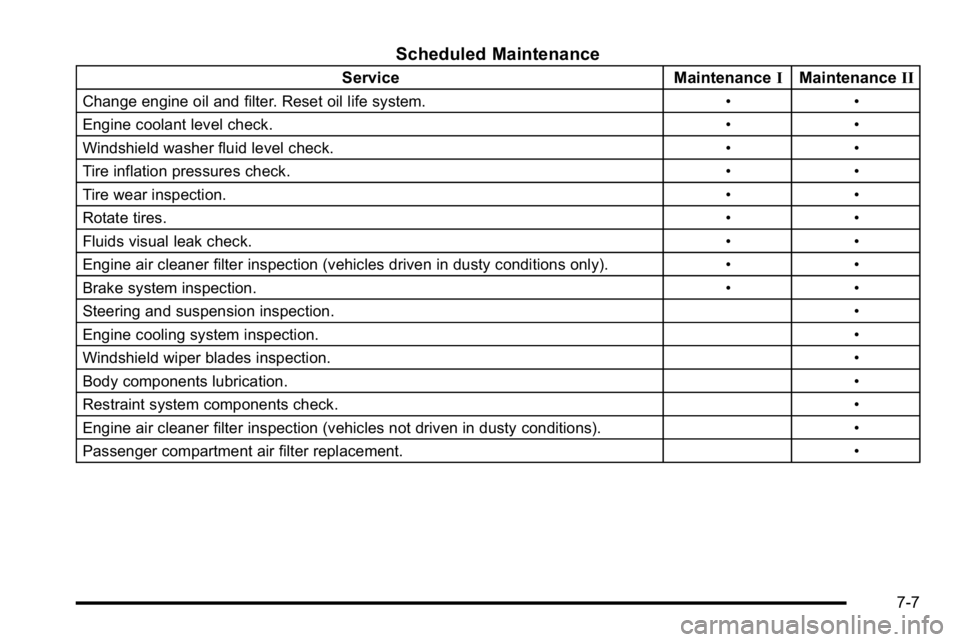
The services described for Maintenance
Ishould be
performed at every engine oil change. The services
described for Maintenance IIshould be
performed when:
.Maintenance Iwas performed the last time the
engine oil was changed.
.It has been 10 months or more since the Change
Engine Oil Soon message has displayed or since
the last service.
Maintenance I
.Change engine oil and filter. See Engine Oilon
page 6‑17. An Emission Control Service.
.Engine coolant level check. See Engine Coolant
(4.6L Engine)on page 6‑27or Engine Coolant
(3.9L Engine) on page 6‑31.
.Windshield washer fluid level check. See
Windshield Washer Fluid on page 6‑39.
.Tire inflation check. See Inflation - Tire Pressureon page 6‑65.
.Tire wear inspection. See Tire Inspection and
Rotation on page 6‑71.
.Rotate tires. See Tire Inspection and Rotationon
page 6‑71.
7-3
Page 429 of 474
Scheduled Maintenance
ServiceMaintenanceIMaintenance II
Change engine oil and filter. Reset oil life system. • •
Engine coolant level check. • •
Windshield washer fluid level check. • •
Tire inflation pressures check. • •
Tire wear inspection. • •
Rotate tires. • •
Fluids visual leak check. • •
Engine air cleaner filter inspection (vehicles driven in dusty conditions only). • •
Brake system inspection. • •
Steering and suspension inspection. •
Engine cooling system inspection. •
Windshield wiper blades inspection. •
Body components lubrication. •
Restraint system components check. •
Engine air cleaner filter inspection (vehicles not driven in dusty conditions). •
Passenger compartment air filter replacement. •
7-7