air conditioning BUICK LUCERNE 2010 Owner's Manual
[x] Cancel search | Manufacturer: BUICK, Model Year: 2010, Model line: LUCERNE, Model: BUICK LUCERNE 2010Pages: 474
Page 5 of 474
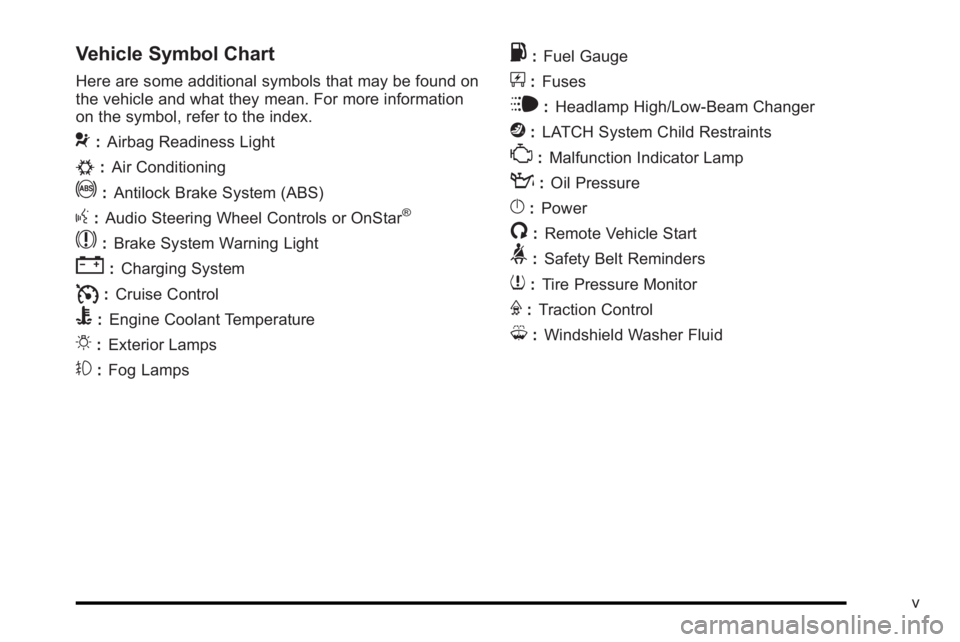
Vehicle Symbol Chart
Here are some additional symbols that may be found on
the vehicle and what they mean. For more information
on the symbol, refer to the index.
9:Airbag Readiness Light
#:Air Conditioning
!:Antilock Brake System (ABS)
g:Audio Steering Wheel Controls or OnStar®
$: Brake System Warning Light
":Charging System
I:Cruise Control
B: Engine Coolant Temperature
O:Exterior Lamps
#:Fog Lamps
.: Fuel Gauge
+:Fuses
i: Headlamp High/Low-Beam Changer
j:LATCH System Child Restraints
*: Malfunction Indicator Lamp
::Oil Pressure
}:Power
/:Remote Vehicle Start
>:Safety Belt Reminders
7:Tire Pressure Monitor
F:Traction Control
M:Windshield Washer Fluid
v
Page 19 of 474
Windshield Wiper/Washer
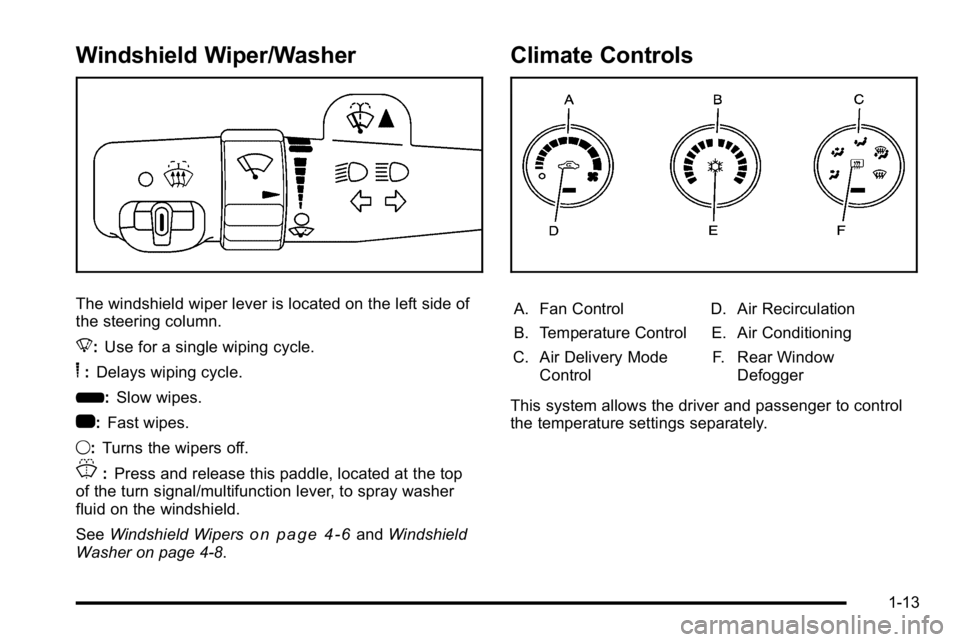
The windshield wiper lever is located on the left side of
the steering column.
8:Use for a single wiping cycle.
6:Delays wiping cycle.
6: Slow wipes.
1: Fast wipes.
9: Turns the wipers off.
J:Press and release this paddle, located at the top
of the turn signal/multifunction lever, to spray washer
fluid on the windshield.
See Windshield Wipers
on page 4‑6andWindshield
Washer on page 4‑8.
Climate Controls
A. Fan Control
B. Temperature Control
C. Air Delivery Mode Control D. Air Recirculation
E. Air Conditioning
F. Rear Window Defogger
This system allows the driver and passenger to control
the temperature settings separately.
1-13
Page 20 of 474
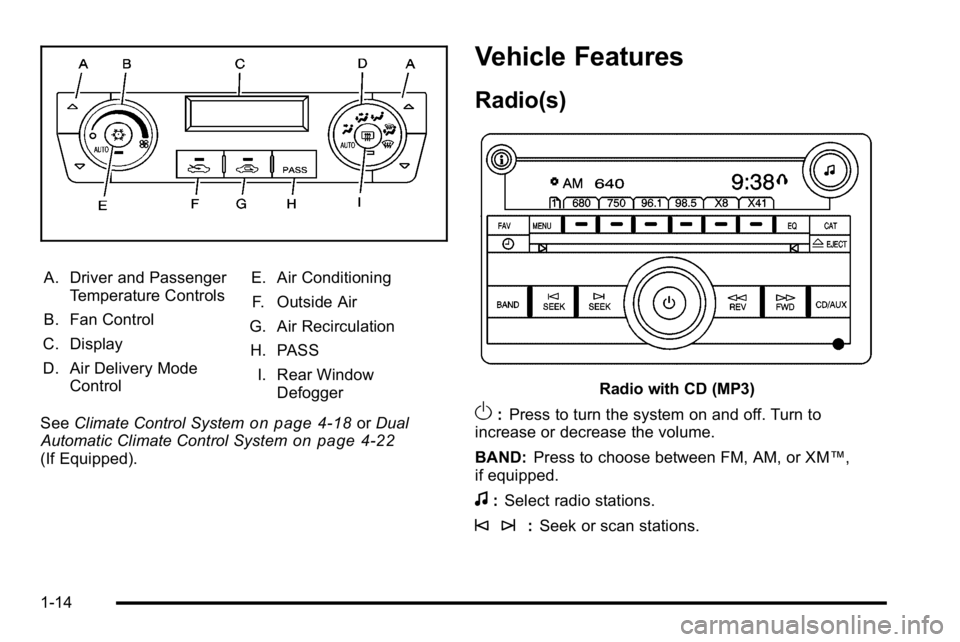
A. Driver and PassengerTemperature Controls
B. Fan Control
C. Display
D. Air Delivery Mode Control E. Air Conditioning
F. Outside Air
G. Air Recirculation
H. PASS I. Rear Window Defogger
See Climate Control System
on page 4‑18orDual
Automatic Climate Control Systemon page 4‑22(If Equipped).
Vehicle Features
Radio(s)
Radio with CD (MP3)
O: Press to turn the system on and off. Turn to
increase or decrease the volume.
BAND: Press to choose between FM, AM, or XM™,
if equipped.
f: Select radio stations.
© ¨: Seek or scan stations.
1-14
Page 115 of 474
Remote Vehicle Start
Your vehicle may have a remote starting feature. This
feature allows you to start the engine from outside the
vehicle. It may also start the vehicle's heating or air
conditioning systems, rear window defogger, and
heated seats. SeeHeated Seats
on page 2‑4and
Heated and Ventilated Seatson page 2‑6for
additional information. When the remote start system is
active, the climate control system will heat or cool the
inside of the vehicle at the setting the vehicle was set to
when the vehicle was last turned off. The rear window
defogger will be turned on by the climate control system
when it is cold outside. If the vehicle has heated seats,
they may also turn on when it is cold outside. Cooled
seats are not activated during a remote start. Normal
operation of the system will return after the key is
turned to the ON/RUN position.
Laws in some communities may restrict the use of
remote starters. For example, some laws may require a
person using the remote start to have the vehicle in
view when doing so. Check local regulations for any
requirements on remote starting of vehicles.
Do not use the remote start feature if your vehicle is low
on fuel. Your vehicle may run out of fuel.
If your vehicle has the remote start feature, the RKE
transmitter functions will have an increased range of
operation. However, the range may be less while the
vehicle is running. There are other conditions which can affect the
performance of the transmitter, see
Remote Keyless
Entry (RKE) System
on page 3‑4for additional
information.
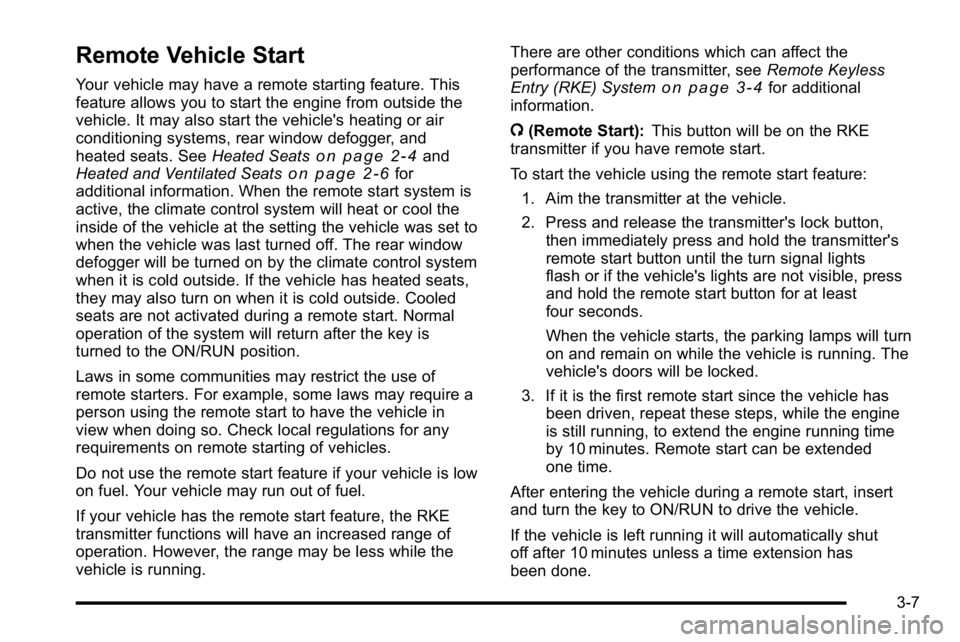
/ (Remote Start): This button will be on the RKE
transmitter if you have remote start.
To start the vehicle using the remote start feature:
1. Aim the transmitter at the vehicle.
2. Press and release the transmitter's lock button, then immediately press and hold the transmitter's
remote start button until the turn signal lights
flash or if the vehicle's lights are not visible, press
and hold the remote start button for at least
four seconds.
When the vehicle starts, the parking lamps will turn
on and remain on while the vehicle is running. The
vehicle's doors will be locked.
3. If it is the first remote start since the vehicle has been driven, repeat these steps, while the engine
is still running, to extend the engine running time
by 10 minutes. Remote start can be extended
one time.
After entering the vehicle during a remote start, insert
and turn the key to ON/RUN to drive the vehicle.
If the vehicle is left running it will automatically shut
off after 10 minutes unless a time extension has
been done.
3-7
Page 179 of 474

A. Fan Control
B. Temperature Control
C. Air Delivery Mode Control D. Recirculation
E. Air Conditioning F. Rear Window Defogger
Operation
(
(Off): Turns the climate control system off. Outside
air still enters the vehicle and is directed to the floor.
The airflow direction and temperature can be adjusted.
Temperature Control: Turn clockwise or
counterclockwise to increase or decrease the
temperature.
9(Fan Control): Turn clockwise or counterclockwise
to increase or decrease the fan speed. The fan speed is
temporarily reduced between the transition to a new
mode. The fan will resume when the new mode is
complete.
If the airflow seems low when the fan speed is at the
highest setting, the passenger compartment air filter
may need to be replaced. For more information, see
Passenger Compartment Air Filter
on page 4‑28and
Scheduled Maintenance on page 7‑3.
Air Delivery Mode Control: Turn clockwise or
counterclockwise to change the direction of the airflow
in the vehicle.
4-19
Page 180 of 474
To change the current mode, select one of the following:
H(Vent):Air is directed to the instrument panel
outlets.
)(Bi-Level): Air is divided between the instrument
panel outlets and the floor outlets. Slightly cooler air is
directed to the instrument panel outlets and warmer air
is directed to the floor outlets.
6(Floor): Air is directed to the floor outlets, with some
air directed to the windshield and side window outlets.
If recirculation is selected while in this mode, it stays on
for three minutes to reduce windshield fogging.
-(Floor/Defog): This clears the windows of fog or
moisture. Air is directed to the windshield and side
window outlets and to the floor outlets. The system
runs the air conditioning compressor unless the outside
temperature is near or below freezing.
0(Defrost): This mode clears the windshield of
fog or frost more quickly. Air is directed to the
windshield and side window outlets. The system runs
the air conditioning compressor unless the outside
temperature is near or below freezing.
#(Air Conditioning): Press to turn the air
conditioning system on or off. An indicator light below
the button comes on to show that this mode is on. Air
conditioning can be selected in any mode as long as
the fan knob is not in the off position.
On hot days during the vehicle's initial start-up, open
the windows to let hot inside air escape; then close
them. This helps to reduce the time it takes for the
vehicle to cool down. It also helps the system to operate
more efficiently.
For quicker cool down on hot days, do the following:
1. Select
H.
2. Select
h.
3. Select
#.
4. Select the coolest temperature.
5. Select the highest fan speed.
The air-conditioning system removes moisture from the
air, so a small amount of water might drip under the
vehicle while idling or after turning off the engine. This
is normal.
4-20
Page 182 of 474

Dual Automatic Climate Control
System
The heating, cooling, and ventilation for the vehicle can
be controlled with this system.
For vehicles with the remote start feature and it is
activated, the climate control system heats or cools the
inside of the vehicle, with the settings used before the
vehicle was turned off. The heated seats, if the vehicle
has them, and the rear window defogger will be turned
on by the climate control system when it is cold outside.
The cooled seat setting is not activated during a remote
start. Normal operation of the system will return after
the key is turned to the ON/RUN position. SeeRemote
Keyless Entry (RKE) System Operation
on page 3‑4for more information.
A. Driver and Passenger
Temperature Controls
B. Fan Control
C. Display
D. Air Delivery Mode Control E. Air Conditioning
F. Outside Air
G. Recirculation
H. PASS I. Rear Window Defogger
4-22
Page 183 of 474

Automatic Operation
AUTO (Automatic Fan):When AUTO is selected on
the fan control, the system automatically adjusts the fan
speed. If the OnStar
®system is activated when this
position is selected, the fan speed will lower.
AUTO (Automatic Mode)
1. Turn the fan control to AUTO.
2. Turn the mode control to AUTO.
3. Adjust the temperature to a comfortable setting between 68°F (21°C) and 78°F (26°C).
Choosing the coldest or warmest temperature
setting will not cause the system to heat or cool
any faster. In cold weather, the system starts at
reduced fan speeds to avoid blowing cold air into
the vehicle until warmer air is available. The
system will start out blowing air to the floor, but
may change modes automatically as the vehicle
warms up to maintain the chosen temperature
setting. The length of time needed to warm the
interior depends on the outside temperature.
4. Wait a few minutes for the system to automatically regulate. Then adjust the temperature as
necessary to find your comfort setting. Do not cover the solar sensor located in the center of
the instrument panel, near the windshield. For more
information on the solar sensor, see
“Sensors”later in
this section.
After the vehicle is started, the display shows the
interior temperature settings.
When the ENG/MET (English/metric) button on the
Driver Information Center (DIC) is pressed, the display
shows readings in Fahrenheit or Celsius. Use the
ENG/MET button to toggle between the readings.
AUTO (Automatic Air Conditioning): If AUTO is
selected on the fan or mode control, the system
automatically controls the air conditioning compressor.
The A/C compressor runs automatically even at cool
outside temperatures in order to dehumidify the air. The
A/C indicator light is lit when the system is operating
automatically. Press the A/C button on the fan control to
turn off the A/C. To clear windows better in defog or
defrost modes, the A/C compressor runs automatically
in damp cool conditions.
4-23
Page 185 of 474

W(Floor/Defog):This mode clears the windows of fog
or moisture. Air is directed to the floor outlets, with
some air directed to the windshield and side window
outlets. The system turns off recirculation and runs
the air-conditioning compressor unless the outside
temperature is at or below freezing. The recirculation
mode cannot be selected while in the floor/defog mode.
0(Defrost): This mode removes fog or frost from the
windshield more quickly. Air is directed to the
windshield and the side window outlets. The system
automatically turns off recirculation and runs the
air-conditioning compressor, unless the outside
temperature is at or below freezing. Recirculation
cannot be selected while in the defrost mode.
#(Air Conditioning): Press to turn the air
conditioning system on or off and override the
automatic system. An indicator light below the
button comes on to show that this mode is on.
The air conditioning system removes moisture from the
air, so a small amount of water might drip under the
vehicle while idling or after turning off the engine. This
is normal.
:(Outside Air): Press to let outside air enter the
vehicle. An indicator light comes on to show this mode
is on. Pressing
?cancels this mode.
?(Recirculation): Press to turn the recirculation
mode on. An indicator light below the button comes on
to show that this mode is on. This mode recirculates
and helps to quickly cool the air inside the vehicle.
It can be used to prevent outside air and odors from
entering the vehicle. This mode cannot be selected
while in the defog or defrost modes. If you try to select
the recirculation mode, the indicator light flashes three
times and turns off.
Operation in this mode during periods of high humidity
and cool outside temperatures may result in increased
window fogging. If window fogging is experienced,
select the defrost mode.
PASS (Passenger Climate Control): Press to turn the
passenger climate control systems on or off.
When the passenger climate control system is on, the
passenger temperature setting is displayed.
If the PASS button is pressed to turn the passenger
temperature setting off, the driver temperature setting
controls the temperature for the entire vehicle.
4-25
Page 216 of 474

DRIVER DOOR OPEN
This message displays when the driver door is not
closed properly. Make sure that the door is closed
completely.
ENGINE HOT A/C
(Air Conditioning) OFF
This message displays when the engine coolant
becomes hotter than the normal operating temperature.
To avoid added strain on a hot engine, the air
conditioning compressor is automatically turned off.
When the coolant temperature returns to normal, the
A/C operation automatically resumes. You can continue
to drive your vehicle. If this message continues to
appear, have the system repaired by your dealer as
soon as possible to avoid compressor damage.
ENGINE OVERHEATED IDLE ENGINE
Notice:If you drive your vehicle while the engine is
overheating, severe engine damage may occur. If an
overheat warning appears on the instrument panel
cluster and/or DIC, stop the vehicle as soon as
possible. Do not increase the engine speed above
normal idling speed. See Engine Overheating
on
page 6‑35for more information.
This message displays when the engine coolant
temperature is too hot. Stop and allow the vehicle to
idle until it cools down.
ENGINE OVERHEATED STOP ENGINE
Notice: If you drive your vehicle while the engine is
overheating, severe engine damage may occur. If an
overheat warning appears on the instrument panel
cluster and/or DIC, stop the vehicle as soon as
possible. See Engine Overheating
on page 6‑35for
more information.
This message displays along with a continuous chime
when the engine has overheated. Stop and turn the
engine off immediately to avoid severe engine damage.
See Engine Overheating on page 6‑35.
ENGINE POWER IS REDUCED
This message displays when the vehicle's engine power
is reduced. Reduced engine power can affect the
vehicle's ability to accelerate. If this message is on, but
there is no reduction in performance, proceed to your
destination. The performance may be reduced the next
time the vehicle is driven. The vehicle may be driven
at a reduced speed while this message is on, but
acceleration and speed may be reduced. Anytime this
message stays on, the vehicle should be taken to your
dealer for service as soon as possible.
ERROR
This message displays while viewing the odometer or
trip odometers if there is a problem with the instrument
panel cluster. See your dealer for service.
4-56