maintenance schedule BUICK LUCERNE 2010 Owner's Manual
[x] Cancel search | Manufacturer: BUICK, Model Year: 2010, Model line: LUCERNE, Model: BUICK LUCERNE 2010Pages: 474
Page 2 of 474
2010 Buick Lucerne Owner ManualM
Windshield Wiper Blade Replacement . . . . . . . . . . . 6-55
Tires . . . . . . . . . . . . . . . . . . . . . . . . . . . . . . . . . . . . . . . . . . . . 6-57
Appearance Care . . . . . . . . . . . . . . . . . . . . . . . . . . . . . . 6-101
Vehicle Identification . . . . . . . . . . . . . . . . . . . . . . . . . . . 6-109
Electrical System . . . . . . . . . . . . . . . . . . . . . . . . . . . . . . 6-110
Capacities and Specifications . . . . . . . . . . . . . . . . . . 6-118 Maintenance Schedule
. . . . . . . . . . . . . . . . . . . . . . . . . . . 7-1
Maintenance Schedule . . . . . . . . . . . . . . . . . . . . . . . . . . . 7-2
Customer Assistance Information . . . . . . . . . . . . . . . 8-1
Customer Assistance and Information . . . . . . . . . . . . 8-2
Reporting Safety Defects . . . . . . . . . . . . . . . . . . . . . . . . 8-16
Vehicle Data Recording and Privacy . . . . . . . . . . . . . 8-19
Index . . . . . . . . . . . . . . . . . . . . . . . . . . . . . . . . . . . . i-1
Page 29 of 474

Tire Sealant and Compressor Kit
This vehicle may come with a jack and spare tire or a
tire sealant and compressor kit. The kit can be used to
seal small punctures in the tread area of the tire.
SeeTire Sealant and Compressor Kit
on page 6‑82for
complete operating information.
Engine Oil Life System
The engine oil life system calculates engine oil life
based on vehicle use and displays a DIC message
when it is necessary to change the engine oil and filter.
The oil life system should be reset to 100% only
following an oil change.
Resetting the Oil Life System
1. Display the OIL LIFE REMAINING on the DIC.
2. Press and hold the SET/RESET button on the DIC for more than five seconds. The oil life will change
to 100%.
See Engine Oil Life System on page 6‑20.
Fuel E85 (85% Ethanol)
Vehicles that have the 3.9L V6 engine (VIN Code M)
have a yellow fuel cap and can use either unleaded
gasoline or ethanol fuel containing up to 85% ethanol
(E85). See Fuel E85 (85% Ethanol)
on page 6‑8.
In all other engines, use only the unleaded gasoline
described under Gasoline Octane on page 6‑6.
Driving for Better Fuel Economy
Driving habits can affect fuel mileage. Here are some
driving tips to get the best fuel economy possible.
.Avoid fast starts and accelerate smoothly.
.Brake gradually and avoid abrupt stops.
.Avoid idling the engine for long periods of time.
.When road and weather conditions are
appropriate, use cruise control, if equipped.
.Always follow posted speed limits or drive more
slowly when conditions require.
.Keep vehicle tires properly inflated.
.Combine several trips into a single trip.
.Replace the vehicle's tires with the same TPC
Spec number molded into the tire's sidewall near
the size.
.Follow recommended scheduled maintenance.
1-23
Page 106 of 474
Restraint System Check
Checking the Restraint Systems
Safety Belts
Now and then, check that the safety belt reminder light,
safety belts, buckles, latch plates, retractors, and
anchorages are all working properly.
Look for any other loose or damaged safety belt system
parts that might keep a safety belt system from doing its
job. See your dealer to have it repaired. Torn or frayed
safety belts may not protect you in a crash. They can rip
apart under impact forces. If a belt is torn or frayed, get
a new one right away.
Make sure the safety belt reminder light is working.
SeeSafety Belt Reminders
on page 4‑32for more
information.
Keep safety belts clean and dry. See Care of Safety
Belts
on page 6‑104.
Airbags
The airbag system does not need regularly scheduled
maintenance or replacement. Make sure the airbag
readiness light is working. See Airbag Readiness Light
on page 4‑33for more information.
Notice: If an airbag covering is damaged, opened,
or broken, the airbag may not work properly. Do not
open or break the airbag coverings. If there are any
opened or broken airbag covers, have the airbag
covering and/or airbag module replaced. For the
location of the airbag modules, see What Makes an
Airbag Inflate?
on page 2‑64. See your dealer for
service.
2-74
Page 179 of 474

A. Fan Control
B. Temperature Control
C. Air Delivery Mode Control D. Recirculation
E. Air Conditioning F. Rear Window Defogger
Operation
(
(Off): Turns the climate control system off. Outside
air still enters the vehicle and is directed to the floor.
The airflow direction and temperature can be adjusted.
Temperature Control: Turn clockwise or
counterclockwise to increase or decrease the
temperature.
9(Fan Control): Turn clockwise or counterclockwise
to increase or decrease the fan speed. The fan speed is
temporarily reduced between the transition to a new
mode. The fan will resume when the new mode is
complete.
If the airflow seems low when the fan speed is at the
highest setting, the passenger compartment air filter
may need to be replaced. For more information, see
Passenger Compartment Air Filter
on page 4‑28and
Scheduled Maintenance on page 7‑3.
Air Delivery Mode Control: Turn clockwise or
counterclockwise to change the direction of the airflow
in the vehicle.
4-19
Page 184 of 474
h(Auto Recirculation) :If AUTO is selected on
either the fan or mode control, the system automatically
controls the supply of fresh outside air or recirculates
the interior air to cool the car faster. The indicator light
on the recirculation button will light whenever the
system switches to recirculation. You may force outside
air by pressing the outside air button. The next time
AUTO fan or mode is selected, it will reset back to
AUTO operation.
Manual Operation
9(Off): Turns the climate control system off. Outside
air still enters the vehicle and is directed to the floor.
The airflow direction and temperature can be adjusted.
If the temperature is adjusted while the system is off,
the display will light to show the current settings.
w x(Driver Temperature Controls): Press these
buttons next to the fan control to increase or decrease
the temperature inside the vehicle.
w x(Passenger Temperature Controls): Press
these buttons next to the mode control to increase or
decrease the temperature for the front passenger. If the
passenger climate control system is off, pressing one of
these buttons turns it on.
9(Fan Control): Turn clockwise or counterclockwise
to increase or decrease the fan speed. Turning this
control completely counterclockwise turns on the
automatic fan operation.
If the airflow seems low when the fan speed is at the
highest setting, the passenger compartment air filter
may need to be replaced. For more information, see
Passenger Compartment Air Filter
on page 4‑28and
Scheduled Maintenance on page 7‑3.
Air Delivery Mode Control: Turn clockwise or
counterclockwise to change the direction of the airflow
in the vehicle.
To change the current mode, select one of the following:
F(Vent): Air is directed to the instrument panel outlets.
*(Bi-Level): Air is divided between the instrument
panel outlets and the floor outlets. In automatic
operation, cooler air is directed to the upper outlets and
warmer air to the floor outlets.
7(Floor): Air is directed to the floor outlets, with some
air directed to the windshield and side window outlets.
If recirculation is selected while in this mode, it stays on
for three minutes to reduce windshield fogging.
4-24
Page 188 of 474
Passenger Compartment Air Filter
Outside air is routed through a passenger compartment
air filter before entering the vehicle. This filter removes
certain particles from the air, including pollen and dust
particles. The filter should be replaced as part of routine
scheduled maintenance. SeeScheduled Maintenance
on page 7‑3for when to replace the filter.
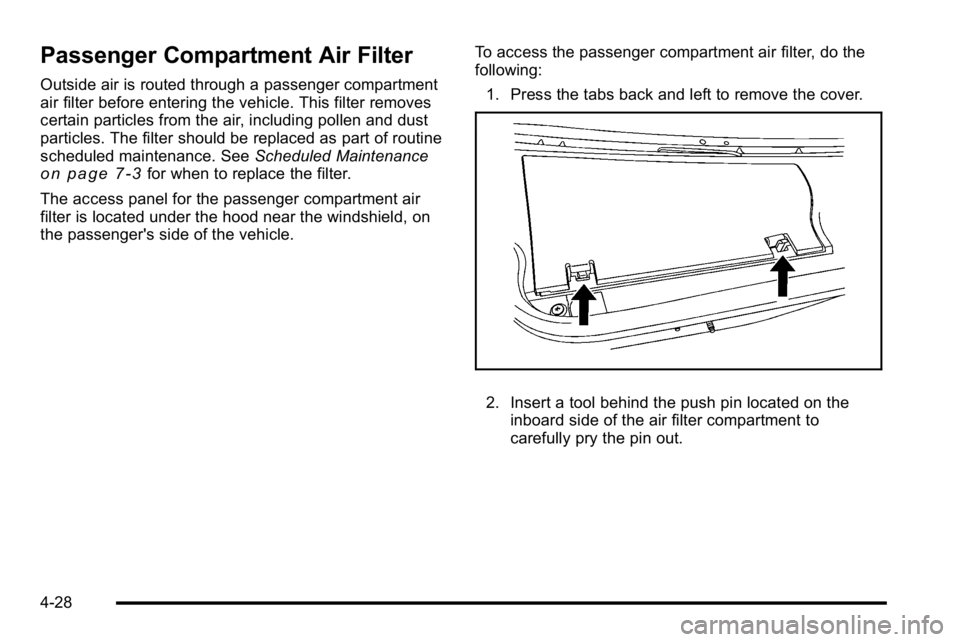
The access panel for the passenger compartment air
filter is located under the hood near the windshield, on
the passenger's side of the vehicle. To access the passenger compartment air filter, do the
following:
1. Press the tabs back and left to remove the cover.
2. Insert a tool behind the push pin located on the inboard side of the air filter compartment to
carefully pry the pin out.
4-28
Page 204 of 474
Emissions Inspection and Maintenance
Programs
Some state/provincial and local governments have
or might begin programs to inspect the emission
control equipment on the vehicle. Failure to pass this
inspection could prevent getting a vehicle registration.
Here are some things to know to help the vehicle pass
an inspection:
.The vehicle will not pass this inspection if the
check engine light is on with the engine running,
or if the key is in ON/RUN and the light is not on.
.The vehicle will not pass this inspection if the
OBD II (on-board diagnostic) system determines
that critical emission control systems have not
been completely diagnosed by the system. The
vehicle would be considered not ready for
inspection. This can happen if the battery has
recently been replaced or if the battery has run
down. The diagnostic system is designed to
evaluate critical emission control systems during
normal driving. This can take several days of
routine driving. If this has been done and the
vehicle still does not pass the inspection for lack of
OBD II system readiness, your dealer can prepare
the vehicle for inspection.
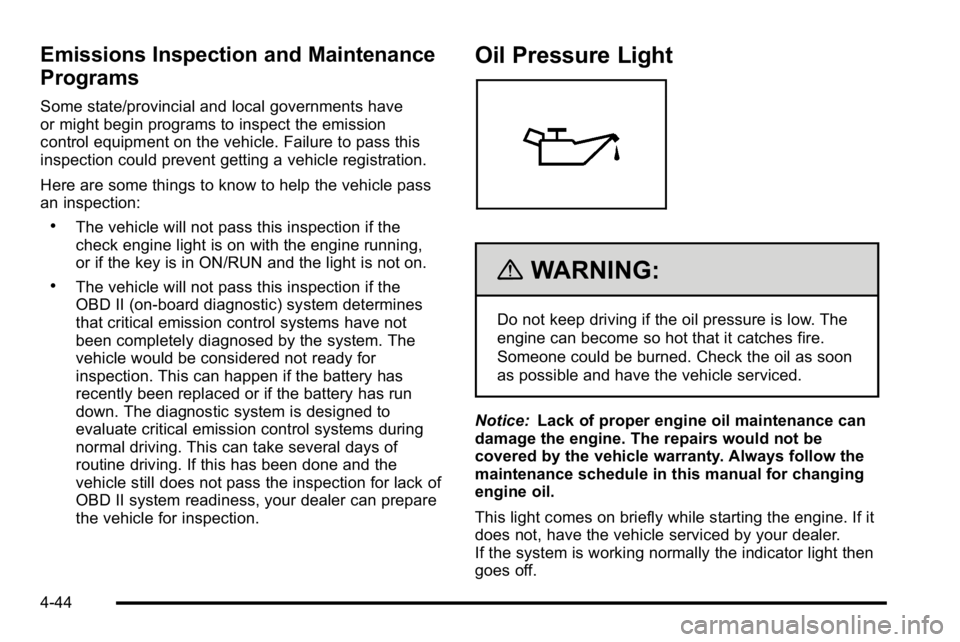
Oil Pressure Light
{WARNING:
Do not keep driving if the oil pressure is low. The
engine can become so hot that it catches fire.
Someone could be burned. Check the oil as soon
as possible and have the vehicle serviced.
Notice: Lack of proper engine oil maintenance can
damage the engine. The repairs would not be
covered by the vehicle warranty. Always follow the
maintenance schedule in this manual for changing
engine oil.
This light comes on briefly while starting the engine. If it
does not, have the vehicle serviced by your dealer.
If the system is working normally the indicator light then
goes off.
4-44
Page 210 of 474
Blank Display
This display shows no information.
Vehicle Information Menu Items
T
(Vehicle Information):Press this button to scroll
through the following menu items:
Oil Life
Press the vehicle information button until OIL LIFE
REMAINING displays. This display shows an estimate
of the oil's remaining useful life. If you see 99% OIL
LIFE REMAINING on the display, that means 99% of
the current oil life remains. The engine oil life system
will alert you to change the oil on a schedule consistent
with your driving conditions.
When the remaining oil life is low, the CHANGE
ENGINE OIL SOON message will appear on the
display. See “CHANGE ENGINE OIL SOON” underDIC
Warnings and Messages
on page 4‑55. You should
change the oil as soon as possible. See Engine Oilon
page 6‑17. In addition to the engine oil life system
monitoring the oil life, additional maintenance is
recommended in the Maintenance Schedule in this
manual. See Scheduled Maintenance
on page 7‑3for
more information.
Remember, you must reset the OIL LIFE yourself after
each oil change. It will not reset itself. Also, be careful
not to reset the OIL LIFE accidentally at any time other than when the oil has just been changed. It cannot be
reset accurately until the next oil change. To reset the
engine oil life system, see
Engine Oil Life System
on
page 6‑20.
Units
Press the vehicle information button until UNITS
displays. This display allows you to select between
Metric or English units of measurement. Once in this
display, press the set/reset button to select between
ENGLISH or METRIC units.
Park Assist
If your vehicle has the Ultrasonic Rear Parking Assist
(URPA) system, this display allows the system to be
turned on or off. Press the vehicle information button
until PARK ASSIST displays. Once in this display, press
the set/reset button to select between ON or OFF. If you
choose ON, the system will be turned on. If you choose
OFF, the system will be turned off. The URPA system
automatically turns back on after each vehicle start.
When the URPA system is turned off and the vehicle is
shifted out of PARK (P), the DIC will display the PARK
ASSIST OFF message as a reminder that the system
has been turned off. See DIC Warnings and Messages
on page 4‑55andUltrasonic Rear Parking Assist
(URPA)on page 3‑37for more information.
4-50
Page 215 of 474

DIC Warnings and Messages
Messages are displayed on the DIC to notify the driver
that the status of the vehicle has changed and that
some action may be needed by the driver to correct the
condition. Multiple messages may appear one after
another. Some messages may not require immediate
action, but you can press the set/reset button to
acknowledge that you received the message and clear
it from the DIC display. Pressing any of the DIC buttons
also acknowledges and clears any messages. Some
messages cannot be cleared from the DIC display
because they are more urgent. These messages require
action before they can be cleared. You should take any
messages that appear on the display seriously and
remember that clearing the messages will only make
the messages disappear, not correct the problem. The
following are the possible messages that can be
displayed and some information about them.
AUTOMATIC LIGHT CONTROL OFF
This message displays when the automatic headlamps
are turned off. SeeExterior Lampson page 4‑12for
more information.
AUTOMATIC LIGHT CONTROL ON
This message displays when the automatic headlamps
are turned on. See Exterior Lampson page 4‑12for
more information.
BATTERY SAVER ACTIVE
This message displays when the system detects that
the battery voltage is dropping beyond a reasonable
level. The battery saver system starts reducing certain
features of the vehicle that you may be able to notice.
At the point that the features are disabled, this message
is displayed. It means that the vehicle is trying to save
the charge in the battery.
Turn off all unnecessary accessories to allow the
battery to recharge.
The normal battery voltage range is 11.5 to 15.5 volts.
CHANGE ENGINE OIL SOON
This message displays when service is required for the
vehicle. See your dealer. See Engine Oilon page 6‑17andScheduled Maintenanceon page 7‑3for more
information.
Acknowledging the CHANGE ENGINE OIL SOON
message will not reset the OIL LIFE REMAINING. That
must be done at the OIL LIFE screen under the vehicle
information menu. See “Oil Life”underDIC Operation
and Displays
on page 4‑47and Engine Oil Life Systemon page 6‑20.
4-55
Page 301 of 474
If parking the rig on a hill:1. Press the brake pedal, but do not shift into P (Park) yet. Turn the wheels into the curb if facing downhill
or into traffic if facing uphill.
2. Have someone place chocks under the trailer wheels.
3. When the wheel chocks are in place, release the brake pedal until the chocks absorb the load.
4. Reapply the brake pedal. Then apply the parking brake and shift the transmission into P (Park).
5. Release the brake pedal.
Leaving After Parking on a Hill
1. Apply and hold the brake pedal while you:
.start the engine,
.shift into a gear, and
.release the parking brake.
2. Let up on the brake pedal.
3. Drive slowly until the trailer is clear of the chocks.
4. Stop and have someone pick up and store the chocks.
Maintenance When Trailer Towing
The vehicle needs service more often when pulling a
trailer. See Scheduled Maintenanceon page 7‑3for
more information. Things that are especially important
in trailer operation are automatic transmission fluid,
engine oil, belts, cooling system and brake system. It is
a good idea to inspect these before and during the trip.
Check periodically to see that all hitch nuts and bolts
are tight.
Engine Cooling When Trailer Towing
The cooling system may temporarily overheat during
severe operating conditions. See Engine Overheating
on page 6‑35.
Changing a Tire When Trailer Towing
If the vehicle gets a flat tire while towing a trailer, be
sure to secure the trailer and disconnect it from the
vehicle before changing the tire.
5-33