brake BUICK LUCERNE 2011 User Guide
[x] Cancel search | Manufacturer: BUICK, Model Year: 2011, Model line: LUCERNE, Model: BUICK LUCERNE 2011Pages: 450, PDF Size: 3.63 MB
Page 131 of 450
Black plate (27,1)Buick Lucerne Owner Manual - 2011
To release the parking brake, hold the regular brake
pedal down, then push the parking brake pedal down.
When you lift your foot off the parking brake pedal, the
pedal will follow your foot to the released position.
Notice:Driving with the parking brake on can
overheat the brake system and cause premature
wear or damage to brake system parts. Make sure
that the parking brake is fully released and the
brake warning light is off before driving.
If you are towing a trailer and are parking on any hill,
see Towing a Trailer on page 5‑25.
Shifting Into Park
{WARNING:
It can be dangerous to get out of the vehicle if the
shift lever is not fully in P (Park) with the parking
brake firmly set. The vehicle can roll. If you have
left the engine running, the vehicle can move
suddenly. You or others could be injured. To be
sure the vehicle will not move, even when you are
on fairly level ground, use the steps that follow.
If you are pulling a trailer, see Towing a Trailer
on
page 5‑25
.
Steering Column Shift Lever
If the vehicle has a steering column shift lever, use this
procedure to shift the vehicle into P (Park):
1. Hold the brake pedal down.
2. Move the shift lever into P (Park) by pulling the shift lever toward you and moving it up as far as it
will go.
3. With your foot still holding the brake pedal down, set the parking brake. See Parking Brake
on
page 3‑26for more information.
4. Turn the ignition key to LOCK/OFF.
5. Remove the key and take it with you. If you can leave the vehicle with the ignition key in your hand,
the vehicle is in P (Park).
Console Shift Lever
If the vehicle is equipped with a console shift lever, use
this procedure to shift the vehicle into P (Park):
1. Hold the brake pedal down.
2. Move the shift lever into P (Park) by pushing the lever all the way toward the front of the vehicle and
then to the left.
3. While keeping the brake pedal applied, set the parking brake. See Parking Brake
on page 3‑26for more information.
3-27
Page 132 of 450
Black plate (28,1)Buick Lucerne Owner Manual - 2011
4. Turn the ignition key to LOCK/OFF.
5. Remove the key and take it with you. If you canleave the vehicle with the ignition key in your hand,
the vehicle is in P (Park).
Leaving the Vehicle With the Engine
Running
{WARNING:
It can be dangerous to leave the vehicle with the
engine running. The vehicle could move suddenly
if the shift lever is not fully in P (Park) with the
parking brake firmly set. And, if you leave the
vehicle with the engine running, it could overheat
and even catch fire. You or others could be
injured. Do not leave the vehicle with the engine
running.
If you have to leave the vehicle with the engine running,
be sure your vehicle is in P (Park) and the parking
brake is firmly set before you leave it. See Parking
Brake
on page 3‑26for more information.
Torque Lock
Torque lock is when the weight of the vehicle puts too
much force on the parking pawl in the transmission.
This happens when parking on a hill and shifting the
transmission into P (Park) is not done properly and then
it is difficult to shift out of P (Park). To prevent torque
lock, set the parking brake and then shift into P (Park).
To find out how, see “Shifting Into Park”in this section.
If torque lock does occur, your vehicle may need to be
pushed uphill by another vehicle to relieve the parking
pawl pressure, so you can shift out of P (Park).
Shifting Out of Park
Automatic Transmission Shift Lock
This vehicle has an electronic shift lock release system.
The shift lock release is designed to:
.Prevent ignition key removal unless the shift lever
is in P (Park)
.Prevent movement of the shift lever out of P (Park),
unless the ignition is in ON/RUN and the regular
brake pedal is applied.
3-28
Page 133 of 450
Black plate (29,1)Buick Lucerne Owner Manual - 2011
The shift lock is always functional except in the case of
a an uncharged or low voltage (less than 9 volt) battery.
If the vehicle has an uncharged battery or a battery with
low voltage, try charging or jump starting the battery.
SeeJump Starting on page 6‑44.
Console Shift
If the console shifter cannot be moved out of P (Park)
1. Apply and maintain the regular brakes.
2. Turn the ignition to ON/RUN position. See Ignition
Positions
on page 3‑19for more information.
3. Let up on the shift lever and make sure the shift lever is pushed all the way into P (Park).
4. Then, move the shift into the desired gear.
If you still cannot move the shift lever from P (Park),
consult your dealer or a professional towing service.
Column Shift
If the shifter cannot be moved out of P (Park) 1. Apply and maintain the regular brakes.
2. Turn the ignition key to the ON/RUN position. See Ignition Positions
on page 3‑19for more
information. 3. Shift out of the P (Park) position to the N (Neutral)
position.
4. Then, move the shift into the desired gear.
If you still cannot move the shift lever from P (Park),
consult your dealer or a professional towing service.
Parking Over Things That Burn
{WARNING:
Things that can burn could touch hot exhaust
parts under the vehicle and ignite. Do not park
over papers, leaves, dry grass, or other things that
can burn.
3-29
Page 135 of 450
Black plate (31,1)Buick Lucerne Owner Manual - 2011
WARNING: (Continued)
death. Never run the engine in an enclosed
area that has no fresh air ventilation. For more
information, seeEngine Exhaust on page 3‑30.
{WARNING:
It can be dangerous to get out of the vehicle if the
automatic transmission shift lever is not fully in
P (Park) with the parking brake firmly set. The
vehicle can roll. Do not leave the vehicle when the
engine is running unless you have to. If you have
left the engine running, the vehicle can move
suddenly. You or others could be injured. To be
sure the vehicle will not move, even when you
are on fairly level ground, always set the parking
brake and move the shift lever to P (Park).
Follow the proper steps to be sure the vehicle will not
move. See Shifting Into Park on page 3‑27.
If parking on a hill and pulling a trailer, see Towing a
Trailer on page 5‑25.
Mirrors
Automatic Dimming Rearview Mirror
The vehicle may have an automatic dimming inside
rearview mirror with OnStar®and/or a compass
display. Automatic dimming reduces the glare from the
headlamps of the vehicle behind you. The dimming
feature comes on and the indicator light illuminates
each time the vehicle is started.
Vehicles with OnStar have three additional control
buttons located at the bottom of the mirror. See your
dealer for more information on the system and how to
subscribe to OnStar. See the OnStar
®owners guide for
more information about the services OnStar provides.
O(On/Off): Press to turn the dimming feature and/or
compass display on or off.
Cleaning the Mirror
Do not spray glass cleaner directly on the mirror. Use a
soft towel dampened with water.
3-31
Page 140 of 450
Black plate (36,1)Buick Lucerne Owner Manual - 2011
The system can be disabled through the Driver
Information Center (DIC). See“Park Assist”under
DIC Operation and Displays
on page 4‑42for more
information.
When the System Does Not Seem to
Work Properly
SERVICE PARK ASSIST: If this message occurs, take
the vehicle to your dealer to repair the system.
PARK ASSIST OFF: If the URPA system does not
activate due to a temporary condition, the message
displays on the DIC, see DIC Operation and Displays
on page 4‑42for more information. This can occur
under the following conditions:
.The driver disables the system.
.The ultrasonic sensors are not clean. Keep the
vehicle's rear bumper free of mud, dirt, snow, ice
and slush. For cleaning instructions, see Washing
Your Vehicle on page 6‑102.
.A trailer was attached to the vehicle, or a bicycle or
an object was hanging out of the trunk during the
last drive cycle. Once the object is removed, URPA
will return to normal operation.
.A tow bar is attached to the vehicle.
.The vehicle's bumper is damaged. Take the vehicle
to your dealer to repair the system.
.Other conditions may affect system performance,
such as vibrations from a jackhammer or the
compression of air brakes on a very large truck.
If the system is still disabled, after driving forward at
least 40 km/h (25 mph), take the vehicle to your dealer.
Side Blind Zone Alert (SBZA)
The vehicle may have a Side Blind Zone Alert (SBZA)
system. Read this entire section before using the
system.
{WARNING:
SBZA is only a lane changing aid and does not
replace driver vision. SBZA does not detect:
.Vehicles outside the side blind zones which
may be rapidly approaching.
.Pedestrians, bicyclists, or animals. (Continued)
3-36
Page 154 of 450
Black plate (50,1)Buick Lucerne Owner Manual - 2011
Floor Mats
{WARNING:
If a floor mat is the wrong size or is not properly
installed, it can interfere with the accelerator pedal
and/or brake pedal. Interference with the pedals
can cause unintended acceleration and/or
increased stopping distance which can cause a
crash and injury. Make sure the floor mat does not
interfere with the accelerator or brake pedal.
Use the following guidelines for proper floor mat usage.
.The original equipment floor mats were designed
for your vehicle. If the floor mats need replacing, it
is recommended that GM certified floor mats be
purchased. Non-GM floor mats may not fit properly
and may interfere with the accelerator or brake
pedal. Always check that the floor mats do not
interfere with the pedals.
.Use the floor mat with the correct side up. Do not
turn it over.
.Do not place anything on top of the driver side
floor mat.
.Use only a single floor mat on the driver side.
.Do not place one floor mat on top of another.
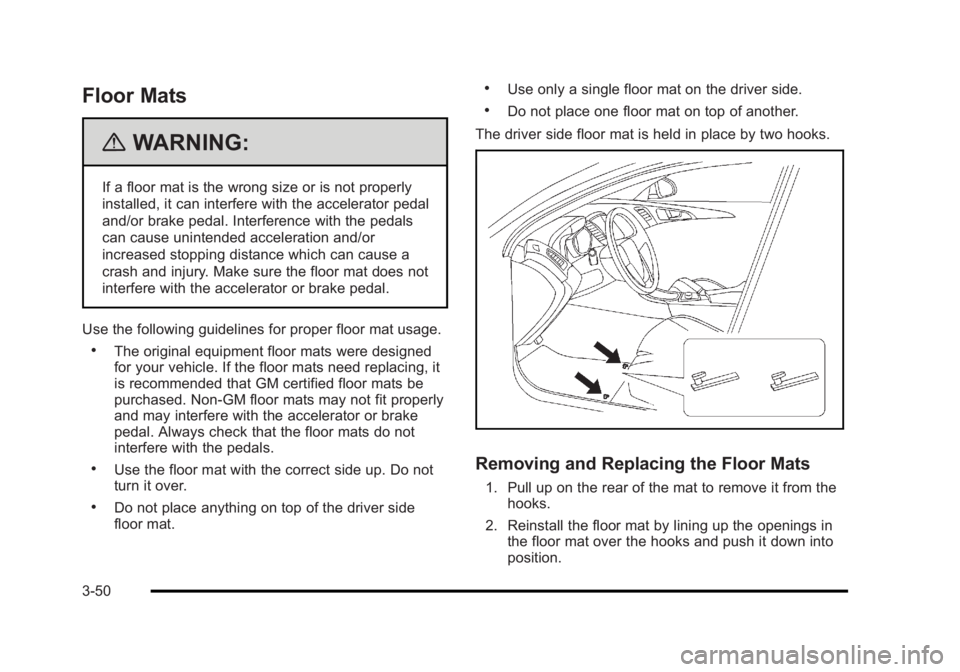
The driver side floor mat is held in place by two hooks.
Removing and Replacing the Floor Mats
1. Pull up on the rear of the mat to remove it from the hooks.
2. Reinstall the floor mat by lining up the openings in the floor mat over the hooks and push it down into
position.
3-50
Page 155 of 450
Black plate (51,1)Buick Lucerne Owner Manual - 2011
3. Make sure the floor mat is properly secured andverify that it does not interfere with the accelerator
or brake pedals.
Rear Seat Armrest
This vehicle has a rear seat armrest with cupholders.
Pull the tab on the armrest forward, to access it.
Convenience Net
Use the convenience net, located in the rear, to store
small loads as far forward as possible. The net should
not be used to store heavy loads.
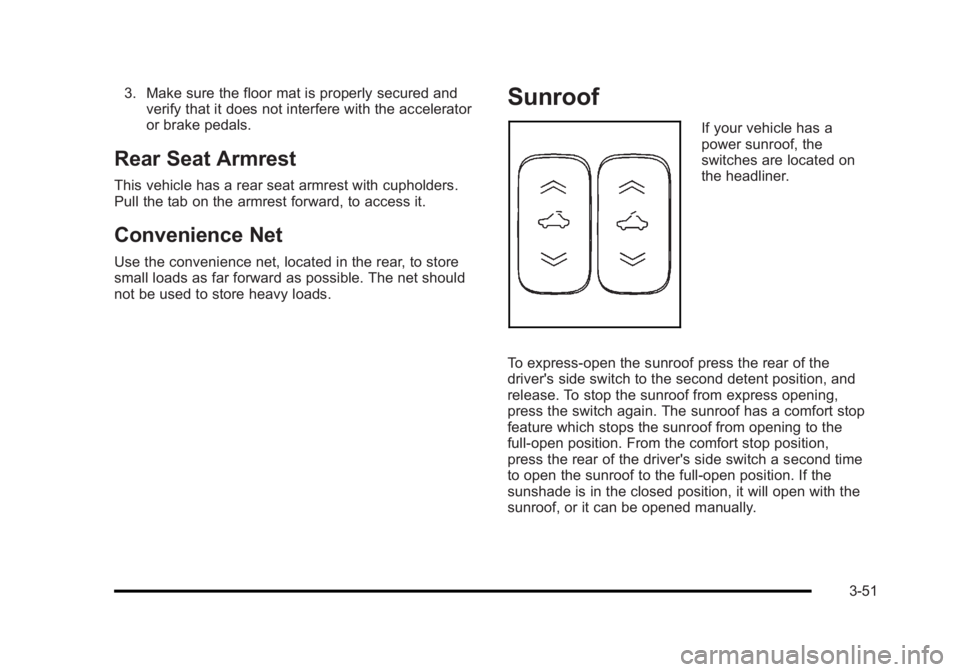
Sunroof
If your vehicle has a
power sunroof, the
switches are located on
the headliner.
To express-open the sunroof press the rear of the
driver's side switch to the second detent position, and
release. To stop the sunroof from express opening,
press the switch again. The sunroof has a comfort stop
feature which stops the sunroof from opening to the
full-open position. From the comfort stop position,
press the rear of the driver's side switch a second time
to open the sunroof to the full-open position. If the
sunshade is in the closed position, it will open with the
sunroof, or it can be opened manually.
3-51
Page 157 of 450
Black plate (1,1)Buick Lucerne Owner Manual - 2011
Section 4 Instrument Panel
Instrument Panel Overview. . . . . . . . . . . . . . . . . . . . . . . .4-3
Hazard Warning Flashers . . . . . . . . . . . . . . . . . . . . . . . 4-3
Horn . . . . . . . . . . . . . . . . . . . . . . . . . . . . . . . . . . . . . . . . . . . . 4-3
Tilt Wheel . . . . . . . . . . . . . . . . . . . . . . . . . . . . . . . . . . . . . . . 4-3
Power Tilt Wheel and Telescopic Steering Column . . . . . . . . . . . . . . . . . . . . . . . . . . . . . . . . . . . . . . . 4-4
Heated Steering Wheel . . . . . . . . . . . . . . . . . . . . . . . . . 4-4
Turn Signal/Multifunction Lever . . . . . . . . . . . . . . . . . . 4-4
Turn and Lane-Change Signals . . . . . . . . . . . . . . . . . 4-5
Headlamp High/Low-Beam Changer . . . . . . . . . . . . 4-5
Flash-to-Pass . . . . . . . . . . . . . . . . . . . . . . . . . . . . . . . . . . . 4-5
Windshield Wipers . . . . . . . . . . . . . . . . . . . . . . . . . . . . . . 4-6
Windshield Washer . . . . . . . . . . . . . . . . . . . . . . . . . . . . . 4-7
Cruise Control . . . . . . . . . . . . . . . . . . . . . . . . . . . . . . . . . . 4-7
Exterior Lamps . . . . . . . . . . . . . . . . . . . . . . . . . . . . . . . . 4-10
Wiper Activated Headlamps . . . . . . . . . . . . . . . . . . . . 4-11
Headlamps on Reminder . . . . . . . . . . . . . . . . . . . . . . . 4-11
Daytime Running Lamps (DRL) . . . . . . . . . . . . . . . . 4-11
Fog Lamps . . . . . . . . . . . . . . . . . . . . . . . . . . . . . . . . . . . . 4-12
Cornering Lamps . . . . . . . . . . . . . . . . . . . . . . . . . . . . . . 4-12
Exterior Lighting Battery Saver . . . . . . . . . . . . . . . . . 4-12
Instrument Panel Brightness . . . . . . . . . . . . . . . . . . . 4-12
Courtesy Lamps . . . . . . . . . . . . . . . . . . . . . . . . . . . . . . . 4-13
Entry Lighting . . . . . . . . . . . . . . . . . . . . . . . . . . . . . . . . . . 4-13
Delayed Entry Lighting . . . . . . . . . . . . . . . . . . . . . . . . . 4-13
Theater Dimming . . . . . . . . . . . . . . . . . . . . . . . . . . . . . . 4-13 Delayed Exit Lighting . . . . . . . . . . . . . . . . . . . . . . . . . . 4-13
Perimeter Lighting . . . . . . . . . . . . . . . . . . . . . . . . . . . . . 4-13
Front Reading Lamps . . . . . . . . . . . . . . . . . . . . . . . . . . 4-13
Electric Power Management . . . . . . . . . . . . . . . . . . . 4-14
Inadvertent Power Battery Saver . . . . . . . . . . . . . . . 4-14
Battery Run-Down Protection . . . . . . . . . . . . . . . . . . 4-15
Accessory Power Outlet(s) . . . . . . . . . . . . . . . . . . . . . 4-15
Ashtray(s) . . . . . . . . . . . . . . . . . . . . . . . . . . . . . . . . . . . . . 4-16
Climate Controls . . . . . . . . . . . . . . . . . . . . . . . . . . . . . . . . . . 4-16
Climate Control System . . . . . . . . . . . . . . . . . . . . . . . . 4-16
Dual Automatic Climate Control System . . . . . . . 4-20
Outlet Adjustment . . . . . . . . . . . . . . . . . . . . . . . . . . . . . . 4-25
Passenger Compartment Air Filter . . . . . . . . . . . . . 4-25
Warning Lights, Gauges, and Indicators . . . . . . . .4-27
Instrument Panel Cluster . . . . . . . . . . . . . . . . . . . . . . . 4-28
Speedometer and Odometer . . . . . . . . . . . . . . . . . . . 4-29
Trip Odometer . . . . . . . . . . . . . . . . . . . . . . . . . . . . . . . . . 4-29
Tachometer . . . . . . . . . . . . . . . . . . . . . . . . . . . . . . . . . . . . 4-29
Safety Belt Reminders . . . . . . . . . . . . . . . . . . . . . . . . . 4-29
Airbag Readiness Light . . . . . . . . . . . . . . . . . . . . . . . . 4-30
Passenger Airbag Status Indicator . . . . . . . . . . . . . 4-31
Charging System Light . . . . . . . . . . . . . . . . . . . . . . . . 4-32
Brake System Warning Light . . . . . . . . . . . . . . . . . . . 4-32
Antilock Brake System (ABS) Warning Light . . . 4-33
Traction Control System (TCS) Warning Light . . . . . . . . . . . . . . . . . . . . . . . . . . . . . . . . . . . . . . . . . 4-34
4-1
Page 164 of 450
Black plate (8,1)Buick Lucerne Owner Manual - 2011
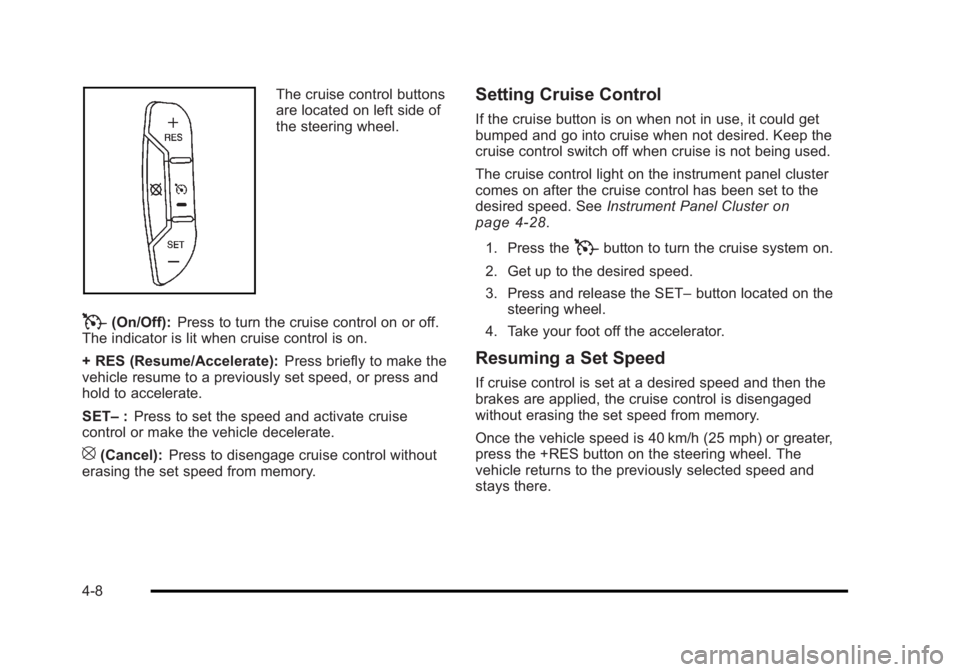
The cruise control buttons
are located on left side of
the steering wheel.
T(On/Off):Press to turn the cruise control on or off.
The indicator is lit when cruise control is on.
+ RES (Resume/Accelerate): Press briefly to make the
vehicle resume to a previously set speed, or press and
hold to accelerate.
SET– :Press to set the speed and activate cruise
control or make the vehicle decelerate.
[(Cancel): Press to disengage cruise control without
erasing the set speed from memory.
Setting Cruise Control
If the cruise button is on when not in use, it could get
bumped and go into cruise when not desired. Keep the
cruise control switch off when cruise is not being used.
The cruise control light on the instrument panel cluster
comes on after the cruise control has been set to the
desired speed. See Instrument Panel Cluster
on
page 4‑28.
1. Press the
Tbutton to turn the cruise system on.
2. Get up to the desired speed.
3. Press and release the SET– button located on the
steering wheel.
4. Take your foot off the accelerator.
Resuming a Set Speed
If cruise control is set at a desired speed and then the
brakes are applied, the cruise control is disengaged
without erasing the set speed from memory.
Once the vehicle speed is 40 km/h (25 mph) or greater,
press the +RES button on the steering wheel. The
vehicle returns to the previously selected speed and
stays there.
4-8
Page 165 of 450
Black plate (9,1)Buick Lucerne Owner Manual - 2011
Increasing Speed While Using Cruise
Control
If the cruise control system is already activated,
.Press and hold the +RES button on the steering
wheel until the desired speed is reached, then
release it.
.To increase vehicle speed in small increments,
press the +RES button. Each time this is done, the
vehicle goes about 1.6 km/h (1 mph) faster.
Reducing Speed While Using Cruise
Control
If the cruise control system is already activated,
.Press and hold the SET–button on the steering
wheel until the lower speed desired is reached,
then release it.
.To slow down in small amounts, press the
SET– button briefly. Each time this is done, the
vehicle goes about 1.6 km/h (1 mph) slower.
Passing Another Vehicle While Using
Cruise Control
Use the accelerator pedal to increase vehicle speed.
When you take your foot off the pedal, the vehicle will
slow down to the cruise speed you set earlier.
Using Cruise Control on Hills
How well the cruise control will work on hills depends
upon the vehicle speed, load and the steepness of the
hills. When going up steep hills, you might have to step
on the accelerator pedal to maintain your speed. When
going downhill, you might have to brake or shift to a
lower gear to keep your speed down. If the brakes are
applied the cruise control will turn off.
Ending Cruise Control
There are three ways to end cruise control:
.To disengage cruise control, step lightly on the
brake pedal, or
.Press the[button on the steering wheel.
.To turn off the cruise control, press theTbutton
on the steering wheel.
Erasing Speed Memory
The cruise control set speed memory is erased from
memory by pressing
Tor if the ignition is turned off.
4-9