buttons BUICK LUCERNE 2011 User Guide
[x] Cancel search | Manufacturer: BUICK, Model Year: 2011, Model line: LUCERNE, Model: BUICK LUCERNE 2011Pages: 450, PDF Size: 3.63 MB
Page 146 of 450
Black plate (42,1)Buick Lucerne Owner Manual - 2011
LDW Error Message
SERVICE LANE DEPARTURE SYSTEM:This
message may appear in the DIC to indicate that LDW is
not working properly. If this message remains on after
continued driving, the system needs service. Take your
vehicle to your dealer.
LANE DEPARTURE SYSTEM UNAVAILABLE: This
message may appear in the DIC if LDW does not
activate due to a temporary condition.
Universal Home Remote
System
See Radio Frequency Statementon page 8‑18for information regarding Part 15 of the Federal
Communications Commission (FCC) rules and Industry
Canada Standards RSS-210/220/310.
Universal Home Remote System
Operation (With Three Round LED)
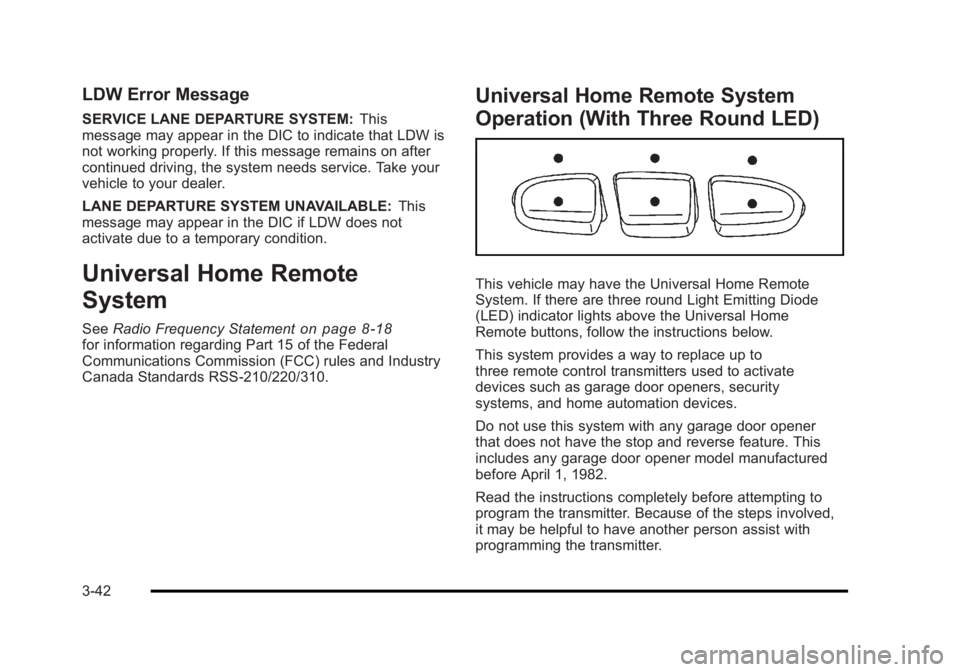
This vehicle may have the Universal Home Remote
System. If there are three round Light Emitting Diode
(LED) indicator lights above the Universal Home
Remote buttons, follow the instructions below.
This system provides a way to replace up to
three remote control transmitters used to activate
devices such as garage door openers, security
systems, and home automation devices.
Do not use this system with any garage door opener
that does not have the stop and reverse feature. This
includes any garage door opener model manufactured
before April 1, 1982.
Read the instructions completely before attempting to
program the transmitter. Because of the steps involved,
it may be helpful to have another person assist with
programming the transmitter.
3-42
Page 147 of 450

Black plate (43,1)Buick Lucerne Owner Manual - 2011
Be sure to keep the original remote control transmitter
for use in other vehicles, as well as, for future
programming. Only the original remote control
transmitter is needed for Fixed Code programming.
The programmed buttons should be erased when
the vehicle is sold or the lease ends. See“Erasing
Universal Home Remote Buttons” later in this section.
Park the vehicle outside of the garage when
programming a garage door. Be sure that people and
objects are clear of the garage door or gate that is
being programmed.
Programming Universal Home
Remote —Rolling Code
For questions or help programming the Universal
Home Remote System, call 1-866-572-2728 or go to
learcar2u.com.
Most garage door openers sold after 1996 are Rolling
Code units. Programming a garage door opener involves
time-sensitive actions, so read the entire procedure
before starting. Otherwise, the device will time out
and the procedure will have to be repeated.
To program up to three devices:1. From inside the vehicle, press the two outside
buttons at the same time for one to two seconds,
and immediately release them.
3-43
Page 151 of 450
Black plate (47,1)Buick Lucerne Owner Manual - 2011
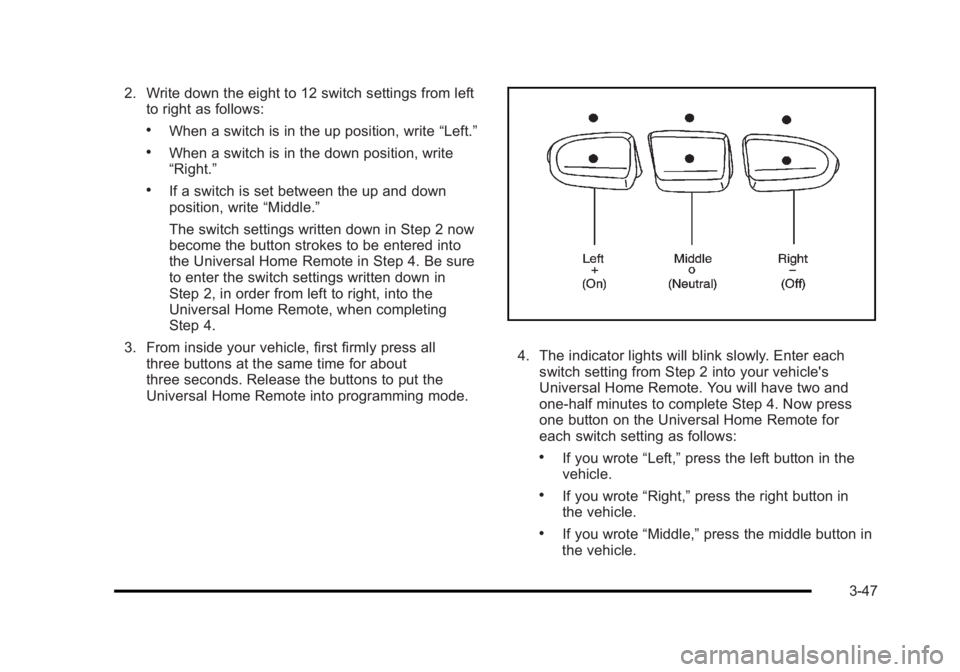
2. Write down the eight to 12 switch settings from leftto right as follows:
.When a switch is in the up position, write “Left.”
.When a switch is in the down position, write
“Right.”
.If a switch is set between the up and down
position, write“Middle.”
The switch settings written down in Step 2 now
become the button strokes to be entered into
the Universal Home Remote in Step 4. Be sure
to enter the switch settings written down in
Step 2, in order from left to right, into the
Universal Home Remote, when completing
Step 4.
3. From inside your vehicle, first firmly press all three buttons at the same time for about
three seconds. Release the buttons to put the
Universal Home Remote into programming mode.
4. The indicator lights will blink slowly. Enter eachswitch setting from Step 2 into your vehicle's
Universal Home Remote. You will have two and
one-half minutes to complete Step 4. Now press
one button on the Universal Home Remote for
each switch setting as follows:
.If you wrote “Left,”press the left button in the
vehicle.
.If you wrote “Right,”press the right button in
the vehicle.
.If you wrote “Middle,”press the middle button in
the vehicle.
3-47
Page 152 of 450
Black plate (48,1)Buick Lucerne Owner Manual - 2011
5. After entering all of the switch positions, again,firmly press and release all three buttons at the
same time. The indicator lights will turn on.
6. Press and hold the button that will be used to control the garage door until the garage door
moves. The indicator light above the selected
button should slowly blink. This button may need to
be held for up to 55 seconds.
7. Immediately release the button when the garage door moves. The indicator light will blink rapidly
until programming is complete.
8. Press and release the same button again. The garage door should move, confirming that
programming is successful and complete.
To program another Fixed Code device such as an
additional garage door opener, a security device,
or home automation device, repeat Steps 1-8, choosing
a different button in Step 6 than what was used for the
garage door opener.
Using Universal Home Remote
Press and hold the appropriate button for at least half
of a second. The indicator light will come on while the
signal is being transmitted.
Reprogramming Universal Home
Remote Buttons
Any of the three buttons can be reprogrammed by
repeating the instructions.
Erasing Universal Home Remote
Buttons
The programmed buttons should be erased when the
vehicle is sold or the lease ends.
To erase either Rolling Code or Fixed Code on the
Universal Home Remote device: 1. Press and hold the two outside buttons at the same time for approximately 20 seconds, until the
indicator lights, located directly above the buttons,
begin to blink rapidly.
2. Once the indicator lights begin to blink, release both buttons. The codes from all buttons will be
erased.
For help or information on the Universal Home Remote
System, call the customer assistance phone number
under Customer Assistance Offices on page 8‑5.
3-48
Page 164 of 450
Black plate (8,1)Buick Lucerne Owner Manual - 2011
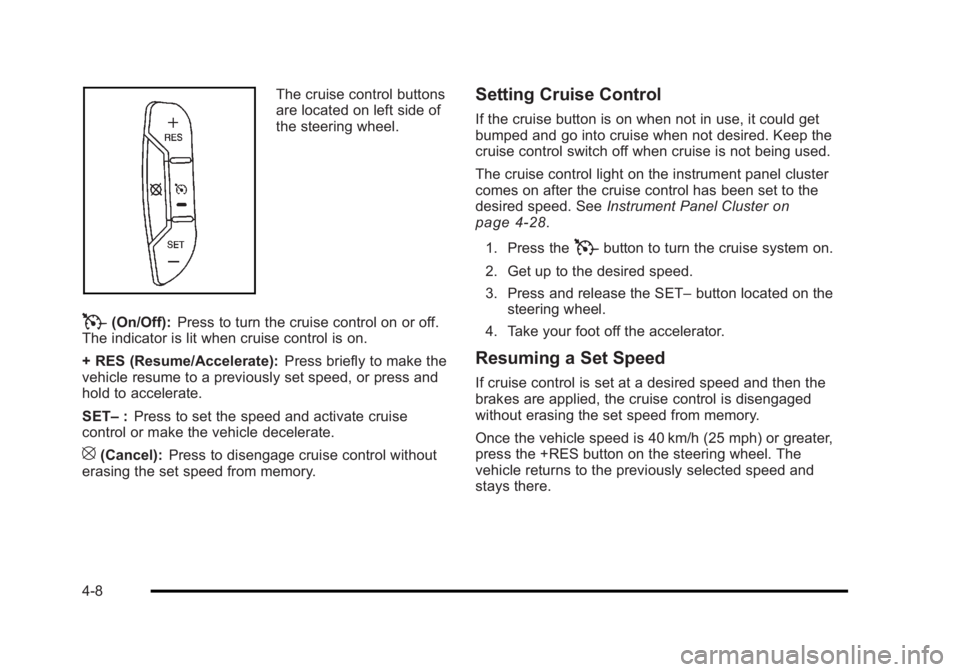
The cruise control buttons
are located on left side of
the steering wheel.
T(On/Off):Press to turn the cruise control on or off.
The indicator is lit when cruise control is on.
+ RES (Resume/Accelerate): Press briefly to make the
vehicle resume to a previously set speed, or press and
hold to accelerate.
SET– :Press to set the speed and activate cruise
control or make the vehicle decelerate.
[(Cancel): Press to disengage cruise control without
erasing the set speed from memory.
Setting Cruise Control
If the cruise button is on when not in use, it could get
bumped and go into cruise when not desired. Keep the
cruise control switch off when cruise is not being used.
The cruise control light on the instrument panel cluster
comes on after the cruise control has been set to the
desired speed. See Instrument Panel Cluster
on
page 4‑28.
1. Press the
Tbutton to turn the cruise system on.
2. Get up to the desired speed.
3. Press and release the SET– button located on the
steering wheel.
4. Take your foot off the accelerator.
Resuming a Set Speed
If cruise control is set at a desired speed and then the
brakes are applied, the cruise control is disengaged
without erasing the set speed from memory.
Once the vehicle speed is 40 km/h (25 mph) or greater,
press the +RES button on the steering wheel. The
vehicle returns to the previously selected speed and
stays there.
4-8
Page 167 of 450
Black plate (11,1)Buick Lucerne Owner Manual - 2011
Wiper Activated Headlamps
This feature activates the headlamps and parking lamps
after the windshield wipers are turned on and have
completed eight wipe cycles within four minutes.
When the ignition is turned to LOCK/OFF, the
wiper-activated headlamps immediately turn off. The
wiper-activated headlamps also turn off if the windshield
wipers are turned off.
Headlamps on Reminder
If you leave the exterior lamp buttons for the headlamps
or parking lamps on, remove the key from the ignition
and open the driver's door, you will hear a continuous
warning chime. The chime will turn off when the lamps
are turned off.
Daytime Running Lamps (DRL)
Daytime Running Lamps (DRL) can make it easier for
others to see the front of your vehicle during the day.
Fully functional daytime running lamps are required on
all vehicles first sold in Canada.
A light sensor on top of the instrument panel monitors
the exterior light level for the operation of DRL, so be
sure it is not covered.The DRL system makes the low-beam headlamps turn
on at reduced brightness in daylight when the following
conditions are met:
.The engine is running.
.The exterior lamp button for the headlamps is off.
When the DRL are on, only the low-beam headlamps
will be on. The parking lamps, taillamps, sidemarker
and other lamps will not be on.
When it is dark enough outside, the low-beam
headlamps will come on. The other lamps that turn on
with the headlamps will also turn on. When it is bright
enough outside, the regular lamps will go off, and the
low-beam headlamps change to the reduced brightness
of DRL.
To turn off all exterior lighting at night when the vehicle
is parked, turn the exterior lamp control to the off
position. See Exterior Lamps
on page 4‑10for more
information.
The regular headlamp system should be turned on
when needed.
4-11
Page 178 of 450
Black plate (22,1)Buick Lucerne Owner Manual - 2011
Manual Operation
9(Off):Turns the climate control system off. Outside
air still enters the vehicle and is directed to the floor.
The airflow direction and temperature can be adjusted.
If the temperature is adjusted while the system is off,
the display will light to show the current settings.
w x(Driver Temperature Controls): Press these
buttons next to the fan control to increase or decrease
the temperature inside the vehicle.
w x(Passenger Temperature Controls): Press
these buttons next to the mode control to increase or
decrease the temperature for the front passenger. If the
passenger climate control system is off, pressing one of
these buttons turns it on.
9(Fan Control): Turn clockwise or counterclockwise
to increase or decrease the fan speed. Turning this
control completely counterclockwise turns on the
automatic fan operation.
If the airflow seems low when the fan speed is at the
highest setting, the passenger compartment air filter
may need to be replaced. For more information, see
Passenger Compartment Air Filter
on page 4‑25and
Scheduled Maintenance on page 7‑3.
Air Delivery Mode Control: Turn clockwise or
counterclockwise to change the direction of the airflow
in the vehicle. To change the current mode, select one of the following:
F(Vent):
Air is directed to the instrument panel outlets.
*(Bi-Level): Air is divided between the instrument
panel outlets and the floor outlets. In automatic
operation, cooler air is directed to the upper outlets
and warmer air to the floor outlets.
7(Floor): Air is directed to the floor outlets, with some
air directed to the windshield and side window outlets.
If recirculation is selected while in this mode, it stays on
for three minutes to reduce windshield fogging.
W(Floor/Defog): This mode clears the windows of fog
or moisture. Air is directed to the floor outlets, with
some air directed to the windshield and side window
outlets. The system turns off recirculation and runs the
air-conditioning compressor unless the outside
temperature is at or below freezing. The recirculation
mode cannot be selected while in the floor/defog mode.
0(Defrost): This mode removes fog or frost from
the windshield more quickly. Air is directed to the
windshield and the side window outlets. The system
automatically turns off recirculation and runs the
air-conditioning compressor, unless the outside
temperature is at or below freezing. Recirculation
cannot be selected while in the defrost mode.
4-22
Page 198 of 450
Black plate (42,1)Buick Lucerne Owner Manual - 2011
Here are some things that some owners ask about.
None of these show a problem with the fuel gauge:
.At the service station, the gas pump shuts off
before the gauge reads full.
.It takes more (or less) fuel to fill up than the gauge
indicated. For example, the gauge may have
indicated half full, but it took more (or less) than
half the tank's capacity to fill it.
.The gauge moves up a little while turning a corner,
speeding up or making a hard stop.
.The gauge does not go back to empty when the
ignition is turned off.
Driver Information Center (DIC)
Your vehicle has a Driver Information Center (DIC).
All messages will appear in the DIC display located
below the speedometer in the instrument panel cluster.
The DIC buttons are located on the instrument panel, to
the left of the instrument panel cluster.
The DIC comes on when the ignition is on. After a short
delay, the DIC will display the information that was last
displayed before the engine was turned off.The DIC displays trip, fuel, and vehicle system
information, and warning messages if a system
problem is detected. The bottom line of the DIC
shows the shift lever position indicator. See
Automatic
Transmission Operation
on page 3‑24for more
information.
If your vehicle's DIC has these features, the compass
direction and the outside air temperature may also
display on the DIC when viewing the trip and fuel
information. The compass direction appears on the
top right corner of the DIC display. The outside air
temperature automatically appears in the bottom right
corner of the DIC display. If there is a problem with
the system that controls the temperature display, the
numbers will be replaced with dashes. If this occurs,
have the vehicle serviced by your dealer.
The DIC also allows some features to be customized.
See DIC Vehicle Customization
on page 4‑58for more
information.
DIC Operation and Displays
The DIC has different displays which can be accessed
by pressing the DIC buttons located on the instrument
panel, to the left of the instrument panel cluster.
4-42
Page 199 of 450
Black plate (43,1)Buick Lucerne Owner Manual - 2011
DIC Buttons
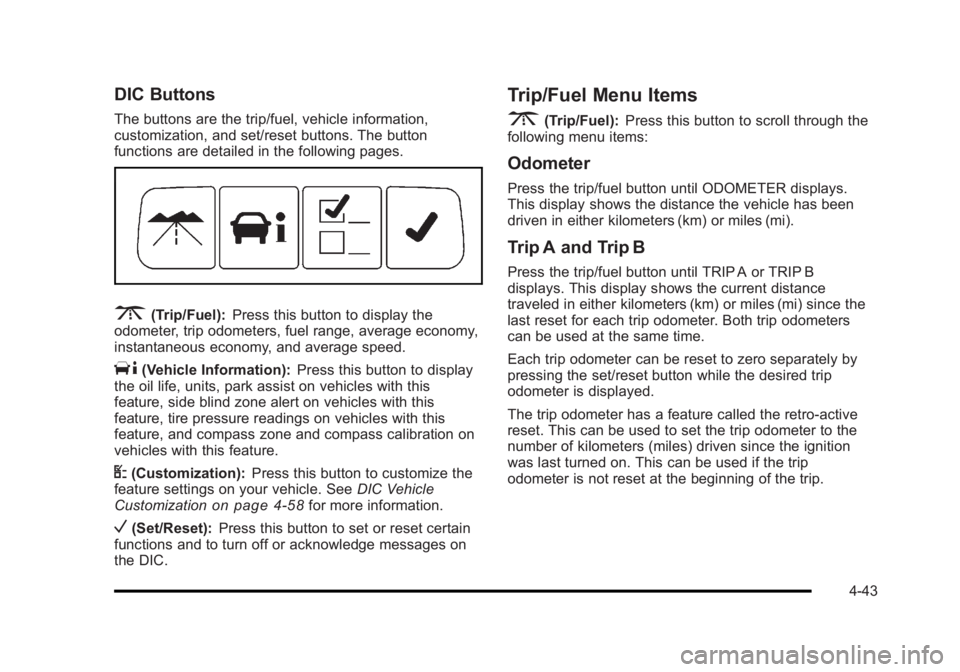
The buttons are the trip/fuel, vehicle information,
customization, and set/reset buttons. The button
functions are detailed in the following pages.
3(Trip/Fuel):Press this button to display the
odometer, trip odometers, fuel range, average economy,
instantaneous economy, and average speed.
T(Vehicle Information): Press this button to display
the oil life, units, park assist on vehicles with this
feature, side blind zone alert on vehicles with this
feature, tire pressure readings on vehicles with this
feature, and compass zone and compass calibration on
vehicles with this feature.
U(Customization): Press this button to customize the
feature settings on your vehicle. See DIC Vehicle
Customization
on page 4‑58for more information.
V(Set/Reset): Press this button to set or reset certain
functions and to turn off or acknowledge messages on
the DIC.
Trip/Fuel Menu Items
3
(Trip/Fuel): Press this button to scroll through the
following menu items:
Odometer
Press the trip/fuel button until ODOMETER displays.
This display shows the distance the vehicle has been
driven in either kilometers (km) or miles (mi).
Trip A and Trip B
Press the trip/fuel button until TRIP A or TRIP B
displays. This display shows the current distance
traveled in either kilometers (km) or miles (mi) since the
last reset for each trip odometer. Both trip odometers
can be used at the same time.
Each trip odometer can be reset to zero separately by
pressing the set/reset button while the desired trip
odometer is displayed.
The trip odometer has a feature called the retro-active
reset. This can be used to set the trip odometer to the
number of kilometers (miles) driven since the ignition
was last turned on. This can be used if the trip
odometer is not reset at the beginning of the trip.
4-43
Page 205 of 450
Black plate (49,1)Buick Lucerne Owner Manual - 2011
2. Press the vehicle information button untilPRESS
VTO CALIBRATE COMPASS displays.
3. Press the set/reset button to start the compass calibration.
4. The DIC will display CALIBRATING: DRIVE IN CIRCLES. Drive the vehicle in tight circles at less
than 5 mph (8 km/h) to complete the calibration.
The DIC will display CALIBRATION COMPLETE
for a few seconds when the calibration is complete.
The DIC display will then return to PRESS
VTO
CALIBRATE COMPASS.
DIC Warnings and Messages
Messages are displayed on the DIC to notify the driver
that the status of the vehicle has changed and that
some action may be needed by the driver to correct the
condition. Multiple messages may appear one after
another. Some messages may not require immediate
action, but you can press the set/reset button to
acknowledge that you received the message and clear
it from the DIC display. Pressing any of the DIC buttons
also acknowledges and clears any messages. Some
messages cannot be cleared from the DIC display
because they are more urgent. These messages require
action before they can be cleared. You should take any
messages that appear on the display seriously and
remember that clearing the messages will only make the messages disappear, not correct the problem.
The following are the possible messages that can be
displayed and some information about them.
AUTOMATIC LIGHT CONTROL OFF
This message displays when the automatic headlamps
are turned off. See
Exterior Lampson page 4‑10for
more information.
AUTOMATIC LIGHT CONTROL ON
This message displays when the automatic headlamps
are turned on. See Exterior Lampson page 4‑10for
more information.
BATTERY SAVER ACTIVE
This message displays when the system detects that
the battery voltage is dropping beyond a reasonable
level. The battery saver system starts reducing certain
features of the vehicle that you may be able to notice.
At the point that the features are disabled, this message
is displayed. It means that the vehicle is trying to save
the charge in the battery.
Turn off all unnecessary accessories to allow the
battery to recharge.
The normal battery voltage range is 11.5 to 15.5 volts.
4-49