display BUICK LUCERNE 2011 User Guide
[x] Cancel search | Manufacturer: BUICK, Model Year: 2011, Model line: LUCERNE, Model: BUICK LUCERNE 2011Pages: 450, PDF Size: 3.63 MB
Page 136 of 450
Black plate (32,1)Buick Lucerne Owner Manual - 2011
Compass
Compass Operation
There is a compass display in the upper right corner of
the mirror.
Compass Calibration
Press and holdOto activate the compass calibration
mode. CAL displays in the compass window on the
mirror.
If after a few seconds the display does not show a
compass direction, (N for North for example), there may
be a strong magnetic field interfering with the compass.
Interference can be caused by a magnetic antenna
mount, note pad holder, or similar object. If CAL
displays in the compass window, the compass may
need to be reset or calibrated.
The compass can be calibrated by driving the vehicle in
circles at 5 mph (8 km/h) or less until the display reads a
direction.
Compass Variance
The compass is set to zone eight. If you do not live
in zone eight or drive out of the area, the compass
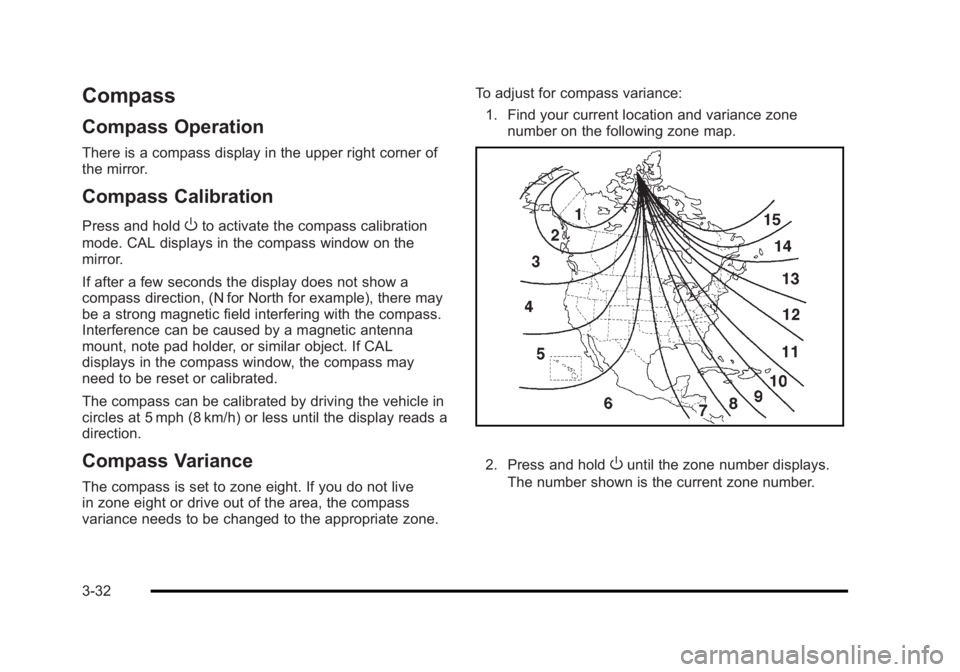
variance needs to be changed to the appropriate zone. To adjust for compass variance:
1. Find your current location and variance zone number on the following zone map.
2. Press and holdOuntil the zone number displays.
The number shown is the current zone number.
3-32
Page 137 of 450
Black plate (33,1)Buick Lucerne Owner Manual - 2011
3. Once the zone number displays,press
Orepeatedly until the correct zone
number displays. Stop pressing the button and
the mirror returns to normal operation. If CAL
appears in the compass window, the compass
may need calibration. See “Compass Calibration”
listed previously.
Outside Power Mirrors
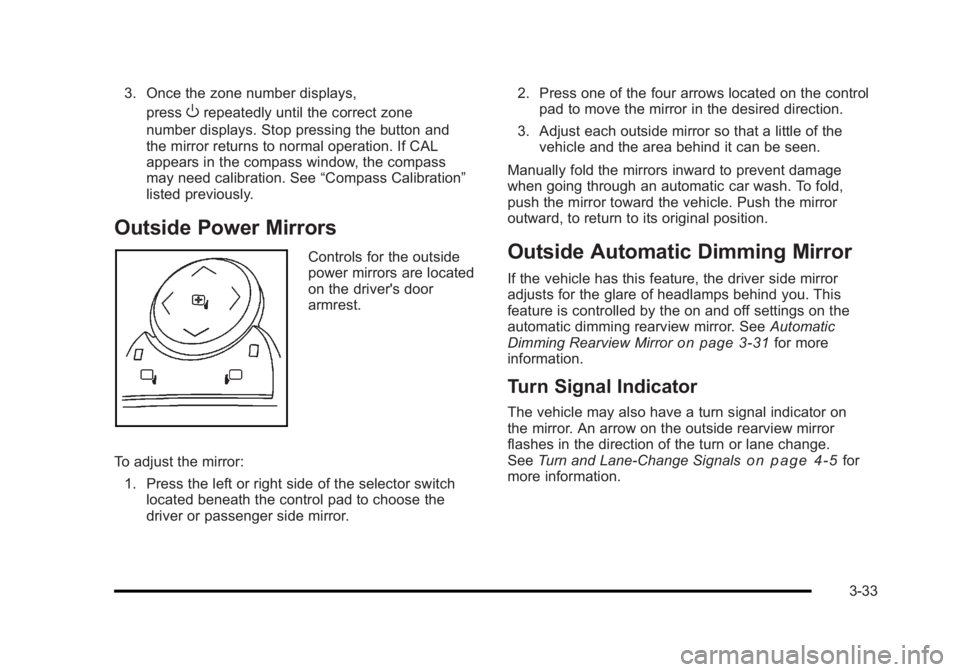
Controls for the outside
power mirrors are located
on the driver's door
armrest.
To adjust the mirror: 1. Press the left or right side of the selector switch located beneath the control pad to choose the
driver or passenger side mirror. 2. Press one of the four arrows located on the control
pad to move the mirror in the desired direction.
3. Adjust each outside mirror so that a little of the vehicle and the area behind it can be seen.
Manually fold the mirrors inward to prevent damage
when going through an automatic car wash. To fold,
push the mirror toward the vehicle. Push the mirror
outward, to return to its original position.Outside Automatic Dimming Mirror
If the vehicle has this feature, the driver side mirror
adjusts for the glare of headlamps behind you. This
feature is controlled by the on and off settings on the
automatic dimming rearview mirror. See Automatic
Dimming Rearview Mirror
on page 3‑31for more
information.
Turn Signal Indicator
The vehicle may also have a turn signal indicator on
the mirror. An arrow on the outside rearview mirror
flashes in the direction of the turn or lane change.
See Turn and Lane-Change Signals
on page 4‑5for
more information.
3-33
Page 140 of 450
Black plate (36,1)Buick Lucerne Owner Manual - 2011
The system can be disabled through the Driver
Information Center (DIC). See“Park Assist”under
DIC Operation and Displays
on page 4‑42for more
information.
When the System Does Not Seem to
Work Properly
SERVICE PARK ASSIST: If this message occurs, take
the vehicle to your dealer to repair the system.
PARK ASSIST OFF: If the URPA system does not
activate due to a temporary condition, the message
displays on the DIC, see DIC Operation and Displays
on page 4‑42for more information. This can occur
under the following conditions:
.The driver disables the system.
.The ultrasonic sensors are not clean. Keep the
vehicle's rear bumper free of mud, dirt, snow, ice
and slush. For cleaning instructions, see Washing
Your Vehicle on page 6‑102.
.A trailer was attached to the vehicle, or a bicycle or
an object was hanging out of the trunk during the
last drive cycle. Once the object is removed, URPA
will return to normal operation.
.A tow bar is attached to the vehicle.
.The vehicle's bumper is damaged. Take the vehicle
to your dealer to repair the system.
.Other conditions may affect system performance,
such as vibrations from a jackhammer or the
compression of air brakes on a very large truck.
If the system is still disabled, after driving forward at
least 40 km/h (25 mph), take the vehicle to your dealer.
Side Blind Zone Alert (SBZA)
The vehicle may have a Side Blind Zone Alert (SBZA)
system. Read this entire section before using the
system.
{WARNING:
SBZA is only a lane changing aid and does not
replace driver vision. SBZA does not detect:
.Vehicles outside the side blind zones which
may be rapidly approaching.
.Pedestrians, bicyclists, or animals. (Continued)
3-36
Page 141 of 450
Black plate (37,1)Buick Lucerne Owner Manual - 2011
WARNING: (Continued)
Failure to use proper care when changing lanes
may result in damage to the vehicle, injury,
or death. Always check the outside and rearview
mirrors, glance over your shoulder, and use the
turn signal before changing lanes.
When the system detects a vehicle in the side blind
zone, amber SBZA displays will light up in the side
mirrors. This indicates that it may be unsafe to change
lanes. Before making a lane change, always check the
SBZA display, check the outside and rearview mirrors,
look over your shoulder for vehicles and hazards, and
use the turn signal.
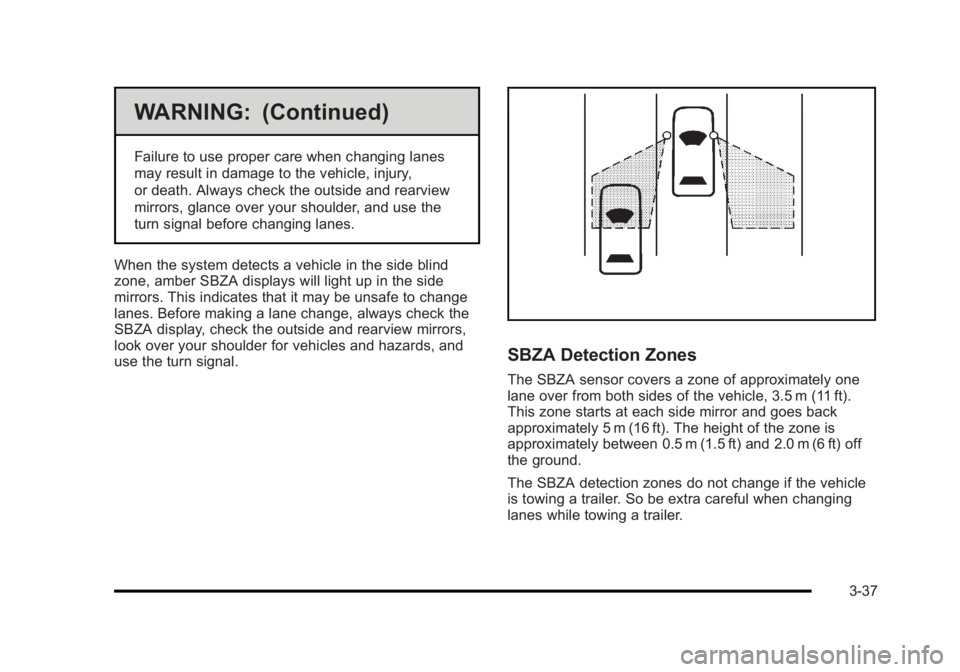
SBZA Detection Zones
The SBZA sensor covers a zone of approximately one
lane over from both sides of the vehicle, 3.5 m (11 ft).
This zone starts at each side mirror and goes back
approximately 5 m (16 ft). The height of the zone is
approximately between 0.5 m (1.5 ft) and 2.0 m (6 ft) off
the ground.
The SBZA detection zones do not change if the vehicle
is towing a trailer. So be extra careful when changing
lanes while towing a trailer.
3-37
Page 142 of 450
Black plate (38,1)Buick Lucerne Owner Manual - 2011
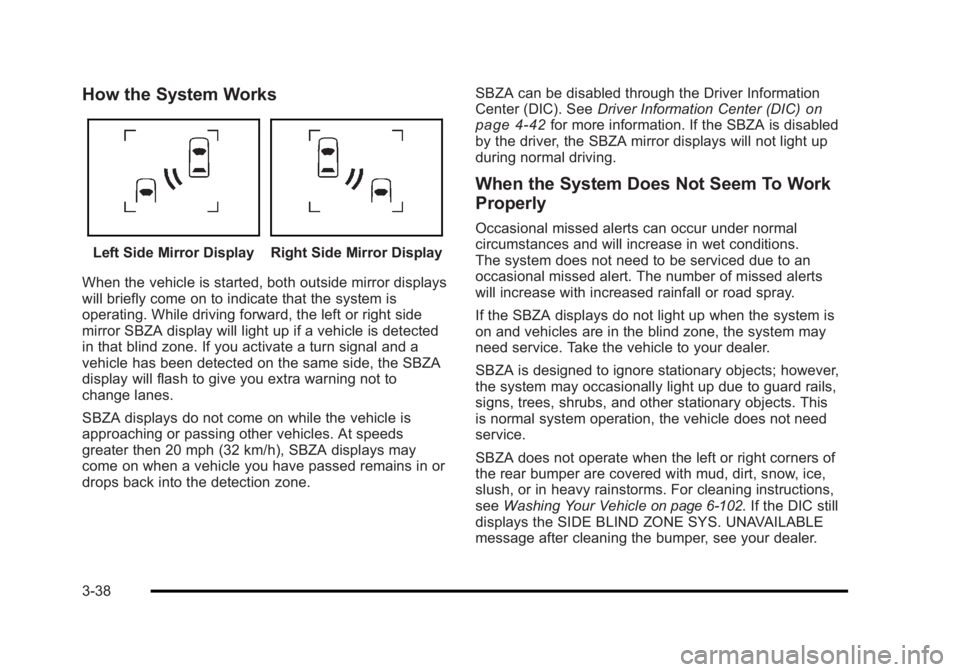
How the System Works
Left Side Mirror DisplayRight Side Mirror Display
When the vehicle is started, both outside mirror displays
will briefly come on to indicate that the system is
operating. While driving forward, the left or right side
mirror SBZA display will light up if a vehicle is detected
in that blind zone. If you activate a turn signal and a
vehicle has been detected on the same side, the SBZA
display will flash to give you extra warning not to
change lanes.
SBZA displays do not come on while the vehicle is
approaching or passing other vehicles. At speeds
greater then 20 mph (32 km/h), SBZA displays may
come on when a vehicle you have passed remains in or
drops back into the detection zone. SBZA can be disabled through the Driver Information
Center (DIC). See
Driver Information Center (DIC)
on
page 4‑42for more information. If the SBZA is disabled
by the driver, the SBZA mirror displays will not light up
during normal driving.
When the System Does Not Seem To Work
Properly
Occasional missed alerts can occur under normal
circumstances and will increase in wet conditions.
The system does not need to be serviced due to an
occasional missed alert. The number of missed alerts
will increase with increased rainfall or road spray.
If the SBZA displays do not light up when the system is
on and vehicles are in the blind zone, the system may
need service. Take the vehicle to your dealer.
SBZA is designed to ignore stationary objects; however,
the system may occasionally light up due to guard rails,
signs, trees, shrubs, and other stationary objects. This
is normal system operation, the vehicle does not need
service.
SBZA does not operate when the left or right corners of
the rear bumper are covered with mud, dirt, snow, ice,
slush, or in heavy rainstorms. For cleaning instructions,
see Washing Your Vehicle
on page 6‑102. If the DIC still
displays the SIDE BLIND ZONE SYS. UNAVAILABLE
message after cleaning the bumper, see your dealer.
3-38
Page 143 of 450
Black plate (39,1)Buick Lucerne Owner Manual - 2011
The SBZA displays may remain on if a trailer is
attached to the vehicle, or a bicycle or object is
extending out to either side of the vehicle.
When SBZA is disabled for any reason other than the
driver turning it off, the driver will not be able to turn
SBZA back on using the DIC. The SIDE BLIND ZONE
ALERT ON option will not be selectable if the conditions
for normal system operation are not met. Until normal
operating conditions for SBZA are met, you should not
rely upon SBZA while driving.
SBZA Error Messages
The following messages may appear in the DIC:
SIDE BLIND ZONE ALERT SYSTEM OFF:This
message indicates that the driver has turned the
system off.
SIDE BLIND ZONE SYS. UNAVAILABLE: This
message indicates that the SBZA system is disabled
because the sensor is blocked and cannot detect
vehicles in the blind zone. The sensor may be
blocked by mud, dirt, snow, ice, slush, or even heavy
rainstorms. This message may also activate during
heavy rain or due to road spray. The vehicle does not
need service. For cleaning, see Washing Your Vehicle
on page 6‑102. SERVICE SIDE BLIND ZONE ALERT SYSTEM:
If this
message appears, both SBZA displays will remain on
indicating there is a problem with the SBZA system.
If these displays remain on after continued driving, the
system needs service. Take the vehicle to your dealer.
FCC Information
See Radio Frequency Statementon page 8‑18for information regarding Part 15 of the Federal
Communications Commission (FCC) rules and
Industry Canada Standards RSS-210/220/310.
Frequency of operation: 24.05GHz –24.25GHz
Field Strength: Not greater than 2.5V/m peak
(0.25V/m average) at a distance of 3 m.
The manufacturer is not responsible for any radio or
TV interference caused by unauthorized modifications
to this equipment. Such modifications could void the
user's authority to operate the equipment.
3-39
Page 158 of 450
Black plate (2,1)Buick Lucerne Owner Manual - 2011
Section 4 Instrument Panel
StabiliTrak®Indicator Light . . . . . . . . . . . . . . . . . . . . . 4-34
Lane Departure Warning (LDW) Light . . . . . . . . . . 4-35
Engine Coolant Temperature Warning Light . . . . 4-36
Engine Coolant Temperature Gauge . . . . . . . . . . . 4-36
Tire Pressure Light . . . . . . . . . . . . . . . . . . . . . . . . . . . . 4-37
Malfunction Indicator Lamp . . . . . . . . . . . . . . . . . . . . 4-37
Oil Pressure Light . . . . . . . . . . . . . . . . . . . . . . . . . . . . . 4-40
Security Light . . . . . . . . . . . . . . . . . . . . . . . . . . . . . . . . . . 4-40
Front Fog Lamp Light . . . . . . . . . . . . . . . . . . . . . . . . . . 4-40
Cruise Control Light . . . . . . . . . . . . . . . . . . . . . . . . . . . 4-41
Highbeam On Light . . . . . . . . . . . . . . . . . . . . . . . . . . . . 4-41
Fuel Gauge . . . . . . . . . . . . . . . . . . . . . . . . . . . . . . . . . . . . 4-41
Driver Information Center (DIC) . . . . . . . . . . . . . . . . . .4-42
DIC Operation and Displays . . . . . . . . . . . . . . . . . . . 4-42
DIC Compass . . . . . . . . . . . . . . . . . . . . . . . . . . . . . . . . . . 4-47
DIC Warnings and Messages . . . . . . . . . . . . . . . . . . 4-49
DIC Vehicle Customization . . . . . . . . . . . . . . . . . . . . 4-58 Audio System(s)
. . . . . . . . . . . . . . . . . . . . . . . . . . . . . . . . . . 4-67
Setting the Clock . . . . . . . . . . . . . . . . . . . . . . . . . . . . . . 4-68
Radio(s) . . . . . . . . . . . . . . . . . . . . . . . . . . . . . . . . . . . . . . . 4-69
Using an MP3 . . . . . . . . . . . . . . . . . . . . . . . . . . . . . . . . . 4-78
XM Radio Messages . . . . . . . . . . . . . . . . . . . . . . . . . . . 4-84
Navigation/Radio System . . . . . . . . . . . . . . . . . . . . . . 4-85
Bluetooth
®. . . . . . . . . . . . . . . . . . . . . . . . . . . . . . . . . . . . . 4-86
Theft-Deterrent Feature . . . . . . . . . . . . . . . . . . . . . . . . 4-94
Audio Steering Wheel Controls . . . . . . . . . . . . . . . . 4-94
Radio Reception . . . . . . . . . . . . . . . . . . . . . . . . . . . . . . . 4-97
Backglass Antenna . . . . . . . . . . . . . . . . . . . . . . . . . . . . 4-97
XM™ Satellite Radio Antenna System . . . . . . . . . 4-98
4-2
Page 160 of 450
Black plate (4,1)Buick Lucerne Owner Manual - 2011
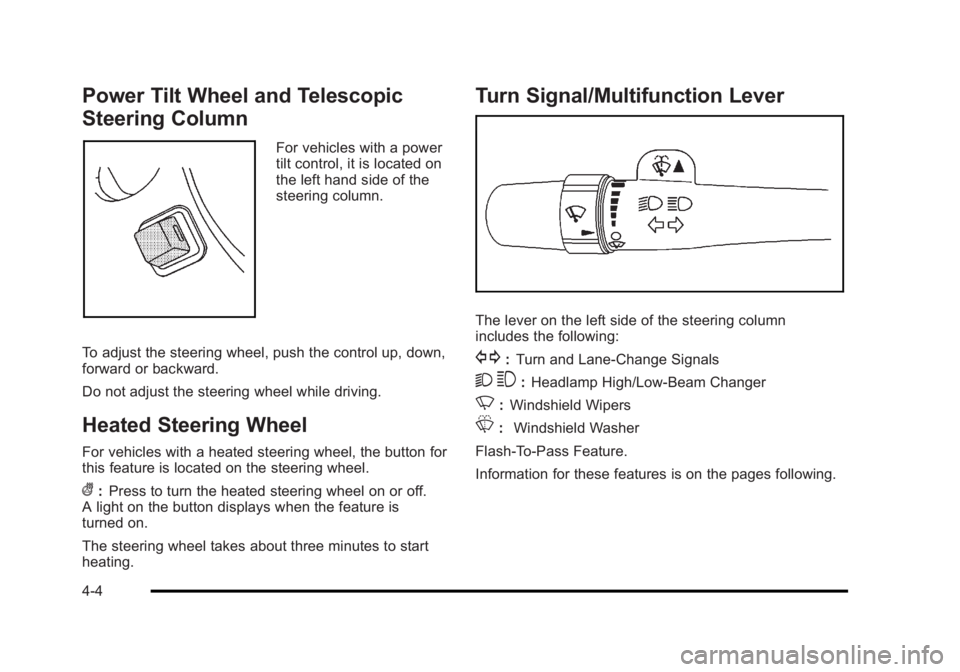
Power Tilt Wheel and Telescopic
Steering Column
For vehicles with a power
tilt control, it is located on
the left hand side of the
steering column.
To adjust the steering wheel, push the control up, down,
forward or backward.
Do not adjust the steering wheel while driving.
Heated Steering Wheel
For vehicles with a heated steering wheel, the button for
this feature is located on the steering wheel.
(: Press to turn the heated steering wheel on or off.
A light on the button displays when the feature is
turned on.
The steering wheel takes about three minutes to start
heating.
Turn Signal/Multifunction Lever
The lever on the left side of the steering column
includes the following:
G: Turn and Lane-Change Signals
2 3:Headlamp High/Low-Beam Changer
N: Windshield Wipers
L: Windshield Washer
Flash-To-Pass Feature.
Information for these features is on the pages following.
4-4
Page 161 of 450
Black plate (5,1)Buick Lucerne Owner Manual - 2011
Turn and Lane-Change Signals
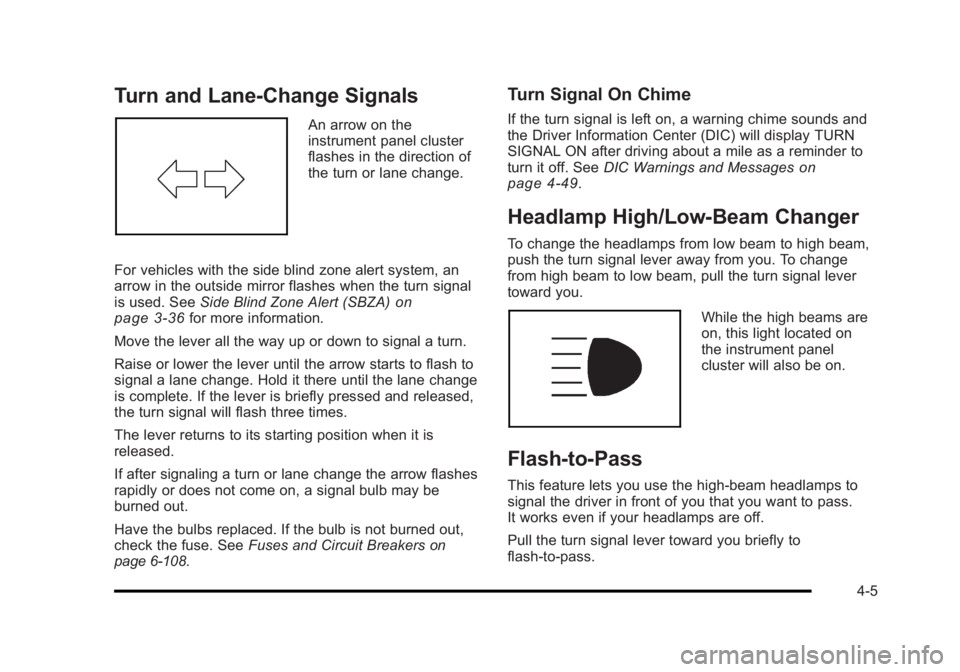
An arrow on the
instrument panel cluster
flashes in the direction of
the turn or lane change.
For vehicles with the side blind zone alert system, an
arrow in the outside mirror flashes when the turn signal
is used. See Side Blind Zone Alert (SBZA)
on
page 3‑36for more information.
Move the lever all the way up or down to signal a turn.
Raise or lower the lever until the arrow starts to flash to
signal a lane change. Hold it there until the lane change
is complete. If the lever is briefly pressed and released,
the turn signal will flash three times.
The lever returns to its starting position when it is
released.
If after signaling a turn or lane change the arrow flashes
rapidly or does not come on, a signal bulb may be
burned out.
Have the bulbs replaced. If the bulb is not burned out,
check the fuse. See Fuses and Circuit Breakers
on
page 6‑108.
Turn Signal On Chime
If the turn signal is left on, a warning chime sounds and
the Driver Information Center (DIC) will display TURN
SIGNAL ON after driving about a mile as a reminder to
turn it off. See DIC Warnings and Messages
on
page 4‑49.
Headlamp High/Low-Beam Changer
To change the headlamps from low beam to high beam,
push the turn signal lever away from you. To change
from high beam to low beam, pull the turn signal lever
toward you.
While the high beams are
on, this light located on
the instrument panel
cluster will also be on.
Flash-to-Pass
This feature lets you use the high-beam headlamps to
signal the driver in front of you that you want to pass.
It works even if your headlamps are off.
Pull the turn signal lever toward you briefly to
flash-to-pass.
4-5
Page 170 of 450
Black plate (14,1)Buick Lucerne Owner Manual - 2011
Electric Power Management
The vehicle has Electric Power Management (EPM) that
estimates the battery's temperature and state of charge.
It then adjusts the voltage for best performance and
extended life of the battery.
When the battery's state of charge is low, the voltage
is raised slightly to quickly bring the charge back up.
When the state of charge is high, the voltage is lowered
slightly to prevent overcharging. If the vehicle has a
voltmeter gauge or a voltage display on the Driver
Information Center (DIC), you may see the voltage
move up or down. This is normal. If there is a problem,
an alert will be displayed.
The battery can be discharged at idle if the electrical
loads are very high. This is true for all vehicles. This is
because the generator (alternator) may not be spinning
fast enough at idle to produce all the power that is
needed for very high electrical loads.
A high electrical load occurs when several of the
following are on, such as: headlamps, high beams,
fog lamps, rear window defogger, climate control fan at
high speed, heated seats, engine cooling fans, trailer
loads, and loads plugged into accessory power outlets.EPM works to prevent excessive discharge of the
battery. It does this by balancing the generator's output
and the vehicle's electrical needs. It can increase
engine idle speed to generate more power, whenever
needed. It can temporarily reduce the power demands
of some accessories.
Normally, these actions occur in steps or levels,
without being noticeable. In rare cases at the highest
levels of corrective action, this action may be noticeable
to the driver. If so, a Driver Information Center (DIC)
message might be displayed, such as BATTERY
SAVER ACTIVE, BATTERY VOLTAGE LOW, or
LOW BATTERY. If this message is displayed, it is
recommended that the driver reduce the electrical
loads as much as possible. See DIC Warnings and
Messages on page 4‑49.
Inadvertent Power Battery Saver
This feature is designed to protect your vehicle's
battery against drainage from the interior lamps,
or garage door opener. When the ignition is turned
off, the power to these features will automatically turn
off after 10 minutes. Power will be restored for an
additional 10 minutes if any door is opened, the trunk
is opened or the courtesy lamp switch is turned on.
4-14