trunk BUICK LUCERNE 2011 User Guide
[x] Cancel search | Manufacturer: BUICK, Model Year: 2011, Model line: LUCERNE, Model: BUICK LUCERNE 2011Pages: 450, PDF Size: 3.63 MB
Page 139 of 450
Black plate (35,1)Buick Lucerne Owner Manual - 2011
Object Detection Systems
Ultrasonic Rear Parking
Assist (URPA)
For vehicles with the Ultrasonic Rear Parking Assist
(URPA) system, it operates at speeds less than 8 km/h
(5 mph), and assists the driver with parking and
avoiding objects while in R (Reverse). The sensors on
the rear bumper are used to detect the distance to an
object up to 2.5 m (8 ft) behind the vehicle, and at least
25 cm (10 in) off the ground.
{WARNING:
The Ultrasonic Rear Parking Assist (URPA)
system does not replace driver vision. It cannot
detect:
.Objects that are below the bumper,
underneath the vehicle, or too close or far
from the vehicle.
.Children, pedestrians, bicyclists, or pets.(Continued)
WARNING: (Continued)
If you do not use proper care before and while
backing, vehicle damage, injury, or death could
occur. Even with URPA, always check behind the
vehicle before backing up. While backing, be sure
to look for objects and check the vehicle's mirrors.
How the System Works
URPA comes on automatically when the shift lever
is moved into R (Reverse). A single tone sounds to
indicate the system is working.
URPA operates only at speeds less than
8 km/h (5 mph).
An obstacle is indicated by audible beeps. The interval
between the beeps becomes shorter as the vehicle gets
closer to the obstacle. When the distance is less than
30 cm (12 in) the beeps are continuous.
To be detected, objects must be at least 25 cm (10 in)
off the ground and below trunk level. Objects must
also be within 2.5 m (8 ft) from the rear bumper. This
distance may be less during warmer or humid weather.
3-35
Page 140 of 450
Black plate (36,1)Buick Lucerne Owner Manual - 2011
The system can be disabled through the Driver
Information Center (DIC). See“Park Assist”under
DIC Operation and Displays
on page 4‑42for more
information.
When the System Does Not Seem to
Work Properly
SERVICE PARK ASSIST: If this message occurs, take
the vehicle to your dealer to repair the system.
PARK ASSIST OFF: If the URPA system does not
activate due to a temporary condition, the message
displays on the DIC, see DIC Operation and Displays
on page 4‑42for more information. This can occur
under the following conditions:
.The driver disables the system.
.The ultrasonic sensors are not clean. Keep the
vehicle's rear bumper free of mud, dirt, snow, ice
and slush. For cleaning instructions, see Washing
Your Vehicle on page 6‑102.
.A trailer was attached to the vehicle, or a bicycle or
an object was hanging out of the trunk during the
last drive cycle. Once the object is removed, URPA
will return to normal operation.
.A tow bar is attached to the vehicle.
.The vehicle's bumper is damaged. Take the vehicle
to your dealer to repair the system.
.Other conditions may affect system performance,
such as vibrations from a jackhammer or the
compression of air brakes on a very large truck.
If the system is still disabled, after driving forward at
least 40 km/h (25 mph), take the vehicle to your dealer.
Side Blind Zone Alert (SBZA)
The vehicle may have a Side Blind Zone Alert (SBZA)
system. Read this entire section before using the
system.
{WARNING:
SBZA is only a lane changing aid and does not
replace driver vision. SBZA does not detect:
.Vehicles outside the side blind zones which
may be rapidly approaching.
.Pedestrians, bicyclists, or animals. (Continued)
3-36
Page 170 of 450
Black plate (14,1)Buick Lucerne Owner Manual - 2011
Electric Power Management
The vehicle has Electric Power Management (EPM) that
estimates the battery's temperature and state of charge.
It then adjusts the voltage for best performance and
extended life of the battery.
When the battery's state of charge is low, the voltage
is raised slightly to quickly bring the charge back up.
When the state of charge is high, the voltage is lowered
slightly to prevent overcharging. If the vehicle has a
voltmeter gauge or a voltage display on the Driver
Information Center (DIC), you may see the voltage
move up or down. This is normal. If there is a problem,
an alert will be displayed.
The battery can be discharged at idle if the electrical
loads are very high. This is true for all vehicles. This is
because the generator (alternator) may not be spinning
fast enough at idle to produce all the power that is
needed for very high electrical loads.
A high electrical load occurs when several of the
following are on, such as: headlamps, high beams,
fog lamps, rear window defogger, climate control fan at
high speed, heated seats, engine cooling fans, trailer
loads, and loads plugged into accessory power outlets.EPM works to prevent excessive discharge of the
battery. It does this by balancing the generator's output
and the vehicle's electrical needs. It can increase
engine idle speed to generate more power, whenever
needed. It can temporarily reduce the power demands
of some accessories.
Normally, these actions occur in steps or levels,
without being noticeable. In rare cases at the highest
levels of corrective action, this action may be noticeable
to the driver. If so, a Driver Information Center (DIC)
message might be displayed, such as BATTERY
SAVER ACTIVE, BATTERY VOLTAGE LOW, or
LOW BATTERY. If this message is displayed, it is
recommended that the driver reduce the electrical
loads as much as possible. See DIC Warnings and
Messages on page 4‑49.
Inadvertent Power Battery Saver
This feature is designed to protect your vehicle's
battery against drainage from the interior lamps,
or garage door opener. When the ignition is turned
off, the power to these features will automatically turn
off after 10 minutes. Power will be restored for an
additional 10 minutes if any door is opened, the trunk
is opened or the courtesy lamp switch is turned on.
4-14
Page 171 of 450
Black plate (15,1)Buick Lucerne Owner Manual - 2011
Battery Run-Down Protection
This feature helps prevent the battery from
being drained, if the interior courtesy lamps,
reading/map lamps, visor vanity lamps or trunk
lamp are accidentally left on. If any of these lamps
are left on, they automatically turn off after 10 minutes,
if the ignition is off. The lamps will not come back on
again until one of the following occurs:
.The ignition is turned on.
.The exterior lamps control is turned off, then on
again.
The headlamps will timeout after 10 minutes, if they are
manually turned on with the ignition on or off.
Accessory Power Outlet(s)
Accessory power outlets can be used to plug in
electrical equipment, such as a cell phone or MP3
player.
The vehicle may have up to three power outlets
depending on the type of front seat installed. If the
vehicle has front bucket seats with a center console,
there are two outlets inside the center console storage
bin, one accessory power outlet and one USB port
outlet. An extra accessory power outlet can be found
under the climate control system next to the ashtray. Remove the cover to access and replace when not
in use.
{WARNING:
Power is always supplied to the outlets. Do not
leave electrical equipment plugged in when the
vehicle is not in use because the vehicle could
catch fire and cause injury or death.
Notice: Leaving electrical equipment plugged in
for an extended period of time while the vehicle is
off will drain the battery. Always unplug electrical
equipment when not in use and do not plug in
equipment that exceeds the maximum 20 ampere
rating.
Certain electrical accessories may not be compatible
with the accessory power outlet and could overload
vehicle or adapter fuses. If a problem is experienced,
see your dealer.
4-15
Page 214 of 450
Black plate (58,1)Buick Lucerne Owner Manual - 2011
TRUNK OPEN
This message displays when the trunk is not closed
completely. Make sure that the trunk is closed
completely. SeeTrunk on page 3‑12.
TURN SIGNAL ON
This message displays as a reminder to turn off the turn
signal if you drive your vehicle for more than about
1.2 km (0.75 mile) with a turn signal on. See Turn
Signal/Multifunction Lever on page 4‑4.
This message displays and a chime sounds only
when the ignition is in ON/RUN. The message will not
disappear until the turn signal is manually turned off,
or a turn is completed.
WASHER FLUID LOW ADD FLUID
This message displays when the windshield washer
fluid is low. Fill the windshield washer reservoir as soon
as possible. See Engine Compartment Overview
on
page 6‑14for the location of the windshield washer
reservoir. Also, see Windshield Washer Fluidon
page 6‑38for more information.
DIC Vehicle Customization
Your vehicle has customization capabilities that allow
you to program certain features to one preferred setting.
Customization features can only be programmed to
one setting on the vehicle and cannot be programmed
to a preferred setting for two different drivers.
All of the customization options may not be available
on your vehicle. Only the options available will be
displayed on the DIC.
The default settings for the customization features were
set when your vehicle left the factory, but may have
been changed from their default state since then.
The customization preferences are automatically
recalled.
To change customization preferences, use the following
procedure.
4-58
Page 297 of 450
Black plate (11,1)Buick Lucerne Owner Manual - 2011
Filling a Portable Fuel Container
{WARNING:
Never fill a portable fuel container while it is in
the vehicle. Static electricity discharge from the
container can ignite the fuel vapor. You can be
badly burned and the vehicle damaged if this
occurs. To help avoid injury to you and others:
.Dispense fuel only into approved containers.
.Do not fill a container while it is inside a
vehicle, in a vehicle's trunk, pickup bed, or
on any surface other than the ground.(Continued)
WARNING: (Continued)
.Bring the fill nozzle in contact with the inside
of the fill opening before operating the nozzle.
Contact should be maintained until the filling is
complete.
.Do not smoke while pumping fuel.
.Do not use a cellular phone while
pumping fuel.
6-11
Page 338 of 450
Black plate (52,1)Buick Lucerne Owner Manual - 2011
Bulb Replacement
For the proper type of replacement bulbs, see
Replacement Bulbs on page 6‑55.
For any bulb changing procedure not listed in this
section, contact your dealer.
Halogen Bulbs
{WARNING:
Halogen bulbs have pressurized gas inside and
can burst if you drop or scratch the bulb. You or
others could be injured. Be sure to read and
follow the instructions on the bulb package.
Taillamps, Turn Signal, Stoplamps
and Sidemarker Lamps
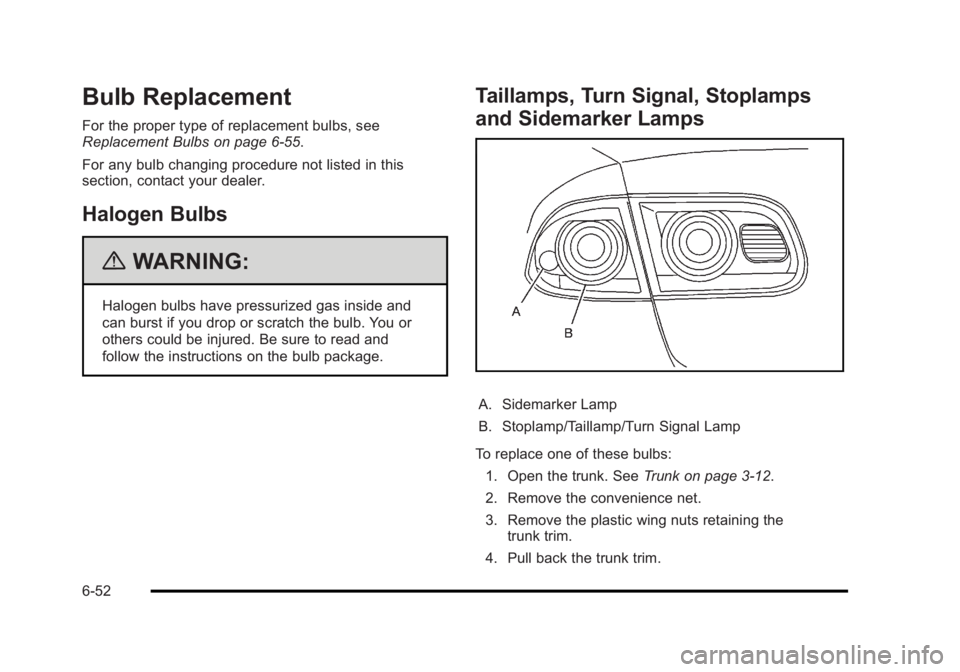
A. Sidemarker Lamp
B. Stoplamp/Taillamp/Turn Signal Lamp
To replace one of these bulbs: 1. Open the trunk. See Trunk on page 3‑12.
2. Remove the convenience net.
3. Remove the plastic wing nuts retaining the trunk trim.
4. Pull back the trunk trim.
6-52
Page 339 of 450
Black plate (53,1)Buick Lucerne Owner Manual - 2011
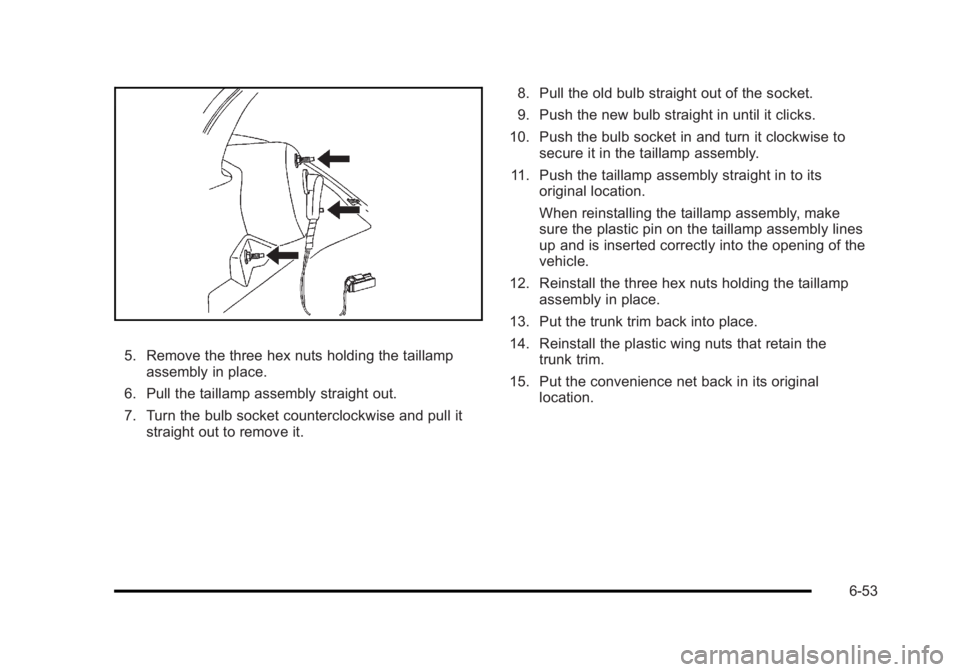
5. Remove the three hex nuts holding the taillampassembly in place.
6. Pull the taillamp assembly straight out.
7. Turn the bulb socket counterclockwise and pull it straight out to remove it. 8. Pull the old bulb straight out of the socket.
9. Push the new bulb straight in until it clicks.
10. Push the bulb socket in and turn it clockwise to secure it in the taillamp assembly.
11. Push the taillamp assembly straight in to its original location.
When reinstalling the taillamp assembly, make
sure the plastic pin on the taillamp assembly lines
up and is inserted correctly into the opening of the
vehicle.
12. Reinstall the three hex nuts holding the taillamp assembly in place.
13. Put the trunk trim back into place.
14. Reinstall the plastic wing nuts that retain the trunk trim.
15. Put the convenience net back in its original location.
6-53
Page 340 of 450
Black plate (54,1)Buick Lucerne Owner Manual - 2011
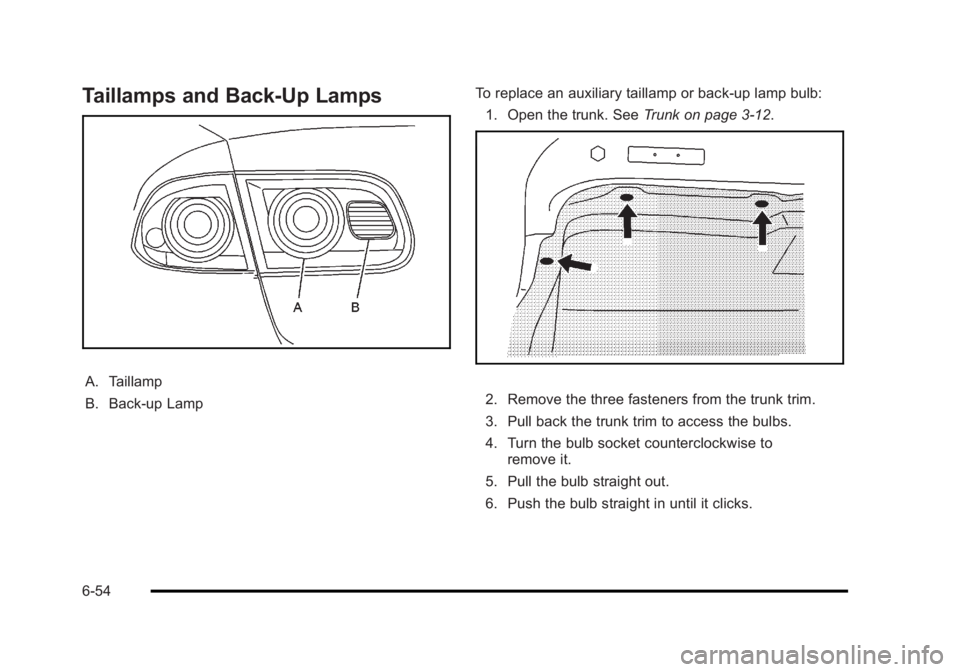
Taillamps and Back-Up Lamps
A. Taillamp
B. Back-up LampTo replace an auxiliary taillamp or back-up lamp bulb:
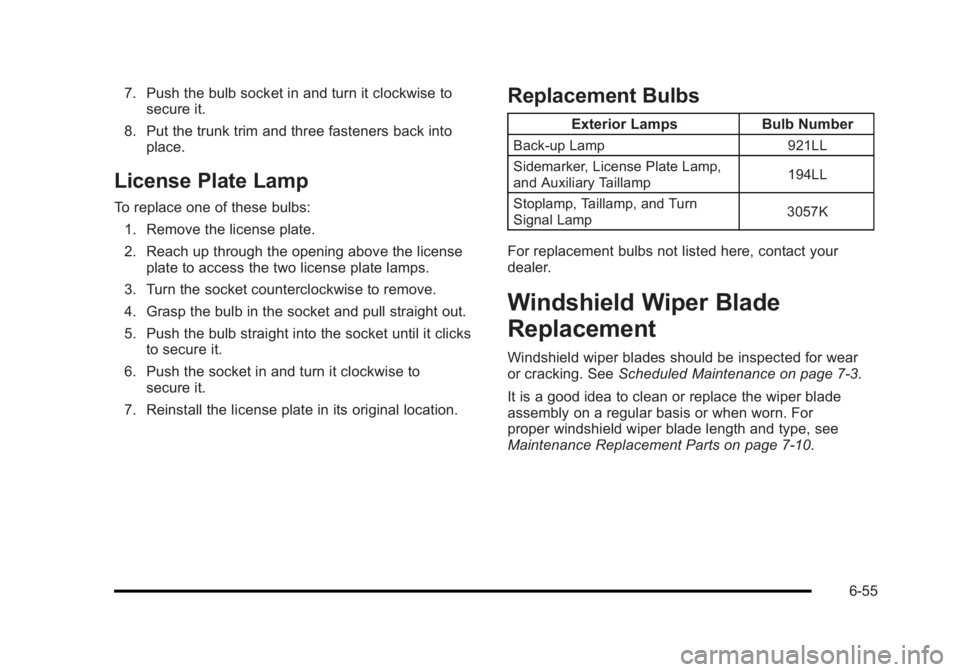
1. Open the trunk. See Trunk on page 3‑12.
2. Remove the three fasteners from the trunk trim.
3. Pull back the trunk trim to access the bulbs.
4. Turn the bulb socket counterclockwise to
remove it.
5. Pull the bulb straight out.
6. Push the bulb straight in until it clicks.
6-54
Page 341 of 450
Black plate (55,1)Buick Lucerne Owner Manual - 2011
7. Push the bulb socket in and turn it clockwise tosecure it.
8. Put the trunk trim and three fasteners back into place.
License Plate Lamp
To replace one of these bulbs:
1. Remove the license plate.
2. Reach up through the opening above the license plate to access the two license plate lamps.
3. Turn the socket counterclockwise to remove.
4. Grasp the bulb in the socket and pull straight out.
5. Push the bulb straight into the socket until it clicks to secure it.
6. Push the socket in and turn it clockwise to secure it.
7. Reinstall the license plate in its original location.
Replacement Bulbs
Exterior Lamps Bulb Number
Back-up Lamp 921LL
Sidemarker, License Plate Lamp,
and Auxiliary Taillamp 194LL
Stoplamp, Taillamp, and Turn
Signal Lamp 3057K
For replacement bulbs not listed here, contact your
dealer.
Windshield Wiper Blade
Replacement
Windshield wiper blades should be inspected for wear
or cracking. See
Scheduled Maintenance on page 7‑3.
It is a good idea to clean or replace the wiper blade
assembly on a regular basis or when worn. For
proper windshield wiper blade length and type, see
Maintenance Replacement Parts on page 7‑10.
6-55