remote start BUICK LUCERNE 2011 Owner's Guide
[x] Cancel search | Manufacturer: BUICK, Model Year: 2011, Model line: LUCERNE, Model: BUICK LUCERNE 2011Pages: 450, PDF Size: 3.63 MB
Page 222 of 450
Black plate (66,1)Buick Lucerne Owner Manual - 2011
NO CHANGE:No change will be made to this feature.
The current setting will remain.
To select a setting, press the set/reset button while the
desired setting is displayed on the DIC.
REMOTE START
If your vehicle has this feature, it allows you to turn
the remote start off or on. The remote start feature
allows you to start the engine from outside of the
vehicle using the Remote Keyless Entry (RKE)
transmitter. See Remote Vehicle Start
on page 3‑7for more information.
Press the customization button until REMOTE START
appears on the DIC display. Press the set/reset button
once to access the settings for this feature. Then press
the customization button to scroll through the following
settings:
OFF:The remote start feature will be disabled.
ON (default): The remote start feature will be enabled.
NO CHANGE: No change will be made to this feature.
The current setting will remain.
To select a setting, press the set/reset button while the
desired setting is displayed on the DIC.
FACTORY SETTINGS
This feature allows you to set all of the customization
features back to their factory default settings.
Press the customization button until FACTORY
SETTINGS appears on the DIC display. Press the
set/reset button once to access the settings for this
feature. Then press the customization button to scroll
through the following settings:
RESTORE ALL (default): The customization features
will be set to their factory default settings.
DO NOT RESTORE: The customization features will
not be set to their factory default settings.
To select a setting, press the set/reset button while the
desired setting is displayed on the DIC.
EXIT FEATURE SETTINGS
This feature allows you to exit the FEATURE
SETTINGS menu.
Press the customization button until FEATURE
SETTINGS PRESS
VTO EXIT appears on the DIC
display. Press the set/reset button to exit the menu.
If you do not exit, pressing the customization button
again will return you to the beginning of the FEATURE
SETTINGS menu.
4-66
Page 301 of 450
Black plate (15,1)Buick Lucerne Owner Manual - 2011
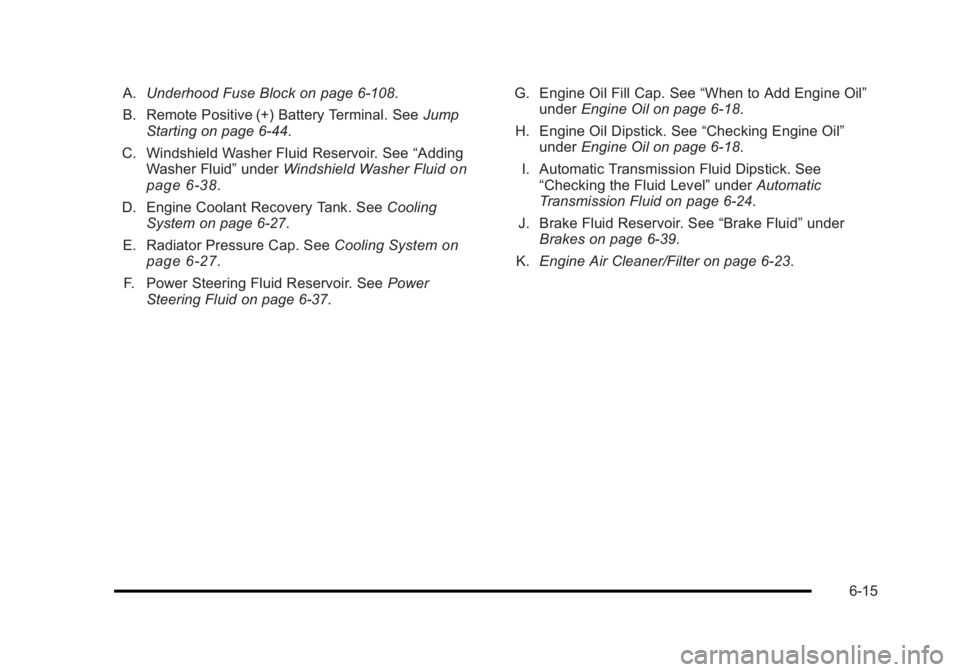
A.Underhood Fuse Block on page 6‑108.
B. Remote Positive (+) Battery Terminal. See Jump
Starting on page 6‑44.
C. Windshield Washer Fluid Reservoir. See “Adding
Washer Fluid” underWindshield Washer Fluid
on
page 6‑38.
D. Engine Coolant Recovery Tank. See Cooling
System on page 6‑27.
E. Radiator Pressure Cap. See Cooling System
on
page 6‑27.
F. Power Steering Fluid Reservoir. See Power
Steering Fluid on page 6‑37. G. Engine Oil Fill Cap. See
“When to Add Engine Oil”
under Engine Oil on page 6‑18.
H. Engine Oil Dipstick. See “Checking Engine Oil”
under Engine Oil on page 6‑18.
I. Automatic Transmission Fluid Dipstick. See “Checking the Fluid Level” underAutomatic
Transmission Fluid on page 6‑24.
J. Brake Fluid Reservoir. See “Brake Fluid”under
Brakes on page 6‑39.
K. Engine Air Cleaner/Filter on page 6‑23.
6-15
Page 303 of 450
Black plate (17,1)Buick Lucerne Owner Manual - 2011
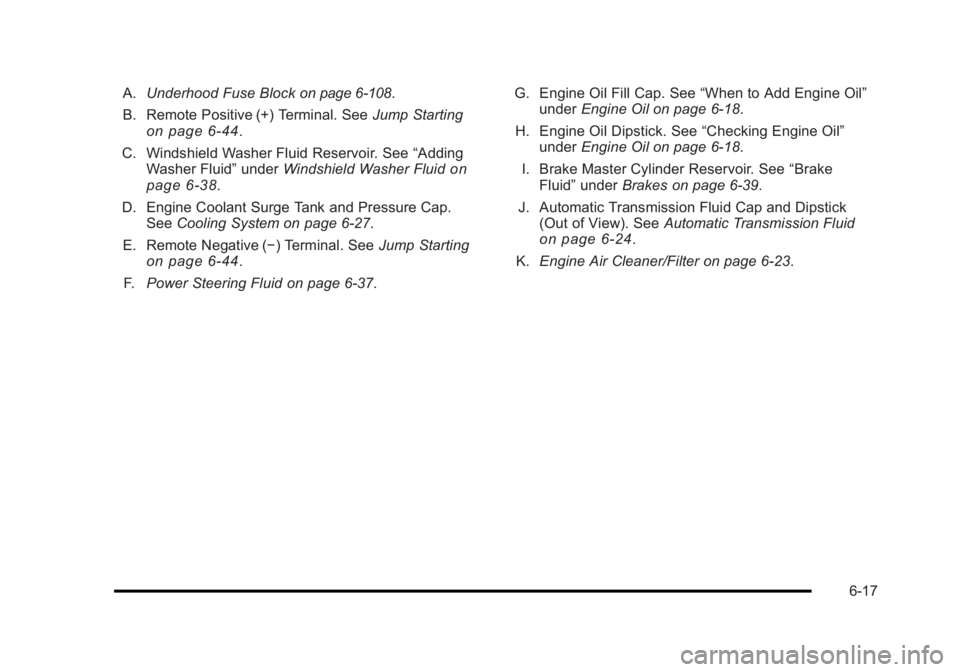
A.Underhood Fuse Blockon page 6‑108.
B. Remote Positive (+) Terminal. See Jump Starting
on page 6‑44.
C. Windshield Washer Fluid Reservoir. See “Adding
Washer Fluid” underWindshield Washer Fluid
on
page 6‑38.
D. Engine Coolant Surge Tank and Pressure Cap. See Cooling System on page 6‑27.
E. Remote Negative (−) Terminal. See Jump Starting
on page 6‑44.
F. Power Steering Fluid on page 6‑37. G. Engine Oil Fill Cap. See
“When to Add Engine Oil”
under Engine Oil on page 6‑18.
H. Engine Oil Dipstick. See “Checking Engine Oil”
under Engine Oil on page 6‑18.
I. Brake Master Cylinder Reservoir. See “Brake
Fluid” under Brakes on page 6‑39.
J. Automatic Transmission Fluid Cap and Dipstick (Out of View). See Automatic Transmission Fluid
on page 6‑24.
K. Engine Air Cleaner/Filter on page 6‑23.
6-17
Page 331 of 450
Black plate (45,1)Buick Lucerne Owner Manual - 2011
Notice:Ignoring these steps could result in costly
damage to the vehicle that would not be covered by
the warranty.
Trying to start the vehicle by pushing or pulling it
will not work, and it could damage the vehicle.
1. Check the other vehicle. It must have a 12-volt battery with a negative ground system.
Notice: Only use a vehicle that has a 12-volt system
with a negative ground for jump starting. If the other
vehicle does not have a 12-volt system with a
negative ground, both vehicles can be damaged.
2. Get the vehicles close enough so the jumper cables can reach, but be sure the vehicles are not
touching each other. If they are, it could cause a
ground connection you do not want. You would
not be able to start your vehicle, and the bad
grounding could damage the electrical systems.
To avoid the possibility of the vehicles rolling, set
the parking brake firmly on both vehicles involved
in the jump start procedure. Put an automatic
transmission in P (Park) or a manual transmission
in Neutral before setting the parking brake. Notice:
If the radio or other accessories are left on
during the jump starting procedure, they could be
damaged. The repairs would not be covered by
the warranty. Always turn off the radio and other
accessories when jump starting the vehicle.
3. Turn off the ignition on both vehicles. Unplug unnecessary accessories plugged into the
cigarette lighter or the accessory power outlet(s).
Turn off the radio and all lamps that are not
needed. This will avoid sparks and help save
both batteries. And it could save the radio!
4. Open the hood on the other vehicle and locate the positive (+) and negative (−) terminal locations on
that vehicle.
You will not see the battery of your vehicle under
the hood. It is located under the rear passenger's
seat. You will not need to access the battery for
jump starting. The remote positive (+) terminal is
for that purpose. See Engine Compartment
Overview
on page 6‑14for location.
6-45
Page 332 of 450
Black plate (46,1)Buick Lucerne Owner Manual - 2011
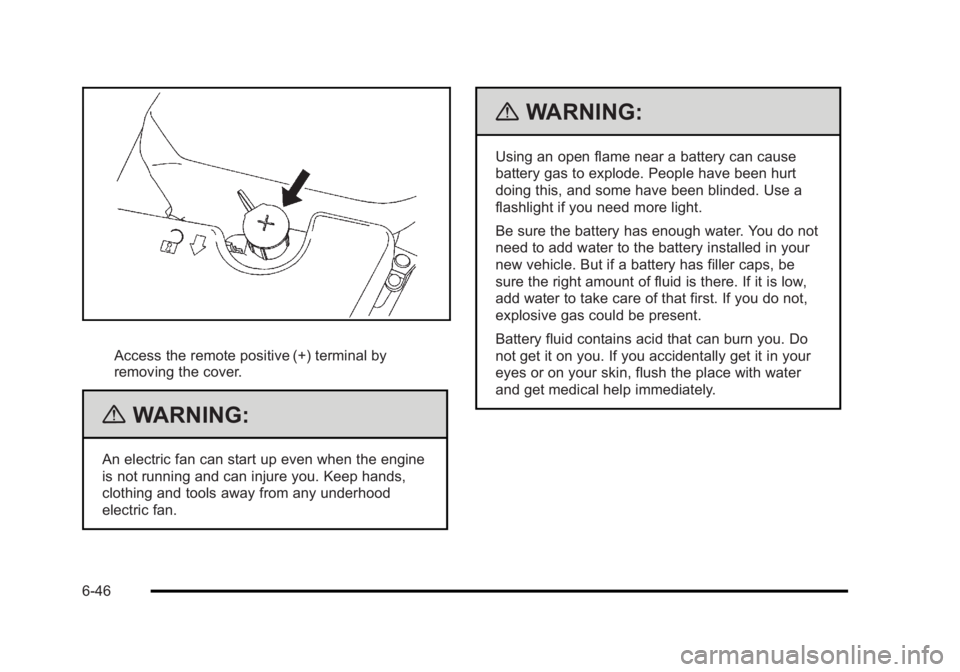
Access the remote positive (+) terminal by
removing the cover.
{WARNING:
An electric fan can start up even when the engine
is not running and can injure you. Keep hands,
clothing and tools away from any underhood
electric fan.
{WARNING:
Using an open flame near a battery can cause
battery gas to explode. People have been hurt
doing this, and some have been blinded. Use a
flashlight if you need more light.
Be sure the battery has enough water. You do not
need to add water to the battery installed in your
new vehicle. But if a battery has filler caps, be
sure the right amount of fluid is there. If it is low,
add water to take care of that first. If you do not,
explosive gas could be present.
Battery fluid contains acid that can burn you. Do
not get it on you. If you accidentally get it in your
eyes or on your skin, flush the place with water
and get medical help immediately.
6-46
Page 334 of 450
Black plate (48,1)Buick Lucerne Owner Manual - 2011
10. Now start the vehicle with the good battery and runthe engine for a while.
11. Try to start the vehicle that had the dead battery. If it will not start after a few tries, it probably needs
service.
Notice: If the jumper cables are connected or
removed in the wrong order, electrical shorting may
occur and damage the vehicle. The repairs would
not be covered by the vehicle warranty. Always
connect and remove the jumper cables in the
correct order, making sure that the cables do not
touch each other or other metal.
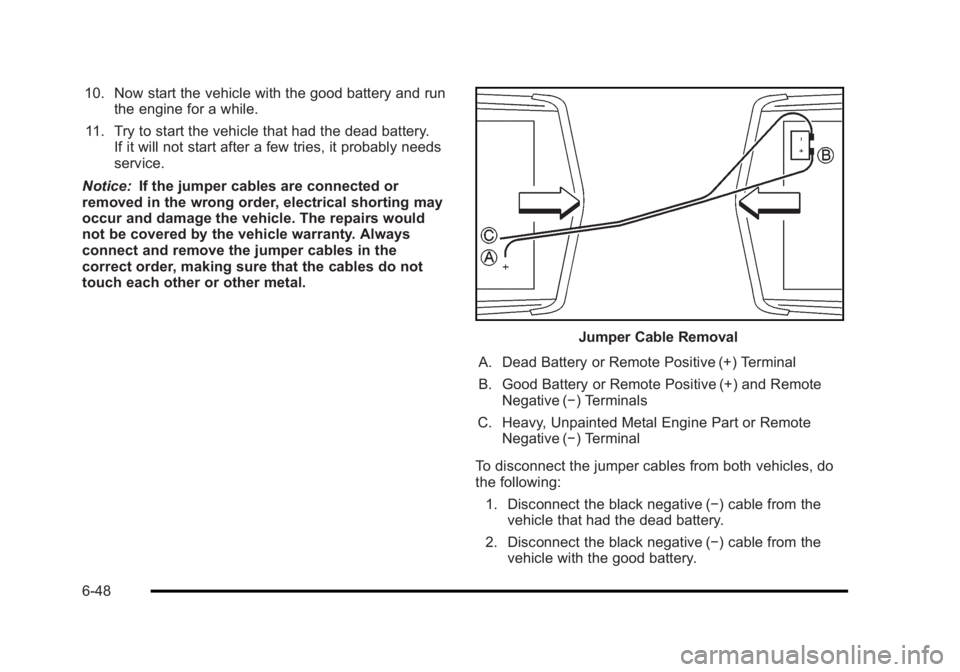
Jumper Cable Removal
A. Dead Battery or Remote Positive (+) Terminal
B. Good Battery or Remote Positive (+) and Remote Negative (−) Terminals
C. Heavy, Unpainted Metal Engine Part or Remote Negative (−) Terminal
To disconnect the jumper cables from both vehicles, do
the following: 1. Disconnect the black negative (−) cable from the vehicle that had the dead battery.
2. Disconnect the black negative (−) cable from the vehicle with the good battery.
6-48
Page 355 of 450
Black plate (69,1)Buick Lucerne Owner Manual - 2011
TPMS Sensor Matching Process
Each TPMS sensor has a unique identification code.
The identification code needs to be matched to a new
tire/wheel position after rotating the vehicle’s tires or
replacing one or more of the TPMS sensors. Also, the
TPMS sensor matching process should be performed
after replacing a spare tire with a road tire containing
the TPMS sensor. The malfunction light and the DIC
message should go off at the next ignition cycle. The
sensors are matched to the tire/wheel positions, using a
TPMS relearn tool, in the following order: driver side
front tire, passenger side front tire, passenger side rear
tire, and driver side rear. See your dealer for service or
to purchase a relearn tool.
There are two minutes to match the first tire/wheel
position, and five minutes overall to match all four tire/
wheel positions. If it takes longer, the matching process
stops and must be restarted.
The TPMS sensor matching process is:1. Set the parking brake.
2. Turn the ignition to ON/RUN with the engine off.
3. Press the Remote Keyless Entry (RKE) transmitter's lock and unlock buttons at the same
time for approximately five seconds. The horn
sounds twice to signal the receiver is in relearn
mode and TIRE LEARNING ACTIVE message
displays on the DIC screen. 4. Start with the driver side front tire.
5. Place the relearn tool against the tire sidewall,
near the valve stem. Then press the button to
activate the TPMS sensor. A horn chirp confirms
that the sensor identification code has been
matched to this tire and wheel position.
6. Proceed to the passenger side front tire, and repeat the procedure in Step 5.
7. Proceed to the passenger side rear tire, and repeat the procedure in Step 5.
8. Proceed to the driver side rear tire, and repeat the procedure in Step 5. The horn sounds two times to
indicate the sensor identification code has been
matched to the driver side rear tire, and the TPMS
sensor matching process is no longer active. The
TIRE LEARNING ACTIVE message on the DIC
display screen goes off.
9. Turn the ignition to LOCK/OFF.
10. Set all four tires to the recommended air pressure level as indicated on the Tire and Loading
Information label.
6-69
Page 436 of 450
Black plate (18,1)Buick Lucerne Owner Manual - 2011
Navigation System
If the vehicle has a navigation system, use of the
system may result in the storage of destinations,
addresses, telephone numbers, and other trip
information. Refer to the navigation system operating
manual for information on stored data and for deletion
instructions.
Radio Frequency
Identification (RFID)
RFID technology is used in some vehicles for functions
such as tire pressure monitoring and ignition system
security, as well as in connection with conveniences
such as key fobs for remote door locking/unlocking and
starting, and in-vehicle transmitters for garage door
openers. RFID technology in GM vehicles does not use
or record personal information or link with any other GM
system containing personal information.
Radio Frequency Statement
This vehicle has systems that operate on a radio
frequency that comply with Part 15 of the Federal
Communications Commission (FCC) rules and with
Industry Canada Standards RSS‐210/220/310.
Operation is subject to the following two conditions:1. The device may not cause interference.
2. The device must accept any interference received, including interference that may cause undesired
operation of the device.
Changes or modifications to any of these systems by
other than an authorized service facility could void
authorization to use this equipment.
8-18
Page 443 of 450
Black plate (7,1)Buick Lucerne Owner Manual - 2011
HeatedSteering Wheel . . . . . . . . . . . . . . . . . . . . . . . . . . . . . . . . . . . . 4-4
Heated Seats . . . . . . . . . . . . . . . . . . . . . . . . . . . . . . . . . . . 2-4, 2-6
Heater . . . . . . . . . . . . . . . . . . . . . . . . . . . . . . . . . . . . . . . . . . . . . 4-16 Engine Coolant . . . . . . . . . . . . . . . . . . . . . . . . . . . . . . . . . . . 3-23
Highbeam On Light . . . . . . . . . . . . . . . . . . . . . . . . . . . . . . . . 4-41
Highway Hypnosis . . . . . . . . . . . . . . . . . . . . . . . . . . . . . . . . . 5-13
Hill and Mountain Roads . . . . . . . . . . . . . . . . . . . . . . . . . . . 5-14
Hood Checking Things Under . . . . . . . . . . . . . . . . . . . . . . . . . . . 6-12
Release . . . . . . . . . . . . . . . . . . . . . . . . . . . . . . . . . . . . . . . . . . 6-13
Horn . . . . . . . . . . . . . . . . . . . . . . . . . . . . . . . . . . . . . . . . . . . . . . . . .4-3
How to Wear Safety Belts Properly . . . . . . . . . . . . . . . . 2-17
I
Ignition Positions . . . . . . . . . . . . . . . . . . . . . . . . . . . . . . . . . . 3-19
Inadvertent Power Battery Saver . . . . . . . . . . . . . . . . . . 4-14
Infants and Young Children, Restraints . . . . . . . . . . . . 2-36
Inflation - Tire Pressure . . . . . . . . . . . . . . . . . . . . . . . . . . . . 6-64
Instrument Panel Brightness . . . . . . . . . . . . . . . . . . . . . . . . . . . . . . . . . . . . . . . . 4-12
Instrument Panel Cluster . . . . . . . . . . . . . . . . . . . . . . . . . . 4-28
Integrated Trailer Brake Control System (ITBC) . . . . 5-25
Introduction . . . . . . . . . . . . . . . . . . . . . . . . . . . . . . . . . . . . . . . . . .7-2
J
Jump Starting . . . . . . . . . . . . . . . . . . . . . . . . . . . . . . . . . . . . . . 6-44
K
Keyless Entry Remote (RKE) System . . . . . . . . . . . . . . . . . . . . . . . . . . . . 3-4
Keys . . . . . . . . . . . . . . . . . . . . . . . . . . . . . . . . . . . . . . . . . . . . . . . . .3-3
L
Labeling, Tire Sidewall . . . . . . . . . . . . . . . . . . . . . . . . . . . . . 6-58
Lamps Cornering . . . . . . . . . . . . . . . . . . . . . . . . . . . . . . . . . . . . . . . . . 4-12
Courtesy . . . . . . . . . . . . . . . . . . . . . . . . . . . . . . . . . . . . . . . . . . 4-13
Daytime Running (DRL) . . . . . . . . . . . . . . . . . . . . . . . . . . 4-11
Exterior Lighting Battery Saver . . . . . . . . . . . . . . . . . . . 4-12
Front Reading . . . . . . . . . . . . . . . . . . . . . . . . . . . . . . . . . . . . 4-13
License Plate . . . . . . . . . . . . . . . . . . . . . . . . . . . . . . . . . . . . . 6-55
Malfunction Indicator . . . . . . . . . . . . . . . . . . . . . . . . . . . . . 4-37
Taillamps and Back-Up . . . . . . . . . . . . . . . . . . . . . . . . . . . 6-54
Lane Departure Warning . . . . . . . . . . . . . . . . . . . . . . . . . . . 3-40
Lane Departure Warning Light . . . . . . . . . . . . . . . . . . . . . 4-35
Lap Belt . . . . . . . . . . . . . . . . . . . . . . . . . . . . . . . . . . . . . . . . . . . 2-32
Lap-Shoulder Belt . . . . . . . . . . . . . . . . . . . . . . . . . . . . . . . . . 2-26
LATCH System for Child Restraints . . . . . . . . . . . . . . . . 2-42
Lighting Delayed Entry . . . . . . . . . . . . . . . . . . . . . . . . . . . . . . . . . . . . 4-13
Delayed Exit . . . . . . . . . . . . . . . . . . . . . . . . . . . . . . . . . . . . . . 4-13
Entry . . . . . . . . . . . . . . . . . . . . . . . . . . . . . . . . . . . . . . . . . . . . . 4-13
Perimeter . . . . . . . . . . . . . . . . . . . . . . . . . . . . . . . . . . . . . . . . . 4-13
Theater Dimming . . . . . . . . . . . . . . . . . . . . . . . . . . . . . . . . . 4-13
i - 7
Page 446 of 450
Black plate (10,1)Buick Lucerne Owner Manual - 2011
Passenger Airbag Status Indicator . . . . . . . . . . . . . . . . . 4-31
Passenger Compartment Air Filter . . . . . . . . . . . . . . . . . 4-25
Passenger Sensing System . . . . . . . . . . . . . . . . . . . . . . . 2-64
Passing . . . . . . . . . . . . . . . . . . . . . . . . . . . . . . . . . . . . . . . . . . . . 5-10
Perchlorate Materials Requirements, California . . . . . .6-4
Perimeter Lighting . . . . . . . . . . . . . . . . . . . . . . . . . . . . . . . . . 4-13
PhoneBluetooth
®. . . . . . . . . . . . . . . . . . . . . . . . . . . . . . . . . . . . . . . . 4-86
Power Door Locks . . . . . . . . . . . . . . . . . . . . . . . . . . . . . . . . . . . . . . . . 3-9
Electrical System . . . . . . . . . . . . . . . . . . . . . . . . . . . . . . . .6-107
Lumbar Controls . . . . . . . . . . . . . . . . . . . . . . . . . . . . . . . . . . . 2-4
Retained Accessory (RAP) . . . . . . . . . . . . . . . . . . . . . . . 3-21
Seat . . . . . . . . . . . . . . . . . . . . . . . . . . . . . . . . . . . . . . . . . . . . . . . 2-3
Steering Fluid . . . . . . . . . . . . . . . . . . . . . . . . . . . . . . . . . . . . . 6-37
Tilt Wheel and Telescopic Steering Column . . . . . . . . 4-4
Windows . . . . . . . . . . . . . . . . . . . . . . . . . . . . . . . . . . . . . . . . . 3-15
Pregnancy, Using Safety Belts . . . . . . . . . . . . . . . . . . . . . 2-31
Privacy . . . . . . . . . . . . . . . . . . . . . . . . . . . . . . . . . . . . . . . . . . . . 8-16 Navigation System . . . . . . . . . . . . . . . . . . . . . . . . . . . . . . . . 8-18
OnStar . . . . . . . . . . . . . . . . . . . . . . . . . . . . . . . . . . . . . . . . . . . 8-17
Radio Frequency Identification (RFID) . . . . . . . . . . . . 8-18
Program Courtesy Transportation . . . . . . . . . . . . . . . . . . . . . . . . . . . 8-9
Programmable Automatic Door Locks . . . . . . . . . . . . . 3-10
Proposition 65 Warning, California . . . . . . . . . . . . . . . . . . .6-4
R
Radio Frequency
Identification (RFID) . . . . . . . . . . . . . . . . . . . . . . . . . . . . . . 8-18
Statement . . . . . . . . . . . . . . . . . . . . . . . . . . . . . . . . . . . . . . . . 8-18
Radio(s) . . . . . . . . . . . . . . . . . . . . . . . . . . . . . . . . . . . . . . . . . . . 4-69
Radios Navigation/Radio System, see Navigation
Manual . . . . . . . . . . . . . . . . . . . . . . . . . . . . . . . . . . . . . . . . . . 4-85
Reception . . . . . . . . . . . . . . . . . . . . . . . . . . . . . . . . . . . . . . . . 4-97
Setting the Clock . . . . . . . . . . . . . . . . . . . . . . . . . . . . . . . . . 4-68
Theft-Deterrent . . . . . . . . . . . . . . . . . . . . . . . . . . . . . . . . . . . 4-94
Rear Door Security Locks . . . . . . . . . . . . . . . . . . . . . . . . . 3-11
Rear Seat Armrest . . . . . . . . . . . . . . . . . . . . . . . . . . . . . . . . . 3-51
Rearview Mirror with Compass and Temperature . . . . . . . . . . . . . . . . . . . . . . . . . . . . . . . . . . . . . 2-12
Rearview Mirrors
Automatic Dimming . . . . . . . . . . . . . . . . . . . . . . . . . . . . . . . 3-31
Reclining Seatbacks . . . . . . . . . . . . . . . . . . . . . . . . . . . . . . . . .2-9
Recommended Fluids and Lubricants . . . . . . . . . . . . . . .7-8
Recreational Vehicle Towing . . . . . . . . . . . . . . . . . . . . . . . 5-23
Reimbursement Program, GM Mobility . . . . . . . . . . . . . . .8-6
Remote Keyless Entry (RKE) System . . . . . . . . . . . . . . . .3-4
Remote Vehicle Start . . . . . . . . . . . . . . . . . . . . . . . . . . . . . . . .3-7
Removing the Flat Tire and Installing the Spare Tire . . . . . . . . . . . . . . . . . . . . . . . . . . . . . . . . . . . . . . . . 6-90
Removing the Spare Tire and Tools . . . . . . . . . . . . . . . . 6-89
Replacement Bulbs . . . . . . . . . . . . . . . . . . . . . . . . . . . . . . . . 6-55
i - 10