page 7 BUICK LUCERNE 2011 Manual PDF
[x] Cancel search | Manufacturer: BUICK, Model Year: 2011, Model line: LUCERNE, Model: BUICK LUCERNE 2011Pages: 450, PDF Size: 3.63 MB
Page 129 of 450
Black plate (25,1)Buick Lucerne Owner Manual - 2011
Notice:Shifting to R (Reverse) while the vehicle is
moving forward could damage the transmission.
The repairs would not be covered by the vehicle
warranty. Shift to R (Reverse) only after the vehicle
is stopped.
To rock the vehicle back and forth to get out of snow,
ice, or sand without damaging the transmission, see If
Your Vehicle is Stuck in Sand, Mud, Ice, or Snow
on
page 5‑17.
N (Neutral): In this position, the engine does not
connect with the wheels. To restart the engine when the
vehicle is already moving, use N (Neutral) only. Also,
use N (Neutral) when the vehicle is being towed.
{WARNING:
Shifting into a drive gear while the engine is
running at high speed is dangerous. Unless your
foot is firmly on the brake pedal, the vehicle could
move very rapidly. You could lose control and hit
people or objects. Do not shift into a drive gear
while the engine is running at high speed. Notice:
Shifting out of P (Park) or N (Neutral) with
the engine running at high speed may damage the
transmission. The repairs would not be covered by
the vehicle warranty. Be sure the engine is not
running at high speed when shifting the vehicle.
D (Drive): This position is for normal driving. It provides
the best fuel economy. If you need more power for
passing, and you are:
.Going less than about 35 mph (55 km/h), push the
accelerator pedal about halfway down.
.Going about 35 mph (55 km/h) or more, push the
accelerator all the way down.
The transmission will shift down to the next gear
and have more power.
Downshifting the transmission in slippery road
conditions could result in skidding, see “Skidding”under
Loss of Control on page 5‑10
3 (Third): This position is also used for normal driving.
It reduces vehicle speed more than D (Drive) without
using the brakes. You might choose 3 (Third) instead of
D (Drive) when driving on hilly, winding roads, when
towing a trailer, so there is less shifting between gears
and when going down a steep hill.
3-25
Page 130 of 450
Black plate (26,1)Buick Lucerne Owner Manual - 2011
2 (Second):This position reduces vehicle speed even
more than 3 (Third) without using the brakes. You can
use 2 (Second) on hills. It can help control vehicle
speed as you go down steep mountain roads, but then
you would also want to use the brakes off and on.
Notice: Driving in 2 (Second) for more than 25 miles
(40 km) or at speeds over 55 mph (90 km/h) may
damage the transmission. Also, shifting into
2 (Second) at speeds above 65 mph (105 km/h) can
cause damage. Drive in 3 (Third) or D (Drive) instead
of 2 (Second).
1 (First): This position reduces vehicle speed even
more than 2 (Second) without using the brakes. You can
use it on very steep hills, or in deep snow or mud. If the
shift lever is put in 1 (First) while going forward, the
transmission will not shift into first gear until the vehicle
is going slowly enough.
Notice: Spinning the tires or holding the vehicle in
one place on a hill using only the accelerator pedal
may damage the transmission. The repair will not be
covered by the vehicle warranty. If you are stuck, do
not spin the tires. When stopping on a hill, use the
brakes to hold the vehicle in place.Parking Brake
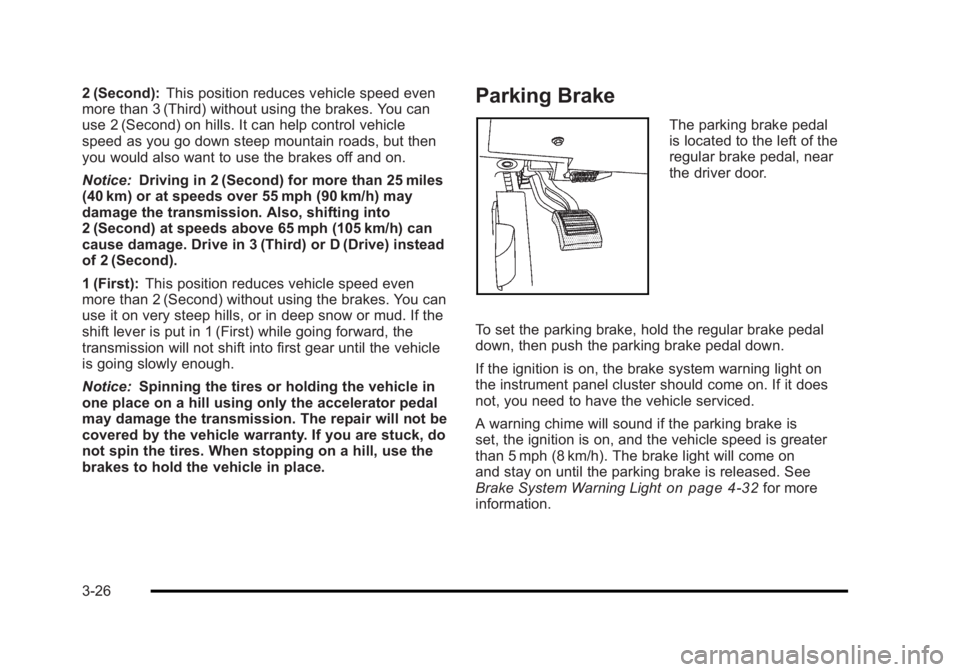
The parking brake pedal
is located to the left of the
regular brake pedal, near
the driver door.
To set the parking brake, hold the regular brake pedal
down, then push the parking brake pedal down.
If the ignition is on, the brake system warning light on
the instrument panel cluster should come on. If it does
not, you need to have the vehicle serviced.
A warning chime will sound if the parking brake is
set, the ignition is on, and the vehicle speed is greater
than 5 mph (8 km/h). The brake light will come on
and stay on until the parking brake is released. See
Brake System Warning Light
on page 4‑32for more
information.
3-26
Page 131 of 450
Black plate (27,1)Buick Lucerne Owner Manual - 2011
To release the parking brake, hold the regular brake
pedal down, then push the parking brake pedal down.
When you lift your foot off the parking brake pedal, the
pedal will follow your foot to the released position.
Notice:Driving with the parking brake on can
overheat the brake system and cause premature
wear or damage to brake system parts. Make sure
that the parking brake is fully released and the
brake warning light is off before driving.
If you are towing a trailer and are parking on any hill,
see Towing a Trailer on page 5‑25.
Shifting Into Park
{WARNING:
It can be dangerous to get out of the vehicle if the
shift lever is not fully in P (Park) with the parking
brake firmly set. The vehicle can roll. If you have
left the engine running, the vehicle can move
suddenly. You or others could be injured. To be
sure the vehicle will not move, even when you are
on fairly level ground, use the steps that follow.
If you are pulling a trailer, see Towing a Trailer
on
page 5‑25
.
Steering Column Shift Lever
If the vehicle has a steering column shift lever, use this
procedure to shift the vehicle into P (Park):
1. Hold the brake pedal down.
2. Move the shift lever into P (Park) by pulling the shift lever toward you and moving it up as far as it
will go.
3. With your foot still holding the brake pedal down, set the parking brake. See Parking Brake
on
page 3‑26for more information.
4. Turn the ignition key to LOCK/OFF.
5. Remove the key and take it with you. If you can leave the vehicle with the ignition key in your hand,
the vehicle is in P (Park).
Console Shift Lever
If the vehicle is equipped with a console shift lever, use
this procedure to shift the vehicle into P (Park):
1. Hold the brake pedal down.
2. Move the shift lever into P (Park) by pushing the lever all the way toward the front of the vehicle and
then to the left.
3. While keeping the brake pedal applied, set the parking brake. See Parking Brake
on page 3‑26for more information.
3-27
Page 132 of 450
Black plate (28,1)Buick Lucerne Owner Manual - 2011
4. Turn the ignition key to LOCK/OFF.
5. Remove the key and take it with you. If you canleave the vehicle with the ignition key in your hand,
the vehicle is in P (Park).
Leaving the Vehicle With the Engine
Running
{WARNING:
It can be dangerous to leave the vehicle with the
engine running. The vehicle could move suddenly
if the shift lever is not fully in P (Park) with the
parking brake firmly set. And, if you leave the
vehicle with the engine running, it could overheat
and even catch fire. You or others could be
injured. Do not leave the vehicle with the engine
running.
If you have to leave the vehicle with the engine running,
be sure your vehicle is in P (Park) and the parking
brake is firmly set before you leave it. See Parking
Brake
on page 3‑26for more information.
Torque Lock
Torque lock is when the weight of the vehicle puts too
much force on the parking pawl in the transmission.
This happens when parking on a hill and shifting the
transmission into P (Park) is not done properly and then
it is difficult to shift out of P (Park). To prevent torque
lock, set the parking brake and then shift into P (Park).
To find out how, see “Shifting Into Park”in this section.
If torque lock does occur, your vehicle may need to be
pushed uphill by another vehicle to relieve the parking
pawl pressure, so you can shift out of P (Park).
Shifting Out of Park
Automatic Transmission Shift Lock
This vehicle has an electronic shift lock release system.
The shift lock release is designed to:
.Prevent ignition key removal unless the shift lever
is in P (Park)
.Prevent movement of the shift lever out of P (Park),
unless the ignition is in ON/RUN and the regular
brake pedal is applied.
3-28
Page 133 of 450
Black plate (29,1)Buick Lucerne Owner Manual - 2011
The shift lock is always functional except in the case of
a an uncharged or low voltage (less than 9 volt) battery.
If the vehicle has an uncharged battery or a battery with
low voltage, try charging or jump starting the battery.
SeeJump Starting on page 6‑44.
Console Shift
If the console shifter cannot be moved out of P (Park)
1. Apply and maintain the regular brakes.
2. Turn the ignition to ON/RUN position. See Ignition
Positions
on page 3‑19for more information.
3. Let up on the shift lever and make sure the shift lever is pushed all the way into P (Park).
4. Then, move the shift into the desired gear.
If you still cannot move the shift lever from P (Park),
consult your dealer or a professional towing service.
Column Shift
If the shifter cannot be moved out of P (Park) 1. Apply and maintain the regular brakes.
2. Turn the ignition key to the ON/RUN position. See Ignition Positions
on page 3‑19for more
information. 3. Shift out of the P (Park) position to the N (Neutral)
position.
4. Then, move the shift into the desired gear.
If you still cannot move the shift lever from P (Park),
consult your dealer or a professional towing service.
Parking Over Things That Burn
{WARNING:
Things that can burn could touch hot exhaust
parts under the vehicle and ignite. Do not park
over papers, leaves, dry grass, or other things that
can burn.
3-29
Page 135 of 450
Black plate (31,1)Buick Lucerne Owner Manual - 2011
WARNING: (Continued)
death. Never run the engine in an enclosed
area that has no fresh air ventilation. For more
information, seeEngine Exhaust on page 3‑30.
{WARNING:
It can be dangerous to get out of the vehicle if the
automatic transmission shift lever is not fully in
P (Park) with the parking brake firmly set. The
vehicle can roll. Do not leave the vehicle when the
engine is running unless you have to. If you have
left the engine running, the vehicle can move
suddenly. You or others could be injured. To be
sure the vehicle will not move, even when you
are on fairly level ground, always set the parking
brake and move the shift lever to P (Park).
Follow the proper steps to be sure the vehicle will not
move. See Shifting Into Park on page 3‑27.
If parking on a hill and pulling a trailer, see Towing a
Trailer on page 5‑25.
Mirrors
Automatic Dimming Rearview Mirror
The vehicle may have an automatic dimming inside
rearview mirror with OnStar®and/or a compass
display. Automatic dimming reduces the glare from the
headlamps of the vehicle behind you. The dimming
feature comes on and the indicator light illuminates
each time the vehicle is started.
Vehicles with OnStar have three additional control
buttons located at the bottom of the mirror. See your
dealer for more information on the system and how to
subscribe to OnStar. See the OnStar
®owners guide for
more information about the services OnStar provides.
O(On/Off): Press to turn the dimming feature and/or
compass display on or off.
Cleaning the Mirror
Do not spray glass cleaner directly on the mirror. Use a
soft towel dampened with water.
3-31
Page 137 of 450
Black plate (33,1)Buick Lucerne Owner Manual - 2011
3. Once the zone number displays,press
Orepeatedly until the correct zone
number displays. Stop pressing the button and
the mirror returns to normal operation. If CAL
appears in the compass window, the compass
may need calibration. See “Compass Calibration”
listed previously.
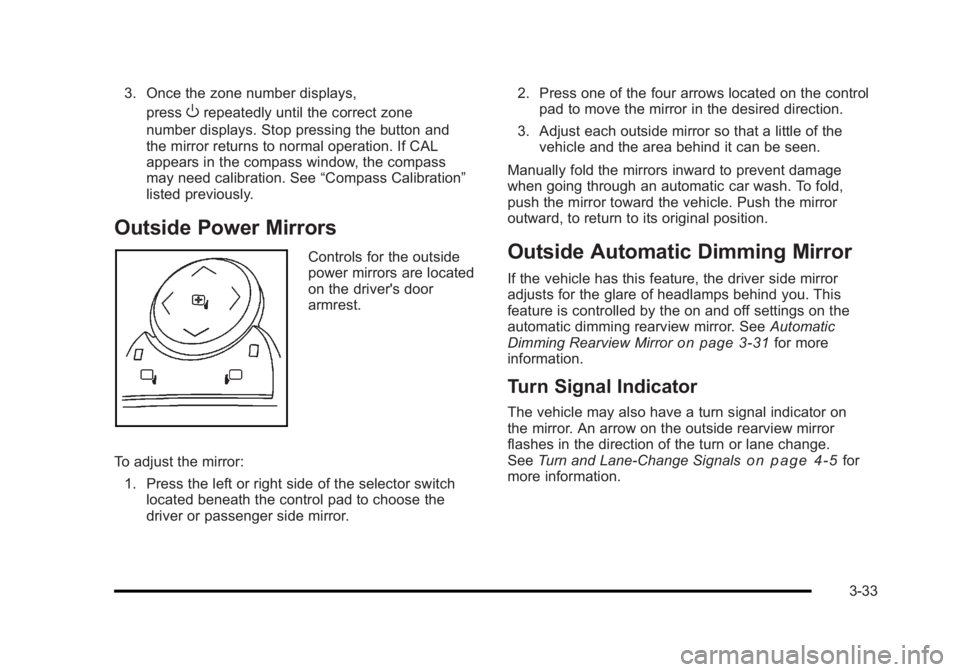
Outside Power Mirrors
Controls for the outside
power mirrors are located
on the driver's door
armrest.
To adjust the mirror: 1. Press the left or right side of the selector switch located beneath the control pad to choose the
driver or passenger side mirror. 2. Press one of the four arrows located on the control
pad to move the mirror in the desired direction.
3. Adjust each outside mirror so that a little of the vehicle and the area behind it can be seen.
Manually fold the mirrors inward to prevent damage
when going through an automatic car wash. To fold,
push the mirror toward the vehicle. Push the mirror
outward, to return to its original position.Outside Automatic Dimming Mirror
If the vehicle has this feature, the driver side mirror
adjusts for the glare of headlamps behind you. This
feature is controlled by the on and off settings on the
automatic dimming rearview mirror. See Automatic
Dimming Rearview Mirror
on page 3‑31for more
information.
Turn Signal Indicator
The vehicle may also have a turn signal indicator on
the mirror. An arrow on the outside rearview mirror
flashes in the direction of the turn or lane change.
See Turn and Lane-Change Signals
on page 4‑5for
more information.
3-33
Page 138 of 450
Black plate (34,1)Buick Lucerne Owner Manual - 2011
Side Blind Zone Alert (SBZA)
If the vehicle has the Side Blind Zone Alert (SBZA)
system, seeSide Blind Zone Alert (SBZA)on
page 3‑36.
Park Tilt Mirrors
If the vehicle has memory mirrors, the outside mirrors
have park tilt mirrors . This feature tilts the driver's side
and passenger side mirror to a factory programmed
position when the vehicle is in R (Reverse). This feature
may be useful in allowing you to view the curb when
you are parallel parking.
When the vehicle is shifted out of R (Reverse) and
either a five second delay has occurred, or the ignition
is turned to LOCK/OFF, the driver and passenger side
mirrors return to their original position.
See DIC Vehicle Customization
on page 4‑58for more
information.
Outside Convex Mirror
{WARNING:
A convex mirror can make things, like other
vehicles, look farther away than they really are.
If you cut too sharply into the right lane, you could
hit a vehicle on the right. Check the inside mirror
or glance over your shoulder before changing
lanes.
The passenger side mirror is convex shaped. A convex
mirror's surface is curved so more can be seen from the
driver seat.
Outside Heated Mirrors
For vehicles with heated mirrors:
<(Rear Window Defogger): Press to heat the
mirrors.
See “Rear Window Defogger” underClimate Control
System
on page 4‑16or Dual Automatic Climate
Control Systemon page 4‑20for more information.
3-34
Page 140 of 450
Black plate (36,1)Buick Lucerne Owner Manual - 2011
The system can be disabled through the Driver
Information Center (DIC). See“Park Assist”under
DIC Operation and Displays
on page 4‑42for more
information.
When the System Does Not Seem to
Work Properly
SERVICE PARK ASSIST: If this message occurs, take
the vehicle to your dealer to repair the system.
PARK ASSIST OFF: If the URPA system does not
activate due to a temporary condition, the message
displays on the DIC, see DIC Operation and Displays
on page 4‑42for more information. This can occur
under the following conditions:
.The driver disables the system.
.The ultrasonic sensors are not clean. Keep the
vehicle's rear bumper free of mud, dirt, snow, ice
and slush. For cleaning instructions, see Washing
Your Vehicle on page 6‑102.
.A trailer was attached to the vehicle, or a bicycle or
an object was hanging out of the trunk during the
last drive cycle. Once the object is removed, URPA
will return to normal operation.
.A tow bar is attached to the vehicle.
.The vehicle's bumper is damaged. Take the vehicle
to your dealer to repair the system.
.Other conditions may affect system performance,
such as vibrations from a jackhammer or the
compression of air brakes on a very large truck.
If the system is still disabled, after driving forward at
least 40 km/h (25 mph), take the vehicle to your dealer.
Side Blind Zone Alert (SBZA)
The vehicle may have a Side Blind Zone Alert (SBZA)
system. Read this entire section before using the
system.
{WARNING:
SBZA is only a lane changing aid and does not
replace driver vision. SBZA does not detect:
.Vehicles outside the side blind zones which
may be rapidly approaching.
.Pedestrians, bicyclists, or animals. (Continued)
3-36
Page 142 of 450
Black plate (38,1)Buick Lucerne Owner Manual - 2011
How the System Works
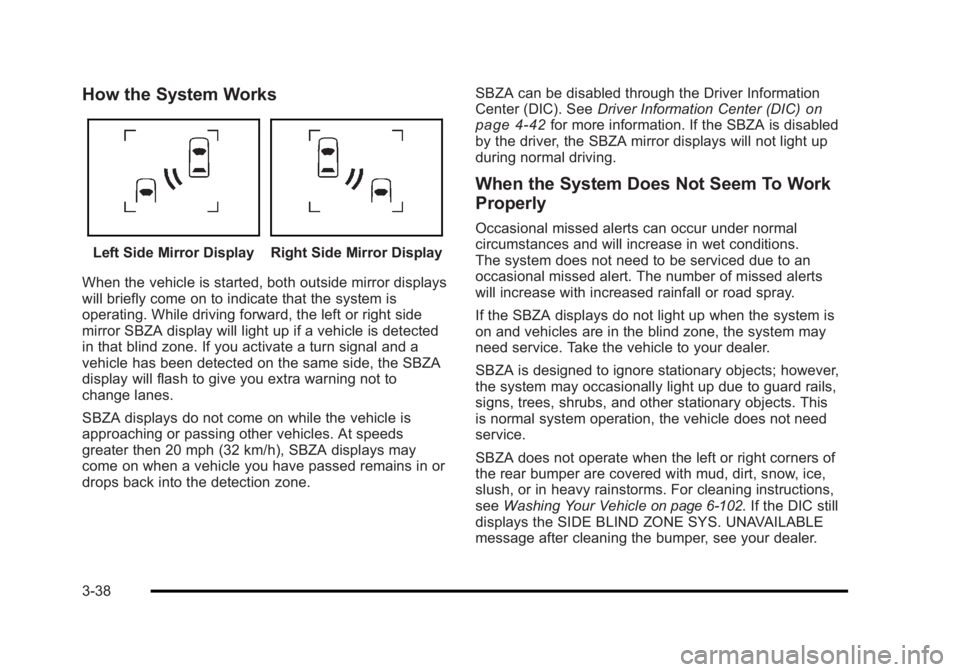
Left Side Mirror DisplayRight Side Mirror Display
When the vehicle is started, both outside mirror displays
will briefly come on to indicate that the system is
operating. While driving forward, the left or right side
mirror SBZA display will light up if a vehicle is detected
in that blind zone. If you activate a turn signal and a
vehicle has been detected on the same side, the SBZA
display will flash to give you extra warning not to
change lanes.
SBZA displays do not come on while the vehicle is
approaching or passing other vehicles. At speeds
greater then 20 mph (32 km/h), SBZA displays may
come on when a vehicle you have passed remains in or
drops back into the detection zone. SBZA can be disabled through the Driver Information
Center (DIC). See
Driver Information Center (DIC)
on
page 4‑42for more information. If the SBZA is disabled
by the driver, the SBZA mirror displays will not light up
during normal driving.
When the System Does Not Seem To Work
Properly
Occasional missed alerts can occur under normal
circumstances and will increase in wet conditions.
The system does not need to be serviced due to an
occasional missed alert. The number of missed alerts
will increase with increased rainfall or road spray.
If the SBZA displays do not light up when the system is
on and vehicles are in the blind zone, the system may
need service. Take the vehicle to your dealer.
SBZA is designed to ignore stationary objects; however,
the system may occasionally light up due to guard rails,
signs, trees, shrubs, and other stationary objects. This
is normal system operation, the vehicle does not need
service.
SBZA does not operate when the left or right corners of
the rear bumper are covered with mud, dirt, snow, ice,
slush, or in heavy rainstorms. For cleaning instructions,
see Washing Your Vehicle
on page 6‑102. If the DIC still
displays the SIDE BLIND ZONE SYS. UNAVAILABLE
message after cleaning the bumper, see your dealer.
3-38