tire pressure BUICK LUCERNE 2011 Owner's Manual
[x] Cancel search | Manufacturer: BUICK, Model Year: 2011, Model line: LUCERNE, Model: BUICK LUCERNE 2011Pages: 450, PDF Size: 3.63 MB
Page 5 of 450
Black plate (5,1)Buick Lucerne Owner Manual - 2011
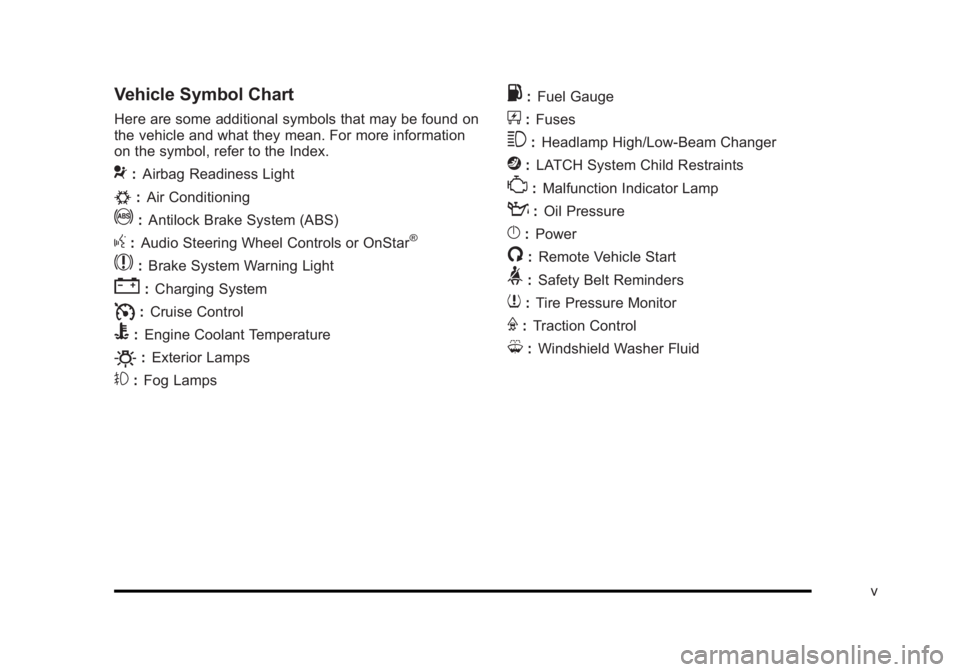
Vehicle Symbol Chart
Here are some additional symbols that may be found on
the vehicle and what they mean. For more information
on the symbol, refer to the Index.
9:Airbag Readiness Light
#:Air Conditioning
!:Antilock Brake System (ABS)
g:Audio Steering Wheel Controls or OnStar®
$: Brake System Warning Light
":Charging System
I:Cruise Control
B: Engine Coolant Temperature
O:Exterior Lamps
#:Fog Lamps
.: Fuel Gauge
+:Fuses
3: Headlamp High/Low-Beam Changer
j:LATCH System Child Restraints
*: Malfunction Indicator Lamp
::Oil Pressure
}:Power
/:Remote Vehicle Start
>:Safety Belt Reminders
7:Tire Pressure Monitor
F:Traction Control
M:Windshield Washer Fluid
v
Page 7 of 450
Black plate (1,1)Buick Lucerne Owner Manual - 2011
Section 1 In Brief
Instrument Panel. . . . . . . . . . . . . . . . . . . . . . . . . . . . . . . . . . . 1-2
Initial Drive Information . . . . . . . . . . . . . . . . . . . . . . . . . . . 1-4
Remote Keyless Entry (RKE) System . . . . . . . . . . . 1-4
Remote Vehicle Start . . . . . . . . . . . . . . . . . . . . . . . . . . . 1-4
Door Locks . . . . . . . . . . . . . . . . . . . . . . . . . . . . . . . . . . . . . 1-5
Trunk Release . . . . . . . . . . . . . . . . . . . . . . . . . . . . . . . . . . 1-5
Windows . . . . . . . . . . . . . . . . . . . . . . . . . . . . . . . . . . . . . . . . 1-6
Seat Adjustment . . . . . . . . . . . . . . . . . . . . . . . . . . . . . . . . 1-6
Memory Features . . . . . . . . . . . . . . . . . . . . . . . . . . . . . . . 1-8
Heated Seats . . . . . . . . . . . . . . . . . . . . . . . . . . . . . . . . . . . 1-9
Heated and Ventilated Seats . . . . . . . . . . . . . . . . . . . . 1-9
Head Restraint Adjustment . . . . . . . . . . . . . . . . . . . . 1-10
Safety Belts . . . . . . . . . . . . . . . . . . . . . . . . . . . . . . . . . . . . 1-10
Sensing System for Passenger Airbag . . . . . . . . . 1-11
Mirror Adjustment . . . . . . . . . . . . . . . . . . . . . . . . . . . . . . 1-11
Steering Wheel Adjustment . . . . . . . . . . . . . . . . . . . . 1-12
Interior Lighting . . . . . . . . . . . . . . . . . . . . . . . . . . . . . . . . 1-13
Exterior Lighting . . . . . . . . . . . . . . . . . . . . . . . . . . . . . . . 1-13
Windshield Wiper/Washer . . . . . . . . . . . . . . . . . . . . . . 1-14
Climate Controls . . . . . . . . . . . . . . . . . . . . . . . . . . . . . . . 1-14 Vehicle Features
. . . . . . . . . . . . . . . . . . . . . . . . . . . . . . . . . . 1-15
Radio(s) . . . . . . . . . . . . . . . . . . . . . . . . . . . . . . . . . . . . . . . 1-15
Satellite Radio . . . . . . . . . . . . . . . . . . . . . . . . . . . . . . . . . 1-16
Portable Audio Devices (Auxiliary Input or USB Port) . . . . . . . . . . . . . . . . . . . . . . . . . . . . . . . . . . . 1-17
Steering Wheel Controls . . . . . . . . . . . . . . . . . . . . . . . 1-17
Bluetooth
®. . . . . . . . . . . . . . . . . . . . . . . . . . . . . . . . . . . . . 1-18
Navigation System . . . . . . . . . . . . . . . . . . . . . . . . . . . . . 1-18
Driver Information Center (DIC) . . . . . . . . . . . . . . . . 1-18
Cruise Control . . . . . . . . . . . . . . . . . . . . . . . . . . . . . . . . . 1-19
Lane Departure Warning (LDW) . . . . . . . . . . . . . . . 1-20
Side Blind Zone Alert (SBZA) . . . . . . . . . . . . . . . . . . 1-20
Ultrasonic Parking Assist . . . . . . . . . . . . . . . . . . . . . . 1-21
Power Outlets . . . . . . . . . . . . . . . . . . . . . . . . . . . . . . . . . 1-21
Universal Remote System . . . . . . . . . . . . . . . . . . . . . 1-21
Performance and Maintenance . . . . . . . . . . . . . . . . . .1-22
Traction Control System (TCS) . . . . . . . . . . . . . . . . 1-22
StabiliTrak
®System . . . . . . . . . . . . . . . . . . . . . . . . . . . 1-22
Tire Pressure Monitor . . . . . . . . . . . . . . . . . . . . . . . . . . 1-22
Tire Sealant and Compressor Kit . . . . . . . . . . . . . . 1-23
Engine Oil Life System . . . . . . . . . . . . . . . . . . . . . . . . 1-23
Fuel E85 (85% Ethanol) . . . . . . . . . . . . . . . . . . . . . . . 1-23
Driving for Better Fuel Economy . . . . . . . . . . . . . . . 1-23
Roadside Assistance Program . . . . . . . . . . . . . . . . . 1-24
OnStar
®. . . . . . . . . . . . . . . . . . . . . . . . . . . . . . . . . . . . . . . 1-24
1-1
Page 28 of 450
Black plate (22,1)Buick Lucerne Owner Manual - 2011
Performance and Maintenance
Traction Control System (TCS)
The traction control system limits wheel spin. The
system turns on automatically every time the vehicle is
started.
.To turn off traction control, press and releaseiin
front of the shift lever.
Filluminates and the
appropriate DIC message is displayed. See DIC
Warnings and Messages on page 4‑49.
.Press and release the button again to turn on
traction control.
For more information, see Traction Control System
(TCS) on page 5‑6.
StabiliTrak®System
The vehicle has a StabiliTrak system that assists with
directional control of the vehicle in difficult driving
conditions. The system turns on automatically every
time the vehicle is started. The system cannot be
turned off.
For more information, see StabiliTrak
®Systemon
page 5‑5.
Tire Pressure Monitor
This vehicle may have a Tire Pressure Monitor
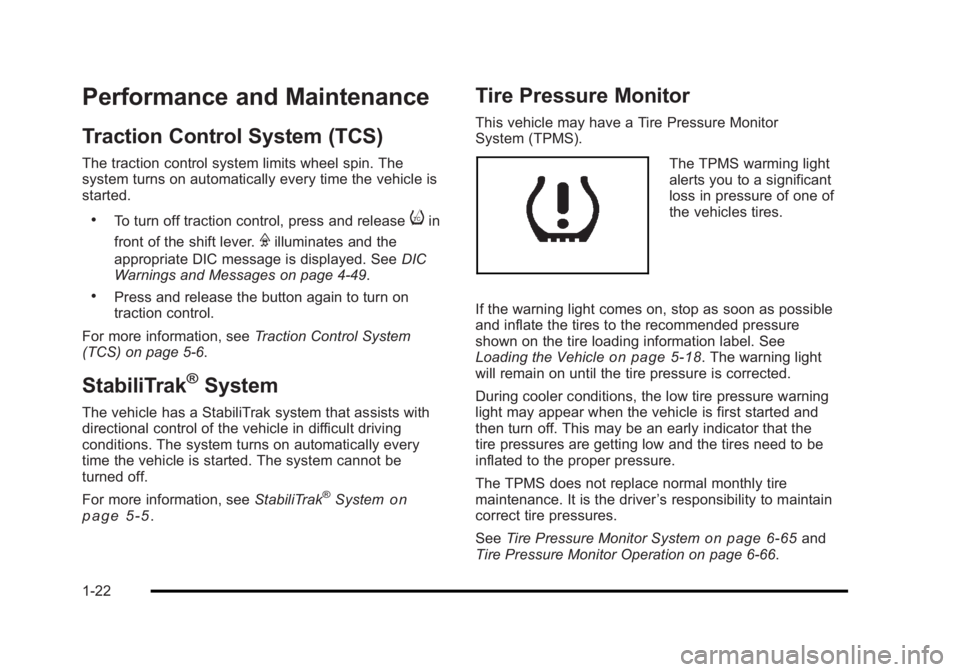
System (TPMS).
The TPMS warming light
alerts you to a significant
loss in pressure of one of
the vehicles tires.
If the warning light comes on, stop as soon as possible
and inflate the tires to the recommended pressure
shown on the tire loading information label. See
Loading the Vehicle
on page 5‑18. The warning light
will remain on until the tire pressure is corrected.
During cooler conditions, the low tire pressure warning
light may appear when the vehicle is first started and
then turn off. This may be an early indicator that the
tire pressures are getting low and the tires need to be
inflated to the proper pressure.
The TPMS does not replace normal monthly tire
maintenance. It is the driver ’s responsibility to maintain
correct tire pressures.
See Tire Pressure Monitor System
on page 6‑65and
Tire Pressure Monitor Operation on page 6‑66.
1-22
Page 158 of 450
Black plate (2,1)Buick Lucerne Owner Manual - 2011
Section 4 Instrument Panel
StabiliTrak®Indicator Light . . . . . . . . . . . . . . . . . . . . . 4-34
Lane Departure Warning (LDW) Light . . . . . . . . . . 4-35
Engine Coolant Temperature Warning Light . . . . 4-36
Engine Coolant Temperature Gauge . . . . . . . . . . . 4-36
Tire Pressure Light . . . . . . . . . . . . . . . . . . . . . . . . . . . . 4-37
Malfunction Indicator Lamp . . . . . . . . . . . . . . . . . . . . 4-37
Oil Pressure Light . . . . . . . . . . . . . . . . . . . . . . . . . . . . . 4-40
Security Light . . . . . . . . . . . . . . . . . . . . . . . . . . . . . . . . . . 4-40
Front Fog Lamp Light . . . . . . . . . . . . . . . . . . . . . . . . . . 4-40
Cruise Control Light . . . . . . . . . . . . . . . . . . . . . . . . . . . 4-41
Highbeam On Light . . . . . . . . . . . . . . . . . . . . . . . . . . . . 4-41
Fuel Gauge . . . . . . . . . . . . . . . . . . . . . . . . . . . . . . . . . . . . 4-41
Driver Information Center (DIC) . . . . . . . . . . . . . . . . . .4-42
DIC Operation and Displays . . . . . . . . . . . . . . . . . . . 4-42
DIC Compass . . . . . . . . . . . . . . . . . . . . . . . . . . . . . . . . . . 4-47
DIC Warnings and Messages . . . . . . . . . . . . . . . . . . 4-49
DIC Vehicle Customization . . . . . . . . . . . . . . . . . . . . 4-58 Audio System(s)
. . . . . . . . . . . . . . . . . . . . . . . . . . . . . . . . . . 4-67
Setting the Clock . . . . . . . . . . . . . . . . . . . . . . . . . . . . . . 4-68
Radio(s) . . . . . . . . . . . . . . . . . . . . . . . . . . . . . . . . . . . . . . . 4-69
Using an MP3 . . . . . . . . . . . . . . . . . . . . . . . . . . . . . . . . . 4-78
XM Radio Messages . . . . . . . . . . . . . . . . . . . . . . . . . . . 4-84
Navigation/Radio System . . . . . . . . . . . . . . . . . . . . . . 4-85
Bluetooth
®. . . . . . . . . . . . . . . . . . . . . . . . . . . . . . . . . . . . . 4-86
Theft-Deterrent Feature . . . . . . . . . . . . . . . . . . . . . . . . 4-94
Audio Steering Wheel Controls . . . . . . . . . . . . . . . . 4-94
Radio Reception . . . . . . . . . . . . . . . . . . . . . . . . . . . . . . . 4-97
Backglass Antenna . . . . . . . . . . . . . . . . . . . . . . . . . . . . 4-97
XM™ Satellite Radio Antenna System . . . . . . . . . 4-98
4-2
Page 193 of 450
Black plate (37,1)Buick Lucerne Owner Manual - 2011
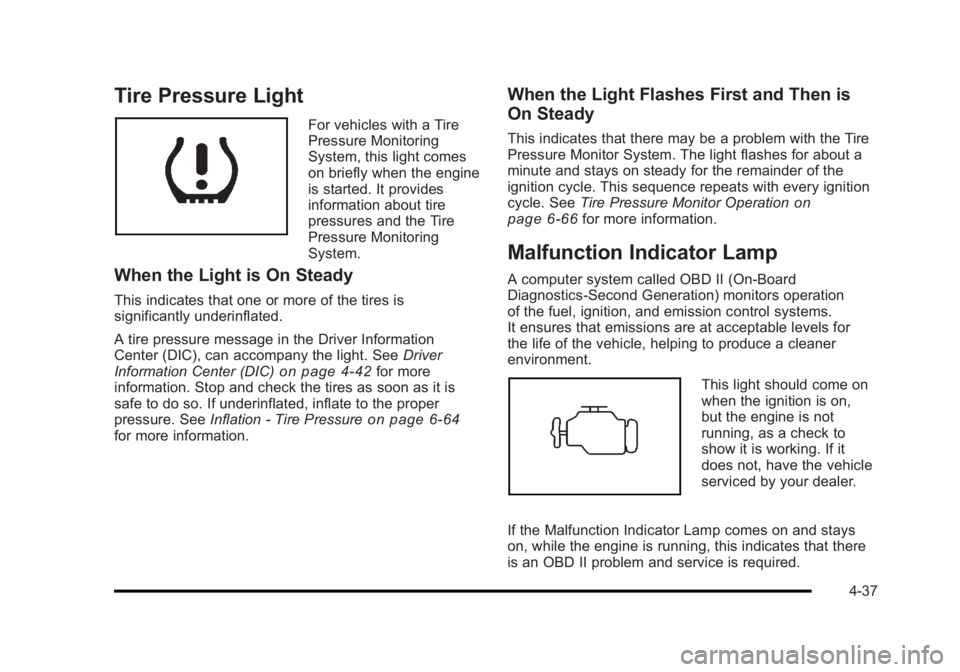
Tire Pressure Light
For vehicles with a Tire
Pressure Monitoring
System, this light comes
on briefly when the engine
is started. It provides
information about tire
pressures and the Tire
Pressure Monitoring
System.
When the Light is On Steady
This indicates that one or more of the tires is
significantly underinflated.
A tire pressure message in the Driver Information
Center (DIC), can accompany the light. SeeDriver
Information Center (DIC)
on page 4‑42for more
information. Stop and check the tires as soon as it is
safe to do so. If underinflated, inflate to the proper
pressure. See Inflation - Tire Pressure
on page 6‑64for more information.
When the Light Flashes First and Then is
On Steady
This indicates that there may be a problem with the Tire
Pressure Monitor System. The light flashes for about a
minute and stays on steady for the remainder of the
ignition cycle. This sequence repeats with every ignition
cycle. SeeTire Pressure Monitor Operation
on
page 6‑66for more information.
Malfunction Indicator Lamp
A computer system called OBD II (On-Board
Diagnostics-Second Generation) monitors operation
of the fuel, ignition, and emission control systems.
It ensures that emissions are at acceptable levels for
the life of the vehicle, helping to produce a cleaner
environment.
This light should come on
when the ignition is on,
but the engine is not
running, as a check to
show it is working. If it
does not, have the vehicle
serviced by your dealer.
If the Malfunction Indicator Lamp comes on and stays
on, while the engine is running, this indicates that there
is an OBD II problem and service is required.
4-37
Page 199 of 450
Black plate (43,1)Buick Lucerne Owner Manual - 2011
DIC Buttons
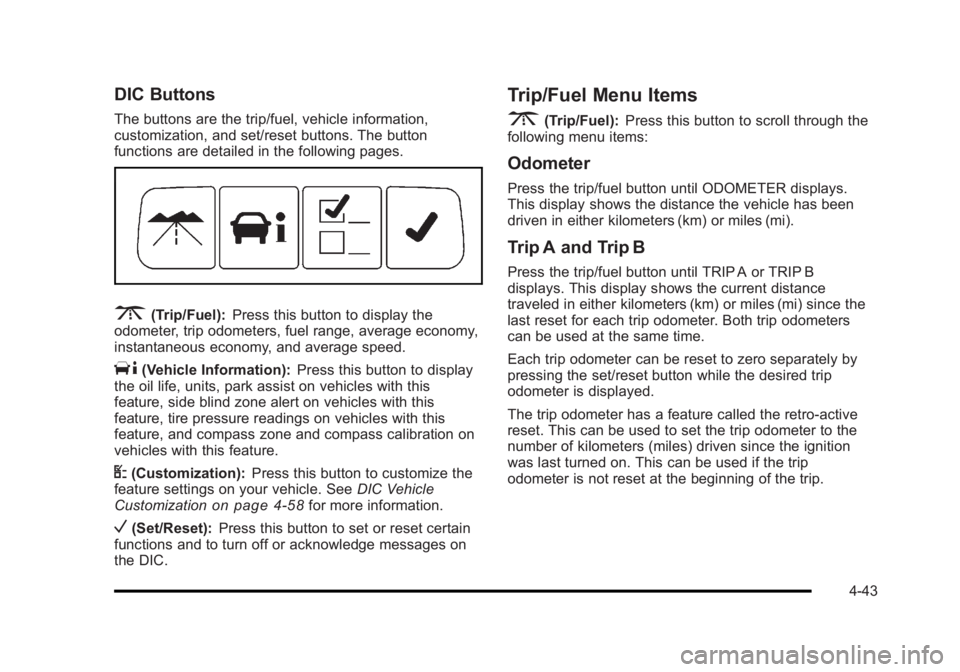
The buttons are the trip/fuel, vehicle information,
customization, and set/reset buttons. The button
functions are detailed in the following pages.
3(Trip/Fuel):Press this button to display the
odometer, trip odometers, fuel range, average economy,
instantaneous economy, and average speed.
T(Vehicle Information): Press this button to display
the oil life, units, park assist on vehicles with this
feature, side blind zone alert on vehicles with this
feature, tire pressure readings on vehicles with this
feature, and compass zone and compass calibration on
vehicles with this feature.
U(Customization): Press this button to customize the
feature settings on your vehicle. See DIC Vehicle
Customization
on page 4‑58for more information.
V(Set/Reset): Press this button to set or reset certain
functions and to turn off or acknowledge messages on
the DIC.
Trip/Fuel Menu Items
3
(Trip/Fuel): Press this button to scroll through the
following menu items:
Odometer
Press the trip/fuel button until ODOMETER displays.
This display shows the distance the vehicle has been
driven in either kilometers (km) or miles (mi).
Trip A and Trip B
Press the trip/fuel button until TRIP A or TRIP B
displays. This display shows the current distance
traveled in either kilometers (km) or miles (mi) since the
last reset for each trip odometer. Both trip odometers
can be used at the same time.
Each trip odometer can be reset to zero separately by
pressing the set/reset button while the desired trip
odometer is displayed.
The trip odometer has a feature called the retro-active
reset. This can be used to set the trip odometer to the
number of kilometers (miles) driven since the ignition
was last turned on. This can be used if the trip
odometer is not reset at the beginning of the trip.
4-43
Page 202 of 450
Black plate (46,1)Buick Lucerne Owner Manual - 2011
Park Assist
If your vehicle has the Ultrasonic Rear Parking Assist
(URPA) system, this display allows the system to be
turned on or off. Press the vehicle information button
until PARK ASSIST displays. Once in this display, press
the set/reset button to select between ON or OFF. If you
choose ON, the system will be turned on. If you choose
OFF, the system will be turned off. The URPA system
automatically turns back on after each vehicle start.
When the URPA system is turned off and the vehicle is
shifted out of PARK (P), the DIC will display the PARK
ASSIST OFF message as a reminder that the system
has been turned off. SeeDIC Warnings and Messages
on page 4‑49andUltrasonic Rear Parking Assist
(URPA)on page 3‑35for more information.
Side Blind Zone
If your vehicle has the Side Blind Zone Alert (SBZA)
system, this display allows the system to be turned on
or off. Press the vehicle information button until SIDE
BLIND ZONE displays. Once in this display, press the
set/reset button to select between ON or OFF. If you
choose ON, the system will be turned on. If you choose
OFF, the system will be turned off. When the SBZA
system is turned off, the DIC will display the SIDE
BLIND ZONE ALERT SYSTEM OFF message as a
reminder that the system has been turned off. See DIC
Warnings and Messages
on page 4‑49and Side Blind
Zone Alert (SBZA)on page 3‑36for more information.
Tire Pressure
On vehicles with the Tire Pressure Monitor System
(TPMS), the pressure for each tire can be viewed in the
DIC. The tire pressure will be shown in either pounds
per square inch (psi) or kilopascals (kPa). Press the
vehicle information button until the DIC displays FRONT
TIRES PSI (kPa) LEFT ## RIGHT ##. Press the vehicle
information button again until the DIC displays REAR
TIRES PSI (kPa) LEFT ## RIGHT ##.
If a low tire pressure condition is detected by the
system while driving, a message advising you to check
the pressure in a specific tire will appear in the display.
See Inflation - Tire Pressure
on page 6‑64andDIC
Warnings and Messageson page 4‑49for more
information.
If the tire pressure display shows dashes instead of a
value, there may be a problem with your vehicle. If this
consistently occurs, see your dealer for service.
Change Compass Zone
Your vehicle may have this feature. To change the
compass zone through the DIC, see DIC Compasson
page 4‑47.
4-46
Page 211 of 450
Black plate (55,1)Buick Lucerne Owner Manual - 2011
SERVICE SUSPENSION SYSTEM
This message displays to indicate that the suspension
system is not operating properly. See your dealer for
service.
SERVICE THEFT SYSTEM
This message displays when there is a problem with the
theft-deterrent system programmed in the key. A fault
has been detected in the system which means that the
system is disabled and it is not protecting the vehicle.
The vehicle usually restarts; however, you may want to
take the vehicle to your dealer before turning off the
engine. SeePASS-Key
®III+ Electronic Immobilizeron
page 3‑17for more information.
SERVICE TIRE MONITOR SYSTEM
On vehicles with the Tire Pressure Monitor System
(TPMS), this message displays if a part on the TPMS
is not working properly. The tire pressure light also
flashes and then remains on during the same ignition
cycle. See Tire Pressure Light
on page 4‑37. Several
conditions may cause this message to appear. See Tire
Pressure Monitor Operation
on page 6‑66for more
information. If the warning comes on and stays on,
there may be a problem with the TPMS. See your
dealer.
SERVICE TRACTION CONTROL
This message displays when the Traction Control
System (TCS) is not functioning properly. A warning
light also appears on the instrument panel cluster.
See Traction Control System (TCS) Warning Light
on
page 4‑34. See Traction Control System (TCS)on
page 5‑6for more information. Have the TCS serviced
by your dealer as soon as possible.
SERVICE TRANSMISSION
This message displays when there is a problem with the
transmission. See your dealer for service.
SERVICE VEHICLE SOON
This message displays when a non-emissions related
malfunction occurs. Have the vehicle serviced by your
dealer as soon as possible.
SIDE BLIND ZONE ALERT
SYSTEM OFF
If your vehicle has the Side Blind Zone Alert (SBZA)
system, this message displays when the SBZA system
has been turned off. See Side Blind Zone Alert (SBZA)
on page 3‑36andDIC Operation and Displayson
page 4‑42for more information.
4-55
Page 213 of 450
Black plate (57,1)Buick Lucerne Owner Manual - 2011
TIRE LEARNING ACTIVE
On vehicles with the Tire Pressure Monitor System
(TPMS), this message displays when the TPMS is
re-learning the tire positions on your vehicle. The tire
positions must be re-learned after rotating the tires or
after replacing a tire or sensor. SeeTire Inspection and
Rotation
on page 6‑70, Tire Pressure Monitor Systemon page 6‑65, and Inflation - Tire Pressureon
page 6‑64for more information.
TIRE LOW ADD AIR TO TIRE
On vehicles with the Tire Pressure Monitor System
(TPMS), this message displays when the pressure in
one or more of the vehicle's tires is low. This message
also displays LEFT FRT (left front), RIGHT FRT (right
front), LEFT RR (left rear), or RIGHT RR (right rear)
to indicate the location of the low tire. The low tire
pressure warning light will also come on. See Tire
Pressure Light
on page 4‑37. If a tire pressure
message appears on the DIC, stop as soon as you
can. Have the tire pressures checked and set to those
shown on the Tire Loading Information label. See Tires
on page 6‑57,Loading the Vehicleon page 5‑18, and
Inflation - Tire Pressureon page 6‑64. You can receive
more than one tire pressure message at a time. To read
the other messages that may have been sent at the
same time, press the set/reset button. The DIC also
shows the tire pressure values. See DIC Operation and
Displays
on page 4‑42.
TRACTION CONTROL OFF
This message displays when the Traction Control
System (TCS) is turned off. Adjust your driving
accordingly. See Traction Control System (TCS)
on
page 5‑6for more information.
TRACTION CONTROL ON
This message displays when the Traction Control
System (TCS) is turned on. See Traction Control
System (TCS)
on page 5‑6for more information.
TRANSMISSION HOT IDLE ENGINE
Notice: If you drive the vehicle while the
transmission fluid is overheating and the
transmission temperature warning is displayed
on the instrument panel cluster and/or DIC, you
can damage the transmission. This could lead to
costly repairs that would not be covered by the
warranty. Do not drive the vehicle with overheated
transmission fluid or while the transmission
temperature warning is displayed.
This message displays when the transmission fluid
in your vehicle is too hot. Stop the vehicle and allow
it to idle until it cools down. If the warning message
continues to display, have the vehicle serviced by your
dealer as soon as possible.
4-57
Page 267 of 450
Black plate (13,1)Buick Lucerne Owner Manual - 2011
Before Leaving on a Long Trip
To prepare your vehicle for a long trip, consider having
it serviced by your dealer before departing.
Things to check on your own include:
.Windshield Washer Fluid:Reservoir full? Windows
clean —inside and outside?
.Wiper Blades: In good shape?
.Fuel, Engine Oil, Other Fluids: All levels checked?
.Lamps:Do they all work and are lenses clean?
.Tires:Are treads good? Are tires inflated to
recommended pressure?
.Weather and Maps: Safe to travel? Have
up-to-date maps?
Highway Hypnosis
Always be alert and pay attention to your surroundings
while driving. If you become tired or sleepy, find a safe
place to park your vehicle and rest.
Other driving tips include:
.Keep the vehicle well ventilated.
.Keep interior temperature cool.
.Keep your eyes moving —scan the road ahead
and to the sides.
.Check the rearview mirror and vehicle instruments
often.
5-13