display BUICK PARK AVENUE 1994 User Guide
[x] Cancel search | Manufacturer: BUICK, Model Year: 1994, Model line: PARK AVENUE, Model: BUICK PARK AVENUE 1994Pages: 324, PDF Size: 17.01 MB
Page 155 of 324
To Play A Compact Disc
Before you begin, please note: DO NOT use mini-discs
that are called singles. They won’t eject.
Use full-size
compact discs only.
Press PWR to turn the system on.
Insert a disc partway
into the slot, label side up. The
player will
pull it in. Wait a few seconds and the disc
should play.
If the disc comes back out, check to see if:
0 The disc is upside down.
It is dirty, scratched, or wet.
There’s too much moisture in the air. (If there is,
wait about one hour and.try again.)
The disc player is too hot. If you’re driving on a very
rough road, the disc may come out, or just
not play
and ERR will appear
in the display. As soon as
things get back
to normal, the disc should play again.
Recall
Press RCL to see what track is playing. Press it again
within 5 seconds to see how long the CD has been
playing that track. The display will automatically return
to the time of day.
The track number also appears when you change the
volume, or when a new track starts to play.
Compression
Pressing the COMP button makes soft and loud passages
more equal
in volume. COMP will appear in the display.
Random
The RDM button means random and when it is pressed,
your CD player
will play the tracks in random order
rather than sequential
1,2,3 ... order. Pressing RDM
again will play the disc in sequential order.
153
ProCarManuals.com
Page 156 of 324
Reverse
Press and hold REV to return rapidly to a favorite
passage
in a track. Release it to play the passage. Note
the seconds counter reading in the display.
Forward
Press and hold FWD to advance quickly within a track.
Release it to resume playing. Watch the display to stop
at a specific passage.
Previous
Press PREV to hear the previous track. If you hold this
button or press
it more than once, the disc will retreat to
previous tracks.
Next
Press NEXT to hear the next track now (instead of
waiting until the present track is finished.) If you hold
this button, or press
it more than once, the disc will
advance further.
Stop/Play
Press ST/PL the disc will stop and the radio will play.
Press ST/PL again to restart
the disc at the point where it
stopped.
Press the PWR button or turn the ignition key off to stop
the disc player. The disc stays in the player and will
resume playing at the point where it stopped.
Eject
Press EJCT and the disc will eject and the radio will
play. The disc
will start at track 1 when you reinsert it.
As a feature to protect the disc, if you turn off the
ignition with the disc partway out of the slot (after
eject), it will be drawn back into the player
in about 30
seconds. The disc will play at track 1 when the radio is
turned on again.
154
ProCarManuals.com
Page 158 of 324
4. Press preset 1 and 4 buttons together. Hold them
until
“---” shows on the display (at least 5 seconds).
You are now ready to enter your secret code. If you
pause more than
15 seconds between steps you may
have to start over.
5. Press SET and “000” will appear on the display.
6. Press SEEK and hold it until the first digit of your
code appears.
two numbers agree with your code.
7. Rotate the TUNE knob right or left to make the next
8. Press the BAND knob and “OOO” will appear. Now
you are ready to enter the second three digits of the
code according to steps
6 and 7.
9. Press the BAND knob. The display will show “rEP”
for
5 seconds, and then“000” will appear indicating
that some steps are to be repeated for verification.
10. Repeat steps 6, 7, and 8.
11. Press the BAND knob. If the display shows “SEC”,
the verification process was successful and the system is
SECURE. If the display shows “---”, the
verification steps were not successful and the entire
sequence must be started again.
To Unlock The System After a Power Loss
When battery power is reapplied to a secured radio, the
radio won’t turn on and “LOC” will appear in the
display.
Enter your secret code
as follows. Pause no more than
15 seconds between steps.
0 Turn the ignition ON (radio off.)
0 Press the SET button. The display will show “000”.
0 Enter the six digits of the code following steps 6 thru
9 on the preceding page. The display will show the
number as entered.
Press the BAND knob and the time appears --
indicating that the disabling sequence was
successful. If the display indicates “SEC”,
the
number did not match and the unit is still secured.
156
ProCarManuals.com
Page 159 of 324
Disabling The Theft System
Press preset buttons 1 and 4, for 5 seconds with the
ignition “On” and radio power “Off’. The display
will show “SEC”, indicating the unit is in the secure
mode.
Press the SET button. The display will show “000”.
Enter the first three digits of the code following step
6 and 7 of the preceding directions. The display will
show the numbers as entered.
Press the BAND knob. The radio will display “000”.
Enter the second three digits of the code. The display
Press the BAND knob. If the display shows “---” ,
will show the numbers as entered.
the disabling sequence was successful. (The numbers
matched the user-selected code
or the factory
back-up code) and the
unit is in the UNSECURED
mode. If the display shows “SEC”, the disabling
sequence was unsuccessful and the numbers did not
match either
of the codes and the unit will remain in
the SECURED mode.
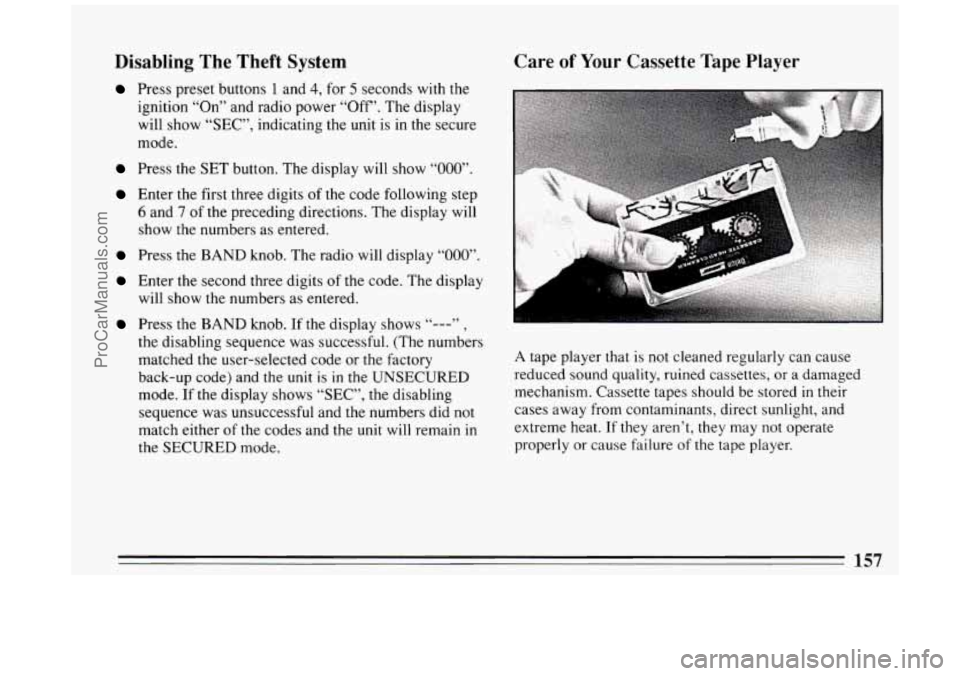
Care of Your Cassette Tape Player
A tape player that is not cleaned regularly can cause
reduced sound quality, ruined cassettes, or a damaged
mechanism. Cassette tapes should be stored
in their
cases away from contaminants, direct sunlight, and
extreme heat.
If they aren’t, they may not operate
properly or cause failure
of the tape player.
157
ProCarManuals.com
Page 242 of 324
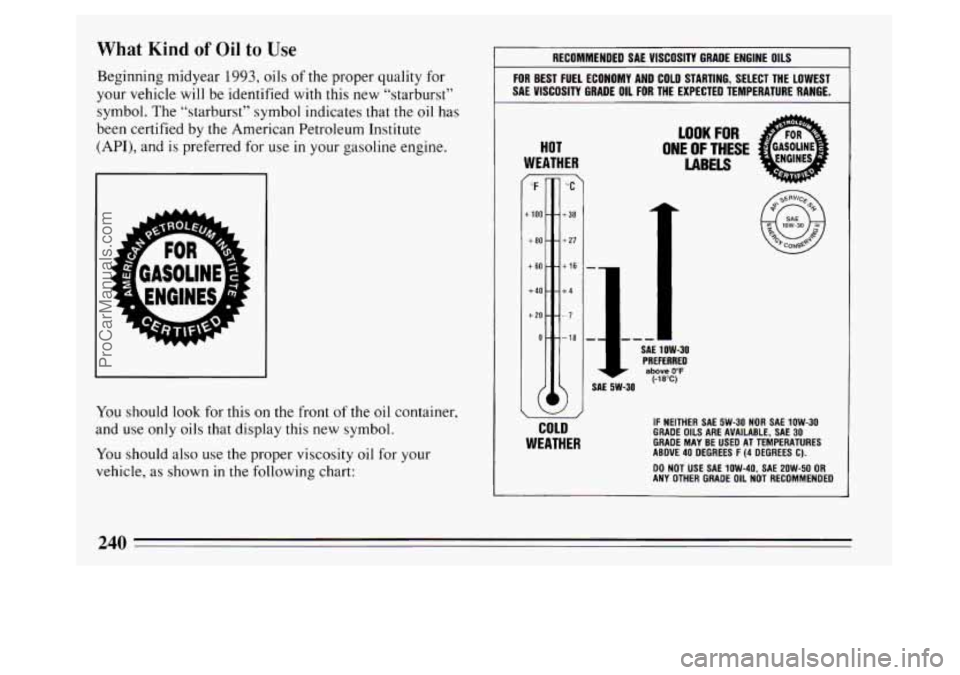
What Kind of Oil to Use
Beginning midyear 1993, oils of the proper quality for
your vehicle
will be identified with this new “starburst”
symbol. The “starburst” symbol indicates that the
oil has
been certified by the American Petroleum Institute
(API), and is preferred for use in your gasoline engine.
You should look for this on the front of the oil container,
and
use only oils that display this new symbol.
You should also use the proper viscosity oil for your
vehicle, as shown
in the following chart:
RECOMMENDED SAE VISCOSITY GRADE ENGINE OILS
FOR BEST FUEL ECONOMY AND COLD STARTING, SELECT THE LOWEST
SAE VISCOSITY GRADE OIL
FOR THE EXPECTED TEMPERATURE RANGE.
HOT
WEATHER
LOOK FOR
ONE OF THESE
LABELS / ‘F %‘ -
+lo0 - - +38
+80--+27
+60--+I6 -
+40--+4
+20 ---7
SAE 1 OW-30 PREFERRED above 0°F (-18°C) SAE 5W-30
a
COLD
WEATHER
IF NEITHER SAE 5W-30 NOR SAE 1OW-30 GRADE OILS ARE AVAILABLE, SAE 30 GRADE MAY BE USED AT TEMPERATURES
ABOVE 40 DEGREES F (4 DEGREES C).
ANY OTHER GRADE OIL NOT RECOMMENDED
DO NOT USE
SAE 1OW-40, SAE 2OW-50 OR
240
ProCarManuals.com