reset BUICK PARK AVENUE 2004 Owner's Guide
[x] Cancel search | Manufacturer: BUICK, Model Year: 2004, Model line: PARK AVENUE, Model: BUICK PARK AVENUE 2004Pages: 410, PDF Size: 4.45 MB
Page 196 of 410
Audio Steering Wheel Controls
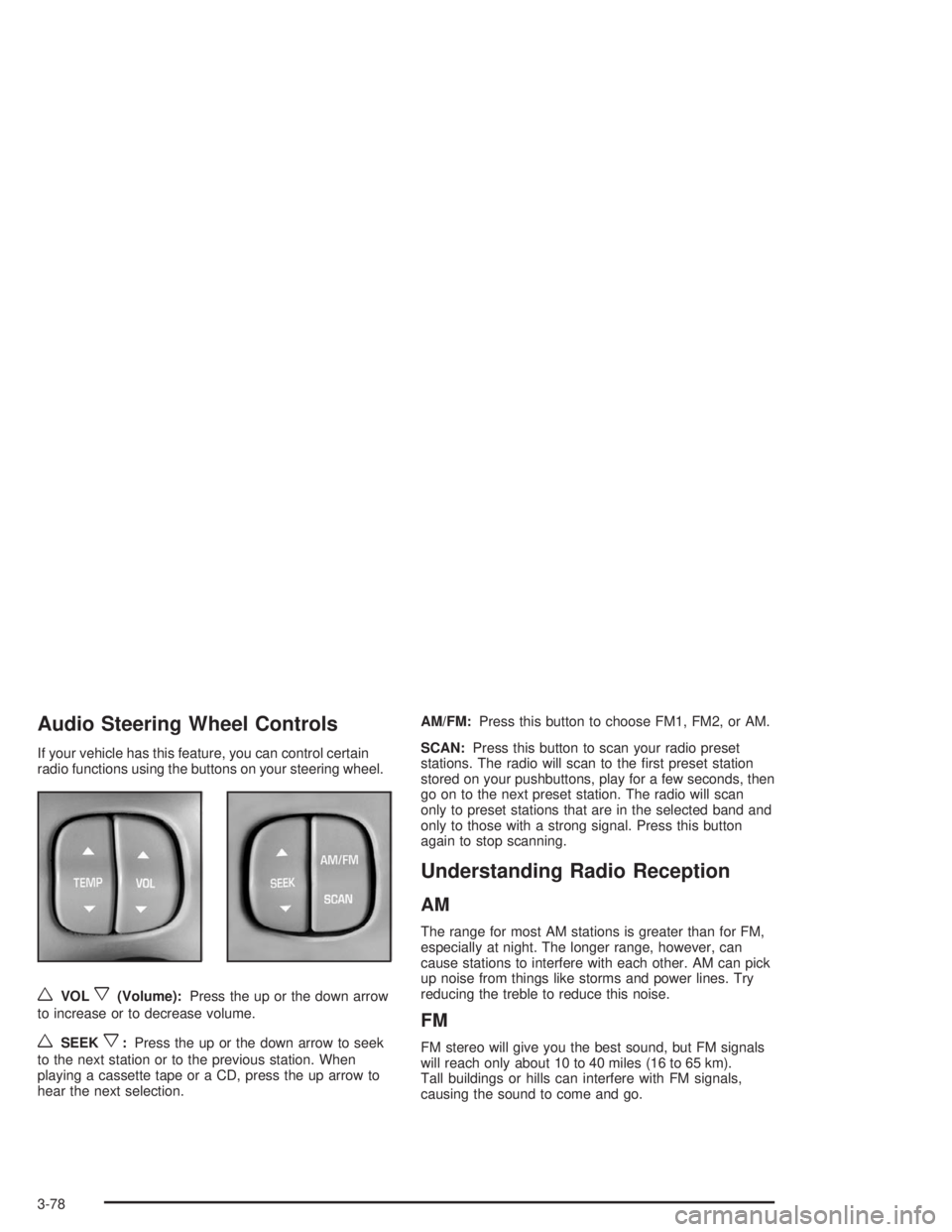
If your vehicle has this feature, you can control certain
radio functions using the buttons on your steering wheel.
wVOLx(Volume):Press the up or the down arrow
to increase or to decrease volume.
wSEEKx:Press the up or the down arrow to seek
to the next station or to the previous station. When
playing a cassette tape or a CD, press the up arrow to
hear the next selection.AM/FM:Press this button to choose FM1, FM2, or AM.
SCAN:Press this button to scan your radio preset
stations. The radio will scan to the rst preset station
stored on your pushbuttons, play for a few seconds, then
go on to the next preset station. The radio will scan
only to preset stations that are in the selected band and
only to those with a strong signal. Press this button
again to stop scanning.
Understanding Radio Reception
AM
The range for most AM stations is greater than for FM,
especially at night. The longer range, however, can
cause stations to interfere with each other. AM can pick
up noise from things like storms and power lines. Try
reducing the treble to reduce this noise.
FM
FM stereo will give you the best sound, but FM signals
will reach only about 10 to 40 miles (16 to 65 km).
Tall buildings or hills can interfere with FM signals,
causing the sound to come and go.
3-78
Page 197 of 410

Care of Your Cassette Tape Player
A tape player that is not cleaned regularly can cause
reduced sound quality, ruined cassettes, or a damaged
mechanism. Cassette tapes should be stored in their
cases away from contaminants, direct sunlight, and
extreme heat. If they are not, they may not operate
properly or may cause failure of the tape player.
Your tape player should be cleaned regularly after every
50 hours of use. Your radio may display CLN to
indicate that you have used your tape player for
50 hours without resetting the tape clean timer. If CLN
appears on the display, your cassette tape player needs
to be cleaned. It will still play tapes, but you should
clean it as soon as possible to prevent damage to your
tapes and player. If you notice a reduction in sound
quality, try a known good cassette to see if the tape or
the tape player is at fault. If this other cassette has
no improvement in sound quality, clean the tape player.
For best results, use a scrubbing action, non-abrasive
cleaning cassette with pads which scrub the tape
head as the hubs of the cleaner cassette turn.
The recommended cleaning cassette is available
through your dealer.The cut tape detection feature of your cassette tape
player may identify the cleaning cassette as a damaged
tape, in error. If the cleaning cassette ejects, insert
the cassette at least three times to ensure thorough
cleaning.
You may also choose a non-scrubbing action, wet-type
cleaner which uses a cassette with a fabric belt to
clean the tape head. This type of cleaning cassette will
not eject on its own. A non-scrubbing action cleaner
may not clean as thoroughly as the scrubbing type
cleaner. The use of a non-scrubbing action, dry-type
cleaning cassette is not recommended.
After you clean the player, press and hold the EJECT
button for ve seconds to reset the CLN indicator.
The radio will display --- to show the indicator was reset.
Cassettes are subject to wear and the sound quality
may degrade over time. Always make sure the cassette
tape is in good condition before you have your tape
player serviced.
3-79
Page 262 of 410

When to Change Engine Oil
(Vehicles With the GM Oil Life System)
If so equipped, your vehicle has a computer system
that lets you know when to change the engine oil and
lter. This is based on engine revolutions and engine
temperature, and not on mileage. Based on driving
conditions, the mileage at which an oil change will be
indicated can vary considerably. For the oil life system to
work properly, you must reset the system every time
the oil is changed.
When the system has calculated that oil life has been
diminished, it will indicate that an oil change is necessary.
A CHANGE ENGINE OIL SOON message will come on.
Change your oil as soon as possible within the next two
times you stop for fuel. It is possible that, if you are driving
under the best conditions, the oil life system may not
indicate that an oil change is necessary for over a year.
However, your engine oil and lter must be changed at
least once a year and at this time the system must be
reset. Your dealer has GM-trained service people who
will perform this work using genuine GM parts and reset
the system. It is also important to check your oil regularly
and keep it at the proper level.
If the system is ever reset accidentally, you must
change your oil at 3,000 miles (5 000 km) since your
last oil change. Remember to reset the oil life system
whenever the oil is changed.
How to Reset the Oil Life System
The GM Oil Life System calculates when to change
your engine oil and lter based on vehicle use.
Anytime your oil is changed, reset the system so it can
calculate when the next oil change is required. If a
situation occurs where you change your oil prior to a
CHANGE ENGINE OIL SOON message being
turned on, reset the system.
Always reset the engine oil life to 100% after every oil
change. It will not reset itself. To reset the Oil Life
System, do the following:
1. Display OIL LIFE INDEX on the DIC.
2. Press and hold the DIC RESET button for more than
ve seconds. The oil life will change to 100%.
3. Turn the key to OFF.
If the CHANGE ENGINE OIL SOON message comes
back on when you start your vehicle, the engine oil
life system has not reset. Repeat the procedure.
5-18
Page 315 of 410

The check tire pressure system detects differences in
tire rotation speeds that are caused by changes in
tire pressure. The system can alert you about a
low tire — but it does not replace normal tire
maintenance. SeeTires on page 5-62.
When the TIRE PRESSURE LOW message appears
on the Driver Information Center, you should stop
as soon as you can and check all your tires for damage.
If a tire is at, seeIf a Tire Goes Flat on page 5-79.
Also check the tire pressure in all four tires as soon as
you can. SeeInation - Tire Pressure on page 5-69.
Any time you adjust a tire’s pressure or have one
or more tires repaired or replaced, you will need to reset
(calibrate) the check tire pressure system. You will
also need to reset the system whenever you rotate the
tires, buy new tires and install or remove the compact
spare tire.
Do not reset the check tire pressure system without
rst correcting the cause of the problem and checking
and adjusting the pressure in all four tires. If you
reset the system when the tire pressures are incorrect,
the check tire pressure system will not work properly
and may not alert you when a tire is low or high.To reset (calibrate) the system:
1. Turn the ignition switch to RUN.
2. Press the GAGE INFO button on the DIC until
TIRE PRESSURE appears on the display.
3. Press and hold the DIC RESET button for about
ve seconds. After ve seconds, the display will
show TIRE PRESSURE RESET. If TIRE
PRESSURE RESET does not appear on the
display after about ve seconds, see your dealer for
service. After you release the DIC RESET button,
TIRE PRESSURE NORMAL will appear on the
display.
The system completes the calibration process during
driving. Calibration time can take 45 to 90 minutes,
depending on your driving habits. After the system has
been calibrated, the system will alert the driver that
a tire is low, up to a maximum speed of 65 mph
(105 km/h).
5-71
Page 317 of 410
Reset the check tire pressure system, if equipped.
SeeCheck Tire Pressure System on page 5-70.
Make certain that all wheel nuts are properly tightened.
See “Wheel Nut Torque” underCapacities and
Specications on page 5-108.
{CAUTION:
Rust or dirt on a wheel, or on the parts to
which it is fastened, can make wheel nuts
become loose after a time. The wheel could
come off and cause an accident. When you
change a wheel, remove any rust or dirt from
places where the wheel attaches to the vehicle.
In an emergency, you can use a cloth or a
paper towel to do this; but be sure to use a
scraper or wire brush later, if you need to,
to get all the rust or dirt off. See “Changing a
Flat Tire” in the Index.
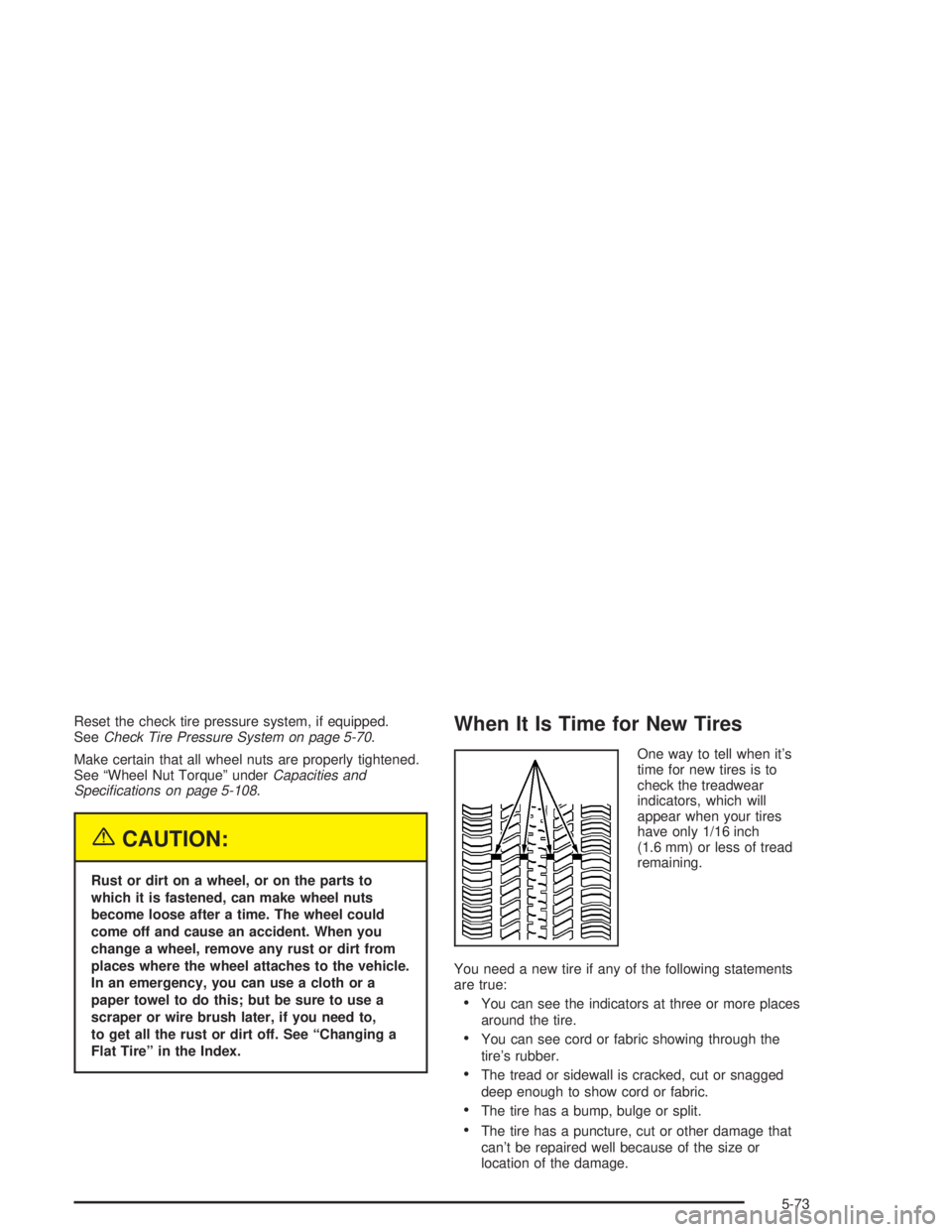
When It Is Time for New Tires
One way to tell when it’s
time for new tires is to
check the treadwear
indicators, which will
appear when your tires
have only 1/16 inch
(1.6 mm) or less of tread
remaining.
You need a new tire if any of the following statements
are true:
You can see the indicators at three or more places
around the tire.
You can see cord or fabric showing through the
tire’s rubber.
The tread or sidewall is cracked, cut or snagged
deep enough to show cord or fabric.
The tire has a bump, bulge or split.
The tire has a puncture, cut or other damage that
can’t be repaired well because of the size or
location of the damage.
5-73
Page 320 of 410
Temperature – A, B, C
The temperature grades are A (the highest), B, and C,
representing the tire’s resistance to the generation
of heat and its ability to dissipate heat when tested
under controlled conditions on a specied indoor
laboratory test wheel. Sustained high temperature can
cause the material of the tire to degenerate and
reduce tire life, and excessive temperature can lead to
sudden tire failure. The grade C corresponds to a
level of performance which all passenger car tires must
meet under the Federal Motor Vehicle Safety Standard
No. 109. Grades B and A represent higher levels of
performance on the laboratory test wheel than the
minimum required by law.
Warning: The temperature grade for this tire is
established for a tire that is properly inated and not
overloaded. Excessive speed, underination, or
excessive loading, either separately or in combination,
can cause heat buildup and possible tire failure.
Wheel Alignment and Tire Balance
The wheels on your vehicle were aligned and balanced
carefully at the factory to give you the longest tire life
and best overall performance.
Scheduled wheel alignment and wheel balancing are
not needed. However, if you notice unusual tire wear or
your vehicle pulling one way or the other, the alignment
may need to be reset. If you notice your vehicle
vibrating when driving on a smooth road, your wheels
may need to be rebalanced.
Wheel Replacement
Replace any wheel that is bent, cracked or badly rusted
or corroded. If wheel nuts keep coming loose, the
wheel, wheel bolts and wheel nuts should be replaced.
If the wheel leaks air, replace it (except some
aluminum wheels, which can sometimes be repaired).
See your dealer if any of these conditions exist.
Your dealer will know the kind of wheel you need.
5-76
Page 361 of 410
Short Trip/City Scheduled
Maintenance
The services shown in this schedule up to 100,000 miles
(166 000 km) should be repeated after 100,000 miles
(166 000 km) at the same intervals for the life of this
vehicle. The services shown at 150,000 miles
(240 000 km) should be repeated at the same interval
after 150,000 miles (240 000 km) for the life of this
vehicle.
SeePart B: Owner Checks and Services on page 6-19
andPart C: Periodic Maintenance Inspections on
page 6-23.
Footnotes
†The U.S. Environmental Protection Agency or the
California Air Resources Board has determined that the
failure to perform this maintenance item will not nullify
the emission warranty or limit recall liability prior to
the completion of the vehicle’s useful life. We, however,
urge that all recommended maintenance services be
performed at the indicated intervals and the
maintenance be recorded.
*If your vehicle has the GM Oil Life System, a computer
system lets you know when to change the oil and
lter. This is based on engine revolutions and enginetemperature, and not on mileage. Based on driving
conditions, the mileage at which an oil change will be
indicated can vary considerably. For the oil life system to
work properly, you must reset the system every time
the oil is changed.
When the system has calculated that oil life has been
diminished, it will indicate that an oil change is necessary.
A CHANGE ENGINE OIL SOON message will come on.
Change your oil as soon as possible within the next two
times you stop for fuel. It is possible that, if you are driving
under the best conditions, the oil life system may not
indicate that an oil change is necessary for over a year.
However, your engine oil and lter must be changed at
least once a year and at this time the system must be
reset. It is also important to check your oil regularly and
keep it at the proper level.
If the system is ever reset accidentally, you must
change your oil at 3,000 miles (5 000 km) since your
last oil change. Remember to reset the oil life system
whenever the oil is changed. See Engine Oil on
page 5-14 for information on resetting the system.
Whenever the tires are rotated, the Check Tire Pressure
System (if equipped) must be reset.
+A good time to check your brakes is during tire
rotation. See Brake System Inspection on page 6-24.
6-7
Page 368 of 410
Long Trip/Highway Scheduled
Maintenance
The services shown in this schedule up to 100,000 miles
(166 000 km) should be repeated after 100,000 miles
(166 000 km) at the same intervals for the life of
this vehicle. The services shown at 150,000 miles
(240 000 km) should be repeated at the same interval
after 150,000 miles (240 000 km) for the life of this
vehicle.
SeePart B: Owner Checks and Services on page 6-19
andPart C: Periodic Maintenance Inspections on
page 6-23.
Footnotes
†The U.S. Environmental Protection Agency or the
California Air Resources Board has determined that the
failure to perform this maintenance item will not nullify
the emission warranty or limit recall liability prior to
the completion of the vehicle’s useful life. We, however,
urge that all recommended maintenance services be
performed at the indicated intervals and the
maintenance be recorded.
*If your vehicle has the GM Oil Life System, a computer
system lets you know when to change the engine oil
and lter. This is based on engine revolutions and
engine temperature, and not on mileage. Based ondriving conditions, the mileage at which an oil change
will be indicated can vary considerably. For the oil
life system to work properly, you must reset the system
every time the oil is changed.
When the system has calculated that oil life has been
diminished, it will indicate that an oil change is necessary.
A CHANGE ENGINE OIL SOON message will come on.
Change your oil as soon as possible within the next two
times you stop for fuel. It is possible that, if you are driving
under the best conditions, the oil life system may not
indicate that an oil change is necessary for over a year.
However, your engine oil and lter must be changed at
least once a year and at this time the system must be
reset. It is also important to check your oil regularly and
keep it at the proper level.
If the system is ever reset accidentally, you must
change your oil at 3,000 miles (5 000 km) since your
last oil change. Remember to reset the oil life system
whenever the oil is changed. See Engine Oil on
page 5-14 for information on resetting the system.
Whenever the tires are rotated, the Check Tire Pressure
System (if equipped) must be reset.
+A good time to check your brakes is during tire
rotation. See Brake System Inspection on page 6-24.
6-14
Page 406 of 410

Reporting Safety Defects
Canadian Government..................................7-11
General Motors...........................................7-11
United States Government............................7-10
Reprogramming a Single HomeLink
®Button.......2-46
Resetting Defaults...........................................2-46
Restraint System Check...................................6-20
Checking Your Restraint Systems...................1-58
Replacing Restraint System Parts
After a Crash..........................................1-59
Restraint Systems
Checking....................................................1-58
Replacing Parts...........................................1-59
Resynchronization............................................. 2-9
Retained Accessory Power (RAP)......................2-25
Right Front Passenger Position, Safety Belts.........1-19
Roadside
Assistance Program....................................... 7-6
Rocking Your Vehicle To Get It Out...................4-31
Running Your Engine While You Are Parked..........2-35
S
Safety Belt
Reminder Light............................................3-36
Safety Belts
Care of......................................................5-93
Center Passenger Position............................1-19Safety Belts (cont.)
Driver Position............................................1-12
How to Wear Safety Belts Properly................1-12
Questions and Answers About Safety Belts........1-10
Rear Safety Belt Comfort Guides for
Children and Small Adults.........................1-24
Rear Seat Passengers.................................1-21
Right Front Passenger Position......................1-19
Safety Belt Extender....................................1-26
Safety Belt Use During Pregnancy.................1-18
Safety Belts Are for Everyone......................... 1-6
Safety Chains.................................................4-42
Safety Warnings and Symbols.............................. iii
Seats
Head Restraints............................................ 1-5
Heated Seats............................................... 1-3
Memory.....................................................2-51
Power Lumbar.............................................. 1-3
Power Seats................................................. 1-2
Reclining Seatbacks...................................... 1-4
Securing a Child Restraint
Center Rear Seat Position............................1-44
Designed for the LATCH System...................1-42
Rear Outside Seat Position...........................1-42
Right Front Seat Position..............................1-46
Security Feedback....................................2-7, 3-55
Security Light.................................................3-45
Selecting the Right Schedule, Maintenance............ 6-5
12
Page 407 of 410
Sensors.........................................................3-26
Service........................................................... 5-3
Adding Equipment to the Outside of
Your Vehicle.............................................. 5-4
Doing Your Own Work................................... 5-3
Engine Soon Light.......................................3-41
Publications Ordering Information...................7-11
Vehicle Soon Light.......................................3-45
Service Bulletins.............................................7-11
Service Engine Soon Light...............................3-41
Service Manuals.............................................7-11
Setting Preset Stations............................3-60, 3-65
Setting the Time.............................................3-58
Setting the Tone (Bass/Treble)..................3-60, 3-65
Sheet Metal Damage.......................................5-95
Shifting Into Park (P).......................................2-30
Shifting Out of Park (P)...................................2-33
Short Trip/City Denition.................................... 6-5
Short Trip/City Intervals..................................... 6-5
Short Trip/City Scheduled Maintenance................ 6-7
Skidding........................................................4-15
Some Other Rainy Weather Tips.......................4-20
Special Fabric Cleaning Problems.....................5-91
Specications, Capacities...............................5-108
Speedometer..................................................3-35
Starter Switch Check.......................................6-21
Starting Your Engine.......................................2-25
Steering........................................................4-11Steering in Emergencies..................................4-12
Steering, Suspension and Front Drive
Axle Boot and Seal Inspection.......................6-23
Steering Tips..................................................4-11
Steering Wheel Comfort Controls......................3-30
Steering Wheel Controls, Audio.........................3-78
Storage Areas
Center Console Storage Area........................2-48
Convenience Net.........................................2-49
Garage Door Opener Compartment................2-47
Glove Box..................................................2-47
Rear Seat Armrest.......................................2-49
Rear Storage Area.......................................2-49
Storing the Flat Tire and Tools..........................5-87
Storing the Spare Tire and Tools.......................5-88
Stuck in Sand, Mud, Ice or Snow......................4-30
Sun Visors.....................................................2-19
Sunroof.........................................................2-50
T
Tachometer....................................................3-35
TCS Warning Light..........................................3-39
Testing the Alarm............................................2-21
Theater Dimming............................................3-15
Theft-Deterrent, Radio.....................................3-75
Theft-Deterrent System...................................... 2-8
13