mileage BUICK PARK AVENUE 2004 Owner's Manual
[x] Cancel search | Manufacturer: BUICK, Model Year: 2004, Model line: PARK AVENUE, Model: BUICK PARK AVENUE 2004Pages: 410, PDF Size: 4.45 MB
Page 153 of 410
Speedometer and Odometer
Your speedometer lets you see your speed in both
miles per hour (mph) and kilometers per hour (km/h).
Your odometer shows how far your vehicle has been
driven, in either miles (used in the United States)
or kilometers (used in Canada).
Your vehicle has a tamper-resistant odometer. You may
wonder what happens if your vehicle needs a new
odometer installed. If possible, the new one has to be
set to the same reading the old one had. If it can’t
be, then it’s set at zero and a label must be put on the
driver’s door to show the old mileage reading and
when the new odometer was installed.
Trip Odometer
A trip odometer can tell how far you’ve driven since you
last set it back to zero. To reset it, push the RESET
button. The trip odometer is reset through the Driver
Information Center (DIC) if your vehicle is equipped
with this feature. SeeDIC Controls and Displays
on page 3-47for more information.
Tachometer
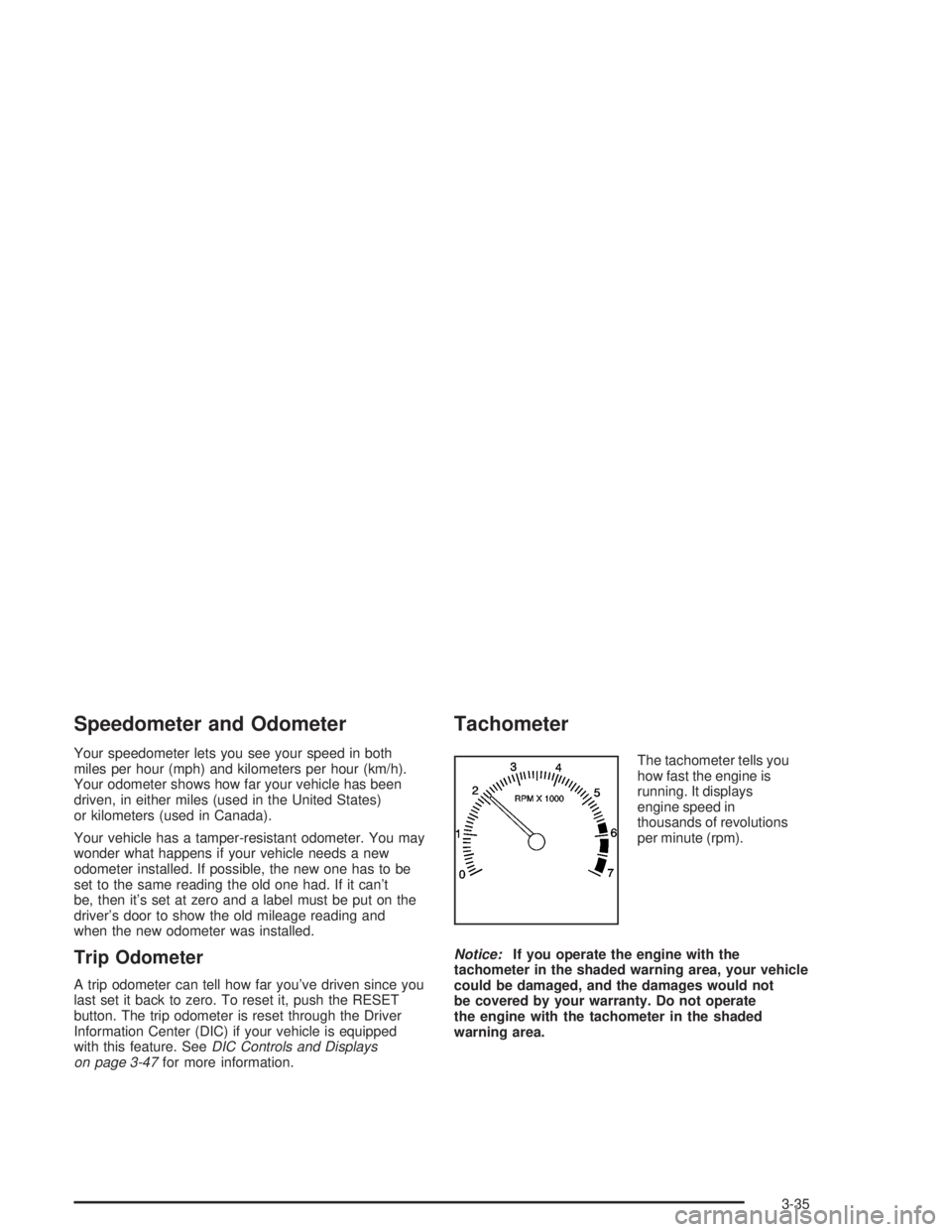
The tachometer tells you
how fast the engine is
running. It displays
engine speed in
thousands of revolutions
per minute (rpm).
Notice:If you operate the engine with the
tachometer in the shaded warning area, your vehicle
could be damaged, and the damages would not
be covered by your warranty. Do not operate
the engine with the tachometer in the shaded
warning area.
3-35
Page 166 of 410

ODO/TRIP (Odometer/Trip)
When this button is pressed, the display will show the
total mileage, and TRIP 1 or TRIP 2 miles. TRIP 1 and
TRIP 2 will display the miles traveled since the last reset.
To reset the trip odometer, press the ODO/TRIP button
until the trip miles are shown in the DIC display, then
press the RESET button. The trip odometer will now
accumulate miles until the next reset.
FUEL INFO (Information)
Fuel Used:Press the FUEL INFO button until the
display shows FUEL USED. This display will show you
how much fuel has been used since the last reset.
To learn how much fuel is used from a new starting
point, press the RESET button while the fuel used
is displayed in the DIC.
Fuel Range:Press the FUEL INFO button until the
display shows FUEL RANGE. The fuel range will
calculate the remaining distance you can drive without
refueling. This calculation is based on the average
fuel economy for the last 25 miles (40.25 km) driven,
and the fuel remaining in the fuel tank. The RESET
button does not function in this mode.Instantaneous Fuel Economy:Press the FUEL INFO
button until the display shows FUEL ECONOMY
INST. Instantaneous fuel economy varies with your
driving conditions, such as acceleration, braking and the
grade of the road being traveled. The RESET button
does not function in this mode.
Average Fuel Economy:Press the FUEL INFO button
until the display shows FUEL ECONOMY AVERAGE.
Average fuel economy is viewed as a long term
approximation of your overall driving conditions.
To learn the average fuel economy from a new starting
point, press the RESET button while the average
fuel economy is displayed in the DIC.
GAGE INFO (Information)
Coolant Temperature:Press the GAGE INFO button
until COOLANT TEMP appears in the display. If there are
no problems detected with the temperature, COOLANT
TEMP NORMAL will appear in the display. If the
temperature is too high, COOLANT TEMP HOT will
appear in the display. If you see the COOLANT TEMP
HOT message, your engine is overheated. You should
pull off the road, stop your vehicle and turn off your
engine as soon as possible. This manual explains what to
do. SeeEngine Overheating on page 5-28.
3-48
Page 247 of 410
Service
Your dealer knows your vehicle best and wants you to
be happy with it. We hope you will go to your dealer
for all your service needs. You will get genuine GM parts
and GM-trained and supported service people.
We hope you will want to keep your GM vehicle all GM.
Genuine GM parts have one of these marks:
Doing Your Own Service Work
If you want to do some of your own service work, you will
want to use the proper service manual. It tells you much
more about how to service your vehicle than this manual
can. To order the proper service manual, seeService
Publications Ordering Information on page 7-11.
Your vehicle has an air bag system. Before attempting
to do your own service work, seeServicing Your Air
Bag-Equipped Vehicle on page 1-58.
You should keep a record with all parts receipts and list
the mileage and the date of any service work you
perform. SeePart E: Maintenance Record on page 6-26.
{CAUTION:
You can be injured and your vehicle could be
damaged if you try to do service work on a
vehicle without knowing enough about it.
CAUTION: (Continued)
5-3
Page 262 of 410

When to Change Engine Oil
(Vehicles With the GM Oil Life System)
If so equipped, your vehicle has a computer system
that lets you know when to change the engine oil and
lter. This is based on engine revolutions and engine
temperature, and not on mileage. Based on driving
conditions, the mileage at which an oil change will be
indicated can vary considerably. For the oil life system to
work properly, you must reset the system every time
the oil is changed.
When the system has calculated that oil life has been
diminished, it will indicate that an oil change is necessary.
A CHANGE ENGINE OIL SOON message will come on.
Change your oil as soon as possible within the next two
times you stop for fuel. It is possible that, if you are driving
under the best conditions, the oil life system may not
indicate that an oil change is necessary for over a year.
However, your engine oil and lter must be changed at
least once a year and at this time the system must be
reset. Your dealer has GM-trained service people who
will perform this work using genuine GM parts and reset
the system. It is also important to check your oil regularly
and keep it at the proper level.
If the system is ever reset accidentally, you must
change your oil at 3,000 miles (5 000 km) since your
last oil change. Remember to reset the oil life system
whenever the oil is changed.
How to Reset the Oil Life System
The GM Oil Life System calculates when to change
your engine oil and lter based on vehicle use.
Anytime your oil is changed, reset the system so it can
calculate when the next oil change is required. If a
situation occurs where you change your oil prior to a
CHANGE ENGINE OIL SOON message being
turned on, reset the system.
Always reset the engine oil life to 100% after every oil
change. It will not reset itself. To reset the Oil Life
System, do the following:
1. Display OIL LIFE INDEX on the DIC.
2. Press and hold the DIC RESET button for more than
ve seconds. The oil life will change to 100%.
3. Turn the key to OFF.
If the CHANGE ENGINE OIL SOON message comes
back on when you start your vehicle, the engine oil
life system has not reset. Repeat the procedure.
5-18
Page 358 of 410

Part A: Scheduled Maintenance
Services
In this part are scheduled maintenance services which
are to be performed at the mileage intervals specied.
Using Your Maintenance Schedule
We at General Motors want to keep your vehicle in good
working condition. But we do not know exactly how
you will drive it. You may drive short distances only a
few times a week. Or you may drive long distances
all the time in very hot, dusty weather. You may
use your vehicle in making deliveries. Or you may drive
it to work, to do errands or in many other ways.
Because of the different ways people use their vehicles,
maintenance needs may vary. You may need more
frequent checks and replacements. So please read the
following and note how you drive. If you have
questions on how to keep your vehicle in good condition,
see your dealer.This part tells you the maintenance services you should
have done and when to schedule them.
When you go to your dealer for your service needs,
you will know that GM-trained and supported service
people will perform the work using genuine GM parts.
The proper uids and lubricants to use are listed in
Part D. Make sure whoever services your vehicle uses
these. All parts should be replaced and all necessary
repairs done before you or anyone else drives the
vehicle.
These schedules are for vehicles that:
carry passengers and cargo within recommended
limits. You will nd these on the tire and loading
information label. SeeLoading Your Vehicle
on page 4-33.
are driven on reasonable road surfaces within legal
driving limits.
use the recommended fuel. SeeGasoline Octane
on page 5-4.
6-4
Page 361 of 410

Short Trip/City Scheduled
Maintenance
The services shown in this schedule up to 100,000 miles
(166 000 km) should be repeated after 100,000 miles
(166 000 km) at the same intervals for the life of this
vehicle. The services shown at 150,000 miles
(240 000 km) should be repeated at the same interval
after 150,000 miles (240 000 km) for the life of this
vehicle.
SeePart B: Owner Checks and Services on page 6-19
andPart C: Periodic Maintenance Inspections on
page 6-23.
Footnotes
†The U.S. Environmental Protection Agency or the
California Air Resources Board has determined that the
failure to perform this maintenance item will not nullify
the emission warranty or limit recall liability prior to
the completion of the vehicle’s useful life. We, however,
urge that all recommended maintenance services be
performed at the indicated intervals and the
maintenance be recorded.
*If your vehicle has the GM Oil Life System, a computer
system lets you know when to change the oil and
lter. This is based on engine revolutions and enginetemperature, and not on mileage. Based on driving
conditions, the mileage at which an oil change will be
indicated can vary considerably. For the oil life system to
work properly, you must reset the system every time
the oil is changed.
When the system has calculated that oil life has been
diminished, it will indicate that an oil change is necessary.
A CHANGE ENGINE OIL SOON message will come on.
Change your oil as soon as possible within the next two
times you stop for fuel. It is possible that, if you are driving
under the best conditions, the oil life system may not
indicate that an oil change is necessary for over a year.
However, your engine oil and lter must be changed at
least once a year and at this time the system must be
reset. It is also important to check your oil regularly and
keep it at the proper level.
If the system is ever reset accidentally, you must
change your oil at 3,000 miles (5 000 km) since your
last oil change. Remember to reset the oil life system
whenever the oil is changed. See Engine Oil on
page 5-14 for information on resetting the system.
Whenever the tires are rotated, the Check Tire Pressure
System (if equipped) must be reset.
+A good time to check your brakes is during tire
rotation. See Brake System Inspection on page 6-24.
6-7
Page 368 of 410

Long Trip/Highway Scheduled
Maintenance
The services shown in this schedule up to 100,000 miles
(166 000 km) should be repeated after 100,000 miles
(166 000 km) at the same intervals for the life of
this vehicle. The services shown at 150,000 miles
(240 000 km) should be repeated at the same interval
after 150,000 miles (240 000 km) for the life of this
vehicle.
SeePart B: Owner Checks and Services on page 6-19
andPart C: Periodic Maintenance Inspections on
page 6-23.
Footnotes
†The U.S. Environmental Protection Agency or the
California Air Resources Board has determined that the
failure to perform this maintenance item will not nullify
the emission warranty or limit recall liability prior to
the completion of the vehicle’s useful life. We, however,
urge that all recommended maintenance services be
performed at the indicated intervals and the
maintenance be recorded.
*If your vehicle has the GM Oil Life System, a computer
system lets you know when to change the engine oil
and lter. This is based on engine revolutions and
engine temperature, and not on mileage. Based ondriving conditions, the mileage at which an oil change
will be indicated can vary considerably. For the oil
life system to work properly, you must reset the system
every time the oil is changed.
When the system has calculated that oil life has been
diminished, it will indicate that an oil change is necessary.
A CHANGE ENGINE OIL SOON message will come on.
Change your oil as soon as possible within the next two
times you stop for fuel. It is possible that, if you are driving
under the best conditions, the oil life system may not
indicate that an oil change is necessary for over a year.
However, your engine oil and lter must be changed at
least once a year and at this time the system must be
reset. It is also important to check your oil regularly and
keep it at the proper level.
If the system is ever reset accidentally, you must
change your oil at 3,000 miles (5 000 km) since your
last oil change. Remember to reset the oil life system
whenever the oil is changed. See Engine Oil on
page 5-14 for information on resetting the system.
Whenever the tires are rotated, the Check Tire Pressure
System (if equipped) must be reset.
+A good time to check your brakes is during tire
rotation. See Brake System Inspection on page 6-24.
6-14
Page 384 of 410

Customer Assistance
Information
Customer Satisfaction Procedure
Your satisfaction and goodwill are important to
your dealer and to Buick. Normally, any concerns with
the sales transaction or the operation of your vehicle
will be resolved by your dealer’s sales or service
departments. Sometimes, however, despite the best
intentions of all concerned, misunderstandings can
occur. If your concern has not been resolved to your
satisfaction, the following steps should be taken:
STEP ONE:Discuss your concern with a member of
dealership management. Normally, concerns can
be quickly resolved at that level. If the matter has
already been reviewed with the sales, service or parts
manager, contact the owner of the dealership or
the general manager.
STEP TWO:If after contacting a member of dealership
management, it appears your concern cannot be
resolved by the dealership without further help, contact
the Buick Customer Assistance Center by calling
1-800-521-7300. In Canada, contact GM of Canada
Customer Communication Centre in Oshawa by calling
1-800-263-3777 (English) or 1-800-263-7854 (French).We encourage you to call the toll-free number in order
to give your inquiry prompt attention. Please have
the following information available to give the Customer
Assistance Representative:
Vehicle Identication Number (This is available from
the vehicle registration or title, or the plate at the
top left of the instrument panel and visible through
the windshield.)
Dealership name and location
Vehicle delivery date and present mileage
When contacting Buick, please remember that your
concern will likely be resolved at a dealer’s facility.
That is why we suggest you follow Step One rst if you
have a concern.
STEP THREE:Both General Motors and your dealer
are committed to making sure you are completely
satised with your new vehicle. However, if you continue
to remain unsatised after following the procedure
outlined in Steps One and Two, you should le with the
BBB Auto Line Program to enforce any additional
rights you may have. Canadian owners refer to your
Warranty and Owner Assistance Information booklet for
information on the Canadian Motor Vehicle Arbitration
Plan (CAMVAP).
7-2
Page 385 of 410
The BBB Auto Line Program is an out of court program
administered by the Council of Better Business
Bureaus to settle automotive disputes regarding
vehicle repairs or the interpretation of the New Vehicle
Limited Warranty. Although you may be required to
resort to this informal dispute resolution program prior
to ling a court action, use of the program is free of
charge and your case will generally be heard within
40 days. If you do not agree with the decision given in
your case, you may reject it and proceed with any other
venue for relief available to you.
You may contact the BBB Auto Line Program using the
toll-free telephone number or write them at the
following address:
BBB Auto Line Program
Council of Better Business Bureaus, Inc.
4200 Wilson Boulevard
Suite 800
Arlington, VA 22203-1804
Telephone: 1-800-955-5100
This program is available in all 50 states and the
District of Columbia. Eligibility is limited by vehicle age,
mileage and other factors. General Motors reserves
the right to change eligibility limitations and/or
discontinue its participation in this program.Online Owner Center
The Owner Center is a resource for your GM ownership
needs. You can nd your specic vehicle information
all in one place.
The Owner Center allows you to:
Get e-mail service reminders.
Access information about your specic vehicle,
including tips and videos and an electronic
version of this owner’s manual. (United States only)
Keep track of your vehicle’s service history and
maintenance schedule.
Find GM dealers for service nationwide.
Receive special promotions and privileges only
available to members. (United States only)
Refer to the web for updated information.
To register your vehicle, visit www.MyGMLink.com.
(United States) or My GM Canada within
www.gmcanada.com (Canada).
7-3
Page 388 of 410
Roadside Assistance Program
Buick Motor Division is proud to offer Buick Premium
Roadside Assistance to customers for vehicles covered
under the 3 year/36,000 mile (60 000 km) new car
warranty (whichever occurs rst).
Our commitment to Buick owners has always included
superior service through our network of Buick dealers.
Buick Premium Roadside Assistance provides an
extra measure of convenience and security.
Buick’s Roadside Assistance toll-free number is staffed
by a team of technically trained advisors, who are
available 24 hours a day, 365 days a year.
We take anxiety out of uncertain situations by providing
minor repair information over the phone or making
arrangements to tow your vehicle to the nearest
Buick dealer.
We will provide the following services for
3 years/36,000 miles (60 000 km), at no expense to you:
Fuel delivery
Lock-out service (identication required)
Tow to nearest dealership for warranty service
Change a at tire
Jump startsWe have quick, easy access to telephone numbers of the
following additional services depending on your needs:
Hotels
Glass replacement
Tire repair facilities
Rental vehicle or taxis
Airports or train stations
Police, re department or hospitals
In many instances, mechanical failures are covered
under Buick’s comprehensive warranty. However, when
other services are utilized, our advisors will explain
any payment obligations you might incur.
For prompt and efficient assistance when calling, please
provide the following information to give the advisor:
Location of vehicle
Telephone number of your location
Vehicle model, year and color
Mileage of vehicle
Vehicle Identication Number (VIN)
Vehicle license plate number
7-6