change time BUICK PARK AVENUE 2005 Owner's Guide
[x] Cancel search | Manufacturer: BUICK, Model Year: 2005, Model line: PARK AVENUE, Model: BUICK PARK AVENUE 2005Pages: 388, PDF Size: 2.55 MB
Page 183 of 388
If the error occurred while trying to play a CD in the
CD player or changer, it could be for one of the
following reasons:
It is very hot. When the temperature returns to
normal, the CD should play.
You are driving on a very rough road. When the
road becomes smoother, the CD should play.
The CD is dirty, scratched, wet, or upside down.
The air is very humid. If so, wait about an hour and
try again.
There may have been a problem while burning
the CD.
The label may be caught in the CD player.
If any error occurs repeatedly or if an error cannot be
corrected, contact your dealer.
If the radio displays an error message other than the
error codes listed previously, write it down and provide it
to your dealer when reporting the problem.
Personal Choice Radio Controls
If your vehicle has this feature it will enable two drivers
to store and recall personal settings for radio presets,
last tuned station, volume, tone, and audio source
(radio, cassette, or CD).
The memory buttons, 1 and 2, are located on the
driver’s door panel and correspond to the numbers,
1 and 2, found on the back of each remote keyless entry
transmitter.
To recall audio sources, press the unlock button on the
remote keyless entry transmitter and turn the ignition
on. The radio settings will adjust to where they were last
set by the identied driver, 1 or 2.
To program this feature, do the following:
1. Set all radio preferences. For more information see
“Setting Preset Stations” and “Setting the Tone”
listed for the radio.
2. Locate the memory buttons on the driver’s
door panel.
3. Press one of the memory buttons, 1 or 2, until you
hear two beeps. The beeps conrm that the
selection has been saved and can now be recalled.
Follow these steps each time you want to change the
stored settings.
3-69
Page 196 of 388
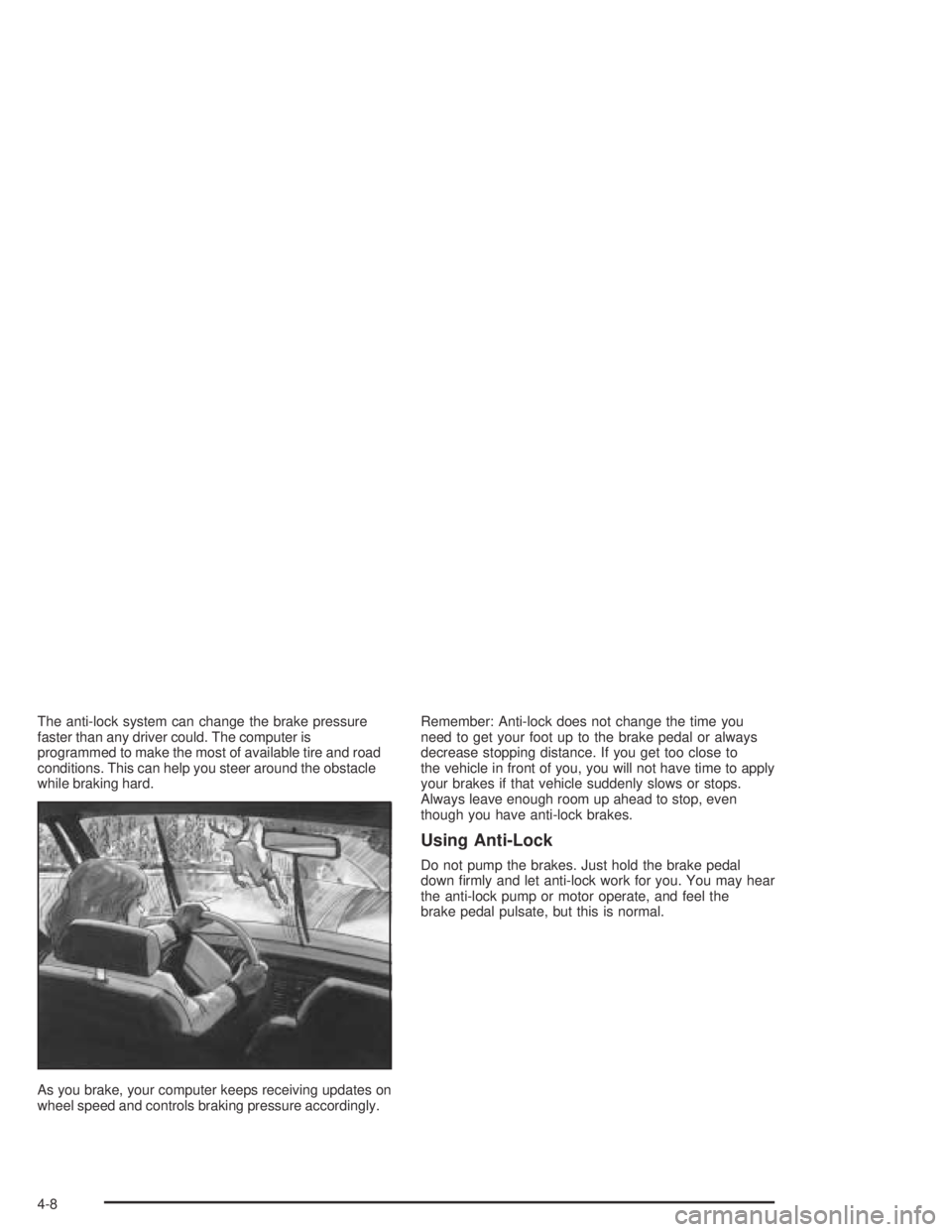
The anti-lock system can change the brake pressure
faster than any driver could. The computer is
programmed to make the most of available tire and road
conditions. This can help you steer around the obstacle
while braking hard.
As you brake, your computer keeps receiving updates on
wheel speed and controls braking pressure accordingly.Remember: Anti-lock does not change the time you
need to get your foot up to the brake pedal or always
decrease stopping distance. If you get too close to
the vehicle in front of you, you will not have time to apply
your brakes if that vehicle suddenly slows or stops.
Always leave enough room up ahead to stop, even
though you have anti-lock brakes.
Using Anti-Lock
Do not pump the brakes. Just hold the brake pedal
down rmly and let anti-lock work for you. You may hear
the anti-lock pump or motor operate, and feel the
brake pedal pulsate, but this is normal.
4-8
Page 198 of 388
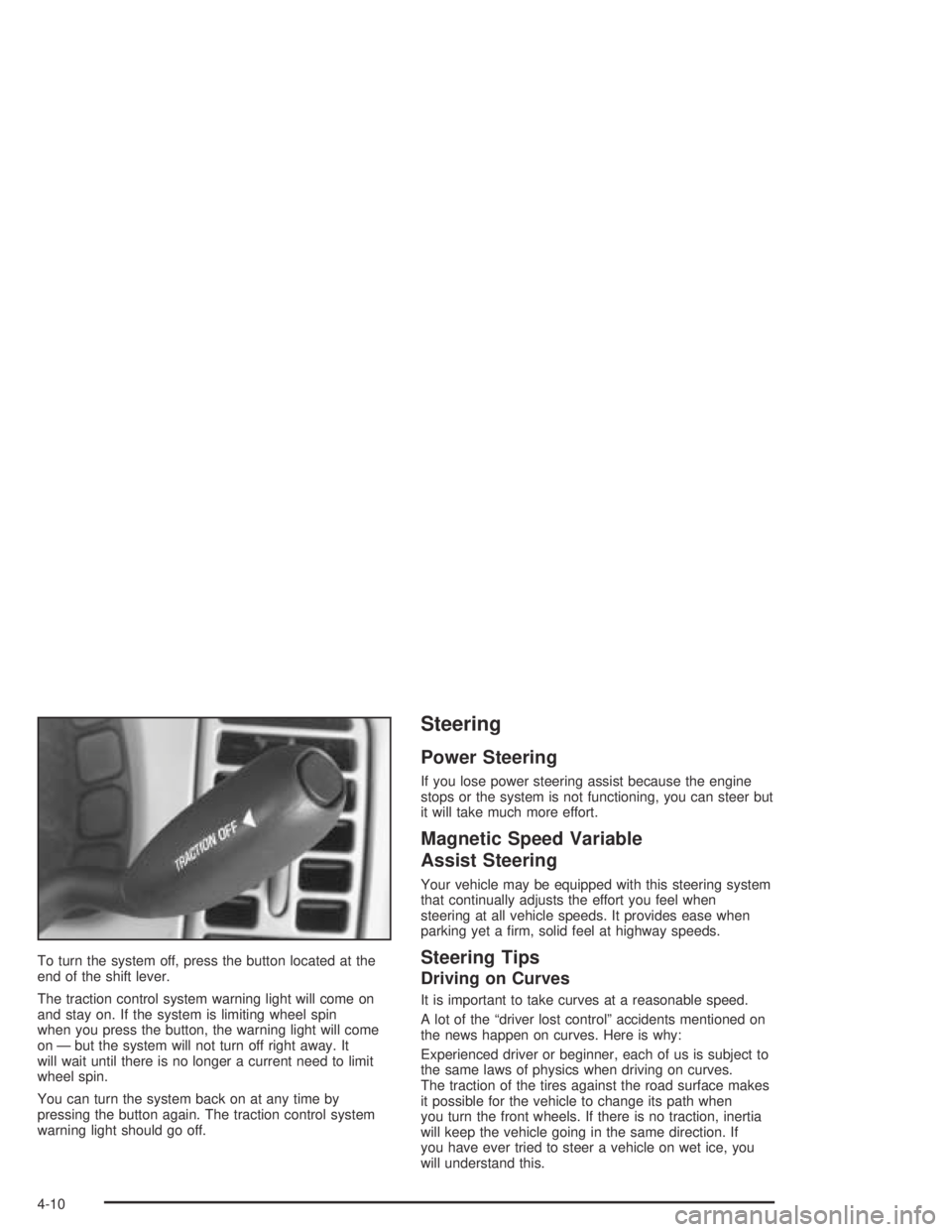
To turn the system off, press the button located at the
end of the shift lever.
The traction control system warning light will come on
and stay on. If the system is limiting wheel spin
when you press the button, the warning light will come
on — but the system will not turn off right away. It
will wait until there is no longer a current need to limit
wheel spin.
You can turn the system back on at any time by
pressing the button again. The traction control system
warning light should go off.
Steering
Power Steering
If you lose power steering assist because the engine
stops or the system is not functioning, you can steer but
it will take much more effort.
Magnetic Speed Variable
Assist Steering
Your vehicle may be equipped with this steering system
that continually adjusts the effort you feel when
steering at all vehicle speeds. It provides ease when
parking yet a rm, solid feel at highway speeds.
Steering Tips
Driving on Curves
It is important to take curves at a reasonable speed.
A lot of the “driver lost control” accidents mentioned on
the news happen on curves. Here is why:
Experienced driver or beginner, each of us is subject to
the same laws of physics when driving on curves.
The traction of the tires against the road surface makes
it possible for the vehicle to change its path when
you turn the front wheels. If there is no traction, inertia
will keep the vehicle going in the same direction. If
you have ever tried to steer a vehicle on wet ice, you
will understand this.
4-10
Page 202 of 388
Check your mirrors, glance over your shoulder, and
start your left lane change signal before moving out
of the right lane to pass. When you are far enough
ahead of the passed vehicle to see its front in your
inside mirror, activate your right lane change signal
and move back into the right lane. Remember that
your right outside mirror is convex. The vehicle you
just passed may seem to be farther away from you
than it really is.
Try not to pass more than one vehicle at a time on
two-lane roads. Reconsider before passing the
next vehicle.
Do not overtake a slowly moving vehicle too rapidly.
Even though the brake lamps are not ashing, it may
be slowing down or starting to turn.
If you are being passed, make it easy for the
following driver to get ahead of you. Perhaps you can
ease a little to the right.
Loss of Control
Let us review what driving experts say about what
happens when the three control systems — brakes,
steering, and acceleration — do not have enough friction
where the tires meet the road to do what the driver
has asked.
In any emergency, do not give up. Keep trying to
steer and constantly seek an escape route or area of
less danger.
Skidding
In a skid, a driver can lose control of the vehicle.
Defensive drivers avoid most skids by taking reasonable
care suited to existing conditions, and by not overdriving
those conditions. But skids are always possible.
The three types of skids correspond to your vehicle’s
three control systems. In the braking skid, your wheels
are not rolling. In the steering or cornering skid, too much
speed or steering in a curve causes tires to slip and lose
cornering force. And in the acceleration skid, too much
throttle causes the driving wheels to spin.
4-14
Page 225 of 388
Towing a Trailer
{CAUTION:
If you do not use the correct equipment and
drive properly, you can lose control when you
pull a trailer. For example, if the trailer is too
heavy, the brakes may not work well — or even
at all. You and your passengers could be
seriously injured. You may also damage your
vehicle; the resulting repairs would not be
covered by your warranty. Pull a trailer only if
you have followed all the steps in this section.
Ask your dealer for advice and information
about towing a trailer with your vehicle.
Your vehicle can tow a trailer if it is equipped with the
proper trailer towing equipment. To identify what
the vehicle trailering capacity is for your vehicle, you
should read the information in “Weight of the Trailer” that
appears later in this section. But trailering is different
than just driving your vehicle by itself. Trailering means
changes in handling, acceleration, braking, durability
and fuel economy. Successful, safe trailering takes
correct equipment, and it has to be used properly.That is the reason for this part. In it are many
time-tested, important trailering tips and safety rules.
Many of these are important for your safety and that of
your passengers. So please read this section carefully
before you pull a trailer.
Load-pulling components such as the engine, transaxle,
wheel assemblies and tires are forced to work harder
against the drag of the added weight. The engine
is required to operate at relatively higher speeds and
under greater loads, generating extra heat. Also,
the trailer adds considerably to wind resistance,
increasing the pulling requirements.
If You Do Decide To Pull A Trailer
If you do, here are some important points:
There are many different laws, including speed limit
restrictions, having to do with trailering. Make sure
your rig will be legal, not only where you live
but also where you will be driving. A good source
for this information can be state or provincial police.
Consider using a sway control. You can ask a hitch
dealer about sway controls.
Do not tow a trailer at all during the rst 1,000 miles
(1 600 km) your new vehicle is driven. Your engine,
axle or other parts could be damaged.
4-37
Page 249 of 388
Engine Oil Life System
When to Change Engine Oil (Vehicles
With the GM Oil Life System)
If so equipped, your vehicle has a computer system that
lets you know when to change the engine oil and
lter. This is based on engine revolutions and engine
temperature, and not on mileage. Based on driving
conditions, the mileage at which an oil change will be
indicated can vary considerably. For the oil life system to
work properly, you must reset the system every time
the oil is changed.
When the system has calculated that oil life has been
diminished, it will indicate that an oil change is
necessary. A CHANGE ENGINE OIL SOON message
will come on. Change your oil as soon as possible within
the next two times you stop for fuel. It is possible that,
if you are driving under the best conditions, the oil
life system may not indicate that an oil change is
necessary for over a year. However, your engine oil and
lter must be changed at least once a year and at
this time the system must be reset. Your dealer has
GM-trained service people who will perform this
work using genuine GM parts and reset the system. It is
also important to check your oil regularly and keep it
at the proper level.If the system is ever reset accidentally, you must
change your oil at 3,000 miles (5 000 km) since your
last oil change. Remember to reset the oil life system
whenever the oil is changed.How to Reset the Oil Life System
The GM Oil Life System calculates when to change
your engine oil and lter based on vehicle use. Anytime
your oil is changed, reset the system so it can
calculate when the next oil change is required. If a
situation occurs where you change your oil prior to a
CHANGE ENGINE OIL SOON message being
turned on, reset the system.
Always reset the engine oil life to 100% after every oil
change. It will not reset itself. To reset the Oil Life
System, do the following:
1. Display OIL LIFE INDEX on the DIC.
2. Press and hold the DIC RESET button for
more than ve seconds. The oil life will change
to 100%.
3. Turn the key to OFF.
If the CHANGE ENGINE OIL SOON message comes
back on when you start your vehicle, the engine oil
life system has not reset. Repeat the procedure.
5-17
Page 254 of 388
Automatic Transaxle Fluid
When to Check and Change
A good time to check your automatic transaxle uid
level is when the engine oil is changed.
Change both the uid and lter every 50,000 miles
(83 000 km) if the vehicle is mainly driven under one or
more of these conditions:
In heavy city traffic where the outside temperature
regularly reaches 90°F (32°C) or higher.
In hilly or mountainous terrain.
When doing frequent trailer towing.
Uses such as found in taxi, police or
delivery service.
If you do not use your vehicle under any of these
conditions, change the uid and lter at 100,000 miles
(166 000 km).
How to Check
Because this operation can be a little difficult, you may
choose to have this done at a GM dealer.
If you do it yourself, be sure to follow all the instructions
here, or you could get a false reading on the dipstick.Notice:Too much or too little uid can damage the
transaxle. Too much can mean that some of the
uid could come out and fall on hot engine or
exhaust system parts, starting a re. Too little uid
could cause the transaxle to overheat. Be sure
to get an accurate reading if you check the
transaxle uid.
Wait at least 30 minutes before checking the transaxle
uid level if you have been driving:
When outside temperatures are above 90°F (32°C).
At high speed for quite a while.
In heavy traffic — especially in hot weather.
While pulling a trailer.
To get the right reading, the uid should be at normal
operating temperature, which is 180°F to 200°F
(82°C to 93°C).
Get the vehicle warmed up by driving about 15 miles
(24 km) when outside temperatures are above 50°F
(10°C). If it is colder than 50°F (10°C), you may have to
drive longer.
5-22
Page 271 of 388
{CAUTION:
The brake wear warning sound means that
soon your brakes will not work well. That
could lead to an accident. When you hear
the brake wear warning sound, have your
vehicle serviced.
Notice:Continuing to drive with worn-out brake
pads could result in costly brake repair.
Some driving conditions or climates may cause a brake
squeal when the brakes are rst applied or lightly
applied. This does not mean something is wrong with
your brakes.
Properly torqued wheel nuts are necessary to help
prevent brake pulsation. When tires are rotated, inspect
brake pads for wear and evenly tighten wheel nuts in
the proper sequence to GM torque specications.
Brake linings should always be replaced as complete
axle sets.
SeeBrake System Inspection on page 6-24.
Brake Pedal Travel
See your dealer if the brake pedal does not return to
normal height, or if there is a rapid increase in
pedal travel. This could be a sign of brake trouble.
Brake Adjustment
Every time you apply the brakes, with or without the
vehicle moving, your brakes adjust for wear.
Replacing Brake System Parts
The braking system on a vehicle is complex. Its many
parts have to be of top quality and work well together if
the vehicle is to have really good braking. Your
vehicle was designed and tested with top-quality GM
brake parts. When you replace parts of your braking
system — for example, when your brake linings
wear down and you need new ones put in — be sure
you get new approved GM replacement parts. If you do
not, your brakes may no longer work properly. For
example, if someone puts in brake linings that are wrong
for your vehicle, the balance between your front and
rear brakes can change — for the worse. The braking
performance you have come to expect can change
in many other ways if someone puts in the wrong
replacement brake parts.
5-39
Page 298 of 388
The check tire pressure system detects differences in
tire rotation speeds that are caused by changes in
tire pressure. The system can alert you about a
low tire — but it does not replace normal tire
maintenance. SeeTires on page 5-58.
When the TIRE PRESSURE LOW message appears on
the Driver Information Center, you should stop as
soon as you can and check all your tires for damage. If
a tire is at, seeIf a Tire Goes Flat on page 5-73.
Also check the tire pressure in all four tires as soon as
you can. SeeInation - Tire Pressure on page 5-64.
Any time you adjust a tire’s pressure or have one
or more tires repaired or replaced, you will need to reset
(calibrate) the check tire pressure system. You will
also need to reset the system whenever you rotate the
tires, buy new tires and install or remove the compact
spare tire.
Do not reset the check tire pressure system without rst
correcting the cause of the problem and checking
and adjusting the pressure in all four tires. If you reset
the system when the tire pressures are incorrect,
the check tire pressure system will not work properly
and may not alert you when a tire is low or high.To reset (calibrate) the system:
1. Turn the ignition switch to RUN.
2. Press the GAGE INFO button on the DIC until TIRE
PRESSURE appears on the display.
3. Press and hold the DIC RESET button for about
ve seconds. After ve seconds, the display will
show TIRE PRESSURE RESET. If TIRE
PRESSURE RESET does not appear on the
display after about ve seconds, see your dealer for
service. After you release the DIC RESET button,
TIRE PRESSURE NORMAL will appear on
the display.
The system completes the calibration process during
driving. Calibration time can take 45 to 90 minutes,
depending on your driving habits. After the system
has been calibrated, the system will alert the driver
that a tire is low, up to a maximum speed of
65 mph (105 km/h).
5-66
Page 299 of 388
Tire Inspection and Rotation
Tires should be rotated every 5,000 to 8,000 miles
(8 000 to 13 000 km).
Any time you notice unusual wear rotate your tires as
soon as possible and check wheel alignment. Also
check for damaged tires or wheels. SeeWhen It Is Time
for New Tires on page 5-68andWheel Replacement
on page 5-71for more information.
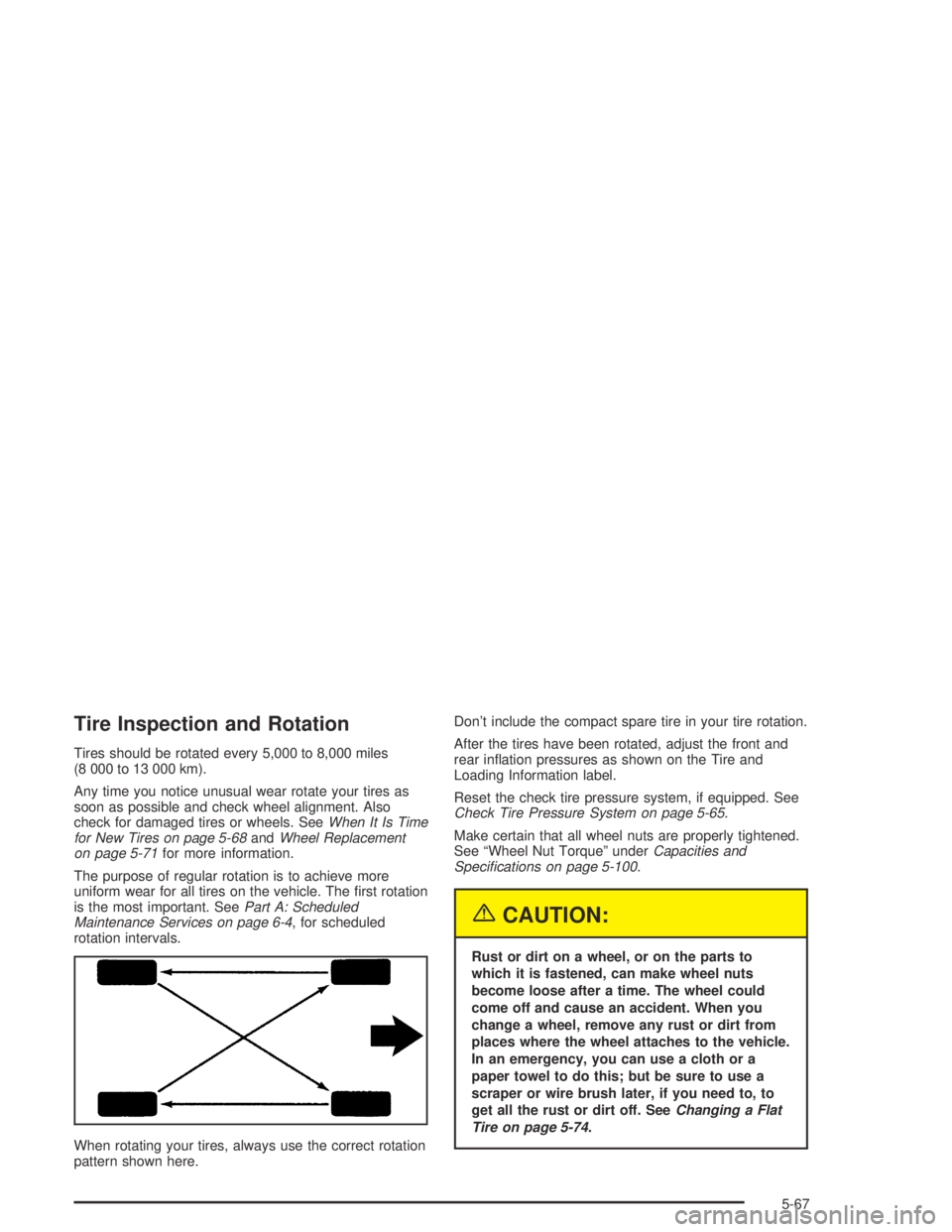
The purpose of regular rotation is to achieve more
uniform wear for all tires on the vehicle. The rst rotation
is the most important. SeePart A: Scheduled
Maintenance Services on page 6-4, for scheduled
rotation intervals.
When rotating your tires, always use the correct rotation
pattern shown here.Don’t include the compact spare tire in your tire rotation.
After the tires have been rotated, adjust the front and
rear ination pressures as shown on the Tire and
Loading Information label.
Reset the check tire pressure system, if equipped. See
Check Tire Pressure System on page 5-65.
Make certain that all wheel nuts are properly tightened.
See “Wheel Nut Torque” underCapacities and
Specications on page 5-100.
{CAUTION:
Rust or dirt on a wheel, or on the parts to
which it is fastened, can make wheel nuts
become loose after a time. The wheel could
come off and cause an accident. When you
change a wheel, remove any rust or dirt from
places where the wheel attaches to the vehicle.
In an emergency, you can use a cloth or a
paper towel to do this; but be sure to use a
scraper or wire brush later, if you need to, to
get all the rust or dirt off. SeeChanging a Flat
Tire on page 5-74.
5-67