ECO mode BUICK RAINIER 2004 Owner's Guide
[x] Cancel search | Manufacturer: BUICK, Model Year: 2004, Model line: RAINIER, Model: BUICK RAINIER 2004Pages: 452, PDF Size: 4.51 MB
Page 204 of 452
AUTO EQ (Automatic Equalization):Press AUTO EQ
to select the desired equalization setting while playing
a CD. The equalization will be automatically set
whenever you play a CD. For more information on
AUTO EQ, see “AUTO EQ” listed previously in
this section.
sSEEKt:Press the left arrow to go to the start of
the current track, if more than ten seconds have passed.
Press the right arrow to go to the next track. If you
press either arrow more than once, the player will
continue moving backward or forward through the CD.
sSCANt:To scan one CD, press and hold
either SCAN arrow for more than two seconds until
SCAN appears on the display and you hear a beep.
Use this feature to listen to 10 seconds of each track of
the currently selected CD. Press either SCAN arrow
again, to stop scanning.
To scan all loaded CDs, press and hold either SCAN
arrow for more than four seconds until CD SCAN
appears on the display and you hear a beep. Use this
feature to listen to 10 seconds of the rst track of
each CD loaded. Press either SCAN arrow again,
to stop scanning.RCL (Recall):Press this knob to see how long the
current track has been playing. To change the default
on the display (track or elapsed time), press the
knob until you see the display you want, then hold the
knob until the display ashes. The selected display
will now be the default.
BAND:Press this button to play the radio when a
CD(s) is in the player.
Using Song List Mode
The six-disc CD changer has a feature called song list.
This feature is capable of saving 20 track selections.
To save tracks into the song list feature, perform
the following steps:
1. Turn the CD player on and load it with at least one
CD. See “LOAD CD” listed previously in this section
for more information.
2. Check to see that the CD changer is not in song
ist mode. S-LIST should not appear in the display.
If S-LIST is present, press the SONG LIST
button to turn it off.
3. Select the desired CD by pressing the numbered
pushbutton and then use the SEEK SCAN right
arrow to locate the track that you want to save.
The track will begin to play.
3-96
Page 205 of 452
4. Press and hold the SONG LIST button to save the
track into memory. When SONG LIST is pressed a
beep will be heard immediately. After two seconds
of continuously pressing SONG LIST, two beeps will
sound to conrm that the track has been saved.
5. Repeat Steps 3 and 4 for saving other selections.
S-LIST FULL will appear on the display if you try to save
more than 20 selections.
To play the song list, press the SONG LIST button.
One beep will be heard and S-LIST will appear on the
display. The recorded tracks will begin to play in
the order that they were saved.
You may seek through the song list by using the SEEK
SCAN arrows. Seeking past the last saved track will
return you to the rst saved track.
To delete tracks from the song list, perform the
following steps:
1. Turn the CD player on.
2. Press the SONG LIST button to turn song list on.
S-LIST will appear on the display.
3. Press the SEEK SCAN arrows to select the desired
track to be deleted.4. Press and hold the SONG LIST button. When
SONG LIST is pressed, a beep will be heard
immediately. After two seconds of continuously
pressing the SONG LIST button, two beeps will be
heard to conrm that the track has been deleted.
After a track has been deleted, the remaining tracks are
moved up the list. When another track is added to the
song list, the track will be added to the end of the list.
To delete the entire song list, perform the following steps:
1. Turn the CD player on.
2. Press the SONG LIST button to turn song list on.
S-LIST will appear on the display.
3. Press and hold the SONG LIST button. A beep will
be heard, followed by two beeps after two seconds
and a nal beep will be heard after four seconds.
S-LIST EMPTY will appear on the display indicating
that the song list has been deleted.
If a CD is ejected, and the song list contains saved
tracks from that CD, those tracks are automatically
deleted from the song list. Any tracks saved to the song
list again are added to the bottom of the list.
To end song list mode, press the SONG LIST button.
One beep will be heard and S-LIST will be removed from
the display.
3-97
Page 217 of 452
Problem Recommended Action
No power. The ignition might not
be in on or accessory.
Check to make sure the
parental control button
has not been activated.
(The power indicator light
will ash if parental
control is active.)
Disc will not play. The system might be off.
Check to make sure the
parental control button
has not been activated.
(The power indicator
light will ash if parental
control is active.)
The system might be in
auxiliary mode.
The disc is upside down
or is not compatible.
The picture does not
ll the screen. There
are black borders on
the top and bottom or
on both sides or it looks
stretched out.Check the display
mode settings in the
display menu.Problem Recommended Action
The disc was ejected,
but it was pulled back
into the DVD player.The disc is being stored
in the DVD player. Press
the eject button again to
eject the disc.
In auxiliary mode, the
picture moves or scrolls.Check the auxiliary
input connections at both
devices.
Change the Video Format
to PAL or NTSC.
The language in the
audio or on the screen
is wrong.Check the audio or
language selection in
the main DVD menu.
The remote control
does not work.Check to make sure there
is no obstruction between
the remote control and the
infrared window located
below the video screen.
Check the batteries to
make sure they are not
dead or installed
incorrectly.
Check to make sure the
parental control button
has not been activated.
(The power indicator light
will ash if parental
control is active.)
3-109
Page 218 of 452
Problem Recommended Action
After stopping the player,
I push Play but
sometimes the DVD
starts where I left off
and sometimes at the
beginning.If the stop button was
pressed one time, the
DVD player will resume
playing where the DVD
was stopped. If the stop
button was pressed two
times the DVD player will
begin to play from the
beginning of the DVD.
The auxiliary source is
running but there is no
picture or sound.Check that the DVD
player is in the auxiliary
source mode.
Check the auxiliary input
connections at both
devices.
My disc is stuck in the
player. The Load/Eject
button does not work.Turn the DVD power off,
then on and press the
Load/Eject button on the
DVD player.
Do not attempt to forcibly
remove the disc from the
DVD player. This could
permanently damage the
disc and DVD player.Problem Recommended Action
Sometimes the wireless
headphone audio cuts
out or buzzes.Check for obstructions,
low batteries, reception
range, and interference
from cellular telephone
towers or by using your
cellular telephone in
the vehicle.
Check that the
headphones are facing
the front of the vehicle.
I lost the remote and/or
the headphones.See your dealer for
assistance.
The DVD is playing,
but there is no picture
or sound.Check that the DVD
player is in DVD mode.
The audio/video skips
or jumps.The DVD or CD could
be dirty, scratched,
or damaged.
What is the best way to
clean the video screen?Wipe the video screen
with a damp, soft cloth.
The audio from the
radio for the Radio with
Six-Disc CD and XM™
has taken over the
audio from the DVD or
CD when using the
wired headphones.The RSE is working
correctly.
Use the wireless
headphones or have
the front seat passengers
listen to another audio
source.
3-110
Page 219 of 452
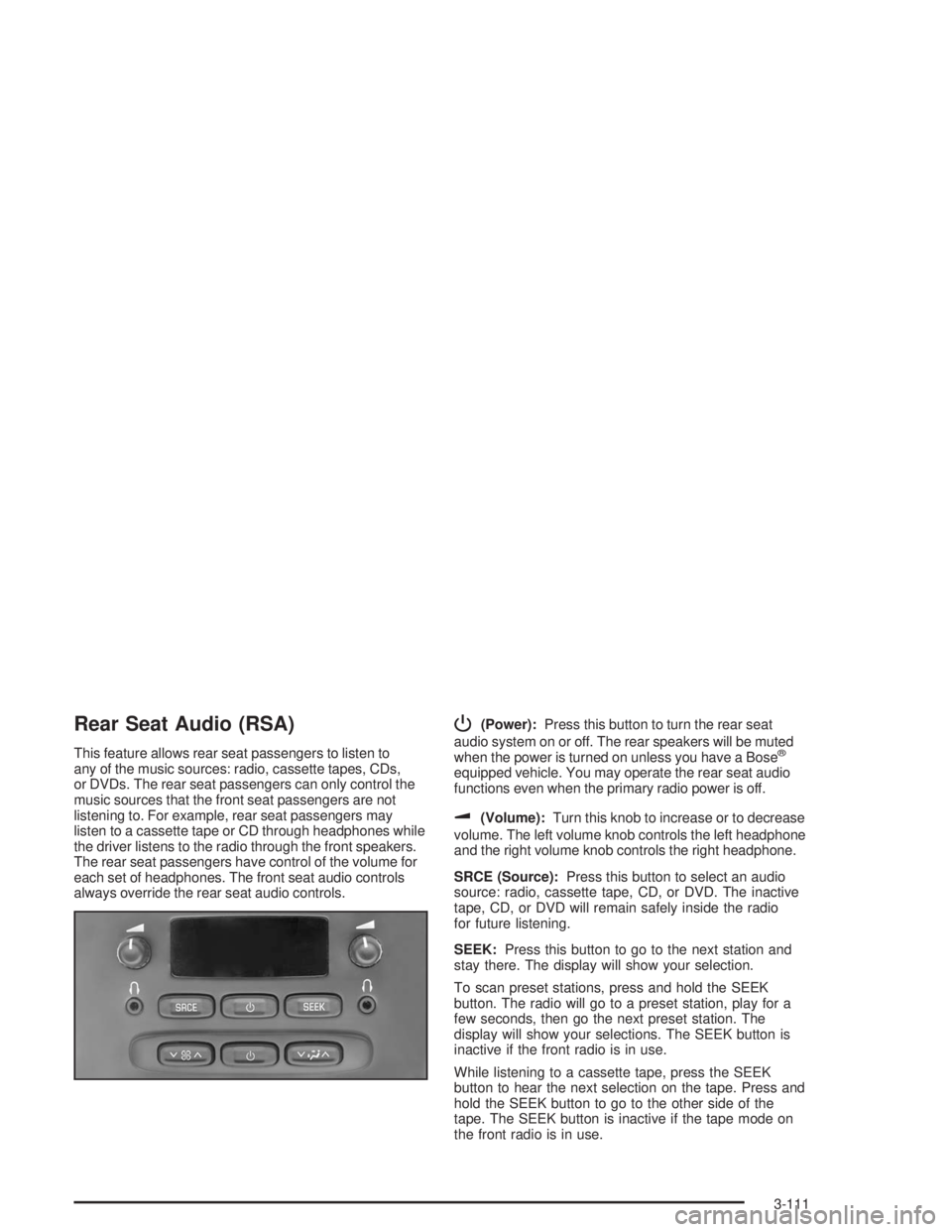
Rear Seat Audio (RSA)
This feature allows rear seat passengers to listen to
any of the music sources: radio, cassette tapes, CDs,
or DVDs. The rear seat passengers can only control the
music sources that the front seat passengers are not
listening to. For example, rear seat passengers may
listen to a cassette tape or CD through headphones while
the driver listens to the radio through the front speakers.
The rear seat passengers have control of the volume for
each set of headphones. The front seat audio controls
always override the rear seat audio controls.
P(Power):Press this button to turn the rear seat
audio system on or off. The rear speakers will be muted
when the power is turned on unless you have a Bose
®
equipped vehicle. You may operate the rear seat audio
functions even when the primary radio power is off.
u(Volume):Turn this knob to increase or to decrease
volume. The left volume knob controls the left headphone
and the right volume knob controls the right headphone.
SRCE (Source):Press this button to select an audio
source: radio, cassette tape, CD, or DVD. The inactive
tape, CD, or DVD will remain safely inside the radio
for future listening.
SEEK:Press this button to go to the next station and
stay there. The display will show your selection.
To scan preset stations, press and hold the SEEK
button. The radio will go to a preset station, play for a
few seconds, then go the next preset station. The
display will show your selections. The SEEK button is
inactive if the front radio is in use.
While listening to a cassette tape, press the SEEK
button to hear the next selection on the tape. Press and
hold the SEEK button to go to the other side of the
tape. The SEEK button is inactive if the tape mode on
the front radio is in use.
3-111
Page 220 of 452
While listening to a CD, press the SEEK button to hear
the next track on the CD. The SEEK button is inactive
if the CD mode on the front radio is in use.
If your vehicle has the Radio with Six-Disc CD and
there is more than one CD loaded, press and hold the
SEEK button for 2 seconds to take you to the next CD.
Radio Personalization
If your vehicle has this feature, it allows the driver to
return to the last used audio source (radio, cassette
or CD) using the remote keyless entry transmitter.
This feature can also store and recall AM and FM
presets, volume, tone and the last selected radio station.
The number on the back of each transmitter (1 or 2)
corresponds to driver 1 or 2. If transmitter 1 is used to
enter the vehicle, the last used audio source and/or
settings set by driver 1 will be recalled. If transmitter 2
is used to enter the vehicle, the last used audio
source and/or settings set by driver 2 will be recalled.
Theft-Deterrent Feature
(RDS Radios)
THEFTLOCK®is designed to discourage theft of your
radio. The feature works automatically by learning
a portion of the Vehicle Identication Number (VIN).
If the radio is moved to a different vehicle, it will
not operate and LOCKED will appear on the display.
When the radio and vehicle are turned off, the blinking
red light indicates that THEFTLOCK
®is armed.
With THEFTLOCK
®activated, your radio will not
operate if stolen.
3-112
Page 276 of 452
Electronically Controlled Air
Suspension System
This system automatically keeps your vehicle level as
you load and unload. The system includes a
compressor, two height sensors and two air springs
supporting the rear axle.
The system also has an internal clock to prevent
overheating. If the system overheats, all leveling function
stops until the system cools down. During this time, the
indicator light on the air inator system will be ashing.
The ignition has to be on for the system to inate, in
order to raise the vehicle to the standard ride height after
loading. The system can lower the vehicle to the
standard ride height after unloading with the ignition on
and also for up to 30 minutes after the ignition has
been turned off.
You may hear the compressor operating when you load
your vehicle, and periodically as the system adjusts
the vehicle to the standard ride height.
Load leveling will not function normally with the inator
hose attached to the inator outlet. Remove the inator
hose from the outlet during loading and unloading.
If the vehicle is parked for an extended period of time,
some bleed down of the suspension is normal. Upon
starting the vehicle, proper height will be achieved.
Overload Protection
The air suspension system is equipped with overload
protection. Overload protection is designed to protect the
air suspension system, and it is an indicator to the
driver that the vehicle is overloaded. When the overload
protection mode is on, it will not allow damage to the
air compressor. However, do not overload the vehicle.
SeeLoading Your Vehicle on page 4-46.
If the suspension remains at a low height, the rear axle
load has exceeded GAWR (Gross Axle Weight
Rating). When the overload protection mode is activated,
the compressor operates for about 30 seconds to one
minute without raising the vehicle depending on the
amount of overload. This will continue each time
the ignition is turned on until the rear axle load is
reduced below GAWR.
Indicator Light
The indicator light on the inator switch in the rear
passenger compartment also serves as an indicator for
internal system error. If the indicator light is ashing
without the load leveling function or the inator being
active, turn off the ignition. The next day turn on
the ignition and check the indicator light. The vehicle
can be driven with the light ashing, but if it is you
should have the vehicle serviced as soon as possible.
4-52
Page 354 of 452
Maximum Loaded Vehicle Weight:The sum of curb
weight; accessory weight; vehicle capacity weight;
and production options weight.
Normal Occupant Weight:The number of occupants
a vehicle is designed to seat multiplied by 150
pounds (68 kg). SeeLoading Your Vehicle on
page 4-46.
Occupant Distribution:Designated seating positions.
Outward Facing Sidewall:The side of a asymmetrical
tire that has a particular side that faces outward
when mounted on a vehicle. The side of the tire that
contains a whitewall, bears white lettering or bears
manufacturer, brand and or model name molding that is
higher or deeper than the same moldings on the
other sidewall of the tire.
Passenger (P-Metric) Tire:A tire used on passenger
cars and some light duty trucks and multipurpose
vehicles.
Recommended Ination Pressure:Vehicle
manufacturer’s recommended tire ination pressure and
shown on the tire placard. SeeInation - Tire Pressure
on page 5-67andLoading Your Vehicle on page 4-46.Radial Ply tire:A pneumatic tire in which the ply cords
that extend to the beads are laid at 90 degrees to the
centerline of the tread.
Rim:A metal support for a tire and upon which the tire
beads are seated.
Sidewall:The portion of a tire between the tread and
the bead.
Speed Rating:An alphanumeric code assigned to a
tire indicating the maximum speed at which a tire
can operate.
Traction:The friction between the tire and the road
surface. The amount of grip provided.
Tread:The portion of a tire that comes into contact
with the road.
Treadwear Indicators:Narrow bands, sometimes
called “wear bars,” that show across the tread of a tire
when only 2/32 inch of tread remains. SeeWhen It
Is Time for New Tires on page 5-70.
5-66
Page 427 of 452
Emergency Tow:Tow to the nearest dealership
for warranty service or in the event of a
vehicle-disabling accident. Assistance when the
vehicle is mired in sand, mud or snow.
Flat Tire Change:Installation of a spare tire will
be covered at no charge. (The customer is
responsible for the repair or replacement of the
tire if not covered by a warrantable failure.)
Jump Start:No-start occurrences which require a
battery jump start will be covered at no charge.
Dealer Locator Service
In many instances, mechanical failures are covered
under Buick’s Bumper-to-Bumper warranty. However,
when other services are utilized, our Roadside
Assistance Representatives will explain any payment
obligations you might incur.
For prompt and efficient assistance when calling, please
provide the following to the Roadside Assistance
Representative:
Your name, home address, and home
telephone number
Telephone number of your location
Location of the vehicle
Model, year, color, and license plate number
Mileage, Vehicle Identication Number and delivery
date of the vehicle
Description of the problem
While we hope you never have the occasion to use our
service, it is added security while traveling for you
and your family. Remember, we are only a phone call
away. Buick Roadside Assistance: 1-800-252-1112,
text telephone (TTY) users, call 1-888-889-2438.
Buick reserves the right to limit services or
reimbursement to an owner or driver when, in Buick’s
judgement, the claims become excessive in frequency or
type of occurrence.
Roadside Assistance is not part of or included in the
coverage provided by the New Vehicle Limited Warranty.
Buick reserves the right to make any changes or
discontinue the Roadside Assistance program at any
time without notication.
7-7
Page 430 of 452
Vehicle Data Collection and Event
Data Records
Your vehicle, like other modern motor vehicles, has a
number of sophisticated computer systems that monitor
and control several aspects of the vehicle’s
performance. Your vehicle uses on-board vehicle
computers to monitor emission control components to
optimize fuel economy, to monitor conditions for air bag
deployment and, if so equipped, to provide anti-lock
braking and to help the driver control the vehicle
in difficult driving situations. Some information may be
stored during regular operations to facilitate repair
of detected malfunctions; other information is stored only
in a crash or near crash event by computer systems
commonly called event data recorders (EDR).
In a crash or near crash event, computer systems, such
as the Air Bag Sensing and Diagnostic Module (SDM)
in your vehicle may record information about the
condition of the vehicle and how it was operated, such
as engine speed, brake applications, throttle position,
vehicle speed, safety belt usage, air bag readiness,
air bag performance data, and the severity of a collision.This information has been used to improve vehicle
crash performance and may be used to improve crash
performance of future vehicles and driving safety.
Unlike the data recorders on many airplanes, these
on-board systems do not record sounds, such as
conversation of vehicle occupants.
To read this information, special equipment is needed
and access to the vehicle or the SDM is required.
GM will not access information about a crash event or
share it with others other than
with the consent of the vehicle owner or, if the
vehicle is leased, with the consent of the lessee,
in response to an official request of police or similar
government office,
as part of GM’s defense of litigation through the
discovery process, or
as required by law.
7-10