roof BUICK RAINIER 2005 User Guide
[x] Cancel search | Manufacturer: BUICK, Model Year: 2005, Model line: RAINIER, Model: BUICK RAINIER 2005Pages: 452, PDF Size: 2.6 MB
Page 87 of 452
Ignition Positions
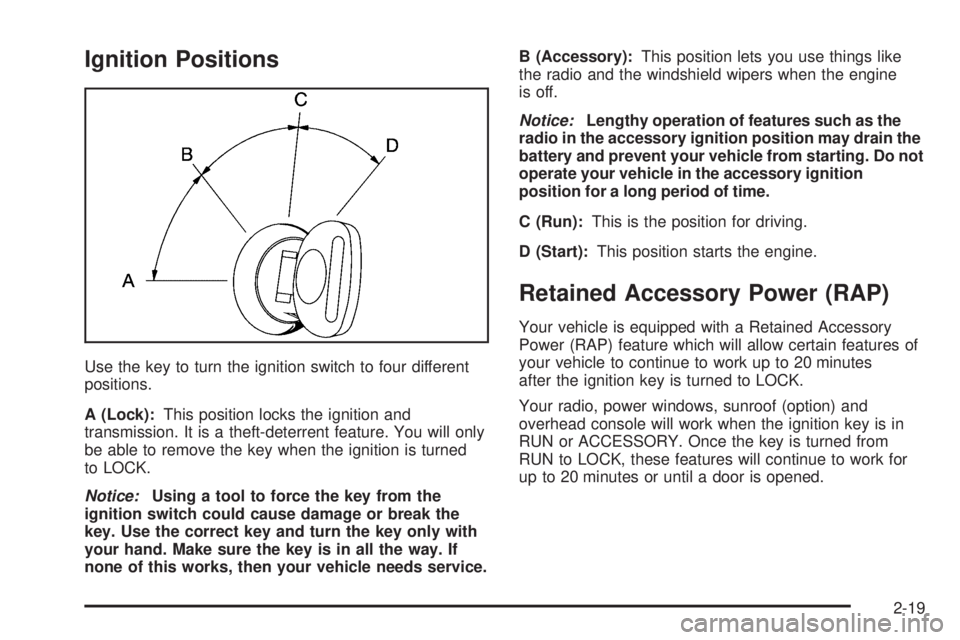
Use the key to turn the ignition switch to four different
positions.
A (Lock):This position locks the ignition and
transmission. It is a theft-deterrent feature. You will only
be able to remove the key when the ignition is turned
to LOCK.
Notice:Using a tool to force the key from the
ignition switch could cause damage or break the
key. Use the correct key and turn the key only with
your hand. Make sure the key is in all the way. If
none of this works, then your vehicle needs service.B (Accessory):This position lets you use things like
the radio and the windshield wipers when the engine
is off.
Notice:Lengthy operation of features such as the
radio in the accessory ignition position may drain the
battery and prevent your vehicle from starting. Do not
operate your vehicle in the accessory ignition
position for a long period of time.
C (Run):This is the position for driving.
D (Start):This position starts the engine.
Retained Accessory Power (RAP)
Your vehicle is equipped with a Retained Accessory
Power (RAP) feature which will allow certain features of
your vehicle to continue to work up to 20 minutes
after the ignition key is turned to LOCK.
Your radio, power windows, sunroof (option) and
overhead console will work when the ignition key is in
RUN or ACCESSORY. Once the key is turned from
RUN to LOCK, these features will continue to work for
up to 20 minutes or until a door is opened.
2-19
Page 114 of 452
Reprogramming a Single HomeLink®
Button
To program a device to HomeLink®using a HomeLink®
button previously trained, follow these steps:
1. Press and hold the desired HomeLink
®button. Do
not release the button.
2. The indicator light will begin to ash after
20 seconds. While still holding the HomeLink
®
button, proceed with Step 2 under “Programming
HomeLink®” shown earlier in this section.
Resetting Defaults
To reset HomeLink®to default settings do the following:
1. Hold down the two outside buttons for about
20 seconds until the indicator light begins to ash.
2. Continue to hold both buttons until the HomeLink
®
indicator light turns off.
3. Release both buttons.
For questions or comments, contact HomeLink
®at
1-800-355-3515, or on the internet at
www.homelink.com.
Storage Areas
Glove Box
Open the glove box by pulling the side of the handle
towards the driverside.
Overhead Console
Your vehicle may have this feature. The overhead
console may include a reading lamps, HomeLink®
transmitter and a sunroof switch. SeeSunroof on
page 2-50andHomeLink®Transmitter on page 2-42for
more information.
If your vehicle has a third row seat, and has a power
operated rear quarter glass, the switches for operating
the rear quarter glass are also located in the overhead
console. These switches allow the driver to open
and close each third row seat window separately.
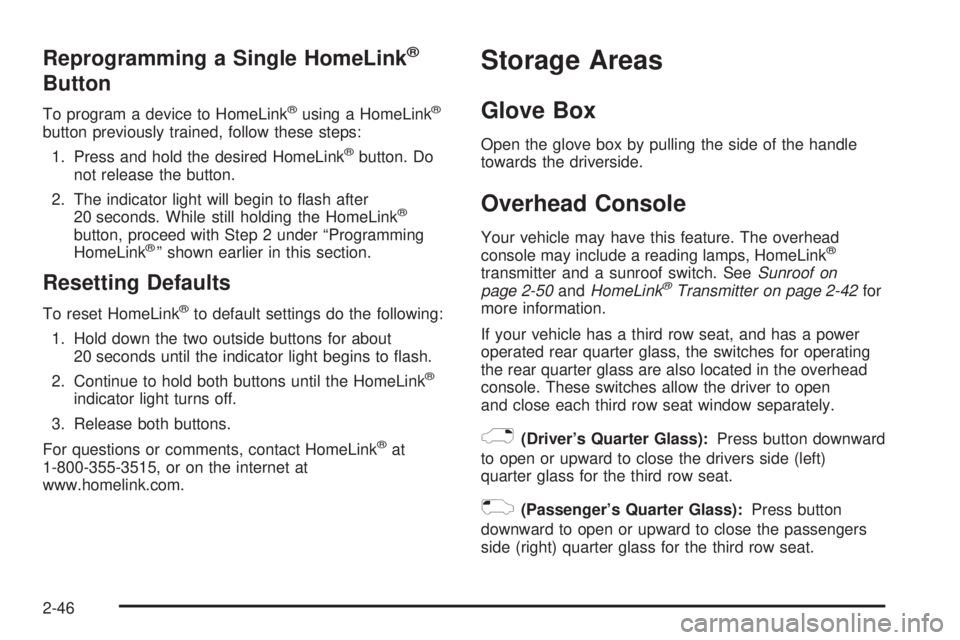
)(Driver’s Quarter Glass):Press button downward
to open or upward to close the drivers side (left)
quarter glass for the third row seat.
((Passenger’s Quarter Glass):Press button
downward to open or upward to close the passengers
side (right) quarter glass for the third row seat.
2-46
Page 115 of 452
Center Console Storage Area
If your vehicle has this console compartment, squeeze
the front lever while lifting the top to open it.
Your vehicle’s console will be equipped with cupholders
located on the front and rear of the storage
compartment.
The console may also contain one or more of the
following components:
Rear Seat Audio Controls
Rear Seat Accessory Power Outlets
Rear Climate Control
If your vehicle has the center armrest compartment, lift
the cover by pulling up on the latch handle located
underneath the front edge of the armrest. The storage
area includes slots for cassettes or compact discs.
Assist Handles
A handle above each door can be used when getting
out of your vehicle.
Luggage Carrier
{CAUTION:
If you try to carry something on top of your
vehicle that is longer or wider than the luggage
carrier — like paneling, plywood, a mattress
and so forth — the wind can catch it as you
drive along. This can cause you to lose
control. What you are carrying could be
violently torn off, and this could cause you or
other drivers to have a collision, and of course
damage your vehicle. You may be able to carry
something like this inside. But, never carry
something longer or wider than the luggage
carrier on top of your vehicle.
A luggage carrier allows you to load things on top of
your vehicle. The luggage carrier has side rails attached
to the roof, sliding crossrails (if equipped) and places
to use for tying things down. These let you load
some other things on top of your vehicle, as long as
they are not wider or longer than the luggage carrier.
2-47
Page 118 of 452
Cargo Tie Downs
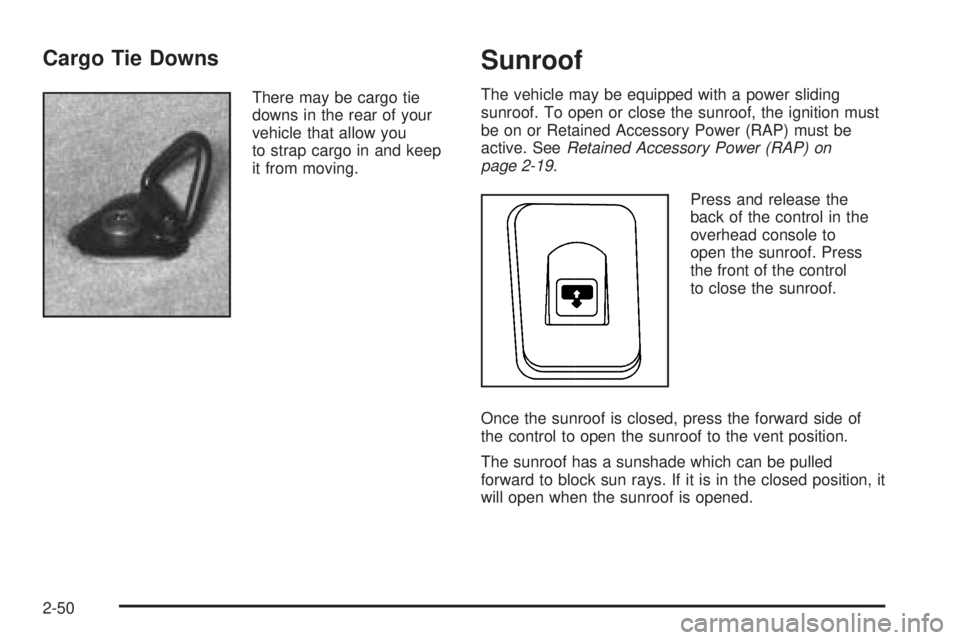
There may be cargo tie
downs in the rear of your
vehicle that allow you
to strap cargo in and keep
it from moving.
Sunroof
The vehicle may be equipped with a power sliding
sunroof. To open or close the sunroof, the ignition must
be on or Retained Accessory Power (RAP) must be
active. SeeRetained Accessory Power (RAP) on
page 2-19.
Press and release the
back of the control in the
overhead console to
open the sunroof. Press
the front of the control
to close the sunroof.
Once the sunroof is closed, press the forward side of
the control to open the sunroof to the vent position.
The sunroof has a sunshade which can be pulled
forward to block sun rays. If it is in the closed position, it
will open when the sunroof is opened.
2-50
Page 244 of 452
Cassettes are subject to wear and the sound quality may
degrade over time. Always make sure the cassette tape
is in good condition before the tape player is serviced.
Care of Your CDs and DVDs
Handle discs carefully. Store them in their original cases
or other protective cases and away from direct sunlight
and dust. If the surface of a disc is soiled, dampen
a clean, soft cloth in a mild, neutral detergent solution
and clean it, wiping from the center to the edge.
Be sure never to touch the side without writing when
handling discs. Pick up discs by grasping the outer
edges or the edge of the hole and the outer edge.
Care of Your CD and DVD Player
The use of CD lens cleaners for CDs is not advised, due
to the risk of contaminating the lens of the CD optics
with lubricants internal to the CD mechanism.
Fixed Mast Antenna
The xed mast antenna can withstand most car washes
without being damaged. If the mast should ever
become slightly bent, straighten it out by hand. If the
mast is badly bent, replace it.Check occasionally to make sure the mast is still
tightened to the fender. If tightening is required, tighten
by hand, then with a wrench one quarter turn.
XM™ Satellite Radio Antenna
System
The XM™ Satellite Radio antenna is located on the roof
of your vehicle. Keep this antenna clear of snow and ice
build up for clear radio reception.
The performance of the XM™ system may be affected if
the sunroof is open.
Loading items onto the roof of your vehicle can interfere
with the performance of the XM™ system. Make sure that
the XM™ satellite antenna is not obstructed.
Chime Level Adjustment
The radio is the vehicle’s chime producer. To change the
volume level, press and hold pushbutton 6 with the
ignition on and the radio power off. The chime volume
level will change from the normal level to loud, and LOUD
will appear on the radio display. To change back to the
default or normal setting, press and hold pushbutton 6
again. The chime level will change from the loud level to
normal, and NORMAL will appear on the radio display.
Removing the radio and not replacing it with a factory
radio or chime will disable vehicle chimes.
3-124
Page 260 of 452
Loading Your Vehicle for Off-Road
Driving
There are some important things to remember about
how to load your vehicle.
The heaviest things should be on the load oor and
forward of your rear axle. Put heavier items as far
forward as you can.
Be sure the load is secured properly, so driving on
the off-road terrain does not toss things around.
{CAUTION:
Cargo on the load oor piled higher than
the seatbacks can be thrown forward
during a sudden stop. You or your
passengers could be injured. Keep cargo
below the top of the seatbacks.
Unsecured cargo on the load oor can be
tossed about when driving over rough
terrain. You or your passengers can be
struck by ying objects. Secure the cargo
properly.
Heavy loads on the roof raise the vehicle’s
center of gravity, making it more likely to
roll over. You can be seriously or fatally
injured if the vehicle rolls over. Put heavy
loads inside the cargo area, not on the
roof. Keep cargo in the cargo area as far
forward and low as possible.
You will nd other important information in this manual.
SeeLoading Your Vehicle on page 4-43,Luggage
Carrier on page 2-47andTires on page 5-53.
4-16
Page 405 of 452
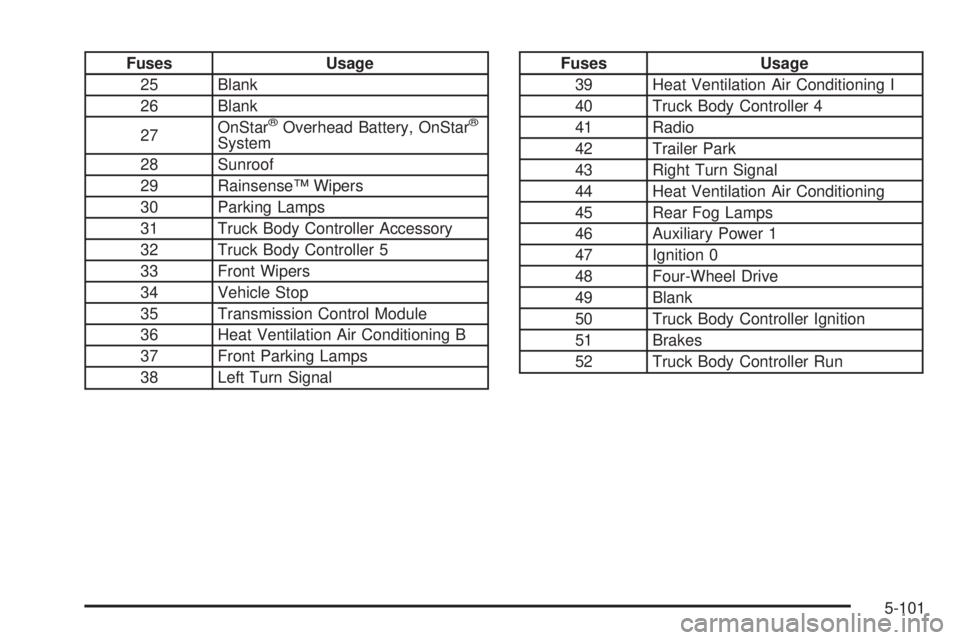
Fuses Usage
25 Blank
26 Blank
27OnStar
®Overhead Battery, OnStar®
System
28 Sunroof
29 Rainsense™ Wipers
30 Parking Lamps
31 Truck Body Controller Accessory
32 Truck Body Controller 5
33 Front Wipers
34 Vehicle Stop
35 Transmission Control Module
36 Heat Ventilation Air Conditioning B
37 Front Parking Lamps
38 Left Turn Signal
Fuses Usage
39 Heat Ventilation Air Conditioning I
40 Truck Body Controller 4
41 Radio
42 Trailer Park
43 Right Turn Signal
44 Heat Ventilation Air Conditioning
45 Rear Fog Lamps
46 Auxiliary Power 1
47 Ignition 0
48 Four-Wheel Drive
49 Blank
50 Truck Body Controller Ignition
51 Brakes
52 Truck Body Controller Run
5-101
Page 450 of 452
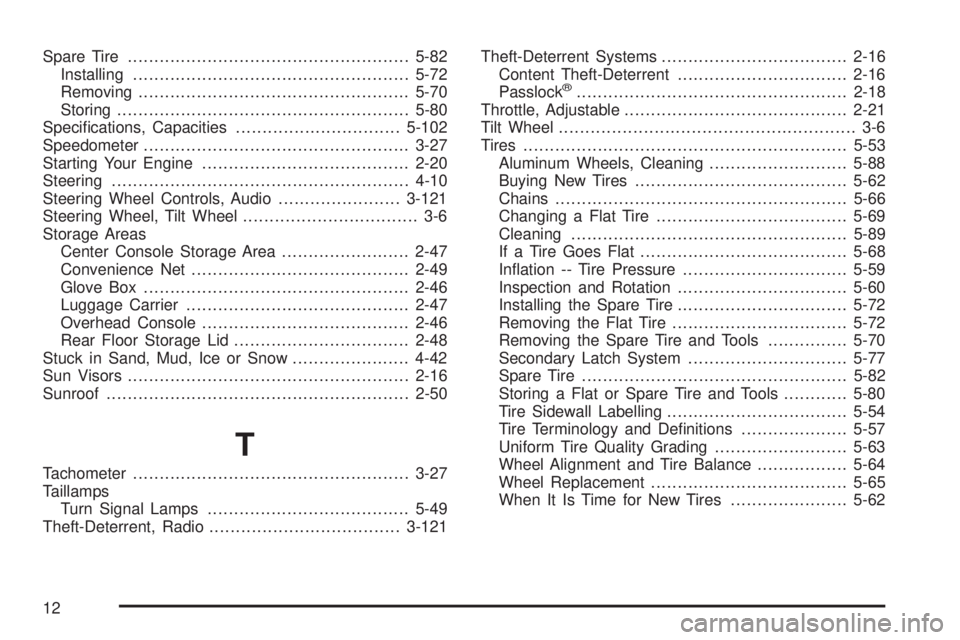
Spare Tire.....................................................5-82
Installing....................................................5-72
Removing...................................................5-70
Storing.......................................................5-80
Specications, Capacities...............................5-102
Speedometer..................................................3-27
Starting Your Engine.......................................2-20
Steering........................................................4-10
Steering Wheel Controls, Audio.......................3-121
Steering Wheel, Tilt Wheel................................. 3-6
Storage Areas
Center Console Storage Area........................2-47
Convenience Net.........................................2-49
Glove Box..................................................2-46
Luggage Carrier..........................................2-47
Overhead Console.......................................2-46
Rear Floor Storage Lid.................................2-48
Stuck in Sand, Mud, Ice or Snow......................4-42
Sun Visors.....................................................2-16
Sunroof.........................................................2-50
T
Tachometer....................................................3-27
Taillamps
Turn Signal Lamps......................................5-49
Theft-Deterrent, Radio....................................3-121Theft-Deterrent Systems...................................2-16
Content Theft-Deterrent................................2-16
Passlock
®...................................................2-18
Throttle, Adjustable..........................................2-21
Tilt Wheel........................................................ 3-6
Tires.............................................................5-53
Aluminum Wheels, Cleaning..........................5-88
Buying New Tires........................................5-62
Chains.......................................................5-66
Changing a Flat Tire....................................5-69
Cleaning....................................................5-89
If a Tire Goes Flat.......................................5-68
Ination -- Tire Pressure...............................5-59
Inspection and Rotation................................5-60
Installing the Spare Tire................................5-72
Removing the Flat Tire.................................5-72
Removing the Spare Tire and Tools...............5-70
Secondary Latch System..............................5-77
Spare Tire..................................................5-82
Storing a Flat or Spare Tire and Tools............5-80
Tire Sidewall Labelling..................................5-54
Tire Terminology and Denitions....................5-57
Uniform Tire Quality Grading.........................5-63
Wheel Alignment and Tire Balance.................5-64
Wheel Replacement.....................................5-65
When It Is Time for New Tires......................5-62
12