air condition BUICK RAINIER 2006 User Guide
[x] Cancel search | Manufacturer: BUICK, Model Year: 2006, Model line: RAINIER, Model: BUICK RAINIER 2006Pages: 470, PDF Size: 2.72 MB
Page 172 of 470

RIGHT REAR DOOR AJAR
If the passenger’s side rear door is not fully closed
this message will appear on the display and you
will hear a chime. Stop and turn off the vehicle, check
the door for obstacles, and close the door again.
Check to see if the message still appears on the DIC.
Press the select button to acknowledge this message
and clear it from the DIC display.
SERVICE AIR BAG
If there is a problem with the airbag system this message
will be displayed on the DIC. Have your GM dealer
inspect the system for problems. SeeAirbag Readiness
Light on page 3-29andAirbag System on page 1-48for
more information. Press the select button to acknowledge
this message and clear it from the DIC display.
SERVICE BRAKE SYSTEM
If a problem occurs with the brake system this message
will appear on the DIC. If this message appears, stop
as soon as possible and turn off the vehicle. Restart the
vehicle and check for the message on the DIC display.
If the message is still displayed, or appears again when
you begin driving, the brake system needs service.
See your GM dealer.
SERVICE STABILITRAK
If you ever see the SERVICE STABILITRAK message,
it means there may be a problem with your StabiliTrak®
system. If you see this message, try to reset the
system by performing the following: stop; turn off the
engine; then start the engine again. If the SERVICE
STABILITRAK message still comes on, it means
there is a problem. You should see your GM dealer
for service. The vehicle is safe to drive, however, you
do not have the benet of StabiliTrak
®, so reduce
your speed and drive accordingly. Press the select
button to acknowledge this message and clear it
from the DIC display.
STABILITRAK ACTIVE
The STABILITRAK ACTIVE message will be displayed
anytime the system activates to maintain vehicle
stability. Any combination of engine speed management,
brake traction control, and stability control will display
the STABILITRAK ACTIVE message on the DIC.
STABILITRAK NOT READY
The STABILITRAK NOT READY message may
be displayed if driving conditions delay system
initialization. This is normal. Once the system
initializes, the STABILITRAK NOT READY
message will no longer be displayed on the DIC.
3-50
Page 188 of 470
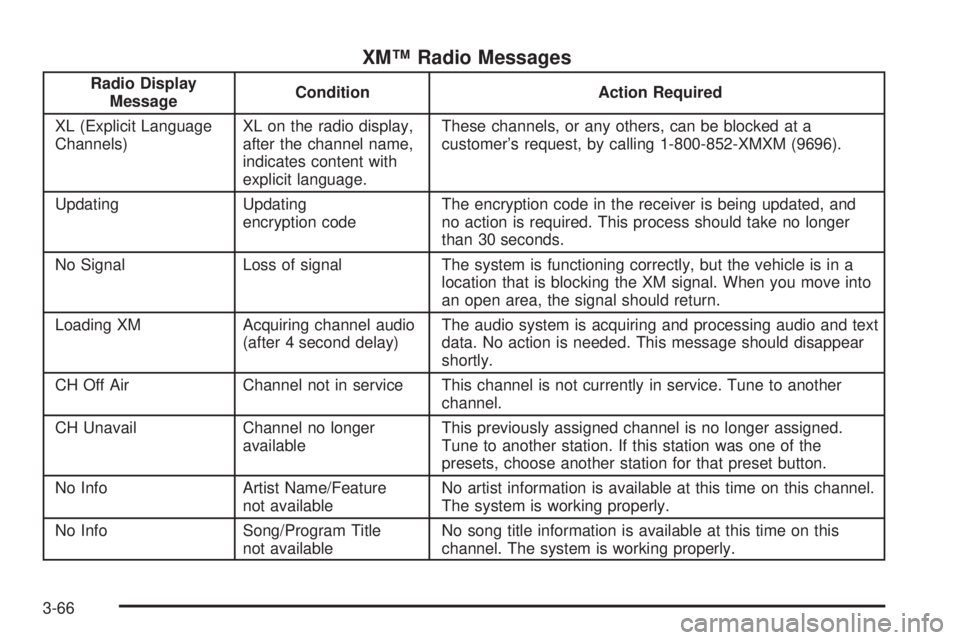
XM™ Radio Messages
Radio Display
MessageCondition Action Required
XL (Explicit Language
Channels)XL on the radio display,
after the channel name,
indicates content with
explicit language.These channels, or any others, can be blocked at a
customer’s request, by calling 1-800-852-XMXM (9696).
Updating Updating
encryption codeThe encryption code in the receiver is being updated, and
no action is required. This process should take no longer
than 30 seconds.
No Signal Loss of signal The system is functioning correctly, but the vehicle is in a
location that is blocking the XM signal. When you move into
an open area, the signal should return.
Loading XM Acquiring channel audio
(after 4 second delay)The audio system is acquiring and processing audio and text
data. No action is needed. This message should disappear
shortly.
CH Off Air Channel not in service This channel is not currently in service. Tune to another
channel.
CH Unavail Channel no longer
availableThis previously assigned channel is no longer assigned.
Tune to another station. If this station was one of the
presets, choose another station for that preset button.
No Info Artist Name/Feature
not availableNo artist information is available at this time on this channel.
The system is working properly.
No Info Song/Program Title
not availableNo song title information is available at this time on this
channel. The system is working properly.
3-66
Page 198 of 470

XM™ Radio Messages
Radio Display
MessageCondition Action Required
XL (Explicit Language
Channels)XL on the radio display,
after the channel name,
indicates content with
explicit language.These channels, or any others, can be blocked at a
customer’s request, by calling 1-800-852-XMXM (9696).
Updating Updating
encryption codeThe encryption code in the receiver is being updated, and
no action is required. This process should take no longer
than 30 seconds.
No Signl Loss of signal The system is functioning correctly, but the vehicle is in a
location that is blocking the XM™ signal. When the vehicle
is moved into an open area, the signal should return.
Loading Acquiring channel audio
(after 4 second delay)The radio system is acquiring and processing audio and text
data. No action is needed. This message should disappear
shortly.
Off Air Channel not in service This channel is not currently in service. Tune to another
channel.
CH Unavl Channel no longer
availableThis previously assigned channel is no longer assigned.
Tune to another station. If this station was one of the
presets, choose another station for that preset button.
No Info Artist Name/Feature
not availableNo artist information is available at this time on this channel.
The system is working properly.
3-76
Page 213 of 470
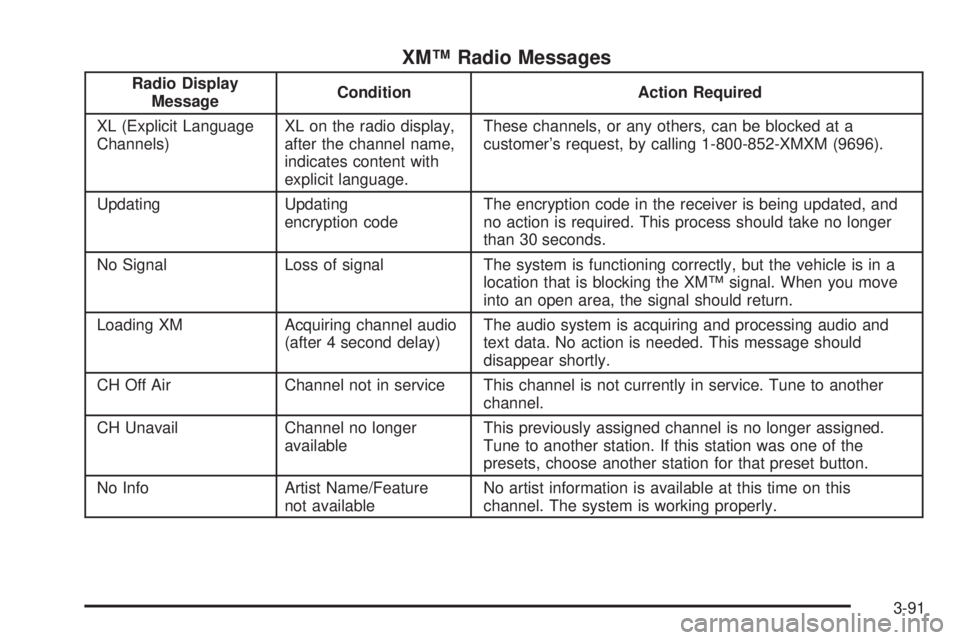
XM™ Radio Messages
Radio Display
MessageCondition Action Required
XL (Explicit Language
Channels)XL on the radio display,
after the channel name,
indicates content with
explicit language.These channels, or any others, can be blocked at a
customer’s request, by calling 1-800-852-XMXM (9696).
Updating Updating
encryption codeThe encryption code in the receiver is being updated, and
no action is required. This process should take no longer
than 30 seconds.
No Signal Loss of signal The system is functioning correctly, but the vehicle is in a
location that is blocking the XM™ signal. When you move
into an open area, the signal should return.
Loading XM Acquiring channel audio
(after 4 second delay)The audio system is acquiring and processing audio and
text data. No action is needed. This message should
disappear shortly.
CH Off Air Channel not in service This channel is not currently in service. Tune to another
channel.
CH Unavail Channel no longer
availableThis previously assigned channel is no longer assigned.
Tune to another station. If this station was one of the
presets, choose another station for that preset button.
No Info Artist Name/Feature
not availableNo artist information is available at this time on this
channel. The system is working properly.
3-91
Page 227 of 470
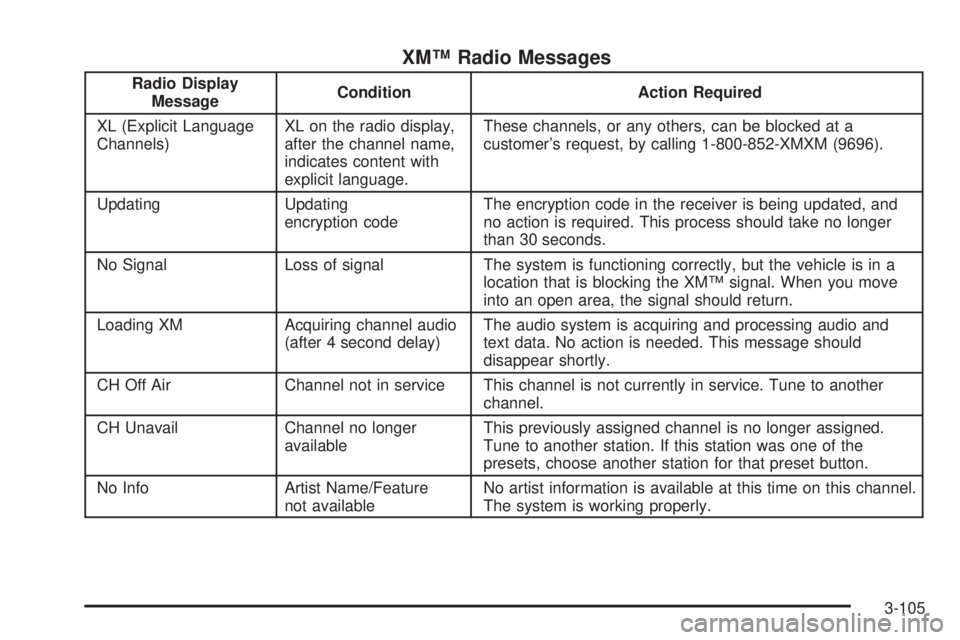
XM™ Radio Messages
Radio Display
MessageCondition Action Required
XL (Explicit Language
Channels)XL on the radio display,
after the channel name,
indicates content with
explicit language.These channels, or any others, can be blocked at a
customer’s request, by calling 1-800-852-XMXM (9696).
Updating Updating
encryption codeThe encryption code in the receiver is being updated, and
no action is required. This process should take no longer
than 30 seconds.
No Signal Loss of signal The system is functioning correctly, but the vehicle is in a
location that is blocking the XM™ signal. When you move
into an open area, the signal should return.
Loading XM Acquiring channel audio
(after 4 second delay)The audio system is acquiring and processing audio and
text data. No action is needed. This message should
disappear shortly.
CH Off Air Channel not in service This channel is not currently in service. Tune to another
channel.
CH Unavail Channel no longer
availableThis previously assigned channel is no longer assigned.
Tune to another station. If this station was one of the
presets, choose another station for that preset button.
No Info Artist Name/Feature
not availableNo artist information is available at this time on this channel.
The system is working properly.
3-105
Page 264 of 470
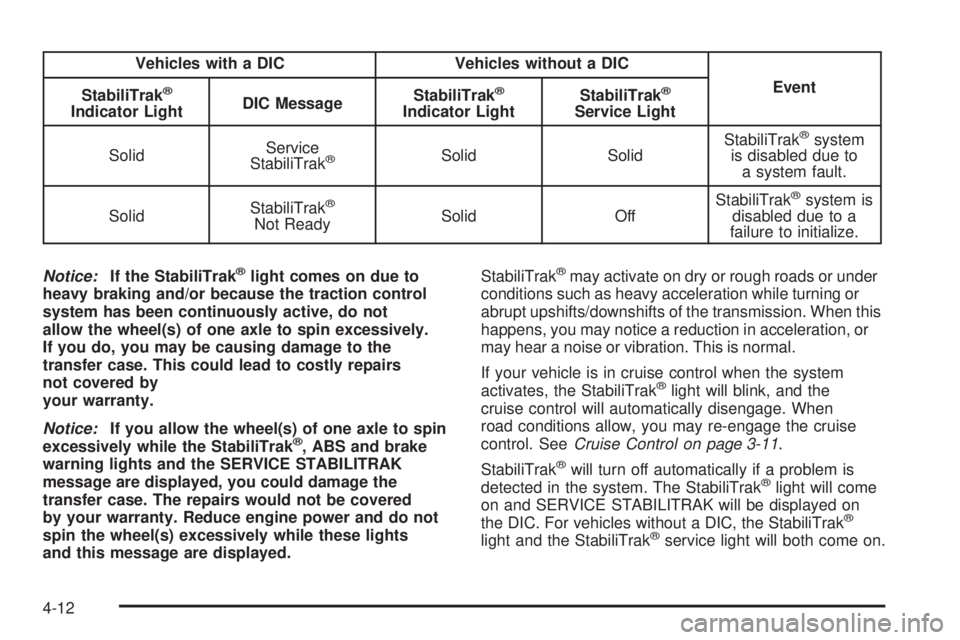
Vehicles with a DIC Vehicles without a DIC
Event
StabiliTrak
®
Indicator LightDIC MessageStabiliTrak
®
Indicator LightStabiliTrak
®
Service Light
SolidService
StabiliTrak
®Solid SolidStabiliTrak
®system
is disabled due to
a system fault.
SolidStabiliTrak
®
Not ReadySolid OffStabiliTrak
®system is
disabled due to a
failure to initialize.
Notice:If the StabiliTrak
®light comes on due to
heavy braking and/or because the traction control
system has been continuously active, do not
allow the wheel(s) of one axle to spin excessively.
If you do, you may be causing damage to the
transfer case. This could lead to costly repairs
not covered by
your warranty.
Notice:If you allow the wheel(s) of one axle to spin
excessively while the StabiliTrak
®, ABS and brake
warning lights and the SERVICE STABILITRAK
message are displayed, you could damage the
transfer case. The repairs would not be covered
by your warranty. Reduce engine power and do not
spin the wheel(s) excessively while these lights
and this message are displayed.StabiliTrak
®may activate on dry or rough roads or under
conditions such as heavy acceleration while turning or
abrupt upshifts/downshifts of the transmission. When this
happens, you may notice a reduction in acceleration, or
may hear a noise or vibration. This is normal.
If your vehicle is in cruise control when the system
activates, the StabiliTrak
®light will blink, and the
cruise control will automatically disengage. When
road conditions allow, you may re-engage the cruise
control. SeeCruise Control on page 3-11.
StabiliTrak
®will turn off automatically if a problem is
detected in the system. The StabiliTrak®light will come
on and SERVICE STABILITRAK will be displayed on
the DIC. For vehicles without a DIC, the StabiliTrak
®
light and the StabiliTrak®service light will both come on.
4-12
Page 322 of 470

California Fuel
If your vehicle is certied to meet California Emissions
Standards, it is designed to operate on fuels that
meet California specications. See the underhood
emission control label. If this fuel is not available
in states adopting California emissions standards,
your vehicle will operate satisfactorily on fuels meeting
federal specications, but emission control system
performance may be affected. The malfunction
indicator lamp may turn on and your vehicle may fail
a smog-check test. SeeMalfunction Indicator Lamp
on page 3-36. If this occurs, return to your authorized
GM dealer for diagnosis. If it is determined that the
condition is caused by the type of fuel used, repairs
may not be covered by your warranty.
Additives
To provide cleaner air, all gasolines in the United States
are now required to contain additives that will help
prevent engine and fuel system deposits from forming,
allowing your emission control system to work
properly. In most cases, you should not have to add
anything to your fuel. However, some gasolines contain
only the minimum amount of additive required to
meet U.S. Environmental Protection Agency regulations.
To help keep fuel injectors and intake valves clean,
or if your vehicle experiences problems due to
dirty injectors or valves, look for gasoline that is
advertised as TOP TIER Detergent Gasoline. Also, your
GM dealer has additives that will help correct and
prevent most deposit-related problems.
5-6
Page 336 of 470
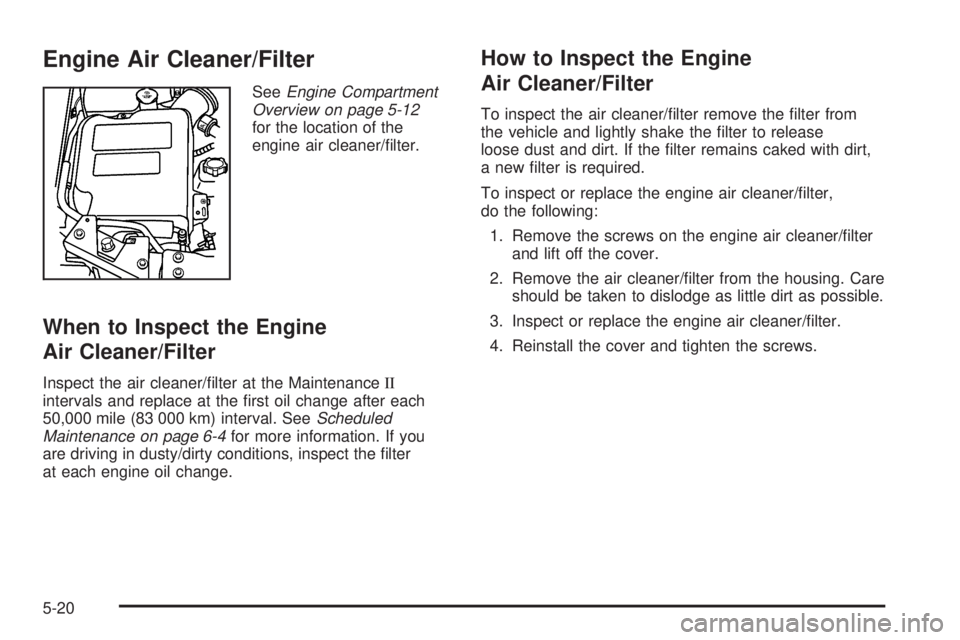
Engine Air Cleaner/Filter
SeeEngine Compartment
Overview on page 5-12
for the location of the
engine air cleaner/lter.
When to Inspect the Engine
Air Cleaner/Filter
Inspect the air cleaner/lter at the MaintenanceII
intervals and replace at the rst oil change after each
50,000 mile (83 000 km) interval. SeeScheduled
Maintenance on page 6-4for more information. If you
are driving in dusty/dirty conditions, inspect the lter
at each engine oil change.
How to Inspect the Engine
Air Cleaner/Filter
To inspect the air cleaner/lter remove the lter from
the vehicle and lightly shake the lter to release
loose dust and dirt. If the lter remains caked with dirt,
a new lter is required.
To inspect or replace the engine air cleaner/lter,
do the following:
1. Remove the screws on the engine air cleaner/lter
and lift off the cover.
2. Remove the air cleaner/lter from the housing. Care
should be taken to dislodge as little dirt as possible.
3. Inspect or replace the engine air cleaner/lter.
4. Reinstall the cover and tighten the screws.
5-20
Page 350 of 470

Engine Fan Noise
Your vehicle has a clutched engine cooling fan. When
the clutch is engaged, the fan spins faster to provide
more air to cool the engine. In most everyday driving
conditions the clutch is not engaged. This improves fuel
economy and reduces fan noise. Under heavy vehicle
loading, trailer towing, and/or high outside temperatures,
the fan speed increases when the clutch engages so
you may hear an increase in fan noise. This is normal
and should not be mistaken as the transmission slipping
or making extra shifts. It is merely the cooling system
functioning properly. The fan will slow down when
additional cooling is not required and the clutch
disengages.
You may also hear this fan noise when you start the
engine. It will go away as the fan clutch disengages.
Power Steering Fluid
SeeEngine Compartment
Overview on page 5-12
for reservoir location.
When to Check Power Steering Fluid
It is not necessary to regularly check power steering uid
unless you suspect there is a leak in the system or
you hear an unusual noise. A uid loss in this system
could indicate a problem. Have the system inspected
and repaired.
How to Check Power Steering Fluid
To check the power steering uid, do the following:
1. Turn the key off and let the engine compartment
cool down.
2. Wipe the cap and the top of the reservoir clean.
5-34
Page 354 of 470
Brake Wear
Your vehicle has four-wheel disc brakes.
Disc brake pads have built-in wear indicators that
make a high-pitched warning sound when the brake
pads are worn and new pads are needed. The sound
may come and go or be heard all the time your vehicle
is moving, except when you are pushing on the
brake pedal rmly.
{CAUTION:
The brake wear warning sound means that
soon your brakes will not work well. That
could lead to an accident. When you hear
the brake wear warning sound, have your
vehicle serviced.
Notice:Continuing to drive with worn-out brake
pads could result in costly brake repair.Some driving conditions or climates may cause a brake
squeal when the brakes are rst applied or lightly applied.
This does not mean something is wrong with your brakes.
Properly torqued wheel nuts are necessary to help
prevent brake pulsation. When tires are rotated, inspect
brake pads for wear and evenly tighten wheel nuts in
the proper sequence to GM torque specications.
Brake linings should always be replaced as complete
axle sets.
Brake Pedal Travel
See your dealer if the brake pedal does not return
to normal height, or if there is a rapid increase in
pedal travel. This could be a sign of brake trouble.
Brake Adjustment
Every time you make a brake stop, your disc brakes
adjust for wear.
5-38