service BUICK RAINIER 2007 Service Manual
[x] Cancel search | Manufacturer: BUICK, Model Year: 2007, Model line: RAINIER, Model: BUICK RAINIER 2007Pages: 534, PDF Size: 2.87 MB
Page 243 of 534
SCAN:Scan the stations within a PTY by
performing the following:
1. Press the TYPE button to activate program
type select mode. P-TYPE and the last
selected PTY displays.
2. Turn the TYPE knob or press and release the
TYPE button to select a PTY.
3. Once the desired PTY displays, press and
hold either the TYPE or the SCAN arrows
for two seconds, and the radio begins
scanning the stations in the PTY.
4. Press either the TYPE or the SCAN arrows to
stop scanning.
BAND (Alternate Frequency):Alternate
frequency lets the radio switch to a stronger
station with the same program type. To turn
alternate frequency on, press and hold BAND for
two seconds. AF ON displays. The radio can
switch to stations with a stronger frequency.
To turn alternate frequency off, press and hold
BAND again for two seconds. AF OFF displays.
The radio does not switch to other stations.
This function does not apply for XM™ Satellite
Radio Service.Setting Preset PTYs (RDS Only)
These pushbuttons have factory PTY presets.
Up to 12 PTYs (six FM1 and six FM2), can
be programmed on the six numbered pushbuttons,
by performing the following steps:
1. Press BAND to select FM1 or FM2.
2. Press the TYPE button to activate program
type select mode. P-TYPE and the last
selected PTY displays.
3. Turn the TYPE knob or press and release the
TYPE button to select a PTY.
4. Press and hold one of the six numbered
pushbuttons until a beep sounds. When
that numbered pushbutton is pressed (while in
PTY mode), the PTY that was set, returns.
5. Repeat the steps for each pushbutton.
243
Page 244 of 534
RDS Messages
INFO (Information):If the current station has a
message, INFO displays. Press this button to
see the message. The message can display the
artist, song title, call in phone numbers, etc.
If the entire message is not displayed, parts of the
message appears every three seconds. To scroll
through the message, press and release the INFO
button. A new group of words displays after every
press of this button. Once the complete message
has displayed, INFO disappears from the display
until another new message is received. The last
message is displayed by pressing the INFO button.
View the last message until a new message is
received or you tune to a different station.
Radio Messages
CAL ERR (Calibration Error):The audio system
has been calibrated for your vehicle from the
factory. If CAL ERR displays, it means that the
radio has not been congured properly for
the vehicle and must be returned to your dealer
for service.LOCKED:This message is displayed when the
THEFTLOCK
®system has locked up. Take
the vehicle to your dealer for service.
If any error occurs repeatedly, or if an error cannot
be corrected, contact your dealer.
Radio Messages for XM™ Only
SeeXM Radio Messages on page 257later in this
section for further detail.
Playing a CD
If the ignition or radio is turned off, with a CD in the
player, it stays in the player. When the ignition or
radio is turned on, the CD starts playing where it
stopped, if it was the last selected audio source.
When a CD is inserted, the CD symbol displays.
As each new track starts to play, the track number
displays.
The CD player can play the smaller 3 inch (8 cm)
single CDs with an adapter ring. Full-size CDs and
the smaller CDs are loaded in the same manner.
244
Page 257 of 534
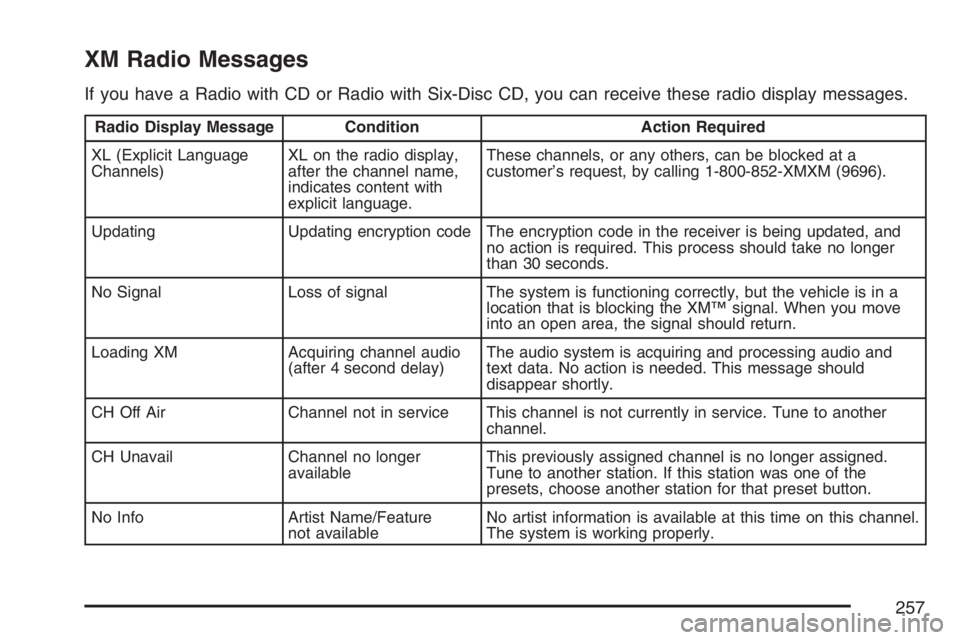
XM Radio Messages
If you have a Radio with CD or Radio with Six-Disc CD, you can receive these radio display messages.
Radio Display Message Condition Action Required
XL (Explicit Language
Channels)XL on the radio display,
after the channel name,
indicates content with
explicit language.These channels, or any others, can be blocked at a
customer’s request, by calling 1-800-852-XMXM (9696).
Updating Updating encryption code The encryption code in the receiver is being updated, and
no action is required. This process should take no longer
than 30 seconds.
No Signal Loss of signal The system is functioning correctly, but the vehicle is in a
location that is blocking the XM™ signal. When you move
into an open area, the signal should return.
Loading XM Acquiring channel audio
(after 4 second delay)The audio system is acquiring and processing audio and
text data. No action is needed. This message should
disappear shortly.
CH Off Air Channel not in service This channel is not currently in service. Tune to another
channel.
CH Unavail Channel no longer
availableThis previously assigned channel is no longer assigned.
Tune to another station. If this station was one of the
presets, choose another station for that preset button.
No Info Artist Name/Feature
not availableNo artist information is available at this time on this channel.
The system is working properly.
257
Page 258 of 534
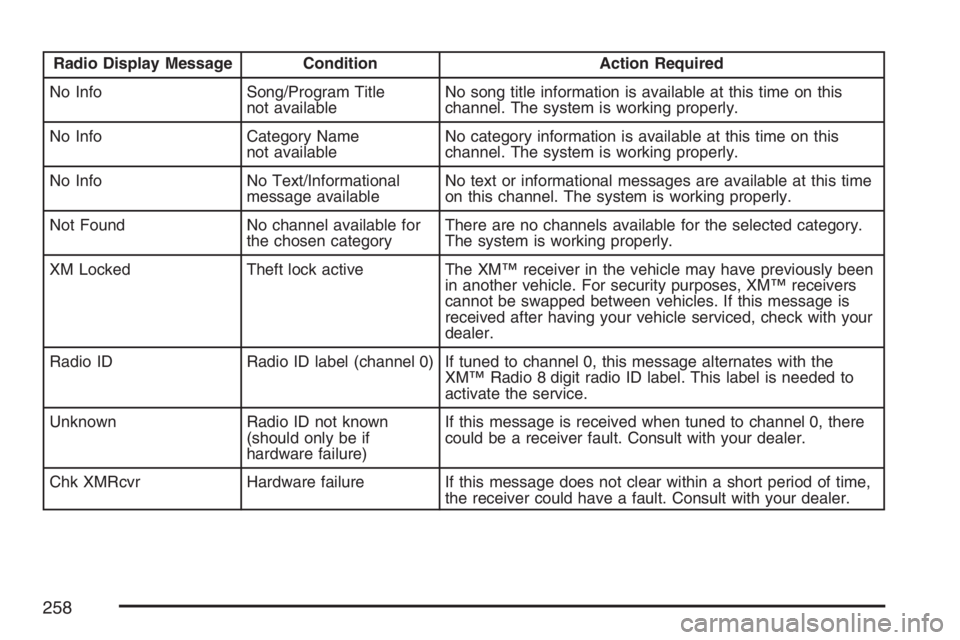
Radio Display Message Condition Action Required
No Info Song/Program Title
not availableNo song title information is available at this time on this
channel. The system is working properly.
No Info Category Name
not availableNo category information is available at this time on this
channel. The system is working properly.
No Info No Text/Informational
message availableNo text or informational messages are available at this time
on this channel. The system is working properly.
Not Found No channel available for
the chosen categoryThere are no channels available for the selected category.
The system is working properly.
XM Locked Theft lock active The XM™ receiver in the vehicle may have previously been
in another vehicle. For security purposes, XM™ receivers
cannot be swapped between vehicles. If this message is
received after having your vehicle serviced, check with your
dealer.
Radio ID Radio ID label (channel 0) If tuned to channel 0, this message alternates with the
XM™ Radio 8 digit radio ID label. This label is needed to
activate the service.
Unknown Radio ID not known
(should only be if
hardware failure)If this message is received when tuned to channel 0, there
could be a receiver fault. Consult with your dealer.
Chk XMRcvr Hardware failure If this message does not clear within a short period of time,
the receiver could have a fault. Consult with your dealer.
258
Page 259 of 534
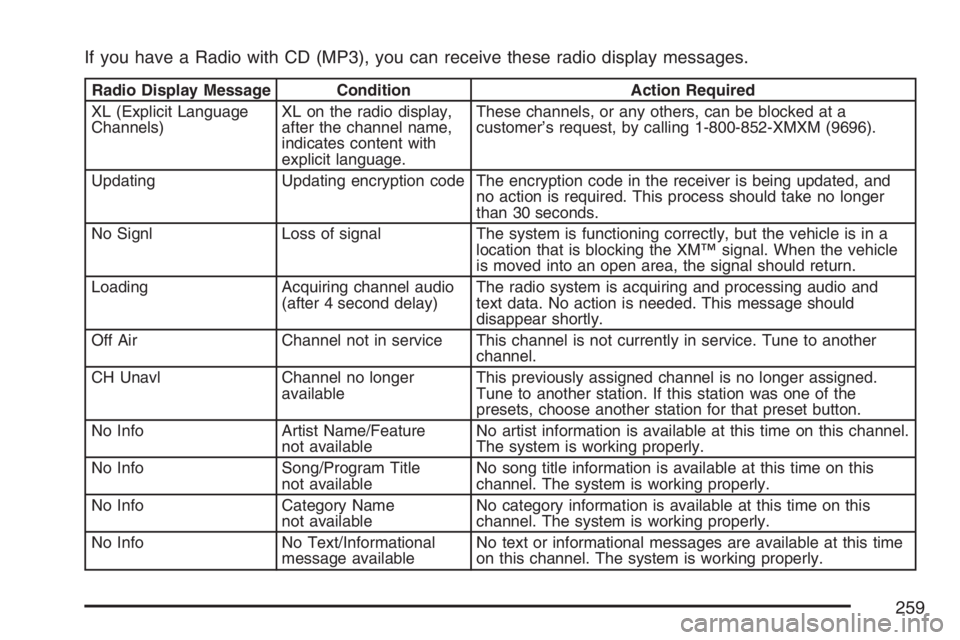
If you have a Radio with CD (MP3), you can receive these radio display messages.
Radio Display Message Condition Action Required
XL (Explicit Language
Channels)XL on the radio display,
after the channel name,
indicates content with
explicit language.These channels, or any others, can be blocked at a
customer’s request, by calling 1-800-852-XMXM (9696).
Updating Updating encryption code The encryption code in the receiver is being updated, and
no action is required. This process should take no longer
than 30 seconds.
No Signl Loss of signal The system is functioning correctly, but the vehicle is in a
location that is blocking the XM™ signal. When the vehicle
is moved into an open area, the signal should return.
Loading Acquiring channel audio
(after 4 second delay)The radio system is acquiring and processing audio and
text data. No action is needed. This message should
disappear shortly.
Off Air Channel not in service This channel is not currently in service. Tune to another
channel.
CH Unavl Channel no longer
availableThis previously assigned channel is no longer assigned.
Tune to another station. If this station was one of the
presets, choose another station for that preset button.
No Info Artist Name/Feature
not availableNo artist information is available at this time on this channel.
The system is working properly.
No Info Song/Program Title
not availableNo song title information is available at this time on this
channel. The system is working properly.
No Info Category Name
not availableNo category information is available at this time on this
channel. The system is working properly.
No Info No Text/Informational
message availableNo text or informational messages are available at this time
on this channel. The system is working properly.
259
Page 260 of 534
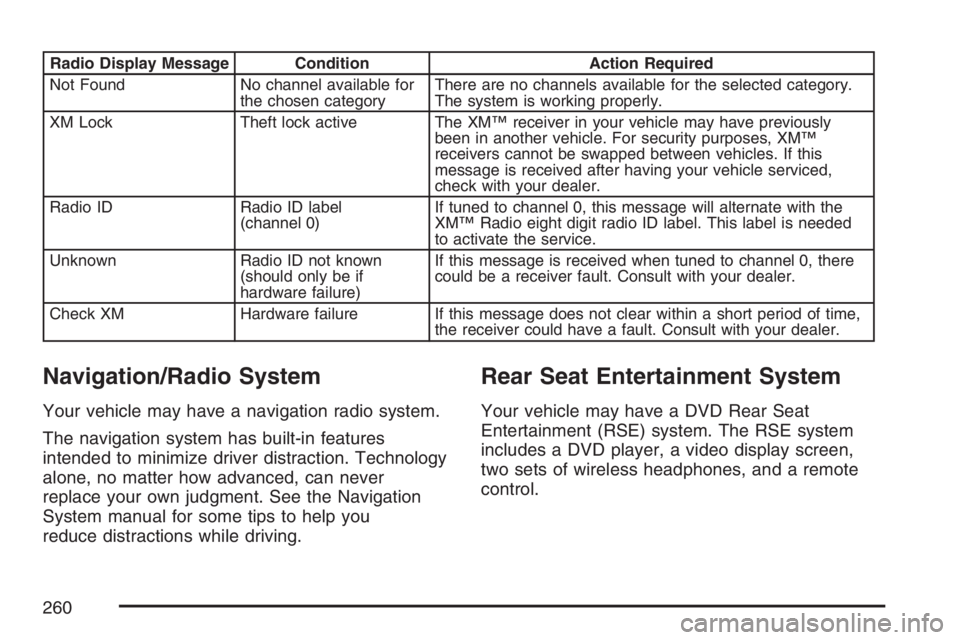
Radio Display Message Condition Action Required
Not Found No channel available for
the chosen categoryThere are no channels available for the selected category.
The system is working properly.
XM Lock Theft lock active The XM™ receiver in your vehicle may have previously
been in another vehicle. For security purposes, XM™
receivers cannot be swapped between vehicles. If this
message is received after having your vehicle serviced,
check with your dealer.
Radio ID Radio ID label
(channel 0)If tuned to channel 0, this message will alternate with the
XM™ Radio eight digit radio ID label. This label is needed
to activate the service.
Unknown Radio ID not known
(should only be if
hardware failure)If this message is received when tuned to channel 0, there
could be a receiver fault. Consult with your dealer.
Check XM Hardware failure If this message does not clear within a short period of time,
the receiver could have a fault. Consult with your dealer.
Navigation/Radio System
Your vehicle may have a navigation radio system.
The navigation system has built-in features
intended to minimize driver distraction. Technology
alone, no matter how advanced, can never
replace your own judgment. See the Navigation
System manual for some tips to help you
reduce distractions while driving.
Rear Seat Entertainment System
Your vehicle may have a DVD Rear Seat
Entertainment (RSE) system. The RSE system
includes a DVD player, a video display screen,
two sets of wireless headphones, and a remote
control.
260
Page 261 of 534
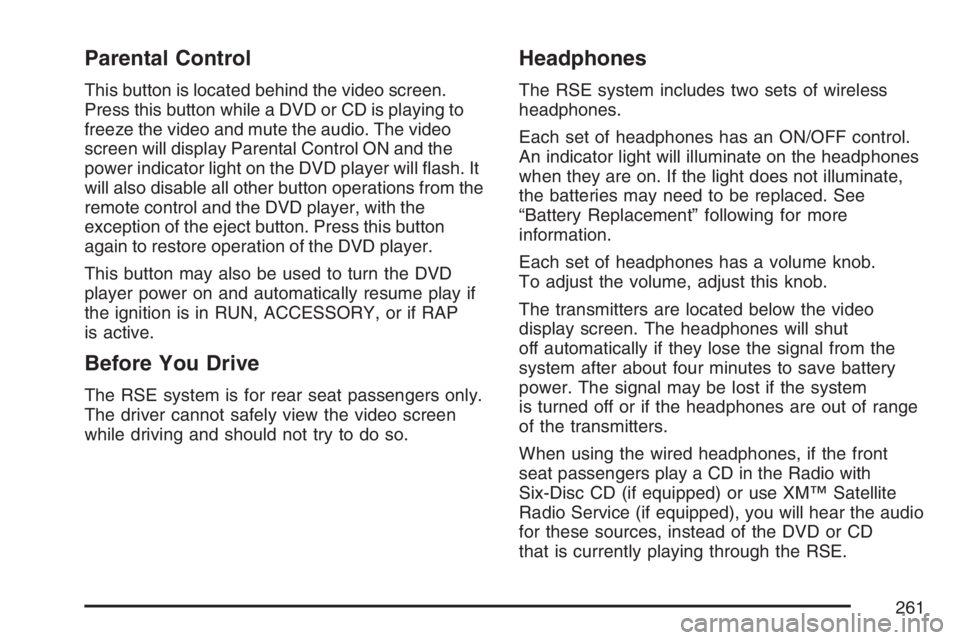
Parental Control
This button is located behind the video screen.
Press this button while a DVD or CD is playing to
freeze the video and mute the audio. The video
screen will display Parental Control ON and the
power indicator light on the DVD player will ash. It
will also disable all other button operations from the
remote control and the DVD player, with the
exception of the eject button. Press this button
again to restore operation of the DVD player.
This button may also be used to turn the DVD
player power on and automatically resume play if
the ignition is in RUN, ACCESSORY, or if RAP
is active.
Before You Drive
The RSE system is for rear seat passengers only.
The driver cannot safely view the video screen
while driving and should not try to do so.
Headphones
The RSE system includes two sets of wireless
headphones.
Each set of headphones has an ON/OFF control.
An indicator light will illuminate on the headphones
when they are on. If the light does not illuminate,
the batteries may need to be replaced. See
“Battery Replacement” following for more
information.
Each set of headphones has a volume knob.
To adjust the volume, adjust this knob.
The transmitters are located below the video
display screen. The headphones will shut
off automatically if they lose the signal from the
system after about four minutes to save battery
power. The signal may be lost if the system
is turned off or if the headphones are out of range
of the transmitters.
When using the wired headphones, if the front
seat passengers play a CD in the Radio with
Six-Disc CD (if equipped) or use XM™ Satellite
Radio Service (if equipped), you will hear the audio
for these sources, instead of the DVD or CD
that is currently playing through the RSE.
261
Page 265 of 534
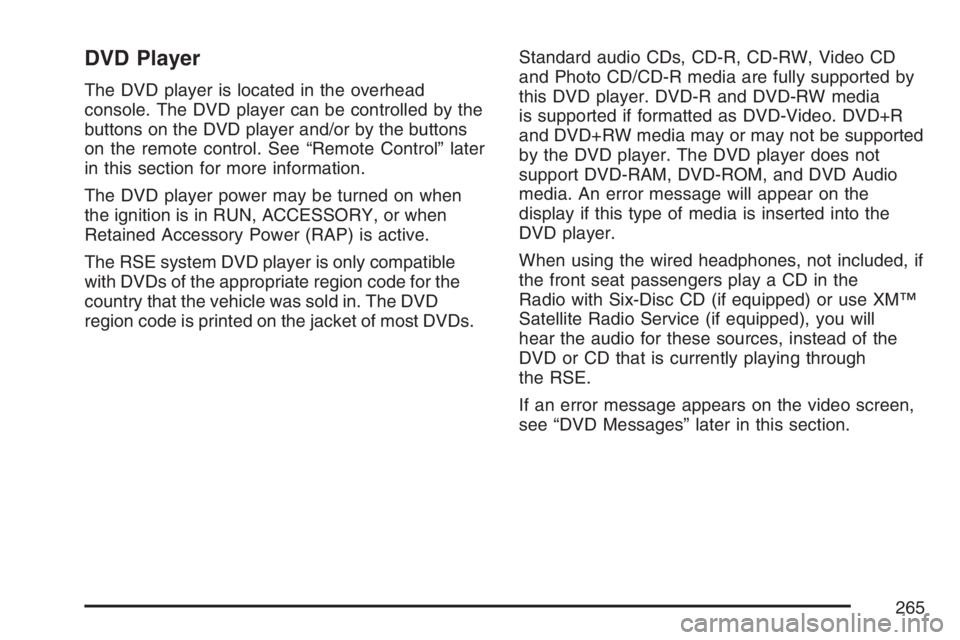
DVD Player
The DVD player is located in the overhead
console. The DVD player can be controlled by the
buttons on the DVD player and/or by the buttons
on the remote control. See “Remote Control” later
in this section for more information.
The DVD player power may be turned on when
the ignition is in RUN, ACCESSORY, or when
Retained Accessory Power (RAP) is active.
The RSE system DVD player is only compatible
with DVDs of the appropriate region code for the
country that the vehicle was sold in. The DVD
region code is printed on the jacket of most DVDs.Standard audio CDs, CD-R, CD-RW, Video CD
and Photo CD/CD-R media are fully supported by
this DVD player. DVD-R and DVD-RW media
is supported if formatted as DVD-Video. DVD+R
and DVD+RW media may or may not be supported
by the DVD player. The DVD player does not
support DVD-RAM, DVD-ROM, and DVD Audio
media. An error message will appear on the
display if this type of media is inserted into the
DVD player.
When using the wired headphones, not included, if
the front seat passengers play a CD in the
Radio with Six-Disc CD (if equipped) or use XM™
Satellite Radio Service (if equipped), you will
hear the audio for these sources, instead of the
DVD or CD that is currently playing through
the RSE.
If an error message appears on the video screen,
see “DVD Messages” later in this section.
265
Page 278 of 534
Radio Reception
You may experience frequency interference and
static during normal radio reception if items
such as cellphone chargers, vehicle convenience
accessories, and external electronic devices
are plugged into the accessory power outlet. If
there is interference or static, unplug the item from
the accessory power outlet.
AM
The range for most AM stations is greater than for
FM, especially at night. The longer range can
cause station frequencies to interfere with each
other. For better radio reception, most AM
radio stations boosts the power levels during the
day, and then reduce these levels during the night.
Static can also occur when things like storms
and power lines interfere with radio reception.
When this happens, try reducing the treble on
your radio.
FM Stereo
FM stereo gives the best sound, but FM signals
reach only about 10 to 40 miles (16 to 65 km). Tall
buildings or hills can interfere with FM signals,
causing the sound to fade in and out.
XM™ Satellite Radio Service
XM™ Satellite Radio Service gives digital radio
reception from coast-to-coast in the 48 contiguous
United States, and in Canada. Just as with FM,
tall buildings or hills can interfere with satellite
radio signals, causing the sound to fade in and out.
In addition, traveling or standing under heavy
foliage, bridges, garages, or tunnels can cause
loss of the XM™ signal for a period of time.
The radio could display NO XM SIGNAL to indicate
interference.
278
Page 287 of 534
Avoid needless heavy braking. Some people drive
in spurts — heavy acceleration followed by
heavy braking — rather than keeping pace with
traffic. This is a mistake. The brakes may not have
time to cool between hard stops. The brakes
will wear out much faster if you do a lot of heavy
braking. If you keep pace with the traffic and
allow realistic following distances, you will
eliminate a lot of unnecessary braking. That means
better braking and longer brake life.
If your vehicle’s engine ever stops while you are
driving, brake normally but do not pump the
brakes. If you do, the pedal may get harder to
push down. If the engine stops, you will still have
some power brake assist. But you will use it
when you brake. Once the power assist is used
up, it may take longer to stop and the brake pedal
will be harder to push.
Adding non-GM accessories can affect your
vehicle’s performance. SeeAccessories and
Modications on page 356.Anti-Lock Brake System (ABS)
Your vehicle has the Anti-Lock Brake System
(ABS), an advanced electronic braking system
that will help prevent a braking skid.
When you start your engine and begin to drive
away, ABS will check itself. You may hear a
momentary motor or clicking noise while this test
is going on. This is normal.
If there is a problem
with ABS, this warning
light will stay on.
SeeAnti-Lock Brake
System Warning
Light on page 187.
Along with ABS, your vehicle has a Dynamic Rear
Proportioning (DRP) system. If there is a DRP
problem, both the brake and ABS warning lights will
come on accompanied by a 10-second chime. The
lights and chime will come on each time the ignition
is turned on until the problem is repaired. See your
dealer for service.
287