radio BUICK RAINIER 2007 Repair Manual
[x] Cancel search | Manufacturer: BUICK, Model Year: 2007, Model line: RAINIER, Model: BUICK RAINIER 2007Pages: 534, PDF Size: 2.87 MB
Page 277 of 534
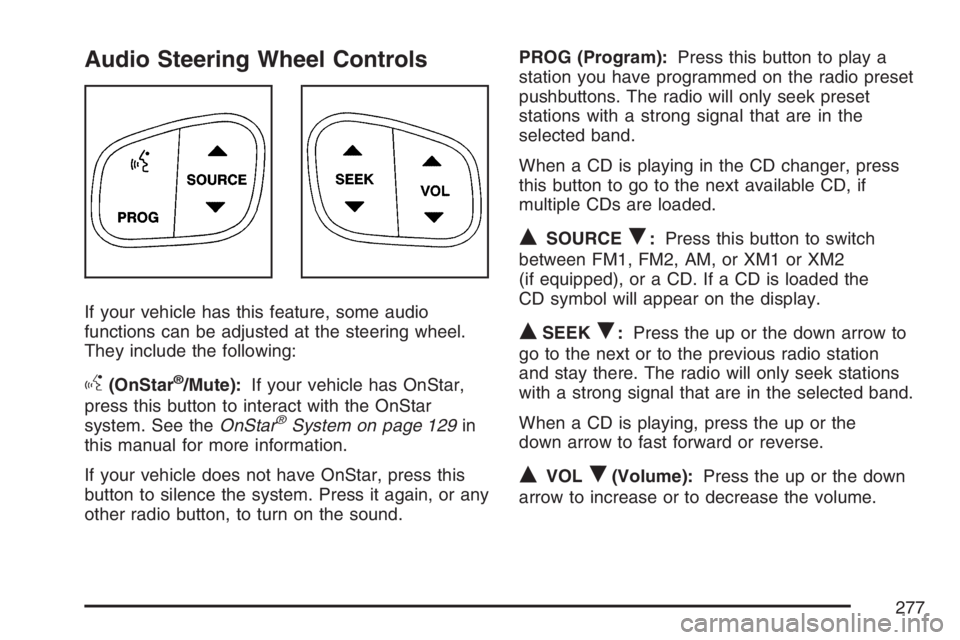
Audio Steering Wheel Controls
If your vehicle has this feature, some audio
functions can be adjusted at the steering wheel.
They include the following:
g(OnStar®/Mute):If your vehicle has OnStar,
press this button to interact with the OnStar
system. See theOnStar
®System on page 129in
this manual for more information.
If your vehicle does not have OnStar, press this
button to silence the system. Press it again, or any
other radio button, to turn on the sound.PROG (Program):Press this button to play a
station you have programmed on the radio preset
pushbuttons. The radio will only seek preset
stations with a strong signal that are in the
selected band.
When a CD is playing in the CD changer, press
this button to go to the next available CD, if
multiple CDs are loaded.
QSOURCER:Press this button to switch
between FM1, FM2, AM, or XM1 or XM2
(if equipped), or a CD. If a CD is loaded the
CD symbol will appear on the display.
QSEEKR:Press the up or the down arrow to
go to the next or to the previous radio station
and stay there. The radio will only seek stations
with a strong signal that are in the selected band.
When a CD is playing, press the up or the
down arrow to fast forward or reverse.
QVOLR(Volume):Press the up or the down
arrow to increase or to decrease the volume.
277
Page 278 of 534
Radio Reception
You may experience frequency interference and
static during normal radio reception if items
such as cellphone chargers, vehicle convenience
accessories, and external electronic devices
are plugged into the accessory power outlet. If
there is interference or static, unplug the item from
the accessory power outlet.
AM
The range for most AM stations is greater than for
FM, especially at night. The longer range can
cause station frequencies to interfere with each
other. For better radio reception, most AM
radio stations boosts the power levels during the
day, and then reduce these levels during the night.
Static can also occur when things like storms
and power lines interfere with radio reception.
When this happens, try reducing the treble on
your radio.
FM Stereo
FM stereo gives the best sound, but FM signals
reach only about 10 to 40 miles (16 to 65 km). Tall
buildings or hills can interfere with FM signals,
causing the sound to fade in and out.
XM™ Satellite Radio Service
XM™ Satellite Radio Service gives digital radio
reception from coast-to-coast in the 48 contiguous
United States, and in Canada. Just as with FM,
tall buildings or hills can interfere with satellite
radio signals, causing the sound to fade in and out.
In addition, traveling or standing under heavy
foliage, bridges, garages, or tunnels can cause
loss of the XM™ signal for a period of time.
The radio could display NO XM SIGNAL to indicate
interference.
278
Page 280 of 534
XM™ Satellite Radio Antenna
System
The XM™ Satellite Radio antenna is located on
the roof of your vehicle. Keep this antenna clear of
snow and ice build up for clear radio reception.
If your vehicle has a sunroof, the performance of
the XM™ system may be affected if the sunroof
is open.
Loading items onto the roof of your vehicle can
interfere with the performance of the XM™ system.
Make sure the XM™ Satellite Radio antenna is
not obstructed.
Chime Level Adjustment
The radio is used to adjust the vehicle’s chime
level. To change the volume level of the chime,
press and hold pushbutton 6 with the ignition
on and the radio power off. The volume level will
change from the normal level to loud, and
LOUD CHIME will appear on the radio display.
To change back to the default or normal setting,
press and hold pushbutton 6 again. The volume
level will change from the loud level to normal, and
NORMAL CHIME will appear on the radio
display. Removing the radio and not replacing it
with a factory radio or chime module will
disable vehicle chimes.
280
Page 398 of 534
Notice:If you leave your radio or other
accessories on during the jump starting
procedure, they could be damaged. The repairs
would not be covered by your warranty.
Always turn off your radio and other
accessories when jump starting your vehicle.
3. Turn off the ignition on both vehicles.
Unplug unnecessary accessories plugged into
the cigarette lighter or the accessory power
outlets, if equipped. Turn off the radio and all
lamps that are not needed. This will avoid
sparks and help to save both batteries. And it
could save the radio!
4. Open both hoods and locate the batteries.
Find the positive (+) and negative (−)
terminals on each battery. Your vehicle has a
remote negative (−) jump starting terminal.
You should always use this remote terminal
instead of the terminal on the battery.
The remote negative (−) terminal is located on
the front engine lift bracket on vehicles with
the 4.2L L6 engine or the engine accessory
drive bracket for vehicles with the 5.3L V8
engine, and is marked GND (Ground).
SeeEngine Compartment Overview on
page 366for more information on location.
{CAUTION:
Using a match near a battery can cause
battery gas to explode. People have been
hurt doing this, and some have been
blinded. Use a ashlight if you need
more light.
Be sure the battery has enough water.
You do not need to add water to the
battery installed in your new vehicle. But
if a battery has ller caps, be sure the
right amount of uid is there. If it is low,
add water to take care of that rst. If you
do not, explosive gas could be present.
Battery uid contains acid that can burn
you. Do not get it on you. If you
accidentally get it in your eyes or on your
skin, ush the place with water and get
medical help immediately.
398
Page 420 of 534
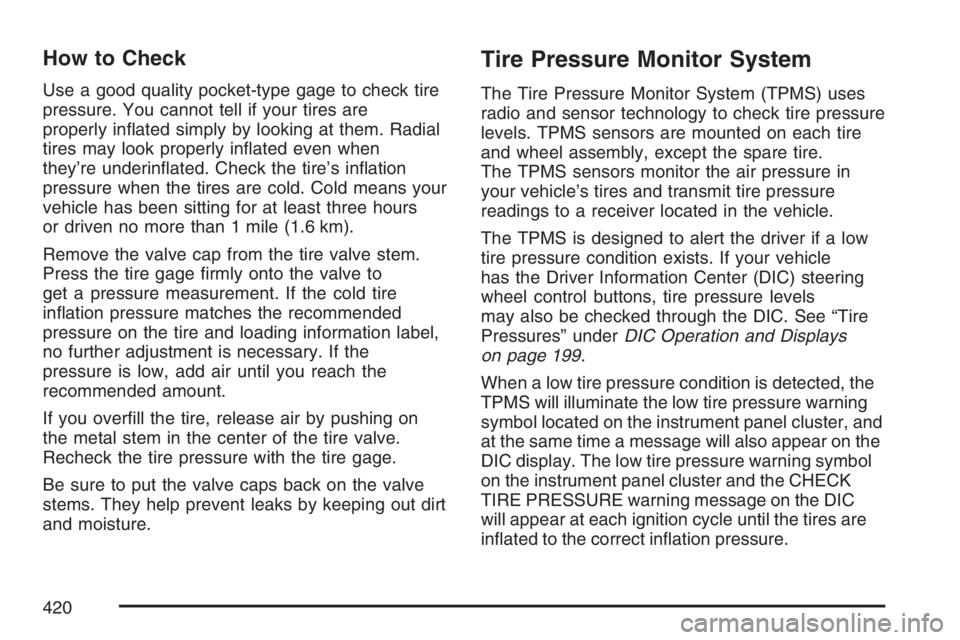
How to Check
Use a good quality pocket-type gage to check tire
pressure. You cannot tell if your tires are
properly inated simply by looking at them. Radial
tires may look properly inated even when
they’re underinated. Check the tire’s ination
pressure when the tires are cold. Cold means your
vehicle has been sitting for at least three hours
or driven no more than 1 mile (1.6 km).
Remove the valve cap from the tire valve stem.
Press the tire gage rmly onto the valve to
get a pressure measurement. If the cold tire
ination pressure matches the recommended
pressure on the tire and loading information label,
no further adjustment is necessary. If the
pressure is low, add air until you reach the
recommended amount.
If you overll the tire, release air by pushing on
the metal stem in the center of the tire valve.
Recheck the tire pressure with the tire gage.
Be sure to put the valve caps back on the valve
stems. They help prevent leaks by keeping out dirt
and moisture.
Tire Pressure Monitor System
The Tire Pressure Monitor System (TPMS) uses
radio and sensor technology to check tire pressure
levels. TPMS sensors are mounted on each tire
and wheel assembly, except the spare tire.
The TPMS sensors monitor the air pressure in
your vehicle’s tires and transmit tire pressure
readings to a receiver located in the vehicle.
The TPMS is designed to alert the driver if a low
tire pressure condition exists. If your vehicle
has the Driver Information Center (DIC) steering
wheel control buttons, tire pressure levels
may also be checked through the DIC. See “Tire
Pressures” underDIC Operation and Displays
on page 199.
When a low tire pressure condition is detected, the
TPMS will illuminate the low tire pressure warning
symbol located on the instrument panel cluster, and
at the same time a message will also appear on the
DIC display. The low tire pressure warning symbol
on the instrument panel cluster and the CHECK
TIRE PRESSURE warning message on the DIC
will appear at each ignition cycle until the tires are
inated to the correct ination pressure.
420
Page 424 of 534
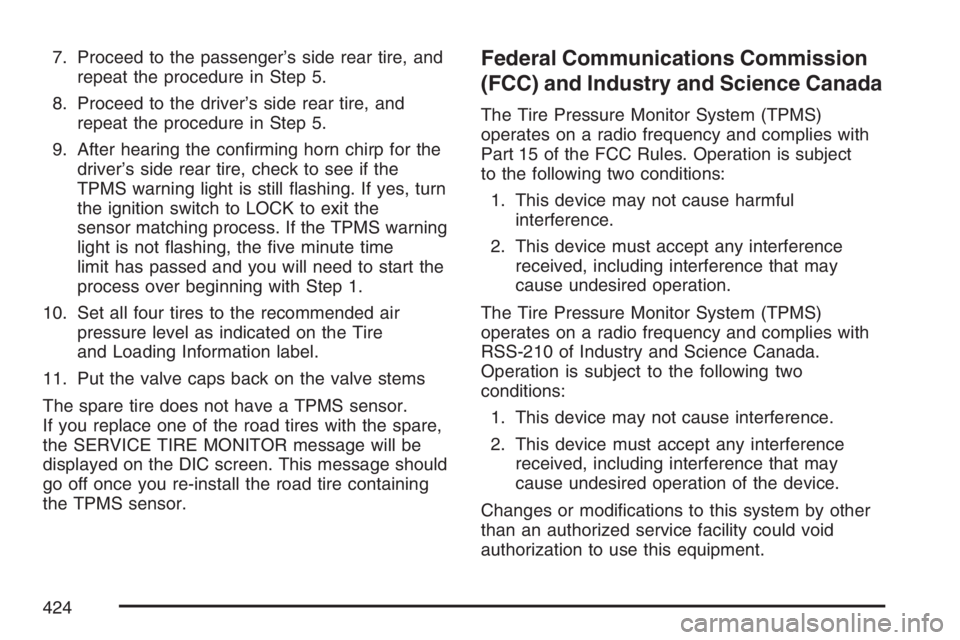
7. Proceed to the passenger’s side rear tire, and
repeat the procedure in Step 5.
8. Proceed to the driver’s side rear tire, and
repeat the procedure in Step 5.
9. After hearing the conrming horn chirp for the
driver’s side rear tire, check to see if the
TPMS warning light is still ashing. If yes, turn
the ignition switch to LOCK to exit the
sensor matching process. If the TPMS warning
light is not ashing, the ve minute time
limit has passed and you will need to start the
process over beginning with Step 1.
10. Set all four tires to the recommended air
pressure level as indicated on the Tire
and Loading Information label.
11. Put the valve caps back on the valve stems
The spare tire does not have a TPMS sensor.
If you replace one of the road tires with the spare,
the SERVICE TIRE MONITOR message will be
displayed on the DIC screen. This message should
go off once you re-install the road tire containing
the TPMS sensor.Federal Communications Commission
(FCC) and Industry and Science Canada
The Tire Pressure Monitor System (TPMS)
operates on a radio frequency and complies with
Part 15 of the FCC Rules. Operation is subject
to the following two conditions:
1. This device may not cause harmful
interference.
2. This device must accept any interference
received, including interference that may
cause undesired operation.
The Tire Pressure Monitor System (TPMS)
operates on a radio frequency and complies with
RSS-210 of Industry and Science Canada.
Operation is subject to the following two
conditions:
1. This device may not cause interference.
2. This device must accept any interference
received, including interference that may
cause undesired operation of the device.
Changes or modications to this system by other
than an authorized service facility could void
authorization to use this equipment.
424
Page 465 of 534
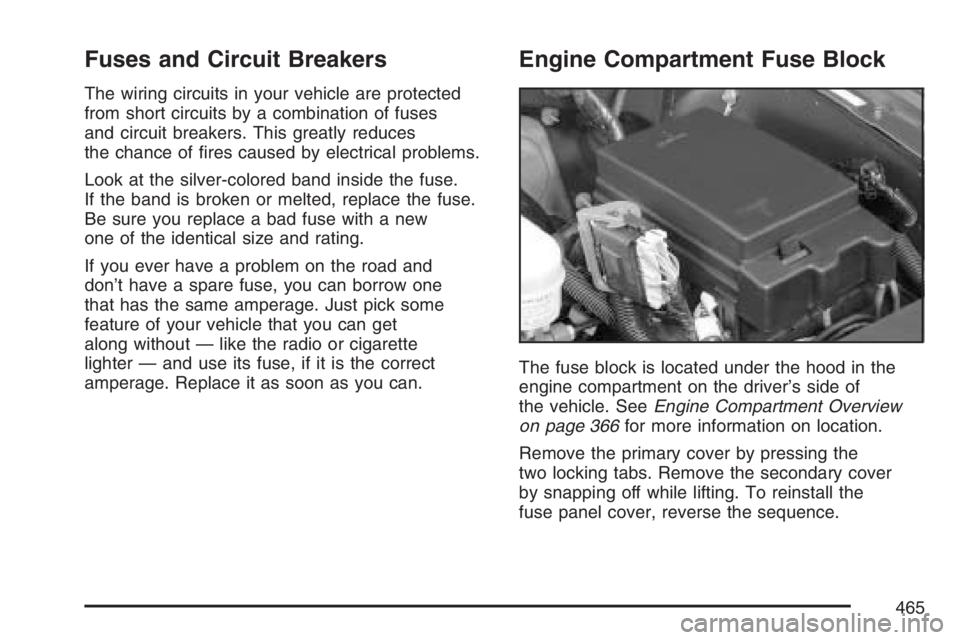
Fuses and Circuit Breakers
The wiring circuits in your vehicle are protected
from short circuits by a combination of fuses
and circuit breakers. This greatly reduces
the chance of res caused by electrical problems.
Look at the silver-colored band inside the fuse.
If the band is broken or melted, replace the fuse.
Be sure you replace a bad fuse with a new
one of the identical size and rating.
If you ever have a problem on the road and
don’t have a spare fuse, you can borrow one
that has the same amperage. Just pick some
feature of your vehicle that you can get
along without — like the radio or cigarette
lighter — and use its fuse, if it is the correct
amperage. Replace it as soon as you can.
Engine Compartment Fuse Block
The fuse block is located under the hood in the
engine compartment on the driver’s side of
the vehicle. SeeEngine Compartment Overview
on page 366for more information on location.
Remove the primary cover by pressing the
two locking tabs. Remove the secondary cover
by snapping off while lifting. To reinstall the
fuse panel cover, reverse the sequence.
465
Page 473 of 534
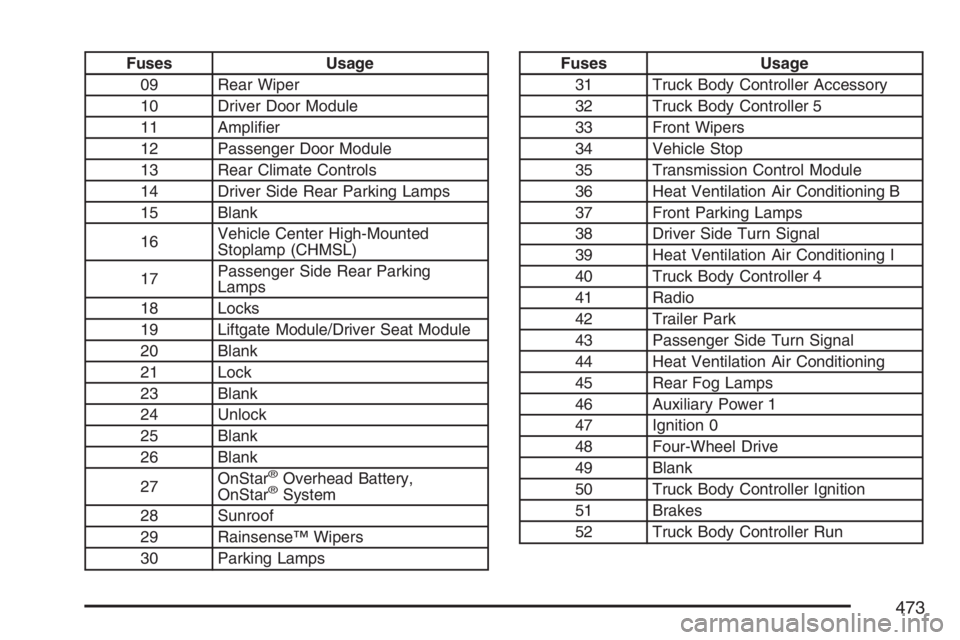
Fuses Usage
09 Rear Wiper
10 Driver Door Module
11 Amplier
12 Passenger Door Module
13 Rear Climate Controls
14 Driver Side Rear Parking Lamps
15 Blank
16Vehicle Center High-Mounted
Stoplamp (CHMSL)
17Passenger Side Rear Parking
Lamps
18 Locks
19 Liftgate Module/Driver Seat Module
20 Blank
21 Lock
23 Blank
24 Unlock
25 Blank
26 Blank
27OnStar
®Overhead Battery,
OnStar®System
28 Sunroof
29 Rainsense™ Wipers
30 Parking Lamps
Fuses Usage
31 Truck Body Controller Accessory
32 Truck Body Controller 5
33 Front Wipers
34 Vehicle Stop
35 Transmission Control Module
36 Heat Ventilation Air Conditioning B
37 Front Parking Lamps
38 Driver Side Turn Signal
39 Heat Ventilation Air Conditioning I
40 Truck Body Controller 4
41 Radio
42 Trailer Park
43 Passenger Side Turn Signal
44 Heat Ventilation Air Conditioning
45 Rear Fog Lamps
46 Auxiliary Power 1
47 Ignition 0
48 Four-Wheel Drive
49 Blank
50 Truck Body Controller Ignition
51 Brakes
52 Truck Body Controller Run
473
Page 519 of 534
A
Accessories and Modications..................... 356
Accessory Inator........................................ 434
Accessory Power Outlet(s).......................... 168
Adding Equipment to Your Airbag-Equipped
Vehicle....................................................... 85
Additives, Fuel............................................ 359
Add-On Electrical Equipment....................... 464
Adjustable Throttle and Brake Pedal............ 112
Air Cleaner/Filter, Engine............................. 374
Air Conditioning........................................... 170
Air Suspension............................................ 337
Airbag
Passenger Status Indicator....................... 182
Readiness Light....................................... 181
Airbag Sensing and Diagnostic
Module (SDM).......................................... 510
Airbag System............................................... 68
Adding Equipment to Your
Airbag-Equipped Vehicle......................... 85
How Does an Airbag Restrain?.................. 76
Passenger Sensing System....................... 78
Servicing Your Airbag-Equipped Vehicle..... 84
What Makes an Airbag Inate?.................. 76
What Will You See After an Airbag
Inates?................................................. 77Airbag System (cont.)
When Should an Airbag Inate?................. 74
Where Are the Airbags?............................. 71
All-Wheel Drive........................................... 402
All-Wheel-Drive (AWD) System.................... 293
All-Wheel-Drive Service Light....................... 196
Antenna, Fixed Mast................................... 279
Antenna, XM™ Satellite Radio Antenna
System.................................................... 280
Anti-Lock Brake System (ABS).................... 287
Anti-Lock Brake, System Warning Light....... 187
Appearance Care
Aluminum Wheels.................................... 459
Care of Safety Belts................................ 457
Chemical Paint Spotting........................... 461
Cleaning Exterior Lamps/Lenses.............. 458
Cleaning the Inside of Your Vehicle.......... 453
Fabric/Carpet........................................... 455
Finish Care.............................................. 458
Finish Damage......................................... 460
Instrument Panel, Vinyl, and Other
Plastic Surfaces.................................... 456
Leather.................................................... 456
Sheet Metal Damage............................... 460
Tires........................................................ 460
Underbody Maintenance........................... 461
519
Page 520 of 534
Appearance Care (cont.)
Vehicle Care/Appearance Materials.......... 462
Washing Your Vehicle.............................. 457
Windshield, Backglass, and
Wiper Blades........................................ 459
Ashtray(s).................................................... 169
Audio System(s).......................................... 215
Audio Steering Wheel Controls................. 277
Care of Your CD and DVD Player............ 279
Care of Your CDs and DVDs................... 279
Chime Level Adjustment........................... 280
Fixed Mast Antenna................................. 279
Navigation/Radio System,
see Navigation Manual......................... 260
Radio with CD................................217, 228
Radio with Six-Disc CD............................ 238
Rear Seat Audio (RSA)............................ 275
Setting the Time...................................... 217
Theft-Deterrent Feature............................ 276
Understanding Radio Reception............... 278
XM™ Satellite Radio Antenna System...... 280
Automatic Headlamp System....................... 164
Automatic Transmission
Fluid........................................................ 375
Operation................................................. 114B
Battery........................................................ 396
Electric Power Management..................... 167
Run-Down Protection............................... 168
Before Leaving on a Long Trip.................... 321
Brake
Anti-Lock Brake System (ABS)................. 287
Emergencies............................................ 289
Parking.................................................... 118
System Warning Light.............................. 186
Brake Pedal, Throttle................................... 112
Brakes........................................................ 392
Braking....................................................... 286
Braking in Emergencies............................... 289
Break-In, New Vehicle................................. 108
Bulb Replacement....................................... 404
Halogen Bulbs......................................... 404
Headlamps, Front Turn Signal, and
Parking Lamps..................................... 405
License Plate Lamps................................ 407
Replacement Bulbs.................................. 407
Taillamps and Turn Signal Lamps............. 405
Buying New Tires........................................ 427
520