ignition BUICK RANDEZVOUS 2003 Workshop Manual
[x] Cancel search | Manufacturer: BUICK, Model Year: 2003, Model line: RANDEZVOUS, Model: BUICK RANDEZVOUS 2003Pages: 432, PDF Size: 2.75 MB
Page 201 of 432
Setting the Time
Press and hold H until the correct hour appears on the
display. AM will also appear for morning hours.
Press and hold M until the correct minute appears on
the display. The time may be set with the ignition
on or off.
To synchronize the time with an FM station broadcasting
Radio Data System (RDS) information, press and
hold H and M at the same time until TIME UPDATED
appears on the display. If the time is not available from
the station, NO UPDATE will appear on the display
instead.
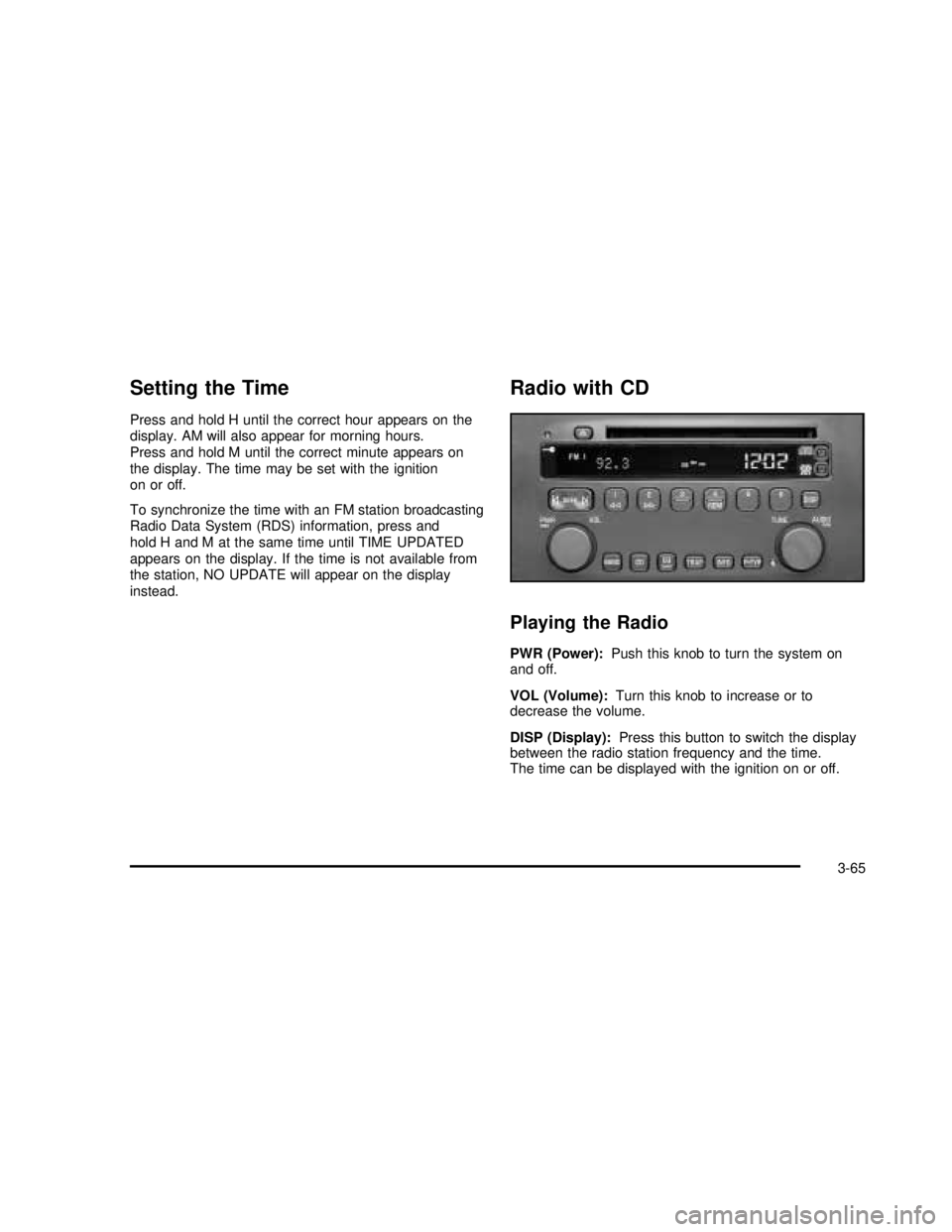
Radio with CD
Playing the Radio
PWR (Power):Push this knob to turn the system on
and off.
VOL (Volume):Turn this knob to increase or to
decrease the volume.
DISP (Display):Press this button to switch the display
between the radio station frequency and the time.
The time can be displayed with the ignition on or off.
3-65
2003 - Rendezvous OM
Page 205 of 432

BAND (Alternate Frequency):Alternate frequency
allows the radio to switch to a stronger station with the
same program type. Press and hold BAND for two
seconds to turn alternate frequency on. AF ON
will appear on the display. The radio may switch to
stronger stations. Press and hold BAND again for two
seconds to turn alternate frequency off. AF OFF
will appear on the display. The radio will not switch to
other stations. When you turn the ignition off and then on
again, the alternate frequency feature will automatically
be turned on.
RDS Messages
ALERT!:Alert warns of local or national emergencies.
When an alert announcement comes on the current
radio station, ALERT! will appear on the display. You will
hear the announcement, even if the volume is muted
or a compact disc is playing. If a compact disc is playing,
play will stop during the announcement. You will not
be able to turn off alert announcements.
ALERT! will not be affected by tests of the emergency
broadcast system. This feature is not supported by
all RDS stations.
INFO (Information):If the current station has a
message, INFO will appear on the display. Press this
button to see the message. The message may display
the artist and song title, call in phone numbers, etc.If the whole message is not displayed, parts of it will
appear every three seconds. To scroll through the
message at your own speed, press the INFO button
repeatedly. A new group of words will appear on
the display with each press. Once the complete
message has been displayed, INFO will disappear from
the display until another new message is received.
The old message can be displayed by pressing
the INFO button until a new message is received or a
different station is tuned to.
TRAF (Traffic):Press this button to seek to a station
that broadcasts traffic announcements. TRAF will appear
on the display. If no station is found, NO TRAF will
appear on the display.
When a traffic announcement comes on the current
station or on a related network station, you will hear it,
even if the volume is muted or a compact disc is
playing. If the compact disc player is being used, play
will stop during the announcement.
Radio Messages
CAL (CALIBRATE):Your audio system has been
calibrated for your vehicle from the factory. If this
message appears on the display it means that your
radio has not been configured properly for your vehicle
and must be returned to the dealership for service.
3-69
2003 - Rendezvous OM
Page 206 of 432

Playing a Compact Disc
Insert a disc partway into the slot, label side up. The
player will pull it in. The disc should begin playing. If you
want to insert a CD while the ignition or the radio is
off,first press the eject button or DISP.
If you turn off the ignition or radio with a disc in the
player, it will stay in the player. When you turn on the
ignition or system, the disc will start playing where
it stopped, if it was the last selected audio source.
If an error appears on the display, see“Compact Disc
Errors”later in this section.
1
s(Reverse):Press and hold this pushbutton to
quickly reverse within a track. Release is it to play the
passage. You will hear sound at a reduced level.
2
\(Forward):Press and hold this pushbutton to
quickly advance within a track. Release it to play
the passage. You will hear sound at a reduced level.
4 RDM (Random):Press this pushbutton to hear
the tracks in random, rather than sequential, order.
Press RDM again to turn off random play.
DISP (Display):Press this button to see which track is
playing. Press it again withinfive seconds to see
how long it has been playing. To change what isnormally shown on the display (track or elapsed time),
press this button until you see the display you want, then
hold the button until the displayflashes.
©SEEK¨:Press the left arrow to go to the start of
the current track if more than eight seconds have
played. If you hold the button or press it more than once,
the player will continue moving back through the disc.
Press the right arrow to go to the next track. If you hold
the button or press it more than once, the player will
continue moving forward through the disc.
To scan CD tracks, press and hold one of the SEEK
arrows for two seconds until SCAN appears on the
display. You will hear a beep. The disc will go to the next
track, play for a few seconds, then go on to the next
track. The sound will mute and SCAN and the track
number will appear on the display while scanning. The
disc will only scan forward. Press one of the SEEK
arrows again to stop scanning.
BAND:Press this button to listen to the radio when a
CD is playing.
CD:Press this button to change to playing a CD when
listening to the radio.
Z(Eject):Press this button to eject a CD.
3-70
2003 - Rendezvous OM
Page 208 of 432

This system relies upon receiving specific information
from these stations and will only work when the
information is available. In rare cases, a radio station
may broadcast incorrect information that will cause
the radio features to work improperly. If this happens,
contact the radio station.
While you are tuned to an RDS station, the station
name or the call letters will appear on the display instead
of the frequency. RDS stations may also provide the
time of day, a program type (PTY) for current
programming and the name of the program being
broadcast.
XM™Radio Satellite Service
(USA Only)
XM™is a continental U.S. based satellite radio service
that offers 100 coast to coast channels including
music, news, sports, talk and children’s programming.
XM™provides digital quality audio and text information,
including song title and artist name. A service fee is
required in order to receive the XM™service. For more
information, contact XM™at www.xmradio.com or
call 1-800-852-XMXM (9696).
Playing the Radio
PWR (Power):Push this knob to turn the system on
and off.VOL (Volume):Turn this knob to increase or to
decrease the volume.
SCV (Speed-Compensated Volume):With SCV, your
audio system adjusts automatically to make up for
road and wind noise as you drive. To get to SCV, press
the TUNE/AUDIO knob repeatedly until SPEED VOL
is displayed. Turn the TUNE/AUDIO knob to select OFF,
MIN, MED or MAX. Each higher choice allows for
more volume compensation at faster vehicle speeds.
Then, as you drive, SCV automatically increases
the volume, as necessary, to overcome noise at any
speed. The volume level should always sound the same
to you as you drive. If you don’t want to use SCV,
select OFF.
DISP (Display):Press this button to display the time
when the ignition is turned off.
For XM™(USA only, if equipped), press this button while
in XM™mode to retrieve various pieces of information
related to the current song or channel. By pressing and
releasing the DISP button, you may retrieve four different
categories of information: Artist, Song Title, Category or
PTY, Channel Number/Channel Name.
To change the default on the display, push this button
until you see the display you want, then hold the button
until the displayflashes. The selected display will now be
the default.
3-72
2003 - Rendezvous OM
Page 211 of 432

To use the PTY interrupt feature, press and hold the
P-TYP button until you hear a beep on the PTY
you want to interrupt with. An asterisk will appear next
to the PTY name (for example CLASSICAL*). When you
are listening to a compact disc, the last selected RDS
station will interrupt play if that selected PTY format
is broadcast.
An asterisk will not display for XM™.
SCAN:You can also scan through the stations within a
category by performing the following:
1. Press P-TYP. The PTY symbol will be displayed on
the screen.
2. Select a category by turning the AUDIO knob.
3. Once the desired category is displayed, press and
hold either SEEK arrow, and the radio will begin
scanning within your chosen category.
4. Press and hold either SEEK arrow again to stop at
a particular station.
If both P-TYP and TRAF are on, the radio will search
for stations with the selected PTY and traffic
announcements.
BAND (Alternate Frequency):Alternate frequency
allows the radio to switch to a stronger station with the
same program type. Press and hold BAND for two
seconds to turn alternate frequency on. AF ON
will appear on the display. The radio may switch to
stronger stations. Press and hold BAND again for twoseconds to turn alternate frequency off. AF OFF will
appear on the display. The radio will not switch to other
stations. When you turn the ignition off and then on
again, the alternate frequency feature will automatically
be turned on.
This function does not apply for XM™.
RDS Messages
ALERT!:Alert warns of local or national emergencies.
When an alert announcement comes on the current
radio station, ALERT! will appear on the display. You will
hear the announcement, even if the volume is muted
or a cassette tape or compact disc is playing. If a
cassette tape or compact disc is being used, play will
stop during the announcement. You will not be able
to turn off alert announcements.
ALERT! will not be affected by tests of the emergency
broadcast system. This feature is not supported by
all RDS stations.
INFO (Information):If the current station has a
message, INFO will appear on the display. Press this
button to see the message. The message may display
the artist and song title, call in phone numbers, etc.
If the whole message is not displayed, parts of it
will appear every three seconds. To scroll through the
message at your own speed, press the INFO button
repeatedly. A new group of words will appear on
the display with each press. Once the complete
3-75
2003 - Rendezvous OM
Page 215 of 432

Playing a Cassette Tape
The longer side with the tape visible should face to the
right. If the ignition and the radio are on, the tape
can be inserted and will begin playing. If you hear
nothing or hear a garbled sound, the tape may not be in
squarely. Press the eject button to remove the tape
and start over.
While the tape is playing, use the VOLUME and AUDIO
controls just as you do for the radio. The display will
show an arrow to show which side of the tape is playing.
If you want to insert a tape while the ignition or radio
is off,first press the eject button or DISP. Cassette tape
adapter kits for portable compact disc players will
work in your cassette tape player.
Your tape bias is set automatically.
If an error appears on the display, see“Cassette Tape
Messages”later in this section.
1
s(Reverse):Press this pushbutton to reverse the
tape rapidly. The radio will play while the tape reverses.
Press it again to return to playing speed.
2
\(Forward):Press this pushbutton to advance
quickly to another part of the tape. The radio will play
while the tape advances. Press this pushbutton again to
return to playing speed.6 SIDE:Press this pushbutton to play the other side of
the tape.
©SEEK¨:Your tape must have at least three
seconds of silence between each selection for seek to
work. Press the left or the right arrow to go to the
previous or to the next selection on the tape.
To scan cassette tape selections, press and hold one of
the SEEK arrows for two seconds until SCN appears
on the display. You will hear a beep. The tape will go to
the next selection, play for a few seconds, then go on
to the next selection. The cassette tape will only
scan forward. Press one of the SEEK arrows again to
stop scanning.
BAND:Press this button to listen to the radio when a
cassette tape or CD is playing.
CD TAPE:Press this button to play a cassette tape or
a CD when listening to the radio.
Z(Eject):Press this button to eject a tape.
3-79
2003 - Rendezvous OM
Page 216 of 432

Cassette Tape Messages
If an error message appears while trying to play a
cassette tape, it could be for one of the following
reasons:
•TIGHT TAPE:The tape is tight and the player can’t
turn the tape hubs. Remove the tape. Hold the tape
with the open end down and try to turn the right
hub counterclockwise with a pencil. Turn the tape
over and repeat. If the hubs do not turn easily, your
tape may be damaged and should not be used in
the player. Try a new tape to make sure your player
is working properly.
•BROKEN TAPE:The tape is broken. Try a
new tape.
CLEAN PLAYER:If this message appears on the
display, the cassette tape player needs to be cleaned. It
will still play tapes, but you should clean it as soon as
possible to prevent damage to the tapes and player. See
Care of Your Cassette Tape Player on page 3-108.
If any error occurs repeatedly or if an error can’t
be corrected, contact your dealership. If your radio
displays an error number, write it down and provide it to
your dealership when reporting the problem.
CD Adapter Kits
It is possible to use a portable CD player adapter kit
with your cassette tape player after activating the bypass
feature on your tape player.
To activate the bypass feature, use the following steps:
1. Turn the ignition on.
2. Turn the radio off.
3. Insert the adapter into the cassette slot.
4. Press and hold the CD TAPE button until READY is
displayed.
The override feature will remain active until the eject
button is pressed.
Playing a Compact Disc
Insert a disc partway into the slot, label side up. The
player will pull it in. The disc should begin playing. If you
want to insert a CD while the ignition or the radio is
off,first press the eject button or DISP.
If you turn off the ignition or radio with a disc in the
player, it will stay in the player. When you turn on the
ignition or system, the disc will start playing where
it stopped, if it was the last selected audio source.
If an error appears on the display, see“Compact Disc
Errors”later in this section.
3-80
2003 - Rendezvous OM
Page 219 of 432

AUTO VOL (Automatic Volume):Your system has a
feature called automatic volume. With this feature,
your audio system adjusts automatically to make up for
road and wind noise as you drive.
Set the volume at the desired level. Press this button to
select MIN, MED or MAX. Each higher setting will
allow for more volume compensation at faster vehicle
speeds. Then, as you drive, automatic volume increases
the volume, as necessary, to overcome noise at any
speed. The volume level should always sound the same
to you as you drive. If you don’t want to use automatic
volume, select OFF.
RCL (Recall):Push this knob to switch the display
between the radio station frequency and the time.
Pushing this knob with the ignition off will display
the time.
For XM™(USA only, if equipped), pressing this button
while in XM™mode to retrieve various pieces of
information related to the current song or channel.
By pressing and releasing the RCL button, you may
retrieve four different categories of information:
Artist, Song Title, Category or PTY, Channel
Number/Channel Name.
To change the default on the display, push the knob
until you see the display you want, then hold the knob
until the displayflashes. The selected display will
now be the default.Finding a Station
BAND:Press this button to switch between AM, FM1,
FM2, or XM1, XM2 (USA only, if equipped). The
display will show your selection.
TUNE:Turn this knob to select radio stations.
sSEEKt:Press the right or the left arrow to go to
the next or to the previous station and stay there.
The radio will seek only to stations that are in the
selected band and only to those with a strong signal.
sSCANt:Press and hold either SCAN arrow
for two seconds until SC appears on the display and
you hear a beep. The radio will go to a station, play for
a few seconds, then go on to the next station. Press
either SCAN arrow again to stop scanning.
To scan preset stations, press and hold either SCAN
arrow for more than four seconds. PRESET SCAN will
appear on the display. You will hear a double beep.
The radio will go to a preset station stored on your
pushbuttons, play for a few seconds, then go on to the
next preset station. Press either SCAN arrow again
to stop scanning presets.
The radio will scan only to stations that are in the
selected band and only to those with a strong signal.
3-83
2003 - Rendezvous OM
Page 221 of 432

To adjust all tone and speaker controls to the middle
position, push and hold the AUDIO knob when no tone
or speaker controls are displayed. The radio will
produce one beep and CENTERED will appear on the
display.
Finding a PTY Station (RDS and XM™)
To select andfind a desired PTY perform the following:
1. Press the P-TYPE button. P-TYPE and the last
selected PTY will be displayed on the screen.
2. Select a category by turning the P-TYPE knob.
3. Once the desired category is displayed, press either
SEEK arrow to select the category and take you to
the category’sfirst station.
4. If you want to go to another station within that
category and the category is displayed, press
either SEEK arrow once. If the category is not
displayed, press either SEEK arrow twice to display
the category and then to go to another station.
5. If PTY times out and is no longer on the display, go
back to Step 1.
If both P-TYPE and TRAF are on, the radio will search
for stations with the selected PTY and traffic
announcements.
To use the PTY interrupt feature, press and hold the
P-TYPE button until you hear a beep on the PTY
you want to interrupt with. When selected, an asteriskwill appear beside that PTY on the display. You may
select multiple interrupts if desired. When you are
listening to a compact disc, the last selected RDS station
will interrupt play if that selected program type format
is broadcast.
SCAN:You can also scan through the channels within
a category by performing the following:
1. Press the P-TYPE button. P-TYPE and the last
selected PTY will be displayed on the screen.
2. Select a category by turning the P-TYPE knob.
3. Once the desired category is displayed, press and
hold either SCAN arrow, and the radio will begin
scanning within your chosen category.
4. Press either SCAN arrow again to stop at a
particular station.
BAND (Alternate Frequency):Alternate frequency
allows the radio to switch to a stronger station with the
same program type. Press and hold BAND for two
seconds to turn alternate frequency on. AF ON
will appear on the display. The radio may switch to
stronger stations. Press and hold BAND again for two
seconds to turn alternate frequency off. AF OFF
will appear on the display. The radio will not switch to
other stations. When you turn the ignition off and then on
again, the alternate frequency feature will automatically
be turned on.
This function does not apply for XM™.
3-85
2003 - Rendezvous OM
Page 225 of 432

XM™Radio Messages (cont’d)
Radio Display
MessageCondition Action Required
Unknown Radio ID not known
(should only be if
hardware failure)If you receive this message when you tune to channel 0,
you may have a receiver fault. Consult with your dealer.
Chk XMRcvr Hardware failure If this message does not clear within a short period of time,
your receiver may have a fault. Consult with your retail
location.
Playing a Compact Disc
If an error appears on the display, see“Compact Disc
Messages”later in this section.
LOAD CD
Z:Press the LOAD side of this button to
load CDs into the compact disc player. This compact
disc player will hold up to six discs.
To insert one disc, do the following:
1. Turn the ignition on.
2. Press and release the LOAD side of the LOAD CD
button.
3. Wait for the light, located to the right of the slot, to
turn green.
4. Load a disc. Insert the disc partway into the slot,
label side up. The player will pull the disc in.When a disc is inserted, the CD symbol will be
displayed. If you select an equalization setting for your
disc, it will be activated each time you play a disc.
If the radio is on or off, the disc will begin to play
automatically.
To insert multiple discs, do the following:
1. Turn the ignition on.
2. Press and hold the LOAD side of the LOAD CD
button for two seconds.
You will hear a beep and the light, located to the
right of the slot, will begin toflash.
3. Once the light stopsflashing and turns green, load
a disc. Insert the disc partway into the slot, label
side up. The player will pull the disc in.
3-89
2003 - Rendezvous OM