ABS BUICK RANDEZVOUS 2004 User Guide
[x] Cancel search | Manufacturer: BUICK, Model Year: 2004, Model line: RANDEZVOUS, Model: BUICK RANDEZVOUS 2004Pages: 486, PDF Size: 3.18 MB
Page 415 of 486

A. Push and Pull
B. Turn Tire9. Make sure the tire is stored securely. Push, pull,
and then try to turn the tire. If the tire moves, use
the folding wrench to tighten the cable.
Put back all tools as they were stored in the jack
storage compartment and put the compartment cover
back on.
To put the cover back on, slip the tabs on the side of
the cover into the cover opening. Push the cover
in place and push down the tabs on the cover so that it
rests in the groove. This secures the cover in place.
When you replace the compact spare with a full-size tire,
reinstall the bolt-on wheel covers or the center cap,
which ever your vehicle has. Tighten them hand tight
over the wheel nuts, using the folding wrench.
5-93
Page 416 of 486

Storing the Flat Tire (Vehicles without the
Stowable Seat and without the Rear
Convenience Center)
A. D-Ring
B. Wing Nut
C. J-Hook
D. Valve Stem
E. Full-Size Tire1. Flip up the D-ring located in the rear cargo area.
2. Lay the tire in the rear cargo area of the vehicle with
the valve stem up with the center hole of the tire
over the D-ring.
For vehicles with aluminum wheels, remove the
center cap by tapping the back of the cap with the
folding wrench.
3. Remove the J-hook and the wing nut from the back
of the jack access door. Assemble the wing nut and
the J-hook.
4. Install the wing nut and the J-hook to the D-ring
through the center hole of the tire.
5. Tighten the wing nut to secure the tire to the oor.
Push and pull on the tire to make sure the tire is
secure and does not move.
6. Put back all tools as they were stored in the jack
storage compartment and put the compartment
cover back on.
Slip the tabs on the side of the compartment cover
into the cover opening. Push the cover in place
and push down the tabs on the cover so that it rests
in the groove. This secures the cover in place.
5-94
Page 417 of 486

Storing the Flat Tire (Vehicles with the
Rear Convenience Center)
A. D-Ring
B. Rear Convenience Center
C. Wing Nut
D. J-Hook
E. Full-Size Tire
F. Cap on Bottom of Storage Compartment1. Open the center storage compartment door of the
rear convenience center.
2. Remove the cap on the bottom of the storage
compartment and ip the D-ring up.
3. Lay the tire on top of the center storage
compartment with the valve stem down. Make sure
you can see the D-ring through the center hole
of the tire.
4. Remove the J-hook and the wing nut from the back
of the jack access door. Assemble the wing nut and
the J-hook.
5. Install the wing nut and the J-hook to the D-ring
through the center hole of the tire.
6. Tighten the wing nut to secure the tire to the oor.
Push and pull on the tire to make sure the tire is
secure and does not move.
7. Put back all tools as they were stored in the jack
storage compartment and put the compartment
cover back on.
Slip the tabs on the side of the compartment cover
into the cover opening. Push the cover in place
and push down the tabs on the cover so that it rests
in the groove. This secures the cover in place.
5-95
Page 418 of 486

Storing the Flat Tire (Vehicles with the
Stowable Seat)
A. Rear Convenience Center
B. Full-Size Tire
C. D-Ring
D. Stowable Seat Strap
E. Cargo Net Hook
F. J-Hook
G. Wing Nut1. If the seatback is not in an upright position, move it
to an upright position.
2. There is a strap attached to each side of the
stowable seat. Hook the straps to the cargo
net hook in the rear of the vehicle.
3. Flip the D-ring so it is pointing outward.
4. Open the convenience center cover.
5. Stand the full-size tire up, in the tray against the
back of the seat with the valve stem pointing out.
6. Remove the J-hook and the wing nut from the back
of the jack access door. Assemble the wing nut and
the J-hook.
7. Install the wing nut and the J-hook to the D-ring
through the center hole of the tire.
8. Tighten the wing nut to secure the tire to the
seatback.
Push and pull on the tire to make sure the tire is
secure and does not move.
9. Put back all tools as they were stored in the jack
storage compartment and put the compartment
cover back on.
Slip the tabs on the side of the compartment cover
into the cover opening. Push the cover in place
and push down the tabs on the cover so that it rests
in the groove. This secures the cover in place.
5-96
Page 419 of 486

Storing the Flat Tire with the Stowable
Seatback Folded Flat
A. Stowable Seat
B. Full-Size Tire
C. Wing Nut
D. J-Hook
E. D-Ring1. Fold the seatback down and ip the D-ring up.
2. Lay the tire on the seatback with the valve stem
pointing up with the center hole of the tire over the
D-ring.
3. Remove the J-hook and the wing nut from the back
of the jack access door. Assemble the wing nut and
the J-hook.
4. Install the wing nut and the J-hook to the D-ring
through the center hole of the tire.
5. Tighten the wing nut to secure the tire to the
seatback.
6. Push and pull on the tire to make sure the tire is
secure and does not move.
7. Put back all tools as they were stored in the jack
storage compartment and put the compartment
cover back on.
Slip the tabs on the side of the compartment cover
into the cover opening. Push the cover in place
and push down the tabs on the cover so that it rests
in the groove. This secures the cover in place.
5-97
Page 434 of 486

Underhood Fuse Block
This fuse block is located in the engine compartment,
on the passenger’s side of the vehicle. SeeEngine
Compartment Overview on page 5-12for more
information on location.
The back-up lamp relay (A) is located to the left of the
underhood fuse block.
To remove the cover, press the two tabs in and lift up
the cover.
5-112
Page 435 of 486
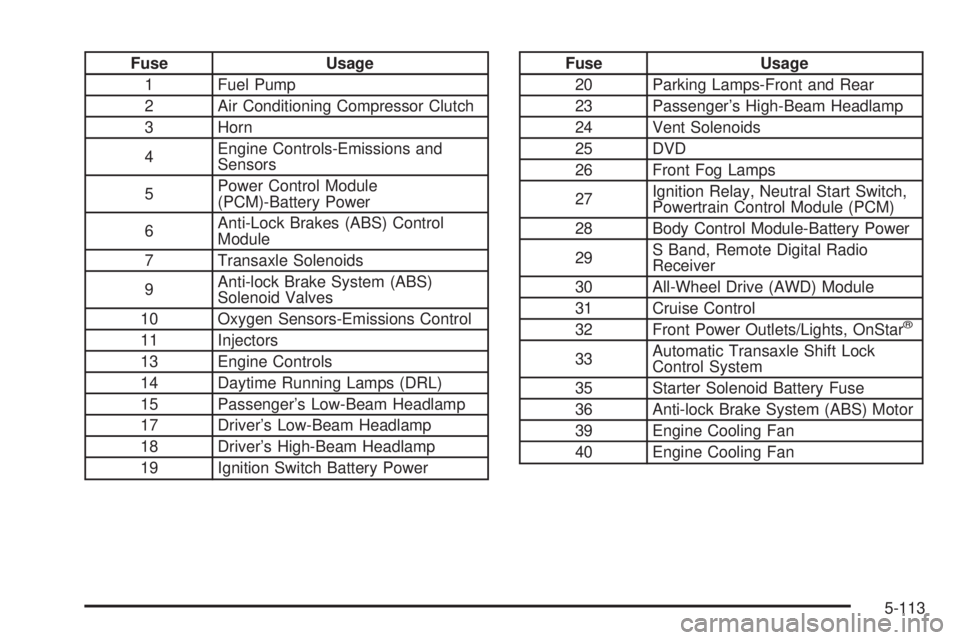
Fuse Usage
1 Fuel Pump
2 Air Conditioning Compressor Clutch
3 Horn
4Engine Controls-Emissions and
Sensors
5Power Control Module
(PCM)-Battery Power
6Anti-Lock Brakes (ABS) Control
Module
7 Transaxle Solenoids
9Anti-lock Brake System (ABS)
Solenoid Valves
10 Oxygen Sensors-Emissions Control
11 Injectors
13 Engine Controls
14 Daytime Running Lamps (DRL)
15 Passenger’s Low-Beam Headlamp
17 Driver’s Low-Beam Headlamp
18 Driver’s High-Beam Headlamp
19 Ignition Switch Battery PowerFuse Usage
20 Parking Lamps-Front and Rear
23 Passenger’s High-Beam Headlamp
24 Vent Solenoids
25 DVD
26 Front Fog Lamps
27Ignition Relay, Neutral Start Switch,
Powertrain Control Module (PCM)
28 Body Control Module-Battery Power
29S Band, Remote Digital Radio
Receiver
30 All-Wheel Drive (AWD) Module
31 Cruise Control
32 Front Power Outlets/Lights, OnStar
®
33Automatic Transaxle Shift Lock
Control System
35 Starter Solenoid Battery Fuse
36 Anti-lock Brake System (ABS) Motor
39 Engine Cooling Fan
40 Engine Cooling Fan
5-113
Page 469 of 486

A
About Driving Your Vehicle................................. 4-2
Accessory Inator...........................................5-74
Accessory Power Outlets.................................3-27
Adding Washer Fluid.......................................5-38
Additional Program Information........................... 7-9
Additives, Fuel................................................. 5-6
Add-On Electrical Equipment...........................5-108
Adjusting the Captain’s Chairs
(Second Row).............................................1-14
Adjusting the Speakers
(Balance/Fade)..........................3-77, 3-88, 3-101
Air Bag
Readiness Light..........................................3-43
Air Bag Systems.............................................1-72
How Does an Air Bag Restrain?....................1-79
Servicing Your Air Bag-Equipped Vehicle.........1-82
What Makes an Air Bag Inate?....................1-78
What Will You See After an Air Bag Inates?......1-80
When Should an Air Bag Inate?...................1-77
Where Are the Air Bags?..............................1-75
Air Cleaner/Filter, Engine.................................5-19
Airbag Sensing and Diagnostic
Module (SDM).............................................7-10
All-Wheel Drive......................................5-48, 5-98
All-Wheel Drive Disable Warning Message..........3-55
All-Wheel-Drive (AWD) System.........................4-12
AM .............................................................3-130Antenna, Integrated Windshield.......................3-132
Antenna, XM™ Satellite Radio Antenna System . . . 3-132
Anti-lock Brake System (ABS)............................ 4-8
Anti-Lock Brake System Warning Light...............3-45
Appearance Care............................................5-99
Care of Safety Belts...................................5-102
Chemical Paint Spotting..............................5-106
Cleaning the Inside of Your Vehicle................5-99
Cleaning the Outside of Your Vehicle............5-103
Finish Damage..........................................5-105
Sheet Metal Damage..................................5-105
Underbody Maintenance.............................5-105
Vehicle Care/Appearance Materials...............5-106
Weatherstrips............................................5-102
Arming with the Power Lock Switch...................2-16
Arming with the Remote Keyless Entry
Transmitter.................................................2-16
Ashtrays........................................................3-28
Audio Speakers............................................3-115
Audio System(s).............................................3-73
Audio Steering Wheel Controls....................3-129
Care of Your Cassette Tape Player...............3-130
Care of Your CD and DVD Player................3-131
Care of Your CDs and DVDs.......................3-131
Integrated Windshield Antenna.....................3-132
Navigation/Radio System.............................3-112
Radio with Cassette and CD.........................3-85
Radio with CD............................................3-74
1