light BUICK RANDEZVOUS 2004 Repair Manual
[x] Cancel search | Manufacturer: BUICK, Model Year: 2004, Model line: RANDEZVOUS, Model: BUICK RANDEZVOUS 2004Pages: 486, PDF Size: 3.18 MB
Page 209 of 486

Remote Door Unlock
The remote door unlock feature can be programmed to
one of the following modes:
DRIVER/ALL:With the rst press of UNLOCK on the
remote keyless entry transmitter, the driver’s door
will unlock, and with the second press of UNLOCK,
within ve seconds of the rst press, all passenger’s
doors will unlock.
ALL:All doors will unlock with every press of UNLOCK
on the remote keyless entry transmitter.
Your vehicle was originally programmed to ALL. The
mode may have been changed since then. To determine
the current mode, or to change the mode, do the
following:
1. Follow the instructions for “Entering Programming
Mode” listed previously.
2. Press the MODE button until REMOTE DOOR
UNLOCK appears on the DIC.
3. Press the SET button until the arrow is before
DRIVER/ALL or ALL.
The mode you selected is now set. You can either exit
programming mode by following the instructions
later in this section or program the next feature available
on your vehicle.
Unlock Feedback
The unlock feedback feature can be programmed to one
of the following modes:
LIGHTS:This mode does the following:
During the day, when the ignition is in OFF and
UNLOCK on the remote keyless entry transmitter
is pressed, the headlamps and parking lamps
will ash.
During the night, when the ignition is in OFF, the
headlamps and parking lamps will be activated
for 30 seconds when UNLOCK is pressed on the
remote keyless entry transmitter. If you would like to
change the amount of time the lamps stay on,
change the headlamp exit delay feature.
OFF:The headlamps and parking lamps will not ash
when UNLOCK is pressed on the remote keyless
entry transmitter.
Your vehicle was originally programmed to LIGHTS.
The mode may have been changed since then.
To determine the current mode, or to change the mode,
do the following:
1. Follow the instructions for “Entering Programming
Mode” listed previously.
3-69
Page 210 of 486

2. Follow the instructions for programming HEADLAMP
EXIT DELAY earlier in this section, to make sure
which mode it is programmed to.
3. Press the SET button until UNLOCK FEEDBACK
appears on the DIC.
4. Press the MODE button until the arrow is before
LIGHTS or OFF.
5. Press the SET button once you have determined
which mode you prefer.
The mode you selected is now set. You can either exit
programming mode by following the instructions
later in this section or program the next feature available
on your vehicle.
Lock Feedback
The lock feedback feature can be programmed to one
of the following modes:
OFF:When LOCK is pressed on the remote keyless
entry transmitter, the headlamps and parking lamps will
not ash and the horn will not sound.
LIGHTS:When LOCK is pressed on the remote
keyless entry transmitter, the headlamps and parking
lamps will ash briey.LIGHTS and HORN:When LOCK is pressed a second
time on the remote keyless entry transmitter within
ve seconds, the headlamps and parking lamps
will ash briey and the horn will sound.
Your vehicle was originally programmed to LIGHTS and
HORN. The mode may have been changed since
then. To determine the current mode, or to change the
mode, do the following:
1. Follow the instructions for “Entering Programming
Mode” listed previously.
2. Press the MODE button until LOCK FEEDBACK
appears on the DIC.
3. Press the SET button until the arrow is before OFF,
LIGHTS or LIGHTS and HORN.
The mode you selected is now set. You can either exit
programming mode by following the instructions
later in this section or program the next feature available
on your vehicle.
3-70
Page 247 of 486
Playing a CD
The CD player can play the smaller 8 cm single CDs
with an adapter ring. Full-size CDs and the smaller CDs
are loaded in the same manner.
If playing a CD-R the sound quality may be reduced
due to CD-R quality, the method of recording, the quality
of the music that has been recorded, and the way the
CD-R has been handled. You may experience an
increase in skipping, difficulty in nding tracks, and/or
difficulty in loading and ejecting. If these problems occur
try a known good CD.
Do not add paper labels to CDs, they could get caught
in the CD player.
Do not play 3 inch CDs without a standard adapter CD.
If an error appears on the display, see “CD Messages”
later in this section.
LOAD CD
Z:Press the LOAD side of this button to
load CDs into the CD player. This CD player will
hold up to six CDs.
To insert one CD, do the following:
1. Turn the ignition on.
2. Press and release the LOAD side of the LOAD
CD button.3. Wait for the light, located to the right of the slot, to
turn green.
4. Load a CD. Insert the CD partway into the slot,
label side up. The player will pull the CD in.
When a CD is inserted, the CD symbol will be displayed.
If you select an equalization setting for your CD, it will
be activated each time you play a CD.
The CD will begin to play automatically. As each new
track starts to play, the track number will appear on the
display.
To insert multiple CDs, do the following:
1. Turn the ignition on.
2. Press and hold the LOAD side of the LOAD CD
button for two seconds.
You will hear a beep and the light, located to the
right of the slot, will begin to ash.
3. Once the light stops ashing and turns green, load
a CD. Insert the CD partway into the slot, label side
up. The player will pull the CD in.
4. Once the CD is loaded, the light will begin ashing
again. Press the LOAD button again. Once the light
turns green, load the next disc. Repeat this
procedure for each disc. The CD player takes up to
six CDs. Do not try to load more than six.
3-107
Page 248 of 486

To load more than one CD but less than six, complete
Steps 1 through 3. When you have nished loading
CDs, the radio will begin to play the last CD loaded.
When a CD is inserted, the CD symbol will be displayed.
If more than one CD has been loaded, a number for
each CD will be displayed. If you select an equalization
setting for your CD, it will be activated each time you
play a CD.
As each new track starts to play, the track number will
appear on the display.
Playing a Specic Loaded CD
For every CD loaded, a number will appear on the
display. To play a specic CD, rst press the CD AUX
button, then press the numbered pushbutton that
corresponds to the CD you want to play. A small bar will
appear under the CD number that is playing, and the
track number will appear.
If an error appears on the display, see “CD Messages”
later in this section.
LOAD CD
Z(Eject):Press the CD eject side of this
button to eject a CD(s). You will hear a beep and the
light will ash to let you know when a CD is being
ejected.REMOVE CD will be displayed. You can now remove the
CD. If the CD is not removed, after 25 seconds, the CD
will be automatically pulled back into the receiver. If you
try to push the CD back into the receiver, before the
25 second time period is complete, the receiver will sense
an error and will try to eject the CD several times before
stopping.
Do not repeatedly press the CD eject button to eject a CD
after you have tried to push it in manually. The receivers
25-second eject timer will reset at each press of eject,
which will cause the receiver to not eject the CD until the
25-second time period has elapsed.
Once the player stops and the CD is ejected, remove the
CD. After removing the CD, push the PWR knob off and
then on again. This will clear the CD-sensing feature and
enable CDs to be loaded into the player again.
{REV (Reverse):Press and hold this button to
reverse quickly within a track. You will hear sound at a
reduced volume. Release the button to play the
passage. The display will show the elapsed time of the
track.
FWD
|(Forward):Press and hold this button to
advance quickly within a track. You will hear sound at a
reduced volume. Release the button to play the passage.
The display will show the elapsed time of the track.
3-108
Page 253 of 486
The navigation radio system includes digital sound
processing (DSP), Radio Data System (RDS) with
program “type” selections (PTY) that will seek out the
kind of music you want to listen to, and XM™ Satellite
Radio Service capabilities (48 contiguous US States).
The radio system can also communicate with your
navigation system to broadcast announcements
on traffic, weather, and emergency alert
communications. For information on how to use this
system, see the “Navigation System” manual.
Rear Seat Entertainment System
Your vehicle may have a Digital Versatile Disc (DVD)
system. The Rear Seat Entertainment (RSE) includes a
DVD player, a video display screen, two sets of
cordless headphones, and a remote control.
Before You Drive
The RSE is designed for rear seat passengers only.
The driver cannot safely view the video screen
while driving and should not try to do so.
Your DVD system is designed to be inoperable when
the vehicle is exposed to extremely low or high
temperatures, in order to protect your system from
damage. Operate your DVD system under normal or
comfortable cabin temperature ranges.
Headphones
The entertainment system includes two cordless
headphones.
The cordless headphones have an ON/OFF switch and
a volume control. To use the headphones turn the
switch to ON. An indicator light on the headphones will
illuminate. If the light does not illuminate, the batteries
may need to be replaced. See “Battery Replacement”
later in this section for more information. Switch the
headphones to OFF when not in use.
The transmitters are located below the overhead RSE
control panel. The headphones will shut off automatically
to save the battery power if the DVD system is shut
off, or if the headphones are out of range of the
transmitters for more than three minutes. If you move
too far forward or step out of the vehicle, the
headphones will lose the audio signal.
To adjust the volume on the cordless headphones, use
the volume control.
3-113
Page 254 of 486
You can listen to the entertainment system through the
wired headphone jacks on the RSA system (if equipped)
when the following occurs:
The RSA system is on
A DVD or auxiliary device is playing
RSE is displayed on the front audio system by
pressing the TAPE/CD button on the RSA system.
Notice:Do not store the headphones in heat or
direct sunlight. This could damage the headphones
and repairs would not be covered by your warranty.
Keep the headphones stored in a cool, dry place.
If there is a decreased audio signal during CD or DVD
play, you may hear a low “hissing” noise through the
speakers and/or headphones. If the hissing sound in the
wireless headphones seems excessive, make sure
that the headphone batteries are fully charged. Some
amount of hissing is normal.
Battery Replacement
To change the batteries, do the following:
1. Loosen the screw on the battery compartment door
located on the left side of the headphone earpiece.
2. Replace the two AAA batteries in the compartment.
Make sure that they are installed correctly using the
diagram on the inside of the battery compartment.3. Tighten the screw on the battery compartment door.
If the headphones are to be stored for a long period
of time, remove the batteries, and keep them in a cool,
dry place.
Stereo RCA Jacks
The RCA jacks are located behind the video screen on
the DVD console. The RCA jacks allow you to
connect audio and video signals from an auxiliary
device such as a camcorder or a video game unit to
your RSE. The yellow RCA jack is used for video, the
red RCA jack for right audio, and the white RCA
jack for left audio inputs. The system requires standard
RCA cables (not included) to connect your auxiliary
device to the RCA jacks. Refer to the manufacturer’s
instructions for proper usage.
To use the auxiliary audio and video inputs on the
entertainment system, connect an external auxiliary
device such as a camcorder to the RCA jacks and turn
on both the auxiliary device power and the power on
the front of the RSE player.
If a disc is present when the RSE power is turned on,
the player will automatically begin playing the disc
and the user will need to press the SRCE button on the
remote control or on the DVD player faceplate to
toggle the system between the DVD player and the
auxiliary device. See “DVD Player”, and “Remote
Control” later in this section for more information.
3-114
Page 257 of 486
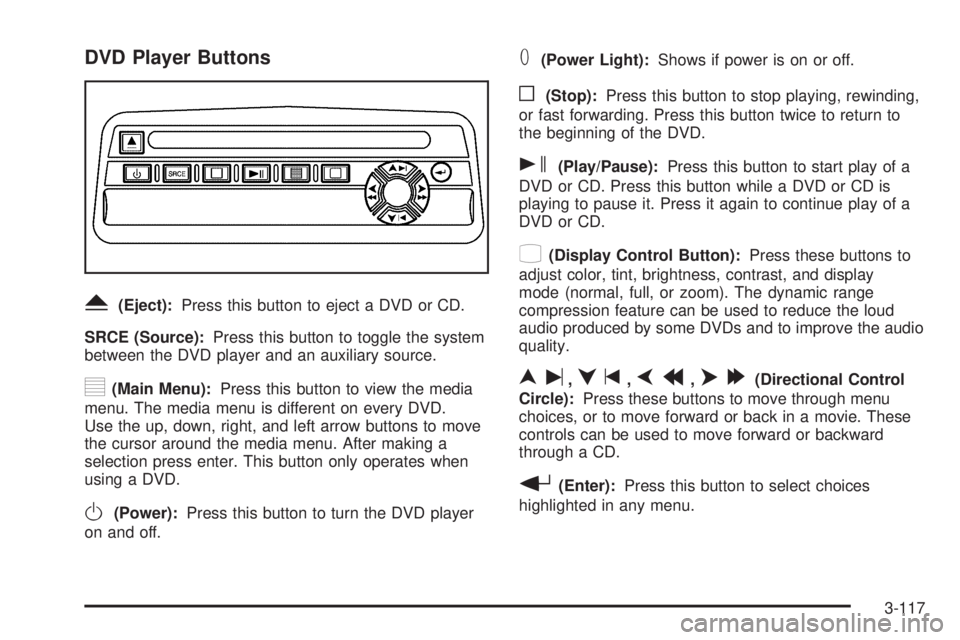
DVD Player Buttons
Y(Eject):Press this button to eject a DVD or CD.
SRCE (Source):Press this button to toggle the system
between the DVD player and an auxiliary source.
y(Main Menu):Press this button to view the media
menu. The media menu is different on every DVD.
Use the up, down, right, and left arrow buttons to move
the cursor around the media menu. After making a
selection press enter. This button only operates when
using a DVD.
O(Power):Press this button to turn the DVD player
on and off.
T(Power Light):Shows if power is on or off.
o(Stop):Press this button to stop playing, rewinding,
or fast forwarding. Press this button twice to return to
the beginning of the DVD.
s(Play/Pause):Press this button to start play of a
DVD or CD. Press this button while a DVD or CD is
playing to pause it. Press it again to continue play of a
DVD or CD.
z(Display Control Button):Press these buttons to
adjust color, tint, brightness, contrast, and display
mode (normal, full, or zoom). The dynamic range
compression feature can be used to reduce the loud
audio produced by some DVDs and to improve the audio
quality.
nu,qt,pr,o[(Directional Control
Circle):Press these buttons to move through menu
choices, or to move forward or back in a movie. These
controls can be used to move forward or backward
through a CD.
r(Enter):Press this button to select choices
highlighted in any menu.
3-117
Page 258 of 486
Parental Control Button:This button is located behind
the video screen, next to the auxiliary jacks, near the
driver of the vehicle. Press this button while a DVD
or CD is playing to freeze the video and mute the audio.
The video screen will display Parental Control On and
the power indicator light on the DVD player will
ash. It will also disable all other button operations from
the remote control and the DVD player, with the
exception of the eject button. The driver will then be
able to gain the attention of the rear seat passengers.
Press this button again to restore normal operation
of the DVD player and remote control.
This button may also be used to turn the DVD player
power on and automatically resume play if the vehicle is
in an enabled power mode.
Playing a Disc
To play a disc, gently insert the disc, label side up, into
the loading slot. The DVD player will continue loading
the disc and the player will automatically start if the
vehicle is in run, accessory, or RAP.
If a disc is already in the player, make sure that the
DVD player is on, then press the play/pause button on
the player faceplate or on the remote control.Some DVDs will not allow you to fast forward or skip
the copyright information or previews. Some DVDs will
begin playing after the previews have nished. If the
DVD does not begin playing at the main title, refer to the
on-screen instructions.
Stopping and Resuming Playback
To stop playing a disc, press and release the stop
button on the DVD player faceplate or the remote
control.
To resume playback, press the play/pause button on
the DVD player faceplate or the remote control. As long
as the disc has not been ejected, and the stop button
has not been pressed twice on the remote control or the
DVD player faceplate, the movie should resume play
from where it was last stopped.
If the disc has been ejected, or if the stop button has
been pressed twice on the remote control or the
DVD player faceplate, the disc will resume play at the
beginning of the disc.
3-118
Page 259 of 486
Ejecting a Disc
Press the eject button on the DVD player faceplate to
eject the disc. There is not an eject button on the remote
control.
If a disc is ejected from the player, but not removed, the
DVD player will reload the disc after a short period of
time. the disc will be stored in the DVD player. The DVD
player will not resume play of the disc automatically.
DVD Messages
The following errors may be displayed on the video
screen.
Disc Format Error:This message will be displayed if a
disc is inserted upside down, if the disc is not readable,
or if the disc format is not compatible with the DVD
player.
Disc Play Error:This message will be displayed if the
mechanism can not play the disc. Scratched or
damaged discs will cause this error.
Region Code Error:This message will be displayed if
the region code of the DVD is not compatible with
the region code of the DVD player.Load/Eject Error:This message will be displayed if the
disc is not properly loaded or ejected.
No Disc:This message will be displayed when the play
button is pressed without a disc in the player.
Remote Control
To use the remote control, aim it at the transmitter
window below the video screen and press the desired
button. Direct sunlight or very bright light may affect the
ability of the transmitter to receive signals from the
remote control. Be sure the remote control’s batteries
are not weak or discharged. Objects blocking the line of
sight will affect the function of the remote control.
Notice:Storing the remote control in a hot area or
in direct sunlight may damage it, and the repairs
would not be covered by your warranty. Store
the remote control stored in a cool, dry place.
3-119
Page 261 of 486
1 through 0 (Numeric Keypad):The numeric keypad
provides you with the capability of direct chapter title
and track number selection.
}10 (Double Digit Entries):Press this button, located
on the bottom right of the numeric key pad, to select
chapter, title, and track numbers greater than 9. Press
this button before selecting the number.
\(Clear):Press this button, located on the bottom left
of the numeric key pad, within three seconds after
inputting a numeric selection, to clear all numeric inputs.
P(Backlight):This button turns on backlighting on
the remote.
y(Main Menu):Press this button to view the media
menu. The media menu is different on every disc. Use the
up, down, right, and left arrow buttons to move the cursor
around the media menu. After making a selection, press
the enter button.
r(Enter):Press this button to select choices
highlighted in any menu.
q(Return):Press this button to take you back one
step in any menu. Press this button to exit the current
menu and to move to the previous menu. This button will
operate only when a DVD is playing and/or a menu is
active.
|(Camera):This button changes camera angles on
DVDs that have this feature. Press this button to
call-up a menu that will operate only when a DVD is
being played. The format and content of this function will
vary from disc to disc.
{(Subtitles):This button turns on subtitles and
moves through subtitle options (English, Spanish,
French, etc., if available). Press this button to call-up a
menu that will operate only when a DVD is being
played. The format and content of this function will vary
from disc to disc.
[(Fast Forward):Press this button to fast forward
the DVD. To stop fast forwarding, press this button
again. This button may not work when the DVD
is playing the copyright information or the previews.
s(Play/Pause):Press this button to start play of a
DVD or CD. Press this button while a DVD is playing
to pause it. Press it again to continue playing the DVD
or CD.
u(Next Chapter/Track):Press this button to go to
the beginning of the next chapter or track. This
button may not work when the DVD is playing the
copyright information or the previews.
3-121