oil BUICK RANDEZVOUS 2004 Owner's Manual
[x] Cancel search | Manufacturer: BUICK, Model Year: 2004, Model line: RANDEZVOUS, Model: BUICK RANDEZVOUS 2004Pages: 486, PDF Size: 3.18 MB
Page 112 of 486

Engine Coolant Heater
Your vehicle may have an engine coolant heater. In
very cold weather, 0°F (−18°C) or colder, the engine
coolant heater can help. You’ll get easier starting
and better fuel economy during engine warm-up.
Usually, the coolant heater should be plugged in a
minimum of four hours prior to starting your vehicle.
At temperatures above 32°F (0°C), use of the coolant
heater is not required.
To Use the Engine Coolant Heater
1. Turn off the engine.
2. Open the hood and unwrap the electrical cord. The
electrical cord is located on the driver’s side of the
engine compartment.
3. Plug it into a normal, grounded 110-volt AC outlet.
{CAUTION:
Plugging the cord into an ungrounded outlet
could cause an electrical shock. Also, the
wrong kind of extension cord could overheat
and cause a re. You could be seriously
injured. Plug the cord into a properly grounded
three-prong 110-volt AC outlet. If the cord will
not reach, use a heavy-duty three-prong
extension cord rated for at least 15 amps.
4. Before starting the engine, be sure to unplug and
store the cord as it was before to keep it away
from moving engine parts. If you don’t, it could be
damaged.
How long should you keep the coolant heater plugged
in? The answer depends on the outside temperature, the
kind of oil you have, and some other things. Instead
of trying to list everything here, we ask that you contact
your dealer in the area where you’ll be parking your
vehicle. The dealer can give you the best advice for that
particular area.
2-22
Page 141 of 486
Instrument Panel Overview...............................3-4
Hazard Warning Flashers................................3-6
Other Warning Devices...................................3-7
Horn.............................................................3-7
Tilt Wheel.....................................................3-7
Turn Signal/Multifunction Lever.........................3-8
Exterior Lamps.............................................3-14
Interior Lamps..............................................3-16
Instrument Panel Switchbank..........................3-21
Head-Up Display (HUD).................................3-21
Ultrasonic Rear Parking Assist (URPA)..............3-24
Accessory Power Outlets...............................3-27
Ashtrays and Cigarette Lighter........................3-28
Climate Controls............................................3-28
Climate Control System.................................3-28
Dual Climate Control System..........................3-32
Dual Automatic Climate Control System...........3-35
Outlet Adjustment.........................................3-38
Warning Lights, Gages and Indicators.............3-39
Instrument Panel Cluster................................3-40
Speedometer and Odometer...........................3-41
Tachometer.................................................3-42
Safety Belt Reminder Light.............................3-43Air Bag Readiness Light................................3-43
Brake System Warning Light..........................3-44
Anti-Lock Brake System Warning Light.............3-45
Traction Control System (TCS) Warning Light . . .3-45
Engine Coolant Temperature Gage..................3-46
Malfunction Indicator Lamp.............................3-46
Fuel Gage...................................................3-49
Message Center.............................................3-50
Service Traction System Warning Message......3-50
Traction Active Message................................3-51
Engine Coolant Temperature Warning
Message..................................................3-51
Charging System Indicator Message................3-52
Low Oil Pressure Message............................3-52
Change Engine Oil Message..........................3-53
Low Tire Message........................................3-54
Door Ajar Warning Message...........................3-54
Rear Hatch Ajar Warning Message..................3-54
PASS-Key
®III Security Message....................3-55
All-Wheel Drive Disable Warning Message.......3-55
Low Washer Fluid Warning Message...............3-56
Low Fuel Warning Message...........................3-56
Low Brake Fluid Warning Message.................3-57
Section 3 Instrument Panel
3-1
Page 162 of 486

The Head-Up Display also displays the following lights
and messages when they appear on the instrument
panel cluster:
Turn Signal Indicators. SeeTurn
Signal/Multifunction Lever on page 3-8.
High-Beam Indicator. SeeTurn Signal/Multifunction
Lever on page 3-8.
Low-Fuel Warning Message. SeeLow Fuel Warning
Message on page 3-56.
The Head-Up Display also displays a CHECK GAGES
icon. The following messages could appear on the
instrument panel cluster when CHECK GAGES appears:
Engine Coolant Temperature Warning. SeeEngine
Coolant Temperature Warning Message on
page 3-51.
Low Oil Pressure. SeeLow Oil Pressure Message
on page 3-52.
Charging System Indicator. SeeCharging System
Indicator Message on page 3-52.
Low Brake Fluid Warning. SeeLow Brake Fluid
Warning Message on page 3-57.
Under warning conditions, the CHECK GAGES icon will
illuminate in the HUD. Look at the instrument panel
cluster for more information.
3-22
Page 192 of 486

Charging System Indicator Message
The charging system
battery symbol will come
on in the message
center when you turn on
the ignition as a check
to show you it is working.
It will remain on as long as the engine is not running.
It should go out once the engine is running. If it stays on,
or comes on while you are driving, you may have a
problem with the charging system. It could indicate that
you have problems with a generator drive belt, or
another electrical problem. Have it checked right away.
Driving while this indicator appears in the message
center could drain your battery.
If you must drive a short distance with the message on,
be certain to turn off all your accessories, such as
the radio and air conditioner.
Low Oil Pressure Message
Your vehicle is equipped with a low oil pressure warning
message.
Your oil pressure message lets you know when you
may have a problem with your engine oil pressure.
United StatesCanada
3-52
Page 193 of 486
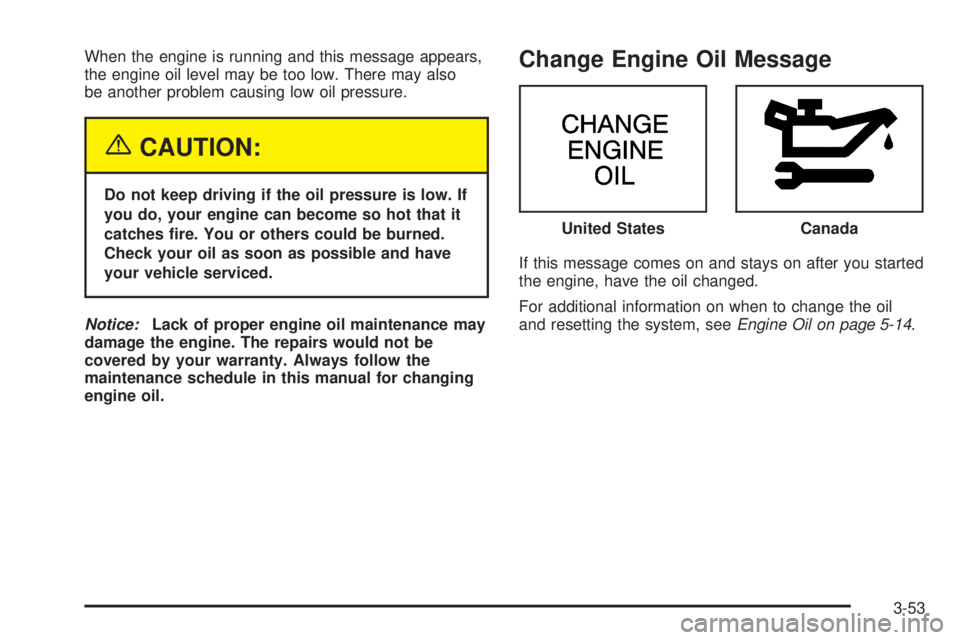
When the engine is running and this message appears,
the engine oil level may be too low. There may also
be another problem causing low oil pressure.
{CAUTION:
Do not keep driving if the oil pressure is low. If
you do, your engine can become so hot that it
catches re. You or others could be burned.
Check your oil as soon as possible and have
your vehicle serviced.
Notice:Lack of proper engine oil maintenance may
damage the engine. The repairs would not be
covered by your warranty. Always follow the
maintenance schedule in this manual for changing
engine oil.
Change Engine Oil Message
If this message comes on and stays on after you started
the engine, have the oil changed.
For additional information on when to change the oil
and resetting the system, seeEngine Oil on page 5-14. United States
Canada
3-53
Page 203 of 486
FUEL USED:The fuel used display will show you how
much fuel has been used since the last time it was
reset. To reset the fuel used to zero, press and hold the
SET button while the fuel used is displayed on the
DIC and until the display goes to zero.
AVG SPEED (Average Speed):The average speed
display will show your average speed from when
you rst started your vehicle. To reset the average
speed, press and hold the SET button while the average
speed is displayed on the DIC and until the speed
resets to your current speed.
OIL LIFE LEFT HOLD SET TO RESET:This message
displays the current percentage of the GM Oil Life
System. Be careful not to reset this display other than
when the oil has been changed. See “How to Reset the
System” underEngine Oil on page 5-14for more
information.TIRE PRESSURE:The check tire pressure system can
alert you to a large change in the pressure of one
tire. You must begin driving before the system will detect
a low tire pressure. SeeCheck Tire Pressure System
on page 5-65.
USE SET TO SELECT ENGLISH METRIC:You can
use this display to select English or metric. Press
the SET button to toggle between English or metric. The
DIC, the odometer, the trip odometer and head-up
display will change. A Canadian odometer and
trip odometer will remain in metric units only.
OFF:No driver information will be displayed in this
mode. If the DIC is left in this mode for more than three
seconds, the display will turn off. Press the MODE
button to start the DIC.
3-63
Page 271 of 486

The cut tape detection feature of your cassette tape
player may identify the cleaning cassette tape as
a damaged tape, in error. If the cleaning cassette ejects,
insert the cassette at least three times to ensure
thorough cleaning.
You may also choose a non-scrubbing action, wet-type
cleaner which uses a cassette with a fabric belt to
clean the tape head. This type of cleaning cassette will
not eject on its own. A non-scrubbing action cleaner
may not clean as thoroughly as the scrubbing type
cleaner. The use of a non-scrubbing action, dry-type
cleaning cassette is not recommended.
After you clean the player, press and hold the eject
button for ve seconds to reset the CLEAN PLAYER
indicator. The radio will display --- to show the indicator
was reset.
Cassettes are subject to wear and the sound quality
may degrade over time. Always make sure the cassette
tape is in good condition before you have your tape
player serviced.Care of Your CDs and DVDs
Handle discs carefully. Store them in their original cases
or other protective cases and away from direct sunlight
and dust. If the surface of a disc is soiled, dampen
a clean, soft cloth in a mild, neutral detergent solution
and clean it, wiping from the center to the edge.
Be sure never to touch the side without writing when
handling discs. Pick up discs by grasping the outer
edges or the edge of the hole and the outer edge.
Care of Your CD and DVD Player
The use of CD lens cleaner discs is not advised, due to
the risk of contaminating the lens of the CD optics
with lubricants internal to the CD mechanism.
Cleaning Your DVD Player
When cleaning the outside DVD cabinet face and
buttons, use only a clean cloth dampened with clean
water.
3-131
Page 297 of 486

Once you are moving on the freeway, make certain you
allow a reasonable following distance. Expect to move
slightly slower at night.
When you want to leave the freeway, move to the
proper lane well in advance. If you miss your exit, do
not, under any circumstances, stop and back up. Drive
on to the next exit.
The exit ramp can be curved, sometimes quite sharply.
The exit speed is usually posted.
Reduce your speed according to your speedometer, not
to your sense of motion. After driving for any distance
at higher speeds, you may tend to think you are
going slower than you actually are.
Before Leaving on a Long Trip
Make sure you are ready. Try to be well rested. If you
must start when you are not fresh — such as after
a day’s work — do not plan to make too many miles that
rst part of the journey. Wear comfortable clothing
and shoes you can easily drive in.Is your vehicle ready for a long trip? If you keep it
serviced and maintained, it is ready to go. If it needs
service, have it done before starting out. Of course, you
will nd experienced and able service experts in GM
dealerships all across North America. They will be ready
and willing to help if you need it.
Here are some things you can check before a trip:
Windshield Washer Fluid:Is the reservoir full? Are
all windows clean inside and outside?
Wiper Blades:Are they in good shape?
Fuel, Engine Oil, Other Fluids:Have you checked
all levels?
Lamps:Are they all working? Are the lenses clean?
Tires:They are vitally important to a safe,
trouble-free trip. Is the tread good enough for
long-distance driving? Are the tires all inated to the
recommended pressure?
Weather Forecasts:What is the weather outlook
along your route? Should you delay your trip a
short time to avoid a major storm system?
Maps:Do you have up-to-date maps?
4-25
Page 322 of 486
Maintenance When Trailer Towing
Your vehicle will need service more often when you are
pulling a trailer. See the Maintenance Schedule for more
on this. Things that are especially important in trailer
operation are automatic transaxle uid, engine oil, belts,
cooling system and brake system. Each of these is
covered in this manual, and the Index will help you nd
them quickly. If you are trailering, it is a good idea to
review these sections before you start your trip.
Check periodically to see that all hitch nuts and bolts
are tight.
Trailer Wiring Harness
Your vehicle may have a trailer wiring harness located
at the rear of your vehicle. To use the trailer wiring
harness, you need a converter kit. Contact your dealer
for more information.
4-50
Page 323 of 486

Service............................................................5-3
Doing Your Own Service Work.........................5-3
Adding Equipment to the Outside of Your
Vehicle......................................................5-4
Fuel................................................................5-4
Gasoline Octane............................................5-4
Gasoline Specications....................................5-5
California Fuel...............................................5-5
Additives.......................................................5-6
Fuels in Foreign Countries...............................5-6
Filling Your Tank............................................5-7
Filling a Portable Fuel Container.......................5-9
Checking Things Under the Hood....................5-10
Hood Release..............................................5-11
Engine Compartment Overview.......................5-12
Engine Oil...................................................5-14
Engine Air Cleaner/Filter................................5-19
Automatic Transaxle Fluid..............................5-21
Engine Coolant.............................................5-23
Radiator Pressure Cap..................................5-25
Engine Overheating.......................................5-26
Cooling System............................................5-29
Power Steering Fluid.....................................5-36
Windshield Washer Fluid................................5-37
Brakes........................................................5-38Battery........................................................5-42
Jump Starting...............................................5-43
All-Wheel Drive..............................................5-48
Bulb Replacement..........................................5-50
Halogen Bulbs..............................................5-50
Headlamps..................................................5-50
Front Turn Signal, Sidemarker and Parking
Lamps.....................................................5-52
Taillamps, Turn Signal, and Stoplamps............5-52
Taillamps and Back-Up Lamps.......................5-53
Replacement Bulbs.......................................5-54
Windshield Wiper Blade Replacement..............5-55
Tires..............................................................5-57
Ination - Tire Pressure.................................5-64
Check Tire Pressure System..........................5-65
Tire Inspection and Rotation...........................5-67
When It Is Time for New Tires.......................5-69
Buying New Tires.........................................5-70
Uniform Tire Quality Grading..........................5-71
Wheel Alignment and Tire Balance..................5-72
Wheel Replacement......................................5-72
Tire Chains..................................................5-74
Accessory Inator.........................................5-74
Section 5 Service and Appearance Care
5-1