seats BUICK RANDEZVOUS 2006 Owner's Guide
[x] Cancel search | Manufacturer: BUICK, Model Year: 2006, Model line: RANDEZVOUS, Model: BUICK RANDEZVOUS 2006Pages: 478, PDF Size: 2.97 MB
Page 92 of 478
Adding Equipment to Your
Airbag-Equipped Vehicle
Q:Is there anything I might add to the front
or sides of the vehicle that could keep the
airbags from working properly?
A:Yes. If you add things that change your vehicle’s
frame, bumper system, front end or side sheet
metal or height, they may keep the airbag system
from working properly. Also, the airbag system may
not work properly if you relocate any of the airbag
sensors. If you have any questions about this,
you should contact Customer Assistance before you
modify your vehicle. The phone numbers and
addresses for Customer Assistance are in Step Two
of the Customer Satisfaction Procedure in this
manual. SeeCustomer Satisfaction Procedure
on page 7-2.
Q:Because I have a disability, I have to get my
vehicle modied. How can I nd out whether
this will affect my airbag system?
A:Changing or moving any parts of the front seats,
safety belts, the airbag sensing and diagnostic
module (located under the driver’s seat), or
the inside rearview mirror can affect the operation
of the airbag system. If you have questions,
call Customer Assistance. The phone numbers
and addresses for Customer Assistance are in
Step Two of the Customer Satisfaction Procedure
in this manual. SeeCustomer Satisfaction
Procedure on page 7-2.
1-86
Page 132 of 478

Reprogramming a Single Universal
Home Remote Button
To program a device to Universal Home Remote using
a Universal Home Remote button previously trained,
follow these steps:
1. Press and hold the desired Universal Home
Remote button. Do not release the button.
2. The indicator light will begin to ash after
20 seconds. While still holding the Universal Home
Remote button, proceed with Step 2 under
“Programming Universal Home Remote” shown
earlier in this section.
For additional information on Universal Home Remote,
seeCustomer Assistance Offices on page 7-4.
Storage Areas
Glove Box
If the glove box has a lock, put your key into the lock
and turn the key counterclockwise. To open the
glove box, pull the latch release.
The glove box door has a detent to prevent the door
from lowering too far. Open the glove box until the door
is partway open, then pull the door down if you need
it fully opened.
To close the glove box, the door must be pushed up
past the detent. To lock the glove box, put your key into
the lock and turn the key clockwise.
Cupholder(s)
There are two cupholders located in the oor console.
The cupholders have liners that remove for larger
beverage items. Remove the liners by lifting them out.
Your vehicle has cupholders located in the rear seat
armrests if it has a split folding rear seat. If your vehicle
has captain’s chairs, there are cupholders on the
sides of the seats. If your vehicle has a stowable seat,
there are cupholders in the center of the seat.
2-38
Page 142 of 478
To store the memory settings, do the following:
1. Adjust the driver’s seat and the outside rearview
mirrors to the position you would like for driving.
2. Press and hold memory button 1 for more than
three seconds.
A double beep will sound when the memory seat and
mirror position have been stored.
To store the seat and outside rearview mirror positions
for a second driver, follow the previous steps, but
press button 2 instead.
To recall your stored positions, your vehicle must be in
PARK (P). Press and release the memory button (1 or 2)
corresponding to the desired driving position. The
seat and the outside rearview mirrors will move to the
position previously stored for the identied driver.
You will hear one beep.To store an exit position for each driver, do the following:
1. Move the seat to the desired exit position.
2. Hold the button with the exit symbol, located below
the memory buttons, for more than three seconds.
The exit position stored will be for the most recently
selected driving position (1 or 2). A double beep
will sound when the exit position is stored.
To use the exit feature, your vehicle must be in
PARK (P). Press and release the button with the exit
symbol and the seat will move to the exit position stored
for the most recently selected driver. You will hear
one beep.
To stop recall movement of the seat at any time, press
one of the three memory buttons or one of the power
seat controls located on the outboard side of the
driver’s seat.
If your vehicle is equipped with a Driver Information
Center (DIC), you can use it to program certain functions
of the memory seats. SeeDIC Vehicle Personalization
on page 3-64.
2-48
Page 162 of 478

Battery Run-Down Protection
Your vehicle has a feature to help prevent you from
draining the battery, in case you accidentally leave the
interior or exterior lamps on. If the interior lamps are
left on while the ignition is in OFF, they will automatically
turn off after 10 minutes. If the exterior lamps are left
on while the ignition is in OFF with all doors and
the liftgate closed, they will automatically turn off after
10 minutes.
If your vehicle has less than 14 miles (24 km) on the
odometer, the battery saver will turn off the lamps after
only three minutes.
If the interior lamps are turned off as a result of the
battery saver feature, they may be turned back on by
turning the interior lamp control to OFF and then back to
ON. The battery saver will not turn the interior lamps
off automatically after doing this. They will have to
be turned off manually.
Instrument Panel Switchbank
There is an instrument panel switchbank located below
the climate controls. It contains switches or blanks
that will vary with the options that are on your vehicle.
The switches you may have are:
Rear Window Wiper/Washer. SeeWindshield
Washer on page 3-9.
Traction Disable. SeeTraction Control System (TCS)
on page 4-10.
Park Aid Disable. SeeUltrasonic Rear Parking
Assist (URPA) on page 3-24.
Heated Seats. SeeHeated Seats on page 1-5.
3-20
Page 170 of 478
Climate Controls
Climate Control System
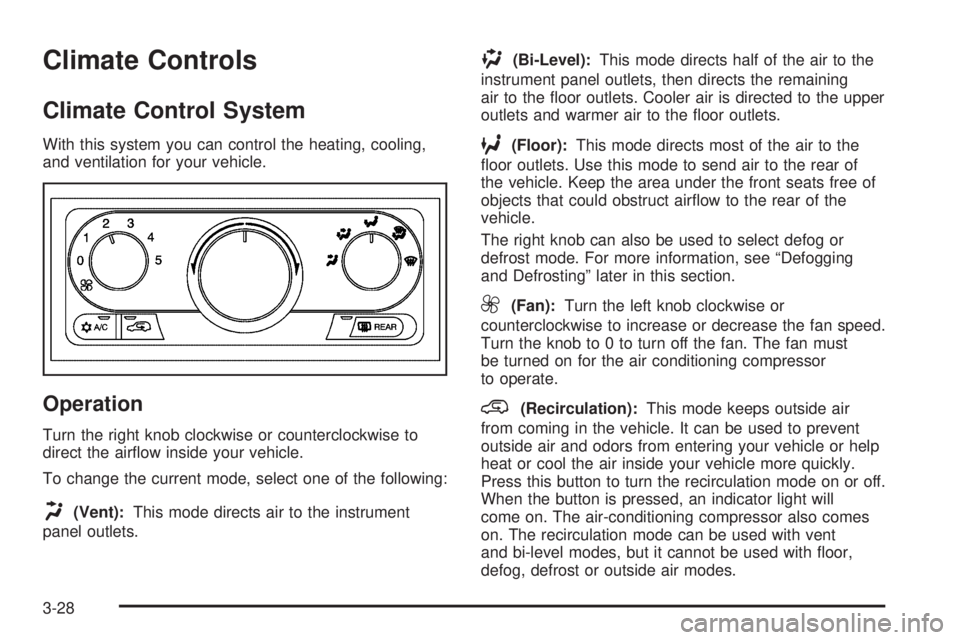
With this system you can control the heating, cooling,
and ventilation for your vehicle.
Operation
Turn the right knob clockwise or counterclockwise to
direct the airow inside your vehicle.
To change the current mode, select one of the following:
H(Vent):This mode directs air to the instrument
panel outlets.
)(Bi-Level):This mode directs half of the air to the
instrument panel outlets, then directs the remaining
air to the oor outlets. Cooler air is directed to the upper
outlets and warmer air to the oor outlets.
6(Floor):This mode directs most of the air to the
oor outlets. Use this mode to send air to the rear of
the vehicle. Keep the area under the front seats free of
objects that could obstruct airow to the rear of the
vehicle.
The right knob can also be used to select defog or
defrost mode. For more information, see “Defogging
and Defrosting” later in this section.
9(Fan):Turn the left knob clockwise or
counterclockwise to increase or decrease the fan speed.
Turn the knob to 0 to turn off the fan. The fan must
be turned on for the air conditioning compressor
to operate.
@(Recirculation):This mode keeps outside air
from coming in the vehicle. It can be used to prevent
outside air and odors from entering your vehicle or help
heat or cool the air inside your vehicle more quickly.
Press this button to turn the recirculation mode on or off.
When the button is pressed, an indicator light will
come on. The air-conditioning compressor also comes
on. The recirculation mode can be used with vent
and bi-level modes, but it cannot be used with oor,
defog, defrost or outside air modes.
3-28
Page 173 of 478
)(Bi-Level):This mode directs half of the air to the
instrument panel outlets, then directs the remaining
air to the oor outlets. Cooler air is directed to the
upper outlets and warmer air to the oor outlets.
6(Floor):This mode directs most of the air to the
oor outlets. Use this mode to send air to the rear of
the vehicle. Keep the area under the front seats free
of objects that could obstruct airow to the rear of
the vehicle.
The right knob can also be used to select defog or
defrost mode. For more information, see “Defogging
and Defrosting” later in this section.
9(Fan):Turn the left knob clockwise or
counterclockwise to increase or decrease the fan speed.
Turn the knob counterclockwise until it stops to turn
off the fan. The fan must be turned on for the air
conditioning compressor to operate.
@(Recirculation):This mode keeps outside air
from coming in the vehicle. It can be used to prevent
outside air and odors from entering your vehicle or help
heat or cool the air inside your vehicle more quickly.
Press this button to turn the recirculation mode on or off.
When the button is pressed, an indicator light will
come on. The air-conditioning compressor also comes
on. The recirculation mode can be used with vent
and bi-level modes, but it cannot be used with oor,
defog, defrost or outside air modes.Temperature Control:Use the driver’s and passenger’s
temperature levers to increase or decrease the air
temperature inside your vehicle.
uA/C (Air Conditioning):Press this button to turn
the air-conditioning system on or off. When A/C is
pressed, an indicator light in the button will come on to
let you know that air conditioning is activated.
You may notice a slight change in engine performance
when the air-conditioning compressor shuts off and
turns on again. This is normal. The system is designed
to make adjustments to help with fuel economy while
still maintaining the selected temperature.
On hot days, open the windows to let hot inside air
escape; then close them. This helps to reduce the time
it takes for your vehicle to cool down. It also helps
the system to operate more efficiently.
The air-conditioning system removes moisture from the
air, so you may sometimes notice a small amount of
water dripping underneath your vehicle while idling
or after turning off the engine. This is normal.
3-31
Page 176 of 478
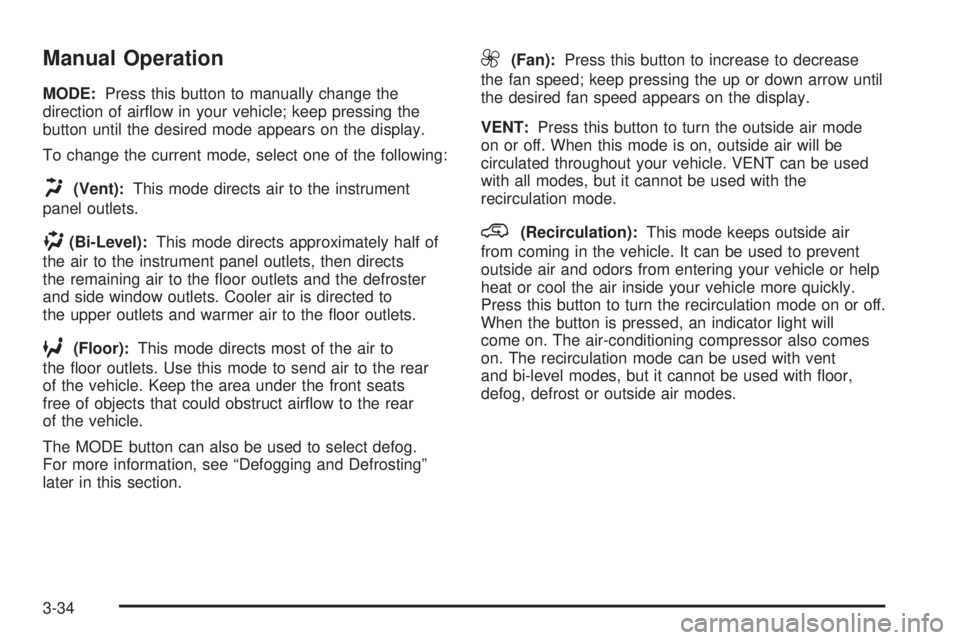
Manual Operation
MODE:Press this button to manually change the
direction of airow in your vehicle; keep pressing the
button until the desired mode appears on the display.
To change the current mode, select one of the following:
H(Vent):This mode directs air to the instrument
panel outlets.
)(Bi-Level):This mode directs approximately half of
the air to the instrument panel outlets, then directs
the remaining air to the oor outlets and the defroster
and side window outlets. Cooler air is directed to
the upper outlets and warmer air to the oor outlets.
6(Floor):This mode directs most of the air to
the oor outlets. Use this mode to send air to the rear
of the vehicle. Keep the area under the front seats
free of objects that could obstruct airow to the rear
of the vehicle.
The MODE button can also be used to select defog.
For more information, see “Defogging and Defrosting”
later in this section.
9(Fan):Press this button to increase to decrease
the fan speed; keep pressing the up or down arrow until
the desired fan speed appears on the display.
VENT:Press this button to turn the outside air mode
on or off. When this mode is on, outside air will be
circulated throughout your vehicle. VENT can be used
with all modes, but it cannot be used with the
recirculation mode.
@(Recirculation):This mode keeps outside air
from coming in the vehicle. It can be used to prevent
outside air and odors from entering your vehicle or help
heat or cool the air inside your vehicle more quickly.
Press this button to turn the recirculation mode on or off.
When the button is pressed, an indicator light will
come on. The air-conditioning compressor also comes
on. The recirculation mode can be used with vent
and bi-level modes, but it cannot be used with oor,
defog, defrost or outside air modes.
3-34
Page 178 of 478
Rear Window Defogger
The rear window defogger uses a warming grid to
remove fog from the rear window.
will come on to let you know that the rear window
defogger is activated.
The rear window defogger will turn off approximately
10 minutes after the button is pressed. If turned on
again, the defogger will only run for approximately
ve minutes before turning off. The defogger can also
be turned off by pressing the button again or by turning
off the engine.
If your vehicle has heated outside rearview mirrors,
the mirrors will heat to help clear fog or frost from the
surface of the mirror when the rear window defog button
is pressed.
Notice:Do not use anything sharp on the inside
of the rear window. If you do, you could cut or
damage the warming grid, and the repairs would
not be covered by your warranty. Do not attach
a temporary vehicle license, tape, a decal or
anything similar to the defogger grid.
Outlet Adjustment
Use the louvers located on the air outlets to change the
direction of the airow.
Operation Tips
Clear away any ice, snow, or leaves from the air
inlets at the base of the vehicle that may block
the ow of air into your vehicle.
Use of non-GM approved hood deectors may
adversely affect the performance of the system.
Keep the path under the front seats clear of objects
to help circulate the air inside of your vehicle more
effectively.
3-36
Page 313 of 478
The Certication/Tire label also tells you the maximum
weights for the front and rear axles, called the Gross
Axle Weight Rating (GAWR). To nd out the actual loads
on your front and rear axles, you need to go to a
weigh station and weigh your vehicle. Your dealer can
help you with this. Be sure to spread out your load
equally on both sides of the centerline.
Never exceed the GVWR for your vehicle or the GAWR
for either the front or rear axle.
{CAUTION:
Do not load your vehicle any heavier than the
Gross Vehicle Weight Rating (GVWR), or either
the maximum front or rear Gross Axle Weight
Rating (GAWR). If you do, parts on your
vehicle can break, and it can change the way
your vehicle handles. These could cause you
to lose control and crash. Also, overloading
can shorten the life of your vehicle.
Notice:Overloading your vehicle may cause
damage. Repairs would not be covered by your
warranty. Do not overload your vehicle.If you put things inside your vehicle — like suitcases,
tools, packages, or anything else, they will go as fast as
the vehicle goes. If you have to stop or turn quickly,
or if there is a crash, they will keep going.
{CAUTION:
Things you put inside your vehicle can strike
and injure people in a sudden stop or turn, or
in a crash.
Put things in the cargo area of your
vehicle. Try to spread the weight evenly.
Never stack heavier things, like suitcases,
inside the vehicle so that some of them
are above the tops of the seats.
Do not leave an unsecured child restraint
in your vehicle.
When you carry something inside the
vehicle, secure it whenever you can.
Do not leave a seat folded down unless
you need to.
4-35
Page 381 of 478

Tire Terminology and Denitions
Air Pressure:The amount of air inside the tire pressing
outward on each square inch of the tire. Air pressure
is expressed in pounds per square inch (psi) or
kilopascal (kPa).
Accessory Weight:This means the combined weight
of optional accessories. Some examples of optional
accessories are, automatic transmission, power steering,
power brakes, power windows, power seats, and air
conditioning.
Aspect Ratio:The relationship of a tire’s height to
its width.
Belt:A rubber coated layer of cords that is located
between the plies and the tread. Cords may be made
from steel or other reinforcing materials.
Bead:The tire bead contains steel wires wrapped by
steel cords that hold the tire onto the rim.
Bias Ply Tire:A pneumatic tire in which the plies are
laid at alternate angles less than 90 degrees to the
centerline of the tread.
Cold Ination Pressure:The amount of air pressure
in a tire, measured in pounds per square inch (psi)
or kilopascals (kPa) before a tire has built up heat from
driving. SeeInation - Tire Pressure on page 5-57.Curb Weight:This means the weight of a motor
vehicle with standard and optional equipment including
the maximum capacity of fuel, oil and coolant, but
without passengers and cargo.
DOT Markings:A code molded into the sidewall of
a tire signifying that the tire is in compliance with
the U.S. Department of Transportation (DOT) motor
vehicle safety standards. The DOT code includes
the Tire Identication Number (TIN), an alphanumeric
designator which can also identify the tire manufacturer,
production plant, brand and date of production.
GVWR:Gross Vehicle Weight Rating, seeLoading
Your Vehicle on page 4-31.
GAWR FRT:Gross Axle Weight Rating for the front
axle, seeLoading Your Vehicle on page 4-31.
GAWR RR:Gross Axle Weight Rating for the rear axle,
seeLoading Your Vehicle on page 4-31.
Intended Outboard Sidewall:The side of an
asymmetrical tire, that must always face outward when
mounted on a vehicle.
Kilopascal (kPa):The metric unit for air pressure.
5-55